
Draw.io MCP Server
The official draw.io MCP (Model Context Protocol) server that enables LLMs to create and open diagrams in the draw.io editor.
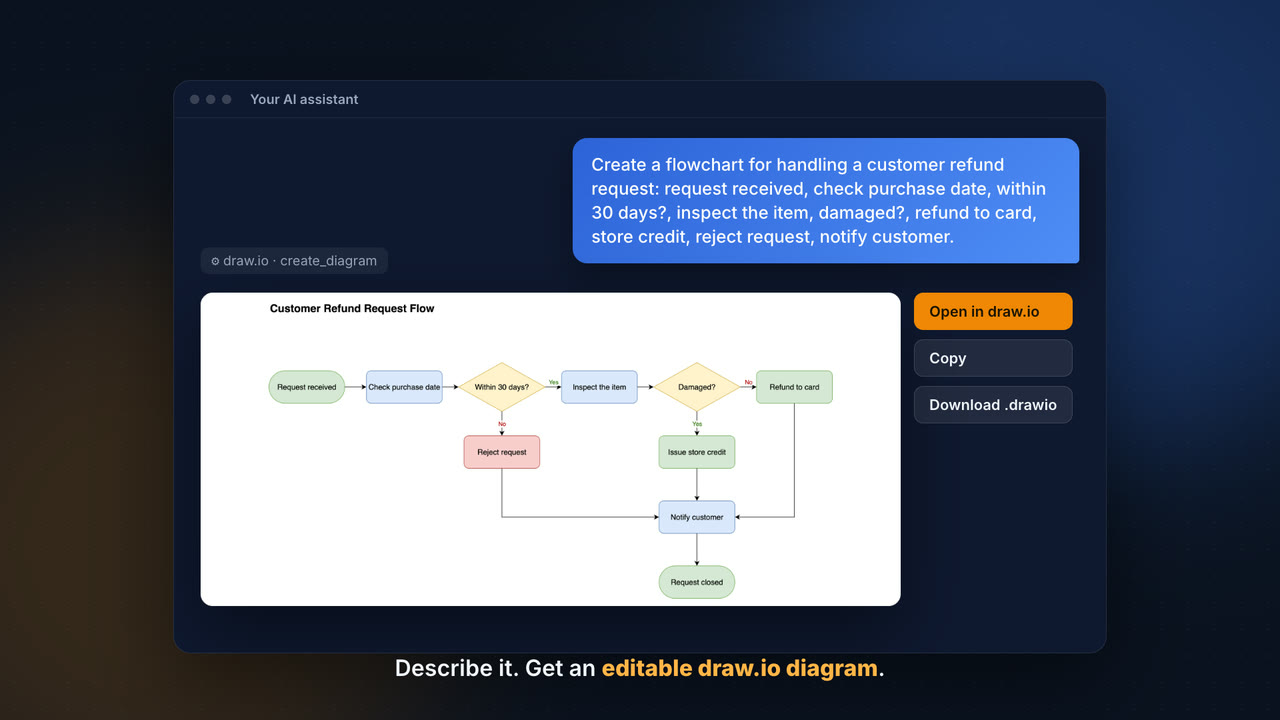
▶ Watch the video and set up draw.io in your AI assistant on drawio.com/mcp.
Four Ways to Create Diagrams
This repository offers four approaches for integrating draw.io with AI assistants. Pick the one that fits your setup:
| MCP App Server | MCP Tool Server | Assistant Plugins | Project Instructions | |
|---|---|---|---|---|
| How it works | Renders diagrams inline in chat | Opens diagrams in your browser | Generates .drawio files, optional PNG/SVG/PDF export or browser URL | Claude generates draw.io URLs via Python |
| Diagram output | Interactive viewer embedded in conversation | draw.io editor in a new tab | .drawio, .drawio.png / .svg / .pdf, or browser URL | Clickable link to draw.io |
| Requires installation | No (hosted at mcp.draw.io) | Yes (npm package) | One-line plugin install (draw.io Desktop only for PNG/SVG/PDF export) | No — just paste instructions |
| Supports XML, CSV, Mermaid | XML and Mermaid | ✅ All three | XML and Mermaid (Mermaid needs draw.io Desktop) | ✅ All three |
| Editable in draw.io | Via "Open in draw.io" button | ✅ Directly | ✅ Directly | Via link |
| Works with | Claude.ai, ChatGPT, VS Code, Cursor, GitHub Copilot CLI, any MCP Apps host | Claude Desktop, Cursor, OpenCode, any MCP client | Claude Code, Codex CLI, GitHub Copilot, Cursor, Antigravity, OpenCode | Claude.ai (with Projects) |
| Best for | Inline previews in chat | Local desktop workflows | Local development workflows | Quick setup, no install needed |
Guides
User guides with tested prompts and examples are in the draw.io documentation, and the setup for each assistant is on drawio.com/mcp:
- Write prompts: Mermaid or draw.io XML, speed and models
- Diagram types and examples and the gallery of every diagram type
- Change and style diagrams: changes by prompt, color themes, styles
- Install options and output formats
- Diagram viewer
The gallery is generated from docs/images/gallery/gallery.json and the editable light and dark SVGs next to it; drawio.com reads them when the site is built.
MCP App Server
The MCP App server renders draw.io diagrams inline in AI chat interfaces using the MCP Apps protocol. Instead of opening a browser tab, diagrams appear directly in the conversation as interactive iframes.
The official hosted endpoint is available at:
https://mcp.draw.io/mcp
Add this URL as a remote MCP server in Claude.ai, ChatGPT, VS Code (GitHub Copilot), Cursor, GitHub Copilot CLI, or any MCP Apps-compatible host — no installation required. On Claude.ai, draw.io is also listed in the connector directory and can be added from there in one click. In Cursor (≥ 2.6), diagrams render inline in the Agent chat (one-click install); on older builds, use the stdio @drawio/mcp tool server instead. In GitHub Copilot CLI, run copilot mcp add --transport http drawio https://mcp.draw.io/mcp; a terminal can't show diagrams inline, so it gets a link that opens each diagram in draw.io.
You can also run the server locally via Node.js or the jgraph/drawio-mcp Docker image, or deploy your own instance to Cloudflare Workers.
Tools:
create_diagram— Renders draw.io XML or Mermaid (28 diagram types) as an interactive diagram inline in chatsearch_shapes— Searches 10,000+ shapes across all draw.io libraries (AWS, Azure, GCP, P&ID, electrical, Cisco, Kubernetes, UML, BPMN, etc.) by keyword, supplemented by the draw.io icon service (brand logos and general-purpose concept icons) when the built-in libraries have no good match. Returns exact style strings that can be used directly in XML. Use this to find the correct shape before callingcreate_diagram.get_drawio_reference— Returns the XML or Mermaid generation reference, which the model reads once per format before its first diagram.
Note: Diagrams appear inline in hosts that support the MCP Apps extension, such as Claude.ai, ChatGPT, VS Code with GitHub Copilot and Cursor. In other hosts, such as GitHub Copilot CLI, the tool still works and answers with a link that opens the diagram in draw.io.
MCP Tool Server
The original MCP server that opens diagrams directly in the draw.io editor. Supports XML, CSV, and Mermaid.js formats with lightbox and dark mode options. Published as @drawio/mcp on npm.
Quick start: npx @drawio/mcp
Setup instructions are available for Claude Desktop, Claude Code, VS Code (GitHub Copilot), Cursor (with one-click install), and OpenCode.
Assistant Plugins (Claude Code, Codex CLI, GitHub Copilot)
The drawio skill packaged as a plugin for AI coding assistants (under plugins/): it generates native .drawio files, with optional export to PNG, SVG, or PDF (with embedded XML so the exported file remains editable in draw.io) — or a browser URL that opens the diagram directly in app.diagrams.net. The Claude Code and Cursor plugins also bundle the hosted MCP App Server, so diagrams show inline where the host supports it; the Codex and Copilot ports need no MCP setup. The same skill ships for four hosts:
Claude Code (full documentation →) — install from this repo's marketplace:
/plugin marketplace add jgraph/drawio-mcp
/plugin install drawio@drawio
Or load it directly from a local clone with claude --plugin-dir ./plugins/claude-code.
Codex CLI (full documentation →) — install from the same marketplace repo:
codex plugin marketplace add jgraph/drawio-mcp
codex plugin add drawio@drawio
GitHub Copilot CLI (full documentation →) — install from the same marketplace repo:
copilot plugin marketplace add jgraph/drawio-mcp
copilot plugin install drawio@drawio
Other Copilot surfaces (VS Code agent mode, the coding agent, code review) load the same skill from a repo's .github/skills/ directory instead — see the plugin README.
Cursor (full documentation →) — the same skill plus the hosted MCP App Server, so diagrams also render inline in Cursor's Agent chat. Install it from the Cursor Marketplace (Customize → drawio → Install), or copy plugins/cursor to ~/.cursor/plugins/local/drawio and reload the window.
Antigravity (full documentation →) — install from the plugin's directory on GitHub:
agy plugin install https://github.com/jgraph/drawio-mcp/tree/main/plugins/antigravity
OpenCode needs no plugin at all: it discovers skills in .opencode/skills/ and .claude/skills/ (and their ~/ equivalents), so the Claude Code skill folder works as-is — see OpenCode (no plugin needed) for the one-line install.
By default, the plugin writes a .drawio file and opens it in draw.io. Mention a format in your request to change the output:
- png / svg / pdf — exports using the draw.io desktop CLI with
--embed-diagram - url — compresses the XML with Node.js's built-in
zliband opens the result atapp.diagrams.net. No draw.io Desktop needed; the.drawiofile is kept locally as a persistent copy.
Alternative: Project Instructions (No MCP Required)
An alternative approach that works without installing anything. Add instructions to a Claude Project that teach Claude to generate draw.io URLs using Python code execution. No MCP server, no desktop app — just paste and go.
Diagram layouts
Two optional, independent layout passes can run after the AI generates a diagram — one re-arranges the nodes, the other only reroutes the edges. Which are available depends on the approach:
| Layout pass | What it does | App Server (create_diagram) | Tool Server (open_drawio_xml) | Assistant Plugins | Project Instructions |
|---|---|---|---|---|---|
ELK auto-layout (postLayout: "elk") | Re-arranges nodes into a clean layered layout; routes the edges as part of it | ✅ | — | ✅ via draw.io Desktop CLI (--layout) | — |
libavoid routing (routing: "libavoid") | Keeps node positions; reroutes connectors orthogonally around the shapes | ✅ | ✅ from v1.3.0 | ✅ via draw.io Desktop CLI (--layout libavoid) | — |
- These apply to draw.io XML diagrams. Mermaid diagrams are auto-laid-out already, so neither pass is needed.
- The App Server applies these in the inline viewer after the diagram renders; the Tool Server applies libavoid server-side before opening the draw.io editor; the plugins run them through the locally installed draw.io Desktop CLI.
- Pick one, not both: ELK already routes its own edges, so adding libavoid on top is redundant. Use
postLayoutto re-arrange a layout, orroutingto tidy the connectors on a layout you placed deliberately.
Data Residency & Offline Use
If you're deploying in an environment with strict data restrictions, here is exactly where diagram data goes for each approach.
No component sends your diagram to a cloud rasterizer. convert.diagrams.net (or
any cloud export endpoint) is not called anywhere in this repository, and there is no
"local dependency missing → fall back to cloud" path. PNG/SVG/PDF export happens only
in the assistant plugins, which shell out to your locally installed draw.io Desktop CLI
(located via which drawio); if it isn't installed, the .drawio file is kept and
nothing is sent.
Does your diagram leave the machine?
| Approach | Diagram leaves the machine? |
|---|---|
MCP App Server — hosted (mcp.draw.io) | Yes — it is sent to the draw.io server as the MCP request. Self-host instead (below) to keep it local. |
MCP App Server — self-hosted (local Node, the jgraph/drawio-mcp Docker image, or your own Cloudflare) | No — processed by your server and embedded in HTML that renders client-side. |
MCP Tool Server (@drawio/mcp) | No — carried in the URL #fragment, which browsers do not transmit to the server. |
| Assistant Plugins (Claude Code, Codex CLI, GitHub Copilot, Cursor, Antigravity) | No — written locally and exported by your local draw.io Desktop CLI. The Claude Code and Cursor plugins also bundle the hosted App Server: diagrams drawn with it are sent to mcp.draw.io (row above). |
By default the servers do not write diagram content to their logs — only request
metadata (method, session, status, timing). The Cloudflare-hosted App Server logs
response bodies only when run with DEBUG=true.
Reducing external requests
Even when the diagram itself stays local, the rendering loads draw.io's web-app /
viewer code from app.diagrams.net and viewer.diagrams.net by default. These
fetch application code and assets — not your diagram — but they are still outbound
requests. To reduce or remove them:
- App Server: build with the
VIEWER_PATHenvironment variable to inline the viewer instead of loading it fromviewer.diagrams.net. Server-side, it makes a version check againstviewer.diagrams.netat startup and daily (no data, 5 s timeout, safe to block), andsearch_shapesqueriesicons.diagrams.netwith the search terms unlessDRAWIO_ICON_SERVICE_URL=off. - Tool Server: set the
DRAWIO_BASE_URLenvironment variable to a self-hosted draw.io instance. Its two server-side passes also fetch code fromviewer.diagrams.netonce per draw.io release and cache it per user: the libavoid routing core (routing: "libavoid", also primed at install time) and the drawio-elk bundle (postLayout: "elk", fetched on first use, overridable withDRAWIO_ELK_URL). Not requesting those passes makes no such call; the diagram is never part of one either way. - Assistant Plugins: the opt-in
urloutput mode opens the diagram atapp.diagrams.net(hardcoded — noDRAWIO_BASE_URLequivalent). Use the default.drawiooutput or local Desktop export instead if you need to avoid that request.
Your LLM is a separate consideration
The diagram is generated by the LLM. If you use a hosted model, the diagram content is produced in that provider's cloud regardless of where this MCP server runs. End-to-end isolation requires a locally hosted model as well.
Verifying
The only reliable way to confirm a deployment makes no outbound calls is to run it with network egress blocked (or watch the browser's Network tab) and verify it still renders. We recommend this for any strict-isolation deployment.
XML Reference (Single Source of Truth)
The draw.io XML generation reference — covering edge routing, containers, layers, tags, metadata, dark mode, style properties, and XML well-formedness — lives in a single canonical file:
All four approaches above use this file as their single source of truth for LLM prompts:
| Approach | How it accesses the reference |
|---|---|
| MCP App Server | Reads the file at startup / build time and returns it from the get_drawio_reference tool |
| MCP Tool Server | Reads the file at startup (from repo or bundled copy via prepack) and returns it from the get_drawio_reference tool; the open_drawio_xml description carries the condensed shared/xml-essentials.md |
| Assistant Plugins (Claude Code, Codex CLI, GitHub Copilot) | Fetch the condensed shared/xml-essentials.md by its GitHub raw URL, and the full reference only for layers, tags, metadata, tables, cross-functional grids and dark-mode colors |
| Project Instructions | Users copy the condensed shared/xml-essentials.md into their Claude Project, and the full reference only when they need those topics |
When updating XML generation guidance, edit shared/xml-reference.md — changes propagate to all consumers automatically. If the change touches a rule that shared/xml-essentials.md summarizes, update that line there too.
Shape Search Index
The search_shapes tool is powered by a pre-built index of all draw.io shapes. The index is generated from the live draw.io client (https://app.diagrams.net/js/app.min.js) by running all sidebar palette initializations in Node.js via jsdom and capturing the shape data.
Icons from the draw.io icon service (icons.diagrams.net — the same grouped icon search the editor sidebar uses) are not part of this index: search_shapes queries the service live when the local index has no strong match for a query, returning the icons as shape=image styles. Set DRAWIO_ICON_SERVICE_URL to a self-hosted service to override the endpoint, or to off to disable icon supplementation.
shape-search/search-index.json is committed to the repository. The Update Shape Search Index GitHub Action regenerates it from the released draw.io client after every draw.io release (drawio-dev dispatches drawio-release when its build has finished) and daily as a fallback, and opens a pull request when the shapes changed. Once merged, the tool server picks it up from the CDN; the hosted app server bundles it, so it needs a deploy.
To regenerate the index manually (e.g. when iterating on the generator itself):
cd shape-search
npm install
npm run generate

# Rebuild the MCP App Server worker to embed the updated index
cd ../mcp-app-server
npm run build:worker
The generator fetches app.min.js directly from the public draw.io web app, so no local checkout of the draw.io source is needed.
Development
# MCP App Server
cd mcp-app-server
npm install
npm start

# MCP Tool Server
cd mcp-tool-server
npm install
npm start
Related Resources
- draw.io - Free online diagram editor
- draw.io Desktop - Desktop application
- @drawio/mcp on npm - This package on npm
- drawio-mcp on GitHub - Source code repository
- Mermaid.js Documentation
- MCP Specification
- MCP Apps Extension