valta-mcp
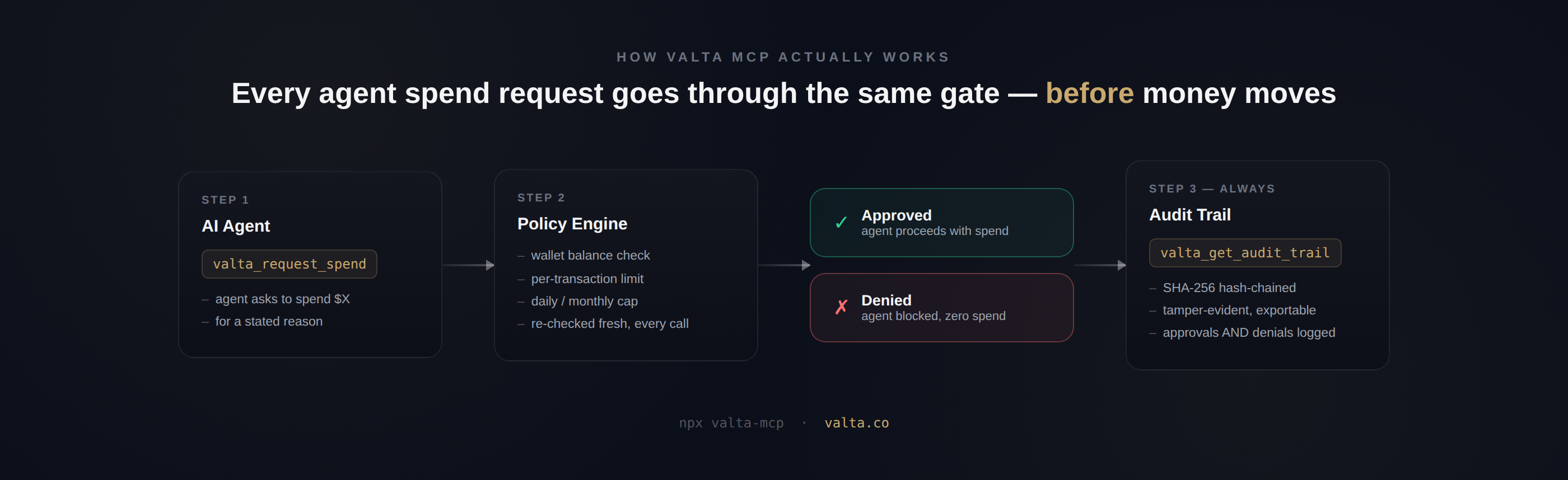
An MCP (Model Context Protocol) server for Valta — financial governance for AI agents. Exposes Valta's spend gate and audit trail as MCP tools, so any MCP-compatible client (Claude Desktop, Claude Code, Cursor, and others) can call them directly.
What this is — and isn't
This server is a thin wrapper over Valta's real, hosted REST API. It does not implement any spend logic, limits, or hashing itself — every tool call here is a pass-through to https://valta.co/api/v1/..., where the actual enforcement (spend gate, audit chain) happens. This repo is the protocol adapter, not the enforcement engine.
Important, read before relying on this for anything security-sensitive: most of these tools are advisory, not enforcing. A tool description telling a model "call this before spending" is guidance, not a guarantee. valta_request_spend, for example, only governs spend that routes through it — it does not intercept or prevent spending that happens through some other tool, API, or webhook the agent has independent access to.
One tool is different: valta_proxy_request. Instead of asking the model to check in before spending elsewhere, this one is the spend — the agent declares an outbound call's cost and routes the actual call through Valta, which checks it against wallet limits and only makes the real request (using your own stored credential) if approved. If it's blocked, the real provider is never contacted at all. This is a genuine, code-level guarantee, not an honor system — but only for the specific services Valta has wired up for proxying (currently: Stripe, Serper, Polygon). Any spend that happens through a channel other than this proxy — the agent's own separate API key, a webhook, a tool this server doesn't know about — is outside what any of these tools can see or stop. See Design notes below.
Install
npm install -g valta-mcp
Or run directly without installing:
npx valta-mcp
Configuration
Get an API key at valta.co/dashboard → Settings → API Keys → Create key.
Add to your MCP client's config (e.g. Claude Desktop's claude_desktop_config.json):
{
  "mcpServers": {
    "valta": {
      "command": "npx",
      "args": ["valta-mcp"],
      "env": {
        "VALTA_API_KEY": "sk_valta_your_key_here"
      }
    }
  }
}
Tools
| Tool | What it does |
|---|---|
valta_check_balance | Read an agent's wallet balance and limits |
valta_request_spend | Request authorization for a spend — approved or denied by the real spend gate |
valta_create_wallet | Create a new named wallet with optional spend limits |
valta_freeze_agent | Kill switch — freeze an agent's wallet, blocking further spend |
valta_unfreeze_agent | Resume a frozen agent's wallet |
valta_get_audit_trail | Read the hash-chained audit trail of spend decisions |
valta_list_wallets | List all named wallets on the account — use this to discover wallet names before checking balance/spending |
valta_transfer_funds | Transfer USDC directly between two of your agent wallets |
valta_list_agents | List all agents on the account |
valta_get_agent | Get details for a single agent |
valta_run_agent | Trigger an agent to run a task |
valta_get_agent_run | Check the status/result of a specific agent run |
valta_list_policies | List spending policies configured on the account |
valta_set_policy | Create a new spending policy (daily cap, per-transaction cap) |
valta_proxy_request | Make a real outbound call to a connected service (Stripe, Serper, Polygon) through Valta's spend-gated egress proxy — declares a cost up front, only reaches the real provider if approved, refunds automatically on failure |
valta_list_proxy_requests | List the receipts for every call the egress proxy has handled — allowed, blocked, refunded, or pending approval, and why |
Every tool's description in src/index.ts states plainly what it enforces and what it doesn't — read those before wiring this into anything that touches real money.
Design notes
Why there's no "non-bypassable system prompt." An earlier draft of this project considered shipping a system-prompt instruction block claiming to make spend gating "non-bypassable." That claim doesn't hold up, for two reasons:
- MCP servers don't control the host's system prompt. Claude Desktop, Claude Code, Cursor, and other hosts each own their own system prompt. An MCP server provides tools and, in some cases, a limited
instructionsfield — it cannot inject a binding, universally-enforced rule into the conversation. - A system prompt is a request to the model, not a code-level constraint. Even where a host does surface server instructions, an agent can still be prompt-injected, jailbroken, or simply routed through a different tool entirely that doesn't call this server at all. Claiming otherwise would be exactly the kind of gap this project exists to close — trusting the model to self-police is the failure mode Valta's spend gate was built to avoid in the first place.
What actually provides a guarantee, and what doesn't. There are now two different levels of enforcement in this server, and it matters which one a given tool gives you:
- Spend authorized by calling
valta_request_spendis genuinely checked against real limits, server-side — but only if the agent chooses to call it first. The gap is spend that happens through some other channel the agent has access to. - Spend routed through
valta_proxy_requestis checked before the real call is made at all — there's no step where the agent could skip the check and still have the payment go through, because the payment-triggering call and the check are the same action. That closes the gap described above, but only for the services this server has wired up for proxying (Stripe, Serper, Polygon as of this writing) — extending it to a new service means adding real credential-handling logic for that provider's specific auth scheme, not flipping a config flag.
If a use case needs a hard guarantee for a service not yet listed above, that service needs to be added to Valta's proxy gate first — open an issue or a PR.
License
MIT.