cam
English · 中文 · 日本語 · 한국어 · العربية · 🌐 Website
A local multi-turn conversational memory system purpose-built for coding agents
Code graph + memory · surgical reads · 100% local · MCP + CLI
Kernel written in Rust
Contents
- Why cam?
- Get Started
- Key Features
- How It Works
- Agent Workflow
- CLI Reference
- Memory Rules
- Configuration
- Benchmarks
- Supported Agents
- Supported Languages
- Supported Platforms
- License
Guides: Interactive Showcase (Website) · Main Agent vs Subagent · MCP Configs by IDE · 中文说明
Why cam?
When an AI coding agent explores a repository, it usually rediscovers structure the slow way — running grep, glob, and full-file Read one file at a time — and forgets everything in the next session.
cam gives the agent two local retrieval planes in a single binary:
| Plane | What it stores | How the agent uses it |
|---|---|---|
| Code Graph | Tree-sitter symbols (functions, types, methods) as a virtual filesystem + 1-hop callers/callees | ls, find, read src/file.rs/symbol, ref symbol --dir in|out — surgical symbol reads instead of whole-file dumps |
| Memory Tree | Project facts, architecture decisions, debugging write-ups, and user habits | recall (Vector + BM25 fused with RRF) and add (with branching --parent and revision --supersedes) |
One binary, two interfaces: The main agent calls
camover MCP (cam mcp); subagents (which rarely inherit MCP tools) call the exact same CLI (cam --json …). Both share.cam/cam.dbon disk, 100% local, zero API cost.
Get Started
Option 1: One-Sentence Agent Install (Recommended)
Paste this prompt directly into your coding agent (Cursor, Claude Code, Codex, Windsurf, GitHub Copilot, Cline, etc.) and let it install, index, and wire cam for you:
Install cam from https://github.com/HanochZhu/codeagent_memory: require a working Rust toolchain (rustup), run `cargo install --git https://github.com/HanochZhu/codeagent_memory --locked`, ensure ~/.cargo/bin (or %USERPROFILE%\.cargo\bin on Windows) is on PATH, then verify with `cam --help`. In this repo run `cam index`. For the main agent, register MCP stdio: command `cam`, args `["mcp"]` (Cursor: .cursor/mcp.json; Claude Code: .mcp.json). Subagents call `cam --json` in the shell. Do not add extra docs.
| Environment | What to do |
|---|---|
| Cursor / Windsurf / Claude Code / Codex | Paste into Agent / Chat; the agent runs the terminal install, builds .cam/cam.db, and writes the MCP config |
| VS Code (Copilot / Continue / Cline) | Paste into Agent / Chat mode with terminal access enabled |
| JetBrains (IntelliJ / RustRover / GoLand) | Paste into AI Assistant, or run cargo install in the built-in terminal |
Note: cargo install places cam in ~/.cargo/bin (Windows: %USERPROFILE%\.cargo\bin). Restart your terminal or IDE if cam is not immediately found on PATH.
Option 2: Manual Setup
1. Install the CLI
Requires a Rust toolchain:
cargo install --git https://github.com/HanochZhu/codeagent_memory --locked
cam --help
From a local clone:
git clone https://github.com/HanochZhu/codeagent_memory.git
cd codeagent_memory
cargo install --path . --locked
Docker (no Rust toolchain required):
docker pull ghcr.io/hanochzhu/codeagent-memory:0.1.5
docker run -i --rm -v "$PWD:/work" -w /work ghcr.io/hanochzhu/codeagent-memory:0.1.5
Or build locally: docker build -t cam https://github.com/HanochZhu/codeagent_memory.git
2. Index & query your project
cd your-project
cam index                                              # parse repo into .cam/cam.db

# Query the code graph
cam ls src/                                            # list files or symbols in a file
cam read src/main.rs/main                              # read a single symbol body
cam ref main --dir in                                  # 1-hop callers (in) or callees (out)

# Query & write to the memory tree
cam recall "how does hybrid recall fuse BM25 and vectors"
cam add --summary "..." < notes.md
cam auto-initializes .cam/ on first use. Run cam watch in the background if you want live incremental graph updates as files change.
3. Connect MCP for the main agent
Add cam mcp to your host's MCP configuration (e.g. .cursor/mcp.json or .mcp.json):
{
  "mcpServers": {
    "cam": {
      "command": "cam",
      "args": ["mcp"]
    }
  }
}
See docs/mcp.md for host-specific config paths and docs/agents.md for main-agent / subagent prompt rules.
The first recall or add downloads the default embedding model (potion-multilingual-128M to ~/.cam/models/) and falls back to a lexical hash embedder if offline.
Key Features
| Feature | Details |
|---|---|
| SQLite Code Graph | Tree-sitter parses functions, types, and call edges into .cam/cam.db for instant symbol-level navigation |
| Virtual Paths | src/main.rs addresses a file outline; src/main.rs/main addresses the symbol body directly |
| Live Incremental Sync | cam sync hashes file contents; cam watch keeps the graph updated on save |
| Hybrid Recall (RRF) | Combines local dense embeddings (model2vec) + identifier-aware BM25 via Reciprocal Rank Fusion ($k=60$) |
| Revision Chains & Tree | --parent builds branching topic hierarchies; --supersedes links linear revisions and folds older entries automatically |
| Ebbinghaus Retention | Retention $R = e^{-t / S}$ gently weights ranking ($\le 10%$) and flags stale / needs_update memories without deleting history |
| Dual Interface (MCP + CLI) | Main agent uses cam_* MCP tools; subagents run cam --json … in the shell |
| 100% Local & Private | Zero external API keys; runs entirely on local SQLite and on-disk embeddings |
| 9 Languages | Rust, Python, TypeScript, JavaScript, Go, Java, C, C++, C# |
How It Works
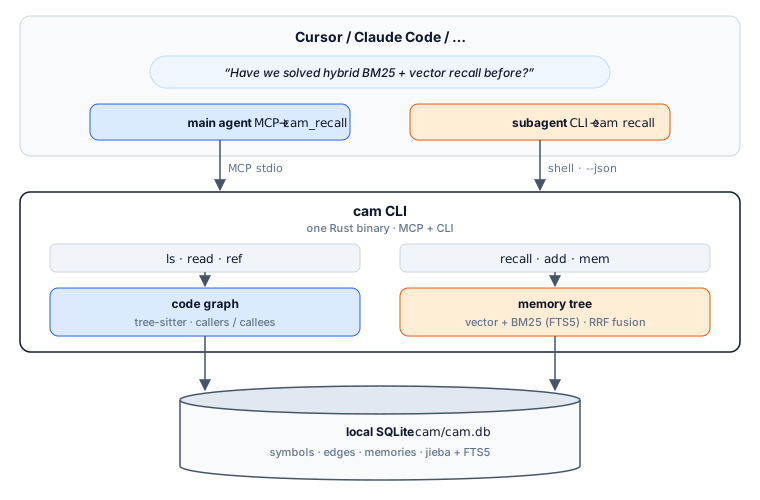
- Extract —
tree-sitterwalks the workspace and stores symbol definitions and call edges in.cam/cam.db. - Surgical Read — Agents navigate via virtual paths (
ls→find→read→ref). Reading a file returns its symbol outline; readingfile/symbolreturns only that symbol's source slice. - Hybrid Recall —
recalltakes an English query, embeds it locally, runs identifier-aware BM25 (splittingsnake_case,kebab-case,camelCase+ English stemming), prunes low-confidence tails, and fuses both lists with RRF ($k=60$) scaled by $0.9 + 0.1 \times R$. Superseded revisions are automatically expanded to their newest replacement. - Write-Back — When an agent solves a non-trivial task, it extracts atomic facts so each
addstores only one fact (English summary; body supports non-Latin characters). Related facts are connected via--link/linksinto a knowledge graph (inspected viamem show; recall does not traverse graph links yet).--parentattaches a memory to a structural topic;--supersedesreplaces an outdated memory while preserving lineage.
Architecture deep dive (Chinese): DESIGN.md.
Agent Workflow
Every coding task follows the same four-step loop:
- Recall first — Query
cam_recall/cam recallin English before grepping. Reuse a hit if it islatestand notneeds_update. - Ensure indexed — If graph tools return
not_indexed, runcam_index/cam indexonce for the project. - Walk the graph — On a memory miss, locate symbols with
findorls, read symbol bodies withread <file>/<symbol>, and trace callers/callees withref <symbol> --dir in|out. - Write back — Persist newly discovered architecture facts or fixes with
cam_add/cam addas atomic facts (one fact per memory, English summary; body supports non-Latin characters), linking related facts withlinks/--link.
| Role | Interface | Typical Usage |
|---|---|---|
| Main Agent (Chat / IDE session) | MCP (cam mcp) | Calls cam_recall, cam_find, cam_ls, cam_read, cam_ref, cam_add, cam_mem_tree, cam_mem_show directly |
| Subagent (Task / explore / CLI) | CLI (cam --json) | Runs cam --json --project <dir> <cmd> in the shell (subagents rarely inherit MCP tools) |
Full agent rules & copy-paste system prompts: docs/agents.md.
CLI Reference
Code Graph Commands
| Command | Description |
|---|---|
cam index | Parse the project with tree-sitter into .cam/cam.db (creates .cam/ if needed) |
cam sync | Incrementally update the graph for modified files using content hashes |
cam watch [--debounce-ms N] | Watch source files and auto-sync (--json streams one JSON report per sync) |
cam ls [virt_path] | List directories, files, or symbols inside a file |
cam read <virt_path> [--full] | Read a file's symbol outline, a specific symbol body (path/symbol), or the --full file |
cam find <query> [--kind K] [--file S] [--scope D] [--limit N] | Case-insensitive substring search over symbol names (exact matches first, then prefixes) |
cam ref <symbol> --dir in|out [--file S] [--kind K] [--scope D] | 1-hop callers (in / --callers) or callees (out / --callees). Returns ranked candidates on ambiguous names |
Memory Commands
| Command | Description |
|---|---|
cam recall "<query>" [--limit N] [--no-expand] [--include-superseded] [--snippets] | Hybrid RRF recall (English query). --no-expand skips newest-revision expansion; --include-superseded keeps old revisions; --snippets clips long bodies below rank 1 |
cam add --summary "..." [--parent ID] [--supersedes ID] [--link ID]... [--body TEXT | --file PATH] | Store one atomic fact as a memory (English summary required; body supports non-Latin characters; via --body, --file, or stdin). --link connects related facts in the knowledge graph; --parent for topic hierarchy; --supersedes to replace an older memory |
cam mem tree | Render the memory hierarchy and revision chains |
cam mem show <id> | Inspect a single memory entry in full |
Server & Configuration Commands
| Command | Description |
|---|---|
cam mcp | Start the stdio MCP server for the main agent (see docs/mcp.md) |
cam status | Show resolved project root, database path, node/edge/memory counts, and active config |
cam config get | Print current ~/.cam/config.toml settings |
cam config set stale_days <N> | Set age threshold (in days) for marking memories stale |
cam config set embedding_model <model> | Set Hugging Face model2vec repo, local model directory, hash, or default |
Global flags & conventions:
--project <dir>(orCAM_PROJECTenv var) overrides automatic upward.cam/.gitroot detection.--jsonemits compact JSON (--prettyfor indented JSON). Errors on--jsonprint{"error":{"code":…,"message":…}}tostdoutand exit non-zero.- Ambiguous symbols: When
readorrefmatches multiple definitions,camreturnsstatus: "ambiguous"with candidate node IDs (e.g.src/main.rs:function:main:12) that can be passed directly back toreadorref. - Ignore rules & multi-repo directories: Honors
.gitignoreand.camignoreat any depth. Skips git submodules and linked worktrees; indexes nested standalone clones askind: "project"(passable to--scope).
Memory Rules
- Atomic facts & knowledge graph links: Store only one atomic fact per memory to avoid packing excessive information into a single entry. When multiple facts are related, link them with
--link/linksto form a knowledge graph (graph recall is not enabled yet). - English queries and summaries: Recall queries and memory summaries must be written in English. Memory bodies support non-Latin characters.
- Retention & reinforcement: Ebbinghaus retention $R = e^{-t / S}$ adjusts recall score via $\text{relevance} \times (0.9 + 0.1 \times R)$. Entries with $R < 0.3$ are marked
needs_update; entries older thanstale_days(default30) are markedstale. Every valid recall hit (needs_update = false) refreshes last-accessed time and multiplies stability $S$ by1.7. - Non-destructive lineage: Memories are never deleted.
--parentforms branching trees;--supersedesforms linear revision chains where only the tail is markedlatestand older revisions are folded out of default recall results.
Configuration
Global settings live in ~/.cam/config.toml:
stale_days = 30
# embedding_model = "minishlab/potion-multilingual-128M" # default (cached under ~/.cam/models/)
# embedding_model = "minishlab/potion-base-8M"           # lighter Hugging Face model2vec repo
# embedding_model = "/path/to/local/model2vec"           # dir with tokenizer.json, config.json, model.safetensors
# embedding_model = "hash"                               # zero-download lexical hash embedder
Use CAM_EMBED_MODEL to override the model for a single process, or cam config set embedding_model default to reset. When the embedding model changes, the next recall automatically re-embeds existing memories before scoring.
Benchmarks
cam evaluates its code graph and memory planes separately against the closest open-source systems on identical corpora:
| Plane | Baseline / Analogue | Benchmark Corpus | Headline Takeaway |
|---|---|---|---|
| Memory | agentmemory hybrid + tokenized grep | coding-agent-life-v1 | 1.000 R@5 / 0.240 P@5 (matches hybrid ceiling, 1.000 newest R@5 on revision chains) |
| Long-term Memory | BM25 / dense retrievers | LongMemEval-S | 0.909 R@5 / 0.980 Hit@5 / 0.840 MRR with potion-multilingual-128M |
| Code Graph | codegraph v0.9.6 | LongMemCode (clap) | 0.769 vs 0.768 on supported 1-hop tasks, P95 ≈ 5.2 ms, $0 |
| Workflow Retrieval | Lexical / BM25 file retrieval | Agent Retrieval Bench V2 edit2ripple | 0.297 MRR (best first-hit rank, P95 7.3 ms) |
| Multi-turn Tokens | Full context dump | DeepSeek multi-turn | 57% fewer tokens on memory track, 98% fewer tokens on code track |
General chat memory frameworks (Mem0, Zep, Letta) target conversational logs rather than these coding-agent corpora and are omitted from the tables below.
System Comparison
| cam | agentmemory | codegraph | |
|---|---|---|---|
| What it stores | Code graph + memory tree | Session / chat memories | Code graph |
| Query primitives | recall / ls / find / read / ref | smart-search / remember | explore / callers / callees |
| Interface | MCP + CLI | MCP + REST + hooks | MCP + CLI |
| Ranking / Fusion | Vector + BM25 + RRF + retention | BM25 + embed + rerank | FTS5 + graph walk |
| Cost | 100% local ($0) | Local server | Local |
1. Memory — coding-agent-life-v1
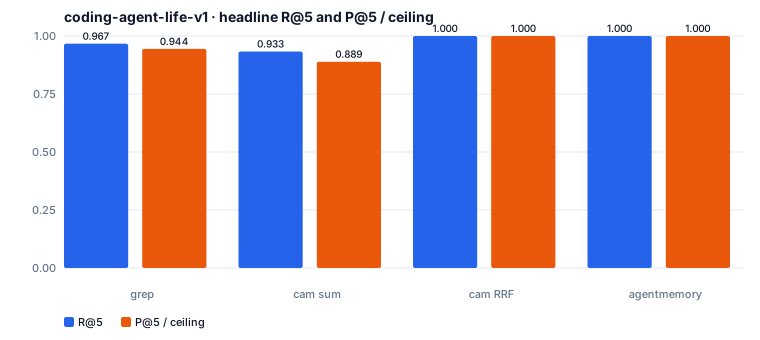
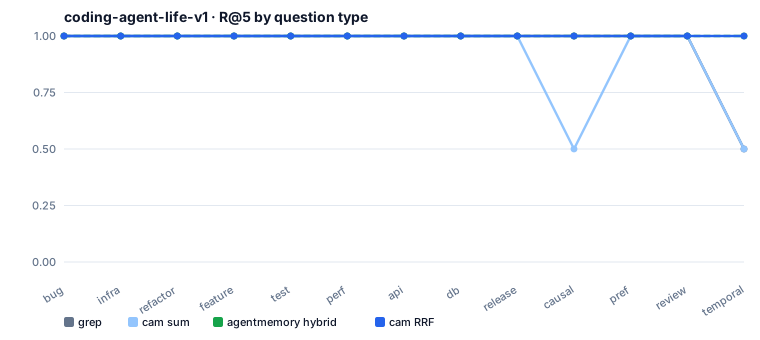
15 sessions, 15 queries, $k=5$ (same scoring as agentmemory score.ts; P@5 ceiling is 0.240).
| System | Hit Rate | R@5 | P@5 | Source |
|---|---|---|---|---|
grep (tokenized substring) | 15 / 15 | 0.967 | 0.227 | this repo, 2026-09-23 |
cam min-max sum (legacy) | 15 / 15 | 0.933 | 0.213 | historical, hash embed |
cam RRF | 15 / 15 | 1.000 | 0.240 | this repo, hash embed |
agentmemory hybrid | 15 / 15 | 1.000 | 0.240 | published v0.9.26 |
Revision chains (--lineage): Re-ingesting every turn as a --supersedes revision tests whether top-$k$ returns the newest node of each gold chain (newest R@k) and whether any superseded node falsely claims latest (stale latest).
| k | R@k | P@k | newest R@k | stale latest |
|---|---|---|---|---|
| 5 | 1.000 | 0.240 | 1.000 | 0 |
| 10 | 1.000 | 0.120 | 1.000 | 0 |
2. Long-Term Memory — LongMemEval-S
100 non-abstention questions sampled with seed 42 from cleaned LongMemEval-S. Retrieval fuses embeddings + BM25 with RRF at $k=10$ without an LLM reader.
| Embedder | R@1 | R@5 | R@10 | Hit@1 | Hit@5 | Hit@10 | MRR | Retrieval P50 / P95 |
|---|---|---|---|---|---|---|---|---|
hash (offline test) | 0.382 | 0.803 | 0.922 | 0.580 | 0.910 | 0.970 | 0.718 | 24.1 / 35.5 ms |
potion-multilingual-128M | 0.474 | 0.909 | 0.952 | 0.740 | 0.980 | 0.990 | 0.840 | 1.12 / 1.34 s |
3. Workflow Retrieval — Agent Retrieval Bench V2 (edit2ripple)
58 anchored-change queries across 44 frozen repository snapshots (no LLM; BCY = Budgeted Context Yield under the canonical 8K-token file-packing protocol).
| System | Recall@5 | Recall@10 | Recall@20 | MRR | BCY@8k |
|---|---|---|---|---|---|
cam graph | 0.300 | 0.335 | 0.378 | 0.297 | 0.300 |
| Lexical | 0.412 | 0.536 | 0.588 | 0.243 | 0.447 |
| BM25 | 0.207 | 0.287 | 0.499 | 0.154 | 0.243 |
cam graph achieves the highest first-hit rank (MRR 0.297, query P95 7.3 ms), while lexical search provides broader multi-file coverage — motivating graph + lexical rank fusion.
4. Code Graph — LongMemCode (clap)
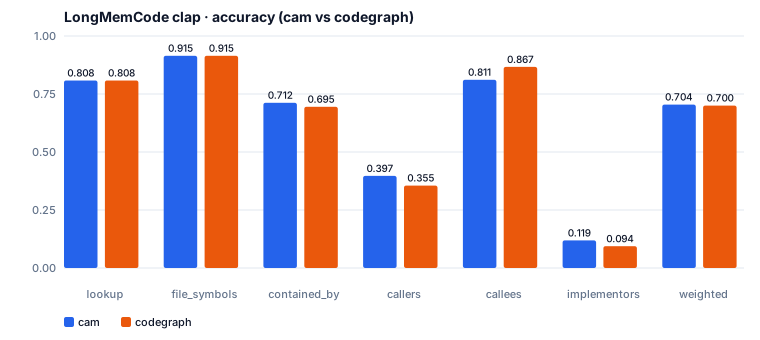
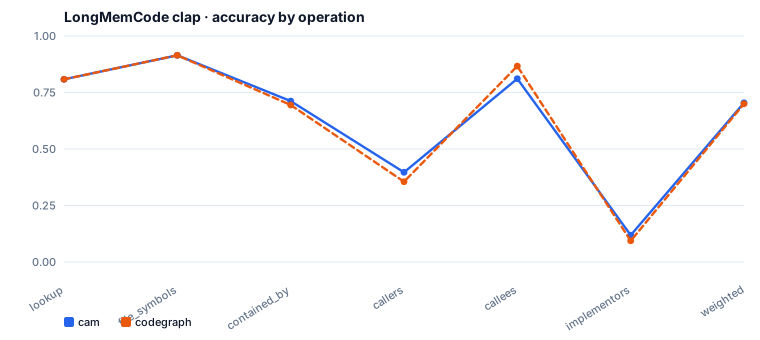
clap v4.6.1, 536 scenarios against SCIP gold (no LLM, P95 ≈ 5.2 ms, $/1k = 0).
| Slice | n | cam | codegraph 0.9.6 |
|---|---|---|---|
| Supported (1-hop) | 478 | 0.769 | 0.768 |
lookup / file_symbols | 293 / 55 | 0.808 / 0.915 | 0.808 / 0.915 |
callers / callees | 67 / 18 | 0.397 / 0.811 | 0.355 / 0.867 |
implementors | 40 | 0.119 | 0.094 |
| Raw / Weighted (all 536) | 536 | 0.709 / 0.704 | 0.704 / 0.700 |
5. Multi-Turn Token Savings — DeepSeek
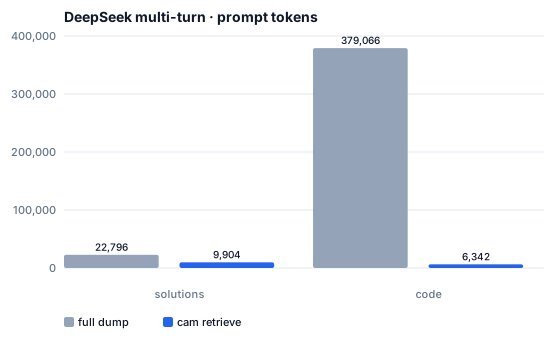
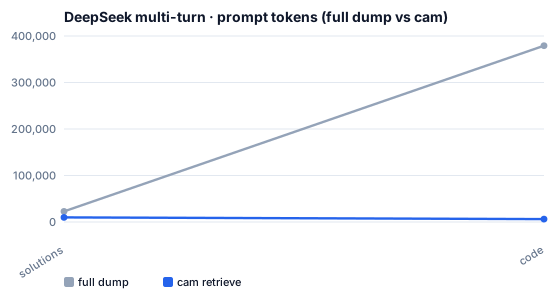
Full context dump vs. per-turn cam retrieval (deepseek-flash, hash embedder, 2026-10-13):
| Track | n | Full Acc. | cam Acc. | Full Tokens | cam Tokens | Token Saving |
|---|---|---|---|---|---|---|
Memory (coding-agent-life) | 15 | 1.00 | 0.87 | 22,796 | 9,904 | 57% (1,471 → 616 / turn) |
| Code (this repo indexed) | 6 | 0.83 | 0.33 | 379,066 | 6,342 | 98% (63,076 → 1,000 / turn) |
Dataset paths are configured in eval/datasets.toml (coding-agent-life-v1 defaults to ../agentmemory or CAM_EVAL_CODING_LIFE).
python3 eval/coding_life/run.py --adapter grep
python3 eval/coding_life/run.py                                             # potion; errors if the model fails
python3 eval/coding_life/run.py --hash-embed                                # hash embedder
python3 eval/longmemeval/run.py --sample 100 --seed 42 --workers 8          # potion
python3 eval/longmemeval/run.py --sample 100 --seed 42 --workers 8 --hash-embed
python3 eval/locomo/run.py --workers 4                                      # potion, evidence recall

git clone --depth 1 https://github.com/eyuansu62/agent-retrieval-bench \
  eval/agent_retrieval/vendor/agent-retrieval-bench
python3 -m pip install -e eval/agent_retrieval/vendor/agent-retrieval-bench
arb download-benchmark --version v2_edit2ripple --local-dir eval/agent_retrieval/data --force
python3 eval/agent_retrieval/run.py --workers 8

python3 eval/llm_multiturn/run.py --track both   # potion; requires DEEPSEEK_API_KEY
python3 eval/longmemcode/run.py --corpus clap
python3 eval/charts/generate.py
Supported Agents
Register cam mcp (stdio) for the main agent; subagents use the cam --json CLI directly with zero extra setup.
| Host | MCP Configuration | Subagent / Notes |
|---|---|---|
| Cursor | .cursor/mcp.json, ~/.cursor/mcp.json, or .cursor-plugin/plugin.json | Task / explore subagents use CLI |
| Claude Code | .mcp.json, ~/.claude.json, or claude mcp add cam -- cam mcp | Limited-tool subagents use CLI |
| Codex | ~/.codex/config.toml → [mcp_servers.cam] | codex exec uses CLI |
| Windsurf | ~/.codeium/windsurf/mcp_config.json | Cascade uses MCP |
| GitHub Copilot | .vscode/mcp.json or ~/.copilot/mcp-config.json | Chat uses MCP; CLI scripts use CLI |
| Continue / Cline | ~/.continue/config.yaml / ~/.cline/mcp.json | |
| JetBrains | AI Assistant → MCP (cam / mcp) | Use absolute path to cam if IDE PATH is empty |
| Gemini CLI / Antigravity / OpenCode / Zed / Droid | See docs/mcp.md |
Copy-paste configs: docs/mcp.md · System prompts: docs/agents.md.
Supported Languages
| Language | Extensions | Indexed Nodes & Edges |
|---|---|---|
| Rust | .rs | functions, structs, enums, traits, calls |
| Python | .py | functions, classes, calls |
| TypeScript | .ts, .tsx | functions, methods, classes, calls |
| JavaScript | .js, .jsx | functions, methods, classes, calls |
| Go | .go | functions, methods, structs, calls |
| Java | .java | functions, methods, classes, interfaces, calls |
| C | .c | functions, structs, calls |
| C++ | .cc, .cpp, .cxx, .h, .hpp | functions, methods, classes, structs, calls |
| C# | .cs | functions, methods, classes, interfaces, calls |
Supported Platforms
cam compiles natively on macOS, Linux, and Windows via cargo install --git https://github.com/HanochZhu/codeagent_memory --locked, or runs anywhere via Docker (ghcr.io/hanochzhu/codeagent-memory:0.1.5). See Get Started.
License
MIT
Made for AI coding agents — Claude Code, Cursor, Codex, Windsurf, Copilot, and JetBrains