Scholar MCP finds papers from natural-language questions, follows citations and related work, and opens the primary text. Save selected papers and notes in a local library that carries your research across sessions.
Quick demo
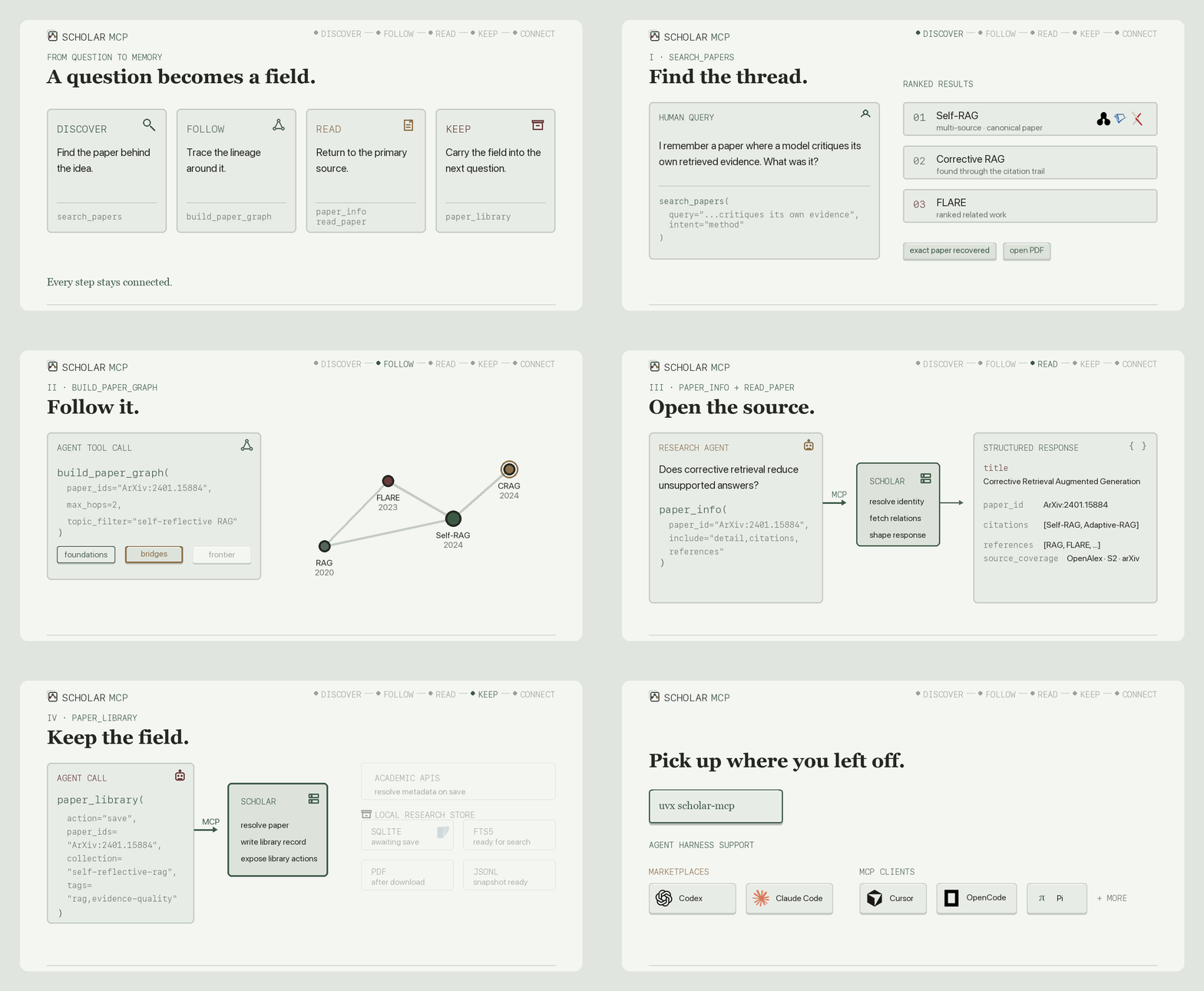
One continuous agent flow: search_papers → build_paper_graph → paper_info + read_paper → paper_library → library connectors.
How it works
Agents call typed MCP tools over stdio or Streamable HTTP. Scholar returns concise text and structured data, while a persistent SQLite library drives FTS5 search, PDF attachments, JSONL snapshots, and Obsidian, Zotero, and Notion connectors.
Quick start
Claude Code:
claude mcp add scholar -- uvx --python 3.12 \
  --find-links https://github.com/Liyux3/scholar-mcp/releases/download/v0.8.5/wheel-index.html \
  --from 'scholar-mcp[rerank]==0.8.5' scholar-mcp
Claude Desktop or any stdio MCP client:
{
  "mcpServers": {
    "scholar": {
      "command": "uvx",
      "args": [
        "--python", "3.12",
        "--find-links", "https://github.com/Liyux3/scholar-mcp/releases/download/v0.8.5/wheel-index.html",
        "--from", "scholar-mcp[rerank]==0.8.5", "scholar-mcp"
      ]
    }
  }
}
The direct server exposes the compact core profile. Install uv; it prepares Python 3.12 and the CPU reranker automatically. Optional source keys unlock deeper coverage and higher throughput. macOS desktop bundles include Python and dependencies; the portable launchers also handle machines without uv.
The repository also ships a research plugin with citation graphs, a local paper library, and the Deep Research skill:
# Codex
codex plugin marketplace add Liyux3/scholar-mcp
codex plugin add scholar-mcp@scholar-mcp

# Claude Code
claude plugin marketplace add Liyux3/scholar-mcp
claude plugin install scholar-mcp@scholar-mcp
The same plugin directory follows the Agent Plugins standard for Cursor, Pi, and compatible harnesses. OpenCode can launch uvx scholar-mcp as a local MCP; Pi can use pi-mcp-adapter.
Release artifacts also include the PyPI package, multi-architecture GHCR image, and macOS MCPB bundles. See the complete distribution matrix.
Tools
| Profile | Tool | Responsibility |
|---|---|---|
| Core | search_papers | Multi-source retrieval, filters, reranking, and citation discovery |
| Core | paper_info | Paper detail, citations, and references through one selective call |
| Core | recommend_papers | Related work through semantic and citation connections |
| Core | search_authors | Author profiles, affiliations, paper counts, and h-index |
| Core | read_paper | Read paper text, tables, and selected figures; pages 1-10 by default |
| Core | download_paper | Persist a PDF and index it in a collection |
| Research | build_paper_graph | Bounded citation graph with PageRank, bridges, nodes, edges, and Mermaid |
| Research | paper_library | Collections, FTS search, notes, tags, PDFs, and Markdown vault export |
scholar://status reports source availability and the actual reranker used without occupying the tool surface. Tool responses retain concise YAML text and also expose structured MCP data.
The bundled Deep Research skill turns search, paper inspection, graph traversal, and selected library writes into a living field map.
Retrieval
| Channel | Sources | Query form and role |
|---|---|---|
| Semantic | OpenAlex semantic, arxiv.gg, optional Exa | Full natural-language question |
| Full text | Semantic Scholar snippet search | Matching passages from open-access papers |
| Broad metadata | OpenAlex, Semantic Scholar, Crossref, optional Scopus | Identity, coverage, citations, and filters |
| Preprints and conferences | arXiv, OpenReview | Recent work and conference records |
| Biomedical | PubMed, Europe PMC | Medicine, biology, and full-text repositories |
| Domain and repository | DBLP, INSPIRE-HEP, DOAJ, CORE, OpenAIRE, HAL | CS, physics, open journals, and repositories |
| Web fallback | Google Scholar | HTTP search with optional automatic session recovery |
Keyword APIs receive measured source-specific query budgets. Semantic endpoints keep the original question. Every source contributes independently to one canonical evidence pool.
Results are canonicalized across DOI, arXiv, Semantic Scholar, OpenAlex, PubMed, and OpenReview identities. Duplicate records contribute complementary metadata and independent source evidence instead of appearing several times.
DashScope qwen3-rerank is the primary reranker when configured. Install the rerank extra for the FlashRank local fallback: uvx --from 'scholar-mcp[rerank]' scholar-mcp. Containers and MCPB bundles include this extra; the local model downloads on first use and stays in the application data directory. Search ranks the initial matches, follows connections from the strongest papers, then reranks the combined set. Metadata completion overlaps source retrieval, and large pools are scored in batches that respect the model service's document and token limits.
For an Alibaba workspace or another region, set DASHSCOPE_HTTP_BASE_URL to the API Host from the console (with https://), or its /api/v1 base. Keep DASHSCOPE_API_KEY from that region. For example:
DASHSCOPE_HTTP_BASE_URL=https://<workspace-id>.cn-beijing.maas.aliyuncs.com/api/v1
SCHOLAR_RERANK_MODEL=qwen3-rerank
The default remains qwen3-rerank. SCHOLAR_RERANK_MODEL can also select qwen3.7-text-rerank, gte-rerank-v2, or the text input of qwen3-vl-rerank, subject to availability in your workspace. Scholar uses the appropriate Alibaba request/response format. Existing installations without a base URL keep the Beijing shared endpoint. Alibaba recommends workspace-dedicated endpoints and states that the shared domain no longer receives new features after September 30, 2026. API keys and model availability are region-specific.
For another provider or a self-hosted model, set SCHOLAR_RERANK_URL to the full rerank endpoint, SCHOLAR_RERANK_MODEL to its model name, and SCHOLAR_RERANK_API_KEY if needed. This explicit endpoint takes priority over the Alibaba configuration and uses only its own credential. Compatible endpoints use the Cohere-style contract:
Request:  query, documents, top_n, model
Response: results: [{index, relevance_score}]
Alibaba's native /api/v1/services/rerank/text-rerank/text-rerank endpoint is also supported, with input/parameters requests and output.results responses. Both formats share the same batching, score validation and local fallback. No provider SDK is required.
Scores must be finite and in [0, 1], with each query-document score comparable across batches. Raw logits need model-specific normalization in the serving backend. Changing models can change the balance with citation and recency ranking. A custom endpoint replaces DashScope and falls back only to the local model. Set SCHOLAR_RERANK_BATCH_SIZE to its per-request document capacity (default 500). Larger candidate pools are scored in batches, not discarded at that limit. Use scholar://status or debug=true to inspect the actual provider/model and any fallback reason; a successful search alone does not confirm that the cloud reranker succeeded.
Normal responses focus on papers, with a short warning if availability affected the search. debug=true adds _meta with source coverage, the actual reranker, per-source yield, latency, provenance, and detailed errors. The base parallel-search budget is 30 seconds, configurable through SCHOLAR_SOURCE_BUDGET_S. Google Scholar pagination can extend it up to 120 seconds to retain completed multi-page results.
With Chrome, Edge, or Chromium and ffmpeg installed, select scholar-mcp[google,rerank]==0.8.5 in the quick-start configuration to enable automatic verification recovery. A short-lived browser establishes the session, then ordinary HTTP handles searches and pagination. It uses a fresh browser profile, never your personal browser profile, and online audio recognition rather than a local model. Auto mode tries headless first; on macOS, a declined challenge can retry using the native browser engine with no startup window and a hidden page. It reuses the last successful quiet mode for that route. Recovery advances when the page is ready, without fixed multi-second delays.
Sessions are stored privately under <data>/sessions/ and tied to the configured proxy. A cold search can wait up to 150 seconds for the bounded recovery worker and the subsequent search. Warm sessions use the normal budget. Set SCHOLAR_GOOGLE_RECOVERY=off to disable recovery, headless to require strictly headless operation, or headed to explicitly allow a visible verification window. SCHOLAR_GOOGLE_BROWSER selects a browser executable outside standard install locations. No browser is downloaded at server startup. If pagination is interrupted, completed pages remain usable and the response reports partial coverage. Failed recovery backs off while retaining the last verified session.
Measured retrieval quality
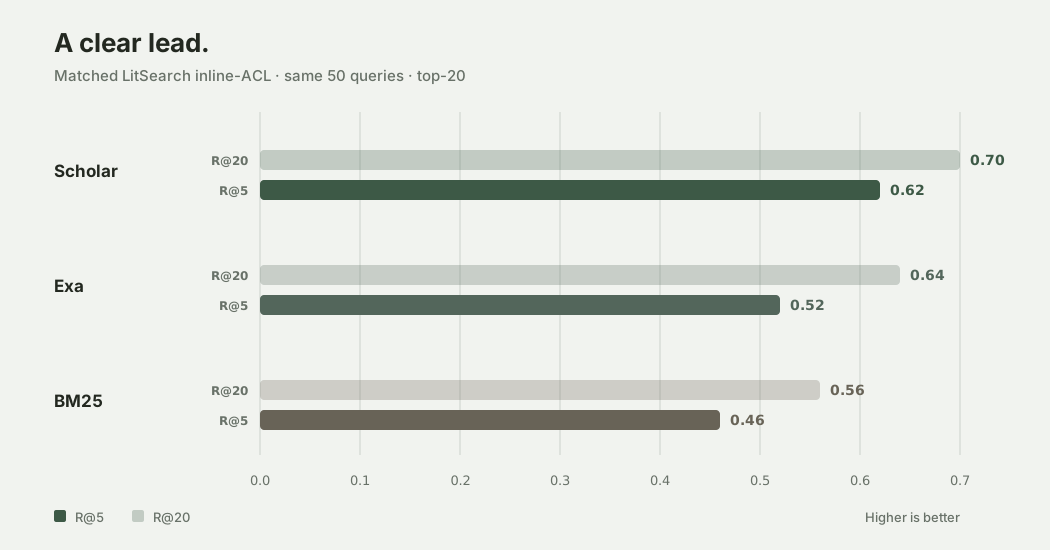
In the frozen matched LitSearch run, Scholar achieved a 10-percentage-point higher top-five query hit rate and 6 points higher at top twenty than Exa research-paper search.
| System | Hit@5 | Hit@10 | Hit@20 | MRR |
|---|---|---|---|---|
| Scholar | 0.62 | 0.68 | 0.70 | 0.442 |
Exa research paper | 0.52 | 0.58 | 0.64 | 0.435 |
BM25 title + abstract | 0.46 | 0.46 | 0.56 | 0.335 |
Scholar recovered nine top-five hits that Exa missed; Exa recovered four that Scholar missed.
Hit@k measures the fraction of queries with at least one ground-truth paper in the top k results. Recall@k instead measures the fraction of all relevant papers recovered for each query. MRR averages the reciprocal rank of the first match, with zero for a miss. The frozen summary retains its legacy R@k field names for these query hit rates.
The comparison uses the same first 50 LitSearch inline-ACL queries, ground-truth titles, title matcher, and top-20 cutoff. Exa ran with category research paper. Scholar used its standard retrieval pipeline with Qwen reranking. BM25 follows the official LitSearch title+abstract implementation: lowercase tokenization, English stopword removal, Porter stemming, and BM25Okapi over the 64K-paper corpus. The Scholar/Exa run was collected on 12 May 2026; BM25 was reproduced on 25 August 2026. The frozen summary is in docs/benchmarks/litsearch-inline-acl-50.json, with raw BM25 results and their hash manifest.
Citation graph and paper library
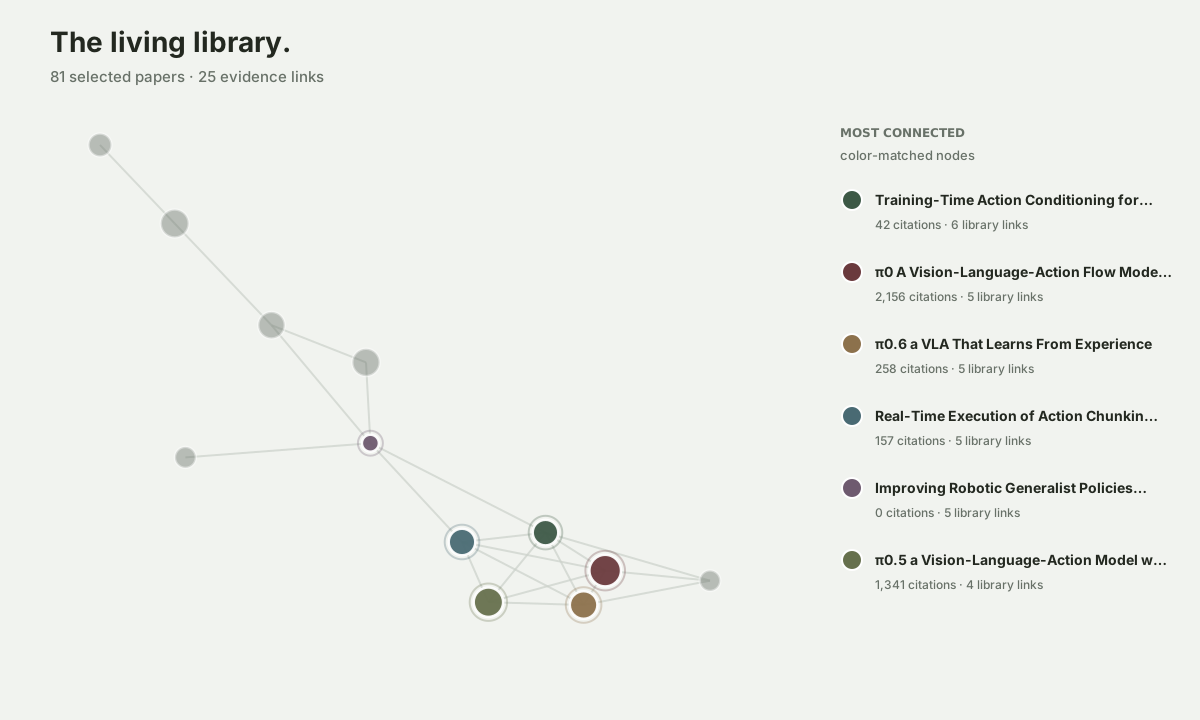
Rendered from a live local collection, the graph reveals foundations, bridges, and the papers that move a field forward. Stable identities and parallel citation traversal keep the map connected as it grows.
The paper library uses one persistent SQLite authority with WAL transactions and FTS5 search. Existing JSONL collections migrate automatically and remain available as compatibility snapshots. Stable identifiers, notes, tags, PDF paths, connector IDs, and sync revisions stay attached to the same canonical record.
Default data layout:
~/.scholar-mcp/
├── papers/    persistent PDFs
├── kb/
│   ├── library.sqlite3    authority + FTS5 + sync state
│   └── *.jsonl            compatibility snapshots
└── vault/                 Markdown projections and wikilinks
Library connectors
# No login: write directly into an Obsidian vault
scholar-mcp library export obsidian --collection rag --path /path/to/vault

# Dry-run by default; add --apply for external writes
scholar-mcp library sync zotero --collection rag
scholar-mcp library publish notion --collection rag
Obsidian is a live Markdown projection. Zotero manages bibliographic items, collections, tags, and notes. Notion receives a one-way reading-list view. External connectors keep their IDs, versions, and content hashes in SQLite, so unchanged papers do not publish twice.
Paper access
read_paper uses a temporary PDF and reads pages 1-10 by default, which usually reaches the conclusion of an AI conference paper. It returns page-aware Markdown, structured tables when their geometry is reliable, and caption selectors for figures and visual table fallbacks. Pass visual="Figure 3" or another returned selector to receive one focused page crop alongside its text. Pass pages="11-20" to continue into references or appendices. The PDF is removed after extraction. download_paper streams into a staging file, atomically publishes a validated PDF, reuses a valid local copy, and indexes its metadata in the selected collection.
The shared resolution chain covers:
- Native open-access records and canonical archives such as arXiv and Europe PMC
- Registered repository resolvers: CORE, OpenAIRE, HAL, Zenodo, and DOAJ
- bioRxiv, medRxiv, SSRN, ChemRxiv, and other preprint servers
- Unpaywall and an optional institutional proxy
scholar-mcp sources prints the registry-derived capability matrix. Add --check to test configured search providers, or --check --source arxiv --query "retrieval augmented generation" to inspect one. arXiv falls back to its own HTTPS search when its Atom API is unavailable. Zenodo participates in PDF resolution but stays out of default discovery because its broad publication records add more candidate noise than retrieval value.
Library proxy access
For paywalled papers, download_paper can fetch through your university library's EZproxy login. It runs after Unpaywall and before the optional Sci-Hub step, and only for a single paper you asked for. Scholar never asks for or stores a password. It reuses the session cookies you export from your own browser after logging in.
- Set
LIBRARY_PROXY_PREFIXto your library's proxy login prefix, the part that comes before the paper address, for examplehttps://proxy.library.example.edu/login?url=. Copy it from any proxied link or the library's bookmarklet; no institution is assumed. - In Edge or Chrome, log in to the library proxy and open any proxied page.
- Export cookies for the proxy domain in Netscape cookies.txt format with a cookies.txt extension (for example Get cookies.txt LOCALLY; Edge can install Chrome Web Store extensions). Save the file somewhere private and set
LIBRARY_PROXY_COOKIESto its path. - Restart the MCP client so it picks up the new environment.
Library sessions are short lived and are controlled by the library, so the export stops working after some hours or when the library ends the session. When the proxy returns its login page, the download message says the session expired; log in again and export a fresh file. The file is a live session credential, so keep it out of git and shared folders. Only cookies belonging to the proxy domain are read; any others in the file are ignored. When a download fails, the message includes a proxied link you can open in your browser while logged in.
If your terminal uses an HTTP proxy, keep the library requests on the same network route as your logged-in browser. For direct library access, add its proxy hostname and subdomains to NO_PROXY.
Configuration
All credentials are optional and remain in the MCP process environment.
| Variable | Purpose |
|---|---|
SCHOLAR_DATA_DIR | Shared data root; default ~/.scholar-mcp |
SCHOLAR_KB_DIR | SQLite library and JSONL snapshot directory |
SCHOLAR_OBSIDIAN_VAULT | Obsidian projection root; no authentication required |
S2_API_KEY / S2_API_KEYS | Semantic Scholar search, snippets, graph, and rate limits |
OPENALEX_API_KEY / OPENALEX_API_KEYS | OpenAlex search, semantic search, and graph calls |
OPENALEX_EMAIL | OpenAlex polite pool and Unpaywall |
DASHSCOPE_API_KEY | Qwen reranker |
DASHSCOPE_HTTP_BASE_URL | Alibaba workspace API Host or /api/v1 base; defaults to the Beijing shared endpoint |
SCHOLAR_RERANK_MODEL | Alibaba model (default qwen3-rerank), or the model served by a custom endpoint |
SCHOLAR_RERANK_URL, SCHOLAR_RERANK_API_KEY | Full custom rerank endpoint and its separate credential; overrides Alibaba routing |
SCHOLAR_RERANK_TIMEOUT | Remote reranker request timeout, including Alibaba; default 120 seconds |
SCHOLAR_RERANK_BATCH_SIZE | Custom reranker's per-request document capacity; default 500 |
SCHOLAR_GOOGLE_PROXY | Dedicated Google Scholar proxy; other sources keep their existing route |
SCOPUS_API_KEY | Optional Scopus metadata source |
CORE_API_KEY | Optional CORE repository source |
EXA_API_KEY | Optional Exa research-paper source |
SCHOLAR_SOURCE_BUDGET_S | Per-round source fan-out budget; default 30 seconds |
SCHOLAR_DOWNLOAD_DIR | Persistent PDF directory; default <data>/papers |
LIBRARY_PROXY_PREFIX, LIBRARY_PROXY_COOKIES | Optional library proxy login prefix and a cookies.txt exported from your logged-in browser; no institution is assumed. See Library proxy access |
LIBRARY_PROXY_BASE, LIBRARY_PROXY_COOKIE | Older form of the same setting: proxy URL and a raw Cookie header. Cookie file fallback: <data>/library_cookie.txt |
SCHOLAR_MCP_EXTENSIONS | Use research for graph and paper-library tools |
ZOTERO_API_KEY, ZOTERO_LIBRARY_ID | Zotero Web API or authorized local API connector |
ZOTERO_LIBRARY_TYPE, ZOTERO_API_BASE | Optional Zotero library type and endpoint override |
NOTION_API_KEY, NOTION_DATA_SOURCE_ID | Notion one-way publisher |
Errors returned to the model redact request URLs and credentials. OpenReview public submissions are searched without an account or password.
Development
git clone https://github.com/Liyux3/scholar-mcp.git
cd scholar-mcp
uv sync --extra dev
uv run pytest
Unit tests run by default. Run live API tests separately with uv run pytest -m integration.
Connector and feature contributions follow CONTRIBUTING.md. Report security issues through the private process in SECURITY.md; citation metadata is available in CITATION.cff.
Local and Docker clients use stdio by default. Set SCHOLAR_MCP_TRANSPORT=http for Streamable HTTP; the default endpoint is /mcp.
License
Apache License 2.0