Waves for Claude
Repair audio by describing what's wrong — and let Claude look at the spectrogram.
This is the Claude plugin for MirrorEdge AI: Waves, a desktop audio-repair editor. The app is the MCP server: the same executable you click also answers on stdio, so Claude drives the real editor, through the same code and the same undo history your mouse uses.
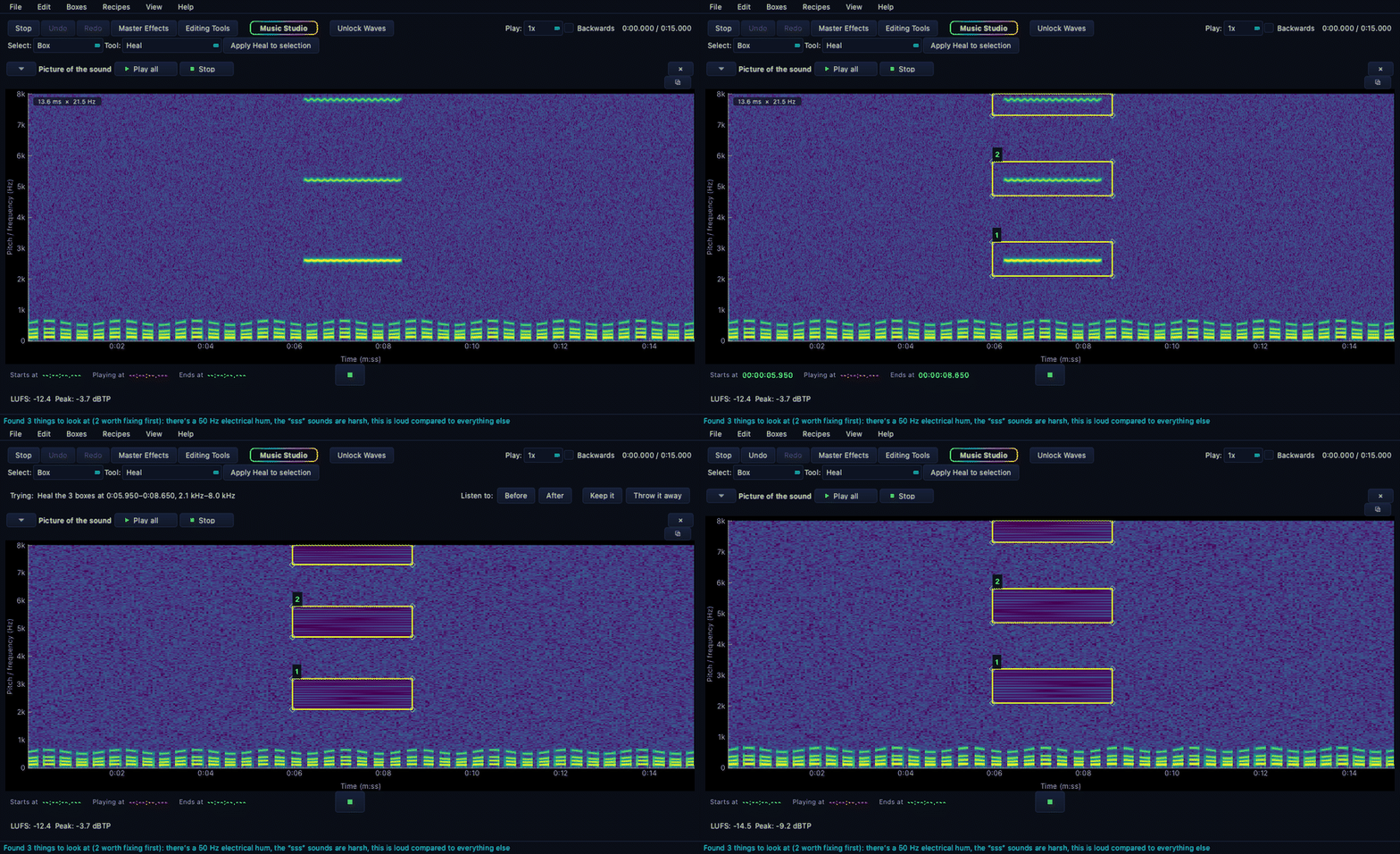
Three bright bars are a phone buzzing through an interview. Three boxes go round them — one moment in time, each box its own band of pitch — and healing erases what is inside and nothing else. The voice underneath is untouched.
There's a hum through this whole interview and someone's phone buzzes about four minutes in. Clean it up and tell me what you did.
Claude opens your recording, measures it, notches out the hum, finds the buzz on the spectrogram, draws a box around it, heals only that, and reports the noise floor before and after. Everything it does is undoable.
Install
You need Waves itself — the plugin drives it, and the app is the server.
- Install Waves (free to use): Microsoft Store · direct download
- Add the marketplace and install the plugin:
/plugin marketplace add MirrorEdgeAI/waves-claude
/plugin install waves@mirroredge
That's it. The plugin finds your installation automatically — Store installs, direct installs and unusual locations are all handled. If it can't find Waves, it tells you where to get it.
Prefer to wire it up by hand? Open Waves and go to Help ▸ Works with Claude for the exact command for your machine.
What Claude can do
Seventeen tools. The two that matter most are at the bottom.
| Tool | What it's for |
|---|---|
open_recording | Open an audio file — or a video, whose sound is lifted out |
close_recording | Put it down again |
look_at_recording | Run eleven checks and list what's wrong, worst first, in plain English |
measure | Loudness, true peak, noise floor — where things stand right now |
list_fixes | All 26 repairs, and what every setting means |
apply_fix | Run one, on the whole recording or one stretch of it |
edit_box | Draw a box in time and pitch, and heal, quieten or boost only inside it |
isolate_speakers | Split a noisy room into one track per voice |
history · undo · redo | Everything done so far, and walking it backwards and forwards |
export · export_speakers · save_session | Keep the result |
check_the_export | Confirm what landed on disk is what you meant |
picture_of_the_sound | Claude sees the spectrogram — the actual picture, zoomed where it asks |
picture_of_the_editor | Claude sees the app — any pane, as it looks on screen |
Those last two are why this is different from wrapping a command-line tool. Claude doesn't guess where the noise is from a description. It looks at the picture, finds the bright bar, and puts a box round it.
Your audio never leaves your computer
Claude sends instructions — "take out the clicks", "quieten 2–3 kHz between 0:06 and 0:08" — and Waves does the work locally, sending back measurements and, when asked, a picture. Your recording is never uploaded, transmitted or copied anywhere.
Waves makes exactly two kinds of network call in its entire life: activating your licence once, and fetching a file you asked it to open from a link.
What it costs
Nothing extra for the plugin. Waves is free to use — opening, editing, listening, measuring, and letting Claude experiment as much as it likes. A subscription covers what you keep: exported files, saved speaker tracks and saved sessions.
- $29/month or $290/year, direct from mirroredgeai.com/waves
- Mac App Store pricing is set by Apple and differs
Requirements
- Windows 10 (1809) or later, or macOS
- Waves 0.5.1 or later
- Claude Code, or any MCP client
Built by MirrorEdge AI · Guide · Terms · Privacy