Skip to content
plugmcp
DirectorySkillsCategoriesBlog
EN/中文
Sign inSign up
Home/Servers/Modelglass

Modelglass

by io.github.Modelglass

Sourced AI-model pricing and capability data — compare and route to the cheapest capable model.

Power your agent

Add this server

The publisher's own URL. Not a PlugMCP endpoint.

Server URL
https://modelglass-api.vercel.app/mcp
Provider
Add in Claude

Claude opens with the name and URL filled in. You still confirm it there.

Claude Code
claude mcp add --transport http io.github.modelglass-modelglass https://modelglass-api.vercel.app/mcp

Run in a terminal.

Claude Desktop
{
  "mcpServers": {
    "io.github.modelglass-modelglass": {
      "command": "npx",
      "args": [
        "-y",
        "mcp-remote",
        "https://modelglass-api.vercel.app/mcp"
      ]
    }
  }
}

claude_desktop_config.json

Step-by-step: add this in Claude

Remote URL or a command on your machine? How the two installs differ

Run on PlugMCP

Host a copy with our keys and logs.

A new server you create. It is not this listing's official endpoint. Use the publisher install when you want their URL and their credentials.

Launch

Related MCP

View more
  • Firecrawl🔥 Official Firecrawl MCP Server - Adds powerful web scraping and search to Cursor, Claude and any other LLM clients.
  • N
    NotionToken-auth Notion MCP: pages, databases, blocks, comments, files. Runs headless in CI and agents.
  • Context7Context7 Platform -- Up-to-date code documentation for LLMs and AI code editors

Related skills

View all
  • reaReverse engineer anything with agents, from app behavior down to native binaries.
  • rea-changelog-updatePrepare or rewrite REA release changelogs and GitHub release notes from pinned Git history, with verified contributor thanks and Release Please synchronization.
  • rea-tool-designDesign or change REA investigation tools, CLI/MCP contracts, provider capabilities, and Evidence semantics.

Questions

How do I install Modelglass?
Copy the http config for Cursor, Claude Desktop, Claude Code, or VS Code on this page. It uses the publisher's install, not a PlugMCP proxy.
Does Modelglass need an API key?
No required environment variable is listed on this record.
What transport does Modelglass use?
Modelglass is reached over HTTP.
When was Modelglass last checked?
Last checked 2026-10-16. Sourced AI-model pricing and capability data — compare and route to the cheapest capable model.

Sourced AI-model pricing and capability data — compare and route to the cheapest capable model.

modelglass-vscode

What Modelglass is

Modelglass is a pricing-and-capability data layer for AI models — image, video, audio, and LLM — built as a sourced, append-only registry: every price carries a source URL and the date it was verified, and a repricing is a new dated entry, never a silent overwrite. It's served two ways: a free comparison site, and a paid read API + MCP server (https://modelglass-api.vercel.app, POST /mcp) for operators wiring model pricing into their own tooling. Modelglass itself doesn't proxy your traffic or pick a model at runtime — it's the data other people's tools (including both extensions in this repo) read.

What this repo is

An npm workspaces monorepo publishing two independent VS Code extensions, each installable on its own:

PackageWhat it isMarketplace
packages/routerModelglass Cost-Aware Router — routes dev tasks to the cheapest capable LLM (and generates video via Runway, audio via ElevenLabs) directly against your own provider keys, BYOK, no Modelglass proxy in the request path. Also available directly inside Copilot Chat's model picker.modelglass.cost-aware-router
packages/mcpModelglass MCP — registers the live Modelglass MCP server directly in Copilot's agent mode, no manual .vscode/mcp.json editing. Seven read-only tools (models, pricing history, competitors, account/tier info) — Copilot's agent decides when to use them, this extension just makes them discoverable.modelglass.modelglass-mcp
packages/sharedInternal only, not published. SecretStorage-backed auth (ensureApiKey/peekApiKey) and the Modelglass API base URL, shared by both extensions above.—

Both extensions use the same Modelglass account/API key — installing one doesn't require separately authenticating the other. See each package's own README.md for full usage docs, including a screenshot of it in action.
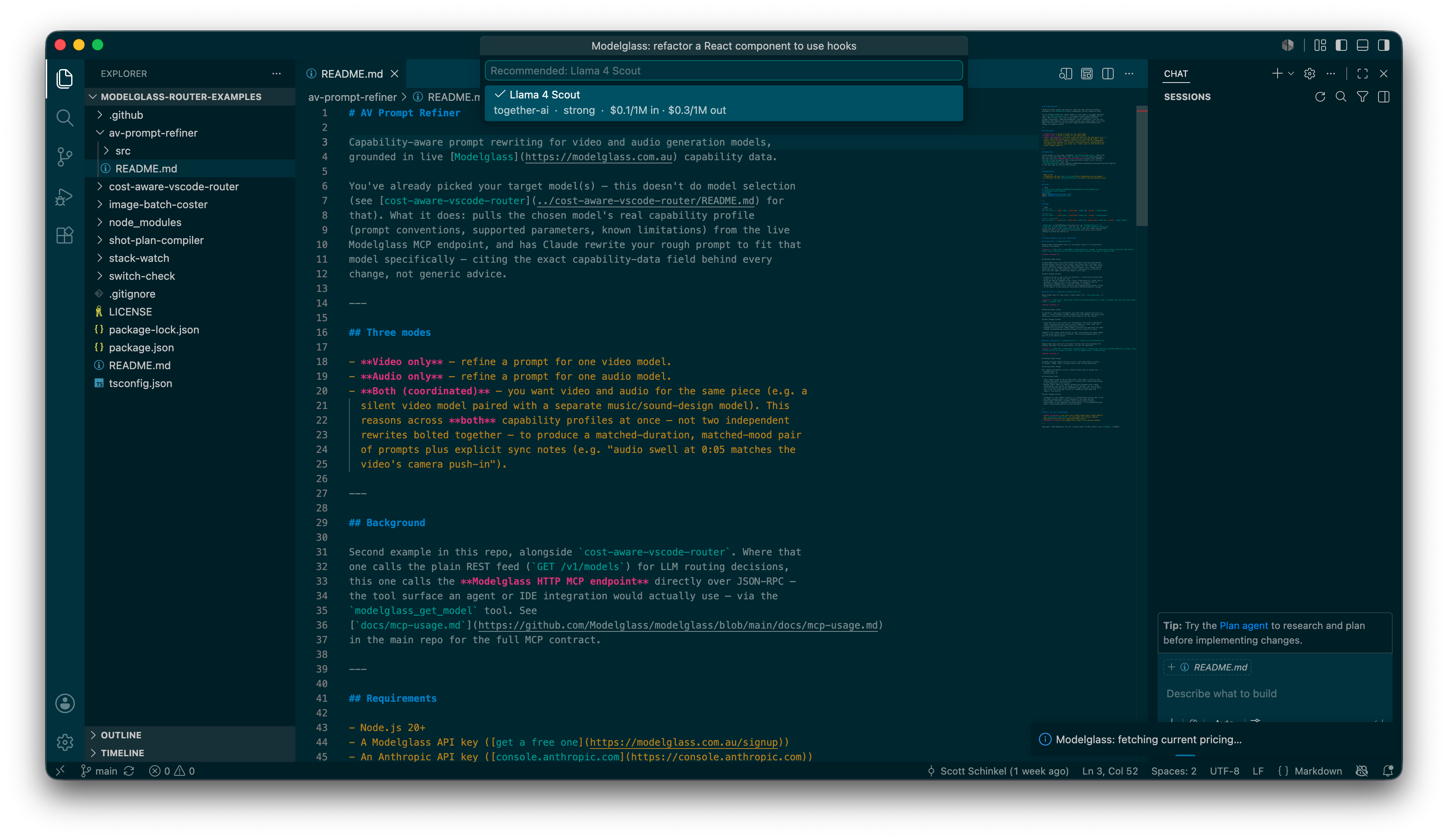
Modelglass: Route Task recommendation

Development

npm install                              # installs + links all three workspace packages
npm run typecheck                        # all packages
npm run test                             # all packages (packages without a test script are skipped)
npm run build                            # all packages

# per-package:
npm run build --workspace packages/router
npm run package --workspace packages/mcp   # -> packages/mcp/*.vsix

To run an extension locally: open packages/router or packages/mcp as the VS Code workspace root and press F5 to launch an Extension Development Host with your changes loaded — standard VS Code extension tooling, no custom launch config needed. See CONTRIBUTING.md for the full local-dev + PR flow.

The router/mcp split is tracked as SCO-434 in the main modelglass repo's Linear project.

Contributing

Bug reports, fixes, and new features are welcome — see CONTRIBUTING.md and our Code of Conduct.

To report a security vulnerability, follow SECURITY.md instead of opening a public issue.

Talk to us

Questions about Modelglass itself or either extension — email [email protected].


Copyright © 2026 Modelglass Pty Ltd. Licensed under the MIT License — see LICENSE.

How do I install Modelglass?
Copy the http config for Cursor, Claude Desktop, Claude Code, or VS Code on this page. It uses the publisher's install, not a PlugMCP proxy.
Does Modelglass need an API key?
No required environment variable is listed on this record.
What transport does Modelglass use?
Modelglass is reached over HTTP.
When was Modelglass last checked?
Last checked 2026-10-16. Sourced AI-model pricing and capability data — compare and route to the cheapest capable model.

No tool list yet. Remote servers get one after the first health check.

plugmcp

Plug any tool into any agent. MCP servers for people who do not write servers. Gateway for volume, n8n for apps.

  • github.com/TODO
  • x.com/TODO
  • linkedin.com/company/TODO

PlugMCP, 2026

Product
  • Browse
  • Install
  • Host your own
  • Pricing
  • Voice mode
  • Browser
Directory
  • All MCP servers
  • MCP Apps
  • Tools
  • Agent skills
  • Categories
  • New
  • Voice
  • Submit a server
Developers
  • Docs
  • Blog
  • Club
  • Work with us
  • What is MCP
  • What is WebMCP
  • Status
Company
  • About
  • Contact
  • Terms
  • Privacy
  • DPA