Skip to content
plugmcp
DirectorySkillsCategoriesBlog
EN/中文
Sign inSign up
Home/Servers/Thinchain

Thinchain

I
by io.github.SnipMCP

MCP server that sanitizes bad broker data and compresses options chains 95% for AI trading agents.

Power your agent

Add this server

The publisher's own command. Not a PlugMCP endpoint.

Local command
uvx thinchain==0.1.1
Provider
Claude Code
claude mcp add io.github.snipmcp-thinchain -- uvx thinchain==0.1.1

Run in a terminal.

Claude Desktop
{
  "mcpServers": {
    "io.github.snipmcp-thinchain": {
      "command": "uvx",
      "args": [
        "thinchain==0.1.1"
      ]
    }
  }
}

claude_desktop_config.json

Step-by-step: add this in Claude

Remote URL or a command on your machine? How the two installs differ

Run on PlugMCP

Host a copy with our keys and logs.

A new server you create. It is not this listing's official endpoint. Use the publisher install when you want their URL and their credentials.

Launch

Related MCP

View more
  • Firecrawl🔥 Official Firecrawl MCP Server - Adds powerful web scraping and search to Cursor, Claude and any other LLM clients.
  • N
    NotionToken-auth Notion MCP: pages, databases, blocks, comments, files. Runs headless in CI and agents.
  • Context7Context7 Platform -- Up-to-date code documentation for LLMs and AI code editors

Related skills

View all
  • reaReverse engineer anything with agents, from app behavior down to native binaries.
  • rea-changelog-updatePrepare or rewrite REA release changelogs and GitHub release notes from pinned Git history, with verified contributor thanks and Release Please synchronization.
  • rea-tool-designDesign or change REA investigation tools, CLI/MCP contracts, provider capabilities, and Evidence semantics.

Questions

How do I install Thinchain?
Copy the stdio config for Cursor, Claude Desktop, Claude Code, or VS Code on this page. It uses the publisher's install, not a PlugMCP proxy.
Does Thinchain need an API key?
No required environment variable is listed on this record.
What transport does Thinchain use?
Thinchain runs locally over stdio.
When was Thinchain last checked?
Last checked 2026-10-16. MCP server that sanitizes bad broker data and compresses options chains 95% for AI trading agents.

MCP server that sanitizes bad broker data and compresses options chains 95% for AI trading agents.

ThinChain

The catalytic converter between raw broker data and your AI trading agent.

Battle-tested. Sanitization logic extracted from a production options trading app. Handles every bad tick Tradier has thrown at us in production.
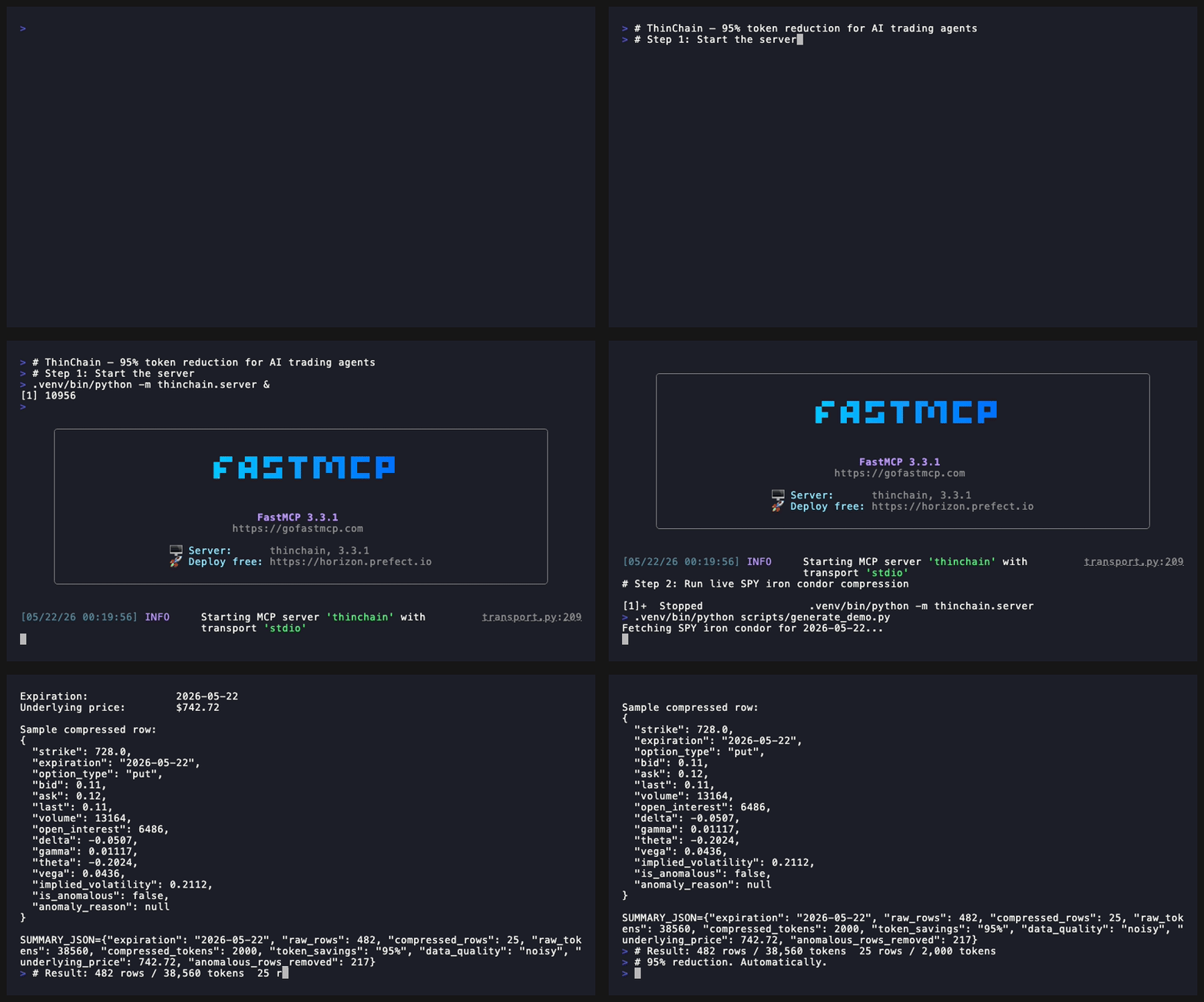
ThinChain Demo

☁️ Moving to production?

The open-source server runs locally with your own API keys. For hosted infrastructure with multi-broker failover, SLA guarantees, and webhook alerts — join the managed cloud waitlist.

The Problem

Tradier's MCP dumps 500-row JSON chains. One bad print can corrupt an agent's reasoning. ThinChain sanitizes, compresses, and circuit-breaks that data before it reaches your model.

Installation

git clone https://github.com/snipmcp/thinchain.git
cd thinchain
pip install -e ".[dev]"
cp .env.example .env

Or with Docker:

docker-compose up --build

Configuration

TRADIER_API_KEY=your_key_here
TRADIER_BASE_URL=https://api.tradier.com/v1
POLYGON_API_KEY=your_key_here
POLYGON_BASE_URL=https://api.polygon.io
DEFAULT_BROKER=tradier
CACHE_TTL_SECONDS=30
LOG_LEVEL=INFO

Usage

Three example prompts to send to Claude (or any MCP-compatible agent):

  1. Use get_compressed_chain to get an iron condor setup on SPY expiring 2026-06-19
  2. Check if SPY options data is trustworthy before I place my trade
  3. Get me the ATM straddle strikes for AAPL expiring 2026-06-19

Run it in two terminals

# Tab 1 — start the MCP server
python -m thinchain.server
# Tab 2 — call a tool from a Python shell or your MCP client
# Tool signatures:
#   get_compressed_chain(symbol, expiration, strategy="raw",
#                        delta_range=None, broker="tradier")
#   get_sanitized_quote(symbol, broker="tradier")
#   get_circuit_status(symbol, expiration, broker="tradier")

How it works

Three layers between raw broker output and your model:

Broker API → [Sanitize] → [Compress] → [Circuit Break] → MCP Tool → AI Agent
              hygiene     strategy      anomaly gate
              rules       slicing       + cache
  • Sanitize: Drops ghost quotes (0.0/0.0), inverted spreads, NaN/empty/dash values, clamps deltas to [-1, 1], normalizes positive theta on long options, flags illiquid strikes.
  • Compress: Slices the chain to only the strikes relevant to your strategy (iron condor, straddle, etc.) — typically 95%+ token reduction.
  • Circuit Break: Four-tier data quality (clean / noisy / degraded / circuit_breaker_active). When >65% of rows are anomalous, refuses to serve stale data and falls back to last known-good cache.

Real numbers from a live SPY iron condor (2026-06-19 expiration)

RAW TRADIER PAYLOAD          THINCHAIN OUTPUT
─────────────────────────────────────────────
Rows:        482             Rows:        25
Est tokens:  38,560          Est tokens:  2,000
Token savings:               95%
Anomalous rows removed:      217
Data quality:                noisy → still safely served

ThinChain compresses 482 rows / 38,560 tokens down to 25 rows / 2,000 tokens — and flags 217 anomalous strikes (illiquid, ghost quotes, wide spreads) that would have polluted the agent's context.

Roadmap

  • Managed cloud tier (hosted, multi-tenant, webhook alerts)
  • Polygon connector hardening (live SIP feed)
  • Webhook alerts for circuit breaker trips

Contributing

PRs welcome. Run pytest before submitting.

How do I install Thinchain?
Copy the stdio config for Cursor, Claude Desktop, Claude Code, or VS Code on this page. It uses the publisher's install, not a PlugMCP proxy.
Does Thinchain need an API key?
No required environment variable is listed on this record.
What transport does Thinchain use?
Thinchain runs locally over stdio.
When was Thinchain last checked?
Last checked 2026-10-16. MCP server that sanitizes bad broker data and compresses options chains 95% for AI trading agents.

No tool list yet. Remote servers get one after the first health check.

plugmcp

Plug any tool into any agent. MCP servers for people who do not write servers. Gateway for volume, n8n for apps.

  • github.com/TODO
  • x.com/TODO
  • linkedin.com/company/TODO

PlugMCP, 2026

Product
  • Browse
  • Install
  • Host your own
  • Pricing
  • Voice mode
  • Browser
Directory
  • All MCP servers
  • MCP Apps
  • Tools
  • Agent skills
  • Categories
  • New
  • Voice
  • Submit a server
Developers
  • Docs
  • Blog
  • Club
  • Work with us
  • What is MCP
  • What is WebMCP
  • Status
Company
  • About
  • Contact
  • Terms
  • Privacy
  • DPA