ThinkReview MCP
Hosted Model Context Protocol server for AI code reviews on pull request and merge request URLs.
Connect Cursor, Claude Code, Claude Desktop, or GitHub Copilot, paste a PR/MR URL, and get a structured review — without pasting a diff into chat.
| Endpoint | https://mcp.thinkreview.dev/v1 |
| Transport | Streamable HTTP |
| Auth | OAuth (recommended) or Bearer token |
| Registry | io.github.Thinkode/thinkreview |
| Product | thinkreview.dev/features/mcp |
| Docs | thinkreview.dev/docs/mcp-integration |
| Setup | portal.thinkreview.dev/mcp |
This repository is for visibility and client documentation. ThinkReview MCP runs as a remote hosted server. The review engine, auth, billing, and git integrations stay on ThinkReview infrastructure and are not published here.
What it does
ThinkReview MCP exposes one tool:
review_url_code
Run a live code review on a GitHub, GitLab, Azure DevOps, or Bitbucket PR/MR URL.
ThinkReview fetches changed files through your stored git credentials (portal Integrations) and returns a structured review: summary, suggestions, security notes, best practices, and suggested follow-up questions.
| Parameter | Required | Description |
|---|---|---|
prUrl | Yes | Full or domain-style PR/MR URL (e.g. https://github.com/org/repo/pull/42) |
language | No | Response language (default: English) |
mrId | No | Optional tracking ID for your workflow |
forceRegenerate | No | true to bypass cache and force a new review |
URL reviews use the same review credits as the ThinkReview browser extension.
Authentication
Choose one method. Interactive configs for both are on portal.thinkreview.dev/mcp.
| Method | How it works | Best for |
|---|---|---|
| OAuth (recommended) | URL-only MCP config → Authenticate in the browser on the ThinkReview portal | Cursor, Claude Code, Claude Desktop, Copilot |
| Bearer token | Long-lived portal token in Authorization: Bearer <token> headers | Extension, CI, or clients that cannot complete OAuth |
OAuth sessions are separate from the extension Bearer token. Regenerating the Bearer token does not revoke OAuth MCP sessions.
Prerequisites
- A ThinkReview account with an active plan or available review credits
- Git credentials under Settings → Integrations for the host of the PR you want to review
- An MCP client that supports Streamable HTTP, plus either:
- OAuth for remote HTTP servers, or
- A Bearer token from portal.thinkreview.dev/mcp
Quick start — OAuth (recommended)
Add a URL-only config, then Authenticate in your client (browser opens the ThinkReview portal).
Cursor
{
  "mcpServers": {
    "thinkreview": {
      "url": "https://mcp.thinkreview.dev/v1"
    }
  }
}
Enable thinkreview, click Authenticate, complete portal consent.
Example: examples/oauth/cursor.mcp.json
Claude Code
CLI:
claude mcp add --transport http thinkreview https://mcp.thinkreview.dev/v1
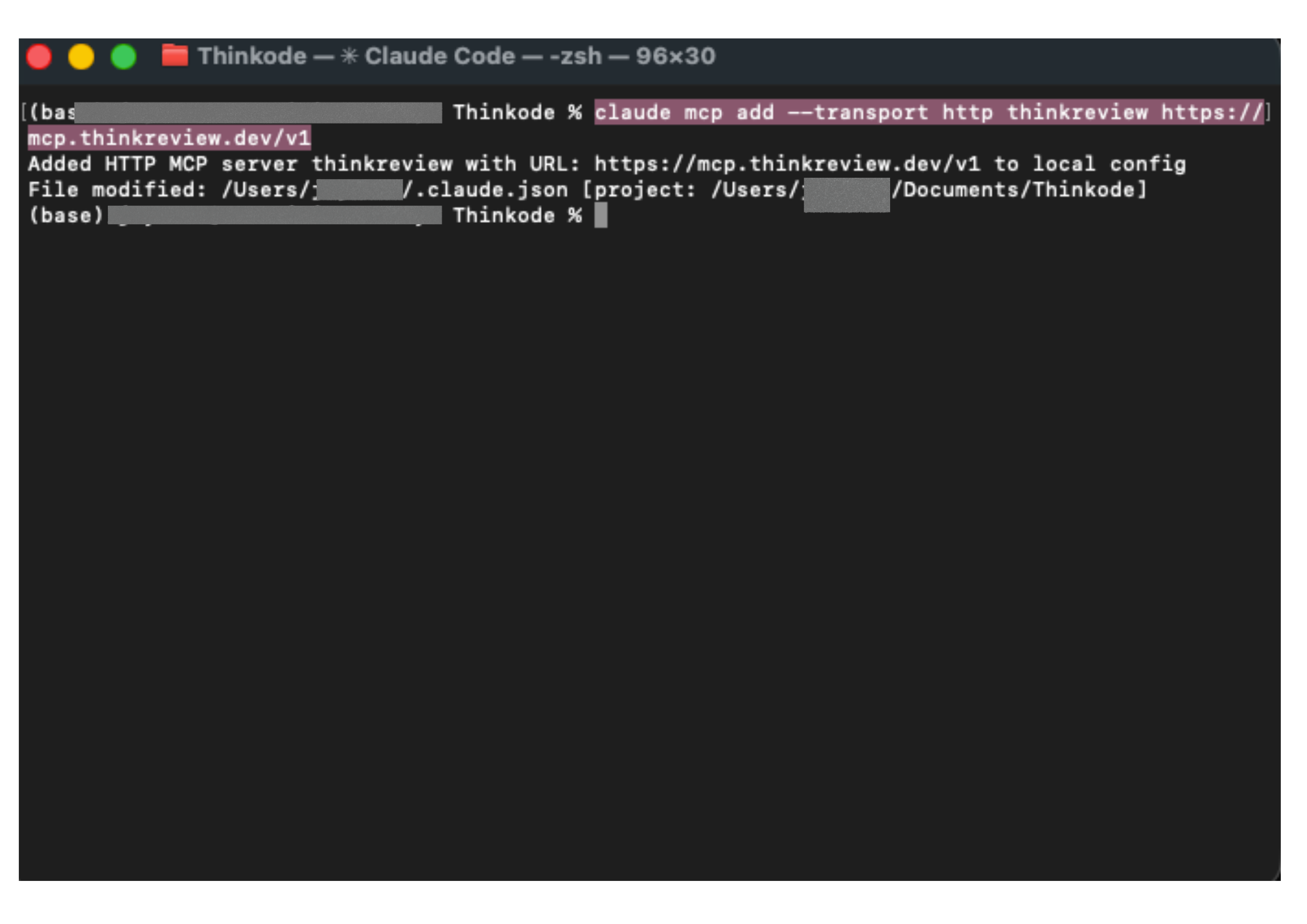
Or config (~/.claude.json / project .mcp.json):
{
  "mcpServers": {
    "thinkreview": {
      "type": "http",
      "url": "https://mcp.thinkreview.dev/v1"
    }
  }
}
Example: examples/oauth/claude.mcp.json
Authenticate (OAuth)
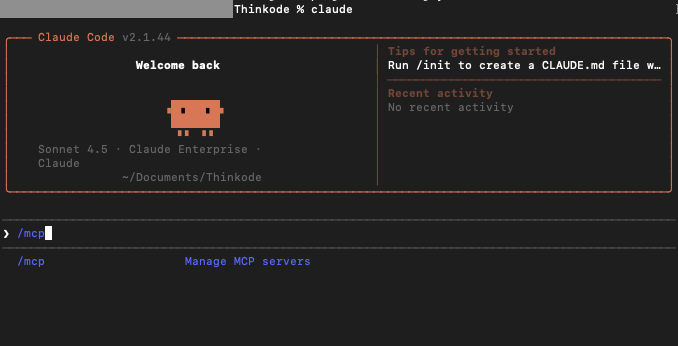
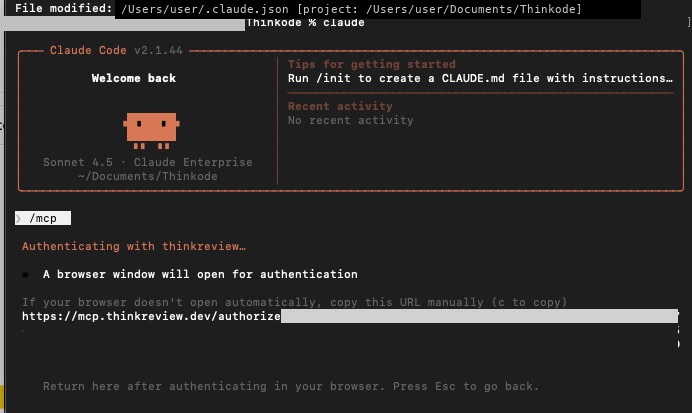
- Start Claude Code and run
/mcp.
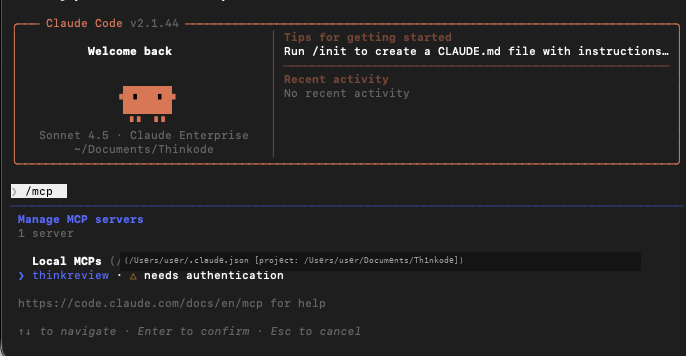
- Select thinkreview — status shows needs authentication.
- Choose Authenticate.
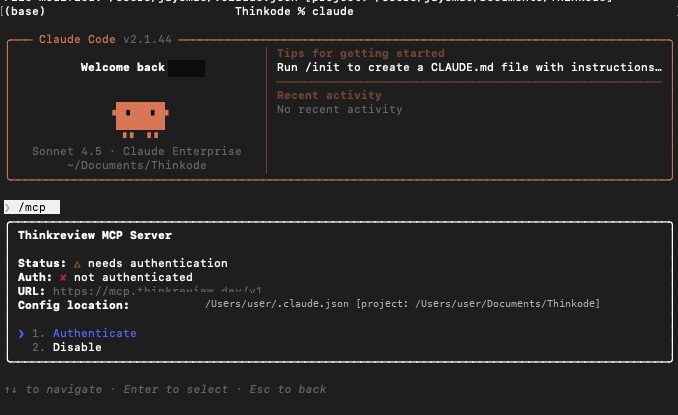
- Claude Code opens the browser OAuth flow (
/authorize→ portal consent).
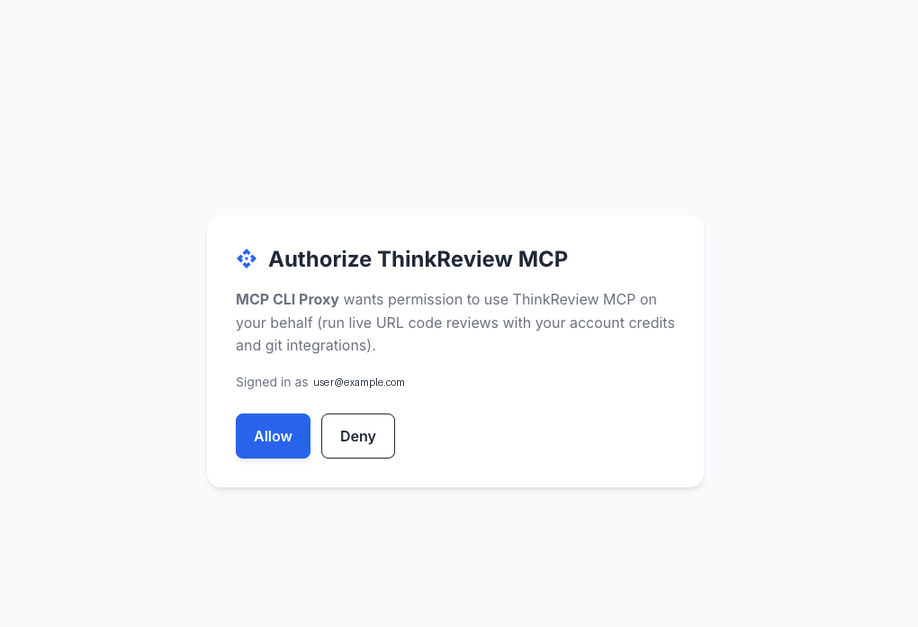
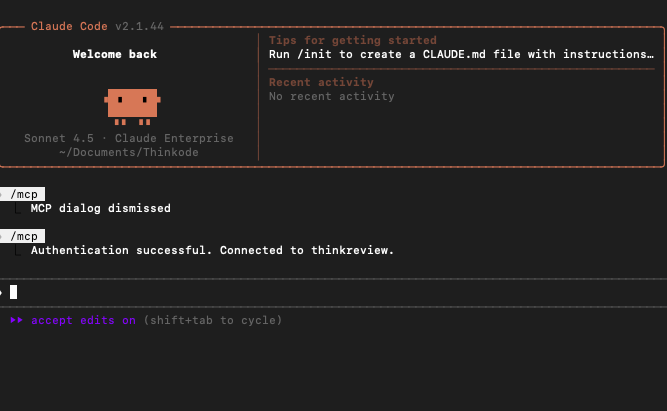
- After you click Allow, return to Claude Code — you should see Authentication successful.
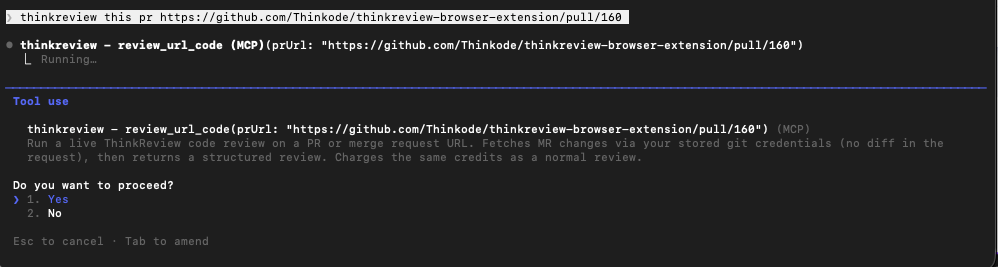
Run a review
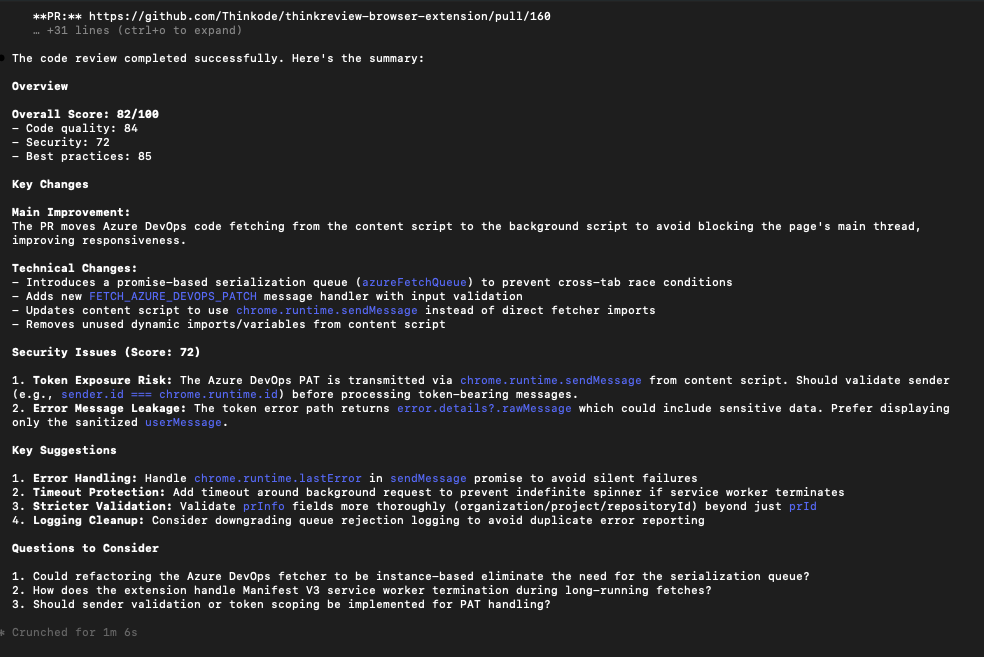
Ask Claude Code to review a PR URL (tool: review_url_code):
Claude Desktop
Preferred: Settings → Connectors → Add custom connector → https://mcp.thinkreview.dev/v1 → Connect → complete portal OAuth.
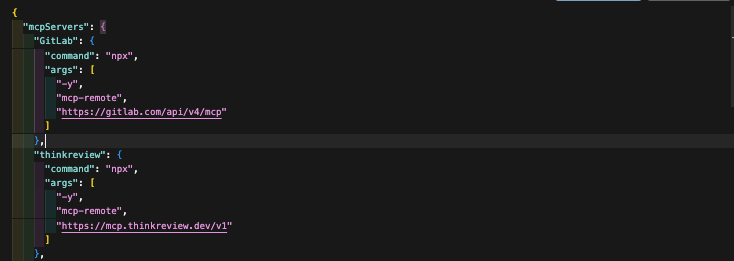
Claude Desktop’s claude_desktop_config.json does not accept Claude Code’s "type": "http" block. To use the config file instead, bridge with mcp-remote (requires Node.js), then fully quit and reopen Desktop:
{
  "mcpServers": {
    "thinkreview": {
      "command": "npx",
      "args": ["-y", "mcp-remote", "https://mcp.thinkreview.dev/v1"]
    }
  }
}
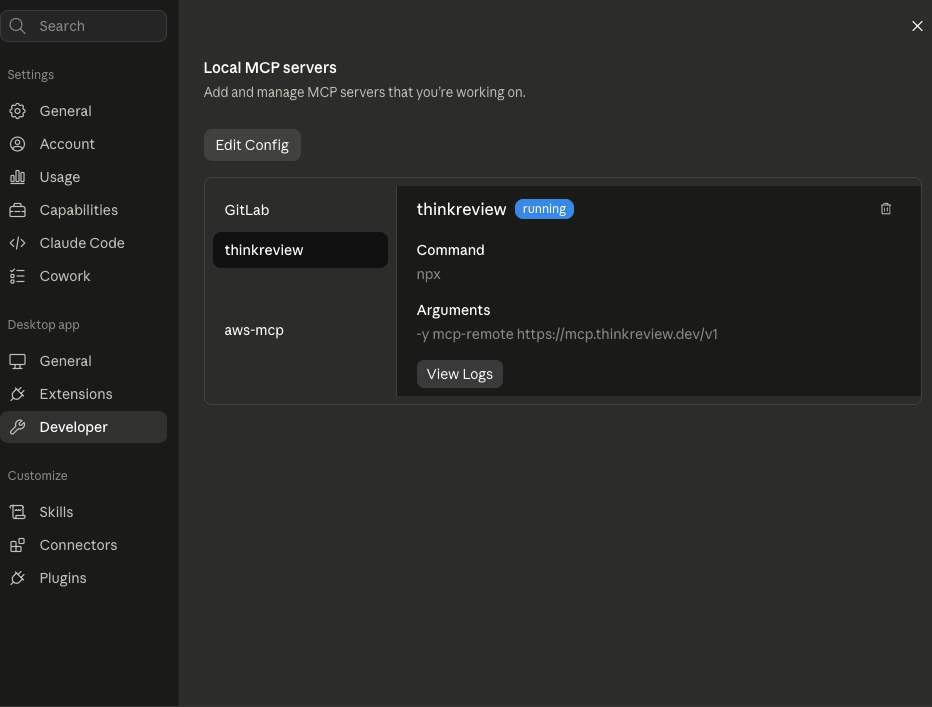
After restart, Settings → Developer → Local MCP servers should show thinkreview as running. Complete OAuth when prompted (same portal consent as Claude Code).
Example: examples/oauth/claude-desktop.mcp.json
GitHub Copilot (VS Code)
.vscode/mcp.json or user MCP config (servers key):
{
  "servers": {
    "thinkreview": {
      "type": "http",
      "url": "https://mcp.thinkreview.dev/v1"
    }
  }
}
Use Auth / Authenticate on the thinkreview server, then enable it in Copilot Chat.
Example: examples/oauth/vscode-copilot.mcp.json
Example prompt
Call
review_url_codefor https://github.com/org/repo/pull/123
Alternative — Bearer token
Copy your token from portal.thinkreview.dev/mcp and add it as a header. Same session token as the browser extension. Regenerating invalidates the previous token for extension and Bearer-based MCP clients.
Cursor
{
  "mcpServers": {
    "thinkreview": {
      "url": "https://mcp.thinkreview.dev/v1",
      "headers": {
        "Authorization": "Bearer <your-token>"
      }
    }
  }
}
Example: examples/bearer/cursor.mcp.json
Claude Code
claude mcp add --transport http thinkreview https://mcp.thinkreview.dev/v1 \
  --header "Authorization: Bearer <your-token>"
{
  "mcpServers": {
    "thinkreview": {
      "type": "http",
      "url": "https://mcp.thinkreview.dev/v1",
      "headers": {
        "Authorization": "Bearer <your-token>"
      }
    }
  }
}
Example: examples/bearer/claude.mcp.json
Claude Desktop (mcp-remote + header)
{
  "mcpServers": {
    "thinkreview": {
      "command": "npx",
      "args": [
        "-y",
        "mcp-remote",
        "https://mcp.thinkreview.dev/v1",
        "--header",
        "Authorization:${AUTH_HEADER}"
      ],
      "env": {
        "AUTH_HEADER": "Bearer <your-token>"
      }
    }
  }
}
Example: examples/bearer/claude-desktop.mcp.json
GitHub Copilot (VS Code)
{
  "servers": {
    "thinkreview": {
      "type": "http",
      "url": "https://mcp.thinkreview.dev/v1",
      "headers": {
        "Authorization": "Bearer <your-token>"
      }
    }
  }
}
Example: examples/bearer/vscode-copilot.mcp.json
Supported platforms
Same hosts as the ThinkReview extension:
- GitHub.com and GitHub Enterprise Server
- GitLab.com and self-managed GitLab
- Azure DevOps Cloud and on-premise
- Bitbucket Cloud and Bitbucket Data Center
Security
- Prefer OAuth so long-lived tokens are not stored in MCP config files
- If you use a Bearer token, treat it like a password — do not commit it to git
- Store tokens only in local MCP client config or a secrets manager
- Regenerate the Bearer token from the portal if it is ever exposed
- Use git PATs with the minimum scopes needed to read PRs/MRs and diffs
Related
License
Documentation and example configs in this repository are licensed under the MIT License.
The ThinkReview hosted MCP service, APIs, and review infrastructure remain proprietary to Thinkode / ThinkReview.