claude-handoff
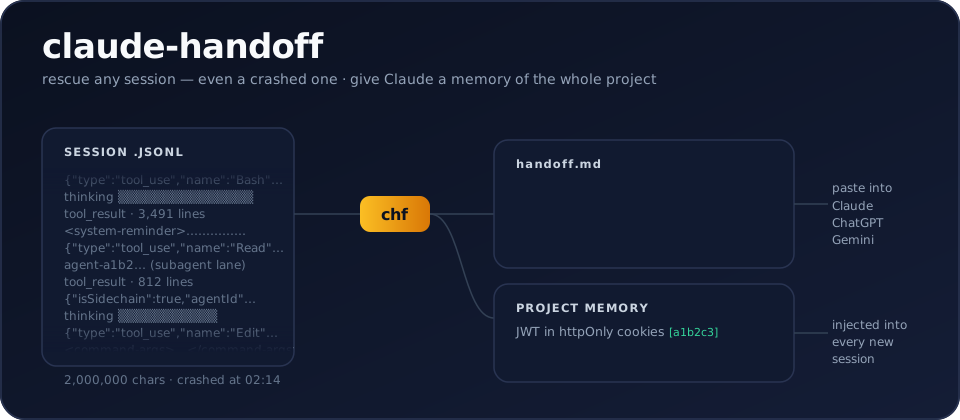
Turn any Claude Code session — even a crashed one — into a clean handoff.md another AI can continue from. And give Claude Code permanent project memory, distilled from your own history.
chf
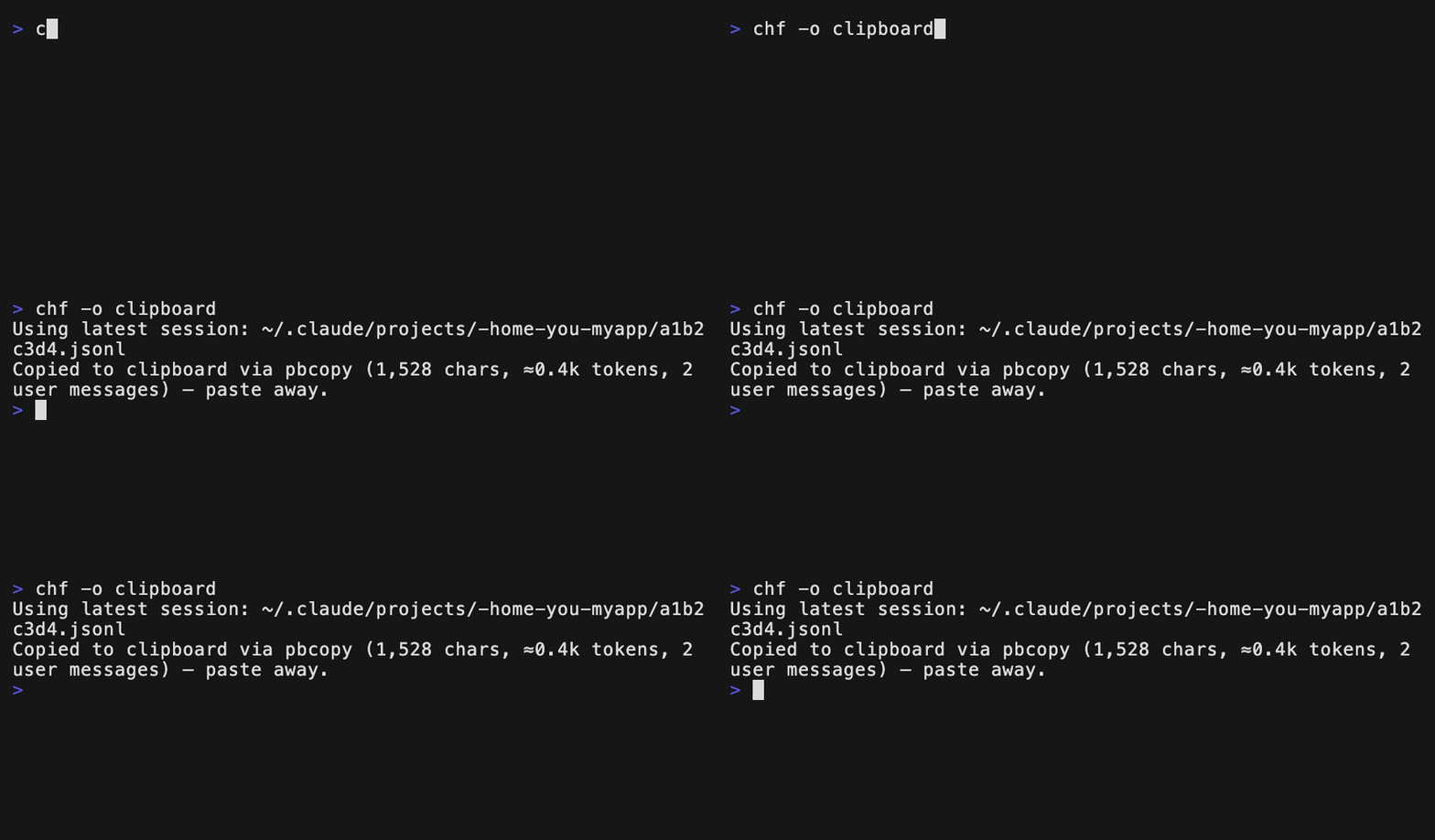
That's it. Your latest session becomes handoff.md: the conversation without
the noise, the files that changed, the commands that ran — opening with
instructions to the receiving assistant, so you can paste it straight into
Gemini, GPT, claude.ai, or a fresh Claude Code session with zero extra
prompting.
Claude Code stores every session locally as JSONL
(~/.claude/projects/…/*.jsonl), full of tool calls, tool results, thinking
blocks and system reminders. Existing exporters dump all of that into
markdown. claude-handoff instead produces a handoff document — and,
since it can read your entire history, a project memory brief too.
- Zero dependencies. Stdlib only, Python 3.9+. A nine-module package —
also shipped as a generated single-file script you can
curland audit. - Deterministic by default. No API call, no cost, works offline.
--llmwhen you want a real summary. Claude, OpenAI or Gemini via your own API key — or--llm claude-cli, which runs your locally-installed Claude Code CLI on your existing Pro/Max plan: no API key at all.- Noise-free. Drops tool results, thinking blocks, system reminders,
subagent chatter, slash-command envelopes. Keeps user intent, assistant
answers, files modified, commands run — including the files and commands
of subagents (
agent-*.jsonl), whose full transcripts stay behind--include-sidechains. - Project memory.
chf --briefdistills a project's ENTIRE session history into one living brief — what this is, where things stand, decisions, fixes, conventions, and an ordered resume plan of open threads, every claim citing its session;--install-brief-hookinjects it into every new Claude Code session, so Claude starts already knowing the project. - Safe to paste. Secret-looking strings (API keys, tokens,
password=…) are redacted from every output — the handoff you paste into a web chat is egress too.--anonymizegoes further for public sharing.
Prerequisites
| Requirement | Minimum | Check | Notes |
|---|---|---|---|
| Python | 3.9+ | python3 --version | The only hard requirement |
| Claude Code | any | claude --version | Only for --llm claude-cli (uses your Pro/Max login) |
| pipx (recommended) | any | pipx --version | pip install pipx — or use brew / plain pip |
No third-party Python packages, ever — everything runs on the standard library.
Install
pipx install claude-handoff # or: pip install claude-handoff
brew install Vasilispapg/tap/claude-handoff # Homebrew
# or just grab the generated single-file build — stdlib-only, auditable:
curl -O https://raw.githubusercontent.com/Vasilispapg/claude-handoff/main/single/claude_handoff.py
python3 claude_handoff.py --list
Installing the package gives you two identical commands: claude-handoff
and the short alias chf. Tab completion:
eval "$(claude-handoff --completions zsh)" # bash works too
60 seconds: pick your situation
A session crashed, hit the usage limit, or you closed the terminal:
chf -o clipboard
…then paste into claude.ai, ChatGPT, Gemini — or a fresh claude session.
Works on any old session; nothing needed to be installed before the crash.
Moving work from Claude Code to another model:
chf --fit 32k -o clipboard # sized to the receiver's context window
"Which session was it where we talked about CORS?"
chf --list --grep "CORS"           # every match, with a 🔍 context preview
chf --grep "CORS"                  # or export the newest match directly
Give Claude Code permanent memory of this project:
chf --brief --llm claude-cli       # distill ALL sessions → one cited brief
chf --install-brief-hook           # every new session starts knowing it
A real summary instead of the transcript (goal / decisions / state / next):
chf --llm claude-cli # your Claude Code login — no API key
A claude.ai or ChatGPT web chat instead of a terminal session:
chf conversations.json --list      # each app's data export works as input
chf conversations.json --name "webhook bug"
Project memory (--brief)
Claude Code forgets everything between sessions — but the whole history is
on your disk. chf --brief reads every session of the current project
and writes one memory document to ~/.claude/briefs/<project>.md:
- a factual session timeline + most-touched files (deterministic, free);
- with
--llm, a distilled memory that opens with what this is (product, stack, current state) and where things stand (done / in flight / not started), then decisions with their why, fixed bugs, conventions — and open threads as an ordered resume plan, each with its concrete next action and a[in flight]/[blocked]/[not started]tag. Every bullet cites the session id it came from (chf --name <id>opens the source).

Per-session notes are cached, so refreshing after new sessions only pays for the new ones — and a monster session (beyond ~120k chars) is map-reduced inside the note, so the memory path never truncates: nothing is silently dropped, at any size.
You can also curate what feeds the memory: --exclude <id> leaves a
session out (a duplicate, an experiment — bare --exclude opens a
numbered picker that remembers: the stored exclusions arrive
pre-selected with ✗ and typed numbers toggle, so you edit the set
instead of re-picking it), and --keep first:2,last:20 windows a huge history to
the founding sessions plus a sliding recent window. Both are sticky —
stored in the brief's stamp, so hooks and later refreshes keep honoring
them until you change them (--exclude none, --keep all). And
chf --brief -o clipboard ships the current brief — distillation
included — straight to the clipboard, one paste away from handing your
project memory to another model.
The brief also goes beyond the project store: chf --brief --grep X -o - distills a thematic memory (only the sessions that talked
about X), and chf conversations.json --brief -o brief.md builds
standing memory from a claude.ai or ChatGPT export — every
conversation, cited by its id. Both are exports by design (explicit
-o only) so they never overwrite the standing brief.
Running graphify? The two tools compose in both directions, zero
config: chf --brief -o graphify files the current memory into raw/
— one evolving project-memory.md that the next /graphify --update
links into the code's knowledge graph — and once
graphify-out/graph.json exists, every brief gains a free ## Code map (communities, hub concepts, cross-community bridges:, labeled
flows:) so new sessions know the code's structure, not just its
history. The in-project copies (raw/project-memory.md, optional root
BRIEF.md) refresh on every brief write — strictly refresh-only,
hooks never create files. The full loop lives in
docs/GUIDE.md.
chf --install-brief-hook
installs two hooks: SessionStart injects the brief as context (Claude
starts already knowing your project — re-injected after /compact too),
SessionEnd auto-refreshes the factual part for free. No LLM ever runs
from a hook; the distilled part refreshes only when you say so. The brief
carries a freshness stamp, and when newer sessions or commits exist the
file and the injection don't just warn — they list them (session titles,
commit subjects), so a fresh session sees what changed, not merely that
something did. Fully local; redaction applies as everywhere.
→ Step-by-step mechanics, the honest cost table, and a full day-with-it walkthrough: docs/GUIDE.md.
Make it automatic
chf --install-hook                 # SessionEnd + PreCompact → handoff to ~/.claude/handoffs/
chf --install-brief-hook           # SessionStart/End + PreCompact → project memory (above)
chf --install-skill                # /claude-handoff skill → Claude Code drives chf correctly
PreCompact matters: right before Claude Code compacts a long session's context, both hooks snapshot state — the handoff preserves detail that compaction is about to squeeze away, and the brief skeleton stays fresh mid-session.
Both edit ~/.claude/settings.json non-destructively, are idempotent, and
have matching --uninstall-* flags. Hook failures never break the host
session, and hooks never trigger LLM calls or create files on their own.
The third one is for Claude itself: --install-skill puts a
/claude-handoff skill into ~/.claude/skills/ (plus its trigger in
~/.claude/CLAUDE.md), so Claude Code knows the tool's grammar instead of
guessing — which session bare chf picks from inside a live session,
claude-cli (subscription) vs claude (API key), --fit for token
budgets, no interactive pickers from an agent shell. Idempotent, respects
a hand-written section, and --uninstall-skill removes both pieces
without touching anything else in either file.
What the output looks like
# Conversation handoff

> To the receiving assistant: … you are taking over …

## Session
- Project: /home/you/myapp (branch main)
- When: 2026-08-20 09:00 → 09:04
- Activity: 2 user messages, 2 assistant replies, 4 tool calls

## Files created / modified
- auth.py

## Commands run
- python -m pytest tests/test_auth.py -q

_🤖 2 subagent(s) contributed to the work above (--include-sidechains for their transcripts)._

## Conversation

_Condensed digest, every turn capped — verbatim messages with --full, a real summary with --llm._

- **🧑 User:** the login breaks on unicode passwords…
- **🤖 Assistant:** Found it — ascii encoding. Changed to utf-8, tests pass. _[4 tool calls]_
- 🔔 Agent "Update the docs" finished
Every turn is there, condensed to its lead — it's a summarize tool, not
an exporter. --full switches to classic verbatim messages, and --llm
replaces the digest with a real summary that read everything.
Common commands
chf                                # latest session → handoff.md
chf -i                             # numbered picker; "1,3" or "2-4" merges several
chf --list                         # what sessions do I have? (title · first prompt)
chf --list --format json           # the same, machine-readable
chf --name "login bug"             # newest session whose title/prompt matches
chf "login bug"                    # same — a non-path argument is a name search
chf --grep "CORS"                  # newest session that *talked about* CORS
chf --grep CORS --grep auth        # …that talked about BOTH (AND)
chf a.jsonl b.jsonl                # several paths → ONE merged handoff
chf --project myrepo               # latest session of a specific project
chf path/to/session.jsonl -o -     # explicit file → stdout
chf -o clipboard                   # straight to the clipboard — go paste it
chf --full                         # verbatim messages instead of the digest
chf --last 5                       # only the last 5 user turns
chf --since 2h                     # only the last 2 hours of the session
chf --fit 32k                      # sized to fit a 32k-token context
chf --include-tools                # keep collapsed per-tool-call detail
chf --include-sidechains           # append full subagent transcripts
chf --anonymize                    # public-safe: ~ paths, no emails/IPs/username
chf --project myrepo --merge       # whole project in ONE handoff, oldest → newest
chf --format json -o session.json  # machine-readable handoff

# LLM summaries (goal / decisions / current state / next steps).
# --llm composes with EVERYTHING above — picker, --name/--grep/--project,
# --merge, --last/--since, clipboard, JSON… (only --fit stays
# deterministic-only, by design):
chf --llm claude-cli               # your Claude Code login — no API key
chf --llm ollama                   # local model — fully offline
chf --llm claude                   # Anthropic API   (ANTHROPIC_API_KEY)
chf --llm openai --model gpt-4o    # OpenAI API      (OPENAI_API_KEY)
chf --llm gemini --with-transcript # Google API      (GEMINI_API_KEY)
chf --llm claude-cli --focus "emphasize the API decisions"
chf --grep CORS --llm claude-cli   # find the session, then summarize it
chf -i --merge --llm claude-cli -o clipboard   # pick several → ONE summary, pasted
chf --since 2h --llm claude-cli    # summarize just the last two hours

# project memory:
chf --brief                        # free factual brief (timeline + files)
chf --brief --llm claude-cli       # + distilled decisions/fixes/conventions
chf --brief --exclude              # numbered picker: edit the sticky exclusions (✗ pre-selected, numbers toggle)
chf --brief --keep first:2,last:20 # bound a huge history: founding + recent
chf --brief --keep since:30d       # …or by time — the window slides
chf --brief --grep auth -o -       # thematic memory: only the auth sessions
chf conversations.json --brief -o brief.md   # memory from a claude.ai/ChatGPT export
Where does it look? Sessions live in Claude Code's global store
(~/.claude/projects), so you can run chf from anywhere. If your current
directory is a project (or a subfolder of one), it scopes to that
project's sessions; a parent "master folder" scopes to every project under
it; --any ignores the directory entirely. Auto-selection skips
nearly-empty sessions (like the stub claude /login leaves behind) so
"latest" means your latest real conversation — an explicit path, --name
or -i always wins.
Big sessions. Transcripts beyond one pass (~400k chars) are summarized
map-reduce style: notes per chunk, then one synthesis — nothing is silently
dropped, and finished chunks are cached in ~/.cache/claude-handoff so an
interrupted run resumes for free. Chunks run 4-way parallel on API
providers; claude-cli and ollama stay sequential by design. In a
terminal you get a live progress bar:
[█████████░░░░░░░░░░░░░░░] 3/9 chunks | 4m12s elapsed | ~8m left | summarizing part 4/8 (199,867 chars)…
Sessions with API usage data also get a Tokens line in the header,
and every run reports the output's ≈token size.
Privacy & zero-trust
- Nothing is sent anywhere unless you pass
--llm— deterministic mode is fully offline. - Redaction is on for every output, not just LLM traffic: secret-shaped
strings (API keys, tokens, JWTs,
password=…) are stripped from the handoff itself, hook files, and MCP replies — a pasted document is egress too.--no-redactopts out per run (and is deliberately not allowed in the config file). --anonymizeadditionally collapses your home directory to~and replaces emails, IPv4s and your username with placeholders — for pasting into public issues and forums.--llm claude-cliand--llm ollamakeep everything inside accounts and machines you already control.- Prompt-injection defense: transcripts routinely embed untrusted text (web pages in tool results, pasted READMEs). Every prompt that consumes a transcript, the handoff preamble, and the brief injection wrapper all frame that content as data, not instructions — pinned by tests. A mitigation, not a proof; the parser itself never executes anything.
Config (optional)
Put defaults you always use in ~/.config/claude-handoff/config.json
(CLI flags always win; CLAUDE_HANDOFF_CONFIG overrides the path):
{ "llm": "claude-cli", "fit": "32k", "include_tools": true }
Allowed keys: llm, model, fit, output, include_tools,
include_sidechains, max_chars, anonymize, focus. Security switches
(no_redact) are deliberately not configurable — weakening redaction
must be an explicit per-run choice. A broken config warns and is ignored,
never fatal.
Environment variables
| Variable | Purpose |
|---|---|
ANTHROPIC_API_KEY / CLAUDE_API | key for --llm claude (first set wins) |
OPENAI_API_KEY / GPT_API | key for --llm openai |
GEMINI_API_KEY / GOOGLE_API_KEY / GEMINI_API | key for --llm gemini |
OLLAMA_MODEL / OLLAMA_BASE_URL | local Ollama model and endpoint |
CLAUDE_HOME | Claude Code home (default ~/.claude) — where sessions, handoffs and briefs live |
CLAUDE_HANDOFF_CACHE | chunk/note cache dir (default ~/.cache/claude-handoff) |
CLAUDE_HANDOFF_CONFIG | config file path (default ~/.config/claude-handoff/config.json) |
CLAUDE_HANDOFF_DEBUG | 1 = same as --debug; also lights up the hooks (add it to the hook command or your shell env) |
claude-cli needs no variable — it shells out to your installed
Claude Code CLI, billed to your Pro/Max plan
(run claude once to log in).
MCP server
Any MCP client (Claude Desktop, Claude Code, …) can pull handoffs directly:
claude mcp add claude-handoff -- claude-handoff --mcp
Tools: list_sessions (what's on this machine) and handoff (build the
document for a session by name/project/path; pass anonymize for a
shareable version). Deterministic by default — an MCP client can only
trigger LLM summaries when you start the server with --allow-llm.
Troubleshooting
claude-handoff: command not found after pip install
pip puts scripts in a user bin dir that may not be on PATH. Use
pipx install claude-handoff or brew — both manage PATH — or add
~/.local/bin (Linux) / ~/Library/Python/3.x/bin (macOS) to your PATH.
"No sessions found under ~/.claude/projects"
You're on a machine (or user) that hasn't run Claude Code, or your store
lives elsewhere — point CLAUDE_HOME at it. Inside a project folder the
tool scopes to that project; pass --any to search everything.
It picked the wrong session
"Latest" skips nearly-empty stubs but is still just the newest file. Use
-i (picker), --name "part of the title", or --grep "something said".
--llm claude-cli fails or asks to authenticate
Run claude once and log in (/login). It works even when invoked from
inside a Claude Code session — inherited CLAUDE* env vars are scrubbed
so the nested CLI authenticates like a fresh one.
--llm claude-cli fails with "Credit balance is too low"
An ANTHROPIC_API_KEY exported in your shell was winning over your
Pro/Max login and billing an (empty) Console account. Since 0.18.0 the
key is scrubbed from the spawned CLI automatically — upgrade if you see
this on an older version, or unset ANTHROPIC_API_KEY for the run.
"Set ANTHROPIC_API_KEY … to use --llm claude"
API providers need a key in the environment — see the table above. No key
at all? Use --llm claude-cli (subscription) or --llm ollama (local).
--fit refuses to combine with --llm / --max-chars
--fit sizes the deterministic output on its own. If you didn't type it,
your config file probably sets fit — override with an explicit
--max-chars removed, or drop the key.
The brief injection warns "sessions newer than this brief exist"
That's the freshness stamp doing its job: run
chf --brief --llm claude-cli to re-distill (cached — only new sessions
are paid for). The factual part refreshes itself if the SessionEnd hook is
installed.
Something silently did nothing?
Tolerant-by-design paths (corrupt JSONL lines, unreadable files, cache
trouble) never crash the run — add --debug (or CLAUDE_HANDOFF_DEBUG=1)
to see exactly what was skipped and why. Hooks always report their
errors on stderr while still exiting 0.
Garbled characters on Windows
Set PYTHONUTF8=1 (the CI runs the whole suite that way).
Full flag reference
| Flag | Meaning |
|---|---|
--list | list sessions (date, size, project, title · first prompt); with a conversations.json, list its chats |
--name QUERY | pick newest session (or web conversation) whose title/first prompt contains QUERY |
--grep TEXT | pick newest session whose conversation contains TEXT (repeat the flag to require ALL terms); with --list/-i shows every match with a 🔍 preview |
--project NAME | pick latest session whose project path contains NAME (repeatable — several projects together) |
-i / --interactive | pick session(s) from a numbered list — 1,3 or 2-4 merges several into one handoff |
--any | ignore the current directory; consider every project's sessions |
--last N / --since 2h | keep only the tail of the conversation (N user turns / a time window) |
--merge | merge every session in scope into ONE handoff (session-break markers, summed activity) |
--brief | distill the project's whole history into ~/.claude/briefs/<project>.md (deterministic; --llm for real distillation) |
--exclude ID | with --brief: leave session(s) out of the memory — an id prefix (from --list or the brief's citations), comma-separate or repeat for several; bare --exclude opens a numbered picker with the stored set pre-selected (✗) — numbers toggle, empty keeps, none clears; sticky across refreshes, --exclude none clears |
--keep SPEC | with --brief: window the sessions that feed the memory — 20 / last:20 (most recent), first:2 (founding), since:7d (by last activity; ISO dates work too), or combinations like first:2,since:30d; sticky, so refreshes keep a sliding window; --keep all clears |
--install-brief-hook / --uninstall-brief-hook | project memory hooks: inject the brief at SessionStart, auto-refresh facts at SessionEnd |
--install-hook / --uninstall-hook | auto-write a handoff to ~/.claude/handoffs/ when each session ends |
--install-skill / --uninstall-skill | install the /claude-handoff Claude Code skill (SKILL.md under ~/.claude/skills/ + trigger section in ~/.claude/CLAUDE.md) so Claude drives chf correctly — idempotent, hand-written sections respected, uninstall leaves the rest of CLAUDE.md untouched |
--format md|json | markdown (default) or machine-readable JSON — also applies to --list |
-o FILE / -o - / -o clipboard / -o graphify | output file / stdout / clipboard / graphify corpus (raw/, for the knowledge graph) (default handoff.md) |
--fit TOKENS | size the deterministic handoff to a token budget (32k, 128k, 1m) by tightening transcript truncation |
--full | verbatim conversation turns (classic transcript) instead of the default condensed digest |
--max-chars N | cap the transcript section (default 80 000; keeps start + recent end) |
--include-tools | collapsed <details> blocks with each tool call |
--include-sidechains | append full subagent transcripts (inline sidechains and <session-id>/subagents/agent-*.jsonl); their file/command activity is always counted |
--llm claude|openai|gemini|claude-cli|ollama | LLM summary instead of raw cleaned transcript |
--model ID | override the LLM model |
--focus TEXT | extra instructions for the summary (e.g. --focus "emphasize the API decisions") |
--with-transcript | with --llm, also append the cleaned transcript |
--anonymize | strip identity for public sharing: home paths → ~, emails/IPs/username → placeholders |
--no-redact | keep secret-looking strings (default: redacted from every output, LLM or not) |
--no-cache | disable the chunk-note cache (~/.cache/claude-handoff) |
--mcp | run as an MCP server over stdio |
--allow-llm | with --mcp: let the handoff tool run LLM summaries (explicit opt-in) |
--completions bash|zsh | print a tab-completion snippet |
--debug | report tolerated failures (corrupt lines, unreadable files) on stderr — nothing becomes fatal |
Roadmap
- Gemini exports as input (Google Takeout ships HTML only — bring a real, redacted export to build against)
- Session chains: auto-detect
/compact-continued sessions and offer to merge the lineage (--follow)
PRs welcome.
How it compares
This space isn't empty — it's fragmented. Pick the tool that matches your situation:
- Exporters — claude-conversation-extractor, claude-code-log, claude-code-transcripts, claude-to-markdown — turn transcripts into readable Markdown/HTML, tool noise included, no handoff framing.
- Cross-CLI session movers — cli-continues (
npm i -g continues) reads 16 coding CLIs' native session stores (Claude Code included) and injects a context doc into another terminal tool. Excellent for Claude Code → Codex/Cursor/Gemini CLI; but it can't target web chats, does no LLM summarization, and needs Node 22.5+. - In-session handoff skills/plugins — thepushkarp/handoff, claude-session-handoff, claude-code-handoff — great if you remember to run them before the session ends; the model writes the summary using your session's context, and the output targets the next Claude session.
- Browser extensions — Handoff, LLM Context Bridge, ContextSwitch — transfer web chats between ChatGPT/Claude/Gemini; they can't see Claude Code sessions.
claude-handoff is the post-hoc, paste-anywhere corner of this map: it works on the JSONL after the fact — old sessions, crashed sessions, sessions that hit the usage limit — needs nothing installed in advance, costs zero tokens by default, can write a real summary when you ask for one (--llm), and produces a document any receiving model can pick up, including claude.ai, ChatGPT and Gemini in the browser or on your phone. And with --brief, it's the only one that turns that history into standing project memory.
Development
git clone https://github.com/Vasilispapg/claude-handoff && cd claude-handoff
python3 -m unittest discover -s tests -v      # the whole suite (no deps needed)
python3 -m claude_handoff tests/fixtures/agent_session.jsonl -o -   # smoke run
python3 scripts/build_single.py --check       # single-file build is fresh
uvx ruff check claude_handoff scripts tests   # lint (config in pyproject)
Runtime code lives in the claude_handoff/ package; single/claude_handoff.py
is generated — rebuild it with python3 scripts/build_single.py after
any package change (CI fails when it's stale). New parser behavior starts
with a redacted fixture in tests/fixtures/ — see
CONTRIBUTING.md and AGENTS.md (instructions
and invariants for both human and AI contributors).
Learn more
docs/GUIDE.md — a day with claude-handoff: walkthrough, how --brief works step by step, honest cost table, cheatsheet · INDEX.md — file map · docs/DEVELOPMENT.md — architecture, JSONL schema notes, design decisions · AGENTS.md — contributor guide for AI coding agents · CONTRIBUTING.md · CHANGELOG.md
License
MIT
mcp-name: io.github.Vasilispapg/claude-handoff