Skip to content
plugmcp
DirectorySkillsCategoriesBlog
EN/中文
Sign inSign up
Home/Servers/WAGO PLC

WAGO PLC

I
by io.github.WagoAlex

Read and monitor WAGO PLC parameters over the WDA REST API. Read-only unless writes are allowed.

Power your agent

Add this server

The publisher's own command. Not a PlugMCP endpoint.

Local command
uvx wago-plc-mcp-server==2.4.4
Credentials from the publisher
  • TRANSPORT — MCP transport. Fixed to stdio for this package.
  • WAGO_PLC_HOSTS — Comma-separated IPs of the WAGO PLCs, reachable from this machine
  • DEFAULT_PLC_USERNAME — WBM username on the PLCs
  • DEFAULT_PLC_PASSWORD — WBM password, same on all listed PLCs
  • WAGO_TIMEOUT_SECONDS — WDA request timeout. CC100 needs 45 or more, other controllers work with 15
  • WAGO_ALLOW_WRITES — true lets the agent change parameters, run methods and upload files. Anything else keeps every PLC read-only
  • AUDIT_LOG_FILE — Optional path for the tamper-evident audit log of writes and refusals
Provider
Claude Code
TRANSPORT=<value> WAGO_PLC_HOSTS=<value> DEFAULT_PLC_USERNAME=<value> DEFAULT_PLC_PASSWORD=<secret> WAGO_TIMEOUT_SECONDS=<value> WAGO_ALLOW_WRITES=<value> AUDIT_LOG_FILE=<value> claude mcp add io.github.wagoalex-wago-plc-mcp-server -- uvx wago-plc-mcp-server==2.4.4

Run in a terminal.

Claude Desktop
{
  "mcpServers": {
    "io.github.wagoalex-wago-plc-mcp-server": {
      "command": "uvx",
      "args": [
        "wago-plc-mcp-server==2.4.4"
      ],
      "env": {
        "TRANSPORT": "<value>",
        "WAGO_PLC_HOSTS": "<value>",
        "DEFAULT_PLC_USERNAME": "<value>",
        "DEFAULT_PLC_PASSWORD": "<secret>",
        "WAGO_TIMEOUT_SECONDS": "<value>",
        "WAGO_ALLOW_WRITES": "<value>",
        "AUDIT_LOG_FILE": "<value>"
      }
    }
  }
}

claude_desktop_config.json

Step-by-step: add this in Claude

Remote URL or a command on your machine? How the two installs differ

Run on PlugMCP

Host a copy with our keys and logs.

A new server you create. It is not this listing's official endpoint. Use the publisher install when you want their URL and their credentials.

Launch

Related MCP

View more
  • Firecrawl🔥 Official Firecrawl MCP Server - Adds powerful web scraping and search to Cursor, Claude and any other LLM clients.
  • N
    NotionToken-auth Notion MCP: pages, databases, blocks, comments, files. Runs headless in CI and agents.
  • Context7Context7 Platform -- Up-to-date code documentation for LLMs and AI code editors

Related skills

View all
  • reaReverse engineer anything with agents, from app behavior down to native binaries.
  • rea-changelog-updatePrepare or rewrite REA release changelogs and GitHub release notes from pinned Git history, with verified contributor thanks and Release Please synchronization.
  • rea-tool-designDesign or change REA investigation tools, CLI/MCP contracts, provider capabilities, and Evidence semantics.

Questions

How do I install WAGO PLC?
Copy the stdio config for Cursor, Claude Desktop, Claude Code, or VS Code on this page. It uses the publisher's install, not a PlugMCP proxy.
Does WAGO PLC need an API key?
The publisher lists these environment variables: TRANSPORT, WAGO_PLC_HOSTS, DEFAULT_PLC_USERNAME, DEFAULT_PLC_PASSWORD, WAGO_TIMEOUT_SECONDS, WAGO_ALLOW_WRITES, AUDIT_LOG_FILE.
What transport does WAGO PLC use?
WAGO PLC runs locally over stdio.
When was WAGO PLC last checked?
Last checked 2026-10-16. Read and monitor WAGO PLC parameters over the WDA REST API. Read-only unless writes are allowed.

Read and monitor WAGO PLC parameters over the WDA REST API. Read-only unless writes are allowed.

wago-plc-mcp-server - bridge WAGO PLCs to AI agents

wago-plc-mcp-server

This MCP server connects Claude and other AI assistants to WAGO PLCs. You ask a question in plain English. The assistant gets the answer from the PLC. You do not need scripts or parameter IDs.
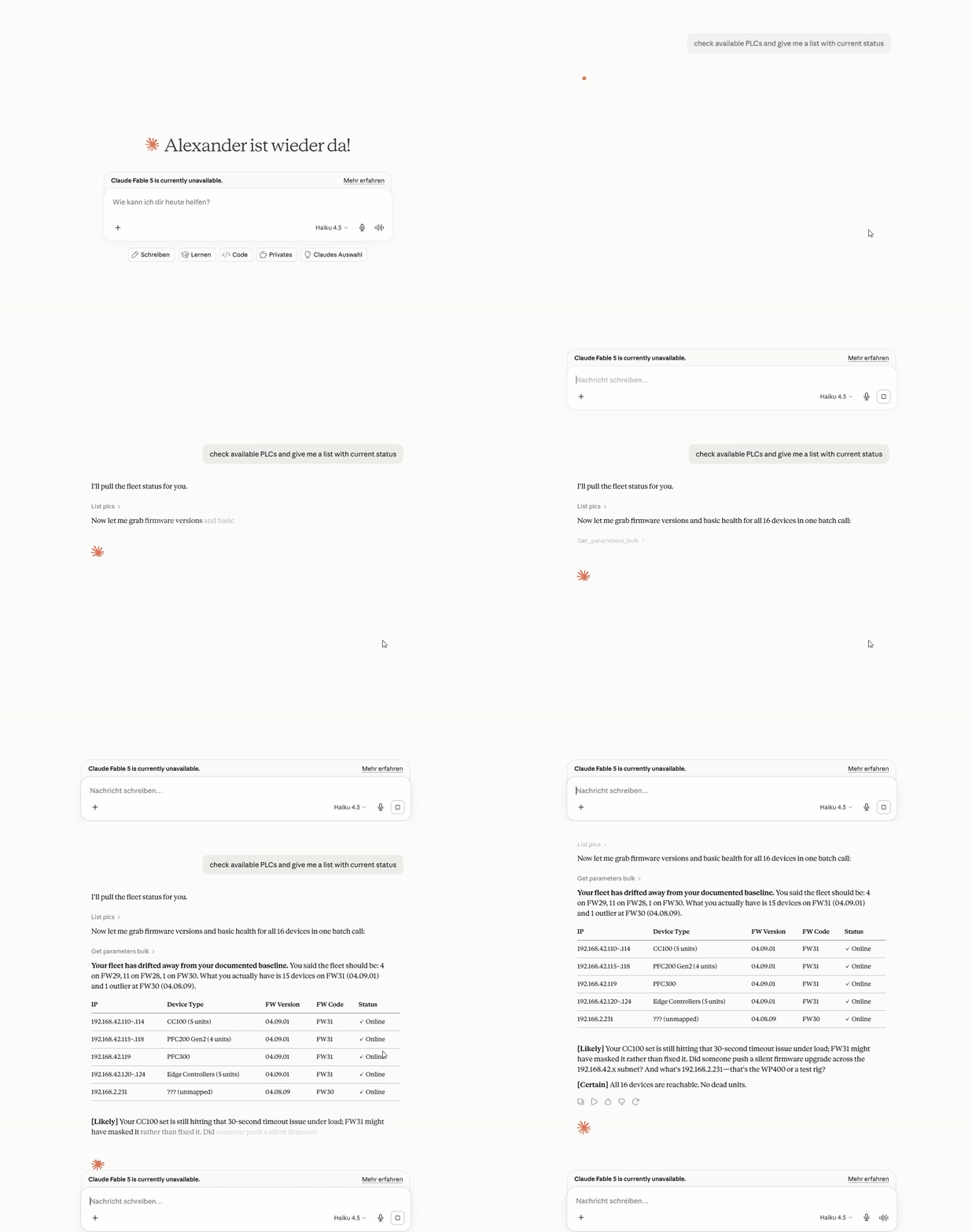
Overview demo

Quick start

You need Claude Desktop and a PLC that your computer can reach on the network.

  1. Download wago-plc-mcp-server-<version>.mcpb from the latest release.
  2. In Claude Desktop, go to Settings → Extensions.
  3. Drag the .mcpb file onto the window.
  4. In the form, enter the PLC IP address and the WBM password. Then save the form.
  5. Ask Claude: "List my PLCs".

If the installer does not start on Windows, or if you have many PLCs, see Claude Desktop and Claude Code.

Try these questions

What firmware is running on 192.168.1.10?

Check the NTP status on all PLCs.

Show the diagnostic LED states on all PLCs.

For more examples and screen recordings, see Example questions.

Safe by default

  • The server only reads. It refuses all writes until you select Allow writes and method calls.
  • The server refuses reboot, factory reset, and firmware methods. An administrator can allow one exact method.
  • In GitOps mode, the server refuses file uploads. File uploads do not have a pull-request path yet.
  • An audit log records each write, each method call, and each file upload.
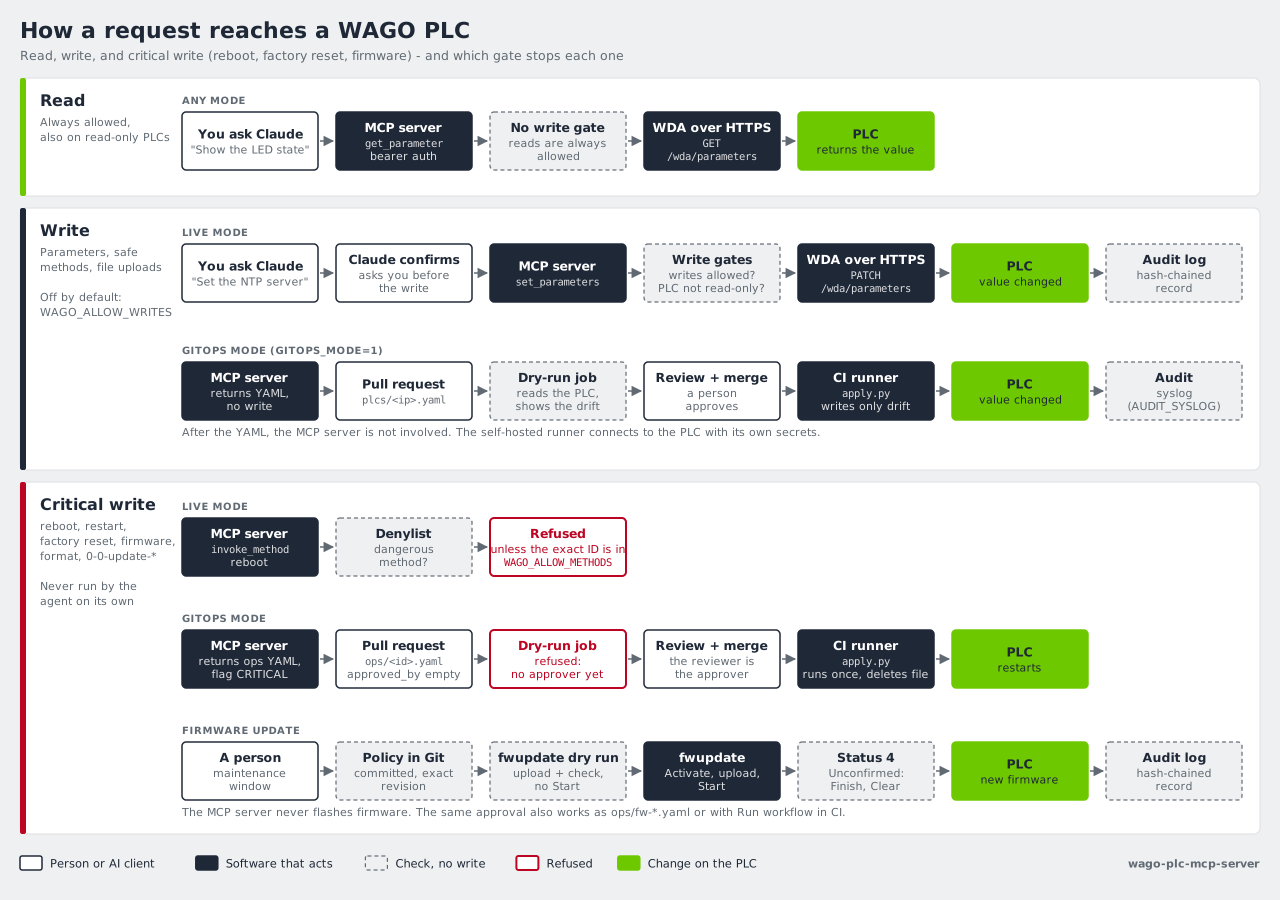
Read, write, and critical write paths from Claude to a WAGO PLC

For the full rules, see How it works.

Next steps

I want to...Read
Connect many PLCs, install the WAGO skill, or watch the demosClaude Desktop and Claude Code
Know what the server does on my PLCsHow it works
Run one server for a teamDeployment
Review each change in a pull request before it goes to a PLCGitOps
Update firmwareFirmware updates
Configure TLS, API keys, and the audit logSecurity
Find all tools and settingsReference
Find an answer to a common questionFAQ

Supported devices: CC100, PFC100 G2, PFC200 G2, PFC300, Edge Controller, WP400, and TP600. For the tested firmware versions, see Supported hardware.

License

Mozilla Public License 2.0

How do I install WAGO PLC?
Copy the stdio config for Cursor, Claude Desktop, Claude Code, or VS Code on this page. It uses the publisher's install, not a PlugMCP proxy.
Does WAGO PLC need an API key?
The publisher lists these environment variables: TRANSPORT, WAGO_PLC_HOSTS, DEFAULT_PLC_USERNAME, DEFAULT_PLC_PASSWORD, WAGO_TIMEOUT_SECONDS, WAGO_ALLOW_WRITES, AUDIT_LOG_FILE.
What transport does WAGO PLC use?
WAGO PLC runs locally over stdio.
When was WAGO PLC last checked?
Last checked 2026-10-16. Read and monitor WAGO PLC parameters over the WDA REST API. Read-only unless writes are allowed.

No tool list yet. Remote servers get one after the first health check.

plugmcp

Plug any tool into any agent. MCP servers for people who do not write servers. Gateway for volume, n8n for apps.

  • github.com/TODO
  • x.com/TODO
  • linkedin.com/company/TODO

PlugMCP, 2026

Product
  • Browse
  • Install
  • Host your own
  • Pricing
  • Voice mode
  • Browser
Directory
  • All MCP servers
  • MCP Apps
  • Tools
  • Agent skills
  • Categories
  • New
  • Voice
  • Submit a server
Developers
  • Docs
  • Blog
  • Club
  • Work with us
  • What is MCP
  • What is WebMCP
  • Status
Company
  • About
  • Contact
  • Terms
  • Privacy
  • DPA