Mailoo
Mailoo (@bitfloo/mailoo) is a Model Context Protocol (MCP) server for email (IMAP/SMTP), calendar, reminders, and ManageSieve automation developed and maintained by Bitfloo.
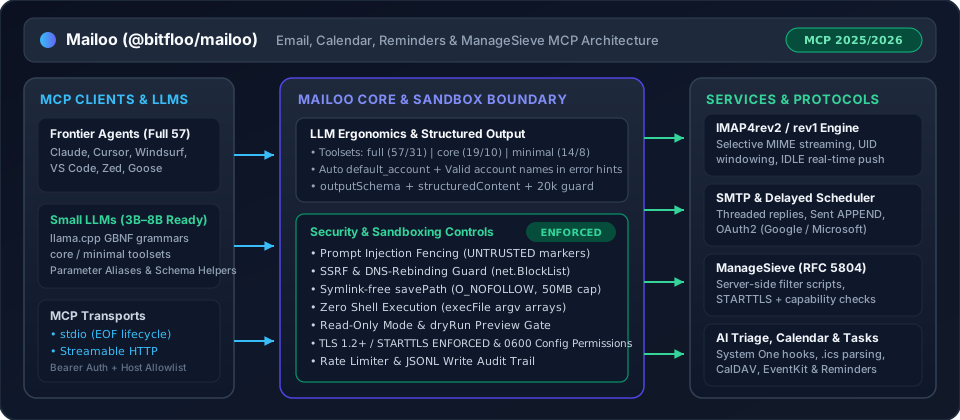
Enables AI assistants and autonomous agents to read, search, send, manage, schedule, and analyze emails, calendars, Reminders, and ManageSieve filter scripts across multiple accounts. Exposes up to 57 tools (with full, core, and minimal toolset profiles), up to 7 prompts, and 6 resources over the MCP 2025/2026 protocol with outputSchema / structuredContent, OAuth2 support (experimental), email scheduling, calendar extraction, analytics, provider-aware label management, real-time IMAP IDLE watcher with AI-powered triage, customizable presets and static rules, ManageSieve filters, and a guided setup wizard.
Behaviour for Sent copies, IMAP4rev2, Sieve, attachment savePath, read-only side effects, and reconnect backoff is documented in docs/configuration.md and docs/tools.md.
Highlights
| Feature | In this tree |
|---|---|
| Multi-account IMAP/SMTP | ✅ |
Send / reply / forward (with dryRun preview) | ✅ |
| Drafts & templates | ✅ |
| Provider-aware labels & bulk ops | ✅ |
| Schedule future emails | ✅ |
| Real-time IMAP IDLE watcher | ✅ |
| AI triage with presets | ✅ |
| Desktop & webhook alerts | ✅ |
| Calendar (ICS, CalDAV & Apple Calendar/Reminders) | ✅ |
| Email analytics | ✅ |
| OAuth2 (Gmail / M365) | ✅ experimental |
| Guided setup wizard | ✅ |
| ManageSieve (server-side filters) | ✅ |
| Sender auth headers (SPF/DKIM/DMARC) | ✅ |
Toolset profiles (full / core / minimal) & GBNF small-LLM ergonomics | ✅ |
MCP 2025/2026 outputSchema & structuredContent | ✅ |
Table of Contents
- Highlights
- Security & Sandboxing Architecture
- LLM Ergonomics & Toolset Profiles
- Docs
- Background
- Install
- Usage
- Capabilities & data flows
- API
- Maintainers
- Contributing
- Attribution & License
Security & Sandboxing Architecture
Policy and how to report a vulnerability: SECURITY.md.
Mailoo is engineered with defense-in-depth sandboxing so AI agents can safely interact with untrusted mail and external servers:
- Zero Shell Execution (
execFileonly) — Native OS integrations (macOSosascriptfor EventKit/Reminders/notifications, Linuxnotify-send, Windowspowershell, and crontab installation) invokechild_process.execFilewith strict argument arrays (shell: false), eliminating command injection vectors. - SSRF & DNS-Rebinding Protection (
net.BlockList) — Outbound alert webhooks validate URLs against an IPv4/IPv6net.BlockListcovering loopback, RFC 1918 private ranges, link-local/cloud metadata (169.254.169.254,100.100.100.200), CGNAT, NAT64, 6to4, and reserved prefixes both at configuration time and at socket connection time (createWebhookConnectLookup), preventing DNS-rebinding attacks (src/safety/validation.ts). - Symlink-Free Write Containment (
savePath) — Attachment and.emlexports viasavePathare strictly confined to the working directory, walk every path segment withlstat, refuse hidden dotfiles and OS persistence directories (Library/LaunchAgents,.ssh,.gnupg), and open targets withO_CREAT | O_EXCL | O_NOFOLLOWunder a 50 MiB file size cap (5 MiB inline base64 cap). - Prompt Injection Fencing (
<<<UNTRUSTED_EXTERNAL_CONTENT>>>) — Untrusted email subjects, sender headers, message bodies, previews, and authentication results are wrapped in<<<UNTRUSTED_EXTERNAL_CONTENT>>>…<<<END_UNTRUSTED_EXTERNAL_CONTENT>>>delimiters (stripping any forged markers inside the payload) so LLMs treat external mail as data, not instructions. - Strict Credential File Permissions (
0600) —config.tomlis written and verified with mode0600inside a0700config directory ($XDG_CONFIG_HOME/mailoo/config.toml). Passwords and message bodies are redacted from the JSONL write audit log (src/safety/audit.ts). - TLS & STARTTLS Verification —
tlsenforces implicit TLS with certificate verification (verify_ssl = trueby default);starttlsfails closed if the server does not advertiseSTARTTLS. ManageSieve refusesAUTHENTICATE PLAINover unencrypted sockets withoutSTARTTLS. - Operational Guardrails (
MCP_EMAIL_READ_ONLY,MCP_EMAIL_TOOLSET,dryRun) —MCP_EMAIL_READ_ONLY=truedisables all write tools, background watchers, hooks, and schedulers at startup, exposing only the 31 read-only tools.MCP_EMAIL_TOOLSET=full|core|minimalscopes the registered tool surface to match the agent's capability tier and context budget.dryRun: trueon high-risk tools (send_email,reply_email,forward_email,send_draft,delete_email,bulk_action,delete_mailbox,sieve_put_script,sieve_delete_script) validates all parameters and account resolution and returns a[DRY RUN]preview without modifying server state.
- Per-Account Rate Limiting —
rate_limit(default 10 sends/minute) enforces an independent token bucket per account (src/safety/rate-limiter.ts). Buckets live in memory, so each server process and eachmailoo scheduler checkrun counts on its own.
LLM Ergonomics & Toolset Profiles
Mailoo is designed to work across both frontier models (Claude, GPT, Gemini) and local/small 3B–8B parameter models (llama.cpp GBNF grammars, Ollama, vLLM):
- Toolset Profiles (
MCP_EMAIL_TOOLSET/settings.toolset):full(default) — All 57 tools (31 inread_onlymode), including Calendar, Reminders, ManageSieve, Watcher, Scheduler, Templates, Contacts, and Analytics.core— 19 tools (10 inread_onlymode) covering core email workflows (accounts,mailboxes,emails,threads,send,drafts,manage,bulk,attachments,health).minimal— 14 tools (8 inread_onlymode) tailored for 3B–4B models with tight context budgets (accounts,mailboxes,emails,send,manage,health).
- Optional
account& Smart Account Resolution — When only a single account is configured ordefault_account(MCP_EMAIL_DEFAULT_ACCOUNT) is set, theaccountparameter is completely optional across tools. Account lookup also matches case-insensitively by profile name or email address (e.g., passing"[email protected]"resolves the matching account), and returns actionable error messages listing valid accounts (name (email)pairs) when ambiguous. - Lossless Parameter Normalization & GBNF Compatibility — Single-message tools accept
emailId,id, oremail_idas either string or integer (42or"42"). Batch tools (get_emails,bulk_action) accept string or numeric ID arrays (["42", "43"]or[42, 43]).list_emailsandsearch_emailsaccept bothhasAttachmentandhas_attachment. All Zod schemas avoid regex lookaheads sollama.cppGBNF grammar compilation succeeds without errors. - Context Window Protection —
get_emailandget_threaddefault toformat="text"and enforce a defaultmaxLengthof20000characters (appending a clear truncation notice when exceeded) so large HTML newsletters never overflow small context windows. - MCP 2025/2026
outputSchema&structuredContent— Tools declare structuredoutputSchemacontracts and return machine-readablestructuredContentalongside human-readable text blocks. - Outgoing attachment paths must be regular files under the working directory or home — Security considerations
Docs
| Topic | Where |
|---|---|
Sent APPEND, IMAP4rev2, Sieve, read_only, reconnect backoff, stdio EOF, shutdown, one mailbox writer per machine | docs/configuration.md |
savePath, search dates, get_email_security, sieve tools, send/draft attachments, RFC 2047, protected folders, busy-mailbox timeout, bulk_action ids, calendar attachment saves | docs/tools.md |
| Performance notes | docs/performance-roadmap.md |
Background
Most MCP email implementations provide only basic read/send. This server aims to be a full-featured email client for AI assistants, covering the entire lifecycle: reading, composing, managing, scheduling, and analyzing email — all from a single MCP server.
Key design decisions:
- XDG-compliant config — TOML at
~/.config/mailoo/config.toml - Multi-account — Operate across multiple IMAP/SMTP accounts simultaneously
- Layered services — Business logic is decoupled from MCP wiring for testability
- Provider auto-detection — Gmail, Outlook, Yahoo, iCloud, Fastmail, ProtonMail, Zoho, GMX
Install
Requires Node.js ≥ 24.
npx -y @bitfloo/mailoo account add
That writes the local config and prints an MCP client snippet. The same package runs the server and the other commands:
npx -y @bitfloo/mailoo
npx -y @bitfloo/mailoo test
npx -y @bitfloo/mailoo with no subcommand starts the MCP server over stdio. Or install the mailoo command:
npm install -g @bitfloo/mailoo
# or
pnpm add -g @bitfloo/mailoo
# or, without a global install:
pnpm dlx @bitfloo/mailoo account add
From a clone
Building this repository needs pnpm 12 (the packageManager version in package.json):
git clone https://github.com/Bitfloo/mailoo.git
cd mailoo
pnpm install && pnpm build
node dist/main.js account add
Docker
The running image needs Docker, not Node on the host. Create the config first with npx -y @bitfloo/mailoo account add (or write the TOML by hand), then mount that directory into the container.
The image is ghcr.io/bitfloo/mailoo, built for linux/amd64 and linux/arm64. Tags are bare semver (no v prefix). The 0.2 tag follows the newest 0.2.x release. Production setups should pin the full version from the release (it matches the npm version) or the image digest.
docker pull ghcr.io/bitfloo/mailoo:0.2
To build from a clone instead (docker-compose.yml uses build: .):
docker build -t ghcr.io/bitfloo/mailoo .
Note: The server uses stdio transport. Config is created on the host (
npx -y @bitfloo/mailoo account add, or a hand-written TOML) and mounted into the container.
Usage
Commands below use npx -y @bitfloo/mailoo. A global install accepts the same subcommands as mailoo. From a clone, after pnpm build, those subcommands are node dist/main.js (see From a clone).
Setup
# Add an email account interactively (recommended)
npx -y @bitfloo/mailoo account add

# Or use the deprecated alias (same wizard)
npx -y @bitfloo/mailoo setup

# Or create a template config manually
npx -y @bitfloo/mailoo config init
The setup wizard auto-detects server settings, tests connections, saves config, and outputs the MCP client config snippet.
Test Connections
npx -y @bitfloo/mailoo test            # all accounts
npx -y @bitfloo/mailoo test personal   # specific account
npx -y @bitfloo/mailoo test / mailoo test is a live-account connection probe, not Vitest. Unit and integration tests are pnpm test / pnpm test:integration (see Contributing). OAuth2 accounts log in with an access token refreshed from the configured refresh token.
Configure Your MCP Client
Run the guided installer, or paste a snippet below. There is no VS Code / MCP gallery listing.
npx -y @bitfloo/mailoo install
The installer can register an npx, pnpm dlx, or global mailoo launch. A mailoo binary already on PATH can use "command": "mailoo" with "args": ["stdio"].
Edit ~/Library/Application Support/Claude/claude_desktop_config.json (macOS) or %APPDATA%\Claude\claude_desktop_config.json (Windows):
{
  "mcpServers": {
    "mailoo": {
      "command": "npx",
      "args": ["-y", "@bitfloo/mailoo", "stdio"]
    }
  }
}
Mailoo is not in the VS Code Extensions gallery. Point Copilot at the npx launch below.
Workspace (.vscode/mcp.json):
{
  "servers": {
    "mailoo": {
      "type": "stdio",
      "command": "npx",
      "args": ["-y", "@bitfloo/mailoo", "stdio"]
    }
  }
}
User config (settings.json, all workspaces):
Open the Command Palette → Preferences: Open User Settings (JSON) and add:
{
  "mcp": {
    "servers": {
      "mailoo": {
        "type": "stdio",
        "command": "npx",
        "args": ["-y", "@bitfloo/mailoo", "stdio"]
      }
    }
  }
}
Edit ~/.cursor/mcp.json:
{
  "mcpServers": {
    "mailoo": {
      "command": "npx",
      "args": ["-y", "@bitfloo/mailoo", "stdio"]
    }
  }
}
Edit ~/.codeium/windsurf/mcp_config.json:
{
  "mcpServers": {
    "mailoo": {
      "command": "npx",
      "args": ["-y", "@bitfloo/mailoo", "stdio"]
    }
  }
}
Edit ~/.config/zed/settings.json:
{
  "context_servers": {
    "mailoo": {
      "command": {
        "path": "npx",
        "args": ["-y", "@bitfloo/mailoo", "stdio"]
      }
    }
  }
}
Add to ~/.vibe/config.toml:
[[mcp_servers]]
name = "mailoo"
transport = "stdio"
command = "npx"
args = ["-y", "@bitfloo/mailoo", "stdio"]
To pass credentials directly instead of using a config file, use the env field:
[[mcp_servers]]
name = "mailoo"
transport = "stdio"
command = "npx"
args = ["-y", "@bitfloo/mailoo", "stdio"]
env = { MCP_EMAIL_ADDRESS = "[email protected]", MCP_EMAIL_PASSWORD = "your-app-password", MCP_EMAIL_IMAP_HOST = "imap.example.com", MCP_EMAIL_SMTP_HOST = "smtp.example.com" }
MCP tools are exposed as mailoo_<tool_name> (e.g. mailoo_list_emails). Restart Vibe after editing the config.
Run the server in a container — mount your config directory read-only. The image is ghcr.io/bitfloo/mailoo:0.2 (or build it with docker build -t ghcr.io/bitfloo/mailoo .):
docker run --rm -i \
  -v ~/.config/mailoo:/home/node/.config/mailoo:ro \
  ghcr.io/bitfloo/mailoo:0.2
For MCP client configuration (e.g. Claude Desktop):
{
  "mcpServers": {
    "mailoo": {
      "command": "docker",
      "args": [
        "run", "--rm", "-i",
        "-v", "~/.config/mailoo:/home/node/.config/mailoo:ro",
        "ghcr.io/bitfloo/mailoo:0.2"
      ]
    }
  }
}
{
  "mcpServers": {
    "mailoo": {
      "command": "npx",
      "args": ["-y", "@bitfloo/mailoo", "stdio"],
      "env": {
        "MCP_EMAIL_ADDRESS": "[email protected]",
        "MCP_EMAIL_PASSWORD": "your-app-password",
        "MCP_EMAIL_IMAP_HOST": "imap.example.com",
        "MCP_EMAIL_SMTP_HOST": "smtp.example.com"
      }
    }
  }
}
CLI Commands
npx -y @bitfloo/mailoo [command]

Commands:
  stdio                     Run as MCP server over stdio (default)
  http [port] [host]        Streamable HTTP (default: port 8080 on 127.0.0.1 and ::1)
  account list              List all configured accounts
  account add               Add a new email account interactively
  account edit [name]       Edit an existing account
  account delete [name]     Remove an account
  setup                     Deprecated alias for 'account add'
  test                      Test connections for all or a specific account
  install                   Register mailoo with MCP clients interactively
  install status            Show registration status for detected clients
  install remove            Unregister mailoo from MCP clients
  config show               Show config (passwords masked)
  config edit               Edit global settings (rate limit, read-only)
  config path               Print config file path
  config init               Create template config
  scheduler check           Process pending scheduled emails
  scheduler list            Show all scheduled emails
  scheduler install         Install OS-level scheduler (launchd/crontab)
  scheduler uninstall       Remove OS-level scheduler
  scheduler status          Show scheduler installation status
  notify test               Send a test desktop notification
  notify status             Check platform notification support
  --version, -v             Print the package version
  help                      Show help
HTTP
http listens on 127.0.0.1 and ::1 (port 8080 unless you pass another port). A non-loopback address or a non-loopback name in MCP_EMAIL_HTTP_ALLOWED_HOSTS requires MCP_EMAIL_HTTP_TOKEN. Details, including 0.0.0.0 / :: and the 8 MiB body limit: docs/configuration.md.
npx -y @bitfloo/mailoo http
MCP_EMAIL_HTTP_TOKEN='replace-with-a-long-random-secret' npx -y @bitfloo/mailoo http 8080 192.0.2.10
Clients send Authorization: Bearer <token> when a token is configured.
Configuration
Located at $XDG_CONFIG_HOME/mailoo/config.toml (default: ~/.config/mailoo/config.toml).
[settings]
rate_limit = 10  # max emails per minute per account
read_only = false
toolset = "full"  # "full" | "core" | "minimal"
default_account = "personal"  # optional when only one account is configured
save_to_sent = true  # see docs/configuration.md — Gmail already files Sent

[[accounts]]
name = "personal"
email = "[email protected]"
full_name = "Your Name"
password = "your-app-password"

[accounts.imap]
host = "imap.example.com"
port = 993
tls = true
# disable_imap4rev2 = true  # Strato and similar SEARCH bugs
# sieve_host = "imap.example.com"
# sieve_port = 4190

[accounts.smtp]
host = "smtp.example.com"
port = 465
tls = true
starttls = false
verify_ssl = true

[accounts.smtp.pool]
enabled = true
max_connections = 1
max_messages = 100
OAuth2 (experimental)
Note: OAuth2 support is experimental. Token refresh and provider-specific flows may require additional testing in your environment.
Token refresh and code exchange give up after 15 seconds, so a provider that stops answering fails the connect with OAuth2 token refresh timed out after 15s instead of hanging it. Callers that need a fresh token at the same time share one refresh request. The IDLE watcher logs in with the same access tokens.
[[accounts]]
name = "work"
email = "[email protected]"
full_name = "Your Name"

[accounts.oauth2]
provider = "google"            # or "microsoft"
client_id = "your-client-id"
client_secret = "your-client-secret"
refresh_token = "your-refresh-token"

[accounts.imap]
host = "imap.example.com"
port = 993
tls = true

[accounts.smtp]
host = "smtp.example.com"
port = 465
tls = true

[accounts.smtp.pool]
enabled = true
max_connections = 1
max_messages = 100
Environment Variables
For single-account setups (overrides config file):
| Variable | Default | Description |
|---|---|---|
MCP_EMAIL_ADDRESS | required | Email address |
MCP_EMAIL_PASSWORD | required without OAuth2 | Password or app password. Not needed when MCP_EMAIL_OAUTH2_PROVIDER is set |
MCP_EMAIL_IMAP_HOST | required | IMAP server hostname |
MCP_EMAIL_SMTP_HOST | required | SMTP server hostname |
MCP_EMAIL_ACCOUNT_NAME | default | Account name |
MCP_EMAIL_FULL_NAME | — | Display name |
MCP_EMAIL_USERNAME | Login username | |
MCP_EMAIL_IMAP_PORT | 993 | IMAP port |
MCP_EMAIL_IMAP_TLS | true | IMAP TLS |
MCP_EMAIL_SMTP_PORT | 465 | SMTP port |
MCP_EMAIL_SMTP_TLS | true | SMTP TLS |
MCP_EMAIL_SMTP_STARTTLS | false | SMTP STARTTLS |
MCP_EMAIL_SMTP_VERIFY_SSL | true | Verify SSL certificates |
MCP_EMAIL_SMTP_POOL_ENABLED | true | Enable SMTP transport pooling |
MCP_EMAIL_SMTP_POOL_MAX_CONNECTIONS | 1 | Max pooled SMTP connections |
MCP_EMAIL_SMTP_POOL_MAX_MESSAGES | 100 | Max messages per pooled connection |
MCP_EMAIL_RATE_LIMIT | 10 | Max sends per minute |
MCP_EMAIL_READ_ONLY | false | Disable all write tools, background watchers, and schedulers |
MCP_EMAIL_TOOLSET | full | Toolset profile to expose (full, core, or minimal) |
MCP_EMAIL_DEFAULT_ACCOUNT | — | Default account name or email when account is omitted |
Sent copies, IMAP4rev2, Sieve host/port, and read_only env vars:
docs/configuration.md.
Email Scheduling
The scheduler enables future email delivery with a layered architecture:
- MCP auto-check — Processes the queue on server startup, before the watcher connects, and every 60 seconds while the MCP server is running. With several
stdioservers, only the one that runs the watcher and hooks checks. A check still running when the next one is due is skipped, and failed sends are logged to the connected MCP client atwarning - CLI —
npx -y @bitfloo/mailoo scheduler checkfor manual or cron-based processing. It sends with the same account settings as the server, including OAuth2 andsave_to_sent, and closes its IMAP/SMTP connections before it exits - OS-level daemon —
npx -y @bitfloo/mailoo scheduler installsets up launchd (macOS) or crontab (Linux) to run every minute, independently of the MCP server
Important — the daemon must be installed for reliable delivery. Without it, scheduled emails only fire while an AI client is actively connected. Your machine also needs to be running at the scheduled time; if it's asleep or off, the daemon will process overdue emails on next wake/startup. A failing send is attempted up to 3 times before the email is marked
failed.
Setting up the daemon
# Install (macOS launchd / Linux crontab — runs every minute)
npx -y @bitfloo/mailoo scheduler install

# Verify it's running
npx -y @bitfloo/mailoo scheduler status

# View pending / sent / failed scheduled emails
npx -y @bitfloo/mailoo scheduler list

# Trigger a manual check immediately
npx -y @bitfloo/mailoo scheduler check

# Remove the daemon
npx -y @bitfloo/mailoo scheduler uninstall
Scheduled emails are JSON files in ~/.local/state/mailoo/scheduled/. Before sending, a check claims the entry with a lock file next to it and keeps that claim fresh while SMTP runs, so the in-process timer, mailoo scheduler check and other server processes do not send it twice. If the process dies after the server accepted a message but before it was recorded as sent, the entry can be sent again after the claim goes stale (at least once, not exactly once). Every attempt for one entry carries the same Message-ID, <schedule id@account domain>, so a receiving server or client can drop the second copy. Once SMTP has accepted a message, a failure to update the queue file is reported, and the entry is not sent again as long as either the sent record or the move into sent/ succeeded. If both failed, the next check sends it again unless it has used all its attempts, then it is marked failed. Each entry tracks its attempts (at most 3) and the last error; list_scheduled returns both, and scheduler list shows the error of a failed entry. An entry the rate limit holds back stays pending for the next check and does not use an attempt.
Real-time Watcher & AI Hooks
The IMAP IDLE watcher monitors configured mailboxes in real-time using persistent IDLE connections (separate from tool connections). Each folder stays in IDLE between fetches, IDLE resumes about a second after each fetch, and idle_timeout sets how often IDLE is restarted. With several stdio servers on one machine (one per MCP client window), only one of them runs the watcher, hooks and scheduler; see configuration. When new emails arrive:
- Static rules — Pattern-match on from/to/subject → apply labels, flag, or mark read instantly (no AI)
- AI triage — Remaining emails are analyzed via MCP sampling with a customizable preset prompt
- Notify mode — Falls back to logging if AI triage is disabled
Configure in config.toml:
[settings.watcher]
enabled = true
folders = ["INBOX"]
idle_timeout = 1740     # 29 minutes (IMAP spec max is 30)

[settings.hooks]
on_new_email = "triage" # "triage" | "notify" | "none"
preset = "inbox-zero"   # "inbox-zero" | "gtd" | "priority-focus" | "notification-only" | "custom"
auto_label = true       # apply AI-suggested labels
auto_flag = true        # flag urgent emails
batch_delay = 5         # seconds to batch before triage

# User context — appended to preset's AI prompt
custom_instructions = """
I'm a software engineer. Emails from @example.com are always high priority.
Newsletters I read: TL;DR, Hacker Newsletter.
"""

# Static rules — run BEFORE AI, skip AI if matched
[[settings.hooks.rules]]
name = "GitHub Notifications"
match = { from = "*@example.com" }
actions = { labels = ["Dev"], mark_read = true }

[[settings.hooks.rules]]
name = "Newsletter Archive"
match = { from = "*@example.com|*@example.test" }
actions = { labels = ["Newsletter"] }

[[settings.hooks.rules]]
name = "VIP Contacts"
match = { from = "[email protected]|[email protected]" }
actions = { flag = true, labels = ["VIP"] }
Batches run one at a time. At most 500 new emails wait for the next batch; more are skipped with a warning in the log and stay in the mailbox unchanged.
Presets
| Preset | Focus | Suggested Labels |
|---|---|---|
inbox-zero | Aggressive categorization + archiving | Newsletter, Notification, Updates, Finance, Social, Promo |
gtd | Getting Things Done contexts | @Action, @Waiting, @Reference, @Someday, @Delegated |
priority-focus | Simple priority classification (default) | (none — just priority + flag) |
notification-only | No AI triage, just log | (none) |
custom | User defines full system prompt | User-defined |
Static Rules
Static rules use glob-style patterns (*@example.com) with | as OR separator (*@example.com|*@example.test). All conditions within a match are AND'd. A to pattern matches when any one recipient matches. An empty pattern counts as no condition, and a rule with no condition matches nothing. First matching rule wins.
Available actions: labels (string array), flag (boolean), mark_read (boolean), alert (boolean — forces desktop notification).
Alerts
Urgency-based multi-channel notification routing — grab attention for important emails even when you're not looking at the chat. All channels are opt-in and disabled by default.
| Priority | Desktop | Sound | MCP Log Level | Webhook |
|---|---|---|---|---|
urgent | ✅ Banner | 🔊 Alert | alert | ✅ |
high | ✅ Banner | 🔇 Silent | warning | ✅ |
normal | ❌ | ❌ | info | ❌ |
low | ❌ | ❌ | debug | ❌ |
The MCP log entry at the listed level names the account, folder, UID, labels
and rule. In alert entries, sender and subject appear only at debug: in a
separate entry, or for low in the single entry.
[settings.hooks.alerts]
desktop = true              # OS-level notifications (macOS/Linux/Windows)
sound = true                # play sound for urgent emails
urgency_threshold = "high"  # minimum priority to trigger desktop alert
webhook_url = "https://ntfy.sh/my-email-alerts"  # optional: Slack, Discord, ntfy.sh, etc.
webhook_events = ["urgent", "high"]
allow_private_webhooks = false  # default; true allows a LAN, VPN, or tailnet target
Details: docs/configuration.md.
Supported platforms: macOS (Notification Center via osascript), Linux (notify-send), Windows (PowerShell toast). Zero npm dependencies — uses native OS commands.
Notification setup by platform:
Desktop notifications use osascript (built-in). The terminal app running the MCP server needs notification permission:
- Open System Settings → Notifications & Focus
- Find your terminal app (Terminal, iTerm2, VS Code, Cursor, etc.)
- Enable Allow Notifications and choose Banners or Alerts
- Ensure Focus / Do Not Disturb is not blocking notifications
Use check_notification_setup to diagnose and test_notification to verify.
Requires notify-send from libnotify. For sound alerts, paplay is also needed:
# Ubuntu / Debian
sudo apt install libnotify-bin pulseaudio-utils

# Fedora
sudo dnf install libnotify pulseaudio-utils

# Arch
sudo pacman -S libnotify
Desktop notifications require a running display server (X11/Wayland) — they will not work in headless/SSH sessions.
Uses PowerShell toast notifications (built-in):
- Open Settings → System → Notifications
- Ensure Notifications is turned on
- Set Focus Assist to allow notifications
- If using Windows Terminal, ensure its notifications are enabled
AI-configurable: The AI can check, test, and configure notifications at runtime:
check_notification_setup— diagnose platform support and show setup instructionstest_notification— send a test notification to verify everything worksconfigure_alerts— enable/disable desktop, sound, threshold, webhook (with optional persist to config file)
Webhook payload:
{
  "event": "email.urgent",
  "account": "work",
  "sender": { "name": "John CEO", "address": "[email protected]" },
  "subject": "Q4 Review Due Today",
  "priority": "urgent",
  "labels": ["VIP"],
  "rule": "VIP Contacts",
  "timestamp": "2026-02-18T11:30:00Z"
}
Static rules can force desktop notifications with alert = true, regardless of urgency threshold:
[[settings.hooks.rules]]
name = "VIP Contacts"
match = { from = "[email protected]" }
actions = { flag = true, alert = true, labels = ["VIP"] }
Features:
- Auto-reconnect — Retries a dropped or failed folder connection on the reconnect backoff schedule; mail delivered while the connection was down is reported after the reconnect, unless the server changed the folder's UIDVALIDITY; a folder that has not connected yet reports only mail that arrives after its first successful connect
- Batching — Groups arrivals within a configurable delay to reduce AI calls
- Rate limiting — Max 10 sampling calls per minute
- Graceful degradation — Falls back to notify mode if client doesn't support sampling
System One (opt-in typed filing)
Optional TypeSafe System One classification on residue mail after static rules. Off by default. Both settings.watcher.enabled and settings.system_one.enabled must be on. Set TYPESAFE_API_KEY in the environment (never in TOML).
Only new mail in source_folders (default INBOX) that no static rule handled is classified. For each such message Mailoo sends one request to api.typesafe.ai (or TYPESAFE_BASE_URL). The request carries (src/services/mail-arrival/state.ts, src/services/mail-arrival/questions.ts):
| Data | Sent |
|---|---|
| Sender | Display name and address from From |
| Subject | The full subject |
| Links | URLs found in the subject, and in the body when include_body = true |
| Attachments | File name and MIME type of each attachment, not the file contents |
| Sender authentication | SPF, DKIM (result and signing domain), and DMARC results; the From, Reply-To, and Return-Path domains; whether a List-Unsubscribe header is present |
| Mailbox | The configured account name and the folder the message is in |
| Folder rules | For each [[settings.system_one.folders]] entry: path, description, and false_criteria, or the other folder paths when false_criteria is unset |
| Model | The model setting (default jev-latest) |
| Body | Only with include_body = true: plain text without the quoted reply chain, cut to body_max_chars (default 6000, maximum 24000) |
Not sent: To, Cc, and Bcc addresses, Message-ID, other raw headers, attachment contents, and the body while include_body is false.
Mailoo remembers the last 5000 messages it classified and does not send them again. A message that reaches two of your accounts is classified once in each. A message whose request, or whose header read, failed is not remembered, so the next notice of it tries again.
auto_move and auto_flag are separate poles and default false. Filing destinations come from folders[].path (validated against IMAP LIST), not a live listing of every mailbox.
[settings.system_one]
enabled = false
include_body = false
auto_move = false
auto_flag = false

[[settings.system_one.folders]]
path = "Receipts"
description = "Invoices, receipts, and payment confirmations."
on_new_email = "notify" or "triage" both feed System One when it is on. none stays off.
Capabilities & data flows
Outbound calls, child processes, files, and environment variables below are what src/ does. Hook triage that uses MCP sampling stays inside the connected client; Mailoo does not dial a separate model host for that path.
Network
| Destination | When | Code |
|---|---|---|
| Configured IMAP host and port | Reads, writes, IDLE | src/connections/manager.ts, src/services/watcher.service.ts |
| Configured SMTP host and port | Sends | src/connections/manager.ts |
ManageSieve host (IMAP host if unset) port 4190 by default (sieve_port / MCP_EMAIL_SIEVE_PORT) | Filter scripts | src/services/sieve.service.ts |
https://oauth2.googleapis.com/token | Google token refresh and code exchange | src/services/oauth.service.ts |
https://accounts.google.com/o/oauth2/v2/auth | Authorization URL for the operator's browser; the process does not fetch it | src/services/oauth.service.ts |
https://login.microsoftonline.com/common/oauth2/v2.0/token | Microsoft token refresh and code exchange | src/services/oauth.service.ts |
https://login.microsoftonline.com/common/oauth2/v2.0/authorize | Authorization URL for the operator's browser; the process does not fetch it | src/services/oauth.service.ts |
Custom token_url / auth_url | Same split when oauth2.provider is custom. Config validation requires https; plain http is accepted only for 127.0.0.1, ::1, or localhost (src/config/schema.ts) | src/services/oauth.service.ts |
Configured webhook URL (http or https POST) | Alerts, after a DNS lookup of that host | src/services/notifier.service.ts, src/safety/validation.ts |
https://api.typesafe.ai (or TYPESAFE_BASE_URL) | System One classification, only when that integration is on. Fields sent: System One | src/services/mail-arrival/index.ts |
mailoo http listens. It does not add an outbound destination. Provider presets in src/cli/providers.ts fill the IMAP and SMTP hosts the wizard saves.
Processes
| Program | When | Code |
|---|---|---|
osascript | macOS notifications, calendar events, reminders | src/services/notifier.service.ts, src/services/osascript.ts (calendar and reminders) |
notify-send | Linux desktop notifications | src/services/notifier.service.ts |
paplay | Linux notification sound | src/services/notifier.service.ts |
powershell | Windows balloon notifications | src/services/notifier.service.ts |
which (Windows: where) | Checks that osascript, afplay, notify-send, paplay, or powershell exists. afplay is only probed; macOS sound goes through osascript | src/services/notifier.service.ts |
xdg-open | Opens a temporary calendar file on Linux | src/services/local-calendar.service.ts |
launchctl | Installs, removes or checks (scheduler status) the macOS scheduler agent | src/cli/scheduler.ts, src/cli/scheduler-install.ts |
crontab | Installs, removes or checks (scheduler status) the Linux scheduler line | src/cli/scheduler.ts, src/cli/scheduler-install.ts |
Files
Paths follow the XDG defaults in src/config/xdg.ts unless XDG_CONFIG_HOME, XDG_DATA_HOME, or XDG_STATE_HOME is set.
| Path | What is written | Code |
|---|---|---|
$XDG_CONFIG_HOME/mailoo/config.toml (mode 0600) | Accounts and settings, including passwords and OAuth secrets | src/config/loader.ts; configure_alerts with save through src/services/alerts-config.ts |
$XDG_DATA_HOME/mailoo/audit.log | Append-only audit lines. File and directory modes: SECURITY.md | src/safety/audit.ts |
$XDG_STATE_HOME/mailoo/scheduled/ and scheduled/sent/ | Scheduled-send JSON records (mode 0600), replaced through a temp file and rename | src/services/scheduler.service.ts |
$XDG_DATA_HOME/mailoo/calendar-attachments/ | Attachment files saved for a calendar event | src/services/imap.service.ts |
$XDG_STATE_HOME/mailoo/mailbox-writers.lock | Which stdio server runs hooks, the watcher and the scheduler. The holder refreshes it and deletes it on shutdown; timings in configuration | src/safety/writer-lease.ts |
$XDG_STATE_HOME/mailoo/calendar-processed.json (mode 0600) and .lock | Which messages already had an automatic event added, found, or declined in the dialog, with each email's subject, replaced through a temp file and rename. A failed or timed-out add is not recorded, so the email stays eligible. A damaged file stops automatic calendar processing, and makes analyze_email_for_scheduling report an error, instead of starting over | src/utils/calendar-state.ts |
savePath under the working directory | download_attachment or export_email when that argument is set | src/tools/attachments.tool.ts, src/tools/export.tool.ts |
OS temp directory, mailoo-event-*.ics | Linux calendar file passed to xdg-open | src/services/local-calendar.service.ts |
~/Library/LaunchAgents/com.bitfloo.mailoo.scheduler.plist | macOS scheduler agent. Its stdout and stderr are /tmp/mailoo-scheduler.log | src/cli/scheduler-install.ts, src/cli/scheduler.ts |
| User crontab | One Mailoo line on Linux | src/cli/scheduler-install.ts |
| MCP client config (Claude, Cursor, Windsurf) | mailoo install merges the launch entry and replaces the file through a temp file and rename (mode 0600). A file that is not a JSON object (for example JSON with comments) is left unchanged and the command stops | src/cli/install-commands.ts, src/cli/client-config.ts |
Templates under $XDG_CONFIG_HOME/mailoo/templates/ are read, not written by the server.
Environment
Single-account setup reads MCP_EMAIL_* (src/config/loader.ts). HTTP listens reads MCP_EMAIL_HTTP_HOST, MCP_EMAIL_HTTP_TOKEN, and MCP_EMAIL_HTTP_ALLOWED_HOSTS (src/safety/http-transport.ts). The same names are the Smithery config keys and the packages[].environmentVariables list in server.json.
| Name | Role |
|---|---|
MCP_EMAIL_ADDRESS, MCP_EMAIL_PASSWORD, MCP_EMAIL_IMAP_HOST, MCP_EMAIL_SMTP_HOST | Account. Password is required unless MCP_EMAIL_OAUTH2_PROVIDER is set |
MCP_EMAIL_ACCOUNT_NAME, MCP_EMAIL_FULL_NAME, MCP_EMAIL_USERNAME | Identity |
MCP_EMAIL_IMAP_PORT, MCP_EMAIL_IMAP_TLS, MCP_EMAIL_IMAP_STARTTLS, MCP_EMAIL_IMAP_VERIFY_SSL, MCP_EMAIL_IMAP_DISABLE_IMAP4REV2, MCP_EMAIL_SIEVE_HOST, MCP_EMAIL_SIEVE_PORT | IMAP and ManageSieve |
MCP_EMAIL_SMTP_PORT, MCP_EMAIL_SMTP_TLS, MCP_EMAIL_SMTP_STARTTLS, MCP_EMAIL_SMTP_VERIFY_SSL, MCP_EMAIL_SMTP_POOL_ENABLED, MCP_EMAIL_SMTP_POOL_MAX_CONNECTIONS, MCP_EMAIL_SMTP_POOL_MAX_MESSAGES | SMTP |
MCP_EMAIL_OAUTH2_PROVIDER, MCP_EMAIL_OAUTH2_CLIENT_ID, MCP_EMAIL_OAUTH2_CLIENT_SECRET, MCP_EMAIL_OAUTH2_REFRESH_TOKEN | OAuth2 |
MCP_EMAIL_RATE_LIMIT, MCP_EMAIL_READ_ONLY, MCP_EMAIL_TOOLSET, MCP_EMAIL_DEFAULT_ACCOUNT, MCP_EMAIL_SAVE_TO_SENT | Settings |
MCP_EMAIL_WATCHER_ENABLED, MCP_EMAIL_WATCHER_FOLDERS, MCP_EMAIL_WATCHER_IDLE_TIMEOUT | IDLE watcher |
MCP_EMAIL_HOOK_ON_NEW_EMAIL, MCP_EMAIL_HOOK_PRESET, MCP_EMAIL_HOOK_AUTO_LABEL, MCP_EMAIL_HOOK_AUTO_FLAG, MCP_EMAIL_HOOK_BATCH_DELAY, MCP_EMAIL_HOOK_CUSTOM_INSTRUCTIONS | Hooks |
MCP_EMAIL_ALERT_DESKTOP, MCP_EMAIL_ALERT_SOUND, MCP_EMAIL_ALERT_URGENCY_THRESHOLD, MCP_EMAIL_ALERT_WEBHOOK_URL, MCP_EMAIL_ALERT_WEBHOOK_ALLOW_PRIVATE | Alerts |
MCP_EMAIL_HOOK_AUTO_CALENDAR, MCP_EMAIL_HOOK_CALENDAR_NAME, MCP_EMAIL_HOOK_CALENDAR_ALARM_MINUTES, MCP_EMAIL_HOOK_CALENDAR_CONFIRM | Automatic calendar |
MCP_EMAIL_SYSTEM_ONE_ENABLED | System One switch. The API key is TYPESAFE_API_KEY, not a MCP_EMAIL_* variable |
TYPESAFE_API_KEY, TYPESAFE_BASE_URL | System One credential and optional API root. The SDK reads TYPESAFE_BASE_URL |
XDG_CONFIG_HOME, XDG_DATA_HOME, XDG_STATE_HOME, APPDATA | Override the directories above. APPDATA is the Windows Claude config directory used by mailoo install |
MCP_EMAIL_HTTP_HOST, MCP_EMAIL_HTTP_TOKEN, MCP_EMAIL_HTTP_ALLOWED_HOSTS | HTTP listen policy |
API
Tools (57)
Read (19)
| Tool | Description |
|---|---|
list_accounts | List all configured email accounts |
list_mailboxes | List folders with unread counts and special-use flags |
list_emails | Paginated email listing with date, sender, subject, and flag filters |
get_email | Read full email content with attachment metadata |
get_emails | Fetch full content of multiple emails in a single call (max 20) |
get_email_status | Get read/flag/label state of an email without fetching the body |
search_emails | Search by keyword; since/before (aliases start_date/end_date) |
download_attachment | Download an attachment (base64, or savePath to disk — not a read-only write) |
export_email | Export one message as its raw RFC 822 .eml source (base64, or savePath to disk); flags unchanged |
find_email_folder | Discover the real folder(s) an email resides in (resolves virtual folders) |
extract_contacts | Extract unique contacts from recent email headers |
get_thread | Reconstruct a conversation thread via References/In-Reply-To |
list_templates | List available email templates |
get_email_stats | Email analytics — volume, top senders, daily trends |
check_health | Connection health, latency, quota, and IMAP capabilities |
get_email_security | Read-only SPF/DKIM/DMARC and From/Reply-To/Return-Path domains |
sieve_status | Whether ManageSieve is reachable (default port 4190) |
sieve_list_scripts | List ManageSieve scripts |
sieve_get_script | Download a ManageSieve script |
Write (12)
| Tool | Description |
|---|---|
send_email | Send a new email (plain text or HTML, CC/BCC, attachments) |
reply_email | Reply with proper threading (In-Reply-To, References) |
forward_email | Forward with original content quoted |
save_draft | Save a draft (RFC 2047 subjects; optional attachments) |
send_draft | Send an existing draft and remove from Drafts |
apply_template | Apply a template with variable substitution |
schedule_email | Schedule an email for future delivery |
list_scheduled | List scheduled emails by status |
cancel_scheduled | Cancel a pending scheduled email |
sieve_put_script | Create or replace a ManageSieve script (does not activate) |
sieve_delete_script | Delete a ManageSieve script |
sieve_activate_script | Activate a script (empty name deactivates all) |
Manage (7)
| Tool | Description |
|---|---|
move_email | Move email between folders |
delete_email | Move to Trash or permanently delete |
mark_email | Mark as read/unread, flag/unflag |
bulk_action | Batch operation on up to 100 emails |
create_mailbox | Create a new mailbox folder |
rename_mailbox | Rename an existing mailbox folder (not INBOX or a special-use folder) |
delete_mailbox | Permanently delete a mailbox and contents (not INBOX or a special-use folder) |
Labels (5)
| Tool | Description |
|---|---|
list_labels | Discover available labels (auto-detects provider strategy) |
add_label | Add a label to an email (ProtonMail folders, Gmail X-GM-LABELS, or IMAP keywords) |
remove_label | Remove a label from an email |
create_label | Create a new label |
delete_label | Delete a label (on Gmail, not INBOX or a special-use folder) |
Watcher & Alerts (6)
| Tool | Description |
|---|---|
get_watcher_status | Show IMAP IDLE connections, folders being monitored, and last-seen UIDs |
list_presets | List available AI triage presets with descriptions and suggested labels |
get_hooks_config | Show current hooks configuration — preset, rules, and custom instructions |
configure_alerts | Update alert/notification settings at runtime |
check_notification_setup | Diagnose desktop notification support and provide setup instructions |
test_notification | Send a test notification to verify OS permissions are configured |
Calendar & Reminders (8)
| Tool | Description |
|---|---|
extract_calendar | Extract ICS/iCalendar events from an email |
analyze_email_for_scheduling | Analyze an email to detect events and reminder-worthy content |
add_to_calendar | Add an email event to the local calendar (macOS/Linux) |
create_reminder | Create a reminder in macOS Reminders.app from an email |
list_calendars | List all available local calendars |
list_events | List local calendar events with optional title, date, and calendar filters |
list_reminders | List Reminders.app items with optional title and list filters |
check_calendar_permissions | Check whether the local calendar is accessible |
Parameter-level notes for the tools above: docs/tools.md.
Prompts (7)
A prompt is listed only when the toolset registers the tools it calls: summarize_thread needs core or full, and summarize_meetings needs full. Where a send, draft, or bulk tool is missing (minimal, read_only), the prompt leaves that step out.
| Prompt | Description |
|---|---|
triage_inbox | Categorize and prioritize unread emails with suggested actions |
summarize_thread | Summarize an email conversation thread |
compose_reply | Draft a context-aware reply to an email |
draft_from_context | Compose a new email from provided context and instructions |
extract_action_items | Extract actionable tasks from email threads |
summarize_meetings | Summarize upcoming calendar events from emails |
cleanup_inbox | Suggest emails to archive, delete, or unsubscribe from |
Resources (6)
| Resource | URI | Description |
|---|---|---|
| Accounts | email://accounts | List of configured accounts |
| Mailboxes | email://{account}/mailboxes | Folder tree for an account |
| Unread | email://{account}/unread | Unread email summary |
| Templates | email://templates | Available email templates |
| Stats | email://{account}/stats | Email statistics snapshot |
| Scheduled | email://scheduled | Pending scheduled emails |
Provider Auto-Detection
| Provider | Domains |
|---|---|
| Gmail | gmail.com |
| Outlook / Hotmail | outlook.com, hotmail.com, live.com |
| Yahoo Mail | yahoo.com, ymail.com |
| iCloud | icloud.com, me.com, mac.com |
| Fastmail | fastmail.com |
| ProtonMail Bridge | proton.me, protonmail.com |
| Zoho Mail | zoho.com |
| GMX | gmx.com, gmx.de, gmx.net |
Architecture
src/
├── main.ts                — Entry point and subcommand routing
├── server.ts              — MCP server factory
├── logging.ts             — MCP protocol logging bridge
├── cli/                   — Interactive CLI commands
│   ├── account-commands.ts — Account CRUD (list, add, edit, delete)
│   ├── setup.ts           — Legacy setup alias → account add
│   ├── test.ts            — Connection tester
│   ├── config-commands.ts — Config management (show, edit, path, init)
│   ├── install-commands.ts — MCP client registration (install, status, remove)
│   ├── providers.ts       — Provider auto-detection (IMAP/SMTP presets)
│   └── scheduler.ts       — Scheduler CLI
├── config/                — Configuration layer
│   ├── xdg.ts             — XDG Base Directory paths
│   ├── schema.ts          — Zod validation schemas
│   └── loader.ts          — Config loader (TOML + env vars)
├── connections/
│   ├── auth.ts            — IMAP/SMTP credentials (password or OAuth2)
│   ├── backoff.ts         — Reconnect delays with jitter after a failed connect
│   ├── manager.ts         — Lazy persistent IMAP/SMTP with OAuth2 (experimental)
│   └── probe.ts           — One-shot IMAP/SMTP login checks (setup wizard, mailoo test)
├── services/              — Business logic
│   ├── imap.service.ts    — IMAP operations
│   ├── label-strategy.ts  — Provider-aware label strategy (ProtonMail/Gmail/IMAP keywords)
│   ├── smtp.service.ts    — SMTP operations + optional \\Sent APPEND
│   ├── sieve.service.ts   — ManageSieve (RFC 5804)
│   ├── template.service.ts — Email template engine
│   ├── oauth.service.ts   — OAuth2 token management (experimental)
│   ├── mail-services.ts   — IMAP/SMTP services from the config, for the servers and the scheduler CLI
│   ├── calendar.service.ts — ICS/iCalendar parsing
│   ├── scheduler.service.ts — Email scheduling queue
│   ├── watcher.service.ts — IMAP IDLE real-time watcher with auto-reconnect
│   ├── hooks.service.ts   — AI triage via MCP sampling + static rules + auto-labeling/flagging
│   ├── notifier.service.ts — Multi-channel notification dispatcher (desktop/sound/webhook)
│   ├── presets.ts         — Built-in hook presets (inbox-zero, gtd, priority-focus, etc.)
│   └── event-bus.ts       — Typed EventEmitter for internal email events
├── tools/                 — MCP tool definitions (57)
├── prompts/               — MCP prompt definitions (7)
├── resources/             — MCP resource definitions (6)
├── safety/                — Audit trail, rate limiter, stdio lifecycle, shutdown, writer lease
│   └── http-transport.ts  — Streamable HTTP listen policy
├── utils/                 — RFC 2047 compose, MIME body, auth headers
└── types/                 — Shared TypeScript types
Maintainers
Contributing
PRs accepted against develop (GitHub default). develop is the release
line; releases are tagged v* from it. Please conform to the
standard-readme specification
when editing this README. See CONTRIBUTING.md.
# Development workflow
pnpm install
pnpm typecheck          # type check
pnpm check              # lint and format
pnpm ci:local           # lint, typecheck, unit; GreenMail if Docker is up
pnpm test               # unit tests (Vitest; no mail server)
pnpm test:integration   # GreenMail IMAP/SMTP (needs Docker)
pnpm test:all           # unit plus GreenMail
pnpm build              # build
pnpm start              # run
pnpm test:integration and pnpm test:all need Docker. pnpm ci:local skips GreenMail when Docker is down. What GitHub runs on a pull request is listed in CONTRIBUTING.md. mailoo test / npx -y @bitfloo/mailoo test is a live-account connection probe, not Vitest.
Attribution & License
This is a public LGPL-3.0-or-later fork of email-mcp by codefuturist. It is not an official codefuturist project. Original copyright remains with the original authors. Mailoo branding, Bitfloo trademarks, and new code are Copyright (c) 2026 Bitfloo.
Licensed under LGPL-3.0-or-later. The GNU GPL-3 text required by LGPL-3 is in COPYING. Attribution is recorded in NOTICE.