Every MCP tool your agent calls is an attack surface — prompt injection, data exfiltration, privilege escalation, supply-chain backdoors. ToolTrust scans tool definitions before your agent trusts them and assigns a trust grade (A–F) so you know the risk. ToolTrust is an MCP Server and a CLI/CI tool — not a host, gateway, or runtime proxy. Coverage is expanding beyond today’s MCP-focused workflows; skills and additional agent tool formats are on the roadmap.
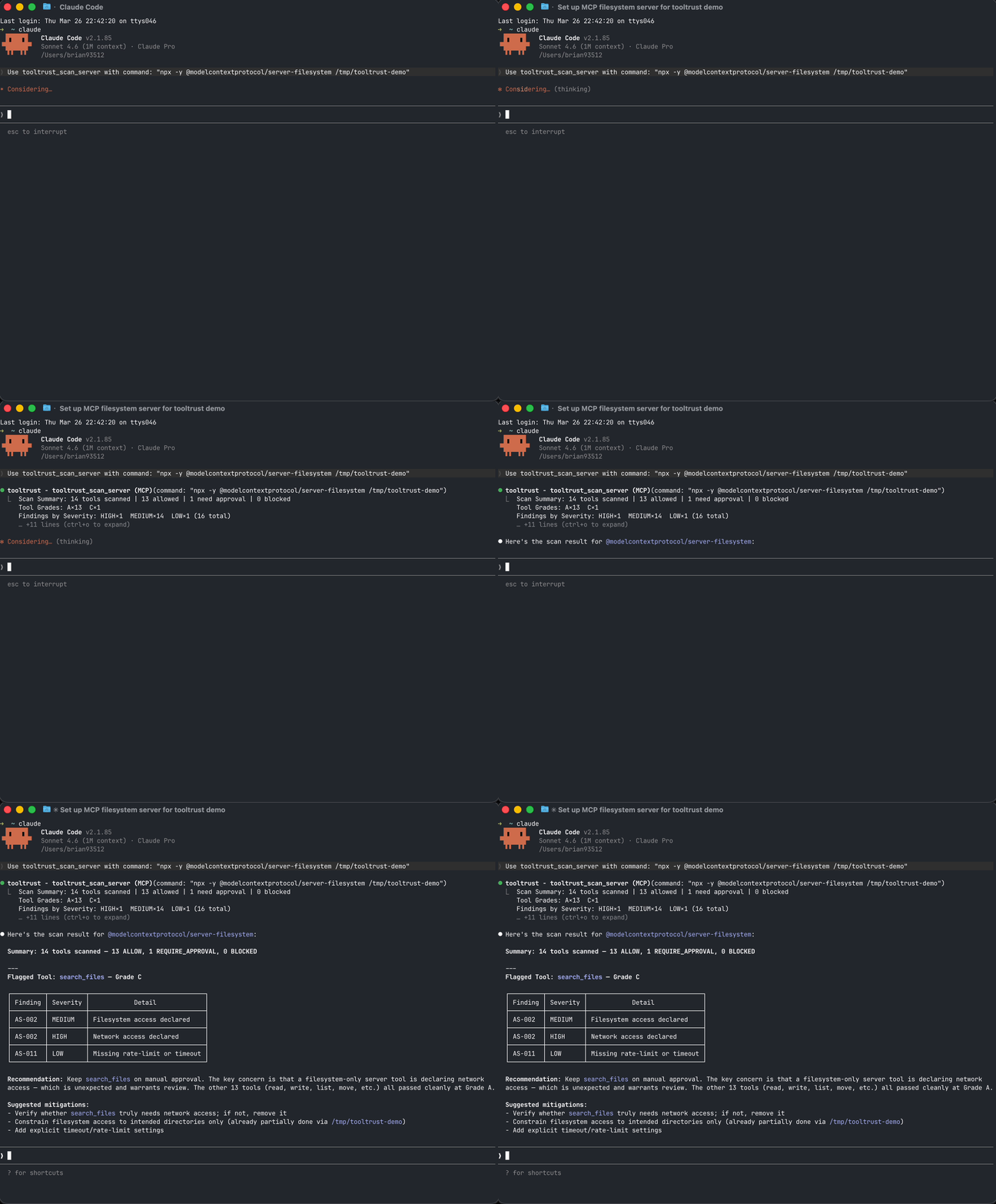
Scan your setup in 30 seconds
Add ToolTrust as an MCP server and let your agent audit its own tools (stdio transport — no network listener; your host launches it as a subprocess):
{
  "mcpServers": {
    "tooltrust": {
      "command": "npx",
      "args": ["-y", "tooltrust-mcp"]
    }
  }
}
Then ask your agent: "Run tooltrust_scan_config"
It reads your MCP config, connects to each server in parallel, scans every tool, and returns a risk report with grades and enforcement decisions — all in seconds.
Or use the CLI:
curl -sfL https://raw.githubusercontent.com/AgentSafe-AI/tooltrust-scanner/main/install.sh | bash
tooltrust-scanner scan --server "npx -y @modelcontextprotocol/server-filesystem /tmp"
Example snapshot (research cohort)
The public ToolTrust Directory holds current grades and aggregates as scanning scales. One published research pass illustrates the shape of the problem — 207 MCP servers, 3,235 tools — not an exhaustive count of everything we scan today:
Only 10% of servers in that cohort had a clean Grade A. See tooltrust.dev for up-to-date directory-wide results (and use this table only as a labeled snapshot).
🔍 What it catches
ToolTrust runs 16 static tool-definition rules in this repo (AS-001–AS-011, AS-013–AS-017) plus 2 source-scan rules for embedded MCP implementations (AS-018, AS-019). AS-012 (tool drift) is evaluated in the ToolTrust Directory when new scan results are compared to previous runs.
Full rule details: docs/RULES.md
How it works
- Parse — Connects to a live MCP server (or reads a JSON file) and extracts every tool definition
- Analyze — Runs tool-definition rules against each tool's name, description, schema, and permissions; source scans add embedded MCP implementation checks
- Grade — Assigns a numeric risk score and letter grade (A–F) per tool
- Enforce — Maps each grade to a gateway policy:
ALLOW,REQUIRE_APPROVAL, orBLOCK
Pure static analysis. No LLM calls. No data leaves your machine (except optional CVE lookups). Runs in milliseconds. Deterministic and reproducible.
Install
# One-line install (macOS / Linux)
curl -sfL https://raw.githubusercontent.com/AgentSafe-AI/tooltrust-scanner/main/install.sh | bash

# Go
go install github.com/AgentSafe-AI/tooltrust-scanner/cmd/tooltrust-scanner@latest

# npx (no install needed)
npx -y tooltrust-mcp
MCP tools
When running as an MCP server, ToolTrust exposes these tools to your agent:
CI / GitHub Actions
Block risky MCP servers in your pipeline:
- name: Audit MCP Server
  uses: AgentSafe-AI/tooltrust-scanner@main
  with:
    server: "npx -y @modelcontextprotocol/server-filesystem /tmp"
    fail-on: "approval"
Deployment and security
For deployment, use the install paths in Install or the workflow example in CI / GitHub Actions. For vulnerability reporting and disclosure policy, see docs/SECURITY.md.
Scan-before-install gate
Never add an untrusted MCP server to your config again:
# Scans the server, then auto-installs if Grade A/B, prompts on C/D, blocks on F
tooltrust-scanner gate @modelcontextprotocol/server-memory -- /tmp

# Replace `claude mcp add` with a scanned install
alias mcp-add='tooltrust-scanner gate'
Full gate options and pre-commit hook setup: docs/USAGE.md
Add a trust badge to your project
If your MCP server passes ToolTrust, let people know:
[](https://www.tooltrust.dev/)
Supply-chain alert: ToolTrust detects and blocks confirmed compromised packages including LiteLLM v1.82.7/8 (TeamPCP backdoor), Trivy v0.69.4–v0.69.6, and Langflow < 1.9.0. If you encounter a Grade F with rule AS-008, remove the package immediately and rotate all credentials.
Usage guide · Developer guide · Contributing · Deployment & security · Changelog · Security · License: MIT
Vulnerability lookup completeness
If an OSV lookup fails (including rate limiting, service errors, malformed responses or timeouts), the scan fails with scan incomplete instead of issuing a success report or security grade. Partial lookup failure also fails the scan. CLI exits nonzero, MCP scan calls return tool errors, and gate does not install the server. This deliberately favors explicit incomplete results over availability; an OSV outage can prevent scans of tools with declared dependencies.
TOOLTRUST_OSV_URL optionally selects an OSV-compatible query endpoint (default: https://api.osv.dev/v1/query). Use only a trusted service: declared dependency names and versions are sent there. HTTPS is required, except numeric loopback HTTP for local integration fixtures; embedded credentials and fragments are rejected. There is no fallback to the public API when an override fails.
The project-local verification skill runs in GitHub Actions as CLI and MCP Verification, covering baseline paths, discovery regressions, and an owned loopback OSV fixture. Reports and command transcripts are uploaded even on failure. Live public OSV availability and MCP HTTP transport are not part of this job.