🗺️ Local Competitor Map
AI-powered local-competitor intelligence on a photorealistic 3D map.
Ask in plain English, like "show me the top 10 plumbers in New York", and the competitors appear as pins on Google's photoreal 3D globe, ranked with ratings, reviews and rich detail cards. A Gemini agent drives it, talking to Google Places through the Model Context Protocol.
▶ Try the live demo
Bring your own Gemini and Google Maps keys; they stay in your browser.
✨ What it does
Local Competitor Map turns a question into a map. You give it a business (or a whole category) and a place. It finds the local competitive set, plots every result on a photorealistic 3D map, and opens a Google-Maps-style detail card on click. A conversational Gemini agent runs the whole flow.
- 🔍 Natural-language search. Ask "who competes with Blue Bottle Coffee in San Francisco?", or run the deterministic
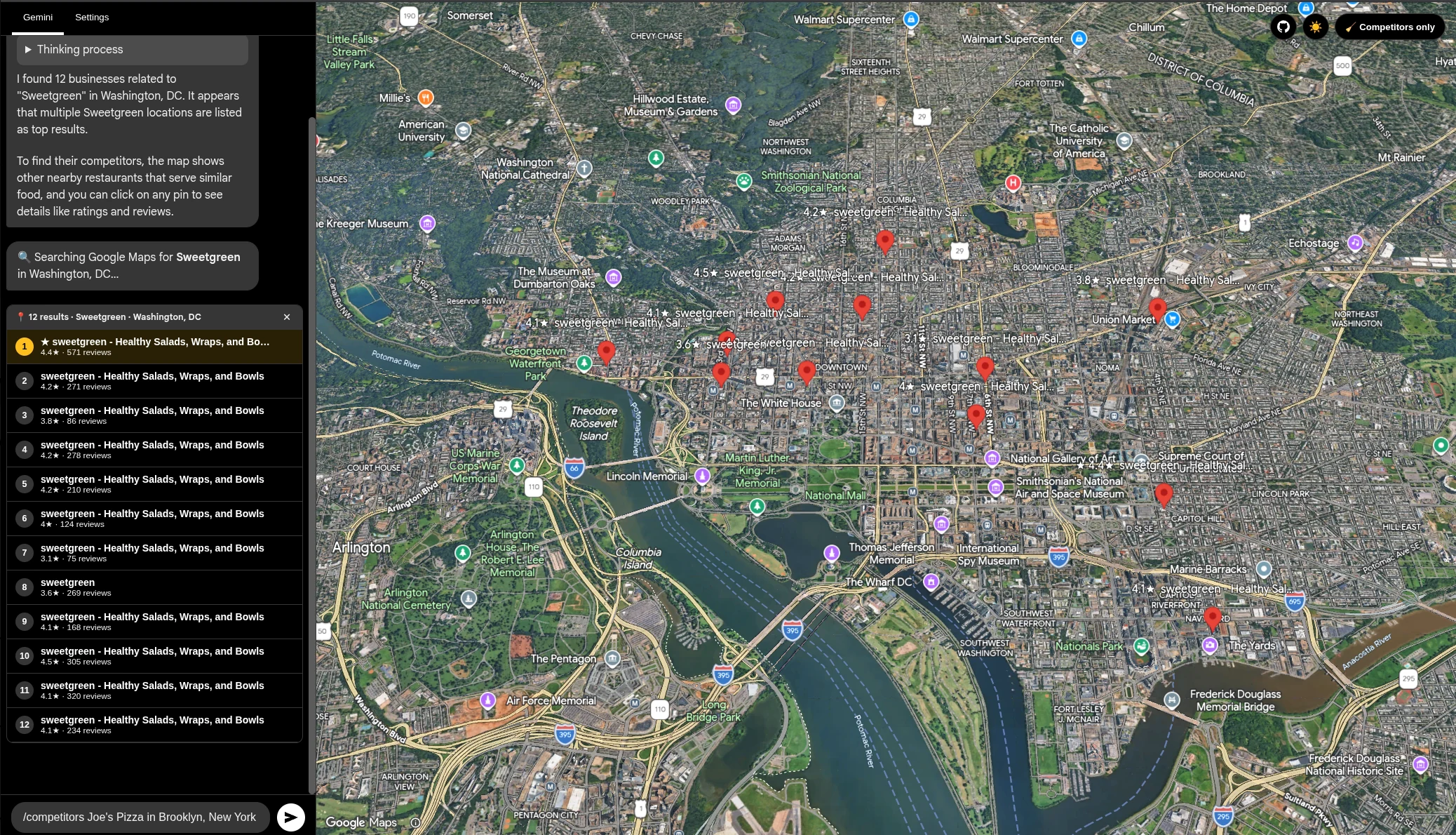
/competitors <business> in <city>command. - 📍 Pins with ratings. Every competitor is a 3D pin labelled with its star rating, and the business you searched for is highlighted.
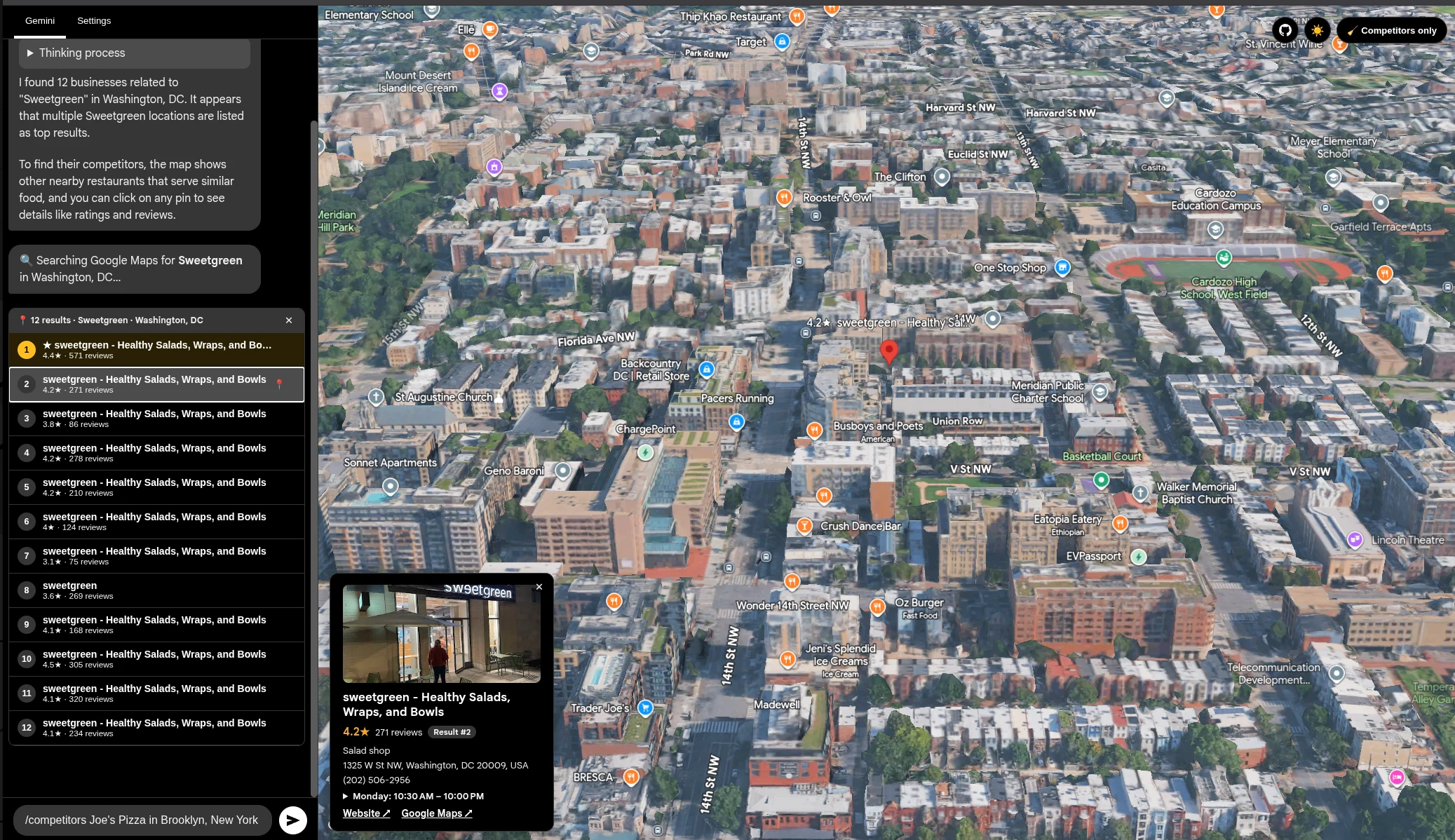
- 🧾 Rich detail cards. A click shows the photo, rating, review count, category, address, phone, hours, website and a Google Maps link.
- 💬 In-chat results list. Competitors live right in the conversation. Click a row to fly the camera and pinpoint it.
- 🧹 Declutter filter. One click hides Google's place labels (parks, streets, unrelated businesses) so only your competitor pins remain.
- 🔑 Bring your own keys. Keys stay in your browser (Settings tab) or a gitignored local file. Nothing is hard-coded or committed.
📸 Screenshots
| Competitors plotted across the city | In-chat list and detail card |
|---|---|
 |  |
🚀 Quick start
Prerequisites: Node.js 18+ and a Google account with the Maps Platform and Gemini APIs enabled (see Configuration).
# 1. Clone
git clone https://github.com/AgriciDaniel/local-competitor-map.git
cd local-competitor-map

# 2. Install
npm install

# 3. Add your keys. Either run the app and paste them in the Settings tab,
#    or copy the example and fill it in (this file is gitignored):
cp runtime-keys.example.ts runtime-keys.ts

# 4. Run
npm run dev
Open the printed URL (for example http://localhost:3000).
🔑 Configuration
The app needs two credentials. Paste them into the in-app Settings tab (stored in
your browser's localStorage), or put them in runtime-keys.ts:
// runtime-keys.ts  (gitignored, never committed)
export const RUNTIME_KEYS = {
  geminiKey: 'YOUR_GEMINI_API_KEY',
  mapsKey: 'YOUR_GOOGLE_MAPS_API_KEY',
};
🔒 Security. Keys are used client-side only.
runtime-keys.ts,.env*and*.zipare gitignored, and the bundled fallback key is empty by default, so no secret is ever committed.
🕹️ Usage
Then:
- Click a list row or a pin. The camera flies to it and a detail card opens.
- Toggle "🧹 Competitors only" (top-right). Google's labels disappear for a clean, competitor-only view.
- Clear (✕) on the results. The map resets.
🧠 How it works
A Lit web component renders the chat and the <gmp-map-3d> photorealistic map. The
Gemini agent receives the map tools over an in-process MCP transport. When it
calls find_local_competitors, the app queries the Places API and renders the
results.
flowchart LR
    U[User prompt] --> G[Gemini 2.5 Flash]
    G -- tool call --> M[MCP server]
    M -- callback --> A[MapApp · Lit]
    A -- Place.searchByText --> P[Google Places API]
    P -- competitors --> A
    A --> Pins[3D pins + in-chat list + detail card]
🗂️ Project structure
.
├── index.html              # App shell + import map
├── index.tsx               # Entry: Gemini chat + MCP client/server wiring
├── map_app.ts              # Lit component: 3D map, chat, competitor UI, filter
├── mcp_maps_server.ts      # MCP tools the agent can call
├── places.ts               # Google Places competitor search
├── settings.ts             # Key resolution (localStorage then runtime-keys.ts)
├── runtime-keys.example.ts # Template for your local keys (copy to runtime-keys.ts)
├── dataforseo.ts           # Shelved: future local-SEO ranking layer
├── index.css               # Styles
└── vite.config.ts          # Vite config (plus dormant DataForSEO proxy)
🛣️ Roadmap
- Organic competitors panel (keyword and SERP overlap), as a second tab
- Geo-grid rank heatmap (true local-pack ranking via DataForSEO)
- Granular POI filter via a cloud Map style and Map ID (hide specific label types)
- Review and NAP intelligence in the detail card
- Optional one-click Google sign-in (Search Console and Business Profile)
🤝 Contributing
Contributions are welcome. Read CONTRIBUTING.md for the dev setup, coding conventions, and how to open issues and pull requests.
📄 License
Licensed under the Apache License 2.0. See LICENSE.
🙏 Acknowledgements
- Built on Google AI Studio's
mcp_maps_3dsample. - Google Maps Platform · Photorealistic 3D Maps, Places API, Gemini API, Model Context Protocol, Lit, Vite.