🚀 Multiple MCP Servers using FastAPI and Testing with Inspector
This project provides a framework for running multiple Model Context Protocol (MCP) servers using different transport mechanisms: FastAPI-based HTTP servers, standalone streamable-http servers, and stdio-based servers.
This project provides a framework for running multiple Model Context Protocol (MCP) servers using different transport mechanisms: FastAPI-based HTTP servers, standalone streamable-http servers, and stdio-based servers.
2026-10-27
Stars
4
Tools
—
Uptime
—
✅ Supported MCP Transports:
stdio
streamable-http
FastAPI-mounted
It includes three main scripts:
mcp-server-with-stdio.py ➡️ A standalone MCP server using stdio transport.
mcp-server-with-streamable-http.py ➡️ A standalone MCP server using streamable-http transport.
mcp-server-fastapi.py ➡️ A FastAPI server hosting two MCP instances (McpServer1 and McpServer2) with streamable-http transport.
Each server implements a simple echo tool for testing and demonstration, and the framework supports robust logging, environment configuration, and graceful shutdown handling. The servers are compatible with the MCP Inspector for interactive testing. 🕵️♂️
Demonstrate the flexibility of MCP servers using different transports (streamable-http and stdio).
Provide a production-ready FastAPI server hosting multiple MCP instances under a single application.
Support standalone MCP servers for simpler use cases or environments requiring stdio communication.
Ensure robust logging, configuration management, and graceful shutdown for all server types.
Enable easy integration with the MCP Inspector for testing and tool interaction.
🗂️ Project Structure
The project is organized as follows:
/
├── src/
│   ├── mcp-server-fastapi.py                # FastAPI server hosting two MCP instances
│   ├── mcp-server-with-streamable-http.py   # Standalone MCP server with streamable-http
│   ├── mcp-server-with-stdio.py             # Standalone MCP server with stdio
│   ├── fastapi_mcp_servers/                 # MCP server implementations for FastAPI
│   │   ├── __init__.py
│   │   ├── mcp_server_1.py                  # First MCP server with echo1 tool
│   │   └── mcp_server_2.py                  # Second MCP server with echo2 tool
│   ├── config/                              # Configuration and logging utilities
│   │   ├── __init__.py
│   │   ├── app_settings.py                  # Environment variable and settings management
│   │   └── logging_config.py                # Logging setup with file rotation and cleanup
│   └── util/
│       └── mcp_server_shutdown_handler.py   # Graceful shutdown handler for MCP servers
├── .env                                     # Environment variables (e.g., PORT, LOG_DIR)
├── pyproject.toml                           # Project dependencies
└── README.md                                # Project documentation
✨ Features
Multiple MCP Servers:
Standalone MCP server using stdio transport for direct stdin/stdout communication.
Standalone MCP server using streamable-http transport at http://0.0.0.0:8001/mcp/.
FastAPI server hosting two MCP instances at /echo1/mcp/ and /echo2/mcp/ with streamable-http transport.
Echo Tool: A simple tool that echoes input messages, implemented across all servers for testing.
Transport Flexibility: Supports streamable-http (recommended for HTTP-based communication) and stdio (for Inspector-driven communication).
Robust Logging: Configurable logging with file rotation and console output, stored in a specified log directory.
Environment Configuration: Loads settings from a .env file (e.g., PORT, LOG_DIR, API_KEY).
Graceful Shutdown: Handles SIGINT and SIGTERM signals to ensure clean termination of MCP servers.
Lifespan Management (FastAPI): Manages startup and shutdown of MCP session managers in the FastAPI server.
MCP Inspector Compatibility: All servers are compatible with the MCP Inspector for interactive tool testing.
🛠️ Prerequisites
To run the project, ensure you have the following installed:
Python: Version 3.8 or higher
Node.js: Required for running the MCP Inspector
uv: A Python package manager for installing dependencies
npx: For running the MCP Inspector
Operating System: Compatible with Windows, macOS, or Linux
Recommended: a modern terminal that supports UTF-8
📦 Required Packages
The project depends on the following Python packages:
mcp[cli]: Provides the MCP server and CLI tools.
fastapi: The FastAPI framework for the mcp-server-fastapi.py script.
uvicorn: ASGI server implementation for running FastAPI.
python-dotenv: For loading environment variables from a .env file.
⚙️ Installation
Clone the Repository:
git clone https://github.com/ahmad-act/Multiple-MCP-Servers-Using-FastAPI-and-Testing-with-Inspector.git
cd Multiple-MCP-Servers-Using-FastAPI-and-Testing-with-Inspector
Set Up a Virtual Environment (optional but recommended):
uv venv
source venv/bin/activate  # On Windows: venv\Scripts\activate
Install Dependencies:
Install the required Python packages using uv:
uv sync
Alternatively,
uv add mcp[cli] fastapi uvicorn python-dotenv
Configure Environment Variables:
Create a .env file in the project root with the following content:
PORT=10000
LOG_DIR=logs
Usage
1️⃣ Standalone Stdio MCP Server (mcp-server-with-stdio.py)
Starting the MCP Server
You do not need to manually run the MCP server for stdio transport. MCP Inspector runs the MCP Server for stdio transport.
Starting the MCP Inspector
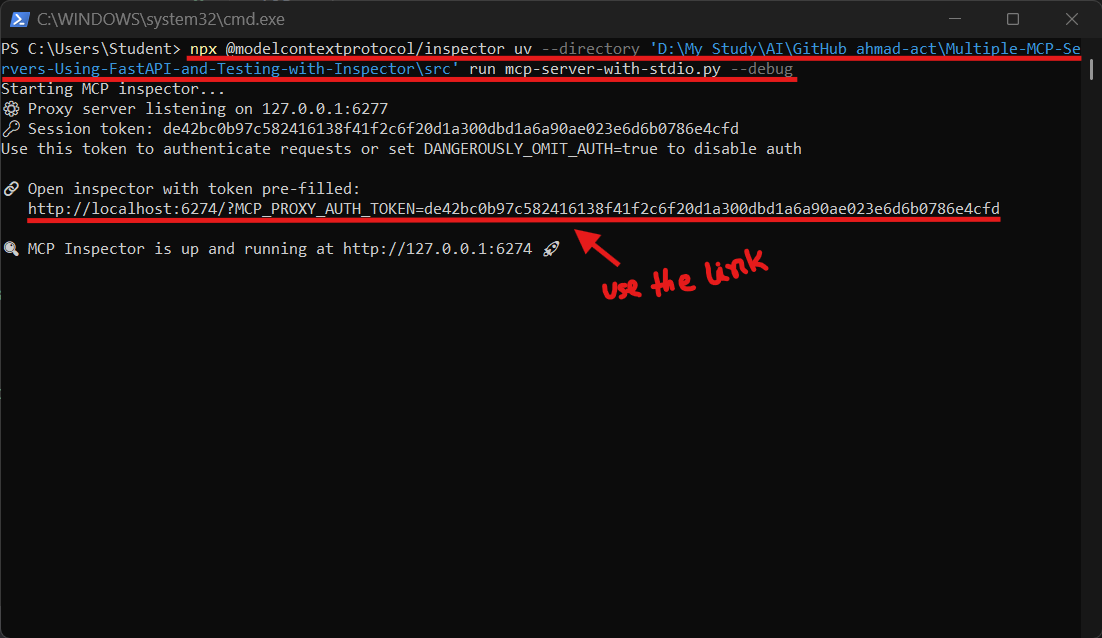
The stdio server is typically launched by the MCP Inspector, not manually. Run the Inspector with the following command, adjusting the --directory path to your src/ directory:
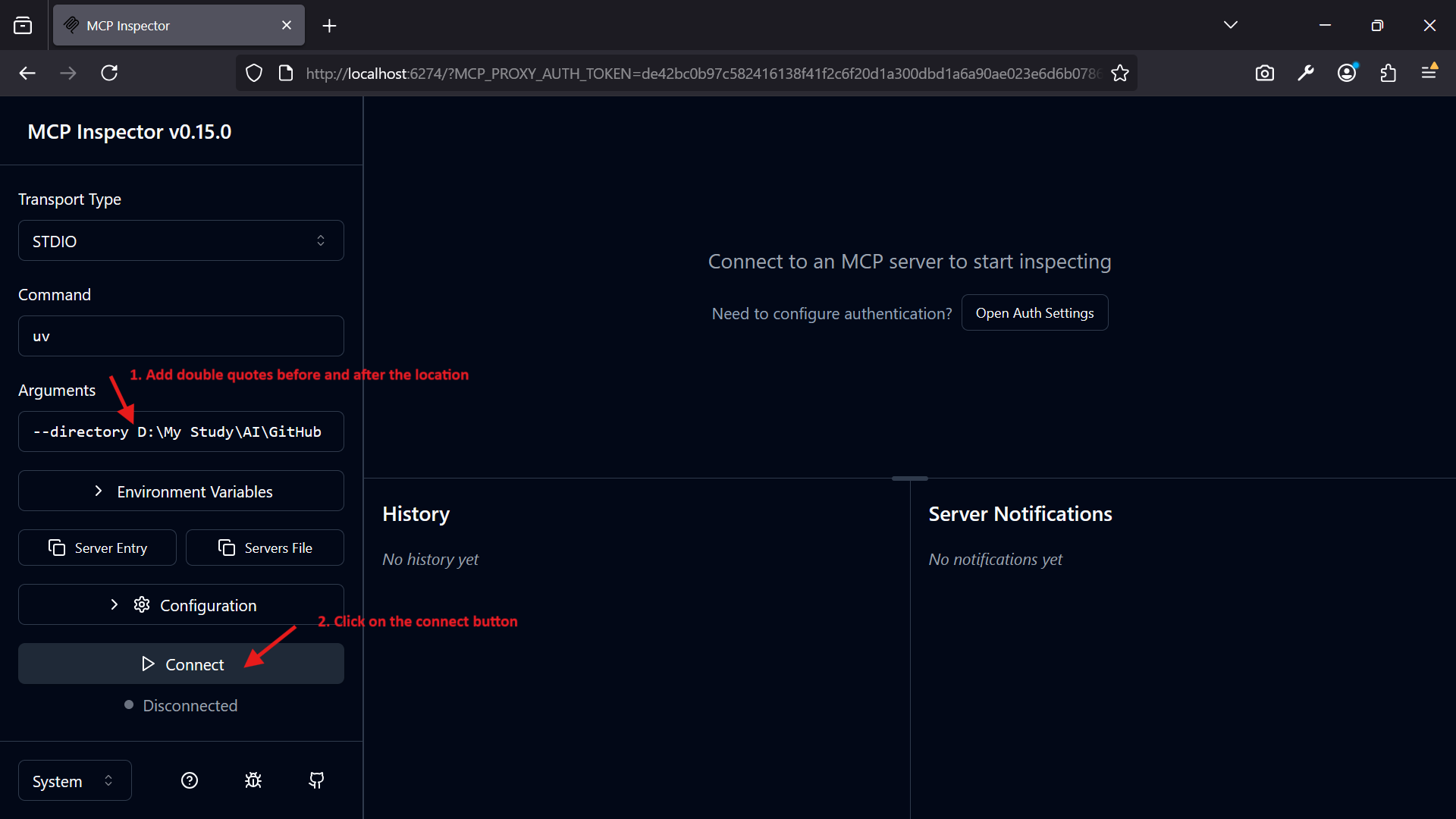
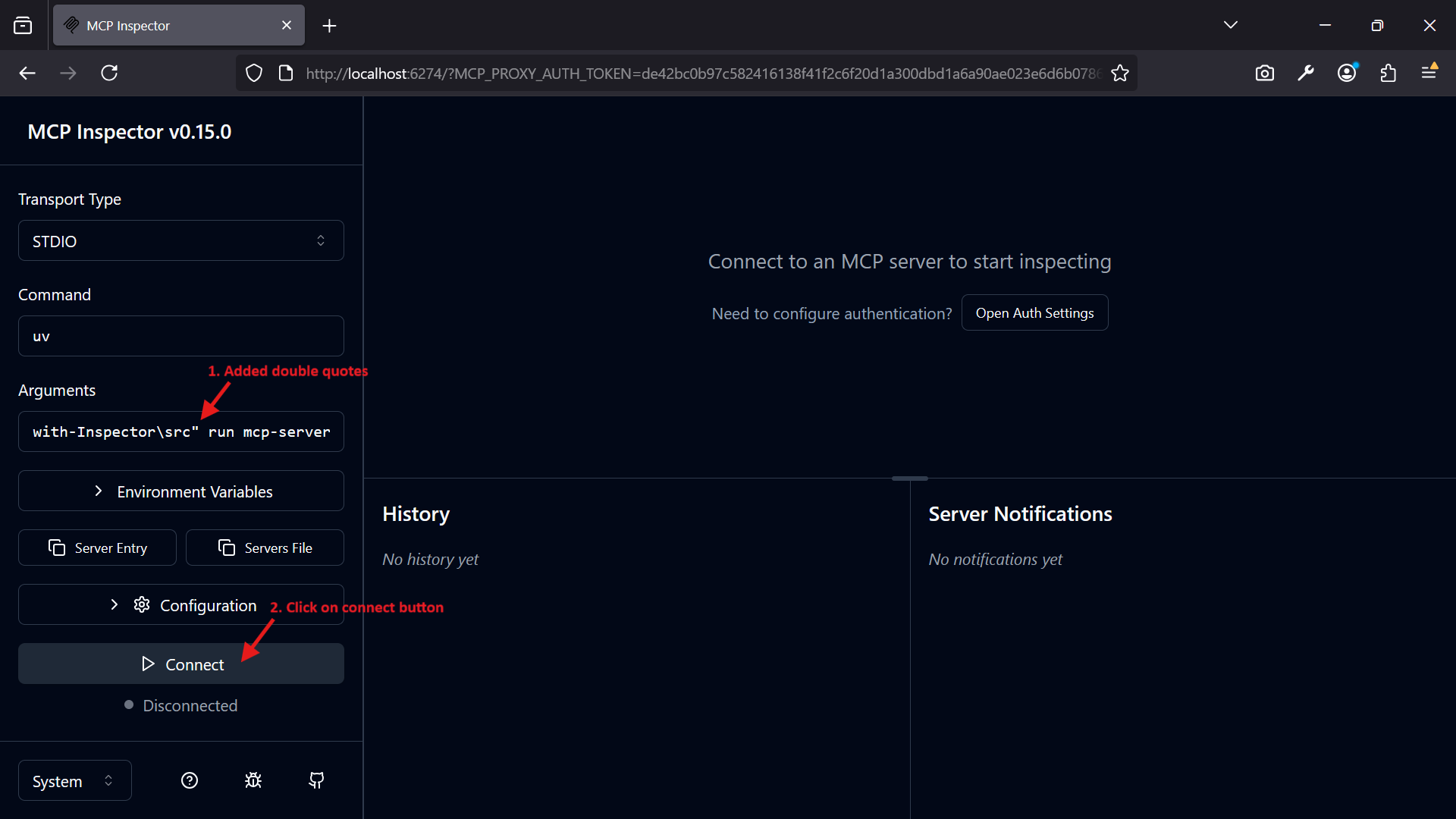
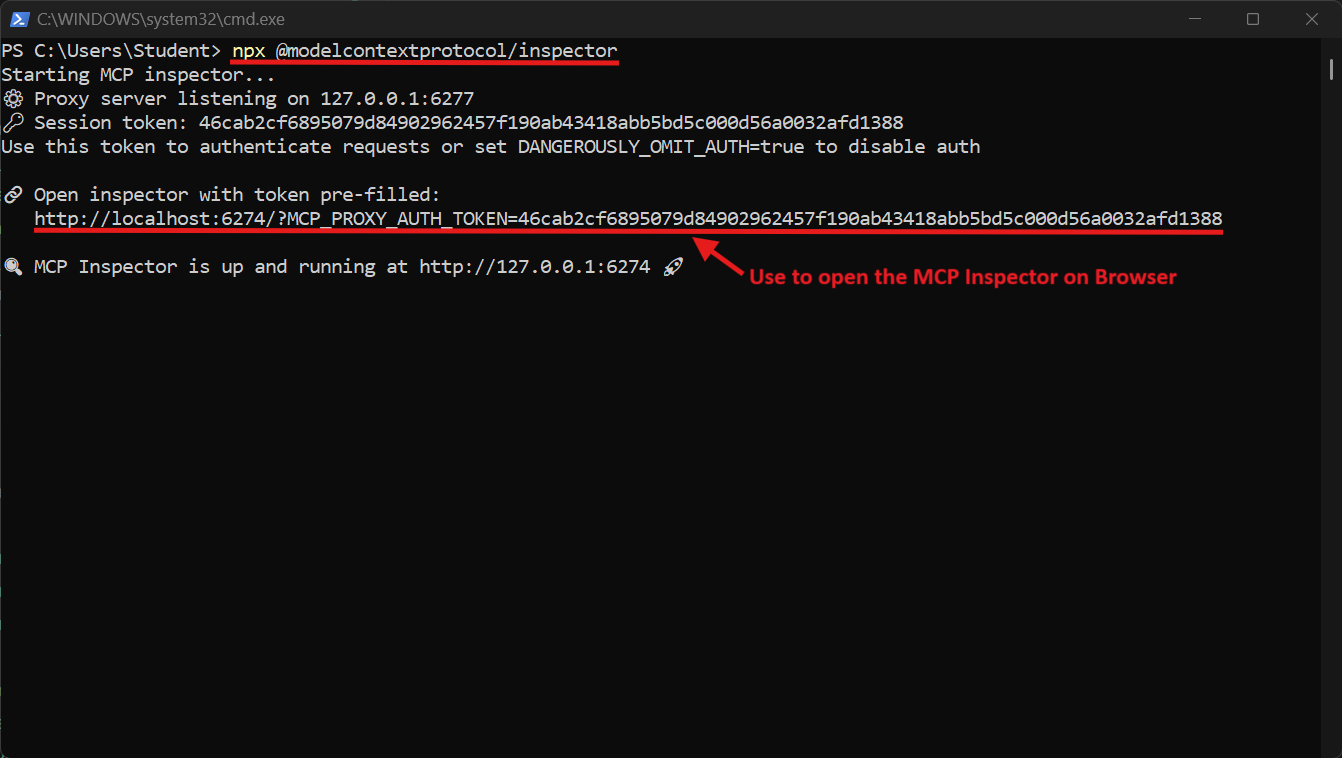
npx @modelcontextprotocol/inspector uv --directory "<your-src-directory>" run mcp-server-with-stdio.py --debug
The Inspector will manage the server lifecycle and communicate over stdio.
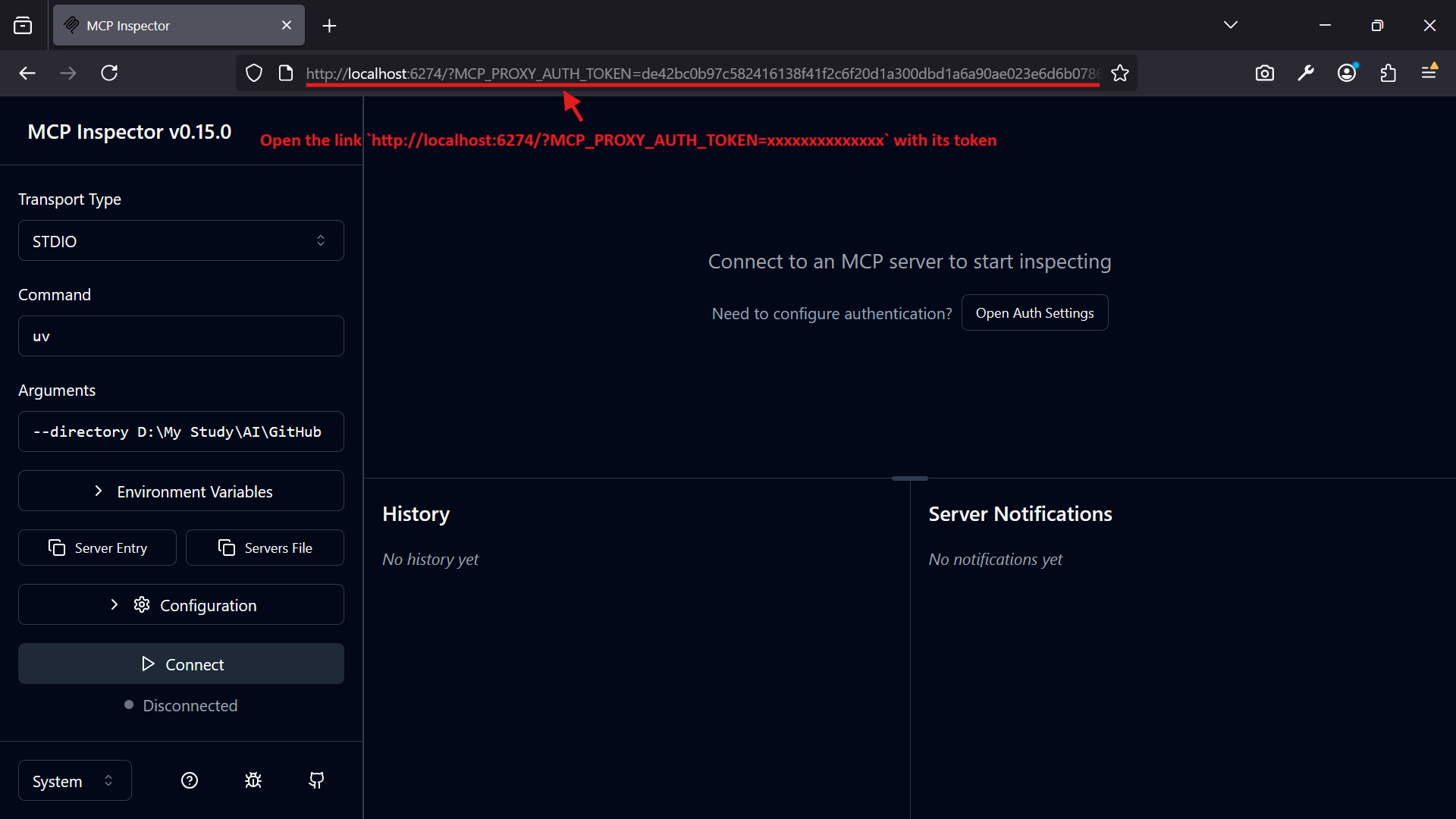
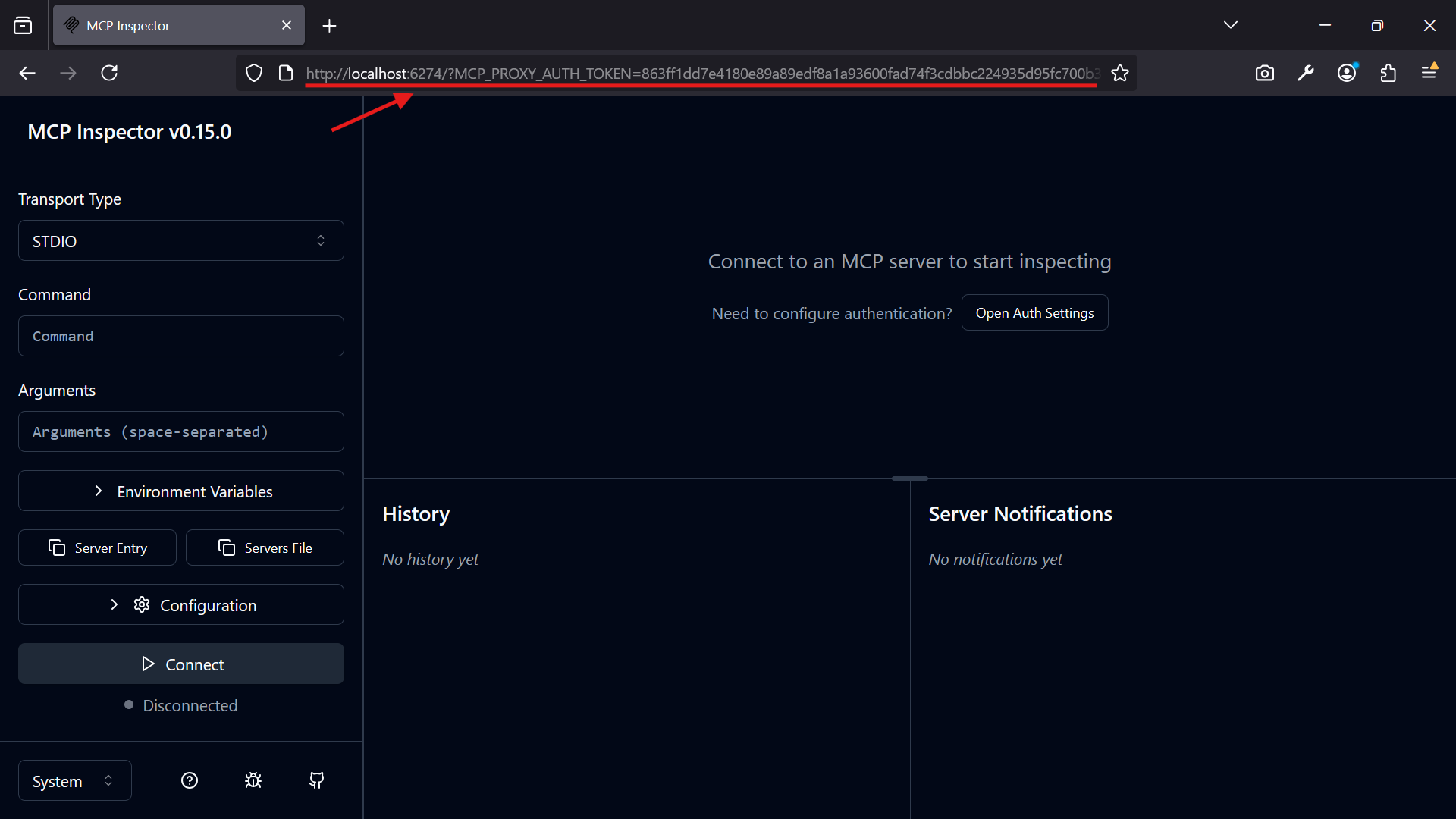
Opening the MCP Inspector
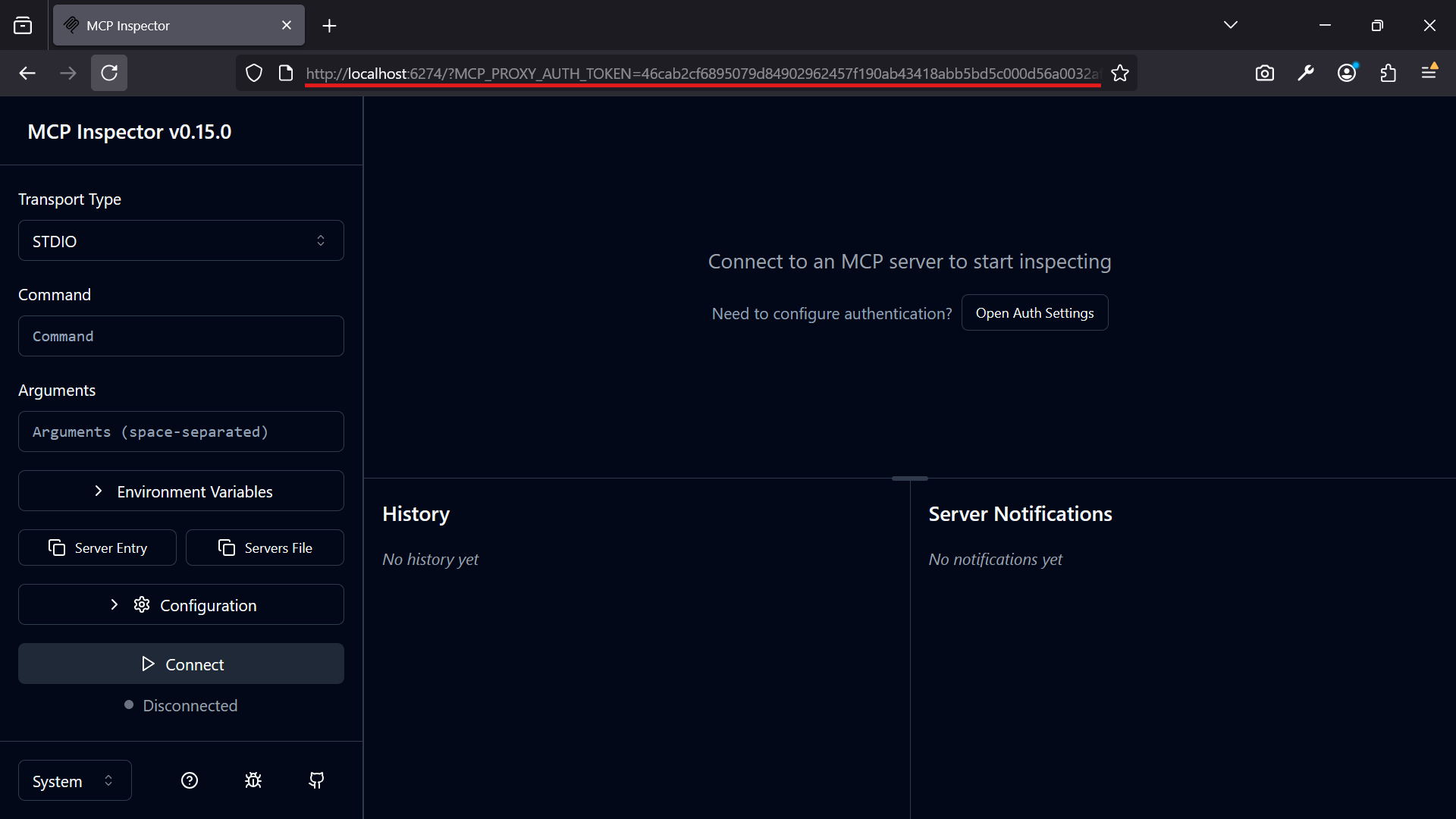
Open the link http://localhost:6274/?MCP_PROXY_AUTH_TOKEN=XXXXXXXXXXXXXXXXXX with its token in your browser:
Using the MCP Inspector
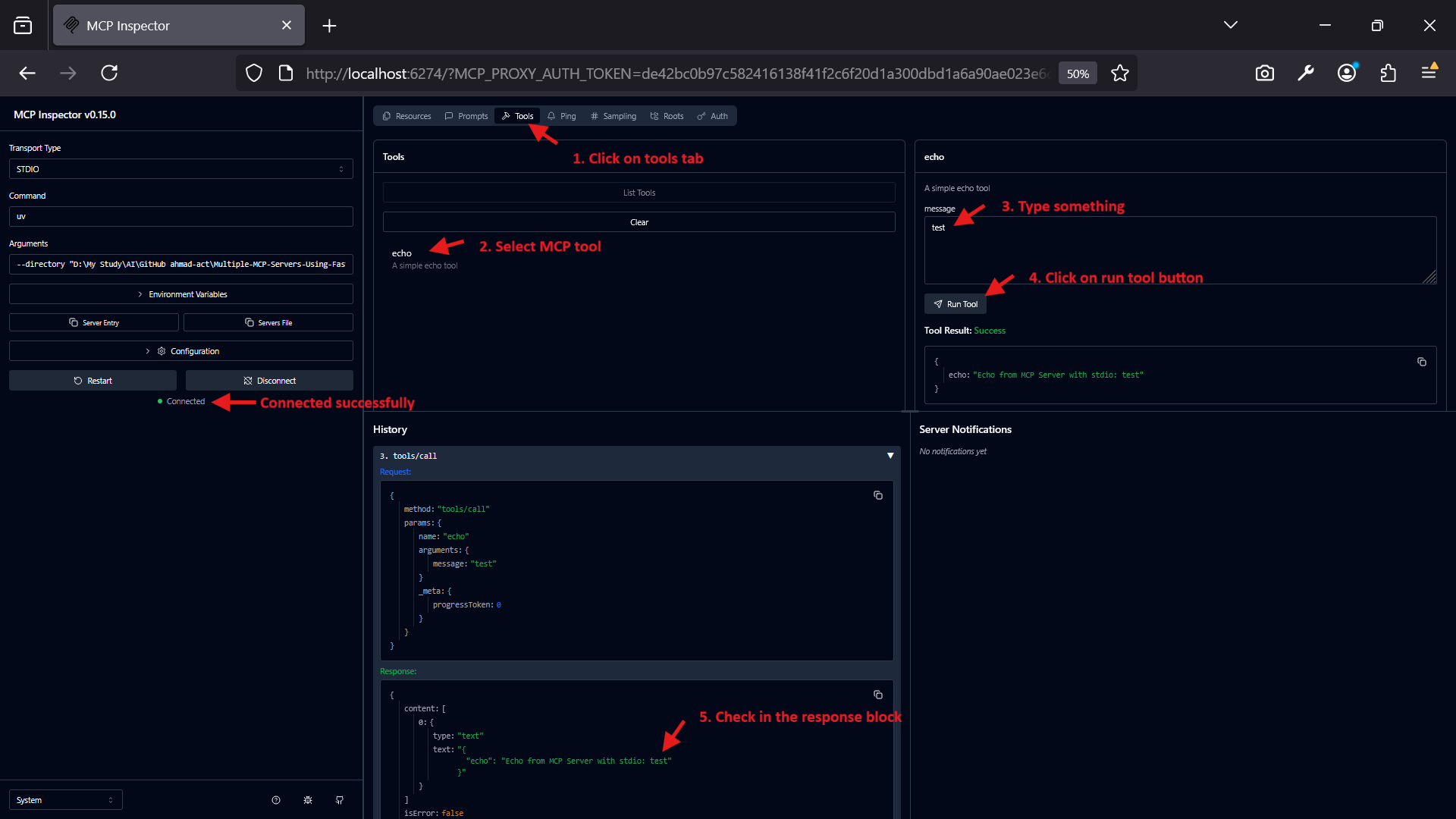
After running the above command, the Inspector will start and automatically connect to the stdio-based server.
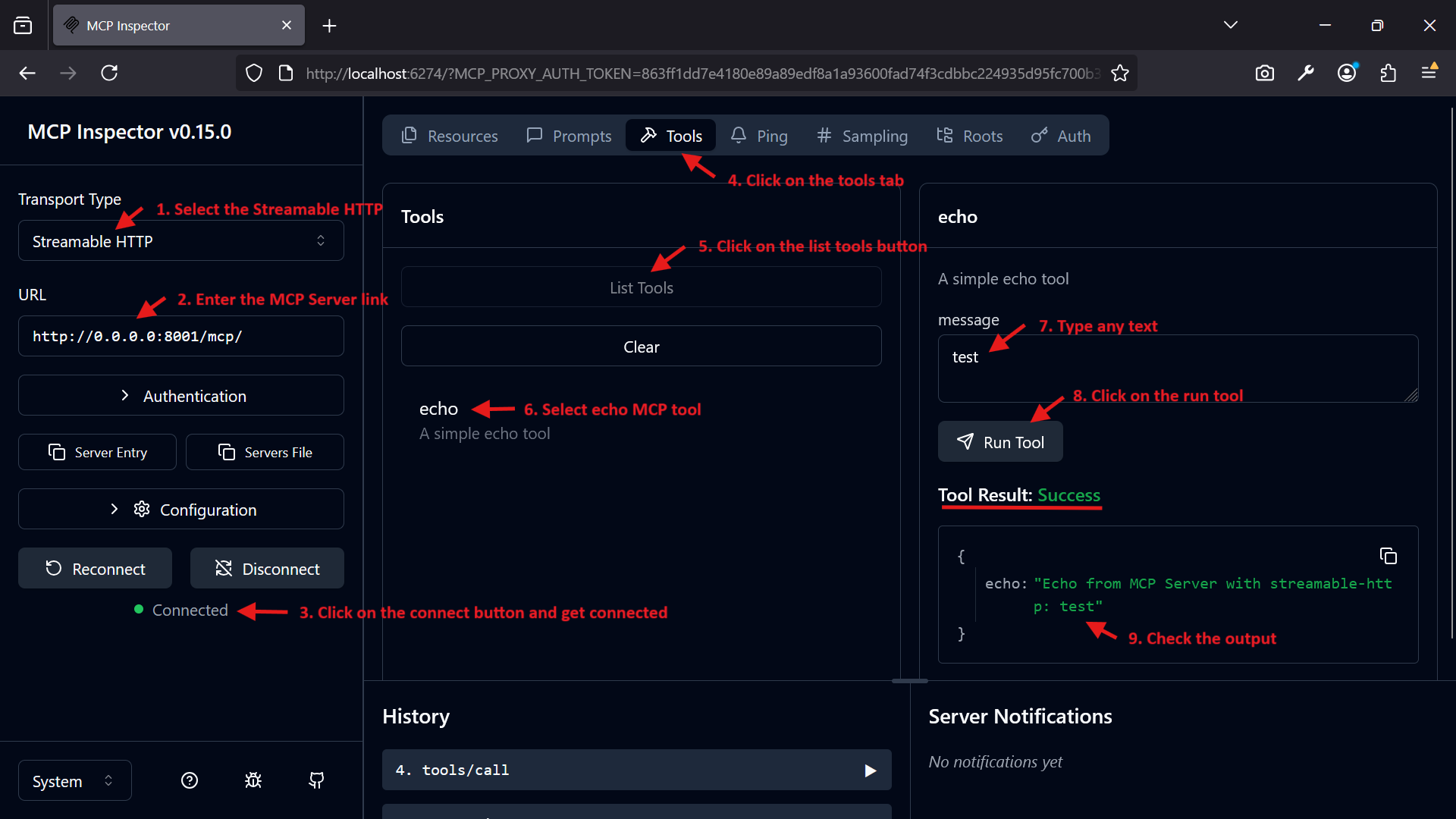
In the Inspector UI (http://127.0.0.1:6274), inspect the available tools (e.g., echo).
Test the echo tool:
Input:
{
  "message": "test"
}
Expected Output:
{
  "echo": "Echo from MCP Server with stdio: test"
}
2️⃣ Standalone Streamable-HTTP MCP Server (mcp-server-with-streamable-http.py)
Starting the MCP Server
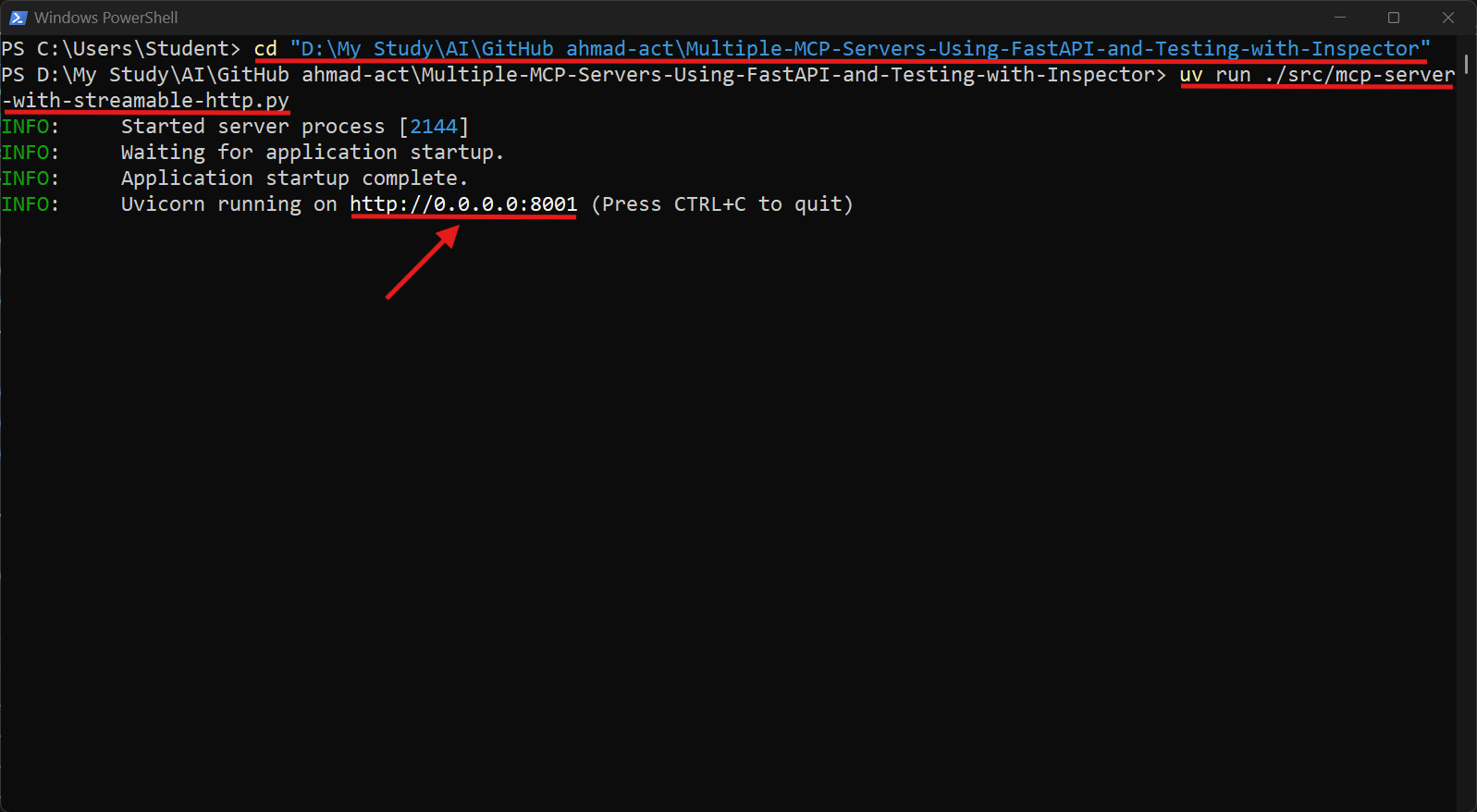
Open new terminal and go to the project root folder:
cd "D:\My Study\AI\GitHub ahmad-act\Multiple-MCP-Servers-Using-FastAPI-and-Testing-with-Inspector"
Run the standalone MCP server:
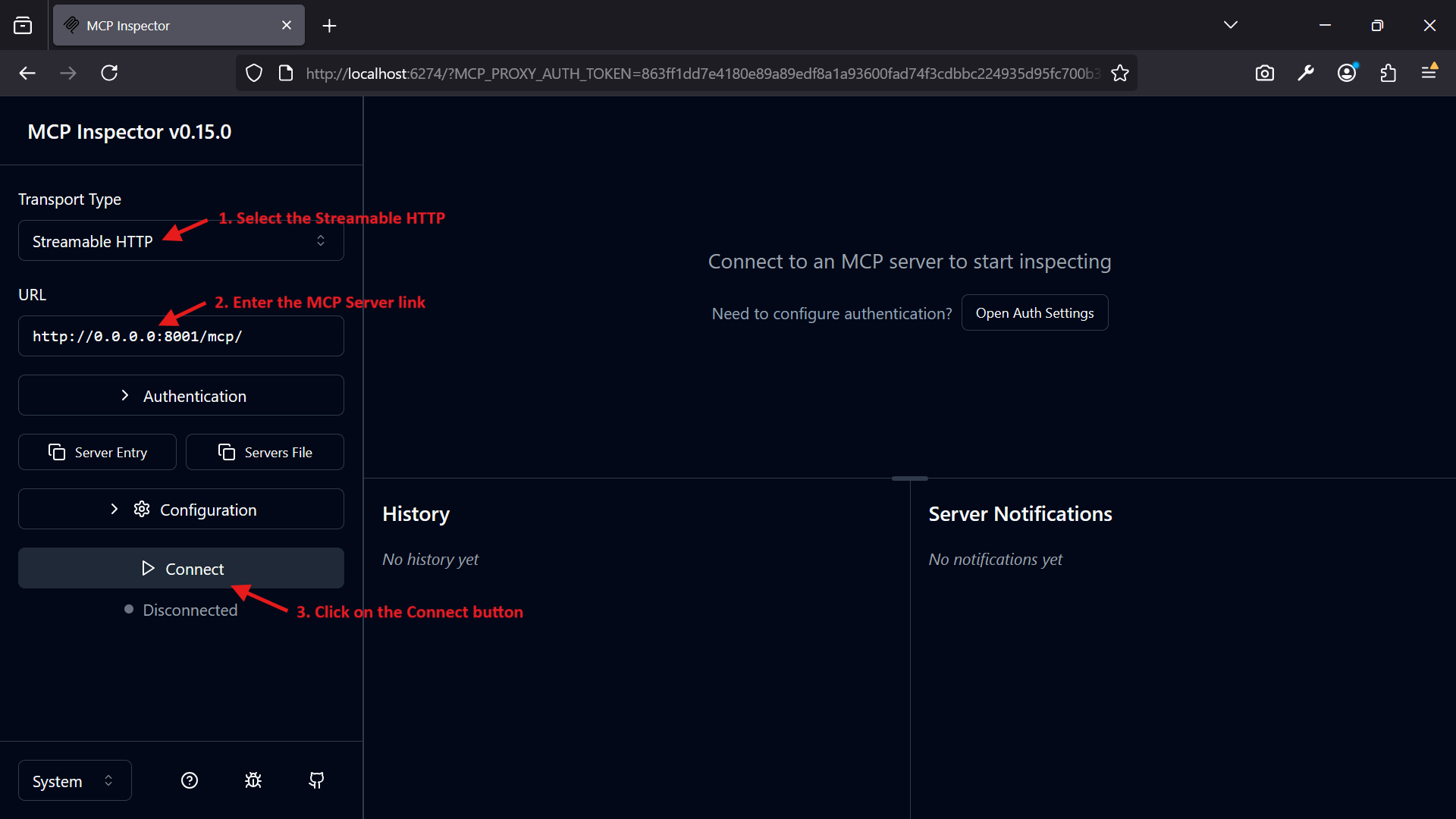
uv run ./src/mcp-server-with-streamable-http.py
The server will start on http://0.0.0.0:8001/mcp/.
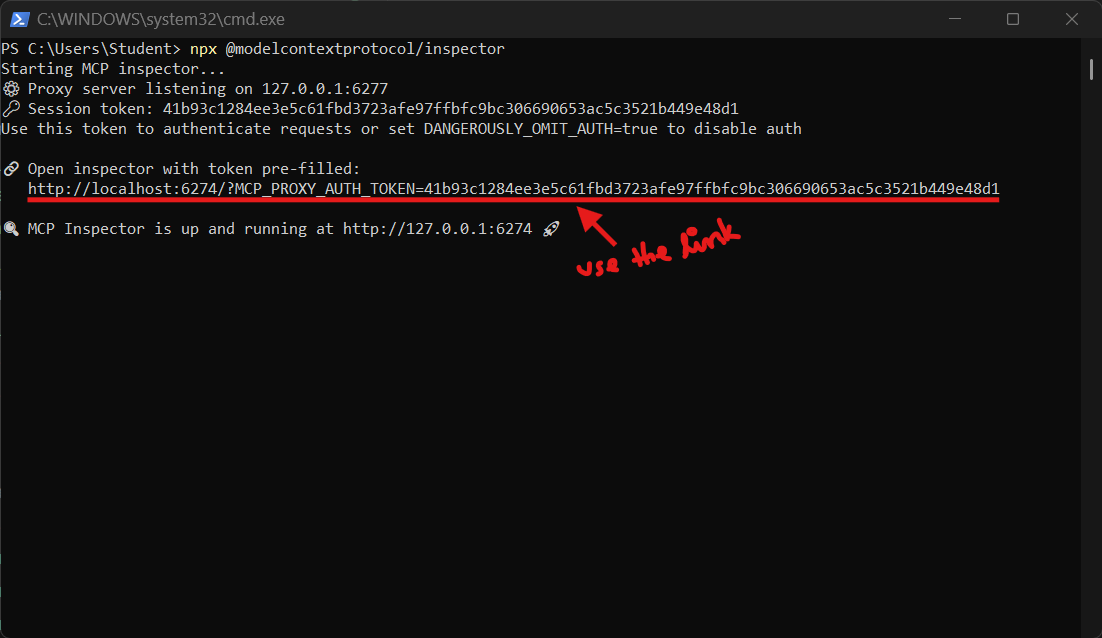
Starting the MCP Inspector
Run the MCP Inspector:
Open new terminal and run the command:
npx @modelcontextprotocol/inspector
Opening the MCP Inspector
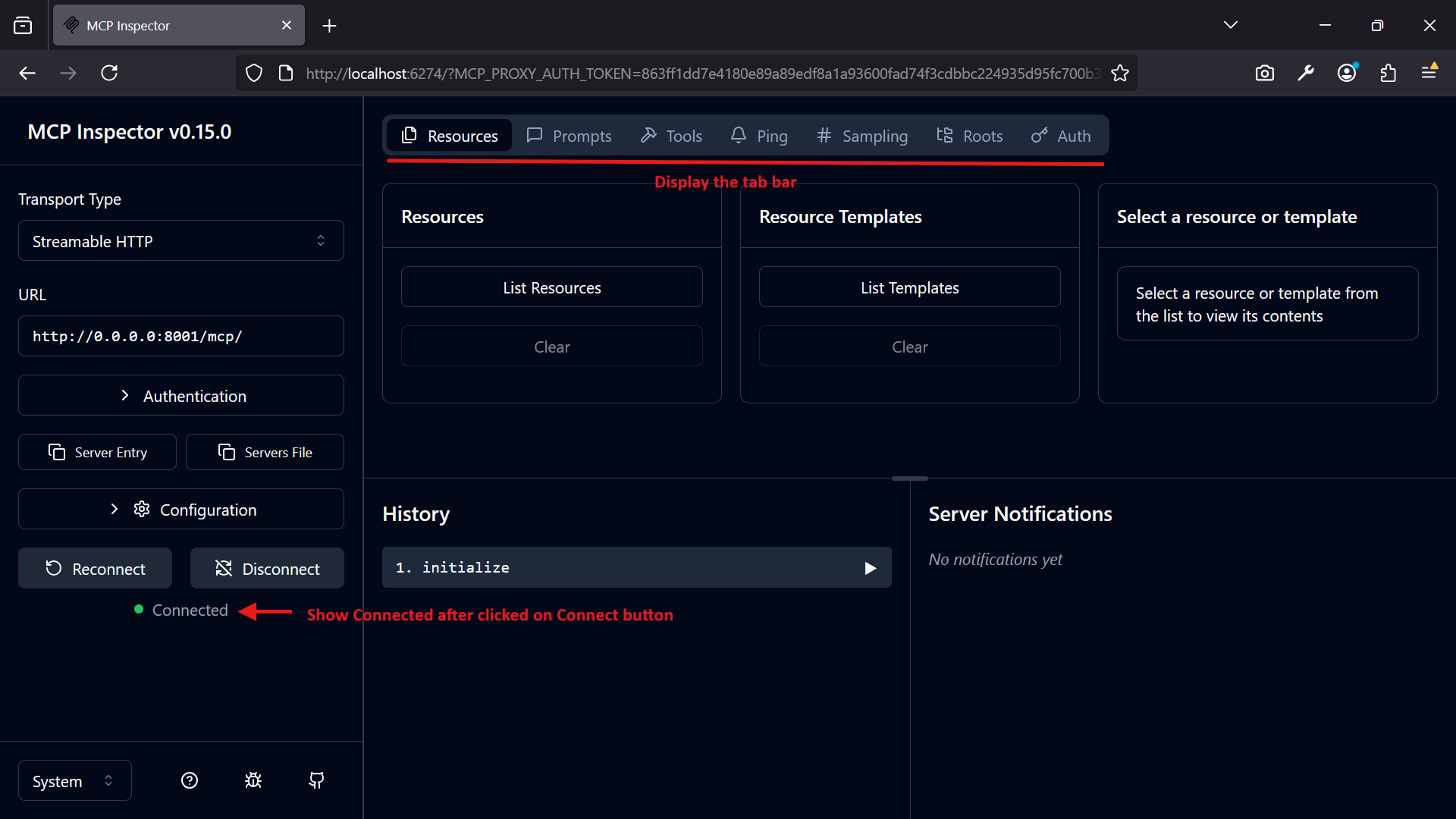
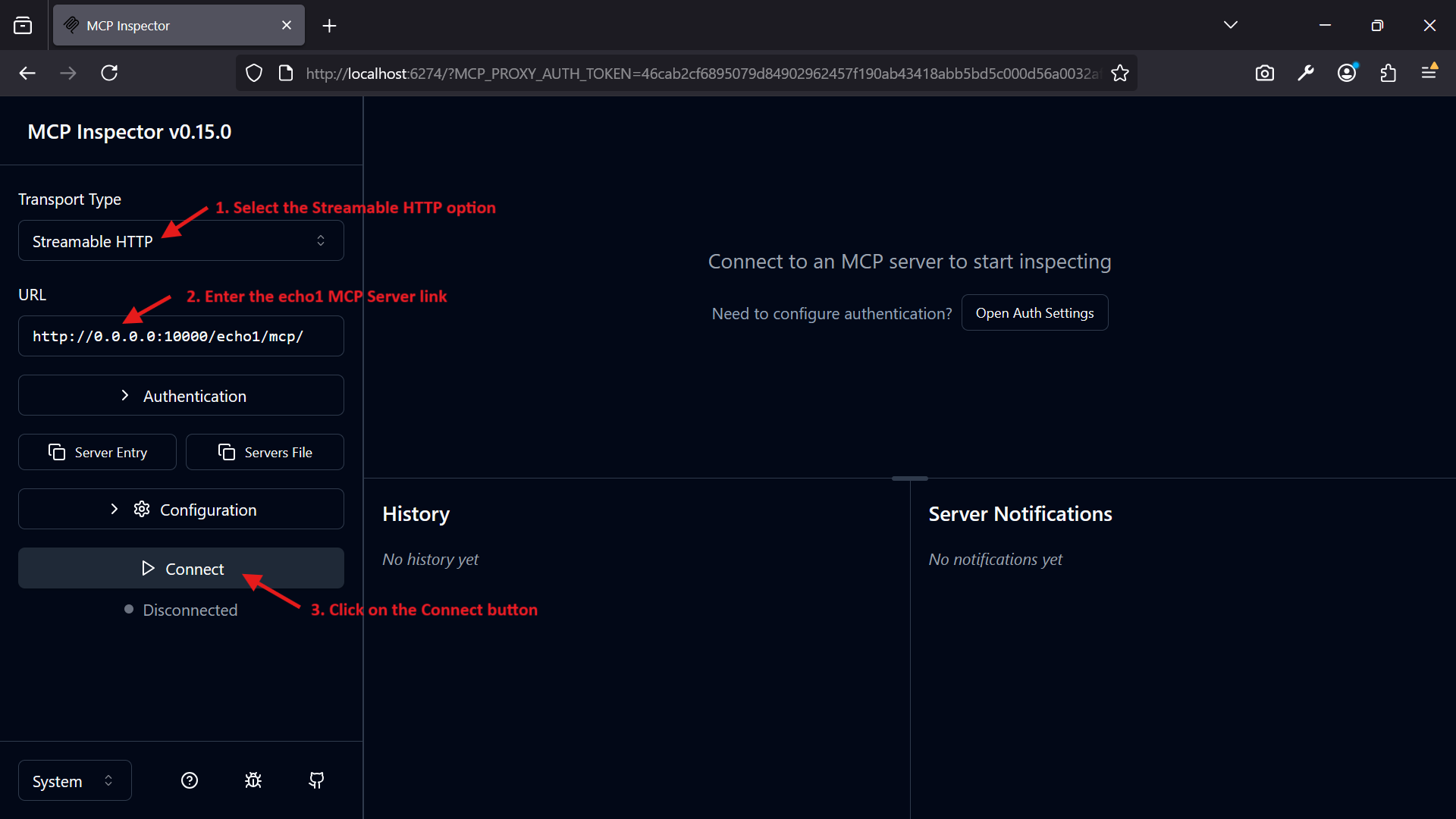
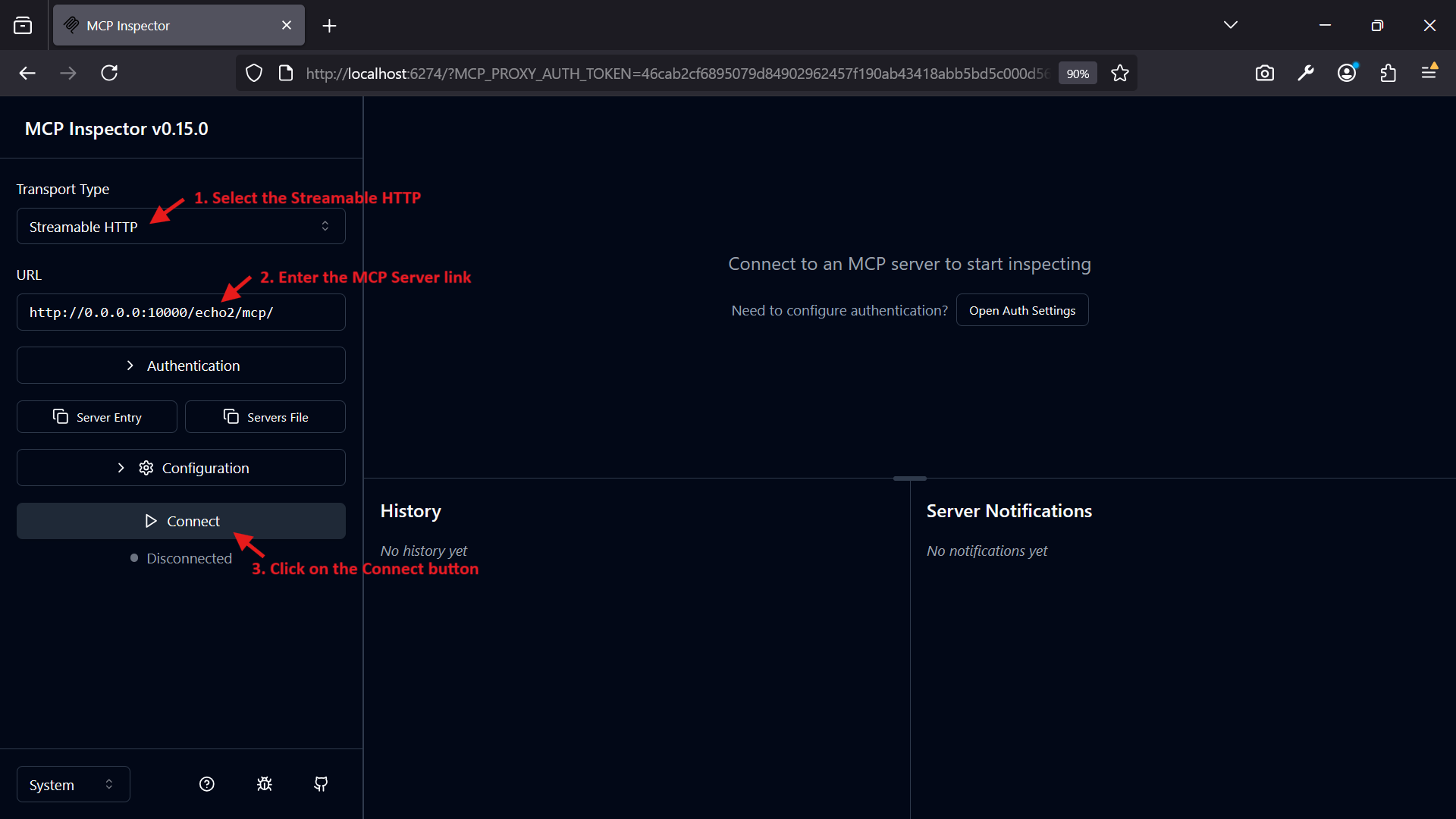
Open the Inspector in your browser at http://127.0.0.1:6274.
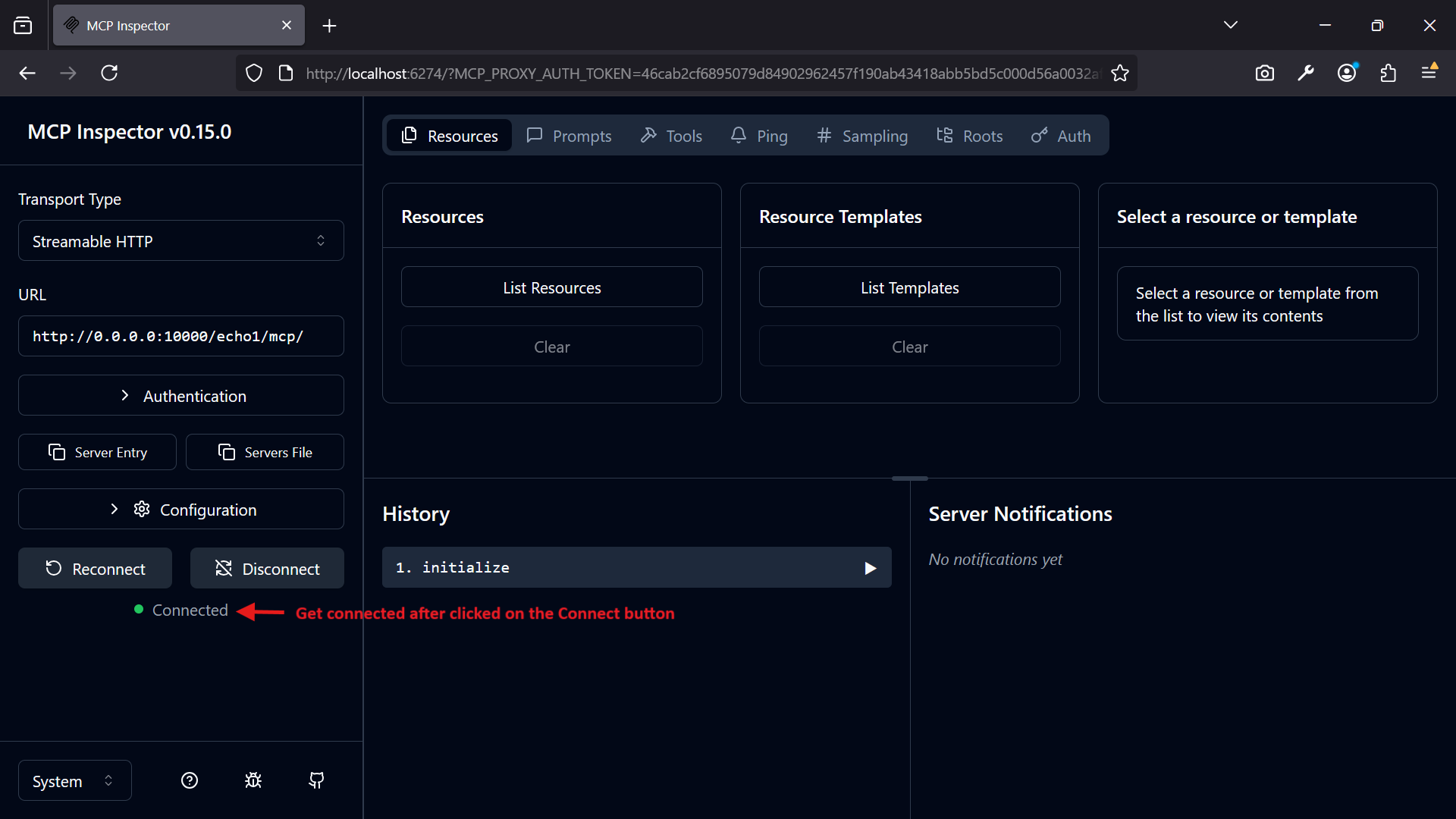
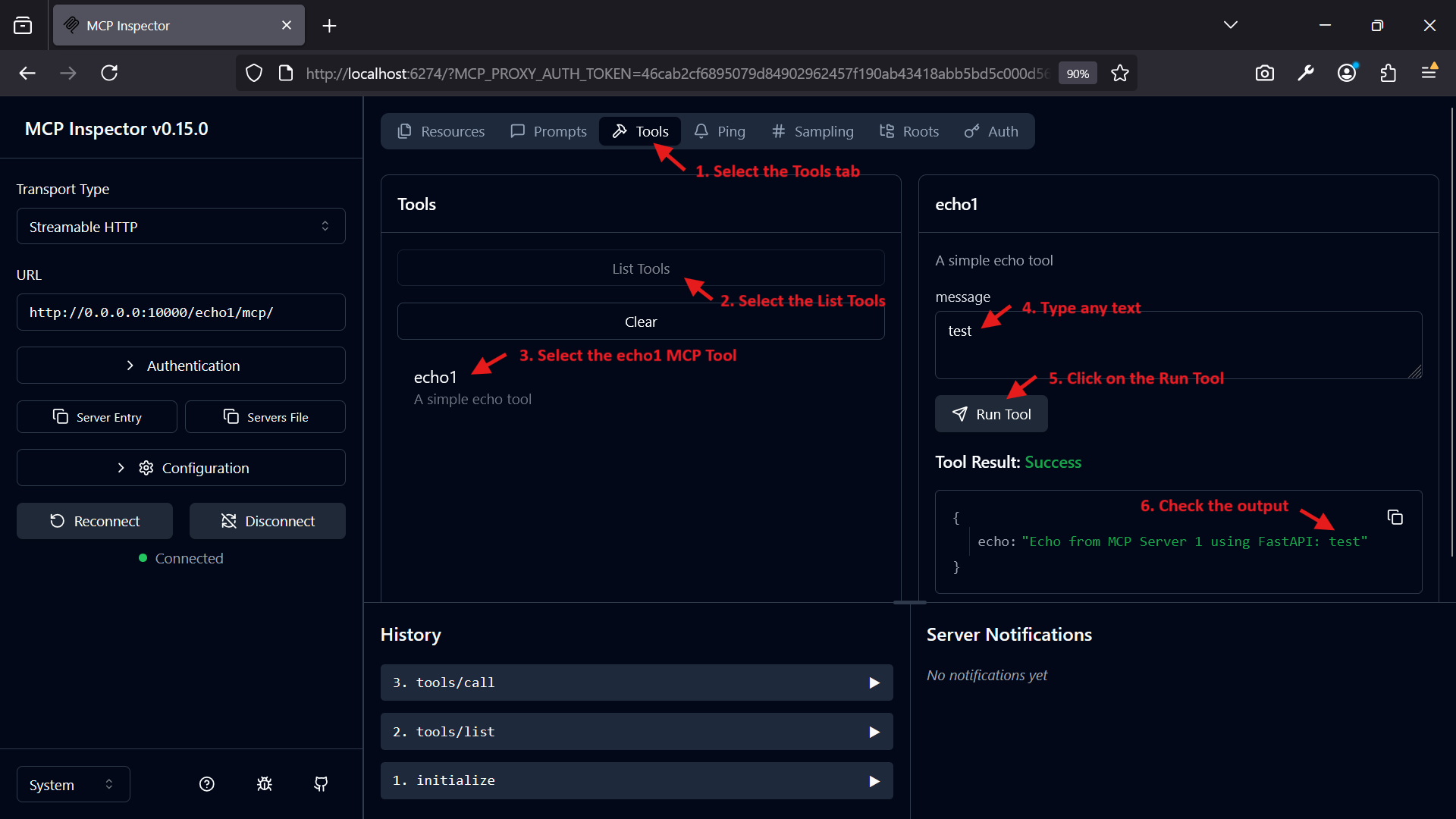
Configure the Inspector to connect to http://0.0.0.0:10000/echo1/mcp/ for McpServer1.
Test the echo tool:
Input:
{
  "message": "test"
}
Expected Output:
{
"echo": "Echo from MCP Server 1 using FastAPI: test"
}
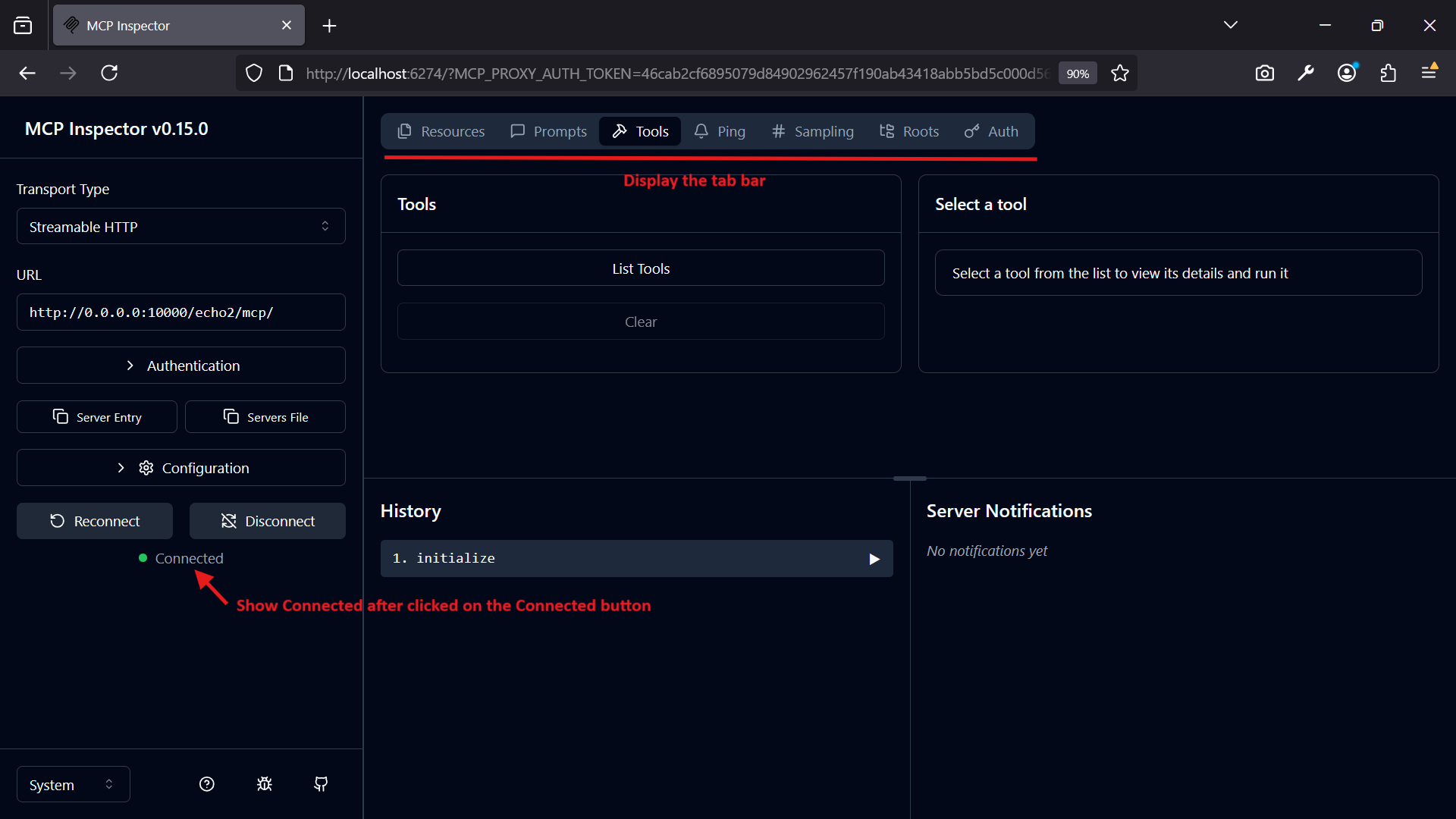
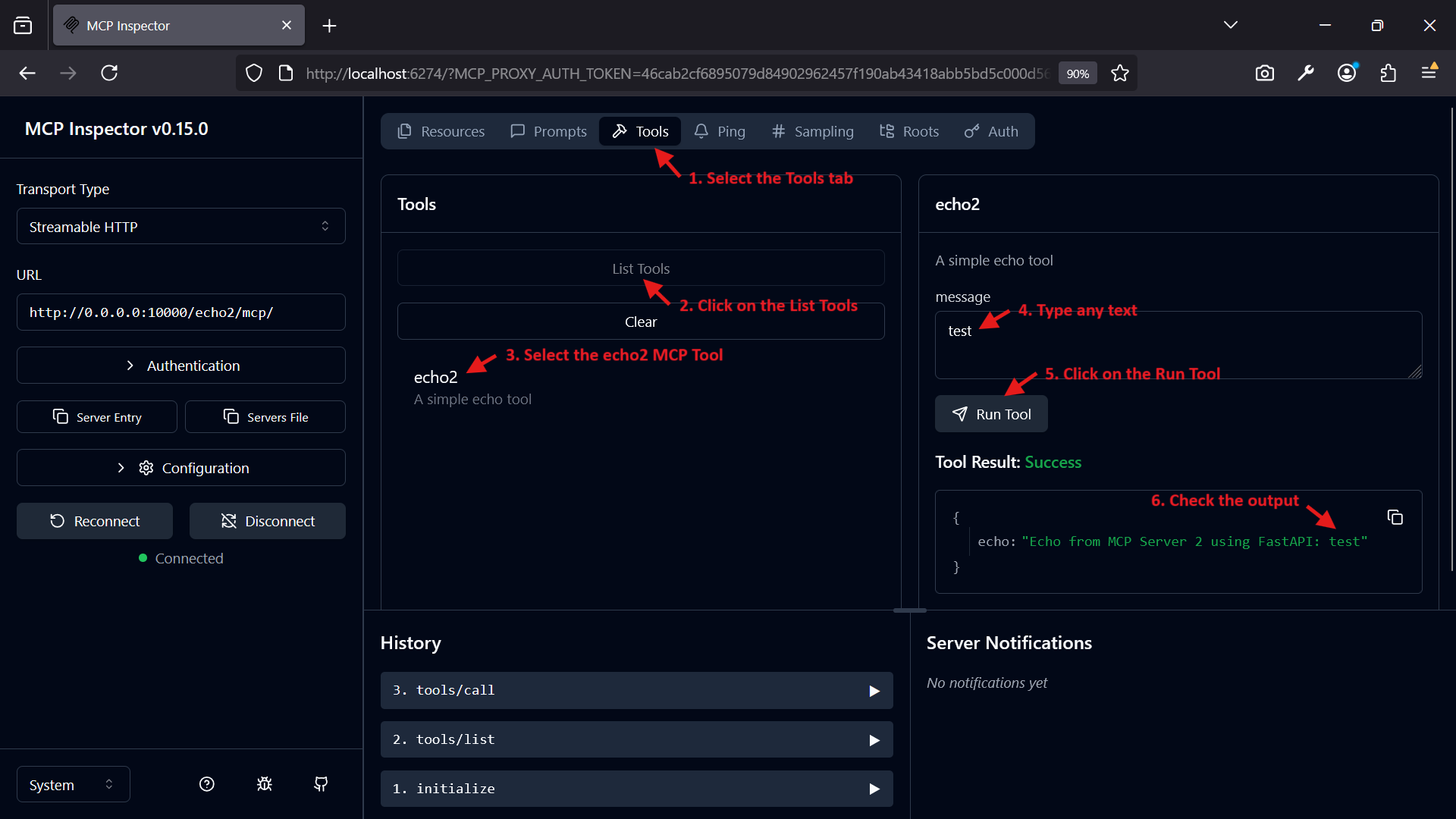
Configure the Inspector to connect to http://0.0.0.0:10000/echo2/mcp/ for McpServer2.
Test the echo tool:
Input:
{
  "message": "test"
}
Expected Output:
{
  "echo": "Echo from MCP Server 2 using FastAPI: test"
}
🧩 Workflow
Choose the Server Type:
Use mcp-server-fastapi.py for a multi-MCP HTTP server.
Use mcp-server-with-streamable-http.py for a standalone HTTP-based MCP server.
Use mcp-server-with-stdio.py for stdio-based communication, typically managed by the MCP Inspector.
Start the Server:
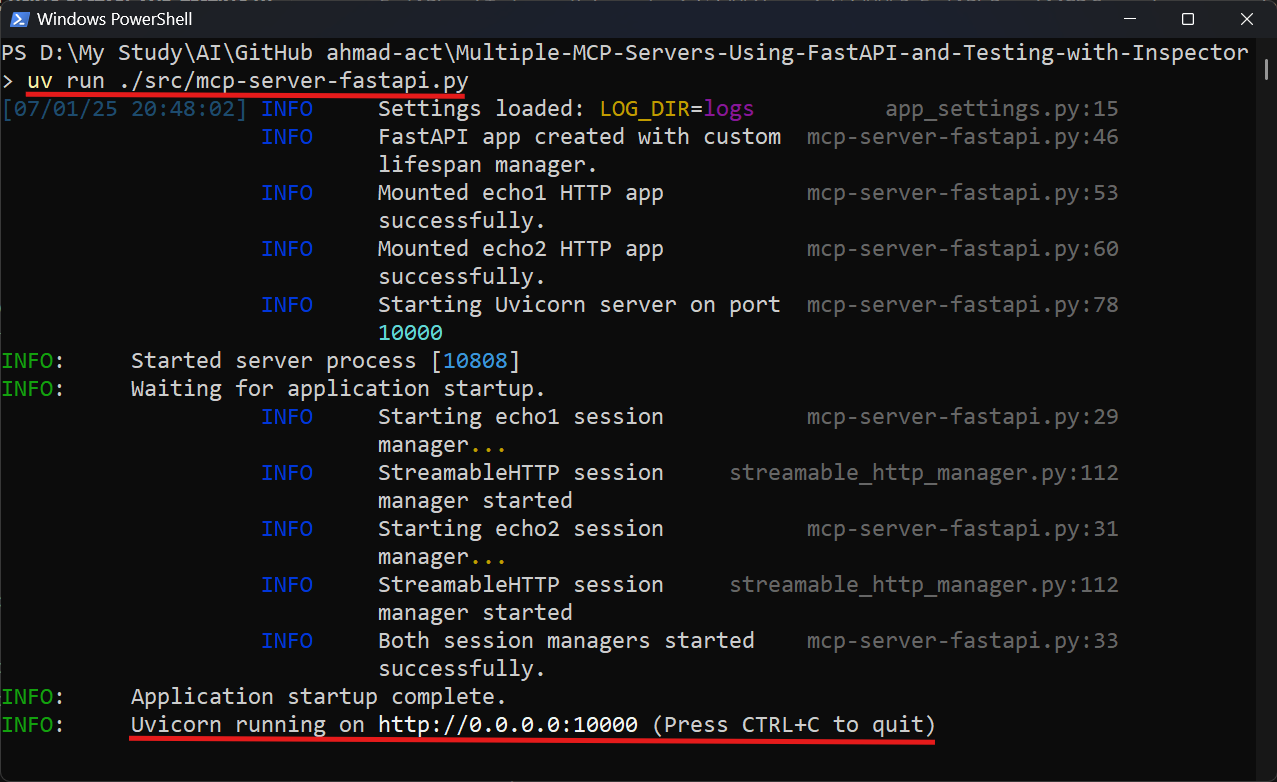
For FastAPI or streamable-http servers, run the respective script with uv run.
For the stdio server, use the MCP Inspector to launch the server.
Interact with MCP Tools: Use the MCP Inspector to connect to the server and test the echo tool.
Monitor Logs: Check logs in the logs/ directory (or the directory specified in LOG_DIR) for debugging and monitoring.
Graceful Shutdown: Press Ctrl+C or send a SIGTERM signal to shut down HTTP-based servers gracefully. For the stdio server, shutting down the Inspector will terminate the server.
📝 Logging
Logs are stored in the directory specified by the LOG_DIR environment variable (default: logs/).
Log files are named in the format YYYYMM.log (e.g., 202507.log for July 2025).
Logs rotate when they reach 5 MB, with up to 5 backup files.
Old log files can be cleaned up using the cleanup_old_logs function in logging_config.py.
Example log output:
2025-07-01 13:06:00,123 - __main__ - INFO - Starting FastMCP server with streamable-http transport...
2025-07-01 13:06:00,125 - __main__ - INFO - FastMCP server initialized successfully.
🛑 Graceful Shutdown
All servers handle SIGINT (e.g., Ctrl+C) and SIGTERM signals to ensure graceful shutdown:
MCP servers are shut down cleanly.
Logs are updated with shutdown status.
The process exits with a status code of 0.
🧭 Notes
Transport Options:
streamable-http is recommended for HTTP-based communication due to its efficiency.
stdio is suitable for environments where direct stdin/stdout communication is preferred, typically with the MCP Inspector.
Port Configuration:
The FastAPI server uses port 10000 by default (configurable via PORT).
The streamable-http server uses port 8001 (hardcoded).
The stdio server does not use a network port.
MCP Inspector: Required for testing all servers. Ensure it is running to interact with MCP tools.
🛠️ Troubleshooting
Server Fails to Start:
Check logs in the logs/ directory for errors.
Ensure the PORT environment variable is a valid integer for HTTP-based servers.
Verify that port 8001 (for streamable-http) or 10000 (for FastAPI) is not in use.
MCP Inspector Cannot Connect:
For HTTP servers, verify the server is running and the endpoint URLs are correct.
For the stdio server, ensure the Inspector command includes the correct --directory path.
Log Files Not Created: Ensure the LOG_DIR directory exists and is writable.
Dependency Issues: Run uv sync to ensure all required packages are installed.
M
Multiple MCP Servers Using FastAPI And Testing With Inspector
ahmad-act·4 stars·
This project provides a framework for running multiple Model Context Protocol (MCP) servers using different transport mechanisms: FastAPI-based HTTP servers, standalone streamable-http servers, and st
1# Multiple MCP Servers Using FastAPI And Testing With Inspector
M
README.mdMCP server
Transport
stdio
Status
Local
Overview
About Multiple MCP Servers Using FastAPI And Testing With Inspector
This project provides a framework for running multiple Model Context Protocol (MCP) servers using different transport mechanisms: FastAPI-based HTTP servers, standalone streamable-http servers, and stdio-based servers.
Tools
Tools
No tool list yet. Remote servers get one after the first health check.
FAQ
Questions
How do I install Multiple MCP Servers Using FastAPI And Testing With Inspector?
Copy the stdio config for Cursor, Claude Desktop, Claude Code, or VS Code on this page. It uses the publisher's install, not a PlugMCP proxy.
Does Multiple MCP Servers Using FastAPI And Testing With Inspector need an API key?
No required environment variable is listed on this record.
What transport does Multiple MCP Servers Using FastAPI And Testing With Inspector use?
Multiple MCP Servers Using FastAPI And Testing With Inspector runs locally over stdio.
When was Multiple MCP Servers Using FastAPI And Testing With Inspector last checked?
Last checked 2026-10-27. This project provides a framework for running multiple Model Context Protocol (MCP) servers using different transport mechanisms: FastAPI-based HTTP servers, standalone streamable-http servers, and stdio-based servers.