
What It Is
AIPermission is a local, single-user developer gateway. You register connector targets, keep their credential profiles inside an encrypted local database, and grant each AI token only the target/profile/action combinations it may use.
All built-in connectors use the same project, target, credential profile, permission, approval, history, and audit pipeline. They are connector types rather than separate product modes. The generated connector catalog is the canonical current list and owns their capability summaries.
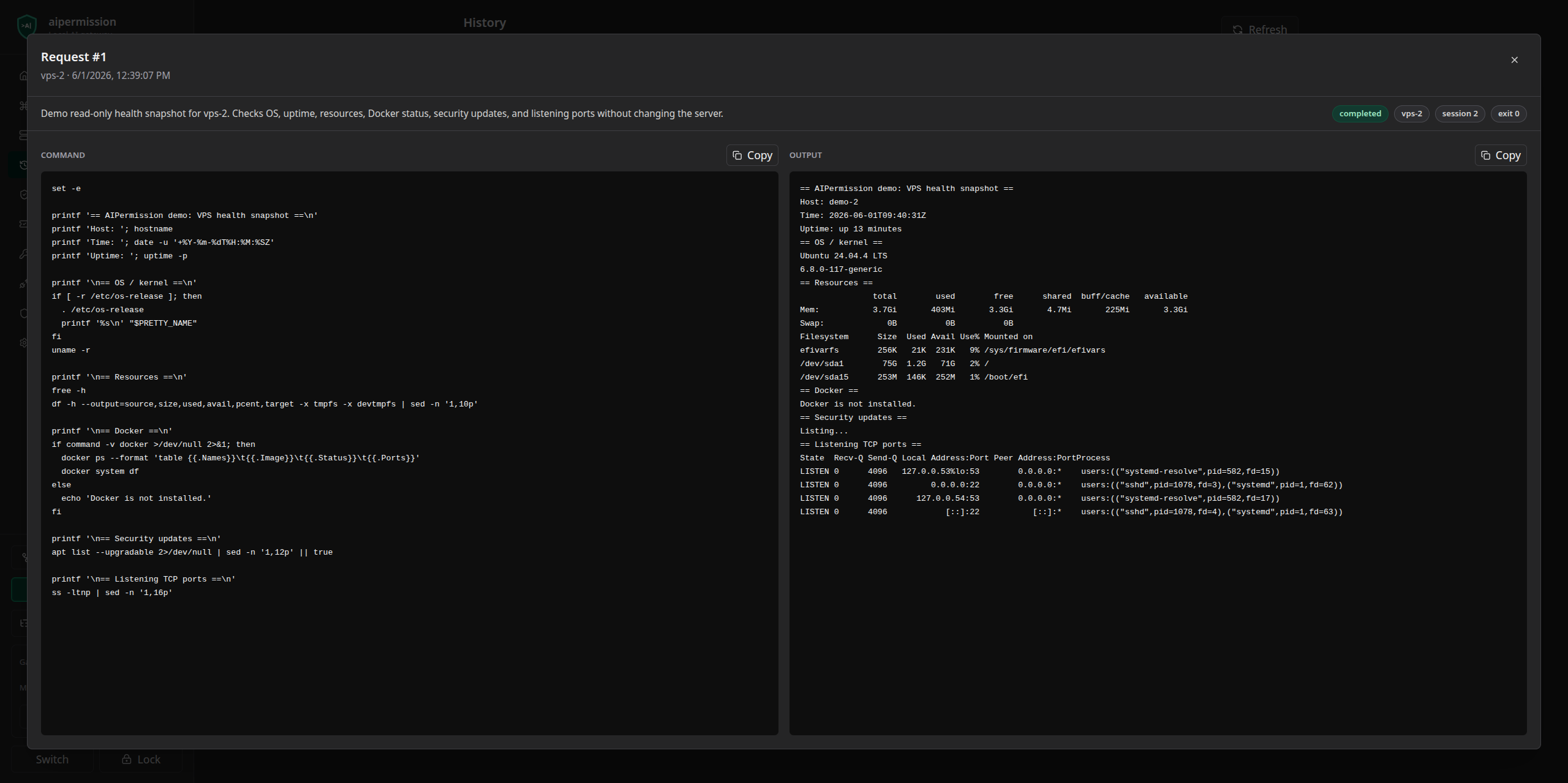
History and audit are encrypted, local, retention-controlled records for the active database. They are not an immutable external audit archive: configured retention can delete them, and deleting or replacing the local database removes its records.
Settings shows per-token connector request storage usage, result reservations, running work, and warnings before capacity is exhausted. Retained output counts toward storage limits even when no action is running. Review capacity and retention guidance rather than assuming that waiting alone frees retained records.
Local-only security boundary: run AIPermission on your own machine and keep its published Docker port bound to
127.0.0.1. It is not a remote multi-user service, LAN gateway, hosted control plane, or team RBAC system. Do not change the Compose bind to0.0.0.0; browser session, Host, CORS, and CSRF checks are defense in depth, not remote authentication.
AIPermission is pre-1.0 developer software. Read the project principles, threat model, and credential boundary before using it with important systems.
Security updates cover both gateway images and the MCP client's Node.js runtime. Use patched Node 22.23.4+, 24.22.1+, or 26.12.1+ for MCP, then restart the client after upgrading its interpreter. See the changelog and native dependency inventory, including the explicitly tracked SQLCipher upstream follow-up.
Why
Without a gateway, AI-assisted operations often alternate between generated commands and pasted terminal output, or expose broad credentials directly to an agent. AIPermission provides a third path:
- The developer stores credentials in the local encrypted gateway.
- An MCP token receives explicit project and connector action permissions.
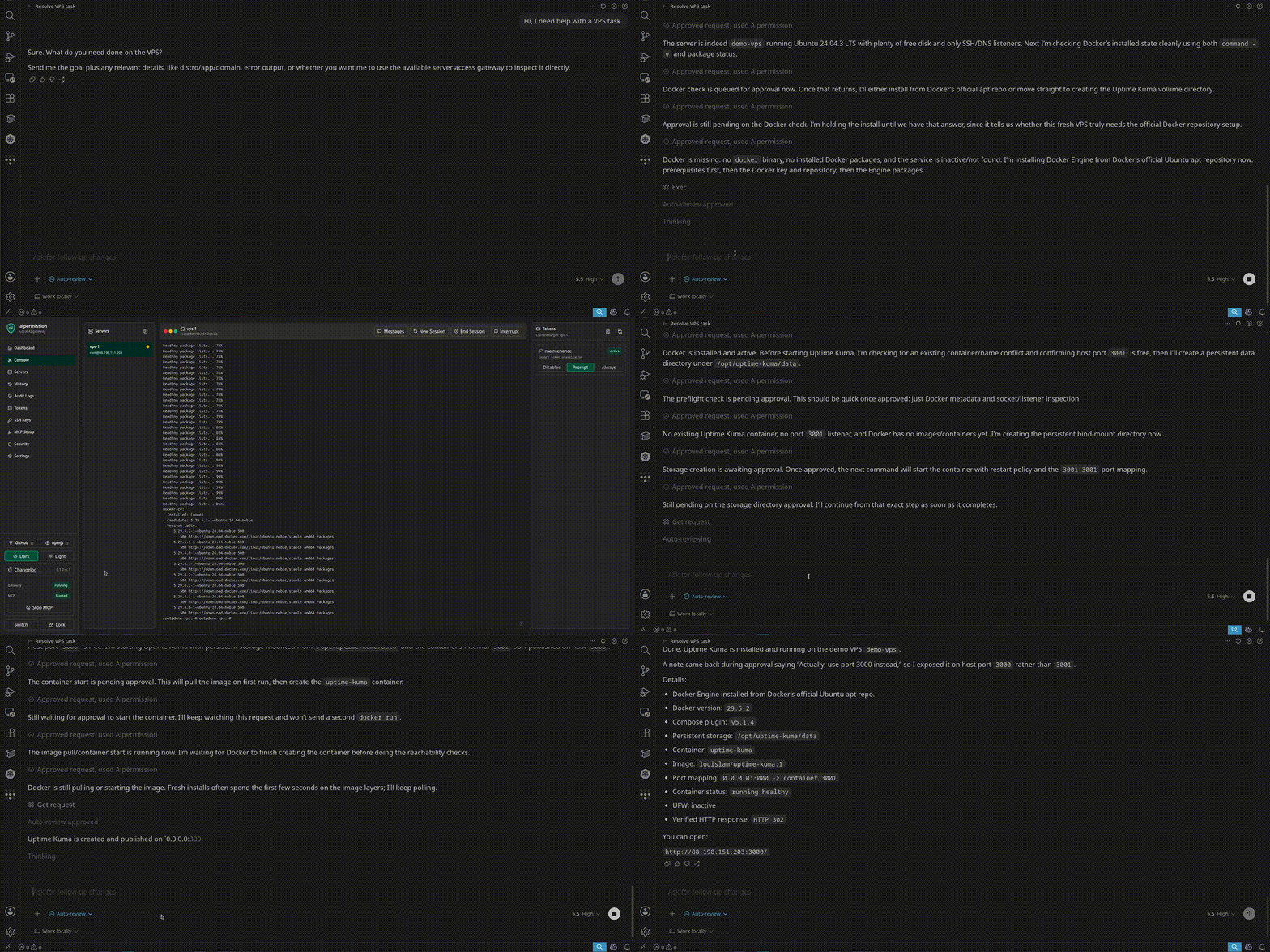
- The AI requests a connector action with a reason.
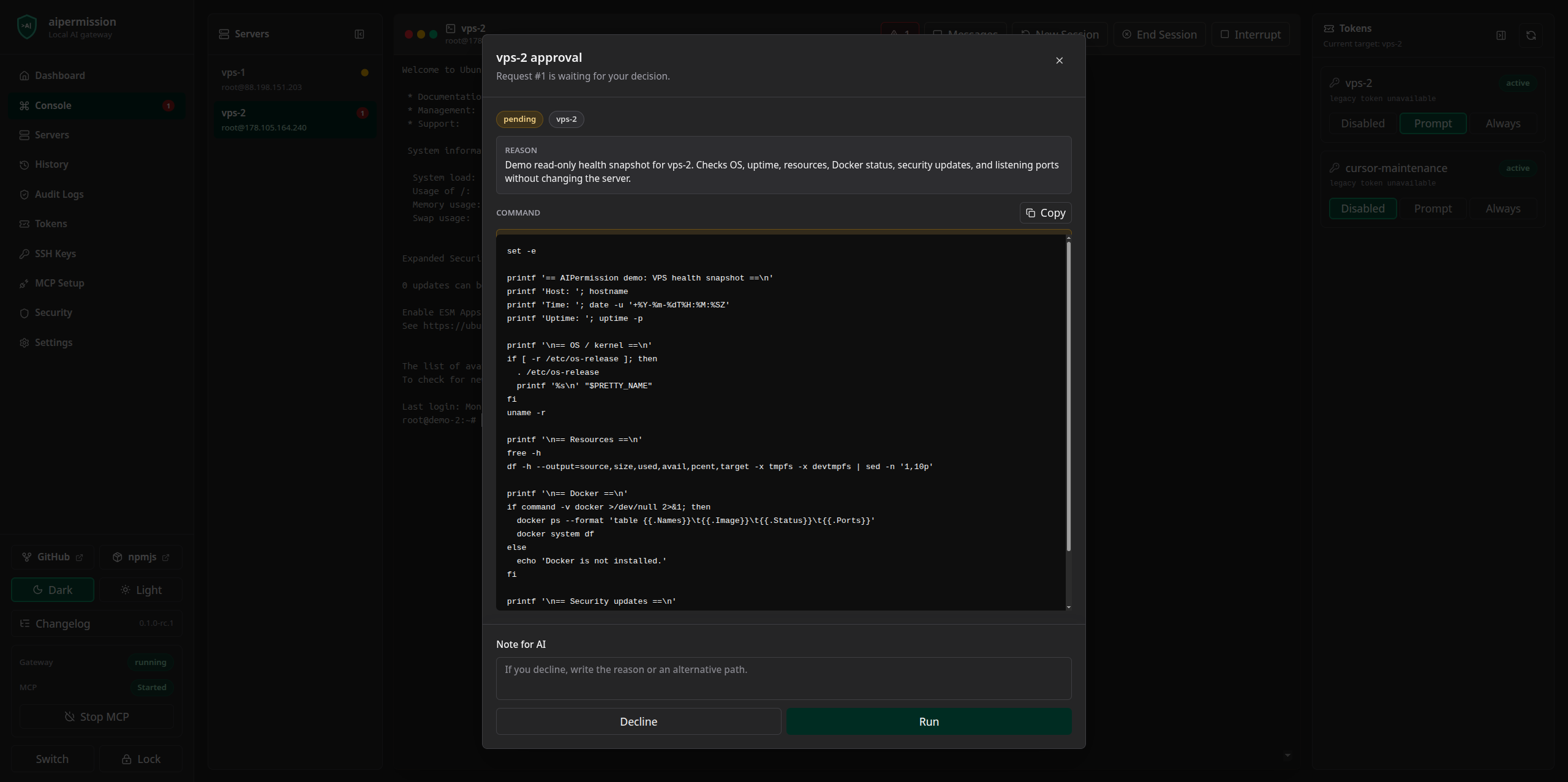
- The gateway blocks it, asks the developer, or runs it according to the current effective rule.
- Results appear in structured History and Audit; supported runtime connectors also expose live local console surfaces.
Connector credentials are used only inside the gateway. They are not returned through MCP or the normal REST API.
Screenshots
| Human approval | Live connector console |
|---|---|
 | 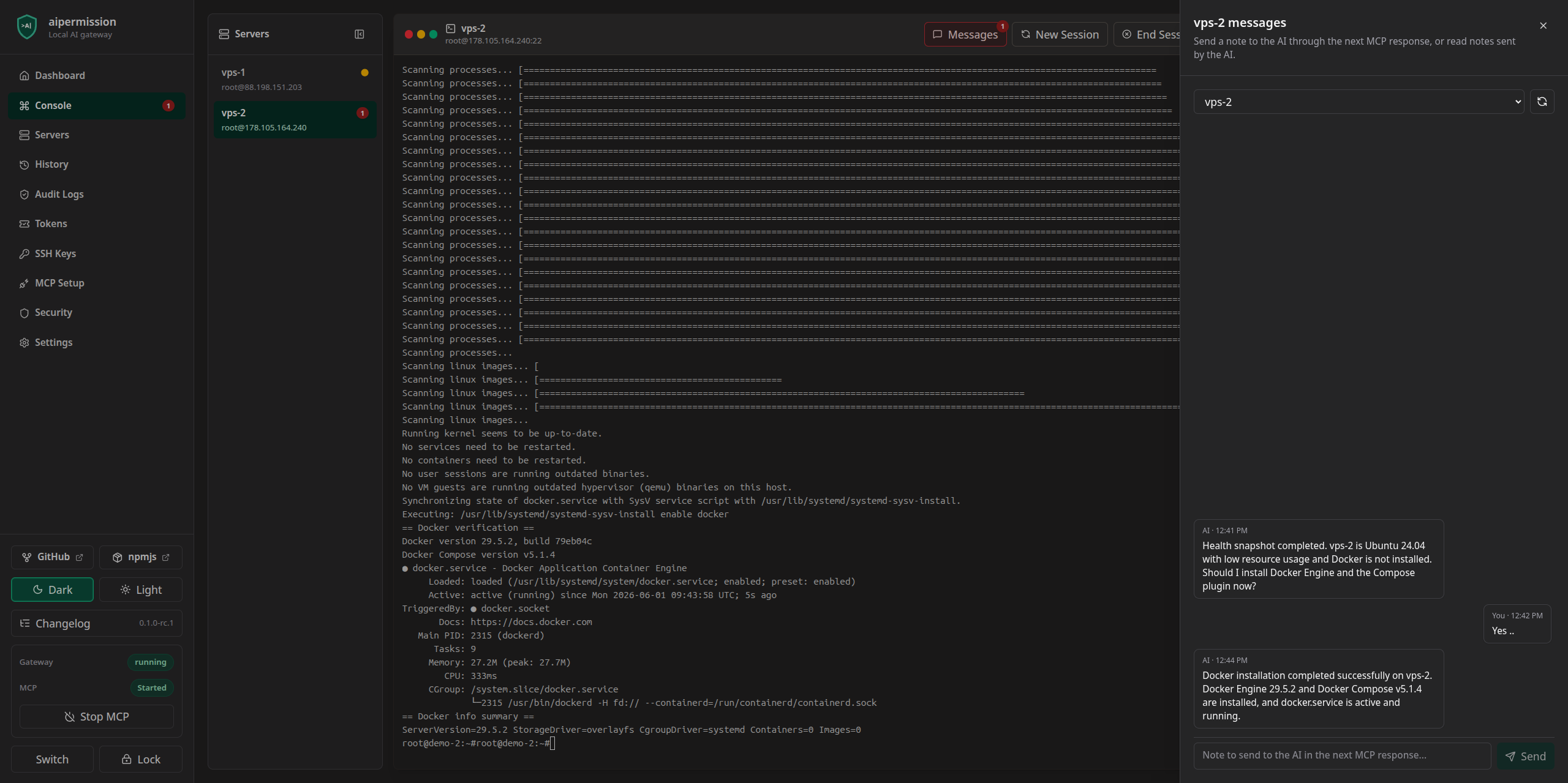 |
| Token-scoped access | Auditable history |
|---|---|
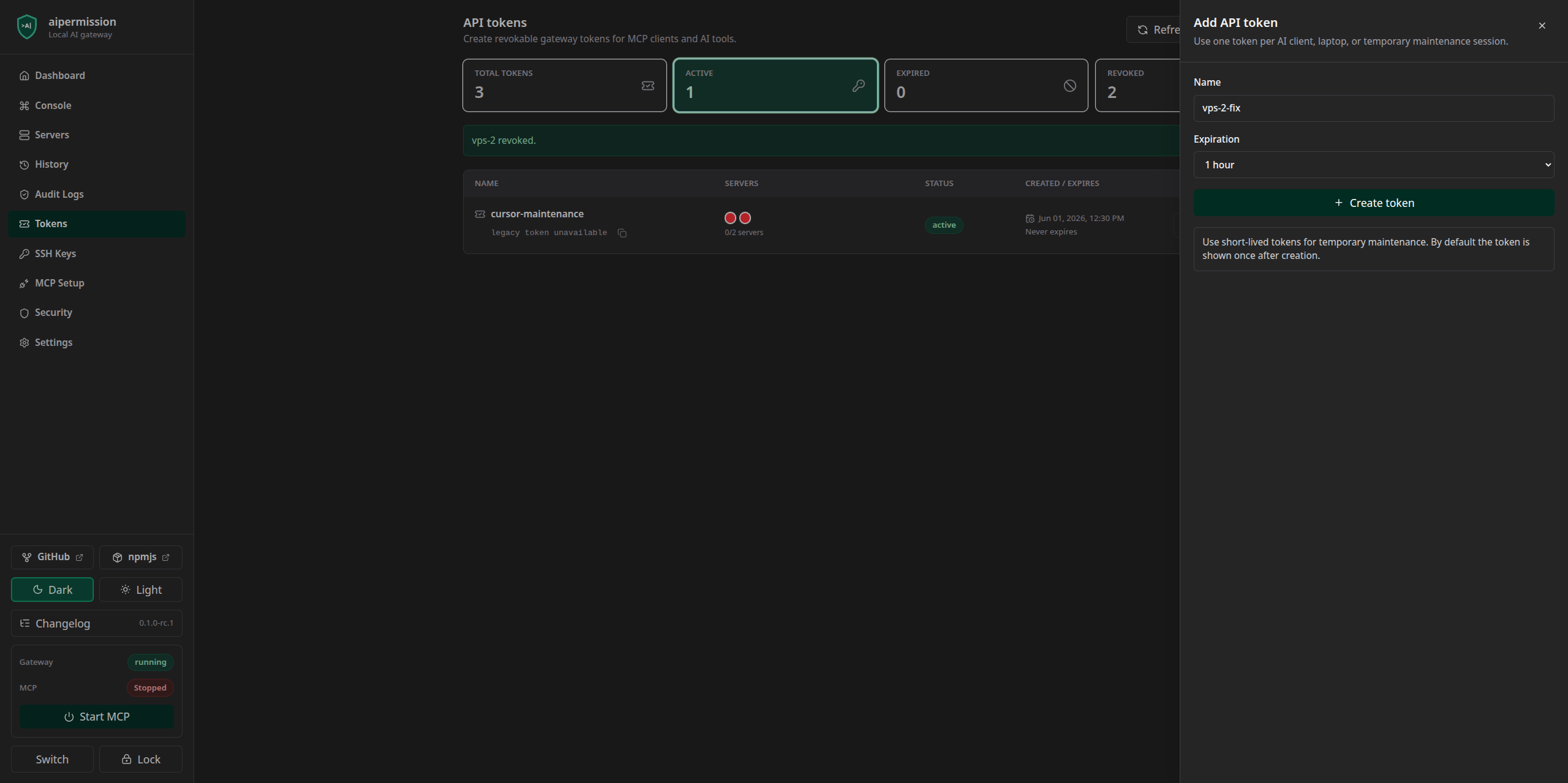 |  |
Quick Start
Requirements:
- Docker with Docker Compose
- Patched Node.js 22.23.4+, 24.22.1+, or 26.12.1+ with npm/npx for the MCP bridge; Node.js 24.22.1 is the reviewed development toolchain
Start from a full Git checkout so version pinning and repository verification metadata remain available:
git clone https://github.com/aipermission/aipermission.git
cd aipermission
Start from published images:
docker compose -f docker-compose.release.yml pull
docker compose -f docker-compose.release.yml up -d
docker compose -f docker-compose.release.yml ps
curl --fail http://localhost:3210/health
Or build the current source tree:
docker compose up -d --build
docker compose ps
curl --fail http://localhost:3210/health
Open:
http://localhost:3210
Both Compose files publish only to 127.0.0.1. The backend is not exposed as
a separate host port. To use another local UI port:
AIPERMISSION_FRONTEND_PORT=3212 docker compose up -d --build
The release Compose file defaults to the version shipped in the checkout, so
these commands work unchanged in POSIX shells, PowerShell, and Command Prompt.
To run a different release, set AIPERMISSION_VERSION in your shell first.
Avoid opting into mutable latest when you need reproducible upgrades or
rollback.
export AIPERMISSION_VERSION=VERSION
docker compose -f docker-compose.release.yml up -d
Containers use the unless-stopped restart policy. See
Docker Runtime for Windows line endings, host
services, logs, and recovery guidance.
Published container images are currently built and validated for Linux AMD64. ARM64 hosts may use platform emulation or build from source, but native ARM64 images are not yet part of the supported release matrix. If startup or health verification fails, inspect the first bounded log sample before changing the gateway bind or deleting local data:
docker compose -f docker-compose.release.yml logs --tail=100
First Setup
- Create and unlock an encrypted local database.
- Create or select a Project.
- Add a credential profile.
- Add a connector target and bind its profile.
- Test the connector.
- Create an MCP token.
- Enable the projects that token may discover.
- Grant target/profile/action rules.
- Configure the token in the AI client.
- Start MCP from the sidebar.
Projects organize one developer's local workspace; they are not team tenancy. See Projects. Project Vault is a separate project-scoped secret inventory and exact-session application flow; see Project Vault.
MCP Setup
Install the official MCP bridge into a supported client:
npx -y @aipermission/mcp@VERSION setup \
  --provider codex \
  --scope user \
  --name aipermission
The setup command asks for the API token with a hidden prompt, writes a config pinned to the package version that created it, and installs the native operator skill. Restart the AI client after installation.
Validate both paths without printing the token:
npx -y @aipermission/mcp@VERSION doctor --client codex --scope user
Supported client presets and source-development setup are documented in MCP Client Setup. The MCP tool contract is documented in MCP Tools.
Replace VERSION with the exact published version you intend to pin.
When reading a development branch, use the matching local package build instead
of copying a placeholder command.
Execution Rules
Each token/target/profile/action permission resolves to one backend rule:
blocked: execution is deniedapproval_required: a pending request appears in the local UIalways_run: execution starts after current token, project, target, credential, and action checks pass
The UI presents these as Disabled, Prompt, and Always where appropriate. Use Prompt for real systems until the workflow is trusted. Temporary permissions can expire automatically. The global MCP Started/Stopped switch is an additional runtime boundary; saved Always rules do not bypass a stopped MCP gateway.
Pending approvals carry a context snapshot. Relevant token, permission, connector, target, credential, dependency, or action changes make the request stale and require a fresh approval. See MCP Permission Flow.
Security Model
Important boundaries:
- Runtime data is stored in a SQLCipher-encrypted local SQLite database.
- Connector-profile credentials stay gateway-owned and are not exposed as credential data to the AI client. Permitted target output remains untrusted; see the credential boundary for the exact class-specific response and redaction contract.
- MCP clients authenticate with scoped API tokens, not connector credentials.
- Web mutations require the unlocked local browser session and CSRF checks.
- Lock/session invalidation hides cached unlocked views in active same-origin tabs. Focus and bounded status checks reconcile other clients; browser notifications cannot unlock a database or grant authorization.
- Connector outputs, command text, mail content, paths, and notes are untrusted data and may contain secrets.
- Gateway-held credentials and correctly declared sensitive fields use a mandatory boundary; pattern matching for arbitrary output remains best-effort. Disabling optional pattern rules does not disable the mandatory credential boundary. See the redaction guarantee matrix, and do not intentionally print credentials into action output or console transcripts.
- Always is for intentional trusted automation, not a substitute for least privilege.
- Resource identifiers are exact action data, not display labels. Do not trim, truncate or repair a returned name before a later operation. Connector contracts reject identities that cannot cross their action boundary losslessly; see the MCP connector boundaries.
- A timeout or lost reply after dispatch is not proof of failure. Preserve the
original request and idempotency key, and reconcile
outcome_unknownbefore another external attempt; see the operator retry guidance. - Downloaded encrypted database backups remain sensitive and require a strong database password. Changing the active database password does not re-encrypt existing snapshots or backups; review old copies separately if a password was compromised. See encrypted storage.
- The unlocked backend process and trusted browser profile are part of the local security boundary.
Canonical detail:
- Security Policy
- Threat Model
- Credential Boundary
- Storage Encryption
- Backup And Restore
- Native Dependencies
Backup And Migration
The UI can download and import encrypted .aipdb database files. The optional
self-hosted AIPermission Backup provider stores versioned encrypted database
streams without receiving the database password or encryption key. See
AIPermission Backup.
Recovery-grade database and transfer downloads require a browser with a native
streaming Save dialog so the UI never buffers an unknown-size encrypted
artifact in memory. Other bounded downloads can use the response-stream
fallback, which buffers at most 64 MiB. Browsers without response streaming
cannot safely download through this UI.
Version 0.2.0 established the connector-native database baseline. Important 0.1.x preview data can be imported with the local one-time migration helper; the normal gateway intentionally carries no pre-0.2 compatibility shim. See Database Migration.
Development
Install the independently locked repository verification, frontend, and MCP packages, then run the standard gates:
npm ci --prefix scripts --workspaces=false
npm ci --prefix frontend --workspaces=false
npm ci --prefix packages/mcp --workspaces=false
make -f Makefile test
make -f Makefile build
make -f Makefile audit
The package-local lockfiles are canonical. Do not run npm install at the
repository root or create a root package-lock.json.
Full release validation:
make -f Makefile release-check
Useful package checks:
npm --prefix frontend run lint
npm --prefix frontend run format:check
npm --prefix frontend run test:coverage
npm --prefix frontend run test:e2e
npm --prefix packages/mcp run build
Read CONTRIBUTING and Development Testing before opening a pull request. Releases use RELEASE_CHECKLIST.md.
Developing Connectors
A normal connector adds:
backend/internal/connectors/<kind>/frontend/src/connectors/templates/<kind>/- connector metadata, docs, and tests
It must use the generic connector pipeline rather than adding its own permission, approval, history, audit, or MCP tool family. Runtime-backed capabilities require reviewed shared adapter contracts.
The complete contract, isolation rules, required frontend slots, credential schema requirements, and test checklist live in Add A Connector.
Documentation
S3 operations preserve exact object keys; see the S3 transfer identity and mapping limits.
docs/index.md is the canonical navigation and ownership index. Use it for architecture, setup, security, API, connector, operator, and maintainer documentation.
Project Status
AIPermission is pre-1.0, local-only developer software. Breaking changes may be made when they remove technical debt or strengthen the security model, and are documented in release notes. Only the latest tagged stable release receives security fixes.
The public roadmap is in docs/ROADMAP.md.
For a reproducible bug, open a bug report. For a security-sensitive finding, use the private reporting instructions in SECURITY.md, not a public issue. Design proposals can start in GitHub Discussions.
License
AIPermission is licensed under AGPL-3.0-only from v0.1.14 onward. See LICENSE.
Versions through v0.1.13 remain available under their original MIT license. Commercial use is allowed under AGPL terms; forks must not imply endorsement by the official AIPermission project.