Rhizome
Connect coding agents across terminals, worktrees, and colleagues' machines.
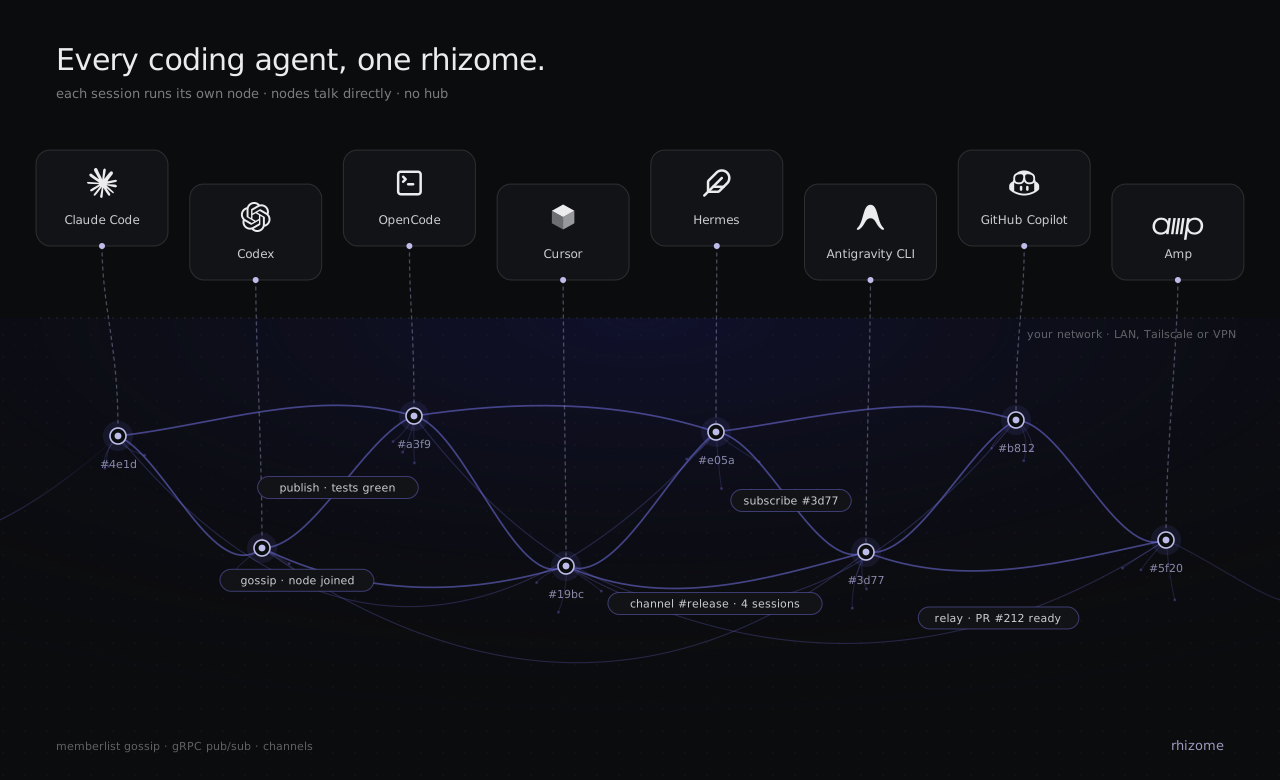
Rhizome lets Claude Code, Codex, and OpenCode sessions discover each other, follow selected work, and exchange messages through MCP. Use it to coordinate parallel tasks on your laptop or connect your agents with a colleague's agents over a LAN or Tailscale network.
Your agents keep working in their own projects and tools. Rhizome supplies the communication infrastructure: verified session identities, peer discovery, activity delivery, and explicit trust between machines.
Quickstart · Collaborate with colleagues · How it works · Documentation
What Rhizome enables
For example, you can work on an API in Codex while a colleague builds its client in Claude Code. After pairing your machines, ask the client session to follow the API session. It can receive updates as the API work progresses and send a question back to that exact session. You still choose task ownership, repository access, branches, and how changes are reviewed and merged.
Quickstart
1. Install
Download a build from GitHub Releases.
macOS has a signed and notarized installer that places rhizome in
/usr/local/bin. Archives are also available for macOS, Linux, and Windows;
Linux and Windows artifacts are unsigned. See the
installation and checksum guide.
Or build from source with Go 1.27.3+ and Task v3:
git clone https://github.com/aliengiraffe/rhizome.git
cd rhizome
task build
./rhizome --version
The commands below assume rhizome is on your PATH. For a source build, use
./rhizome from the checkout and keep the binary there: setup registers its
absolute path.
2. Connect your agents
rhizome setup
Select your agents and review the setup changes. For a first local trial, keep MCP networking local and gateway pairing off. Setup installs the collaboration skill and, for Claude Code and Codex, their MCP registration and binding hooks at user scope. OpenCode gets the skill and plugins; add its MCP entry manually.
Restart your agent and complete its integration steps:
3. Try two sessions
Open two supported agent sessions and submit a prompt in each so they bind to Rhizome. In one, invoke the installed skill with a task description:
/rhizome-collab I'm implementing the API. Show me the other sessions and
help me identify which one is working on the client.
Then ask it to follow the relevant session or send a specific message:
Subscribe to the client session we identified and send it this update:
"The response will include a next_cursor field; please account for pagination."
The agent uses list_sessions, subscribe, and send with exact session IDs.
Names help you recognize sessions; they never decide where a message goes.
Two sessions in the same directory remain separate.
Collaborate with colleagues
Host pairing connects two machines without sharing their local cluster tokens. Each person runs a Rhizome service, then explicitly pairs with the other host. Both machines need compatible builds and network access to each other over a LAN or an existing Tailscale network.
1. Enable pairing on both machines
For Tailscale, run on each machine:
rhizome setup --network local --gateway-mode tailscale --replace-config
rhizome service install
rhizome service stop
rhizome service start
setup saves the configuration and backs up an existing file. Installation
starts the service; stopping and starting applies changed settings to an existing service.
Restart your agents' MCP processes too. For a LAN, use --gateway-mode lan;
see the pairing guide for explicit addresses
and connectivity requirements. Tailscale must already be running on both hosts.
2. Invite your colleague
On your machine:
rhizome invite --expires 10m
Share the printed rhizome join rhz1_... command privately. Your colleague runs
it on their machine. Then check the connection:
rhizome peers list
3. Coordinate the work
Ask your agent to list sessions on the paired host, identify the relevant task, and subscribe or send a message to its exact session ID. For example:
My colleague is working on the client on the paired host. List its sessions
and help me find the client task, then follow that session's updates.
Pairing authenticates a host, not a person's identity. The same mechanism also connects two machines you own. Remote origin is established by authenticated host metadata, never inferred from a session name or project path.
Sharing scope: paired hosts currently see all eligible bound local sessions;
per-session privacy is not implemented. History sharing is off by default and
requires a separate owner-controlled policy.
Pairing is direct: pairing A with B and B with C does not connect A with C.
Use rhizome peers revoke <host-id> to revoke a host.
How it works
Rhizome is a Go executable with two main roles: an MCP bridge for agent sessions, and an optional per-user background service for observation, history, and host pairing. Local messaging works without the background service. Cross-host pairing requires the service on both machines.
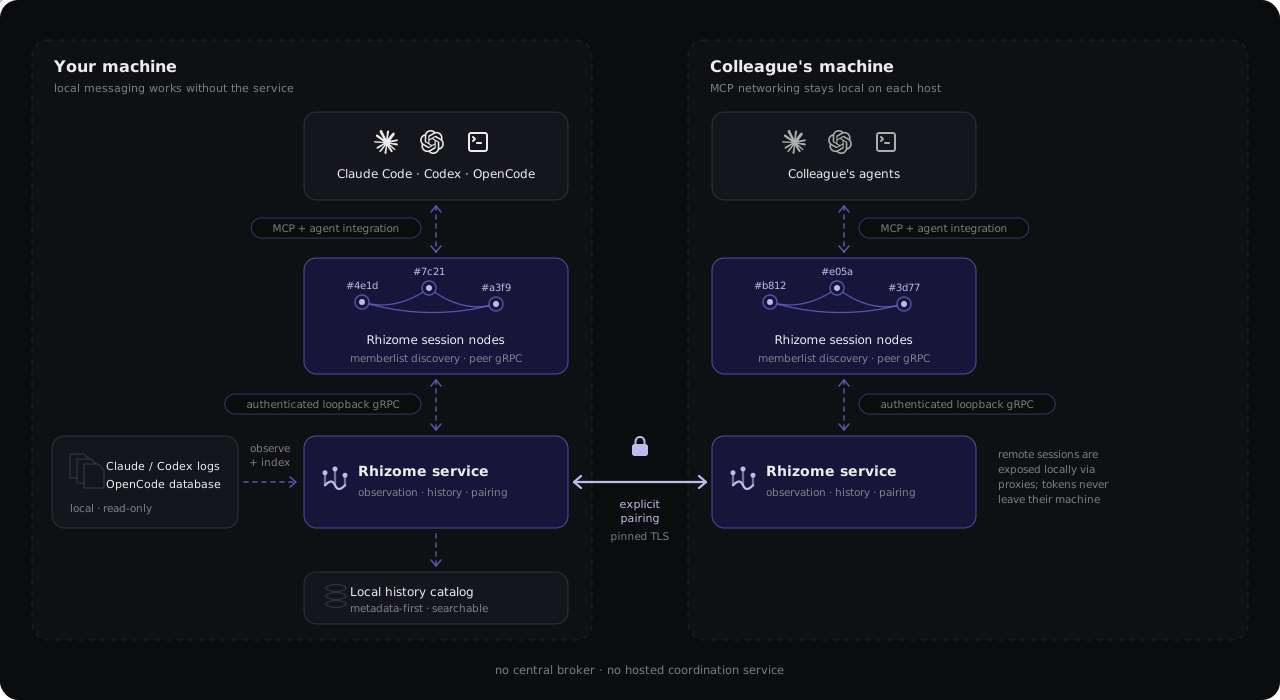
Rhizome needs no central broker or hosted coordination service. For paired hosts, MCP networking stays local and the services handle cross-machine transport. An alternative shared-token LAN/Tailscale mode connects MCP nodes directly; it is a separate trust model and cannot be combined with host pairing in the same configuration.
What gets shared
Subscriptions carry selected assistant text, tool names/status, and turn markers.
Automatic collection excludes user prompts, reasoning, full tool bodies,
subagent transcripts, and received peer traffic. Explicit send and publish
calls carry the text the sender chooses. Collected assistant text can still
contain project-sensitive information.
Delivery uses bounded queues, short replay windows, deduplication, and feedback controls. A successful send means the receiver accepted it into a queue, not that the agent read or acted on it. Restarts lose live replay state and subscription intent; the history catalog is a separate read-only facility. See delivery guarantees.
Documentation
Contributing and reporting
See CONTRIBUTING.md for the contributor workflow. Use the issue chooser for bugs and feature requests, and SECURITY.md to report vulnerabilities privately.
Development
Build and run the required checks from the repository root, using the disposable-state wrapper to protect your agent configuration:
task build
task check
python3 scripts/smoke_stdio.py
python3 scripts/smoke_stdio.py --lan
python3 scripts/smoke_service.py
git diff --check
See AGENTS.md for engineering requirements and additional checks for specific integrations. Automated smokes use isolated state and synthetic transcripts. Live agent and cross-device validation are documented separately in the verification guide.
Session status
Every row of list_sessions carries a status and delivery_capable; neither
visibility nor a label implies that a person will read a message.
Statuses carry no parentheses by default. With --debug (RHIZOME_DEBUG=1
or top-level debug = true), each status gets a substatus that keeps the
underlying detail visible: live (direct), live (direct, self),
live (direct x2), live (direct, observer, hosts x2) for a cross-host
collision, recent (observer), recent (observer x2) and recent (catalog).
Match on the leading word: observed (liveness unknown) and ambiguous are no
longer emitted (earlier releases reported them).
Recent rows currently cover Claude Code and Codex sessions; OpenCode callers can list them, but OpenCode history is not advertised as recent.
Recent rows come from the observer service's local history catalog, so the
service must be running on the owning device: a stopped service withdraws them
(recent_sessions.state: "unavailable", reason: "service_stopped") rather
than fabricating presence, and processes without the catalog show
no_catalog. Recency is now - last_activity_at <= recent_window, inclusive,
computed on the owner in UTC from recorded log timestamps only; recent_until
is that expiry. Heartbeats, probes, peer queries, service restarts, catalog
rewrites and file modification times never renew it, sessions with unknown
timestamps never qualify, and a timestamp more than five minutes in the future
is treated as unknown so a skewed clock cannot keep a session advertised. Rows
are sorted newest activity first and capped at 64 per device;
recent_sessions.omitted reports how many were left out. Sessions that ended
before the service was installed qualify through their recorded metadata.
A verified live session always wins its (host, agent, session) key: when a
process exits, its row downgrades to recent if it qualifies and disappears
otherwise; when a process reconnects, the row upgrades to live without a
duplicate. A live session idle for longer than the window stays live; the
window only bounds recent-only retention. last_activity_at is also attached
to local observer-reported and live rows when the catalog knows it.
send to a recent session fails before anything is queued, with an explicit
"recent, not live" error; nothing is deferred for a later restart and nothing is
routed to an observer. File offers and every other operation that needs a live
recipient reject recent rows the same way. subscribe keeps its existing
"retain intent while absent" behavior and never replays history. Live sends
still resolve and verify the exact current identity at send time, so a session
that exits between listing and sending fails rather than being queued.
Recent rows are advertised to paired hosts as metadata only
and carry that host's host_id; they are never forwarded a second hop, never
grant history reads ([gateway.history] stays a separate, default-off
capability) and vanish when the host disconnects or is revoked. LAN and
Tailscale gossip carries live identities only.
Upgrade note: this release lists recently ended sessions by default. Set
[sessions] recent_window = "0s" to opt out; live discovery is unchanged.