RevAgent — 基于 MCP 协议的"动静结合"AI 逆向分析 Agent
让 LLM 像人类逆向工程师一样思考:先跑起来看行为,再有目的地读代码。
RevAgent 通过 MCP (Model Context Protocol) 将 Ghidra 静态反编译与 GDB/pwntools 动态调试统一编排,配合自研 Agent 行为规训方法论,实现从二进制文件到逆向结论的端到端自动化分析。
Power your agent
Install from the publisher. Not a PlugMCP endpoint.
Host a copy with our keys and logs.
No packaged release in the registry yet. Follow the repository README.
Remote URL or a command on your machine? How the two installs differ
Run on PlugMCP
A new server you create. It is not this listing's official endpoint. Use the publisher install when you want their URL and their credentials.
LaunchFrom the publisher
让 LLM 像人类逆向工程师一样思考:先跑起来看行为,再有目的地读代码。
RevAgent 通过 MCP (Model Context Protocol) 将 Ghidra 静态反编译与 GDB/pwntools 动态调试统一编排,配合自研 Agent 行为规训方法论,实现从二进制文件到逆向结论的端到端自动化分析。
MCP Servers for REV static & dynamic analysis
现有的 AI 辅助逆向工具大多停留在"把反编译代码丢给 LLM 让它解释"的阶段。这在简单场景下有效,但面对真实的高难度样本时会迅速碰壁:
RevAgent 的解法是动静结合 + 行为规训:让 Agent 在静态分析遇到瓶颈时自动切换到动态调试,同时通过方法论框架约束 Agent 的推理路径,避免幻觉和无效循环。
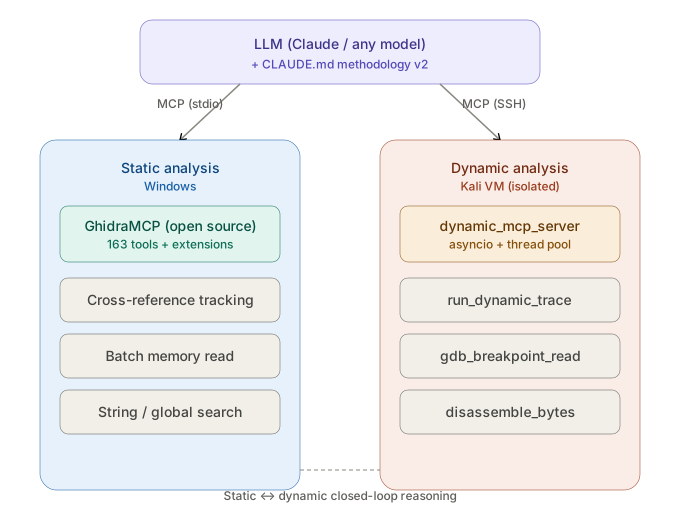
为什么是 MCP 而不是 Function Calling / LangChain?
这是 RevAgent 的核心竞争力——不是工具多,而是 Agent 知道什么时候该用哪个工具、什么时候该停下来。
任何题目,在做超过 5 分钟的静态分析之前,必须先动态运行程序观察行为。
静态反编译可能 misleading,但程序的实际交互行为不会骗你。
时间熔断:单步 thinking > 3 min → 写 Python 脚本
          单题总耗时 > 20 min → 暂停,输出进度摘要

方向熔断:同类输入连续 3 次失败 → 切换到 GDB 断点分析
          同一函数看 3 页无结论 → 切换动态分析
          追踪进入标准库内部 → 立刻停止

深度熔断:调用链 > 5 层未找到用户逻辑 → GDB I/O 断点直接观察
          所有输入返回错误 → 断点分析输入解析函数
LLM 的 Context Window 是稀缺资源。RevAgent 的策略是让 Agent 做检索,而不是做阅读:
CALL 过滤只提取调用点本质上这是一个 RAG 思路:二进制是知识库,tool call 是检索,Context 里只放当前推理需要的片段。
所有动态分析在 隔离 Kali VM 中执行,宿主机通过 SSH 隧道通信。目标二进制的任何行为(网络、文件系统、进程)均被限制在 VM 内,快照可随时回滚。
Agent 生成的调试指令通过 参数化接口 执行(如 gdb_breakpoint_read 接受结构化参数),Server 端负责拼装合法 GDB 命令,避免命令注入。每次执行有 timeout 强制终止。
asyncio event loop (主循环,处理 MCP 消息)
    │
    ├─ LLM 推理 (流式,非阻塞)
    │
    └─ ThreadPoolExecutor
         ├─ GDB 会话 (阻塞调用,run_in_executor 隔离)
         ├─ pwntools 交互 (阻塞调用)
         └─ 子进程执行 (timeout 控制)
pwntools, gdb# 1. 静态端:安装 GhidraMCP 插件(按官方文档)
# 在 Ghidra 中: File → Install Extensions → 选择 GhidraMCP.zip
# 2. 动态端:部署到 Kali VM
scp dynamic_mcp_server.py kali@<VM_IP>:/your_path/
ssh kali@<VM_IP>
pip install pwntools mcp-server
# 3. 配置 MCP Client(以 Claude Code 为例)
# 编辑 .claude.json,添加两个 MCP Server:
{
  "mcpServers": {
    "ghidra-mcp": {
      "command": "python",
      "args": ["bridge_mcp_ghidra.py"],
      "transport": "stdio"
    },
    "pwntools-dynamic": {
      "command": "ssh",
      "args": ["kali@<VM_IP>", "python3", "/your_path/dynamic_mcp_server.py"],
      "transport": "stdio"
    }
  }
}
# 1. 启动 Ghidra,加载目标二进制,启动 GhidraMCP Server
# 2. 将目标二进制复制到 Kali VM
# 3. 启动 Claude Code
claude --dangerously-skip-permissions

# 4. 验证 MCP 连接
/mcp  # 确认两端 ✓ Connected

# 5. 开始分析
> 请分析 /your_path/target_binary,找出 flag
MIT
MCP Servers for REV static & dynamic analysis
Tools
No tool list yet. Remote servers get one after the first health check.
FAQ
Copy the stdio config for Cursor, Claude Desktop, Claude Code, or VS Code on this page. It uses the publisher's install, not a PlugMCP proxy.
No required environment variable is listed on this record.
RevAgent runs locally over stdio.
Last checked 2026-10-28. MCP Servers for REV static & dynamic analysis
