MCPLoadTester
MCPLoadTester is a load testing toolkit for Model Context Protocol (MCP) servers.
It allows performance testing of MCP tools and agents using:
- Apache JMeter
- k6 (planned)
- CLI tools (planned)
Power your agent
Install from the publisher. Not a PlugMCP endpoint.
Host a copy with our keys and logs.
No packaged release in the registry yet. Follow the repository README.
Remote URL or a command on your machine? How the two installs differ
Run on PlugMCP
A new server you create. It is not this listing's official endpoint. Use the publisher install when you want their URL and their credentials.
LaunchFrom the publisher
MCPLoadTester is a load testing toolkit for Model Context Protocol (MCP) servers.
It allows performance testing of MCP tools and agents using:
Apache JMeter sampler plugin for load testing Model Context Protocol (MCP) servers over stdio, HTTP, and HTTP+SSE.
This project now builds a thin plugin jar:
JMETER_HOME/lib/extJMETER_HOME/libJMETER_HOME=/path/to/apache-jmeter-5.6.3 ./gradlew installLocalWithDeps
Use this only if dependencies are already managed elsewhere.
JMETER_HOME=/path/to/apache-jmeter-5.6.3 ./gradlew installLocal
./gradlew jar
Jar path:
build/libs/jmeter-mcp-sampler-<version>.jar
Each tagged release now publishes a Plugins Manager descriptor asset:
https://github.com/AndreyVMarkelov/MCPLoadTester/releases/latest/download/plugins-repo.json
To add this custom repo in JMeter, set in user.properties:
jpgc.repo.address=https://jmeter-plugins.org/repo/;https://github.com/AndreyVMarkelov/MCPLoadTester/releases/latest/download/plugins-repo.json
Then restart JMeter and open Plugins Manager.
The catalog/display name is MCPLoadTester JMeter MCP Sampler.
Path note: commands and scripts/... arguments below are relative to this repository root.
Run JMeter from the repo root, or use absolute paths.
Installation > Recommended local install above).Thread Group -> Add -> Sampler -> MCP Sampler.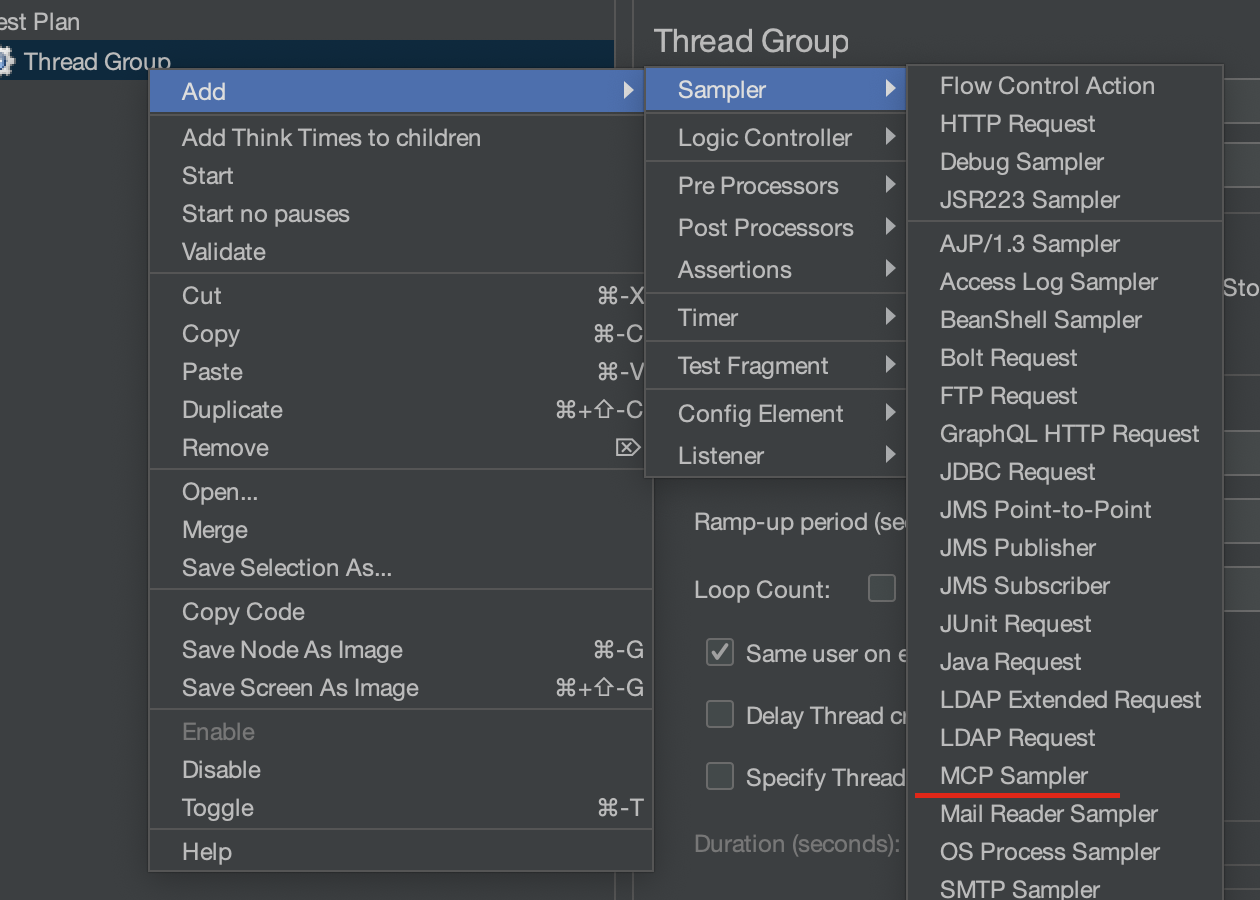
Transport: stdioCommand: python3Arguments: scripts/mock_mcp_server.pyMCP Method: tools/listClient name: jmeter-mcp-sampler (default)Client version: 1.0.0 (default)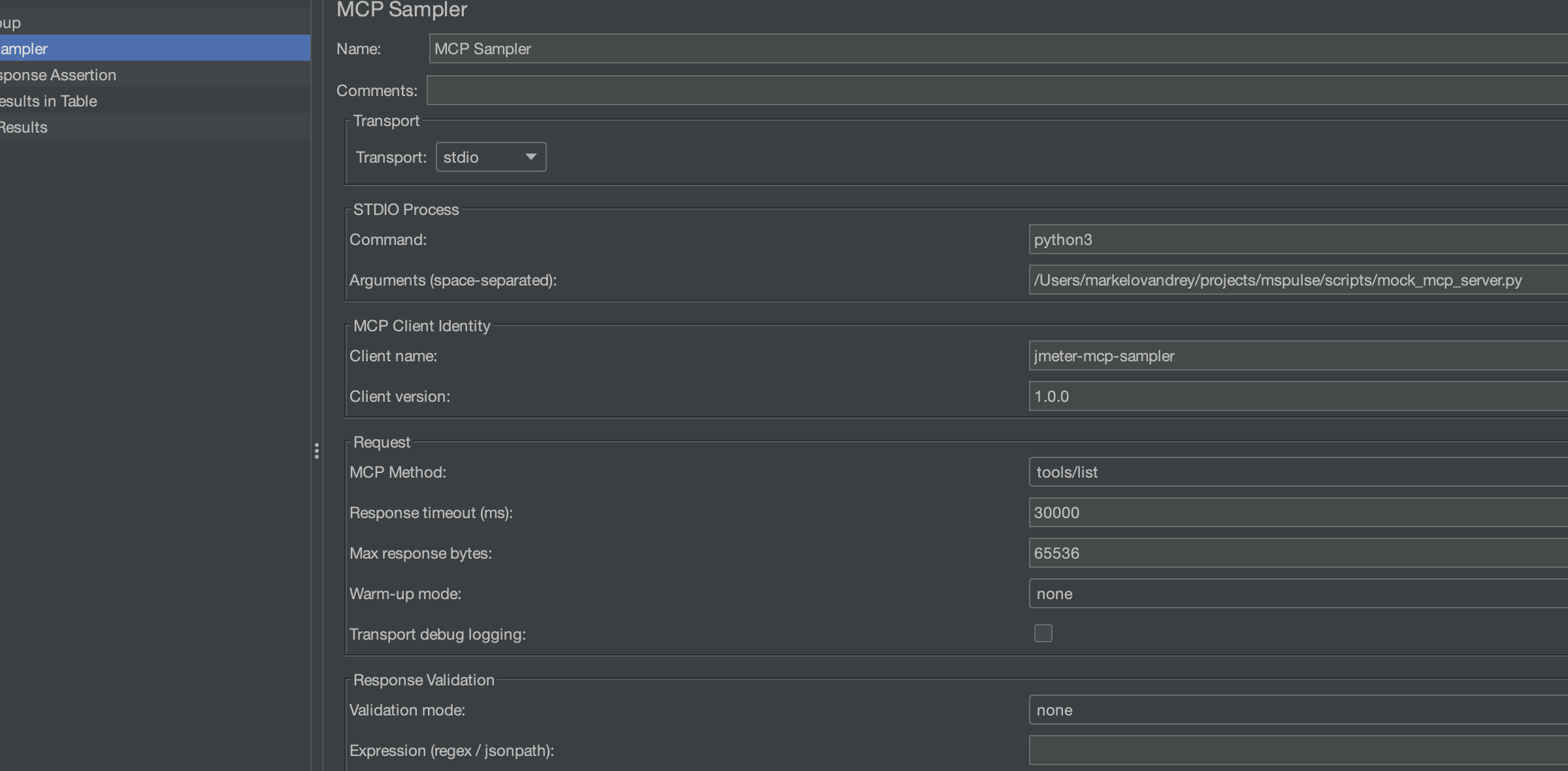
Field to Test: Response DataPattern: echo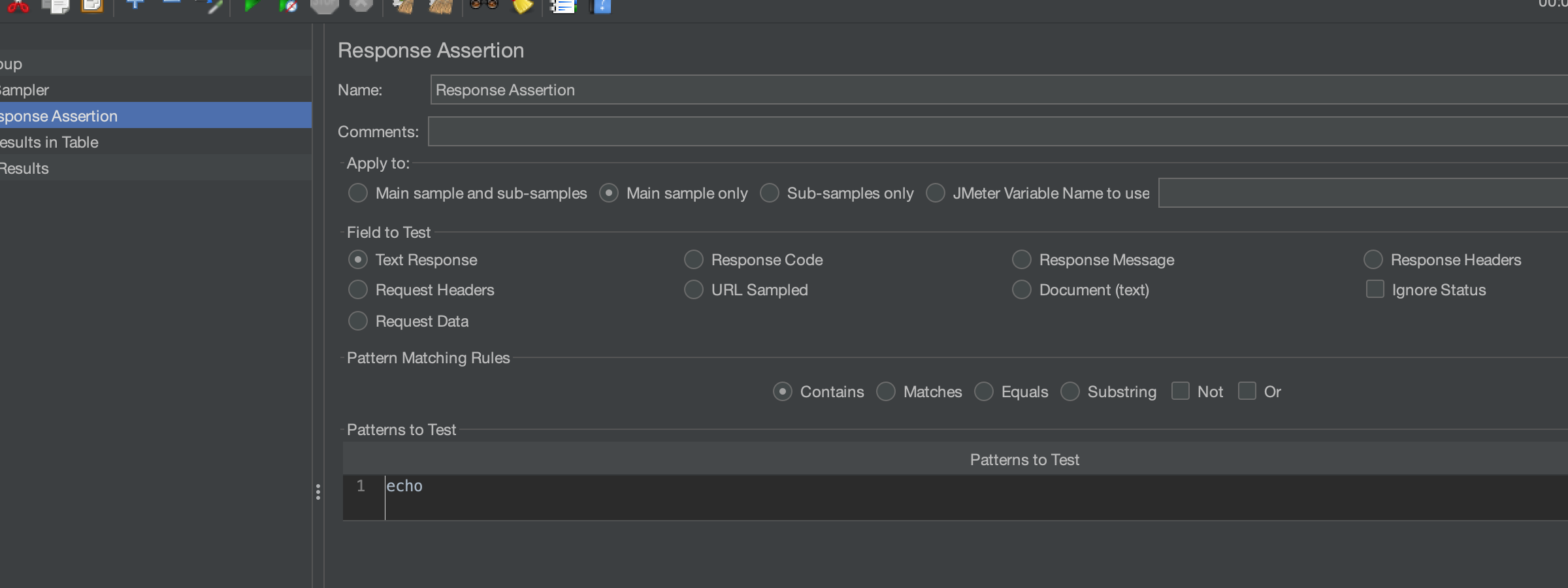
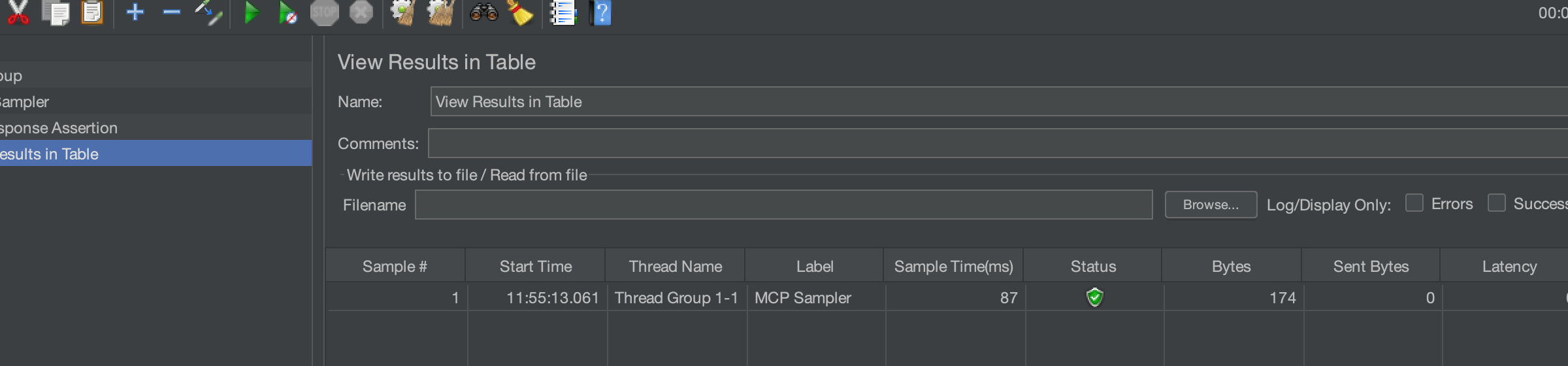
node scripts/mock_http_sse_mcp_server.js
Transport: http+sseHTTP base URL: http://127.0.0.1:8080SSE endpoint path: /eventsHTTP send path: /rpcMCP Method: tools/listValidation mode: none (when using JMeter Response Assertion)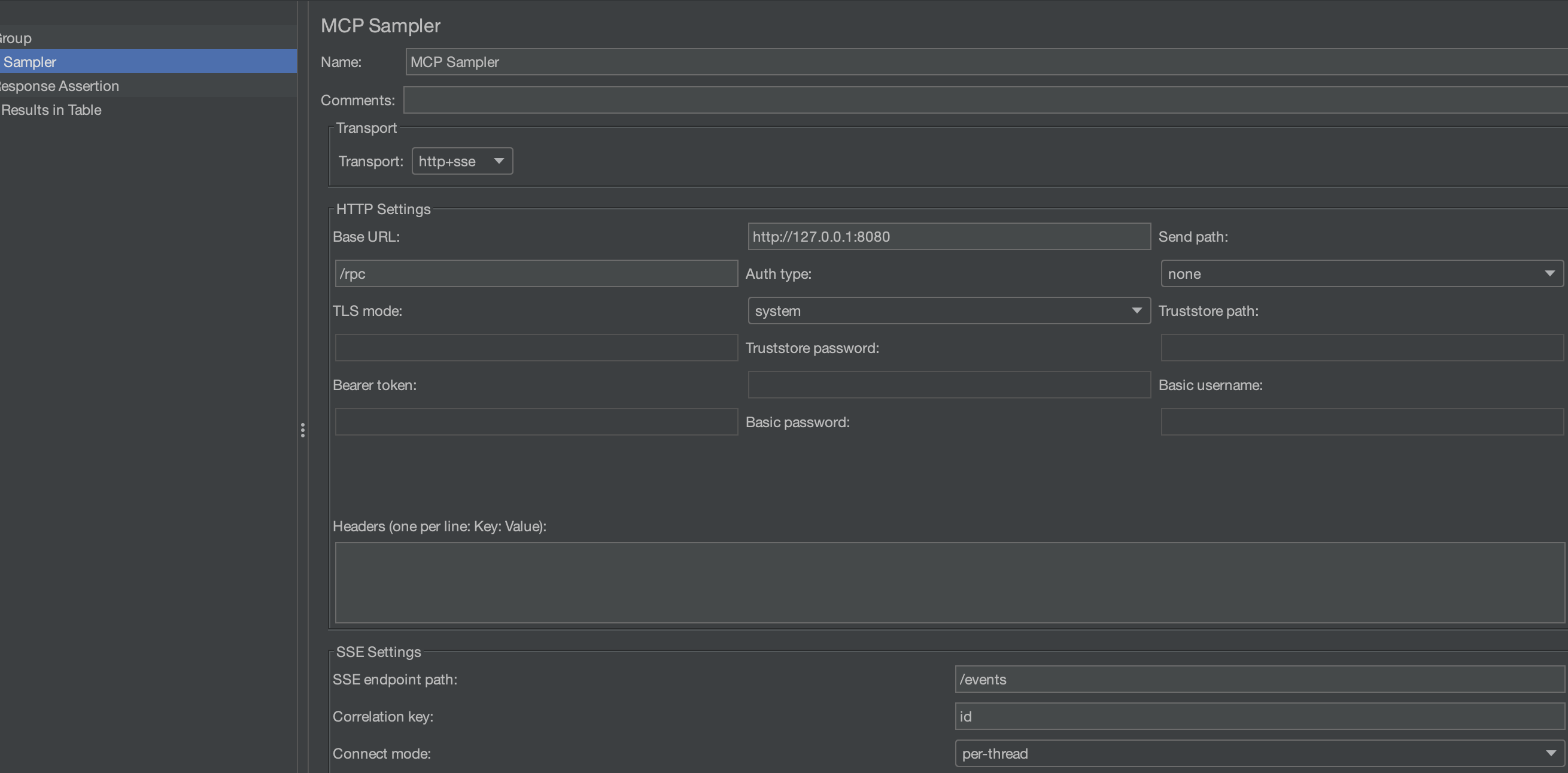
Field to Test: Response CodePattern: 200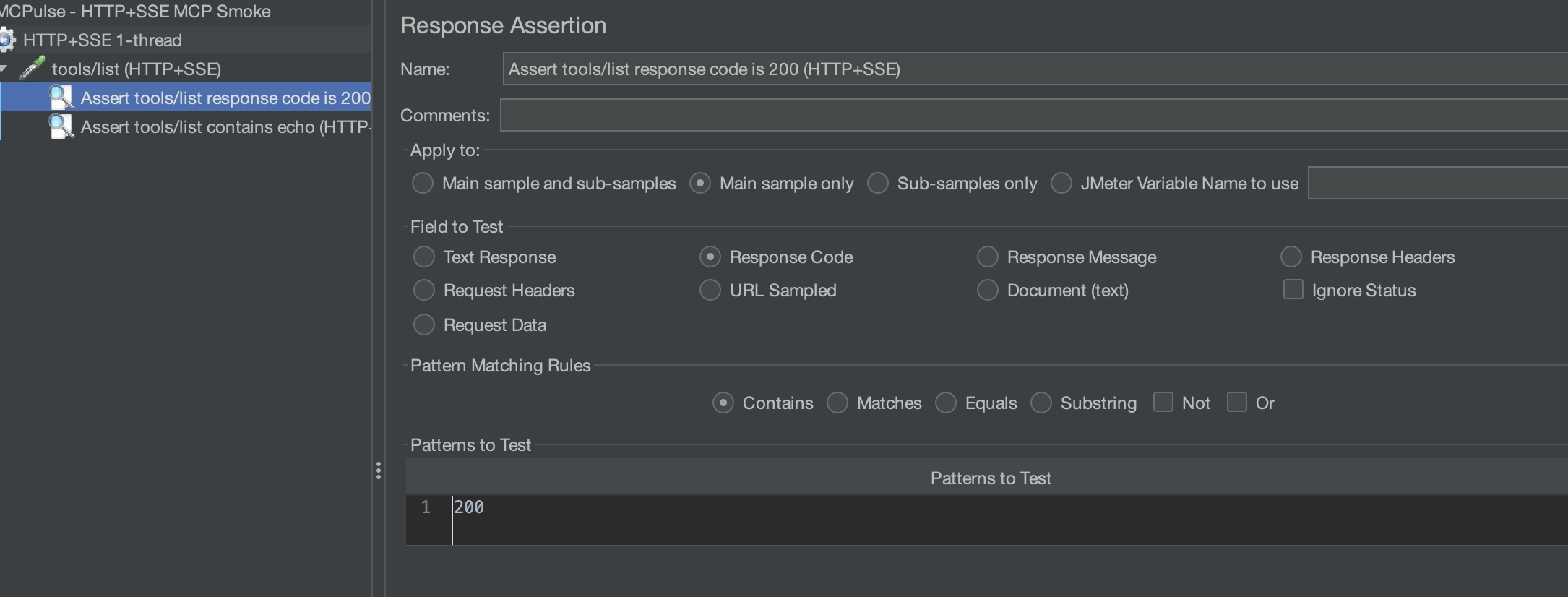
Response Code = 200, sample is green).Alternative: use built-in sampler validation instead of JMeter assertions:
Validation mode: regexValidation expr: echoScreenshot guide and catalog: docs/images/README.md
File: scripts/mock_mcp_server.py
Start manually:
python3 scripts/mock_mcp_server.py
Behavior:
initialize returns server mock-mcp-server.tools/list exposes one tool: echo.tools/call with tool echo echoes arguments back and returns content.resources/list returns one in-memory resource.-32602.Useful tools/call sample:
{"message":"hello","count":2}
Expected response includes:
content[0].text like echo: hello (count=2)echo.message = "hello"File: scripts/mock_calc_mcp_server.js
Start manually:
node scripts/mock_calc_mcp_server.js
Behavior:
initialize returns server mock-calc-mcp-server-ts.tools/list exposes tools add and divide.tools/call validates numeric a and b.-32000.-32602.Useful tools/call samples:
{"a":40,"b":2}
{"a":10,"b":0}
Expected:
add returns numeric value (42 for sample above).divide with b=0 returns error Division by zero.File: scripts/mock_perf_mcp_server.py
Start manually:
python3 scripts/mock_perf_mcp_server.py --base-delay-ms 5 --jitter-ms 10 --slow-every 20 --slow-delay-ms 200
Behavior:
tools/list exposes sleep, payload, cpu.sleep tool supports controlled delay.payload tool returns a large blob for payload-pressure testing.cpu tool burns CPU loops and returns accumulator.Useful tools/call payload samples:
{"delayMs":50}
{"sizeKb":256}
{"loops":300000}
File: scripts/mock_http_sse_mcp_server.js
Start manually:
node scripts/mock_http_sse_mcp_server.js
Behavior:
/events/rpc and /messageinitialize, tools/list, tools/call, resources/listmcp-server-fetch (via uvx):
Command:   uvx
Arguments: mcp-server-fetch
mcp-server-filesystem:
Command:   uvx
Arguments: mcp-server-filesystem /tmp
github-mcp-server:
Command:   github-mcp-server
Arguments: stdio
Requires GITHUB_PERSONAL_ACCESS_TOKEN.
Each profile builds image, runs a test plan, writes JTL + HTML report to results/.
docker compose --profile mock-echo up --build
docker compose --profile mock-calc up --build
docker compose --profile perf-cold-start up --build
docker compose --profile perf-tail up --build
docker compose --profile perf-payload up --build
Reports:
results/docker-mock-echo/report/index.htmlresults/docker-mock-calc/report/index.htmlresults/docker-perf-cold-start/report/index.htmlresults/docker-perf-tail/report/index.htmlresults/docker-perf-payload/report/index.html./gradlew test
./gradlew check
JMETER_HOME=/path/to/apache-jmeter-5.6.3 ./gradlew installLocalWithDeps
JMETER_HOME=/path/to/apache-jmeter-5.6.3 ./gradlew mockAll
JMETER_HOME=/path/to/apache-jmeter-5.6.3 ./gradlew perfAll
Additional CI/release details are documented separately.
Results file ... is not empty in Docker:
results.jtl before run.JMETER_HOME is not set:
JMETER_HOME=/path/to/apache-jmeter-5.6.3.No sampler appears in JMeter:
lib/extlibMIT
Apache JMeter sampler plugin for load testing Model Context Protocol (MCP) servers over stdio, HTTP, and HTTP+SSE.
Tools
No tool list yet. Remote servers get one after the first health check.
FAQ
Copy the stdio config for Cursor, Claude Desktop, Claude Code, or VS Code on this page. It uses the publisher's install, not a PlugMCP proxy.
No required environment variable is listed on this record.
MCPLoadTester runs locally over stdio.
Last checked 2026-10-28. Apache JMeter sampler plugin for load testing Model Context Protocol (MCP) servers over stdio, HTTP, and HTTP+SSE.
