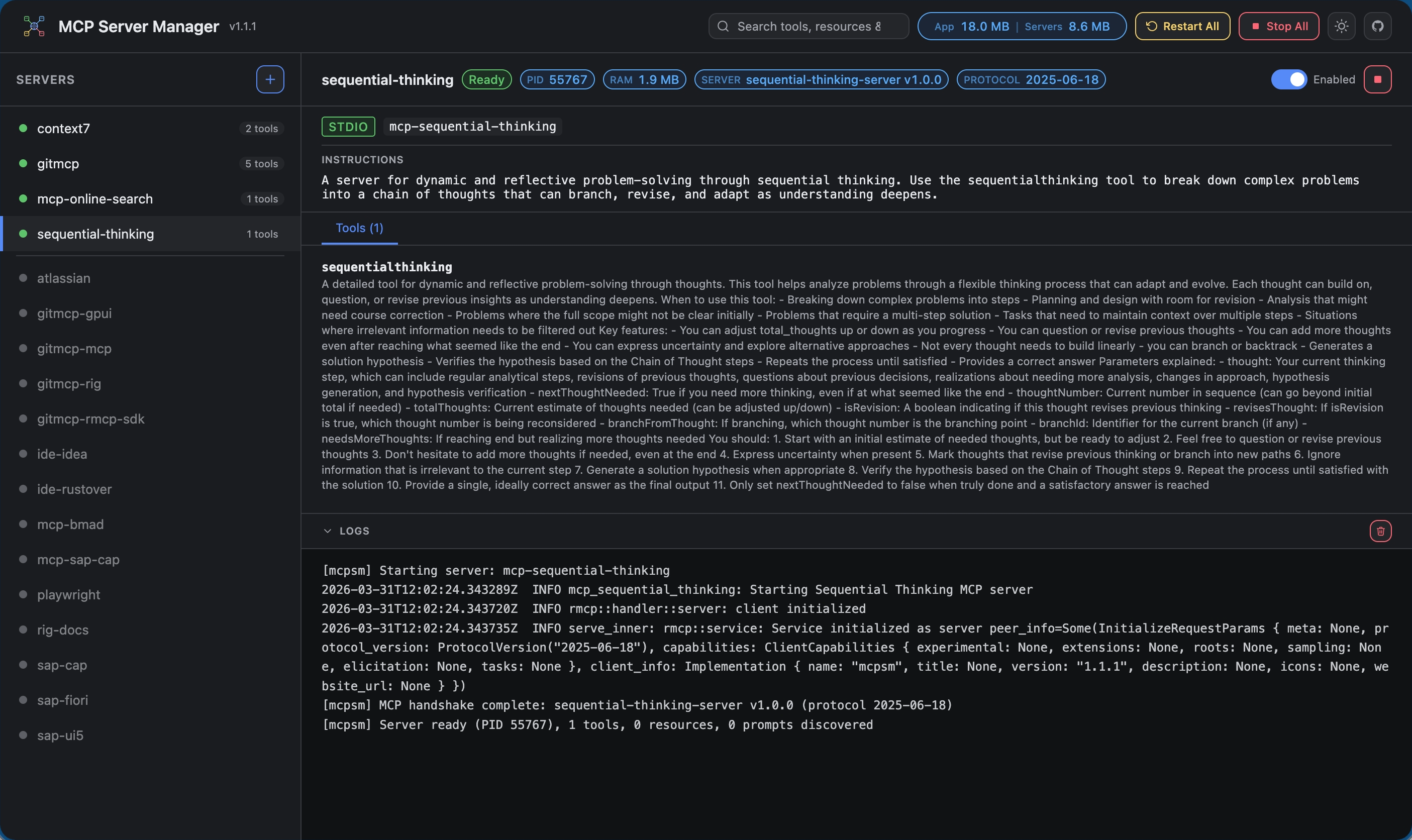
A native macOS application that manages Model Context Protocol (MCP) server instances and acts as a unified MCP proxy. Configure your MCP servers once, then point any client (Claude Code, Cline, GitHub Copilot, Cursor, etc.) at a single endpoint — MCPSM aggregates tools from all running servers automatically.
A Model Context Protocol Server Manager (MCPSM) that orchestrates the MCP servers, manages their configurations, and provides a user-friendly interface for monitoring and controlling server instances.
Stars
8
Tools
—
Uptime
—
Features
Unified MCP proxy — single endpoint aggregates tools from all child servers
Streamable HTTP transport — full MCP protocol support (POST/GET/DELETE) with session management via rmcp SDK
Tool namespacing — tools from each server are prefixed (server_id__tool_name) to avoid collisions
Rich tool info — tool descriptions, annotations (read-only, destructive, idempotent), MCP server info panel with capabilities
Dark/light theme — Islands-inspired color scheme with theme toggle in header (persisted in localStorage)
Server auto-start — non-disabled servers start automatically on launch
Auto-start toggle — per-server toggle in dashboard; toggling only saves config (does not start/stop running servers)
Start/Stop All — header buttons for bulk server control (conditional visibility based on server states)
Configurable port — set "port": 8080 in config to change the dashboard/proxy port (default: 3456)
Config file watching — external edits to the config file are detected and applied automatically (smart diff: only affected servers restart)
Status bar app — macOS status bar with template icon, SF Symbol menu icons, "Open Dashboard", "Edit Config", and "Quit"
Shell environment capture — captures user's full login shell environment at startup, so child processes find tools installed via nvm, pyenv, Homebrew, etc. (critical for .app bundles)
.app bundle — builds as a proper macOS application bundle (MCPSM.app) with app icon and LSUIElement (no Dock icon)
Edit Config — opens ~/.config/mcpsm/mcp.json in your default editor from the status bar
Real-time log viewer — monospaced log panel with auto-scroll (last 200 lines per server)
Built-in templates — pre-configured servers for Sequential Thinking, Knowledge Graph Memory, and Context7
Auto-save — server config is persisted to disk immediately on add/update/delete/disabled toggle
Graceful shutdown — Quit and Ctrl+C stop all running servers cleanly (SIGTERM → 5s → SIGKILL)
Requirements
Rust (edition 2024)
macOS (for the GUI binary — the CLI binary is cross-platform)
Node.js / npx (for running MCP servers that use it)
Building
cargo build --workspace          # Build all crates (debug)
cargo build --release -p mcpsm-cli   # Release build — CLI only
cargo build --release -p mcpsm-gui   # Release build — GUI only
CI and Releases
.github/workflows/ci-linux.yml — builds and tests mcpsm-cli + mcpsm-core on Linux (x86_64, aarch64)
.github/workflows/ci-windows.yml — builds and tests mcpsm-cli + mcpsm-core on Windows (x86_64)
.github/workflows/release.yml — on v* tags (or manual dispatch), builds release artifacts for Linux, Windows, and MCPSM.app for macOS, then publishes them to GitHub Releases
To cut a release, push a semantic tag like v0.1.0:
git tag v0.1.0
git push origin v0.1.0
Building as .app Bundle (macOS)
./scripts/build-app.sh
open target/release/MCPSM.app
This creates a proper macOS application bundle with app icon and LSUIElement (no Dock icon). The .app bundle captures your shell environment at launch, so tools installed via nvm, pyenv, Homebrew, etc. work correctly.
Running
Headless CLI (no GUI, runs on any platform):
cargo run -p mcpsm-cli
macOS GUI (status bar app):
cargo run -p mcpsm-gui
On launch, MCPSM reads server configuration from ~/.config/mcpsm/mcp.json (auto-created on first run). Non-disabled servers start automatically. Servers added through the web dashboard are saved to this file automatically.
disabled (optional, default: false) — when true, the server won't auto-start on launch (omitted from JSON when false)
Config file watching: MCPSM watches the config file for external changes. When you edit it in an editor, MCPSM detects the change and applies a smart diff — only affected servers are stopped/started/restarted.
Connecting MCP Clients
Once MCPSM is running and servers show Ready status in the dashboard, point your MCP client at the proxy endpoint:
Streamable HTTP: http://127.0.0.1:3456/mcp (or your configured port)
Claude Code
claude mcp add mcpsm --transport http http://127.0.0.1:3456/mcp
GitHub Copilot (VS Code)
Create or edit .vscode/mcp.json in your workspace (or open MCP: Open User Configuration from the command palette for global config):
Point to http://127.0.0.1:3456/mcp — any client supporting Streamable HTTP transport will work. The endpoint handles POST (JSON-RPC requests), GET (SSE notifications), and DELETE (session teardown).
A Model Context Protocol Server Manager (MCPSM) that orchestrates the MCP servers, manages their configurations, and provides a user-friendly interface for monitoring and controlling server instances
A Model Context Protocol Server Manager (MCPSM) that orchestrates the MCP servers, manages their configurations, and provides a user-friendly interface for monitoring and controlling server instances.
Tools
Tools
No tool list yet. Remote servers get one after the first health check.
FAQ
Questions
How do I install MCP Server Manager?
Copy the stdio config for Cursor, Claude Desktop, Claude Code, or VS Code on this page. It uses the publisher's install, not a PlugMCP proxy.
No required environment variable is listed on this record.
What transport does MCP Server Manager use?
MCP Server Manager runs locally over stdio.
When was MCP Server Manager last checked?
Last checked 2026-10-28. A Model Context Protocol Server Manager (MCPSM) that orchestrates the MCP servers, manages their configurations, and provides a user-friendly interface for monitoring and controlling server instances.