OwnMemory lets Claude remember you across chats and devices, with the memories stored encrypted under a key only you hold, in storage you own.
Claude calls a remote MCP server running in your own Cloudflare account. The server encrypts each memory and stores it in a D1 database in that account (the one-click default) or in an OwnMemory folder in your Google Drive. It works in the official Claude apps on the web, iPhone and Android.
Get started: create a free Cloudflare account and connect GitHub to it first (steps), then click the button above, choose a random owner code of 12+ characters, and open your server's address to follow its four setup steps. About 5 minutes, on a free Cloudflare account. Full guide, including Google Drive storage: docs/setup.md.
Status: early (v0.2). Built and tested for Claude: on the web, iPhone and Android, and in Claude Code. Other MCP clients that support remote servers with OAuth should be able to connect, but are untested.
How your memories stay yours
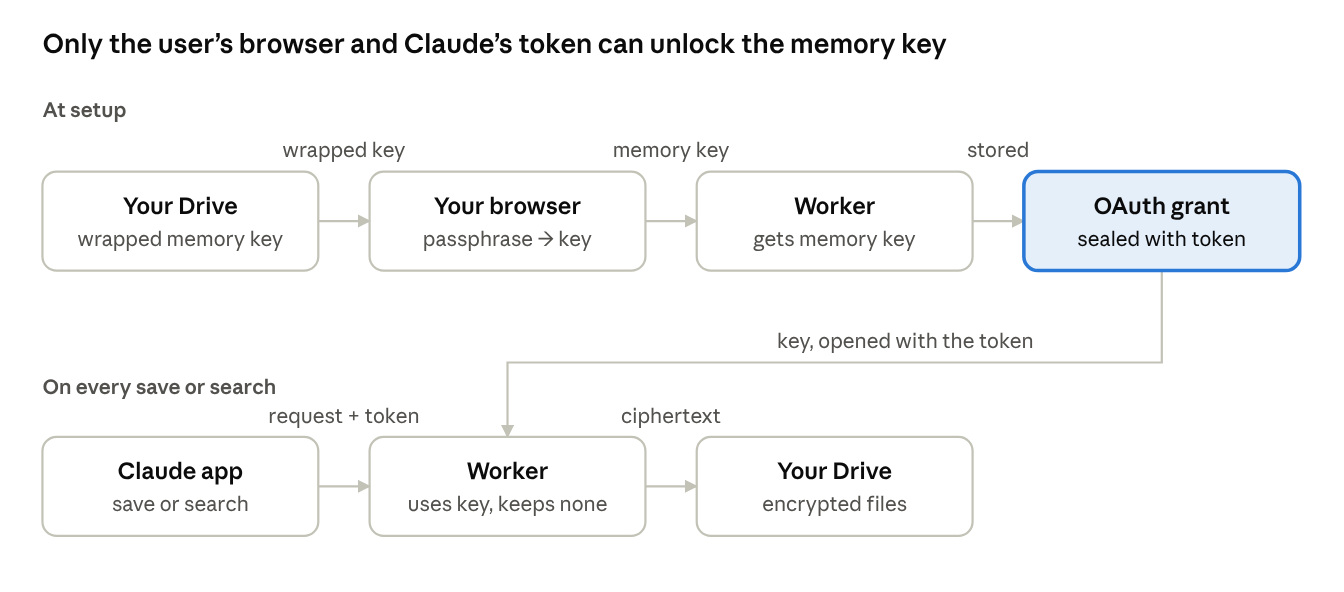
- Your passphrase never leaves your browser. When you connect Claude, the passphrase page turns it into a key that unlocks a random 256-bit memory key. Only the locked copy of that key is stored, in your storage (
keyinfo.json). - Every memory is encrypted (AES-256-GCM) before it is stored, in a file with a random name. Your storage provider and anyone with the files see only ciphertext.
- The server keeps no key at rest. The memory key and your Google token live only inside the OAuth grant, which is encrypted with Claude's access token. The MCP handler is stateless: nothing is written to Durable Objects or logs.
- Hard rules in code. Blocked categories, a pause switch, and a filter that refuses passwords, API keys and card numbers, whatever the AI decides.
- Search by meaning, still private. Embeddings come from Cloudflare Workers AI in your own account and are stored encrypted like the memories. Set the
SEMANTIC_SEARCHsecret tooffto keep memory text away from it; search then uses keywords only. - See and fix what it remembers. Your server's
/memoriespage lets you browse, search, edit, add and delete memories, decrypted only in your browser. - No lock-in. Download all on the memories page gives you every memory as Markdown, and ownmemory.app/decrypt decrypts a downloaded copy in your browser, even without your server.
The one unavoidable exposure: the server and Anthropic see a memory's text while a save or search runs, because Claude sends plain text. Running the server yourself is the safeguard.
Who else could get at your memories, person by person, and how to keep them out: docs/security-model.md.
Tools Claude gets
Repository layout
Contributing, security and license
- Contributions are welcome; see CONTRIBUTING.md. Contributors sign a short contributor license agreement.
- Found a security problem? Please report it privately: SECURITY.md.
- Licensed under the Apache License 2.0. "OwnMemory" and the OwnMemory logo are trademarks of the project and are not covered by the license; forks need a different name.