
BC-250 AutoTune
An MCP server exposing AMD BC-250 telemetry and tuning controls, plus an optimizer that uses them to tune a unit automatically — with a boot watchdog that reverts an unproven configuration if the machine hangs.
Every BC-250 is different, and tuning one is your responsibility. Read docs/SAFETY.md before pointing this at hardware you care about. It matters more for an automated tuner than for a manual GUI, not less.
What it does
- Reads GPU/CPU temperature, power, clocks, voltage, fan RPM, and SMU throttle status — no root, no SMU mailbox contention.
- Applies GPU frequency changes through a safety envelope that refuses out-of-range values rather than clamping them, one small step per call.
- Snapshots the verbatim bytes of every config file before each write, and rolls back on demand.
- Reverts automatically on the next boot if a config was applied and never proven stable — the piece that makes unattended tuning survivable.
- Benchmarks with FurMark, sampling telemetry throughout and aborting on an over-temperature.
- Controls fans where the hardware allows it — the in-tree
nct6683driver exposes PWM read-only, so this needs the out-of-treenct6687dmodule.get_fan_state()reports whether your board can do it.
Supported governors
A BC-250 runs exactly one GPU governor; both in the wild are supported, and the backend is detected automatically.
The D-Bus path is preferred where available: changes are volatile, so a power cycle is a guaranteed rollback.
The reference unit
Every number in this README comes from one machine: a BC-250 board in a custom 3D-printed case, driven over SSH. Its full profile — OS, kernel, governor state, and the hardware quirks it exposed — is in docs/TARGET_MACHINE.md.
Benchmarks
Two 120 s FurMark passes at 1920x1080 on the reference unit, each started from a cooled GPU (60 °C gate) so the pair is comparable.
Stock is oberon's packaged default, 1000–2000 MHz @ 1000 mV. Tuned is
a lower clock ceiling at a lower voltage, 1000–1600 MHz @ 875 mV — an
undervolt, not an overclock.
The counter-intuitive result is that the undervolt wins on every metric at once: faster, cooler, and less power. On a board this thermally constrained 1000 mV generates more heat than the cooler can shed, so the SMU throttles hard and the sustained clock settles below what the cooler 875 mV config holds comfortably. Stock also peaked at 96.5 °C, within 0.5 °C of the harness abort threshold.
Less voltage bought more performance here. Raising limits did not — a separate test stepping the ceiling 1600 → 1650 MHz produced no gain at all.
Efficiency: 0.635 → 0.853 FPS/W (+34.3%).
| Stock | Tuned |
|---|---|
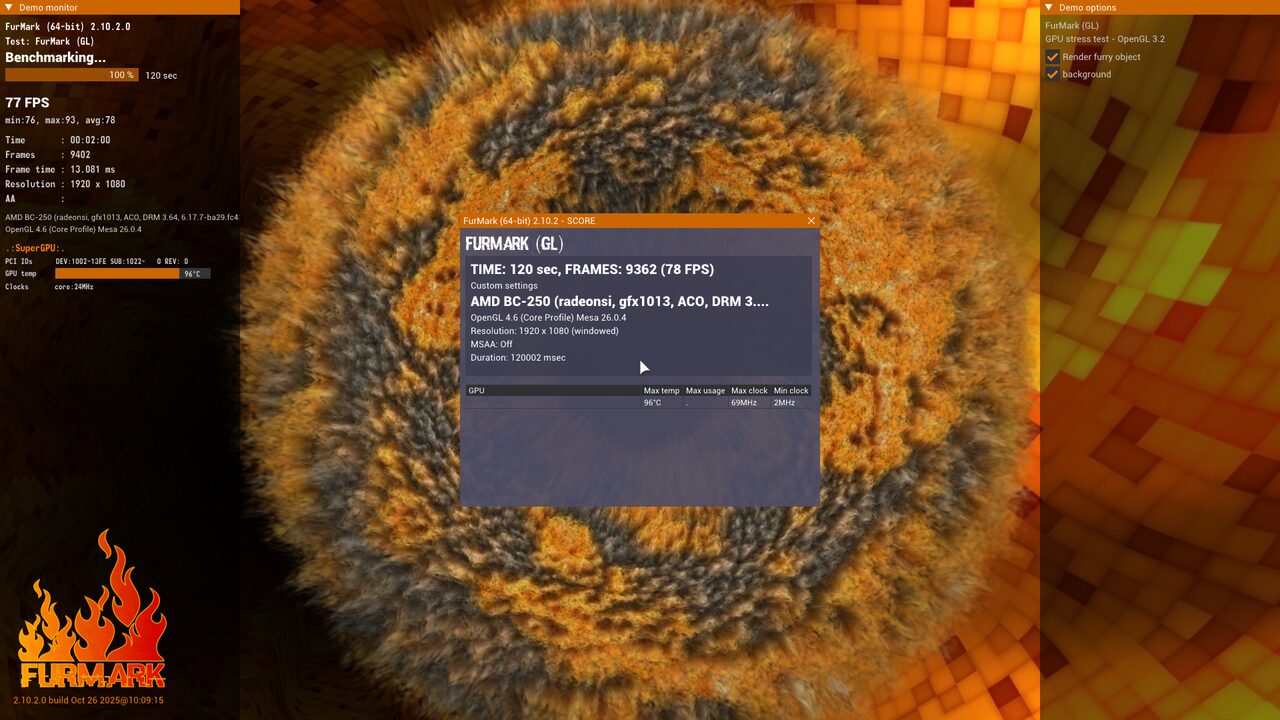 | 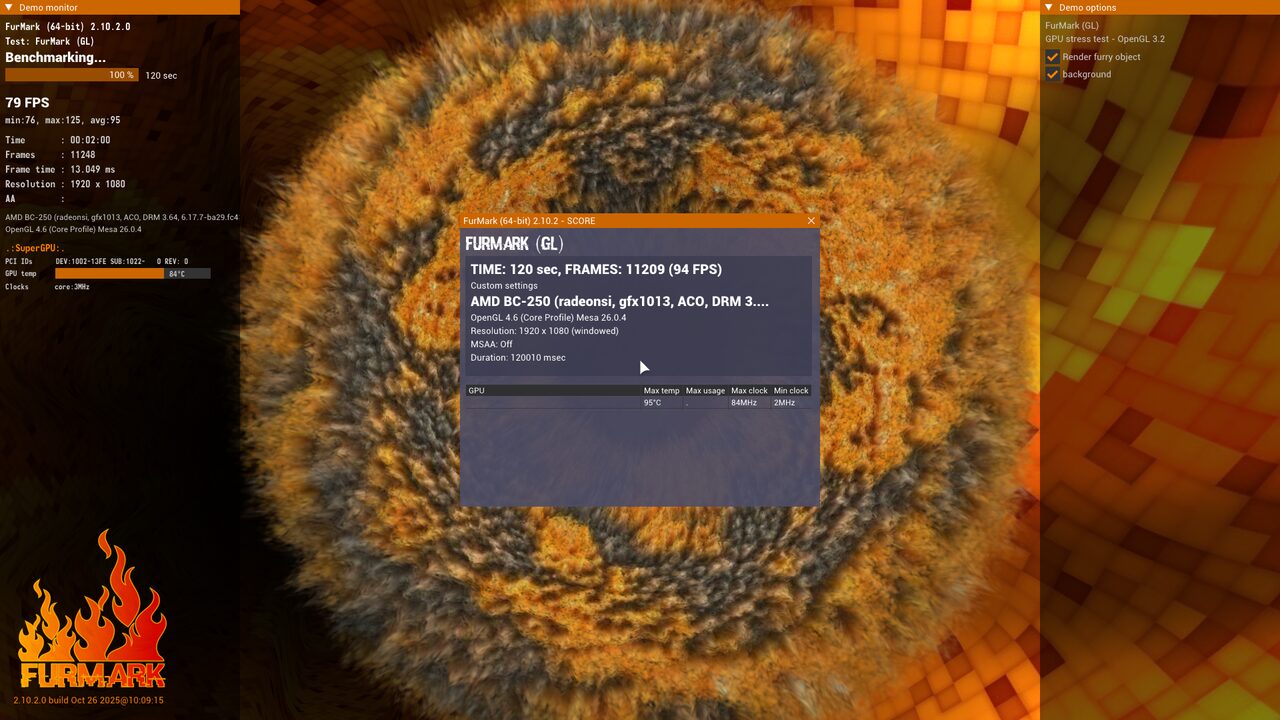 |
3 run(s) aborted on a thermal limit and are excluded from the table above, since an aborted run produces no score. Most recent: GPU reached 92.25 C, at or above the 92.0 C abort threshold
What "stock" means here. Only the GPU governor configuration is stock. Both runs were taken on a machine with the 40 CU unlock and the 8c/16t CPU core unlock already active — 40 of 40 compute units (20 WGPs) applied by a BC-250-patched kernel via
amdgpu.bc250_cc_write_mode=3, and 16 threads online against the factory 6c/12t.
A stock-topology BC-250 (24 CU, 6c/12t) will score lower on both sides. These numbers isolate the effect of the governor configuration with the unlocks held constant; the unlocks themselves are a separate and almost certainly larger lever.
Generated by benchmarks/scripts/generate_readme_benchmarks.py. FurMark runs start from a cooled GPU (60 °C gate) so results are comparable; every row records the temperature it actually started at.
Requirements
- A real BC-250, running Linux, driven locally or over SSH.
- Passwordless sudo. Almost everything needs root: SMU access through PCI
config space,
umrregister reads, and systemd. Unattended tuning cannot work if sudo prompts. - Python 3.11+.
- One of the two GPU governors installed and running —
oberon-governororcyan-skillfish-governor-smu. The backend is detected automatically; you do not configure which. - Optional, for benchmarking: FurMark 2 (Linux
x86_64), plus
ffmpegfor screenshots andxrdb— withoutxrdbFurMark segfaults on a fresh display, see docs/TARGET_MACHINE.md.
Install
git clone https://github.com/bandlayash/bc250-autotune.git
cd bc250-autotune
python3 -m venv .venv
.venv/bin/pip install -e ./mcp_server
On an immutable distro (Bazzite, Silverblue) a venv is the right move — nothing
needs to go into /usr.
Check what the server can see on your box before doing anything else:
.venv/bin/python -c "import json, bc250_mcp.server as s; print(json.dumps(s.get_server_status(), indent=2))"
That reports the detected governor, which sensors work, and which upstream tools are missing, so you can plan around gaps rather than hit them mid-tune.
Connect it to an MCP client
The server speaks stdio. For Claude Code:
claude mcp add bc250 -- /absolute/path/to/bc250-autotune/.venv/bin/bc250-mcp
For any client that takes a JSON config:
{
  "mcpServers": {
    "bc250": {
      "command": "/absolute/path/to/bc250-autotune/.venv/bin/bc250-mcp"
    }
  }
}
The editable install puts a bc250-mcp console script in the venv, so no
working directory or PYTHONPATH is needed. Verified: 18 tools over stdio.
Set DRY_RUN=1 in the environment to exercise the whole loop — envelope
checks, step limits, snapshots — without touching hardware. Refusals are still
refusals in dry run, so the rehearsal does not lie to you.
Optional: fan control
Fan control needs the out-of-tree
nct6687d module — the in-tree
nct6683 driver exposes PWM read-only. On an immutable distro this is fiddly
(read-only /usr, possibly no matching kernel-devel, and SELinux blocking
both the module and its loader), so it is scripted:
sudo true            # the script uses sudo throughout
fan/install-nct6687.sh
It builds against the running kernel, verifies the vermagic matches, installs a systemd unit, and confirms PWM became writable. Re-run it after any kernel change — vermagic is pinned to one release and the module will silently refuse to load against another.
Check the result with get_fan_state(); controllable tells you whether it
worked. Note that fan control is not guaranteed to buy performance: on the
reference unit the chip's automatic curve already runs the fan at 100%, so
there was nothing to gain.
Install the watchdog (do this before any unattended tuning)
This is what reverts a configuration that hangs the machine. It runs as a separate process from the MCP server, because in-memory state is exactly what a hang destroys.
sudo install -d -m 0755 /opt/bc250-autotune
sudo cp -r mcp_server watchdog /opt/bc250-autotune/
sudo cp watchdog/bc250-watchdog.service watchdog/bc250-watchdog-monitor.service /etc/systemd/system/
sudo systemctl daemon-reload
sudo systemctl enable --now bc250-watchdog.service

# Snapshots must live where the watchdog can read them as root at boot.
sudo install -d -o "$USER" -g "$USER" -m 0755 /var/lib/bc250-autotune
Verify it is actually armed:
.venv/bin/python -c "import json, bc250_mcp.server as s; print(json.dumps(s.get_watchdog_status(), indent=2))"
unattended_revert_ready must be true. If it is not, the problems list says
why. Do not start an unattended run until it is.
Tuning
Take a snapshot first, then let the agent work through the optimizer skill:
snapshot_config("stock")     # capture what you have now
get_safety_envelope()        # the bounds it must stay inside
run_benchmark("stock", 120)  # baseline -- run it TWICE, see below
set_gpu_range(1000, 1650)    # one 50 MHz step; refuses larger jumps
run_benchmark("tuned", 120)
rollback("last_good")        # if anything looks wrong
mark_stable()                # once a config has proven itself
Establish a noise floor before believing any result. Run the baseline twice without changing anything and compare. On the reference unit the same config scored 12261 and 10843 depending only on starting temperature — a change smaller than that spread is not a result.
To apply a configuration you have already decided on, including voltage, use
set_gpu_config(min_mhz, max_mhz, min_mv, max_mv) instead. It is absolute
rather than stepped; the step limit exists to constrain an autonomous search,
not you.
Standalone benchmarking
No MCP client needed:
export BC250_FURMARK_DIR=~/furmark/FurMark_linux64   # if not in a default path
benchmarks/scripts/run_benchmark.sh stock 120
python benchmarks/scripts/generate_readme_benchmarks.py
Each run waits for the GPU to cool to 60 °C first, samples telemetry every
second, aborts on an over-temperature, appends a row to
benchmarks/results.jsonl, and captures the score box.
Configuration
Tune mcp_server/bc250_mcp/safety_envelope.yaml to your unit before you
start. Its defaults come from one board plus upstream source. The CPU Vid
ceiling in particular is set deliberately below the 1325 mV that upstream
documents as having destroyed a board — read docs/SAFETY.md
before changing it.
How it works
mcp_server/bc250_mcp/    MCP server: telemetry, governor backends, guarded
                         writes, snapshots, benchmark harness
  safety_envelope.yaml   hard and safe bounds — the single source of truth
watchdog/                boot-time revert service, a separate process by design
benchmarks/scripts/      standalone CLI wrappers, no MCP client needed
skill/bc250-optimizer/   instructions for an agent driving the tools
Every write follows the same path: check the safety envelope, enforce the step limit, snapshot the current config and fsync a watchdog marker to disk, then apply. A value beyond a hard bound is refused, never clamped — a silent clamp would leave you believing you applied one config while the hardware ran another, and every benchmark afterwards would be attributed to the wrong settings.
Documentation
- docs/SAFETY.md — what protects you, what does not, and how to recover a box you cannot log into
- docs/DESIGN.md — why the design is the way it is
- docs/UPSTREAM_INTERFACES.md — every upstream tool's real interface, read from source rather than documentation
- docs/TARGET_MACHINE.md — the reference machine, and the hardware quirks it exposed
- docs/THIRD_PARTY_NOTICES.md — credits
Contributing
Issues and pull requests welcome, particularly from anyone running a BC-250 with a different BIOS revision, cooling solution, or governor — the safety envelope defaults come from a single board and would benefit from more.
Tests run entirely against mocked sysfs and synthetic SMU data, so no hardware is needed:
cd mcp_server
pip install -e ".[dev]"
python -m pytest tests -q
ruff check bc250_mcp tests
Anything hardware-in-the-loop is deliberately kept out of CI.
License
MIT — see LICENSE.