Tetragon MCP Server (WIP)
A Model Context Protocol (MCP) server that exposes Tetragon's kernel-level security observability data to any LLM provider or AI application that supports the MCP specification.
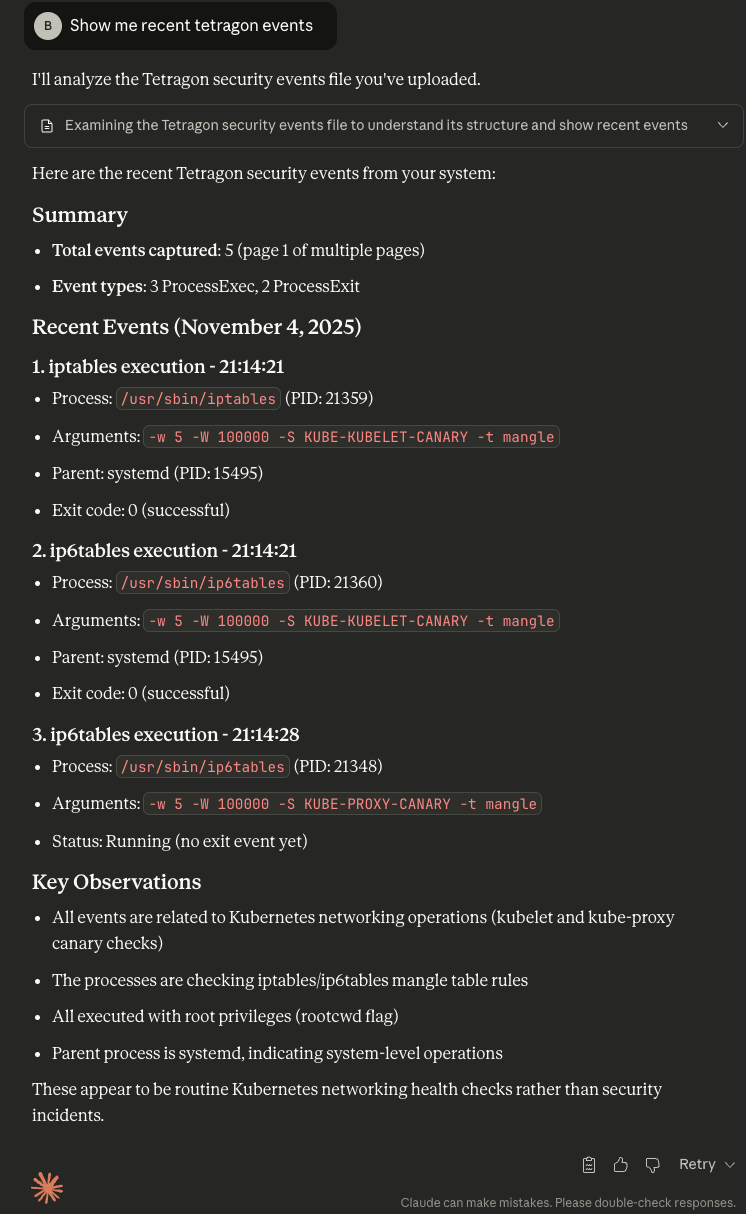
Power your agent
Install from the publisher. Not a PlugMCP endpoint.
Host a copy with our keys and logs.
No packaged release in the registry yet. Follow the repository README.
Remote URL or a command on your machine? How the two installs differ
Run on PlugMCP
A new server you create. It is not this listing's official endpoint. Use the publisher install when you want their URL and their credentials.
LaunchFrom the publisher
A Model Context Protocol (MCP) server that exposes Tetragon's kernel-level security observability data to any LLM provider or AI application that supports the MCP specification.
MCP server implementation for Tetragon
# Clone the repository
git clone https://github.com/calghar/tetragon-mcp.git
cd tetragon-mcp

# Start development environment (includes Tetragon + MCP server + test workloads)
make dev-setup

# Test the server
make dev-test
# Build the binary
make build

# Create multi-cluster configuration
cp examples/multi-cluster-config.yaml ~/.tetragon-mcp.yaml

# Edit configuration with your cluster details
vim ~/.tetragon-mcp.yaml

# Run with multi-cluster configuration
./tetragon-mcp --config ~/.tetragon-mcp.yaml
Multi-cluster configuration example:
clusters:
  - name: "production"
    address: "prod-tetragon.example.com:54321"
    auth:
      type: "tls"
      tls:
        cert_file: "/path/to/prod-client.crt"
        key_file: "/path/to/prod-client.key"
    labels:
      environment: "production"
      region: "us-west-2"

  - name: "staging"
    address: "staging-tetragon.example.com:54321"
    auth:
      type: "none"
    labels:
      environment: "staging"

mcp:
  address: ":8080"
events:
  buffer_size: 50000
  retention_seconds: 7200
# Build and deploy locally
make image IMAGE_TAG=production
./scripts/deploy-docker.sh --type production --config /path/to/production-config.yaml
# Using Docker Compose (recommended for production)
cd deploy/docker
docker-compose -f docker-compose-production.yml up -d

# Using standalone Docker
docker run -d \
  --name tetragon-mcp \
  -p 8080:8080 \
  -v /opt/tetragon-mcp/config.yaml:/etc/tetragon-mcp/config.yaml:ro \
  -v /opt/tetragon-mcp/certs:/etc/certs:ro \
  --restart unless-stopped \
  tetragon-mcp:latest
# Deploy to Kubernetes cluster
kubectl apply -f deploy/kubernetes/multi-cluster-deployment.yaml

# Using Helm (for single cluster)
make deploy NAMESPACE=your-namespace
TBD
This server bridges Tetragon (runtime security observability) with AI/LLM applications using the Model Context Protocol.
The MCP server connects LLM applications to a single Tetragon instance:
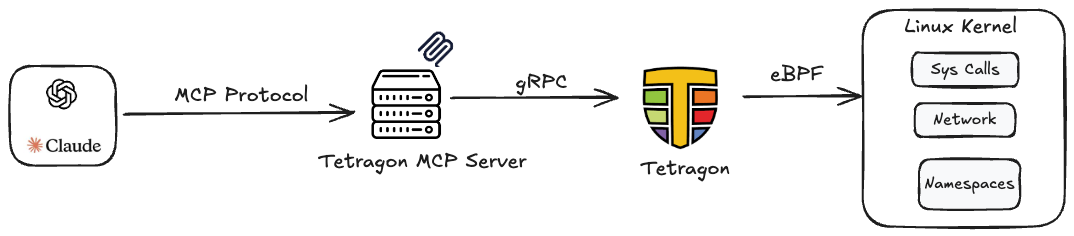
LLM/AI Tool ↔ Tetragon MCP Server ↔ Tetragon (DaemonSet) ↔ eBPF Kernel Events
# Build binary
make build

# Run tests
make test-all

# Run with hot reload
make dev
make help                 # Show all available commands

# Development
make dev-setup           # Setup complete dev environment
make dev-clean           # Clean up dev environment
make dev-logs            # View server logs

# Testing
make test                # Unit tests
make test-integration    # Integration tests
make test-e2e           # End-to-end tests
make test-all           # All tests

# Production
make deploy             # Deploy with Helm
make image              # Build production image
The Tetragon MCP Server supports both stdio and HTTP transport modes, making it compatible with any LLM provider that implements the Model Context Protocol specification.
Most LLM applications (Claude Desktop, OpenAI tools, custom applications) use stdio mode where they launch the MCP server as a subprocess:
Add to your Claude Desktop config (~/.config/claude-desktop/config.json):
{
  "mcpServers": {
    "tetragon": {
      "command": "/path/to/tetragon-mcp",
      "args": ["--stdio", "--config", "/path/to/config.yaml"],
      "env": {
        "TETRAGON_MCP_LOG_LEVEL": "info"
      }
    }
  }
}
For other LLM applications that support MCP stdio transport:
# Generic stdio usage
/path/to/tetragon-mcp --stdio --config /path/to/config.yaml

# With inline configuration
/path/to/tetragon-mcp --stdio --tetragon-address localhost:54321 --log-level info
HTTP mode is useful for testing, debugging, and custom applications that prefer REST APIs:
# Start in HTTP mode (default)
./tetragon-mcp --config /path/to/config.yaml

# Access via HTTP on port 8080
curl -X POST http://localhost:8080/mcp/v1/resources/list -d '{}'
Python Integration:
import requests

# List available resources
response = requests.post("http://your-server:8080/mcp/v1/resources/list", json={})
resources = response.json()["resources"]

# Read security events
response = requests.post("http://your-server:8080/mcp/v1/resources/read", json={
    "uri": "tetragon://events/process-exec",
    "filters": {"limit": 10, "start_time": "2025-01-20T10:00:00Z"}
})
events = response.json()["contents"]
After running make dev-setup, you can test the MCP API directly:
# Health check
curl -X POST http://localhost:30080/health

# Initialize MCP connection
curl -X POST http://localhost:30080/mcp/v1/initialize \
  -H "Content-Type: application/json" -d '{}'

# List available resources
curl -X POST http://localhost:30080/mcp/v1/resources/list \
  -H "Content-Type: application/json" -d '{}'

# Read process execution events
curl -X POST http://localhost:30080/mcp/v1/resources/read \
  -H "Content-Type: application/json" \
  -d '{"uri": "tetragon://events/process-exec", "filters": {"limit": 5}}' | jq .

# Read all events with time filter
curl -X POST http://localhost:30080/mcp/v1/resources/read \
  -H "Content-Type: application/json" \
  -d '{"uri": "tetragon://events", "filters": {"limit": 10}}' | jq .

# Browse events by time buckets (NEW!)
curl -X POST http://localhost:30080/mcp/v1/resources/read \
  -H "Content-Type: application/json" \
  -d '{"uri": "tetragon://events/buckets/daily"}' | jq .

# Access events for a specific date
curl -X POST http://localhost:30080/mcp/v1/resources/read \
  -H "Content-Type: application/json" \
  -d '{"uri": "tetragon://events/2025-09-27"}' | jq .

# Access filtered events for a specific hour
curl -X POST http://localhost:30080/mcp/v1/resources/read \
  -H "Content-Type: application/json" \
  -d '{"uri": "tetragon://events/2025-09-27/14/process-exec"}' | jq .
The server supports hierarchical time bucket navigation for easy data exploration:
tetragon://events/buckets/daily - Browse available days with eventstetragon://events/buckets/hourly - Browse available hours with eventstetragon://events/by-type - Browse events by type first, then by timetetragon://events/recent - Recent events from the last 24 hourstetragon://events/2025-09-27 - All events for a specific datetetragon://events/2025-09-27/14 - Events for a specific hour (14:00-15:00)tetragon://events/2025-09-27/process-exec - Specific event type for a datetetragon://events/2025-09-27/14/kprobe - Specific event type for an hourBenefits:
Please see the Contributing Guide and Developer Guide to get started.
# 1. Fork and clone
git clone https://github.com/YOUR_USERNAME/tetragon-mcp.git

# 2. Create feature branch
git checkout -b feature/your-feature

# 3. Setup development environment
make dev-setup

# 4. Make changes and test
make test-all

# 5. Submit PR
git push origin feature/your-feature
MCP server implementation for Tetragon
Tools
No tool list yet. Remote servers get one after the first health check.
FAQ
Copy the stdio config for Cursor, Claude Desktop, Claude Code, or VS Code on this page. It uses the publisher's install, not a PlugMCP proxy.
No required environment variable is listed on this record.
Tetragon runs locally over stdio.
Last checked 2026-10-28. MCP server implementation for Tetragon
