carnet
One safe door between everything AI in your company and the tools it reaches.
Power your agent
Install from the publisher. Not a PlugMCP endpoint.
Host a copy with our keys and logs.
No packaged release in the registry yet. Follow the repository README.
Remote URL or a command on your machine? How the two installs differ
Run on PlugMCP
A new server you create. It is not this listing's official endpoint. Use the publisher install when you want their URL and their credentials.
LaunchFrom the publisher
Things in your company now call tools on their own. A coding assistant like Claude Code or Cursor. An agent your team built. A workflow in n8n or LangChain. A script with an LLM in the middle. Anything that speaks MCP, and increasingly everything does.
To let one read your Jira or open a pull request, somebody installs a connector and pastes in an API token — on a laptop, in a container, in a CI secret.
That token now sits somewhere nobody tracks. Nobody knows it exists, nobody can take it back, and nothing records what it did.
flowchart LR
    subgraph L[" Today "]
        direction LR
        A1["Ana's laptop<br/>Jira token"] --> J[(Jira)]
        A2["your agent, in a container<br/>Jira token"] --> J
        A3["a nightly automation<br/>Jira token"] --> J
        A4["…and everything else"] --> J
    end
    style L fill:#fff5f5,stroke:#e88
Fifty people means fifty credentials you did not issue, cannot revoke and cannot audit. When somebody leaves, their token keeps working.
Carnet puts one endpoint in the middle. Every assistant, agent and automation points at it instead of at the tool. The credential lives in Carnet, not wherever the thing is running.
flowchart LR
    subgraph R[" With Carnet "]
        direction LR
        B1["Ana in Claude Code"] --> D
        B2["your own agent"] --> D
        B3["an automation"] --> D
        D{{"Carnet<br/>one door"}} --> J[(Jira)]
        D --> G[(GitHub)]
        D --> S[(your API)]
    end
    style R fill:#f5fff7,stroke:#8c8
    style D fill:#eef4ff,stroke:#88a,stroke-width:2px
Now you can answer the questions you could not answer before: who can reach what, what did they actually do, and how do I turn this off for one person — without touching anybody's machine.
It does not run your agents. They stay where they are — a laptop, your cluster, a vendor's cloud. Carnet only handles the tool calls they make, which is why it works the same for a coding assistant you did not build and an agent you did.
An agent you build in LangChain, CrewAI, the OpenAI Agents SDK or AutoGen connects with
its framework's own MCP adapter, the URL and one header — nothing from Carnet to
install — or with carnet-mcp, the three-line client in client/.
The snippets are in docs/GUIDE.md.
Every call takes the same path, and every one of them is written down.
flowchart LR
    C["anything calls<br/>a tool"] --> T{"granted<br/>this tool?"}
    T -- no --> X["Refused,<br/>with a reason"]
    T -- yes --> S{"inside<br/>its scope?"}
    S -- no --> X
    S -- yes --> B{"within today's<br/>limit?"}
    B -- no --> X
    B -- yes --> W["presents the right credential:<br/>the shared one, or this person's own"]
    W --> J[(your tool)]
    J --> L["one audit record"]
    X --> L
    style X fill:#fff0f0,stroke:#e88
    style L fill:#eef4ff,stroke:#88a
    style W fill:#f5fff7,stroke:#8c8
A refusal is an answer the caller can read and explain, not a crash. And it is recorded, so what tried to reach a project it should not is a question with an answer — whether the caller was a person's assistant or an unattended agent at 3am.
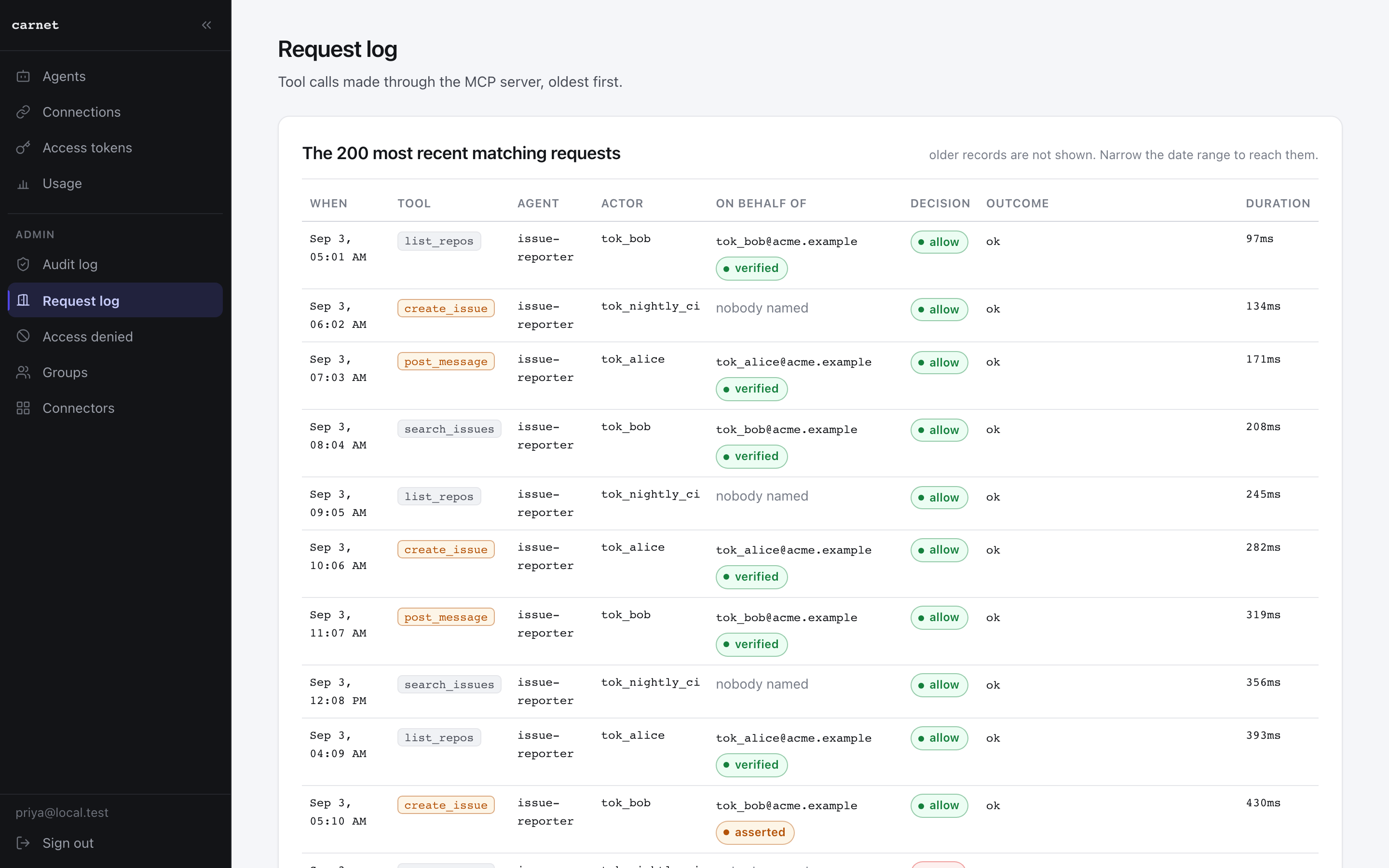
Which looks like this. Every call, who made it, whose account it went out as, what was allowed, what was denied and why:
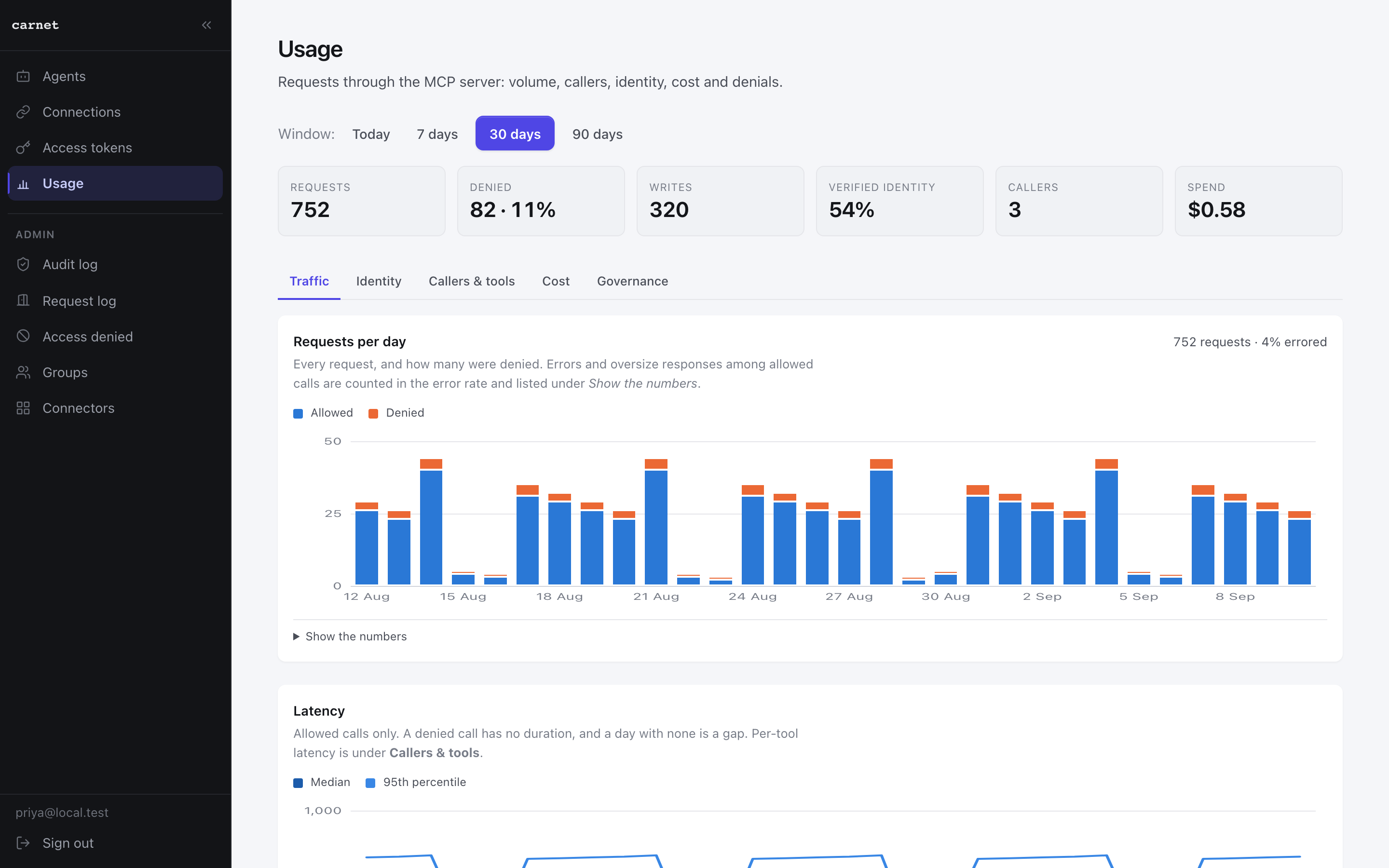
And a month of it, summarised:
There are several MCP gateways. Aggregating servers, filtering tools and writing an audit line are table stakes now — assume every one of them does that. Two things are worth comparing on.
Whose account the call goes out as. Almost every gateway forwards one shared
credential, so the vendor's own audit log records svc-ai-bot for all fifty of your
people. Carnet resolves the credential per caller: each person connects their own
account, and Jira records them. That is the acting for column above, and it is the
difference between an audit trail and a log that says a robot did everything.
Where the line is drawn. Most of these keep identity, or the audit log, or SSO for the paid tier. Everything on this page is in this repository under Apache 2.0 — including per-person identity, groups, roles, spend ceilings and the browser. What is not here is the operational plane: hosting it for you, connectors for Entra and Okta, SCIM, SOC 2 and support.
If you want the one-line version: it is the gateway where each person's calls go out as their own account, and you do not have to buy that.
Control
Identity
Off-boarding
Visibility
Cost
The complete list, down to every flag and setting, is docs/CAPABILITIES.md.
Everything above is what it does. Everything below is how to run it.
docker runYou need Docker and nothing else. No clone, no Python, no database, no sign-in. Copy all four lines:
curl -O https://raw.githubusercontent.com/carnet-mcp/carnet/main/carnet.example.yaml
mv carnet.example.yaml carnet.yaml
export CARNET_TOKEN_LAPTOP=$(docker run --rm ghcr.io/carnet-mcp/carnet carnet --new-token)
export JIRA_TOKEN=… WEATHER_KEY=…        # whatever your carnet.yaml points at

docker run --rm -p 8000:8000 \
  -v ./carnet.yaml:/carnet.yaml -e CARNET_FILE=/carnet.yaml \
  -e JIRA_TOKEN -e WEATHER_KEY -e CARNET_TOKEN_LAPTOP \
  ghcr.io/carnet-mcp/carnet
That file is the whole configuration: the servers you front, the tools you expose from
each, the permission lists that bound them, and the tokens that may call them. Every
secret is a ${VARIABLE} pointer into the environment — a literal is refused — so the
file is safe to commit. Edit it to point at your own servers.
Then point anything at http://localhost:8000/mcp with
Authorization: Bearer $CARNET_TOKEN_LAPTOP — Claude Code, Cursor, an agent framework,
your own code, anything that speaks MCP and can send a header. tools/list returns
exactly what that token is granted; ask for anything else and the call is refused with a
reason.
Three more commands, all of which run in the image with no install:
docker run --rm -v ./carnet.yaml:/f.yaml ghcr.io/carnet-mcp/carnet \
  carnet --check-file /f.yaml        # validate it; every refusal names the key

docker run --rm -e CARNET_FILE=/f.yaml -v ./carnet.yaml:/f.yaml \
  ghcr.io/carnet-mcp/carnet carnet --discover jira   # print the tools: block to paste

docker run --rm ghcr.io/carnet-mcp/carnet carnet --new-token   # another token
A server on your own machine needs one more line, because the door refuses plain HTTP and
private addresses unless you say so:
-e CARNET_EGRESS_INTERNAL_HOSTS=host.docker.internal.
Every published image is signed with cosign, keyless, by the release workflow in this repository:
cosign verify ghcr.io/carnet-mcp/carnet:latest \
  --certificate-identity-regexp '^https://github.com/carnet-mcp/carnet/' \
  --certificate-oidc-issuer https://token.actions.githubusercontent.com
The same command verifies ghcr.io/carnet-mcp/carnet-front, the front door the
deployment in deploy/ runs beside this image — deploy/README.md says how to run the
published pair without building either.
Or build it from a checkout:
docker build -t carnet --target api -f deploy/Dockerfile .
Behind a corporate proxy, an intercepting CA or an internal registry — or with no internet at all, where the image has to arrive as a file somebody carries in — docs/OFFLINE.md is one setting per seam and the offline procedure.
The file above speaks for one shared account per server. This is the other shape: the same image with a database, where people sign in and connect their own accounts.
cd backend
pip install -e ".[dev,postgres,access]"

carnet --local            # then open the URL it prints
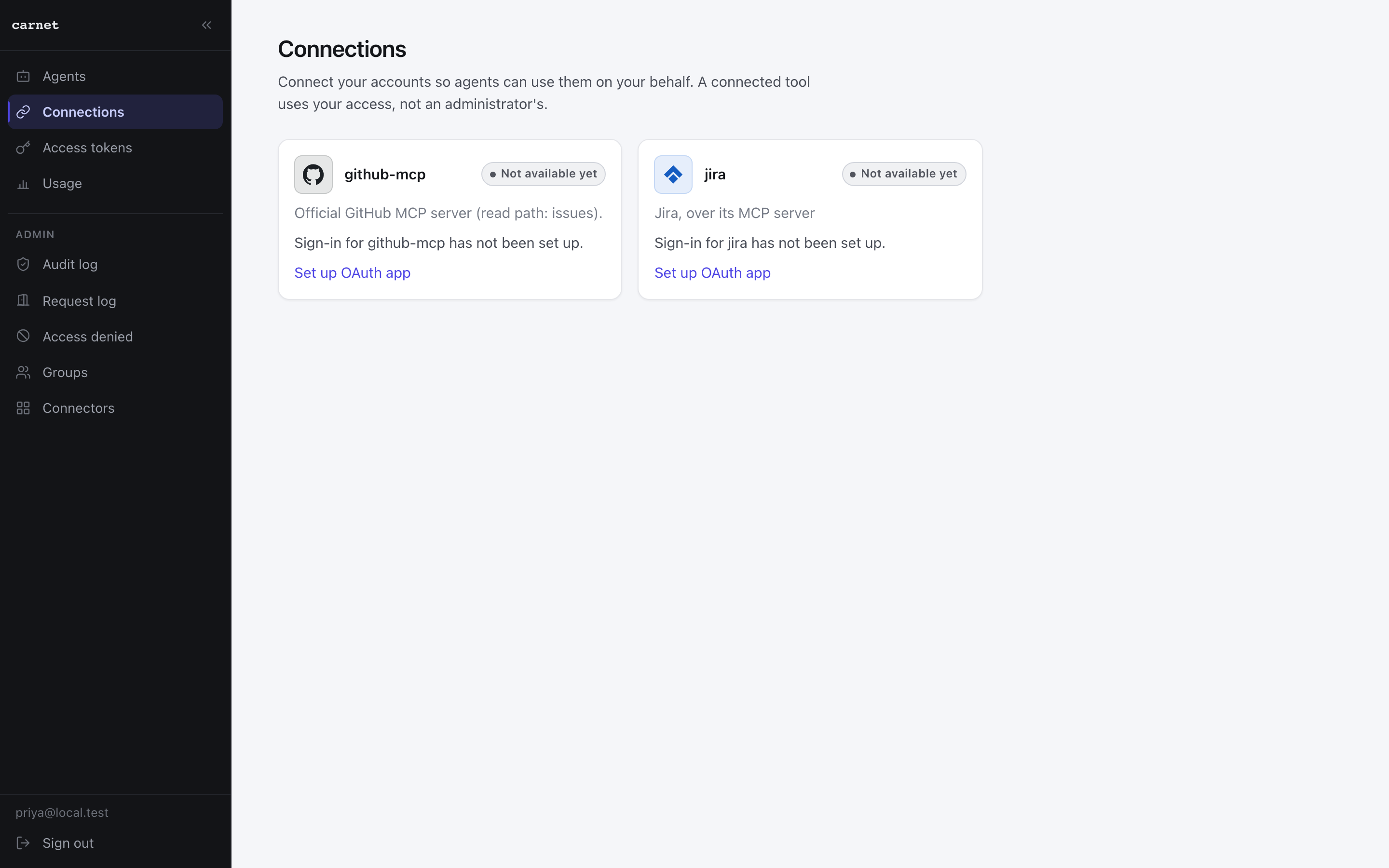
That starts Postgres, the API, the built frontend and a local email-and-password identity
provider. The first account you create becomes the administrator. The provider is a real
OIDC provider running on your machine — the API verifies its tokens with the same code
and the same checks it would use on Okta, so it is not a bypass. State lives in
var/local/. An enterprise identity provider is one carnet --add-idp away.
For a real deployment, deploy/ holds a compose stack with TLS, a front door, and a
migration step that runs before the API starts. See deploy/README.md.
Claude Desktop, Claude.ai and Cursor connect with the URL alone. The door serves the discovery documents, registers the client, sends the person to sign in with the provider they already have, and mints the token at the end. Nothing is pasted.
Read CONTRIBUTING.md, and the code of conduct
that goes with it. Every commit needs a DCO sign-off (git commit -s); there is
no CLA. The gates are pytest, ruff, mypy and the frontend build, and every one of
them runs locally with no secrets and no network.
Security issues go through GitHub's private vulnerability reporting rather than a public issue — see SECURITY.md.
What changed between releases is in the changelog; what an upgrade preserves is in docs/UPGRADING.md.
An MCP tool. Connect your assistant to /mcp and every tool call goes through a broker — scoped per caller, under a credential they never hold, revocable, metered and audited.
Tools
No tool list yet. Remote servers get one after the first health check.
FAQ
Copy the stdio config for Cursor, Claude Desktop, Claude Code, or VS Code on this page. It uses the publisher's install, not a PlugMCP proxy.
No required environment variable is listed on this record.
Carnet runs locally over stdio.
Last checked 2026-10-28. An MCP tool. Connect your assistant to /mcp and every tool call goes through a broker — scoped per caller, under a credential they never hold, revocable, metered and audited.
