AST-first MCP for coding agents. Instead of pasting raw files into the context window, it returns compact structural answers: signatures, usage rows, focused edit context, impact summaries, and review bundles with explicit token budgets.
Tree-sitter MCP Server exposes powerful code analysis tools through the MCP protocol.
Stars
3
Tools
—
Uptime
—
What You Get
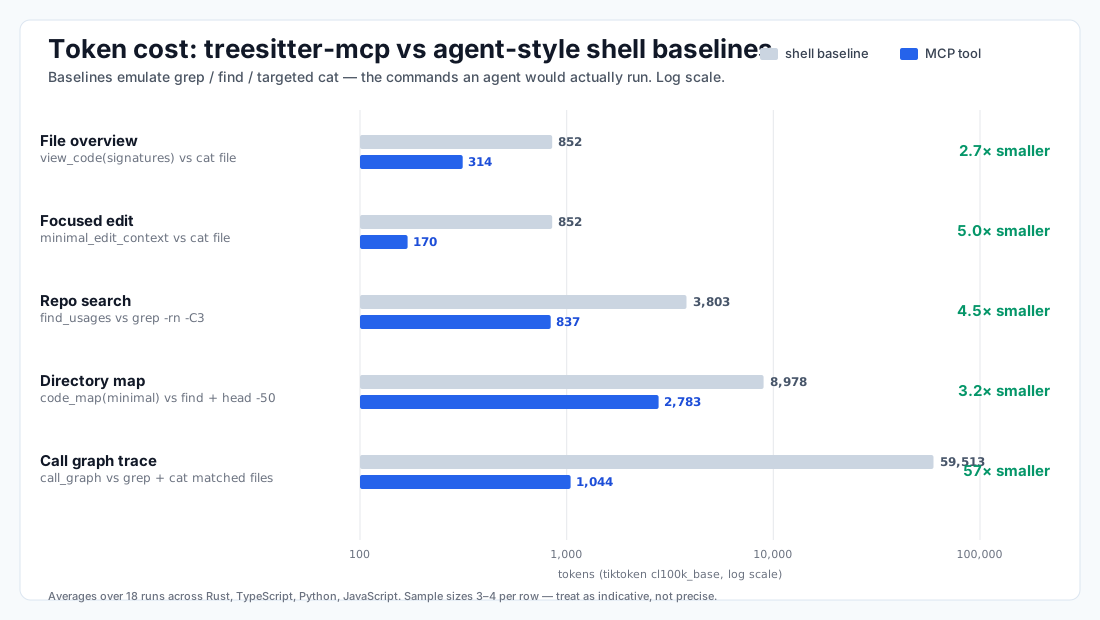
Numbers below compare MCP payloads against the shell workflow an agent would actually
reach for (grep, find + head, targeted reads) — not against cat-everything straw-men.
File overview ~2.7× smaller than cat file (signatures instead of bodies).
Focused edit ~5.0× smaller than cat file (one symbol plus direct deps, not the whole file).
Repo search ~4.5× smaller than grep -rn -C3 symbol, with added scope, owner, and usage-type per hit.
Directory map ~3.2× smaller than find -type f + head -50 per file, and structured rather than raw text.
Call-graph tracing ~57× smaller than grepping then cat-ing each matched file (the workflow for "who calls X?").
~2,071 tokens added to the agent context window to register the server.
Payload-size regressions fail CI — if a refactor bloats a tool output, the build breaks.
These are indicative averages over 18 runs across Rust, TypeScript, Python, and JavaScript
fixtures — treat them as "order-of-magnitude", not precise guarantees. Token savings alone
do not prove a quality win; see BENCHMARK.md for the accuracy-benchmark
methodology this project is building out.
What It Does
treesitter-mcp reduces token load with four repeated patterns:
Structural filtering: return AST-derived symbols and signatures instead of raw bodies when full code is unnecessary.
Focused extraction: return one symbol plus only the dependencies, imports, types, and tests that matter for that task.
Compact grouping: use stable, row-oriented schemas so repeated keys and prose do not dominate the payload.
Budget-aware truncation: use tiktoken counts and explicit max_tokens limits to keep results bounded.
This is the core positioning: it is not just a parser, it is a context compressor for code workflows.
Installation
Homebrew (macOS)
brew tap christoph/treesitter-mcp
brew install treesitter-mcp

claude mcp add --scope project treesitter-mcp -- /opt/homebrew/bin/treesitter-mcp
Release Binaries (Linux and Windows)
Prebuilt release binaries are available on the GitHub Releases page.
Linux: download the release archive for your target, extract it, and point your MCP client at the treesitter-mcp binary
Windows: download the Windows release archive, extract it, and point your MCP client at treesitter-mcp.exe
Other Source Builds
If you are not using Homebrew or a release binary, the same cargo build --release flow also works on other supported platforms with a working Rust toolchain.
Configuration
Claude Code CLI
Add the server to the current project:
claude mcp add --scope project treesitter-mcp -- /ABSOLUTE/PATH/TO/treesitter-mcp
If you need the full installation and configuration details, keep reading below. For the messaging and roadmap behind this README, see docs/COMMUNICATION.md.
Token Efficiency Comparison
Measured on the current code after rebuilding the server.
Baselines emulate the shell workflow an agent would actually run (grep, find + head,
targeted reads) — notcat <every file in scope>. The MCP side is the exact JSON
payload returned by each tool, the same shape the built MCP server returns.
All token counts below are averages, not single examples.
Repo search baseline is grep -rn -C3, not bare grep -l. Bare grep returns only
locations, so it would appear cheaper than MCP for pure locate; the fair comparison
is "locate + a few lines of context", which is what find_usages returns plus scope
and usage-type metadata.
Call-graph baseline reads every file whose text contains the symbol, because
tracing callers without LSP requires reading those files. This is what makes it so
much more expensive than tools that resolve callers structurally.
Sample sizes (3–4 per row) are small — treat multipliers as indicative, not precise.
Use This Instead of Raw Reads
view_code(detail="signatures") instead of cat when you need structure but not bodies.
minimal_edit_context instead of focused file reads when you are editing one known symbol.
call_graph instead of reading multiple files to trace one function.
find_usages instead of concatenating a whole directory to answer one reference question.
code_map instead of dumping a tree when you only need the project shape.
review_context instead of manually assembling diff, impact, tests, and changed-symbol context.
Communication Commitments
The README leads with measured value, not internal architecture.
Benchmarks are reproducible through cargo test report_average_token_benchmarks -- --ignored --nocapture.
CI publishes a benchmark summary so pull requests show the token story directly in the pipeline.
New token-saving ideas are tracked in docs/COMMUNICATION.md, including opportunities still missing from the product.
Measurement Method
The averaged benchmark uses 18 total runs:
4 file-overview runs across Rust, TypeScript, Python, and JavaScript fixture files
4 focused-edit runs across the same four source files
4 call-graph runs across analysis modules in this repository
3 repo-search runs in src/analysis
3 directory-map runs across src, src/analysis, and tests/fixtures/complex_rust_service/src
For each run:
the baseline token count emulates the shell workflow an agent would actually run:
cat file for file-overview and focused-edit scenarios
grep -rn -C3 <symbol> <scope> for repo search
grep -rln <symbol> <scope> | xargs cat for call-graph tracing (read every file that
mentions the symbol, since tracing callers without LSP requires reading them)
find <path> -type f listing plus head -n 50 <file> per source file for directory maps
the MCP token count is the tool response JSON text
both sides are counted with tiktoken_rs::cl100k_base()
baselines use word-boundary matching to approximate real grep behaviour, and skip
files whose language the server does not recognise (same filter the MCP side uses)
Overview
Tree-sitter MCP Server exposes powerful code analysis tools through the MCP protocol, allowing AI assistants to:
Parse and analyze code structure across multiple languages
Extract high-level file shapes without implementation details
Generate token-aware code maps of entire projects
Find symbol usages across codebases
Execute custom tree-sitter queries for advanced analysis
Analyze structural changes between file versions (diff-aware analysis)
Identify potentially affected code when making changes
Adds ~2,071 tokens to the context window when adding the mcp
Supported Languages
Rust (.rs)
Python (.py)
JavaScript (.js, .mjs, .cjs)
TypeScript (.ts, .tsx)
HTML (.html, .htm)
CSS (.css)
Swift (.swift)
C# (.cs)
Java (.java)
Go (.go)
Available Tools
Quick Tool Selection Guide
Choose the right tool for your task:
"I need to understand code"
Don't know which file? → code_map (directory overview)
Starting a new session? → type_map (usage-ranked type context)
Know the file, need overview? → view_code with detail="signatures" (signatures only)
Know the file, need full details? → view_code with detail="full" (complete code)
Know the specific function? → view_code with focus_symbol (focused view, optimized tokens)
Editing one known symbol? → minimal_edit_context (smallest useful edit context)
"I need to find something"
Where is symbol X used? → find_usages (syntax-aware search with usage types)
What calls this / what does this call? → call_graph (compact best-effort callers/callees)
Already have LSP references? → format_references (compact context for precise locations)
Already have LSP diagnostics? → format_diagnostics (compact diagnostics with owners)
What function is at line N? → symbol_at_line (symbol info with scope hierarchy)
What data is available in a template? → template_context (Askama template variables)
"I'm refactoring/changing code"
Before editing a signature:preview_impact (estimate blast radius first)
Before changes:find_usages (see all usages)
After changes:parse_diff (verify changes at symbol level)
Impact analysis:affected_by_diff (what might break with risk levels)
Which tests should I run?relevant_tests (rank likely tests for one symbol)
Did I only change what I meant to change?verify_edit (compact structural guardrail)
Need reviewer context for a diff?review_context (diff + impact + tests + focused context)
Tool Comparison Matrix
Tool
Scope
Token Cost
Speed
Best For
type_map
Directory
Medium
Fast
LLM context priming, finding key types
type_map (count_usages=false)
Directory
Medium
Faster
Type locations without usage ranking
code_map
Directory
Medium
Fast
First-time exploration
code_map (with_types=true)
Directory
Medium
Fast
Code structure + types in one pass
view_code (signatures)
Single file
Low
Fast
Quick overview, API understanding
view_code (full)
Single file
High
Fast
Deep understanding, multiple functions
view_code (focused)
Single file
Medium
Fast
Editing specific function
minimal_edit_context
Single symbol
Low
Fast
Focused edits with direct deps
call_graph
Single symbol
Low-Medium
Medium
Best-effort callers/callees
preview_impact
Single symbol + scope
Medium
Medium
Planned signature changes before editing
find_usages
Multi-file
Medium-High
Medium
Refactoring, impact analysis
format_references
LSP locations
Low-Medium
Fast
Compact context for precise LSP references
format_diagnostics
LSP diagnostics
Low-Medium
Fast
Compact diagnostics with owners
affected_by_diff
Multi-file
Medium-High
Medium
Post-change validation
parse_diff
Single file
Low-Medium
Fast
Verify changes
relevant_tests
Single symbol
Low-Medium
Fast
Targeted test selection after edits
verify_edit
Single file diff
Low
Fast
Check edit stayed within intended scope
review_context
Single file diff
Medium
Medium
Compact review bundle for changed files
symbol_at_line
Single file
Low
Fast
Error debugging, scope lookup
query_pattern
Single file
Medium
Medium
Complex patterns (advanced)
template_context
Single file
Low-Medium
Fast
Askama template editing
Precision vs. Heuristic
These tools provide strong guarantees based on AST structure:
view_code: exact code extraction from parsed AST
parse_diff: structural diff between file revisions
query_pattern: precise tree-sitter AST queries
symbol_at_line: scope chain from AST traversal
template_context: Askama struct resolution
These tools use syntax-aware matching (best-effort, not compiler-grade):
find_usages: identifier matching via tree-sitter, may match homonyms in different scopes
format_references: trusts LSP-provided locations for precision, then adds syntax-aware context
format_diagnostics: trusts LSP-provided diagnostics, then adds syntax-aware owner context
minimal_edit_context: same-file relevance plus direct project-local dependency signatures from imports
call_graph: project-local call extraction, same-file definitions preferred, not compiler-grade resolution
preview_impact: virtual signature diff plus syntax-aware impact scan, no file edits required
affected_by_diff: relies on find_usages for impact analysis
relevant_tests: test discovery via file heuristics plus syntax-aware symbol matches
verify_edit: structural diff guardrail, not semantic intent verification
review_context: composition of existing tools; precision depends on the underlying diff/usages context
affected_by_diff: relies on find_usages for impact analysis
code_map: structural overview, scope-aware but not semantically resolved
type_map: type identification via AST, usage counts are approximate
For compiler-grade symbol resolution (go-to-definition, precise find-references), use an LSP server alongside this MCP server.
Common Workflow Patterns
Pattern 1: LLM Session Initialization (Optimized - Single Pass)
1. code_map (path="src", with_types=true, count_usages=true)  → Get both structure AND usage-ranked types
2. Begin coding tasks with full context
Pattern 1b: LLM Session Initialization (Traditional - Two Passes)
1. type_map (path="src", max_tokens=3000)      → Get usage-ranked types
2. code_map (path="src", detail="minimal")      → Get file structure
3. Begin coding tasks with full type awareness
Pattern 2: Exploring New Codebase
1. code_map (path="src", detail="minimal", with_types=true)  → Get structure + types in one pass
2. view_code (detail="signatures")              → Understand interfaces
3. view_code (focus_symbol="function_name")     → Deep dive
Pattern 2: Refactoring Function
1. find_usages (symbol="function_name")         → See all call sites
2. Make changes
3. parse_diff ()                                → Verify changes
4. affected_by_diff ()                          → Check impact with risk levels
Pattern 2b: Planned Signature Change
1. preview_impact (symbol_name="function_name", new_signature="...") → Estimate fallout first
2. Make changes
3. relevant_tests (symbol_name="function_name")                      → Run focused tests
4. verify_edit (target_symbol="function_name")                       → Confirm edit stayed scoped
Pattern 2c: Reviewing a Local Diff
1. review_context (file_path="src/lib.rs")      → Diff + impact + tests + focused changed-symbol context
2. view_code / minimal_edit_context as needed   → Drill deeper only where needed
Pattern 3: Debugging Error
1. symbol_at_line (line=error_line)             → Find function
2. view_code (focus_symbol=func_name)           → See implementation
3. find_usages (symbol=variable_name)           → Trace data flow
Pattern 4: Understanding Large File
1. view_code (detail="signatures")              → See all functions
2. view_code (focus_symbol=main_func)           → Start with entry point
3. view_code (focus_symbol=helper)              → Drill into helpers as needed
Token Optimization Strategies
Low Budget (<2000 tokens): Use view_code with detail="signatures", code_map with detail="minimal", set find_usagesmax_context_lines=20
Medium Budget (2000-5000 tokens): Use view_code with focus_symbol for focused editing, default settings
High Budget (>5000 tokens): Use view_code with detail="full" freely, code_map with detail="full"
Common Anti-Patterns (What NOT to Do)
❌ Using view_code with detail="full" for quick overview → Use detail="signatures" instead (10x cheaper)
❌ Using query_pattern for symbol search → Use find_usages instead (simpler, cross-language)
❌ Using view_code with detail="full" on large files without checking signatures first → Always start with detail="signatures"
❌ Not setting max_context_lines when using find_usages on common symbols → Can cause token explosion
❌ Not using focus_symbol when editing specific functions → Use focus_symbol for 3x token savings
1. type_map
Generate a usage-sorted map of all project types. Returns structs, classes, enums, interfaces, traits, protocols, and type aliases prioritized by usage frequency.
Primary Use Case: Provide LLM agents with comprehensive type context at session start to prevent hallucinations about type names, fields, and signatures.
Use When:
✅ Starting an LLM coding session (context priming)
✅ Need accurate type definitions across entire project
✅ Want to understand which types are most important
Don't Use When:
❌ Need function/method implementations → use view_code
❌ Need call hierarchy or control flow → use code_map
❌ Analyzing a single file → use view_code
❌ Need both code structure AND types → use code_map with with_types=true
Token Cost: MEDIUM (2000-3000 tokens typical for medium projects)
count_usages (boolean, optional, default: true): Count usages across the project. Set to false for faster results when you only need type locations without usage ranking.
Returns: Compact schema (usage-sorted types)
Output keys: h (header) and types (rows: name|kind|file|line|usage_count)
Optional meta: @ (e.g. @.t=true when truncated)
Rows are newline-delimited; fields are pipe-delimited and escaped (\\, \n, \r, \|)
"signatures": Function/class signatures only (no bodies) - 10x cheaper
"full": Complete implementation code
focus_symbol (string, optional): Focus on ONE symbol, show full code only for it
When set, returns full code for this symbol + signatures for rest - 3x cheaper
definition_location (object, optional): LSP textDocument/definition result or compact
{file,line,col} location used to include the exact dependency type from that definition
comment_mode (string, optional, default: "none"): Comment handling for returned code fields
"none": Current compact behavior
"leading": Prepend the contiguous leading comment block above returned symbol code
Auto-Includes: All struct/class/interface definitions from project dependencies (not external libs)
Returns: Compact schema (BREAKING).
Output keys: p (relative path) plus row tables (h/f/s/c), and optional additional tables (ih/im, bh/bm, etc.)
with_types (boolean, optional, default: false): Also extract type definitions (structs, enums, interfaces, etc.) in the same pass. More efficient than calling type_map separately.
count_usages (boolean, optional, default: false): When with_types=true, also count usages for each type. Set to true for usage-ranked types.
Find Rust structs associated with an Askama template file. Returns struct names, fields, and types (resolved up to 3 levels deep) that are available as variables in the template.
Use When:
✅ Editing Askama HTML templates and need to know available variables
✅ Understanding what data is passed to a template
✅ Debugging template rendering issues
Don't Use When:
❌ Not using Askama templates
❌ Working with non-template files
Token Cost: LOW-MEDIUM
Parameters:
template_path (string, required): Path to the template file (relative or absolute)