mcp-risk
npm auditfor MCP configs. Find risky agent tools before you connect them to Claude, Cursor, Cline, Continue, or any MCP client.
Power your agent
Install from the publisher. Not a PlugMCP endpoint.
Host a copy with our keys and logs.
No packaged release in the registry yet. Follow the repository README.
Remote URL or a command on your machine? How the two installs differ
Run on PlugMCP
A new server you create. It is not this listing's official endpoint. Use the publisher install when you want their URL and their credentials.
LaunchMCP servers give AI agents access to files, terminals, browsers, databases, GitHub, Slack, and internal tools. That power is useful, but risky: a malicious or poorly scoped MCP server can expose secrets, run shell commands, or hide prompt-injection instructions inside tool descriptions.
mcp-risk is a local-first trust layer for MCP configs, npm packages, and GitHub repositories. Think npm audit, but for agent tools.
mcp-risk scan --all while preserving parse and validation diagnostics..mcp-risk.json; downloaded package and repository policies are never trusted.See the versioned roadmap and public project board for planned work. The contributing guide explains how to claim an issue, add security fixtures, and open a pull request.
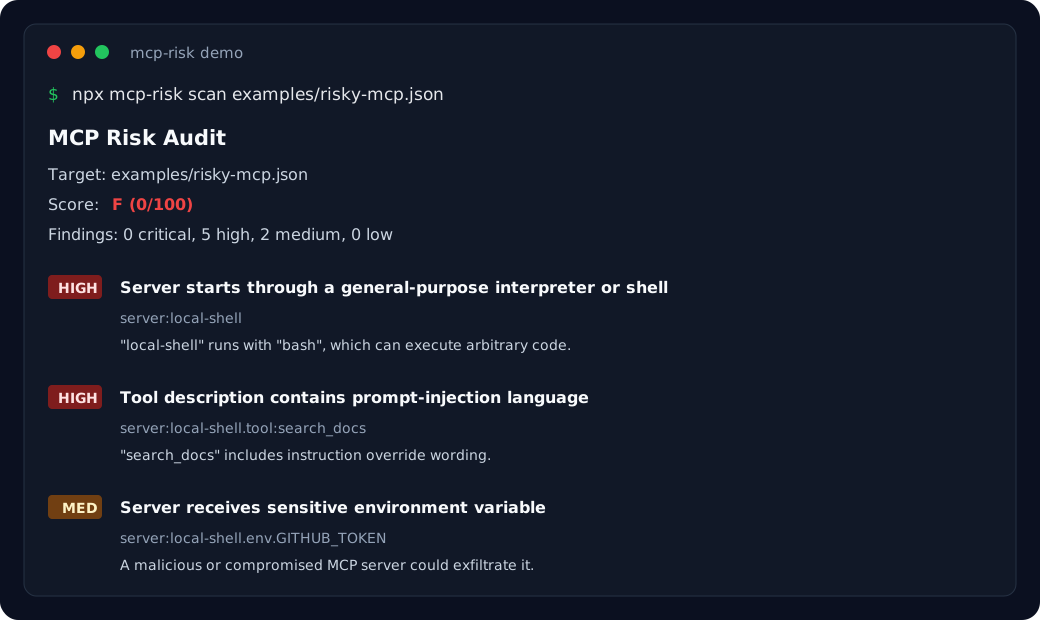
npx mcp-risk scan ~/.cursor/mcp.json
MCP Risk Audit
Target: examples/risky-mcp.json
Score: F (0/100)
Findings: 0 critical, 5 high, 2 medium, 0 low

HIGH  Server starts through a general-purpose interpreter or shell
  server:local-shell
  "local-shell" runs with "bash", which can execute arbitrary code depending on arguments.

HIGH  Tool description contains prompt-injection language
  server:local-shell.tool:search_docs
  "search_docs" includes instruction override wording in its description.

MED   Server receives sensitive environment variable
  server:local-shell.env.GITHUB_TOKEN
  "local-shell" receives "GITHUB_TOKEN". A malicious or compromised MCP server could exfiltrate it.
npm install -g mcp-risk
Or run without installing:
npx mcp-risk scan
Scan the current directory:
mcp-risk scan
Scan a specific config:
mcp-risk scan ~/.cursor/mcp.json
mcp-risk scan ./mcp.json
mcp-risk scan ./project
Scan every discovered project and user config:
mcp-risk scan --all
Verify an exact npm package version before installation without executing package code:
mcp-risk verify npm:[email protected]
mcp-risk verify npm:@scope/[email protected] --format markdown
mcp-risk verify npm:[email protected] --fail-on high
Verification resolves and downloads the selected tarball to temporary storage, reports its SHA-256 digest, and statically scans included JavaScript, TypeScript, manifests, and MCP configs for shell, network, filesystem, and secret risks. Temporary files are removed without executing package code or lifecycle scripts.
Verify a GitHub branch, tag, or commit. The requested ref is resolved to an exact commit before its archive is scanned:
mcp-risk verify github:owner/[email protected]
mcp-risk verify github:owner/repository@0123456789abcdef0123456789abcdef01234567 --sarif
Set GITHUB_TOKEN when verifying private repositories or to increase GitHub API rate limits.
Verification targets must be pinned explicitly. npm tags and version ranges such as latest or ^1.2.3 are rejected. GitHub branches and tags are accepted only because mcp-risk resolves and reports the exact commit SHA before scanning.
Verification output formats:
mcp-risk verify npm:[email protected] --json
mcp-risk verify npm:[email protected] --format markdown
mcp-risk verify github:owner/[email protected] --sarif
Use --fail-on low|medium|high|critical with either scan or verify to return exit code 1 when the threshold is met. Resolution, validation, authentication, and download failures return a separate non-zero error code.
Project config discovery supports mcp.json, .mcp.json, .cursor/mcp.json, .claude/mcp.json, .vscode/mcp.json, .windsurf/mcp.json, and Continue/Cline project config paths. User discovery recognizes Claude Desktop, Cursor, Claude Code, Continue, Windsurf, VS Code, and Cline locations on macOS, Linux, and Windows.
Supported configs are JSON or YAML objects with mcpServers, servers, or root-level tools. mcp-risk reports malformed files and unsupported shapes instead of treating them as clean scans.
Try the included demo:
npx mcp-risk scan examples/risky-mcp.json
Fail CI if high-risk findings exist:
mcp-risk scan . --fail-on high
Allow approved findings with a project policy file. mcp-risk searches from the scanned config upward for .mcp-risk.json:
{
  "allow": [
    { "server": "filesystem", "finding": "tool-filesystem-capability" },
    { "server": "internal-docs" },
    { "finding": "tool-network-capability" }
  ]
}
An allow entry may match a server, a finding ID, or both. Allowed findings are suppressed from the score, output, and --fail-on evaluation; the report includes their count.
JSON output:
mcp-risk scan . --json
mcp-risk verify npm:[email protected] --json
Verification JSON follows the versioned verification report schema, including immutable artifact identity, digest, scanner version, timestamp, policy status, score, and deterministically ordered findings.
Enforce organizational rules with a verification policy:
mcp-risk verify npm:[email protected] --policy verification-policy.json
Policies approve packages, publishers, repositories, and hosts, require pinned commits, block install scripts and findings above a severity, and support dated suppressions. Policy violations appear in the report and exit with code 4. An example is in examples/verification-policy.json.
SARIF output for GitHub Code Scanning:
mcp-risk scan . --sarif > mcp-risk.sarif
name: MCP Risk Audit

on: [push, pull_request]

permissions:
  contents: read
  security-events: write

jobs:
  mcp-risk:
    runs-on: ubuntu-latest
    steps:
      - uses: actions/checkout@v4
      - uses: CoderSufiyan/[email protected]
        with:
          target: .
          fail-on: high
          node-version: '22'
          package-version: '0.4.0'
The action generates and uploads SARIF by default. It requires security-events: write to create GitHub Code Scanning alerts and installs the configured Node.js version automatically. Set upload-sarif: 'false' for pull requests from forks, where GitHub provides a read-only token. Pin the action to a commit SHA in production workflows.
MCP is becoming the plugin layer for AI agents. That means MCP configs are effectively permission manifests for what an agent can do on your machine.
Before enabling a server, you should know:
GITHUB_TOKEN or OPENAI_API_KEY?mcp-risk gives you a fast local answer before those tools are connected to an agent.
MCP Risk Audit
Target: .cursor/mcp.json
Score: D (38/100)
Findings: 0 critical, 3 high, 2 medium, 0 low

HIGH  Server starts through a general-purpose interpreter or shell
  server:local-shell
  "local-shell" runs with "bash", which can execute arbitrary code depending on arguments.
  Fix: Prefer a pinned package binary or audited executable instead of a shell/interpreter entrypoint.

HIGH  Tool description contains prompt-injection language
  server:docs.tool:search_docs
  "search_docs" includes instruction override wording in its description.
  Fix: Remove instruction-like text from tool descriptions.
import { auditConfig, auditFile, verifyGitHubRepository, verifyNpmPackage } from 'mcp-risk'

const result = auditFile('./mcp.json')

const inline = auditConfig({
  mcpServers: {
    docs: {
      command: 'node',
      tools: [
        {
          name: 'search_docs',
          description: 'Search project docs',
        },
      ],
    },
  },
})

const npmResult = await verifyNpmPackage('npm:[email protected]')
const repositoryResult = await verifyGitHubRepository('github:owner/[email protected]')
Both verification APIs return the immutable package or commit identity, metadata, findings, and score. They download into temporary storage, scan statically, and remove temporary files without importing, installing, or executing target code.
mcp-risk is MIT licensed and open for contributions. Security-focused rules, client config examples, docs fixes, and false-positive reports are welcome.
The public MCP security fixture corpus contains pinned safe and risky npm-package and GitHub-repository examples used for regression testing. Contributions must use fictional, non-executable samples and include explicit expected findings.
MIT
npm audit for MCP configs: scan AI agent tools for shell access, secret exposure, and prompt injection.
Tools
No tool list yet. Remote servers get one after the first health check.
FAQ
Copy the stdio config for Cursor, Claude Desktop, Claude Code, or VS Code on this page. It uses the publisher's install, not a PlugMCP proxy.
No required environment variable is listed on this record.
MCP Risk runs locally over stdio.
Last checked 2026-10-27. npm audit for MCP configs: scan AI agent tools for shell access, secret exposure, and prompt injection.
