StashSeek Chat
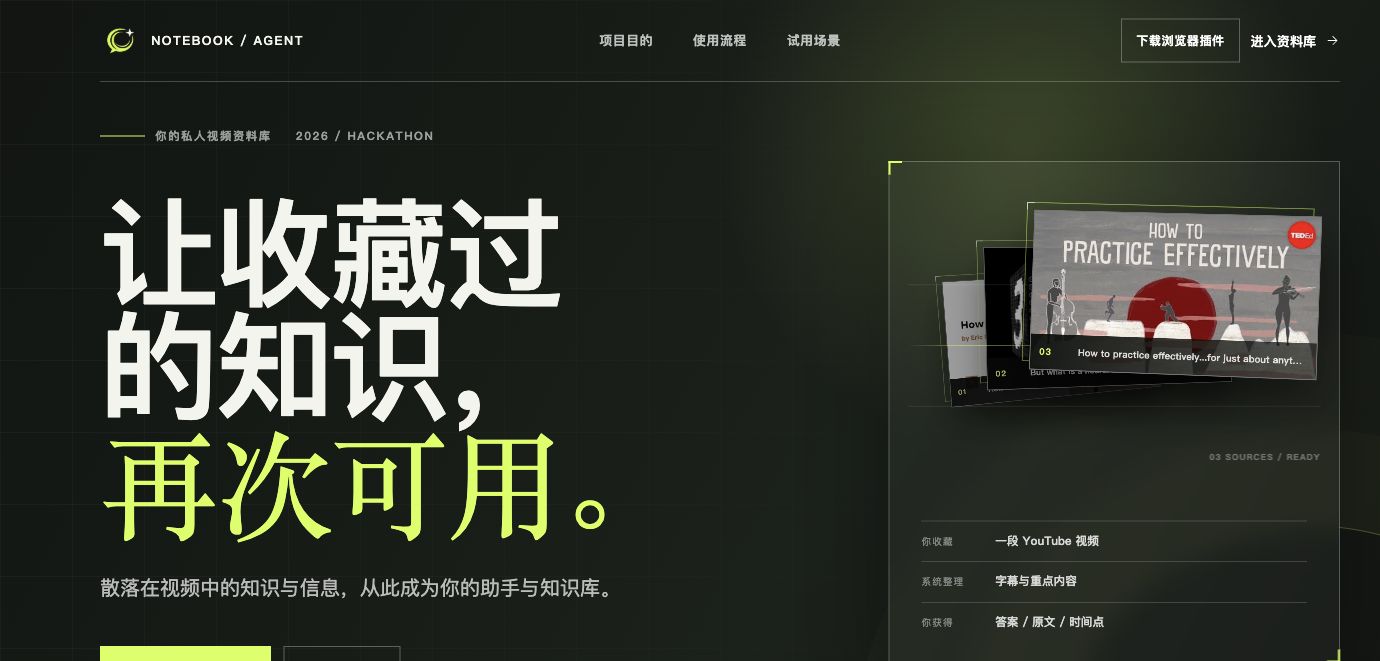
Turn saved videos into private knowledge you can find, verify, and reopen at the original source.
StashSeek Chat is a browser-first conversational Agent for the videos and content you have saved. Save a source, ask a question, and get the matching video with evidence and timestamps instead of an untraceable summary.
Explore the product and public demo →
EAZO Global Hackathon Project
Why StashSeek Chat
People bookmark courses, interviews, talks, and industry analysis, then later remember only a vague idea—not the title, source, or exact moment where it was explained.
A bookmark list proves that something was saved, but it cannot answer “what did it say?”, “where is the evidence?”, or “how do I get back to the source quickly?”. StashSeek Chat lets you ask inside saved content and takes you back to the matching video.
Who it is for
- Deep learners and students: find a concept and its context again while reviewing a long course or lecture.
- Researchers, product teams, and knowledge workers: compare ideas across interviews, talks, and case studies while keeping verifiable sources.
- Content creators: relocate arguments, examples, and phrasing in material they have already watched without replaying every video.
- Privacy-conscious and self-hosting users: keep libraries isolated and access them through the browser extension, MCP, or chat surface.
The shared need is a low-effort path: save once, ask in natural language through an enabled conversation surface, see the evidence, and return to the original video when context matters.
Concrete scenarios
Recall one idea from a long course
You remember that an instructor explained a concept but not which lecture or timestamp. Ask StashSeek Chat, inspect the matching caption evidence, and jump back to the source to continue learning.
Compare ideas across interviews
After saving several interviews, ask what the speakers agree or disagree about. StashSeek Chat keeps the video source for each result so you can read and verify the context.
Save a course page that requires your login
When a course page cannot be read directly by the server, the optional browser companion can read captions from the page in a browser session you have already authorized and submit them to the same private library. Page credentials, cookies, and signed caption URLs are not uploaded as server-fetch jobs.
Ask from a surface you already use
The browser extension and MCP are the core entry points. If you already work in Telegram or WeChat, you can add the optional LangBot bridge. All entry points can reach the same private library while keeping the same tenant boundary.
From saved video to verifiable answer in four steps
StashSeek Chat is not another link list or filing system. It closes a traceable loop from source to answer.
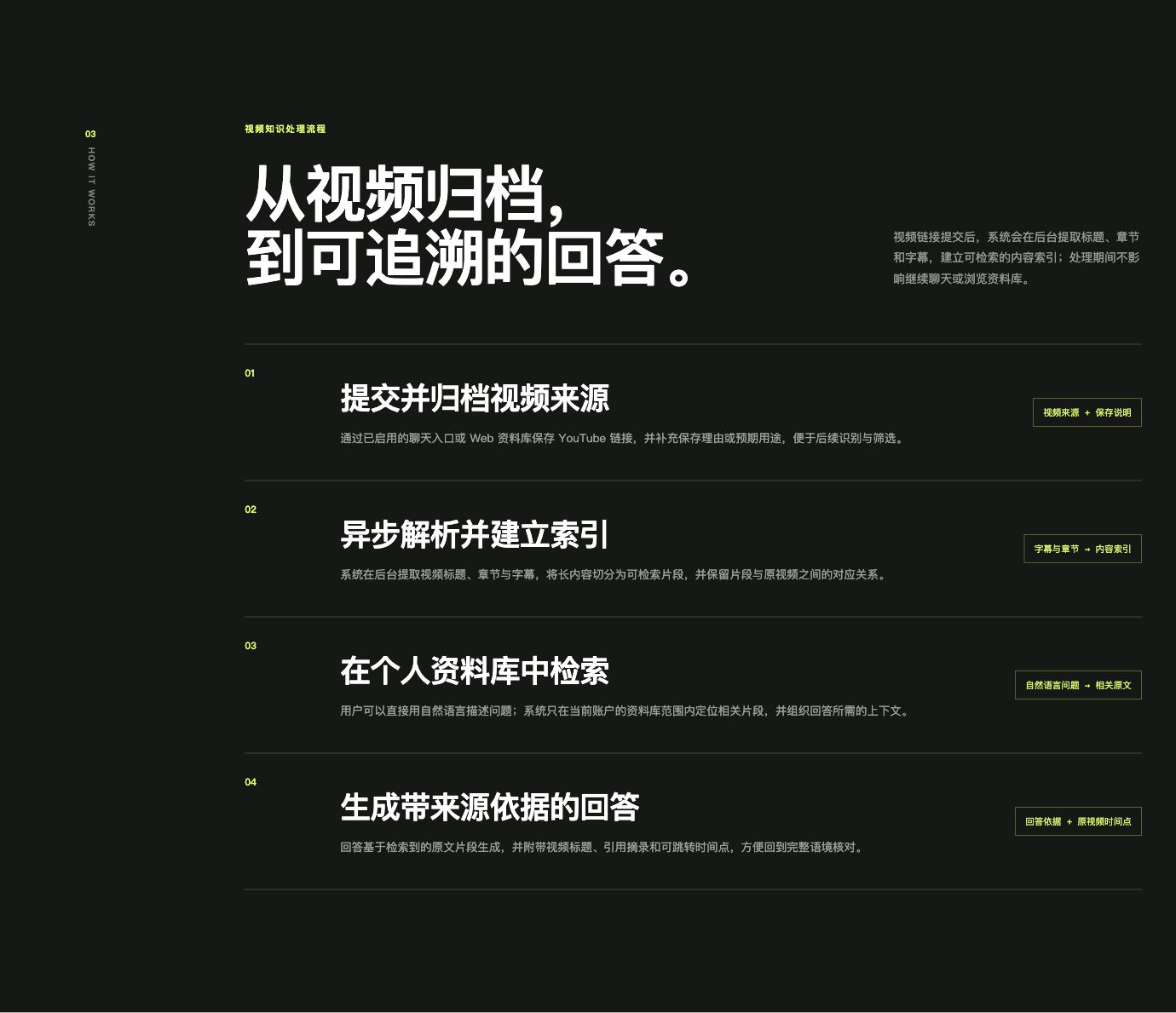
- Save a video source: save a video link from the browser extension or an enabled chat entry point.
- Prepare it asynchronously: the system extracts titles, chapters, and captions in the background while you continue browsing.
- Chat inside your saved content: ask in natural language; retrieval stays inside the current user's library and assembles the relevant source context.
- Receive an evidence-backed answer: the answer includes video titles, quoted excerpts, and jumpable timestamps so you can check the full context in the original video.
The same flow also provides:
- An extension library for saved-item access, transcript views, and retrying failed items when needed.
- Hybrid PostgreSQL full-text and pgvector semantic retrieval within the current user's space.
- Server-validated citations with source titles, real URLs, excerpts, and timestamps. When the library does not contain enough evidence, the answer stays bounded instead of filling the gap from model memory.
- Standard MCP entry points over
stdioand Streamable HTTP. Each client uses a scoped grant:readcovers questions and library reads;fullis required for saving and other mutations. - An optional browser companion for supported page captures, and an optional LangBot bridge for Telegram and WeChat.
Product surfaces
What an answer looks like
A complete answer contains more than a conclusion. It shows how many caption passages supported the response, the corresponding source evidence, and timestamps that take you back to the video. Read the answer first, then verify each point without replaying the entire source.
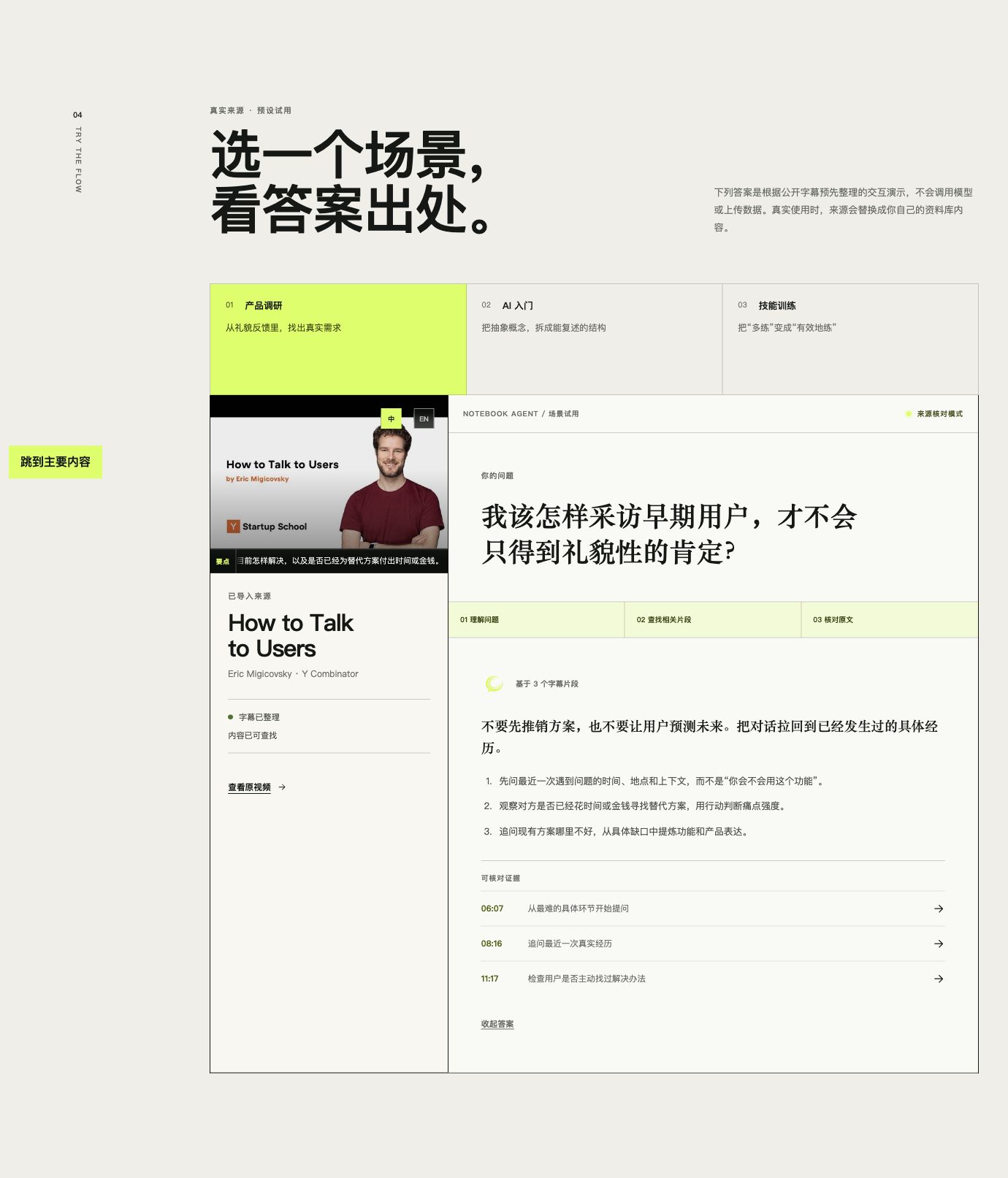
The image above comes from the product page's public preset demo. It does not call a model or upload data; it only demonstrates the path from question to answer to source timestamp. In normal use, the preset source is replaced by content from your own library. The current public product page is presented in Chinese.
Browser extension library
After login, the browser extension is the end-to-end place to save, find, and manage content. New submissions appear in a processing queue first and move into the readable library when ready. You can inspect titles, authors, notes, captions, and source details, then retry, archive, or restore items.
Extension conversations keep answers and evidence together. The server renders source titles, URLs, excerpts, and video timestamps from the current retrieval result so you can move from an answer back to the video.
MCP
MCP connects desktop agents, automation, and other MCP clients through stdio or Streamable HTTP. Grants are bound to a user space and scoped as read or full; the available tools follow that scope. MCP Bearer credentials do not authenticate Web cookies, and a client cannot choose another user's library through a tool argument.
Browser companion
The browser extension handles email login and pairing in the extension itself. It can read captions from supported YouTube and Bilibili pages and submit normalized captions to StashSeek Chat; you can then ask through the extension or another enabled conversation surface and return to the matching video. It is not a generic authenticated-site scraper or a media uploader, and it does not send page cookies, playback credentials, or signed caption URLs to the server.
Telegram and WeChat
Telegram and WeChat are optional LangBot bridge channels, not prerequisites for the core runtime. Cross-channel linking uses a single-use code bound to the target channel. Once linked, both channels reach the same user space while their conversation histories remain separate.
Trust boundaries and current limits
StashSeek Chat promises a more useful and verifiable path through sources you already saved. It does not promise access to every platform, automatic viewing of every video, or an answer when there is no caption evidence.
Start here and choose a documentation path
Short self-hosting route
To run the full save, prepare, and ask workflow, you need Python 3.11+, Docker Compose, PostgreSQL, Redis, S3-compatible object storage, an Agent-model credential, and a Zhipu Embedding API credential. The managed lifecycle launcher supports Linux and macOS; Windows users should follow the direct-start deployment guide.
From the project root:
git clone https://github.com/deequoique/stashseek.git
cd stashseek

python -m venv .venv
source .venv/bin/activate
python -m pip install -e '.[dev]'

# Full runtime: MCP, background ingestion, and the optional channel gateway
# (full is explicit; an omitted profile safely defaults to read)
./scripts/stashseek init --profile full
./scripts/stashseek start --profile full
For a read-only MCP connection to an existing library, choose read; it does not start Redis, MinIO, a worker, or Beat and does not run background ingestion. Choose langbot when you need the background/channel runtime without the public MCP endpoint. Before connecting a client, follow the first-run tutorial to create a user and issue a scoped grant with the same private environment as the managed runtime.
Continue by goal:
- First successful run: First-run tutorial
- Use the extension workspace or browser companion: How-to guides · Browser companion guide
- Connect MCP, Telegram, or WeChat: How-to guides
- Deploy, back up, upgrade, or troubleshoot: How-to guides · Operations runbooks
- Look up profiles, configuration, and interfaces: Reference
- Understand architecture, retrieval, and privacy boundaries: Explanation
- Browse all documentation: Documentation index
Project status and license
StashSeek Chat was built for the EAZO Global Hackathon. The current repository implements the core extension experience, evidence-first answers, MCP, server-side YouTube/Bilibili connectors, and optional browser-companion and LangBot entry points; each deployment profile still has provider and platform reachability requirements documented in the runbooks.
StashSeek Chat is open source under the GNU Affero General Public License v3.0. Contributions are welcome; start with CONTRIBUTING.md.