Stop wiring six MCP servers. Argyph is one local binary that gives your AI coding agent grep, a symbol graph, and semantic search over any repo — indexed in under a second, with no API key.
Install · Quick start · How it works · Tools · Architecture · Roadmap
⭐ If this looks useful, a star helps others find it.
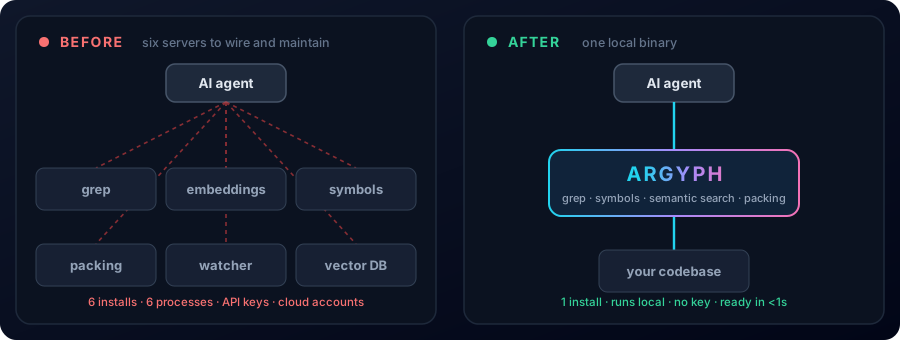
Most developers stitch together a half-dozen MCP servers to give an AI agent context over a codebase — one for grep, one for embeddings, one for symbol search, one for repo packing. Each is a separate install, a separate process, and (often) a separate cloud account. Argyph replaces all of them with a single local binary. It indexes incrementally and is ready in under a second on previously-indexed repos — no daemon, no account, no API key.
The name is a portmanteau of Argus (the hundred-eyed watcher of Greek myth) and Glyph (a carved symbol with bound meaning) — a server that watches a codebase and gives the agent its symbols.
✨ What it does
Argyph exposes three pillars of context behind one MCP endpoint:
[!NOTE] Everything is read-only. Argyph never edits, commits, or executes code.
Local-first by design. Every tier runs on the developer's machine — your proprietary code never touches a cloud vector DB or a remote embedding API, and a bundled embedding model means full functionality with zero keys.
Most existing context servers depend on a cloud vector database (Milvus, Pinecone) and a remote embedding API. That's a non-starter for proprietary code at most companies, and a tax on cold starts everywhere else.
Argyph runs entirely on the developer's machine: a single binary, an embedded vector store, an optional bundled embedding model — no daemon, no account, no key required to get full functionality.
📥 Install
Current release:
v1.0.4— published on npm, crates.io, the Homebrew tap, and as prebuilt GitHub-release binaries.
Claude Code (recommended):
claude mcp add argyph -- npx argyph@latest
npm / npx:
npx argyph
Homebrew (macOS / Linux)
brew install Ezzy1630/argyph/argyph
Universal installer
curl -fsSL https://raw.githubusercontent.com/Ezzy1630/argyph/main/scripts/install.sh | bash
Intel Mac (
x86_64-apple-darwin) users: the ONNX Runtime backend doesn't ship a prebuilt for Intel macOS, so no prebuilt binary is produced for that target. Use the Cargo path below — it builds in a couple of minutes and works fine on Intel Macs.
Cargo
cargo install argyph builds Argyph from source. Requires a Rust
toolchain ≥ 1.88 (rustup update). The bundled local embedder uses
ort (ONNX Runtime); on most
platforms ort ships a prebuilt dynamic library and there is nothing
to do. On Linux you may need libssl-dev and a working C toolchain;
on Windows the MSVC build tools are required. If the build fails on
ort-sys linkage, set ORT_STRATEGY=download before re-running.
cargo install argyph --locked
Build from source
git clone https://github.com/Ezzy1630/argyph.git
cd argyph
cargo build --release
./target/release/argyph serve
Claude Desktop (DXT)
Download argyph.dxt from the latest release and double-click.
🚀 Quick start
# In any repo
cd ~/code/your-repo
argyph init
claude mcp add argyph -- npx argyph@latest
claude
In the chat:
What does this codebase do, and where is session expiration controlled?
Behind the scenes the agent calls ask, and Argyph returns bounded spans — not whole files — so the agent reads only what matters:
{
  "spans": [
    {
      "file": "src/auth/session.rs",
      "start_line": 41,
      "end_line": 55,
      "text": "fn is_expired(&self, now: Instant) -> bool { ... }",
      "kind": "definition",
      "symbol": "is_expired",
      "language": "rust"
    }
  ],
  "strategy_used": "definition"
}
Argyph indexes Tier 0 in under a second on first run, Tier 1 (symbol graph) in seconds, and Tier 2 (embeddings) in the background. You can query immediately — tools return what's available now plus an index_coverage field so the agent knows.
⚙️ How it works
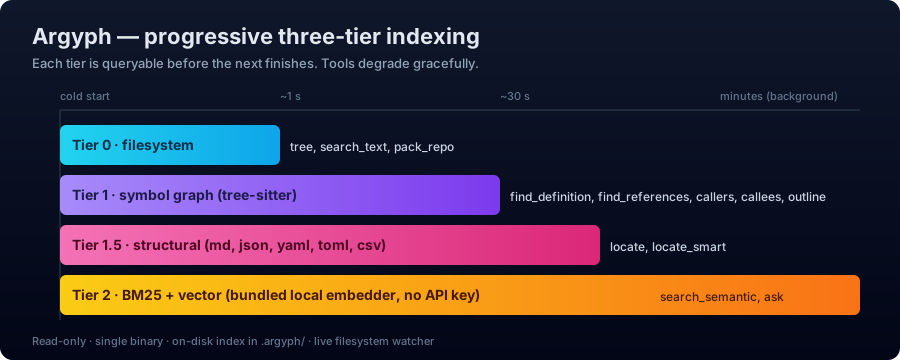
Argyph builds the index in three tiers, each useful before the next completes:
The 80/20 insight: most agent queries are structural (where is parseConfig defined?, what calls validateUser?) and don't need embeddings. Argyph serves those from Tier 1 in milliseconds, even while Tier 2 is still building.
After the first index, the on-disk .argyph/ directory persists and only changed files are reprocessed on subsequent runs. A filesystem watcher keeps everything live.
🧰 Tools
Full schema reference: docs/tools-reference.md.
locate_smart is an opt-in tool that runs a bounded multi-step retrieval loop using an LLM provider. It's disabled by default; enable it in .argyph/config.toml:
[locate_smart]
enabled  = true
provider = "openai"        # or "anthropic" | "ollama"
model    = "gpt-4o-mini"
# endpoint = "http://localhost:11434"   # only for local providers
Or via env:
ARGYPH_LOCATE_SMART_ENABLED=1
ARGYPH_LOCATE_SMART_PROVIDER=anthropic
ARGYPH_LOCATE_SMART_MODEL=claude-haiku-4-5
When disabled, calls to locate_smart return LOCATE_SMART_DISABLED immediately and no provider keys are required.
Build with the smart feature:
cargo install argyph --features smart
Config is layered (highest priority first): env vars, .argyph/config.toml in the repo, built-in defaults. A config file is never required.
ARGYPH_LOG=info
ARGYPH_EMBED_PROVIDER=local        # local | openai | voyage
OPENAI_API_KEY=...                 # standard provider env vars
ARGYPH_DISABLE_WATCHER=true        # for sandboxed environments
Install agent lookup instructions in CLAUDE.md, AGENTS.md, or GEMINI.md:
argyph init
🆚 Why Argyph (vs alternatives)
Argyph is the only one that's all five — symbol graph and semantic search, local-first, one install, incremental.
📊 Benchmarks
Full methodology and reproduction steps are in docs/benchmarks.md — reproduce locally with cargo bench --workspace. Numbers below are the median of three runs on the reference hardware tagged m4-air (Apple M4 MacBook Air, 16 GB RAM, macOS 26) unless stated otherwise.
Hot paths (criterion, mean times)
System-level
Reproduce via:
cargo run --release -p argyph-benches --bin system_bench -- /path/to/repo
Tier 0 — the "useful immediately" gate — scales linearly and fast
(81K files in 2.1 s). search_text and pack_repo are available the
moment Tier 0 is ready.
Tier 1 (the symbol graph) is fast on normal-to-large repos. Two
optimizations landed for v1.0: the within-file reference resolver was
rewritten from an O(symbols²) substring scan to one-pass hash-indexed
lookups (4.2× — TypeScript compiler source: 34.6 s → 8.2 s), and the
per-file symbol/chunk SQL writes are now batched. On very large
monorepos (the full 81K-file TypeScript repo, ~2M LOC) Tier 1 still
does not finish within 30 min — the residual cost is raw tree-sitter
parse volume across 79K files, which needs streaming/parallel indexing
(tracked in ROADMAP.md). The server never blocks at any
scale: Tier-1 tools return INDEX_NOT_READY with a retry hint until
the graph is ready. Full data: docs/benchmarks.md.
🏗️ Architecture
Argyph is a Rust workspace of twelve focused crates with strict module ownership. The full architecture — including the Supervisor lifecycle, the three-tier indexing model, and per-crate responsibility boundaries — is documented in ARCHITECTURE.md.
📦 Project status
Stable. v1.0.x is published on all channels. Active development continues against the milestones at the top of ROADMAP.md; the build plan is in docs/BUILD_PLAN.md.
🤝 Contributing
Argyph is built with substantial AI assistance, but human-architected and human-reviewed. Contribution guide and the (strict) AI agent rules are in CONTRIBUTING.md. Commit conventions, including the project's attribution policy, are in docs/COMMIT_CONVENTIONS.md.
👤 Author
Built by Ezzy1630. See AUTHORS.md.
📄 License
Dual-licensed under either of:
- MIT License (LICENSE-MIT)
- Apache License 2.0 (LICENSE-APACHE)
at your option.