mcp-google-flow
An MCP server that lets any MCP client produce videos and images in Google Flow (Veo, Nano Banana, Omni) through your own signed-in Chrome, with spending guards and a sandboxed file vault.
[!WARNING] Independent project, not affiliated with, endorsed or maintained by Google. "Google Flow" and "Veo" are trademarks of Google. It automates Flow's web interface on your account. Automation may go against Google's Terms of Service and could lead to limits or suspension of the account. Use it at your own risk, ideally with an account separate from your main one. Flow changes its interface without notice; when it does, a tool may stop working until its labels are adjusted (see When Flow's interface changes).
Showcase
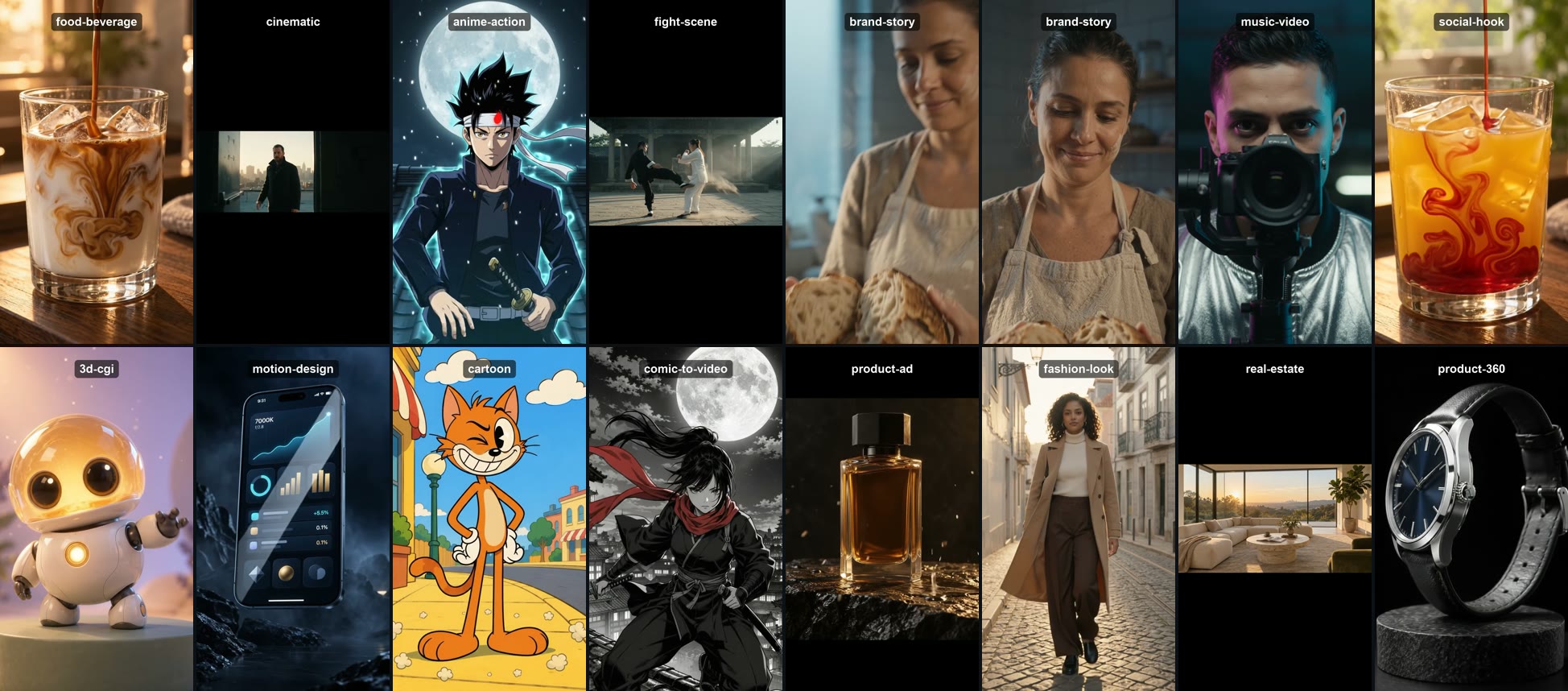
15 visual styles generated in Google Flow: food, cinematic, anime, fight scene, brand story, music video, social hook, 3D, motion design, cartoon, comic, product ad, fashion, real estate and product 360. ▶ Watch the 62-second reel on YouTube.
What it does
- Projects and media: creates and opens projects, uploads images and videos, lists what is in the grid, waits for renders and downloads with predictable names.
- Generation with Flow's real options: reads the modes (Image, Video, Frames), models (Veo 3.1, Omni, Nano Banana…), aspect ratios, resolution, duration, variants and the credit price Flow itself shows, live.
- References by name, like typing
@name: characters, voices, avatars, images and videos from the library. - Frames: video that starts and/or ends on a chosen image.
- Reusable characters, created from Flow's presets or from a description.
- Shot lists: several shots with the same character, with the whole list checked against the budget before the first credit is spent.
- Scenes: builds the timeline, extends the video, edits a clip with a prompt and exports the whole scene as a single mp4.
- Flow tools (Grid Architect, Stringout Creator, Storyboard Studio, Video Resizer and community tools): opens any of them, reads their controls, fills and clicks them.
- Upscale to 1080p and 4K on download.
- Shot planner: turns a script into ready shot prompts, with the camera chosen by each shot's job, natural gestures, a voice and accent kept identical across clips, and single-take prompts.
- Guided slash commands for 9 base-image jobs, script writing and voice design.
- Pro version with ready-made video formats (see Pro version).
Nothing spends credits without an approved quote. Every paid action takes two calls: the first prepares everything, shows the price and returns a quote_id; only the second, with confirm: true and that id, spends.
Requirements
- Node.js 20.11+
- Google Chrome
- A Google account with access to Flow
Installation
git clone https://github.com/felipedamacenoteodoro/mcp-google-flow.git
cd mcp-google-flow
npm ci
npm run build
Register it in your MCP client as a stdio server. Most clients accept this configuration:
{
  "mcpServers": {
    "flow-studio": {
      "command": "node",
      "args": ["/absolute/path/to/mcp-google-flow/dist/main.js"]
    }
  }
}
First run
- Ask the agent to "call flow_sign_in". It opens a normal Chrome window, with no automation attached, on the project's own profile. Google refuses to sign in inside automated browsers, so the sign-in happens here.
- Sign in to Google yourself in that window. The server never sees or types your password.
- Quit that Chrome completely (Cmd+Q on Mac; closing the window is not enough there).
- Ask for anything else, e.g. "flow_new_project". The server reopens the same profile, already signed in, and takes it from there.
The login is kept in the dedicated profile (~/.flow-studio-mcp/chrome-profile). Your everyday Chrome is never touched or copied.
Flow can be in Portuguese or English out of the box. If your Google account uses another language, set FLOW_MCP_LANGUAGE=en and Flow opens in English for the server. Don't use browser translation on Flow (see Troubleshooting).
Tools
How spending is approved
- The agent calls, for example,
flow_generatewithconfirm: false. Flow gets configured, the prompt is typed, and the reply carries the price Flow shows plus aquotewith aquoteId. - You review it. If you approve, the agent calls again with the same request,
confirm: trueandquote_id. - The server refuses when there is no quote, the quote belongs to another request, more than 10 minutes have passed, it was already used, or the price went up. When Flow shows no price (upscale, extend, tools) a conservative estimate is charged, never zero.
Example conversation
Create a project, upload
~/FlowStudio/input/barista.png, make a character from it and generate three 9:16 shots of her presenting the new seasonal coffee. Show me the price first.
The agent calls flow_new_project → flow_upload → flow_create_character (quote → confirm) → flow_run_shot_list with attach_resources (quote → you approve → confirm) → flow_wait → flow_download.
Guided commands
The server ships step-by-step flows that clients supporting MCP prompts show as slash commands, e.g. /mcp__flow-studio__image_avatar.
Image (the base image is what keeps the face identical in every clip)
Support
The agent leads the conversation one question at a time, shows the quote, generates only after your "yes" and tells you the library name of the result so it can be reused as a reference. flow_image_prompt can also be called directly; it does not touch Flow and spends nothing.
Shot planner
flow_plan_shots turns a script into one shot per spoken sentence and writes each prompt in a fixed order: scene → camera → gesture → line → voice → accent → "one continuous take, no cuts". You pick a layout:
What it takes care of:
- One spoken sentence per shot. Several sentences in one clip lead to cuts mid-speech.
- The camera follows the shot's job: hook, argument, key line or call to action, e.g. locked on the key line, slow zoom on the face at the close. Framings and camera moves can be overridden per role (see
flow_directing_guide). - Voice and visual description repeated word for word in every clip of the same person; the plan warns when a voice is missing.
- Two people in frame: the speaker is named by side (left/right) and only they get a voice. All clips can be animated from one base image with both people (frames mode).
- Long scripts: the plan warns that lip-sync degrades and suggests narration.
Script markers:
Leo: I never know which coffee to order.
Ana: [smiles] * Start with the seasonal blend. [nods]
Name: sets the speaker, [gesture] at the start or end of a line adds a gesture (at most one on each side, written in English), and * marks the key line. Spoken lines can be in any language. Each person's voice goes in the cast, as text or as {gender, age, pitch, texture, delivery}.
Pro version
The reel above shows what Google Flow can produce. The Pro version gets you there faster: it adds ready-made video formats on top of this server, each with its own guided slash command: selfie testimonial (UGC), podcast, dualcast, voiceover, product demo, skincare, app demo, fashion, animated product, trend and story. Every format brings its casting, framings, camera plan, rules and the questions to ask, so a complete video comes out of a single conversation.
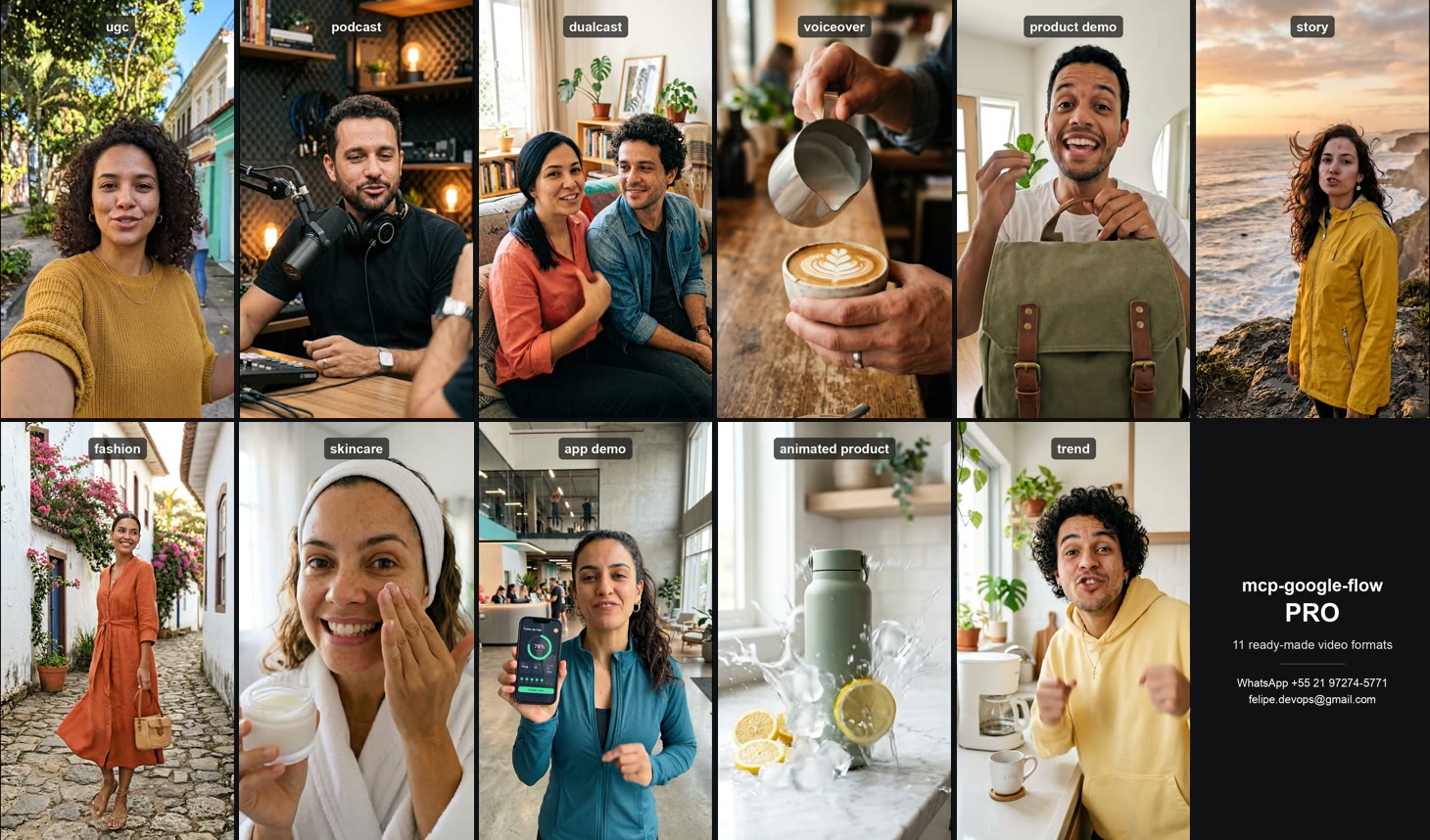
All 11 Pro formats, generated in Google Flow with the Pro guided commands. ▶ Watch the 44-second reel on YouTube.
Interested? Get in touch:
- Email: [email protected]
- WhatsApp: +55 21 97274-5771
Configuration
Everything is set through environment variables, validated at startup:
Security
What the server guarantees, in short (details in SECURITY.md):
- Dedicated profile: never uses or copies your personal Chrome profile.
- DevTools on loopback only, random port: Chrome picks the port. Endpoints outside
127.0.0.1/localhostare refused. - Navigation restricted to
https://flow.google.com. - File vault: uploads only from allowed folders, with the real path resolved (symlinks cannot escape), content checked by its leading bytes rather than its extension, and a size limit. Downloads only into the output folder, always as a new file (never overwrites, never follows a planted symlink).
- Spending: single-use quote bound to the exact request and price, a credit budget per session, an hourly limit, and attachments re-checked right before the click.
- No code built from user text: prompts are typed as keystrokes; values reach the browser as arguments, never as script source.
- Logs on stderr only, with emails, tokens and cookies masked. Internal errors never leak stack traces or paths to the agent.
- Tools run one at a time (there is a single tab), so concurrent calls cannot interleave.
When Flow's interface changes
Every piece of interface text the server depends on lives in src/infrastructure/flow/ui-labels.ts. If Flow changes a label, or your interface is in another language, create a JSON file with only what changed and point FLOW_MCP_UI_LABELS to it:
{ "submit": "Generate", "tileMenu": "More options" }
Unknown keys are rejected, so a typo never passes silently. See ui-labels.example.json.
Every label accepts alternatives separated by |, and the defaults carry both Portuguese and English (e.g. "Iniciar geração|Start generation"), so the same install works in either language. An override can add a third language the same way.
The defaults were checked against both languages on 2026-10-08: home, project, navigation, settings panel (modes, ratios, resolution, duration, models, price), start/end frames, resource picker, tile menu, download qualities, characters and tools. In English the scene builder (add clip, extend, download scene) and the video-rights dialog are not yet validated.
Troubleshooting
"We noticed unusual activity… You have not been charged" ("Notamos uma atividade incomum"). This comes from Google's abuse protection, not from the server, and Flow does not charge for it. The server does not try to get around it. What helps:
- Don't translate the Flow page. Browser translation and other extensions that change pages are the most common trigger. Turn translation off for flow.google.com and use
FLOW_MCP_LANGUAGE=eninstead if your account is in another language. - Slow down. Generate fewer videos back to back; the defaults already pace paid actions (
FLOW_MCP_MIN_SECONDS_BETWEEN_PAID,FLOW_MCP_PAID_PER_HOUR). - Use Flow normally for a while in the same Chrome profile, and avoid VPNs.
- Click generate yourself: with
FLOW_MCP_SUBMIT=manualthe server still prepares everything (mode, model, references, prompt, quote) and brings the Flow window to the front; you press the generate arrow, then the agent continues withflow_wait. Shot lists need automatic clicks, so in this mode generate one shot at a time.
"Couldn't sign you in — this browser or app may not be secure." You signed in inside the automated window. Call flow_sign_in again: it now opens a plain Chrome window for signing in.
"Chrome did not open a DevTools port" right after signing in. The sign-in Chrome is still running. Quit it completely (Cmd+Q on Mac) and try again.
A generation fails with "Failed to generate audio". Flow could not voice the line; it does not charge for it. Try a shorter, simpler line, or the same shot without dialogue.
Architecture
src/
├── domain/           pure rules: prompt, settings, credits, shot planner, directing craft, image jobs, scenes, tools
├── application/      use cases, ports (one interface per area of Flow) and the spend guard
├── infrastructure/   adapters: Chrome/CDP, one class per area of Flow, file vault, logger, config
├── interface/mcp/    tool schemas and registration, guided commands
└── main.ts           composition root: the only place that instantiates concrete classes
Dependencies always point inward: the domain imports nothing, the application imports only the domain, and the infrastructure implements the ports. That is why the use cases are tested against a fake Flow, with no browser.
npm test          # domain, use cases and security guards
npm run typecheck
License
MIT © Felipe D. Teodoro