Codex AI Game Studio
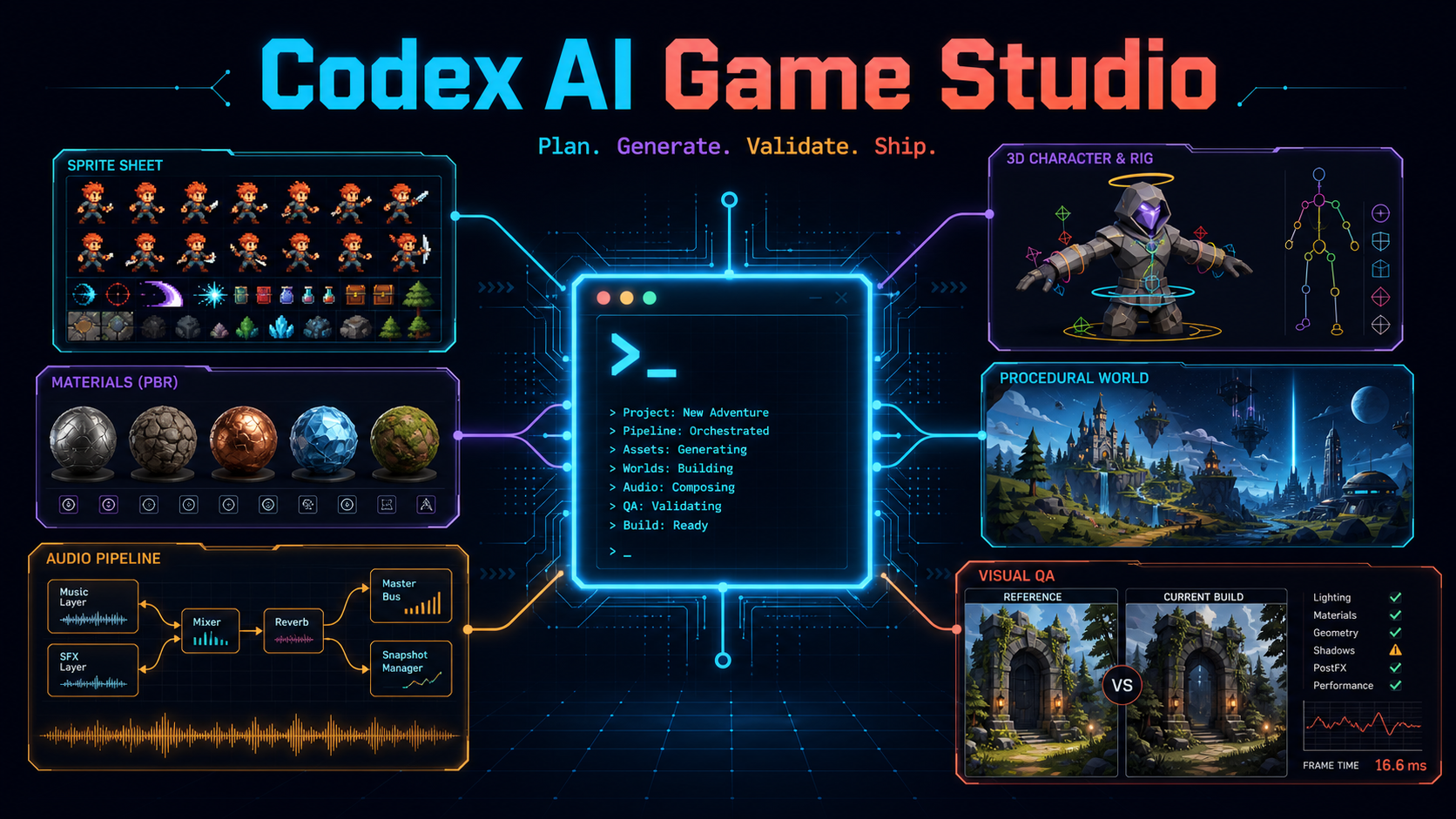
Turn a game idea—or an existing Unity, Godot, Unreal, or browser project—into a reversible, quality-gated Codex production workflow. Codex AI Game Studio plans games, finds compatible AI tools, reconstructs reference images as procedural Three.js models, generates and validates assets, and automates supported editors without silently installing tools or replacing source work.
Under the hood: 85 core skills, 95 bundled skills, 49 studio roles, 163 curated repository records, five editor MCP packs, and dedicated Windows and macOS editions.
Install in 60 seconds · See a real quality gate · Copy a production prompt · Contribute in 10 minutes
If it earns a place in your workflow, star the repository so another game developer can find it. If something is missing, choose a scoped good first issue and improve it with us.
Install
Codex, install Codex AI Game Studio from
https://github.com/frabcd/codex-ai-game-studio.
Add its marketplace, install the core plugin, inspect this project's OS,
engine, DCC tools, GPU, and existing MCP servers. On Windows or macOS, propose
exactly the matching edition; on Linux, keep the universal core. Include the
img2threejs plugin when this project needs image-to-procedural-3D work. Propose
one compatible setup with licenses, downloads, permissions, and rollback
steps, and wait for my confirmation before changing anything.
codex plugin marketplace add frabcd/codex-ai-game-studio --ref v1.1.1
codex plugin add ai-game-studio@frabcd-ai-game-studio
The command above pins the latest stable release. Contributors who intentionally
want the development snapshot can use --ref main instead.
Install the core plugin in Codex
Start a new task after installation. Type / and select an enabled skill, or invoke the router explicitly:
$ai-game-studio:start Help me turn this folder into a playable vertical slice.
The core plugin is self-contained and universal-directory-ready. Engine, DCC, pixel-art, and lifecycle-automation packs stay optional in this GitHub marketplace because they can execute local processes or control desktop applications.
Choose your edition
The repository ships two curated Codex distributions. Both include the universal core, automation and editor packs, and the Apache-2.0 img2threejs workflow; each includes exactly one matching platform planner.
Windows
codex plugin add ai-game-studio-windows@frabcd-ai-game-studio
codex plugin add ai-game-studio-img2threejs@frabcd-ai-game-studio
$ai-game-studio-windows:setup-windows-edition Inspect this machine read-only.
Prefer native Windows tools. If a useful workflow is macOS, POSIX, Homebrew,
Apple-Silicon, or Metal bound, adapt licensed portable source when testable;
otherwise compare verified Windows equivalents. Never claim binary
compatibility, and wait for my transaction digest before changing anything.
Download the Windows v1.1.1 edition · Windows tutorials
macOS
codex plugin add ai-game-studio-macos@frabcd-ai-game-studio
codex plugin add ai-game-studio-img2threejs@frabcd-ai-game-studio
$ai-game-studio-macos:setup-macos-edition Inspect this Mac read-only. Prefer
native Apple Silicon or Intel tools and Metal, MPS, Core ML, or CPU routes. If
a useful workflow is Windows, PowerShell, CUDA, or DirectML bound, adapt
licensed portable source when testable; otherwise compare verified macOS
equivalents. Disclose Rosetta and hosted fallbacks, and wait for my transaction
digest before changing anything.
Download the macOS v1.1.1 edition · macOS tutorials
Use v1.1.1 or later for marketplace-installed platform plugins. Version
v1.1.0 remains published for provenance but cannot hand an independently
cached platform descriptor to the core.
The edition ZIPs are convenience marketplaces, not preinstalled engines or models. A platform selection writes only transaction-listed project state; any package, application, MCP, model, Rosetta, WSL, or hosted-service change needs a separate confirmed proposal.
The 60-second quickstart
- Install the core with the two commands above. On Windows or macOS, add exactly one matching platform edition; on Linux, use the core directly. Start a new task.
- Type
/and choose AI Game Studio: Start, or write$ai-game-studio:start. - Describe the outcome—not the tooling. For example:
Make a two-minute Godot arena prototype from this concept art. - Codex inspects the project and machine read-only, searches the offline catalog, and returns one setup/workflow proposal.
- Review its exact pins, downloads, licenses, permissions, backups, and rollback. Confirm the displayed digest only if it is right.
- Codex applies exactly that transaction, validates the result, and records choices under
.ai-game-studio/.
No catalog entry is automatically cloned, no model weights are silently downloaded, and no existing source asset is replaced without human approval.
See a quality gate
This deterministic sprite fixture keeps the source pixels unchanged while the workflow detects baseline drift, loop seams, and inconsistent padding, produces a corrected candidate, and records human approval.
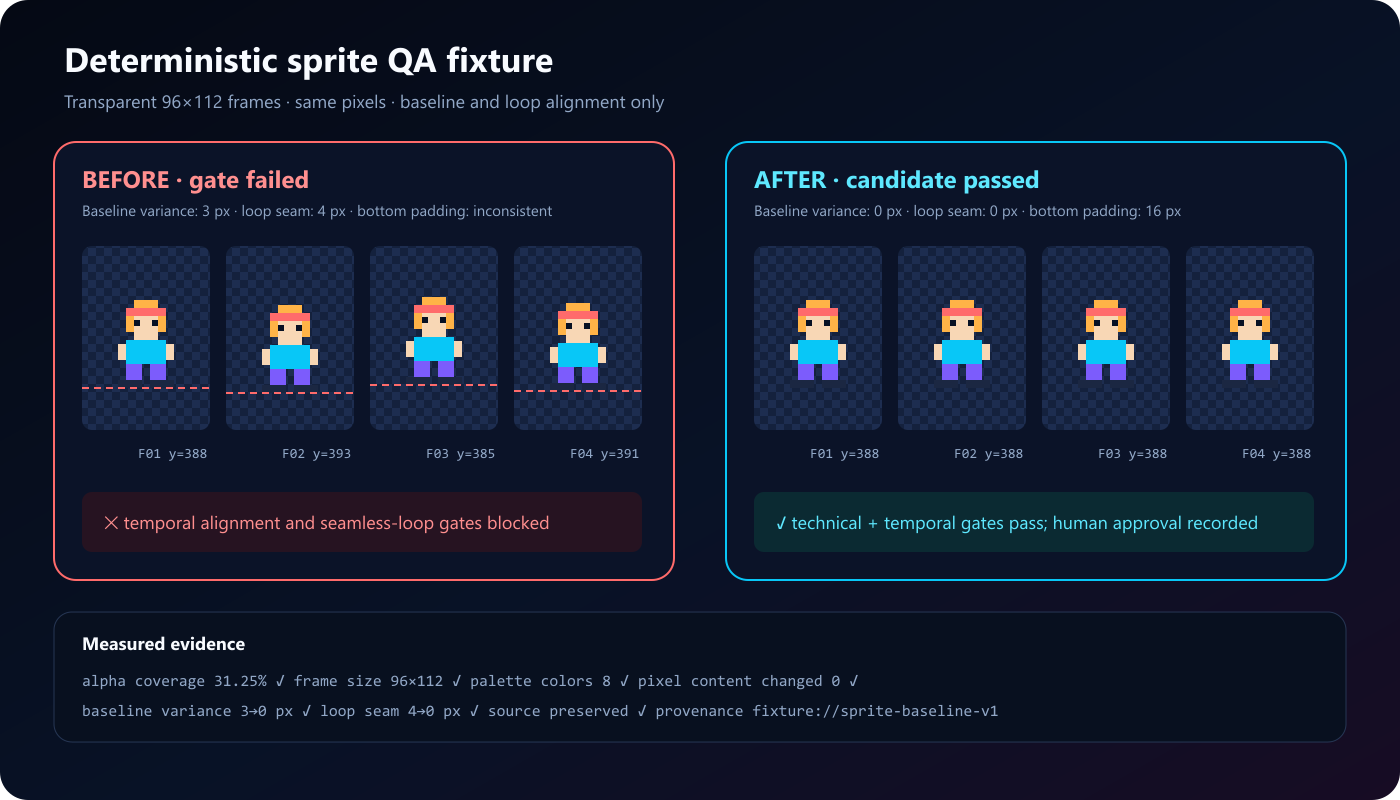
Inspect all representative QA fixtures or read the current validation report. Production workflows apply the same evidence-first pattern to 3D topology, PBR materials, animation, audio, navigation, performance, visual regression, and playability.
Four ways to invoke it
Deprecated custom-prompt aliases are intentionally absent. In IDE integrations that do not expose plugins, install or copy the standalone skills/ directories as a fallback; live hooks and plugin-bundled MCP packs require a plugin-capable Codex surface.
See the official Codex plugin guide and slash-command reference for the current product behavior.
What makes this a game studio
- Full production workflow: concept, GDD, architecture, backlog, prototype, vertical slice, content, QA, launch, live operations, and retrospectives.
- Generative asset pipelines: 2D sprites and tiles, image/text-to-3D, PBR materials, rigs, animation, worlds, dialogue, voices, music, and sound effects.
- Reference-to-code 3D: the pinned img2threejs forge turns suitable object or character references into procedural Three.js with strict spec, multi-angle, material, structure, and bounded-correction gates.
- Native platform editions: Windows and macOS planners detect the real host and convert incompatible workflows through tested source adaptations or disclosed capability equivalents.
- Tool routing: 163 curated GitHub repository records classified by capability, platform, runtime, GPU, licenses, permissions, risk, and maturity—usable offline.
- Editor automation: opt-in packs for Unity, Godot, Unreal, Blender, and pixel-art workflows, with one MCP server allowed per host application.
- Quality evidence: technical checks, multi-view visual review, temporal consistency, performance budgets, playability smoke tests, provenance, and before/after artifacts.
- Codex-native parity: 73 attributed workflows, 49 agent TOMLs, 12 mapped hook behaviors, 11 scoped rules, and 40 actual upstream templates from the pinned Claude Code Game Studios baseline, plus 12 new generative-game skills.
This project complements OpenAI's browser-focused Game Studio plugin. Its emphasis is cross-engine generative tooling, local editor routing, provenance, reversible automation, and production quality gates.
Safety model: inspect → propose → confirm → apply → verify
flowchart LR
    A["Read-only detection"] --> B["One compatible transaction"]
    B --> C{"User confirms digest?"}
    C -- "No" --> D["No change"]
    C -- "Yes" --> E["Pinned, scoped apply"]
    E --> F["Health and quality gates"]
    F --> G["Lockfile, evidence, rollback"]
Every mutating pack or platform command starts from pack plan or
edition plan. A transaction records plan_id, the detected environment,
exact actions, downloads, license findings, permissions, backups, rollback
operations, expiry, and a canonical digest. pack apply and edition apply
refuse missing, expired, altered, or unconfirmed digests.
Read-only inspection may identify executables, versions, project markers, MCP server names, GPU backends, VRAM, free disk, and whether required credential environment-variable names exist. It never reads or prints secret values.
“What should I say?”
Use plain outcomes. The router will select the specialist workflow.
The complete tutorial workbook explains for every scenario what Codex inspects, what it asks, what it proposes, what it may change, expected artifacts, acceptance gates, and rollback.
Optional packs
Install only what the confirmed plan needs:
codex plugin add ai-game-studio-automation@frabcd-ai-game-studio
codex plugin add ai-game-studio-unity@frabcd-ai-game-studio
codex plugin add ai-game-studio-godot@frabcd-ai-game-studio
codex plugin add ai-game-studio-unreal@frabcd-ai-game-studio
codex plugin add ai-game-studio-blender@frabcd-ai-game-studio
codex plugin add ai-game-studio-pixel@frabcd-ai-game-studio
codex plugin add ai-game-studio-img2threejs@frabcd-ai-game-studio
codex plugin add ai-game-studio-windows@frabcd-ai-game-studio
codex plugin add ai-game-studio-macos@frabcd-ai-game-studio
Only one MCP server per host application may be active. Pack descriptors disclose source pins, commands, conflicts, supported OS/architecture, permissions, health checks, uninstall, and rollback. Merely enabling a pack does not download its upstream server; the inert adapter directs you through doctor, plan, and digest-confirmed apply.
Compatibility
“Supported” never means every external repository works everywhere. The catalog records native, claimed, unknown, and unsupported combinations. CUDA-only tooling on incompatible hardware triggers a capability/cost/quality comparison and a new confirmation—not a silent substitute.
Production quality gates
Every production recipe finishes with:
- Rights, consent, licenses, and generation provenance.
- Technical format and engine-import validation.
- Visual and temporal consistency from representative views.
- Runtime memory, frame time, draw calls, and asset budgets.
- Playability and interaction smoke tests.
- Screenshot or artifact regression evidence.
- Human approval before replacing source assets.
Specialized checks cover alpha and sprite baselines; mesh topology, normals, UVs, PBR channels, LODs, and collision; skin weights, root motion, foot sliding, and loop seams; navigation, lighting, and spawn reachability; audio peaks, loudness, and loop seams. Enhancement workflows always retain originals and create before/after previews.
See the deterministic before/after and representative QA fixtures for inspectable evidence covering sprites, meshes, rigs, animation, audio, scenes, visual regression, and gameplay smoke tests.
Offline catalog and live refresh
The checked-in catalog is the final fallback and contains all 163 repositories from the verified source snapshot. Stable curation is separate from volatile stars, releases, archive state, and activity. Search order is:
- Installed GitHub connector.
- Authenticated
gh. - Public GitHub metadata.
- Checked-in offline snapshot.
The weekly workflow refreshes only volatile metadata and opens a review pull request. It never pushes curation changes to main. Repositories are metadata—not vendored dependencies. Models, weights, datasets, engines, DCC applications, libraries, benchmarks, and starter projects remain external.
python plugins/ai-game-studio/scripts/ai_game_studio.py catalog search "text to 3d"
python plugins/ai-game-studio/scripts/ai_game_studio.py catalog recommend --capability mesh-generation --commercial
Unknown or custom code, weight, dataset, output, or commercial terms block commercial recommendations until a human reviews them.
Repository layout
.agents/plugins/marketplace.json       Ten installable entries
plugins/ai-game-studio/                Universal core, 85 skills, CLI, catalog, recipes
plugins/ai-game-studio-automation/     Hooks, agents, rules, templates, migration
plugins/ai-game-studio-{engine}/       Optional inert MCP adapters and setup skills
plugins/ai-game-studio-img2threejs/    Pinned Apache-2.0 image-to-Three.js forge
plugins/ai-game-studio-{windows,macos}/ Native platform planners and adaptation rules
parity/                                Pinned upstream coverage ledger
docs/                                  Tutorials, architecture, legal, migration, support
tests/                                 Unit, schema, hook, parity, platform, safety tests
sources/                               Immutable catalog source snapshot
See Architecture, Catalog contribution guide, Claude migration map, and validation evidence.
Security, privacy, and rights
- No hosted backend: the core plugin does not operate a server, receive telemetry, or store credentials.
- Credentials: only environment-variable names are detected. Secret values are never catalog fields, plan fields, logs, or provenance output.
- Network and downloads: external access, model weights, and large downloads are disclosed before confirmation. Servers bind to stdio or localhost unless a user explicitly approves otherwise.
- Permissions: optional integrations can write the active project or control a local editor; their exact scope is in the transaction. Hooks must be reviewed in
/hooks. - Licenses: code, model weights, datasets, inputs, outputs, and commercial rights are tracked separately.
- Identity and voice: unlicensed identity references and voice cloning without documented consent are blocked.
- Third parties: optional tools remain governed by their own licenses, privacy notices, terms, model cards, and service costs.
Read the Security Policy, Privacy Notice, Terms, and Support before production deployment.
Provenance and Claude parity
The workflow baseline is adapted from Donchitos/Claude-Code-Game-Studios at commit 984023ddac0d5e27624f2baacde6105e45de375f under MIT. It is ported—not mechanically path-renamed—into current Codex skills, agent TOMLs, hooks, and generated AGENTS.md guidance. See NOTICE.md and the parity ledger.
Existing Codex ports were used only as prior-art references and were not copied.
The optional img2threejs workflow is pinned to upstream release v1.4.3 at
commit 9a8ecf129a58c1b557a1f03f7727f6295672cd51 under Apache-2.0. Its
runtime-focused vendored snapshot, modifications, and retained license are
recorded in NOTICE.md and
plugins/ai-game-studio-img2threejs/UPSTREAM.json.
Contributing and roadmap
Issues, pull requests, and Discussions are welcome. Start with the
10-minute contributor path,
browse good first issue, and read the
contributor verification policy. Catalog
changes require a canonical repository, primary-source evidence, separate
license findings, platform claims, permission review, and an immutable pin.
If this saves your team a production detour, starring the repository helps other game developers find the maintained catalog. Useful contributions matter more: add a verified integration, improve a recipe gate, or attach a reproducible QA fixture.
License
Original repository code is MIT. The optional vendored img2threejs plugin is Apache-2.0, and all other third-party sources and integrations keep their own licenses. See LICENSE and NOTICE.md.