
coolify-mcp
MCP server for Coolify API - enables full deployment workflows from zero to production.
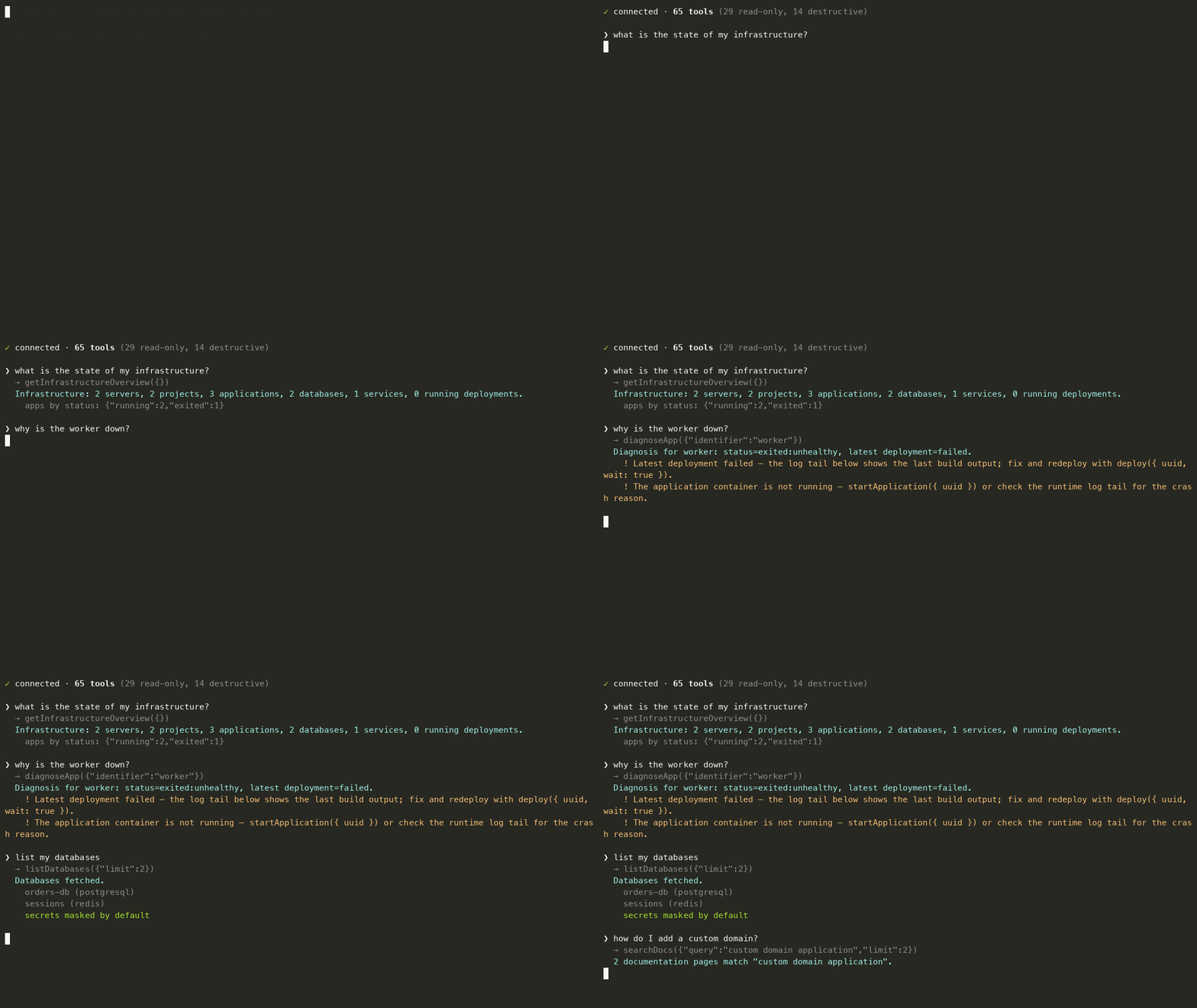
Targets the Coolify v4.3.10 API. Types and schemas are generated directly from Coolify's official OpenAPI spec, so tool inputs always match what the API actually accepts.
Features
- Full Deployment Workflow: Create projects, environments, servers, and applications from scratch
- 5 Application Types: one
createApplicationtool covers public git, GitHub App, Deploy Key, Dockerfile, and Docker Image sources — plus Docker Compose deployments viacreateService(since Coolify v4.1, compose deployments are services) - Environment Management: Full CRUD for environment variables with secret masking
- Deployment Control: Deploy (optionally waiting for the terminal status, with a log tail on failure), start, stop, restart applications
- Diagnostics:
diagnoseAppfinds an app by UUID, name, or domain and aggregates status, recent deployments, failure log tails, runtime logs, and suggested next actions - Docs Search:
searchDocsruns full-text search across the official Coolify documentation from a bundled local index — no network needed - Security: Write protection, secret redaction, and MCP annotations (
readOnlyHint/destructiveHint) so clients can auto-approve reads and gate destructive calls - Near-full API coverage: databases (8 engines, backups, envs), services, storages, scheduled tasks, teams, previews, servers, SSH keys, and GitHub Apps
- Token-efficient: 65 tools whose definitions cost ~9k tokens of context, with strict runtime validation against schemas generated from Coolify's OpenAPI spec
Requirements
- Node 18+
- A Coolify API token (Settings > API in your Coolify dashboard)
Install
Claude Desktop, one-click: download coolify-mcp.mcpb from the latest release and drag it into Settings → Extensions. You'll be prompted for your Coolify URL and token — no Node install, no JSON editing.
Via npm:
npm install -g @fndchagas/coolify-mcp
# or
npx -y @fndchagas/coolify-mcp
Quick Start
Claude Code CLI
claude mcp add coolify \
  --env COOLIFY_BASE_URL="https://coolify.example.com/api/v1" \
  --env COOLIFY_TOKEN="<token>" \
  -- npx -y @fndchagas/coolify-mcp
OpenAI Codex CLI
codex mcp add coolify \
  --env COOLIFY_BASE_URL="https://coolify.example.com/api/v1" \
  --env COOLIFY_TOKEN="<token>" \
  -- npx -y @fndchagas/coolify-mcp
Or edit ~/.codex/config.toml:
[mcp_servers.coolify]
command = "npx"
args = ["-y", "@fndchagas/coolify-mcp"]
env = { COOLIFY_BASE_URL = "https://coolify.example.com/api/v1", COOLIFY_TOKEN = "<token>" }
Manual Configuration (~/.mcp.json)
{
  "mcpServers": {
    "coolify": {
      "type": "stdio",
      "command": "npx",
      "args": ["-y", "@fndchagas/coolify-mcp"],
      "env": {
        "COOLIFY_BASE_URL": "https://coolify.example.com/api/v1",
        "COOLIFY_TOKEN": "<token>",
        "COOLIFY_ALLOW_WRITE": "true"
      }
    }
  }
}
Environment Variables
Deploy from Zero
With this MCP, you can deploy an application from scratch:
1. listProjects / createProject       → Get or create a project
2. listEnvironments / createEnvironment → Get or create an environment
3. listServers / createServer         → Get or create a server
4. listPrivateKeys / createPrivateKey → Get or create SSH keys (if needed)
5. createApplication (type: public)   → Create the application
6. applicationEnvs (action: upsert)   → Configure environment variables
7. deploy                             → Trigger deployment
Tools Reference
Projects & Environments
Servers & Infrastructure
Applications - Read
Applications - Create
Docker Compose deployments are created with
createServicepassingdocker_compose_raw— since Coolify v4.1 they are services, not applications.
Applications - Manage
Environment Variables
Database and service env vars have their own tools:
databaseEnvsandserviceEnvs.
Deployments
Databases
Services
Storages, Scheduled Tasks & Previews
Teams, Servers & Git
Batch Operations
Other
Security Features
Write Protection
Disable all write operations:
COOLIFY_ALLOW_WRITE=false
Secret Masking
- Environment variable values are masked by default
- Database credentials are redacted
- Use
showSecrets: trueonly when necessary
HTTP Transport Hardening
The HTTP transport binds to 127.0.0.1 by default. To expose it beyond loopback, set MCP_HTTP_TOKEN — every request to /mcp must then carry Authorization: Bearer <token> (checked in constant time) — and the bind switches to 0.0.0.0 (override with MCP_HTTP_HOST). Binding to a non-loopback host without a token logs a loud warning: anyone who can reach the port controls your Coolify instance.
Human Confirmation on Destructive Deletes
On MCP clients that support elicitation (Claude Code, VS Code Copilot), deleting a project, application, database, service, server, or private key asks you to confirm first, stating what will be lost. Clients without elicitation behave exactly as before. A decline, cancel, or timeout aborts the call; set COOLIFY_MCP_ELICITATION=off to disable the prompts entirely.
Development
git clone https://github.com/frndchagas/coolify-mcp.git
cd coolify-mcp
npm install
npm run dev
Scripts
npm run dev            # Run in development mode
npm run build          # Build TypeScript
npm run generate       # Fetch the pinned OpenAPI spec and regenerate types
Pinned Coolify Version
Version is defined in src/coolify/constants.ts. To update:
- Edit
COOLIFY_VERSIONinsrc/coolify/constants.ts - Run
npm run generate
Registry Listings
- MCP Registry:
io.github.frndchagas/coolify-mcp
MCP Client Examples
HTTP Client
import { Client } from '@modelcontextprotocol/sdk/client/index.js';
import { StreamableHTTPClientTransport } from '@modelcontextprotocol/sdk/client/streamableHttp.js';

const client = new Client({ name: 'coolify-client', version: '1.0.0' });
const transport = new StreamableHTTPClientTransport(
  new URL('http://localhost:7331/mcp')
);

await client.connect(transport);

// List all applications
const apps = await client.callTool({
  name: 'listApplications',
  arguments: {},
});
console.log(apps.structuredContent);

// Deploy an application
const deploy = await client.callTool({
  name: 'deploy',
  arguments: { uuid: 'your-app-uuid' },
});
console.log(deploy.structuredContent);

await client.close();
Stdio Client
import { Client } from '@modelcontextprotocol/sdk/client/index.js';
import { StdioClientTransport } from '@modelcontextprotocol/sdk/client/stdio.js';

const client = new Client({ name: 'coolify-client', version: '1.0.0' });
const transport = new StdioClientTransport({
  command: 'npx',
  args: ['-y', '@fndchagas/coolify-mcp'],
  env: {
    COOLIFY_BASE_URL: 'https://coolify.example.com/api/v1',
    COOLIFY_TOKEN: '<token>',
  },
});

await client.connect(transport);

const result = await client.callTool({
  name: 'getApplication',
  arguments: { uuid: 'your-app-uuid' },
});
console.log(result.structuredContent);

await client.close();
License
MIT