
HoloCore Context Engine

HoloCore Context Engine is a local AI knowledge and activity system for all your projects. Version 0.13.0 adds local agent activity capture for Cursor, Gemini CLI, and OpenCode alongside Claude Code and Codex.
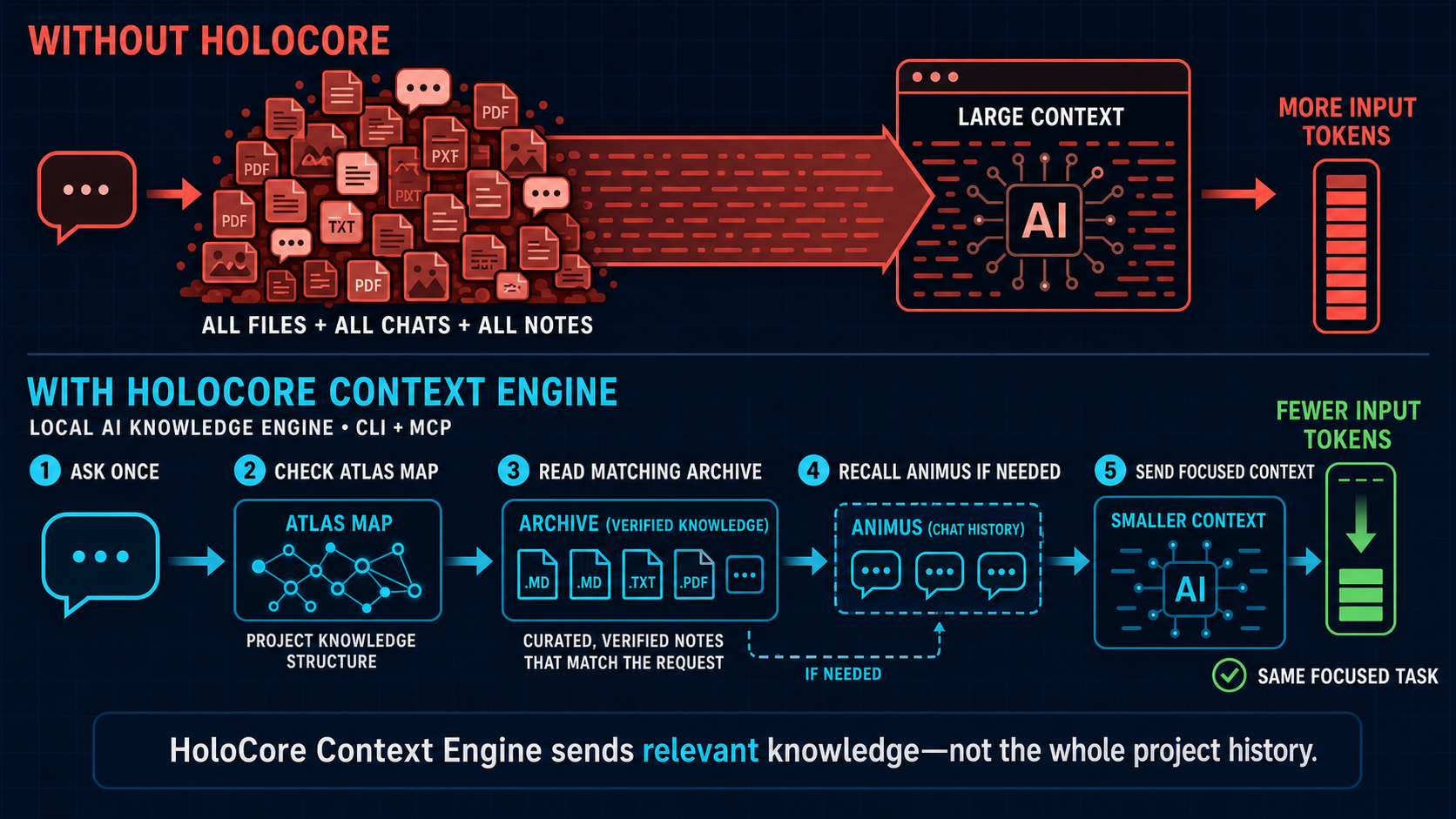
The runtime is HoloCore-native. It does not import, launch, or require the original Obsidian Second Brain, Graphify, or MemPalace applications. Those projects were behavioral references for the rewrite and are not runtime components.
In simple terms
HoloCore gives an AI assistant three kinds of context, using plain names in the user interface:
- Knowledge: verified notes, rules, and decisions.
- Code Map: files, functions, dependencies, and relationships.
- Memories: useful details from previous work, conversations, errors, and decisions.
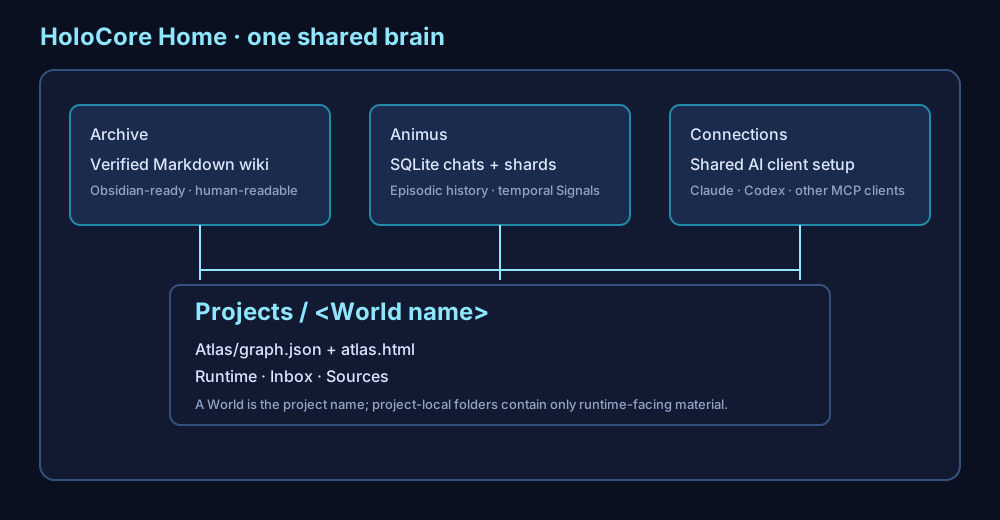
You choose one HoloCore Home. Knowledge is one Obsidian-ready vault shared by every registered project. Old installs can migrate in place; legacy folder names remain available as junctions for older HoloCore versions and existing links.
<Home>/
├── Knowledge/                     One Obsidian vault
│   ├── Projects/<project-id>/     Durable knowledge for one project
│   ├── Shared/                    Knowledge intentionally shared by projects
│   └── system/index.md            Vault entry point
├── Projects/<project-id>/CodeMap/  Project code map
├── Memories/                       Memory database and chat history
│   ├── animus.db                   Kept for database compatibility
│   └── ChatHistory/<project-id>/   Original chat audits
├── Connections/                    AI client setup
└── worlds.json                     Kept for registry compatibility
Knowledge is shared as a vault, but retrieval remains scoped: HoloCore searches the active project's entries and Shared, not every other project's entries.
For an existing installation, preview the one-time rename with holocore migrate-layout, then apply it with holocore migrate-layout --apply. HoloCore updates do not rename personal folders automatically. The migration keeps worlds.json and animus.db in their existing roles and creates legacy folder junctions when Windows supports them.
Open the vault with holocore open-knowledge (holocore open-archive remains supported).
How retrieval works
HoloCore builds one route and executes it once:
readiness check → Code Map → project Knowledge + Shared → Memories when history matters → exact sources
holocore search checks the Code Map freshness and refreshes it when required. The map narrows the project scope first. Knowledge adds verified notes. Memories are searched only for questions about earlier work, errors, attempts, or conversations. Every selected source runs at most once, and a recursion guard prevents a HoloCore search from routing back into itself.
Benchmark results
On the HoloCore repository, the corrected relevance-gated route returned fewer estimated retrieval tokens than Graphify-only:
HoloCore used approximately 35.5% fewer retrieval tokens than Graphify across five code questions. Code queries used check → Atlas; architecture and prior-work queries used bounded check → Atlas → Archive → Animus routes. Full timings and reproduction details are in the plain-text benchmark results.
To view every registered project's structural graph in Obsidian, run holocore obsidian-vault, then open the generated HoloCore Obsidian Vault folder inside HoloCore Home as the Obsidian vault.
The shared Obsidian view can refresh automatically. holocore watch --install --home "C:\\Brains\\Holocore Home" installs a Windows logon trigger; it polls registered Worlds every 30 seconds, reconciles changed Worlds, and regenerates HoloCore Obsidian Vault. The watcher reads World sources and Atlas inputs only, so its generated Markdown cannot trigger a refresh loop. holocore watch --uninstall removes the trigger.
Automatic memory and agent activity
Setup installs local capture hooks for supported clients:
- Claude Code and Codex record session, prompt, tool, subagent, stop, and session-end events supported by the client.
- Cursor, Gemini CLI, and OpenCode record supported tool, file-edit, and session lifecycle events as activity only.
- Conversation content is captured at safe transcript checkpoints.
- The activity ledger records the agent, action, status, time, and affected file paths without storing tool payloads, prompts, secrets, or authorization values.
The hook reads only new transcript content, stores a raw audit under the project, distills useful memories into HoloCore's local memory store, and automatically promotes useful facts, decisions, preferences, entities, and summaries into the active project's Knowledge. Promotion uses deterministic names and deduplication so the same extraction is not repeatedly added.
Hooks are installed automatically but require client trust once:
- In Claude Code, restart the project and use
/mcpto approve or confirm the HoloCore server. - In Codex, restart or reopen the project and use
/hooksto review and trust the HoloCore Stop hook.
One-line Windows install
Open PowerShell and run:
irm https://raw.githubusercontent.com/HassanMahomed/HoloCore/main/install.ps1 | iex
The installer downloads the release asset from GitHub, verifies its SHA-256 checksum when available, creates HoloCore Home, adds holocore to the user PATH, detects supported AI clients, and asks which detected clients to connect. No Python installation is required. On upgrades, HoloCore scans again so clients installed later can be connected to every registered project.
The downloadable Windows executable and checksum are also available on the GitHub Releases page. See the Windows installation guide for unattended options, upgrades, and removal.
Developer install
Install from Git:
uv tool install "git+https://github.com/HassanMahomed/HoloCore.git"
Set up the first project and explicitly choose the shared Home:
cd <project>
holocore setup --home <Home>
Later projects reuse the saved Home:
cd <another-project>
holocore setup
On an interactive first run without --home, setup asks where the shared Home should live. holocore home <Home> selects or changes it explicitly.
After setup:
holocore status
holocore paths
holocore worlds
holocore search "Why did we choose SQLite?"
holocore console                    # open the local browser Console
holocore connections                # installed versus connected AI clients
holocore activity affected "app.py" # agents and actions that touched an item
holocore handoff                    # bounded summary for the next agent
holocore handoffs create <run-id> --title "Continue release work"
holocore handoffs list --status open
The Console brings chat history, memories, verified knowledge, the code map, agent activity, affected items, storage locations, and commands into one local view. Knowledge edits are validated; captured conversations remain immutable.
Use the Project selector in the Console header to move between registered projects without restarting the server. The Commands tab is grouped by purpose; the other sections are scoped to the selected project.
Console sections:
- Chat History — captured provider transcripts, dates, sources, and searchable text.
- Memories — saved details from earlier work and conversations.
- Knowledge — editable Markdown notes with managed/user-owned provenance and source links.
- Code Map — project items, relationships, paths, explanations, and clusters.
- Agent Activity — filter agents by action, status, tool, or affected item; see handoff totals at a glance.
- Locations — exact Home, project, memory, knowledge, code-map, raw-chat, and connection paths.
- Commands — available actions grouped by purpose for Claude, Codex, and MCP clients.
- Setup & Updates — connections, diagnostics, cleanup preview, migration, and freshness status.
The older technical names remain accepted by the CLI and MCP API for backward compatibility, but new user-facing documentation prefers project, knowledge, code map, activity, memory, item, and cluster.
Open <Home>/Knowledge as one Obsidian vault if you want Obsidian's Markdown and graph interface. Obsidian is optional; HoloCore works from the CLI and AI clients without it.
Keep every project current
holocore sync-all
holocore update
sync-all reconciles generated integration files and refreshes Atlas for every registered World. update upgrades the installed CLI and then performs the same all-World reconciliation. For a large installation, update the CLI first and reconcile separately:
holocore update --no-sync
holocore sync-all
The second command can take time because it reads each registered World's source files and rebuilds its Atlas. Press Ctrl+C to stop a refresh safely; the installed CLI remains updated. Close active Claude/Codex MCP sessions before updating if Windows reports that holocore.exe is in use. Missing project folders are reported without stopping other Worlds.
Optional automatic updates are deliberately session-driven, not scheduled:
holocore auto-update --enable
holocore auto-update                 # show status
holocore auto-update --check-now
HoloCore checks GitHub at most once per day after it records real activity. Offline failures are quiet and retried later. If an update is available, it is installed only after the AI session ends. There is no resident background process and no Windows Scheduled Task.
AI clients
Setup detects Claude Code, Codex, Gemini CLI, Cursor, and OpenCode, then asks which detected clients to connect. Setup creates non-destructive project integrations:
- Claude receives
.mcp.json, project slash commands and skills, plus aSessionEndcapture hook. - Codex receives
.codex/config.toml,$-invoked skills under.agents/skills, plus aStopcapture hook. - Gemini, Cursor, and OpenCode receive their native project MCP and command formats.
Use holocore detect-clients to inspect detection, holocore connections to distinguish installed apps from working HoloCore connections, and holocore connect to add or repair integrations after installing another client. holocore update and the Windows upgrade flow rescan automatically. Existing unrelated settings are preserved; invalid files are reported and skipped rather than overwritten.
Legacy/internal vocabulary
Existing installations, paths, and APIs keep these mappings: Archive = Knowledge, Atlas = Code Map, Animus = Memories, World = Project, Sector = Area, Memory Shard = Memory, Archive Entry = Knowledge Note, Signal = Item, Constellation = Cluster, Deck = Collection, and Chronicle = History.
Documentation
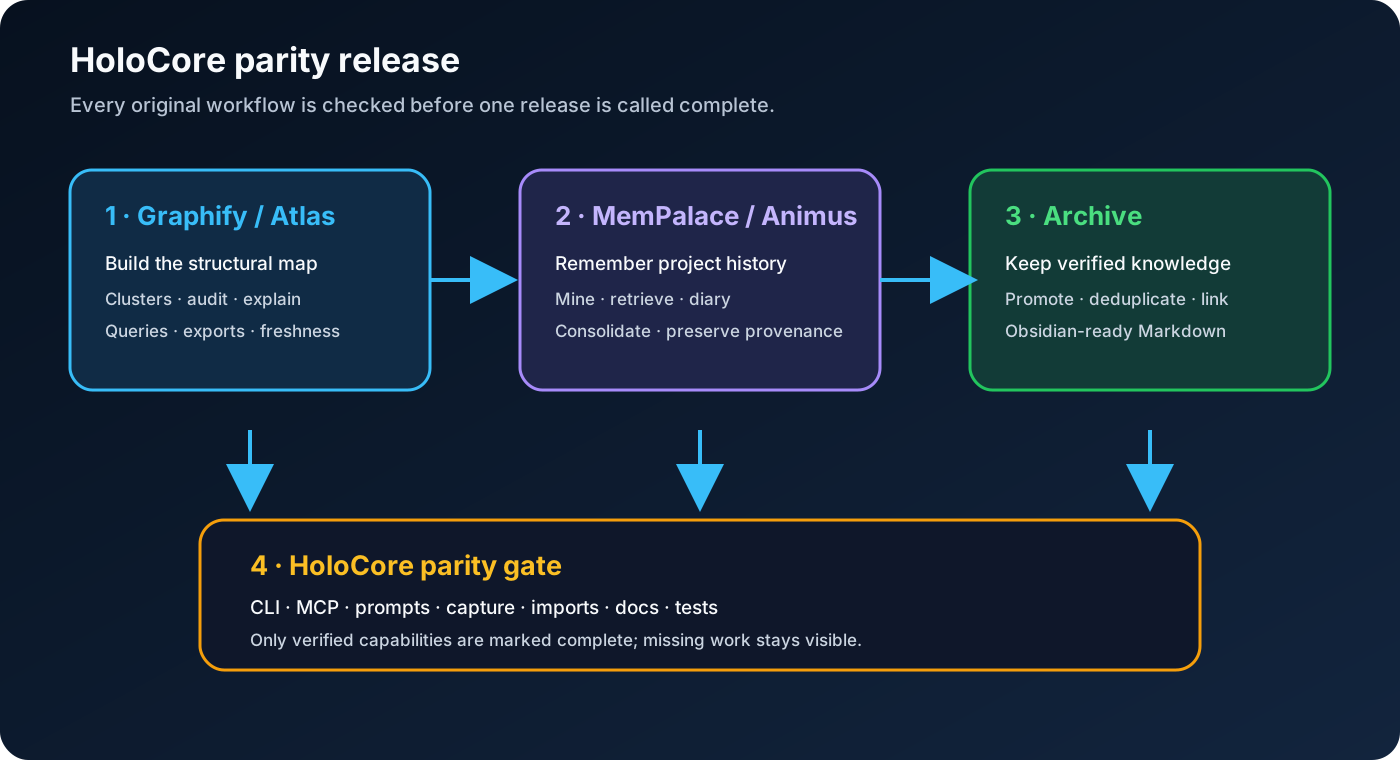
The current release includes code-map clusters, audits, relationship paths and exports; memory search, timelines, consolidation and optional embedding retrieval; conflict-aware knowledge promotion; native AI-client integration generation; and claimable agent handoffs. The interactive Code Map is portable and searchable. For a Markdown knowledge view, open <Home>/Knowledge in Obsidian.
- Visual guide
- User guide
- Installation guide
- One-line Windows installation
- Agent activity ledger
- What is new in v0.11
- Folder naming and in-place migration plan
- Version 0.12 release notes
- Version 0.13 release notes
- What is new in v0.10
- What is new in v0.9
- Prerequisites and optional graph tools
- Workflow guide
- Slash-command and skill reference
- Configuration guide
- MCP reference
- Architecture and technical guide
- Troubleshooting
- Portability and AI-client guide
- Capability status
- Product identity and discovery tags
- Acknowledgments and third-party provenance
Safety model
HoloCore is local-first. Archive Markdown stays in the user-selected Home. Atlas, Animus, transcript cursors, and raw chats stay inside each project. Setup and reconciliation merge only HoloCore-owned integration entries. Capture hooks are non-blocking and should never prevent the parent AI client from ending a session.
Raw chats and Animus can contain sensitive information. HoloCore adds their paths to the project .gitignore; protect and back them up according to your own data policy.
License and development
HoloCore is licensed under the Apache License 2.0. Third-party behavioral inspirations and their licenses are recorded in THIRD_PARTY_NOTICES.md.
Development verification:
$env:PYTHONPATH = "src"
python -m pytest -q
uv build