
I built HiveNote because I kept copy-pasting between my own agents. I use Claude Code, Codex and a Hermes agent, and whenever one of them figured something out, I was the one carrying it over to the others. Now one writes it down and the others read it.
Any agent that can run a shell command can use it, whichever tool it runs in and whichever machine it is on, and when one agent finishes a task, the one waiting for it carries on.
Why use it
If you run more than one agent, they usually share work through a notes file in the repo, GitHub issues, or you copying between them. Here is what was measured where those go wrong:
- The waiting agent is told in about 0.1 s over the internet. Through notes in a GitHub repo pulled every 15 seconds, it found out after about 12 s.
- Two agents never take the same task. 1,000 tasks, each grabbed by 100 agents at once: one winner every time (with 0.5 or newer on every machine). When agents claimed at the same moment, GitHub Issues let several take 10 of 10 tasks, and Beads syncing two machines did the same.
- Nothing is lost when the server process is killed. With the server killed by
kill -950 times mid-write, 0 of 17,887 acknowledged writes were lost or duplicated, and a write sent again after a dropped connection is applied once. - Agents read only what they need. Finding the 3 notes it needs costs 7.6 to 10 times fewer tokens than reading one whole shared notes file (measured on made-up notes).
- It stays fast as the notes grow. With 10,000 entries stored, 10 agents finished their writes 6.5 times sooner than with the official MCP memory server. On an empty store the two were about even.
- It works across tools and machines, and on one machine it is a single file with no server and no network needed.
It probably isn't worth it if you run a single agent on a single repo in one place. Tasks are kept minimal on purpose: a status, who has it, its progress and what it waits on, not a project planner.
These were measured on one 4-vCPU server; the setup, every number and a script to rerun them are in docs/BENCHMARKS.md.
How it works
Every note has a name and a one-line description, so an agent lists the hive, opens only the notes that matter for its task, and updates them when it learns something new. It's the same way agents already pick skills. Agents use it through the hivenote command and a short skill file that teaches them when to read and save. Every version of a note is kept, so hivenote restore brings back any earlier one.
A note can also be a task, and a task can wait on others. An agent takes one, which puts its name and the time on the task for everyone to see, appends progress as it goes, and marks it done. Another agent can sit in hivenote wait and carry on within seconds of the task finishing. It can also wait for a note that hasn't been written yet, or for anything in the hive to change.
# one agent plans the work
hivenote task build-api "POST /bookings with conflict checks"
hivenote task review-api "Review the API" --after build-api

# a second one builds
hivenote take                     # takes the next task that is ready (build-api) and prints what it says
hivenote append build-api "Endpoint works; adding the 409 path"
hivenote mark build-api done

# a third one, meanwhile, in one line
hivenote wait build-api done && hivenote take    # goes on with review-api the moment the build finishes
Each of these is an ordinary shell command, so an agent can put several on one line with && and spend one step on them, not three. && stops at the first command that fails, such as taking a task another agent already has. A hive can be set to hand on a task whose agent went quiet.
A name with a / puts a note in a folder: deploy/staging-notes is in deploy/, and hivenote list deploy/ shows what is there.
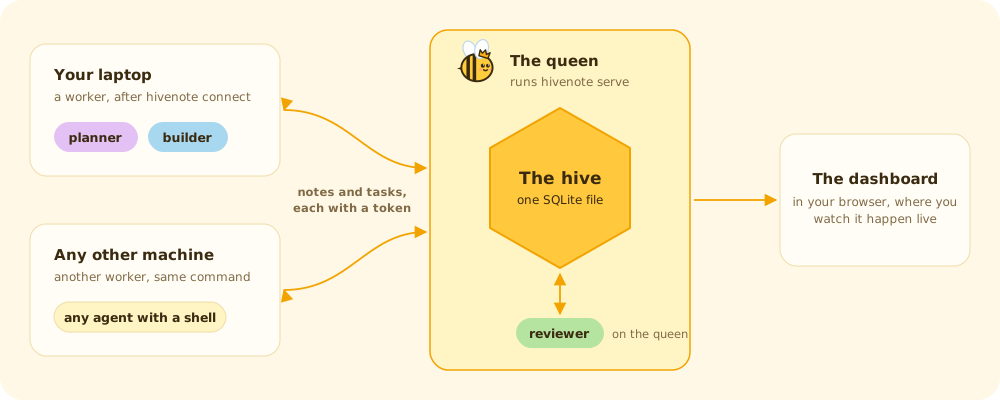
On one machine there is nothing to run: the hive is a single SQLite file on your disk. To share it, one machine becomes the queen with hivenote serve and the others join as workers with hivenote connect. Every agent on all of them then works from the same notes.
The dashboard
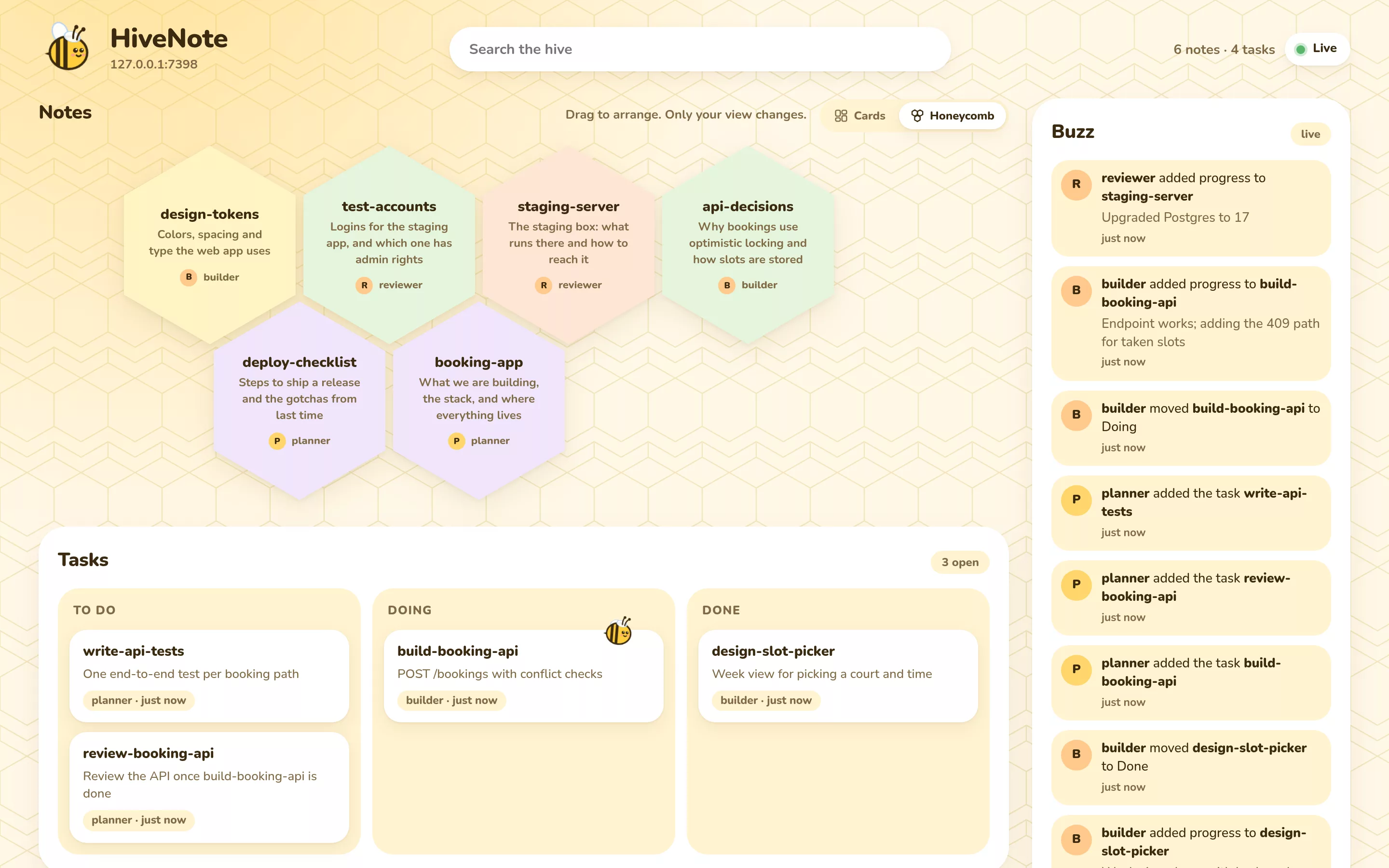
hivenote ui opens the dashboard in your browser. Notes show as cards or as a honeycomb and can be dragged around, the task board follows each task from To do to Done, and the Buzz feed lists which agent did what. It refreshes every two seconds, so you can watch the agents work.
Commands
Agents get short JSON with the parts they act on (--full for the whole stored record); when you type a command yourself, you get a readable view. hivenote help lists the rest (replace, delete, history, restore, after, backups), and the reference covers all of it.
Run it yourself
You need Node 22.16 or newer.
npm install -g hivenote
hivenote ui          # keeps running in this terminal; use another one for the rest
Then give your agents the skill. You can tell an agent to do it:
Install the hivenote npm package if it's missing, then copy the skill folder at
skills/hivenoteinside the package into your skills folder.
Or copy it yourself into the folder your agent reads skills from (macOS, Linux, WSL or Git Bash). For example:
mkdir -p ~/.claude/skills && cp -r "$(npm root -g)/hivenote/skills/hivenote" ~/.claude/skills/   # Claude Code
mkdir -p ~/.codex/skills && cp -r "$(npm root -g)/hivenote/skills/hivenote" ~/.codex/skills/      # Codex
Sharing a hive between machines
Pick one machine to be the queen. On it:
hivenote token add laptop               # one token per worker machine, printed once
hivenote serve 0.0.0.0                  # listens on port 7391 and serves the dashboard too
On each worker machine:
hivenote connect                        # asks for the queen's URL (http://ITS-ADDRESS:7391) and the token
hivenote status                         # checks the queen answers and the token works
If the queen can't be reached, a worker keeps working: reads answer from what it last saw, and new notes, progress lines and changes to notes added while she was away are kept. Changes to her notes wait for her, so nothing is ever replayed over what others did meanwhile. When she is back, hivenote merge sends what was kept; anything she can't take, such as a note whose name someone used meanwhile, shows up in hivenote conflicts for the agent to settle with hivenote resolve.
If the machines aren't on the same network, the queen can open a tunnel to the internet herself:
hivenote serve public # prints an https address that works from anywhere
This starts a Cloudflare quick tunnel. There is no account to make and no port to open on the machine or the router. The first time, it tells you what a public hive means and asks you to agree (an agent agrees by running hivenote serve public yes), and it downloads Cloudflare's cloudflared program, one fixed release that is only run if its checksum matches. Workers connect to the address it prints, with a token as before. The address is random and lasts until the command stops; starting it again gives a new one, and each worker runs hivenote connect with it, keeping the token it already has. Cloudflare gives quick tunnels no uptime guarantee, so a hive that has to stay at one address needs your own tunnel or Tailscale.
Any other address works too: your LAN, Tailscale, or a tunnel you run. On a network you don't fully trust, and always across the internet, put it behind HTTPS (a Cloudflare tunnel works) or Tailscale, because plain HTTP sends the token unencrypted.
Updating
Run npm install -g hivenote@latest on every machine, the queen first. Your notes, tokens and connections stay as they are. A worker on 1.0 needs the queen on 1.0 for ready, take, after and folders, and says so when she is older. 1.0 uses the same hive file as 0.5, unchanged. Restart hivenote serve on the queen so it runs the new version, and copy the skill again so agents learn any new commands.