
Reqwise Figma MCP
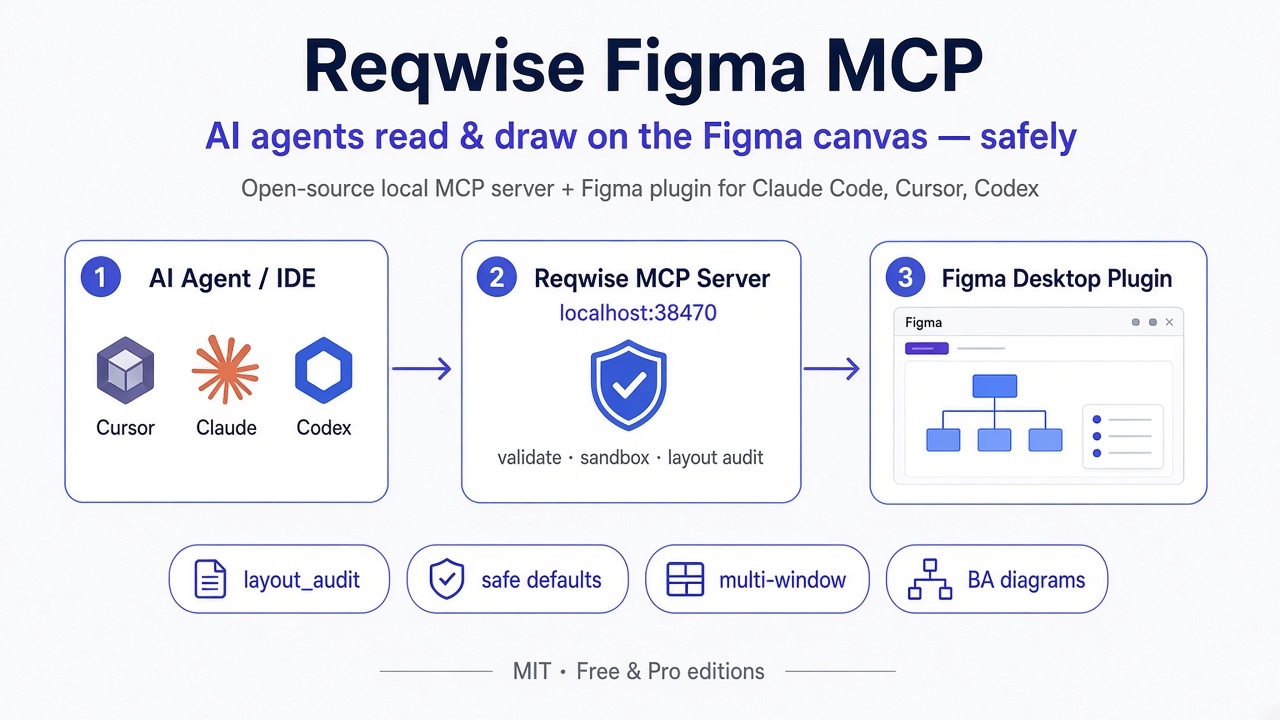
An MCP server that lets AI agents read and draw on the Figma canvas — safely. Open source (MIT).
Need BPMN, UI templates, a 1-to-1 code ↔ Figma component map, design systems, journey maps, personas, accessibility and responsive audits, or self-playing demos? They are in Reqwise Figma MCP Pro →. Compare the two editions below.
Reqwise Figma MCP pairs a local MCP server with a companion Figma plugin. Point Claude Code, Cursor, Codex or any MCP-capable agent at it, and the agent can inspect a Figma file and draw into it by executing JavaScript against a figma.* proxy API — with the plugin layer catching the mistakes that usually turn "AI draws a screen" into "AI draws an overflowing, half-clipped mess." It also draws the BA diagrams a spec needs — userflow, activity, sequence, ERD, sitemap, state machine — and proof-reads the model behind each one.
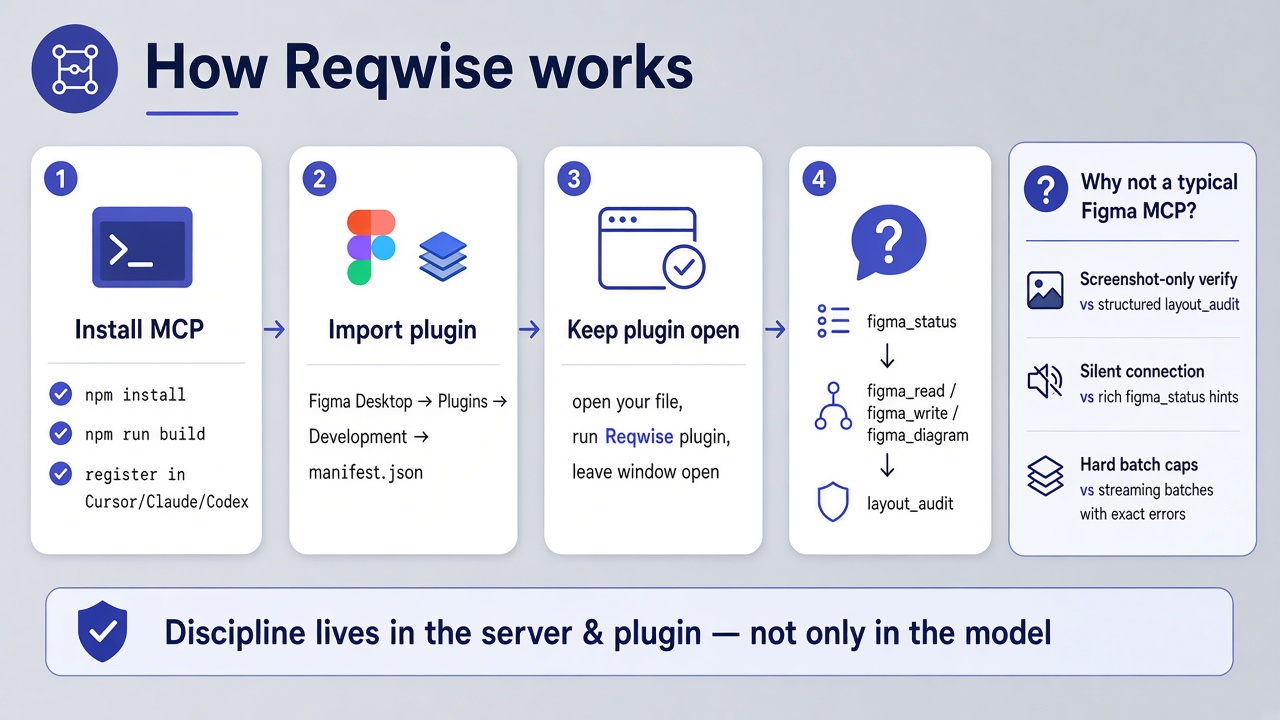
It exists because the current generation of Figma MCPs make agents responsible for discipline they don't have: remembering never to overlay a semi-transparent frame, re-declaring token maps every call, manually computing x/y offsets, eyeballing screenshots to check for clipping. Reqwise moves that discipline into the server and plugin, and gives the agent a structured way to verify its own work.
Free vs Pro
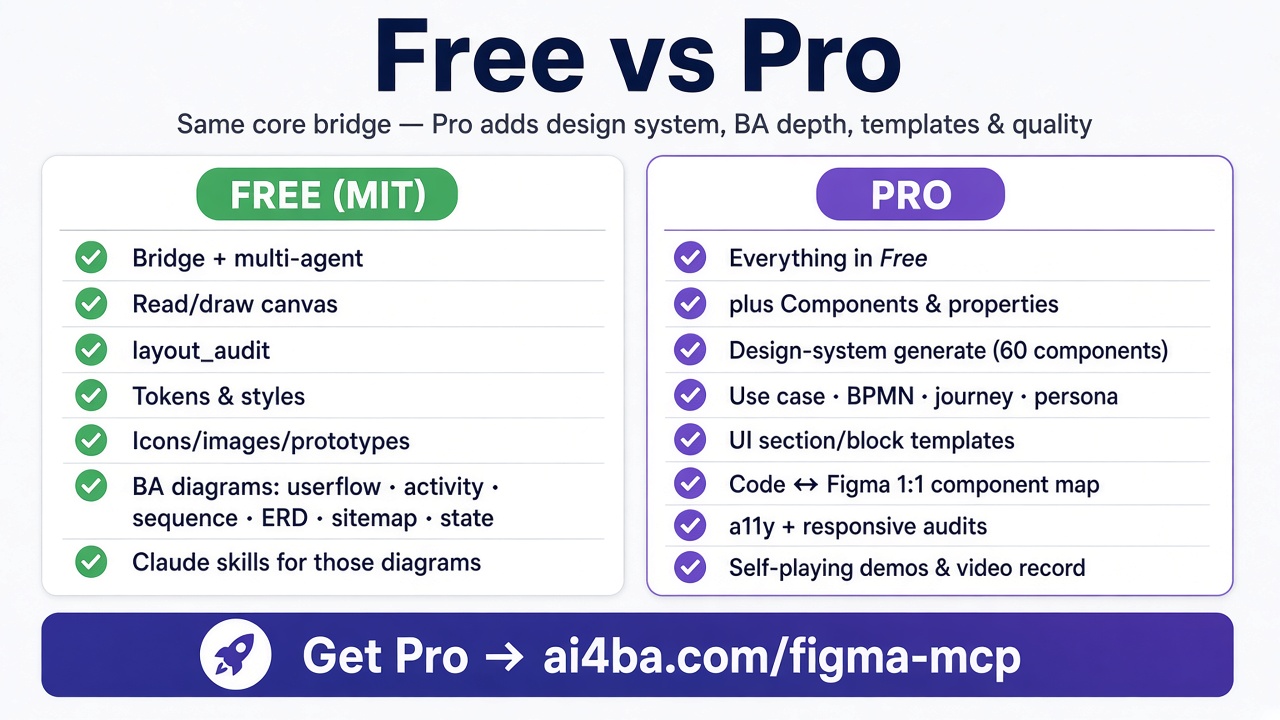
Get Pro → — this table is generated from the feature list both editions ship from, so it is current with every release.
Why this one
See ARCHITECTURE.md for the full design rationale and the root-cause fixes behind these defaults.
Quickstart
git clone https://github.com/hoangpm96/reqwise-figma-mcp.git
cd reqwise-figma-mcp
npm install
npm run build
This builds the server to dist/ and the plugin bundle to plugin/code.js.
Register the MCP server — all editors at once (Cursor, Claude Code, Codex):
npm run install:mcp
or one editor by hand:
claude mcp add reqwise-figma -s user -- /absolute/path/to/reqwise-figma-mcp/scripts/reqwise-mcp.sh
Import the plugin into Figma Desktop: menu → Plugins → Development → Import plugin from manifest… → select plugin/manifest.json. Run it from Plugins → Development → Reqwise Figma MCP and keep its window open.
Check the connection: ask your agent to call figma_status. Full walkthrough and troubleshooting: docs/SETUP.md and docs/INSTALL.md. Several editors at once: docs/MULTI-AGENT.md.
Every session: open your Figma file → Plugins → Development → Reqwise Figma MCP → leave the window open. Figma doesn't auto-start plugins.
Tools
Full parameter reference for every operation and every figma.* method: docs/TOOLS.md. Pro adds figma_design_system and figma_record, four more diagram kinds (use case, BPMN, journey map, persona set), the UI templates, the code ↔ Figma component map and the audits — see Free vs Pro.
Diagram skills
.claude/skills/ ships a skill per diagram kind — /figma-userflow, /figma-activity, /figma-sequence, /figma-state, /figma-erd, /figma-sitemap — plus the discipline they share (the connection gate, the four levels of "correct", the findings loop, verification). Copy them into .claude/skills/ in your project. See .claude/skills/README.md.
Example: figma_write
// Set tokens once — they persist in this session's `state.tokens`.
await figma.setupTokens({
  colors: { primary: "#2563EB", surface: "#0B0B0F" },
  numbers: { "radius-md": 8 },
});

// Draw a card with wrapping text, reusing the parent's width.
const card = await figma.create({
  type: "FRAME", name: "Card", parentId: state.rootId,
  width: 320, layoutMode: "VERTICAL",
});
await figma.applyVariable(card.id, "fills", "surface");
await figma.create({
  type: "TEXT", parentId: card.id, wrap: true,
  characters: "A long paragraph that must wrap inside the card.",
});

// Verify before screenshotting for a human.
const audit = await figma.layoutAudit(card.id);
if (audit.summary.issues.length) console.warn(audit.summary.issues);
Example: snapshot a design system to design-kit.md
Ask your agent to call:
{ "op": "generate_design_md", "params": { "depth": 3, "includeAnatomy": true, "includeScreens": true } }
The response contains a source-grounded markdown snapshot: extraction coverage, colors,
typography, observed layout frequencies, screen composition evidence, local and
remote component usage, exact node ids/keys/variant ids/property keys, ready-to-run
instantiate examples, reuse rules, responsive evidence and known gaps. Save
it in the target codebase as design-kit.md before asking the agent to create UI
from an existing Figma component system. Facts are separated from observations and
unknown UX semantics. For a very large file, tune maxComponents, maxScreens,
maxInstances or maxOutputChars; output limits omit complete sections rather
than cutting Markdown mid-table/code-block.
design.mdanddesign-kit.mdare two different files — human intent vs. machine snapshot, likepackage.jsonvs.package-lock.json. The tools never overwritedesign.md. See the two-file workflow.
Architecture
MCP client (Claude Code / Cursor)
      │ stdio (MCP)
      ▼
 Reqwise MCP server (Node ≥ 18, TypeScript)
      │  owns HTTP+WS server on localhost:38470 (fallback +1..+9)
      │    GET  /health    → diagnostics JSON
      │    POST /rpc       → follower → leader forwarding (auth token)
      │    WS   /ws        → Figma plugin UI connection
      ▼
 Figma Desktop plugin
   ├── ui.html   (WebSocket client, heartbeat, reconnect w/ backoff)
   └── code.js   (Plugin API executor, safe-default handlers)
Every operation — leader-direct or follower-forwarded — passes through one validateOperation() choke point before it reaches the plugin. Full topology, the leader/follower protocol, and the 15 safe-default fixes are documented in ARCHITECTURE.md.
Documentation
docs/SETUP.md— start here: install, daily routine, troubleshootingdocs/INSTALL.md— installation reference: env vars, port behaviour, leader/followerdocs/TOOLS.md— full tool +figma.*API reference, error codesdocs/MIGRATION.md— migrating fromfigma-ui-mcpdocs/RECIPES.md— practical cookbookdocs/DEMO-PROMPT.md— a paste-ready prompt that demos every free diagram kind plus mobile screensARCHITECTURE.md— design goals and internals
Reqwise Figma MCP Pro
Pro is the full edition, built by the same author on this same core: a design-system generator with ten visual styles, use case and BPMN diagrams, journey maps and persona sets, component authoring, UI section and block templates that draw with your own components and tokens (and design-system templates that come with palette and visual style preconfigured), a 1-to-1 map between your code components and their Figma counterparts (props ↔ variants, so generated UI matches the codebase instead of resembling it), accessibility and responsive audits, self-playing demos and demo videos. ai4ba.com/figma-mcp
License
MIT — see LICENSE. Reqwise Figma MCP Pro is a separate, commercially licensed product.