
PostgreSQL SSH MCP Server
A secure PostgreSQL MCP server with built-in SSH tunneling. Connect to databases through bastion hosts automatically — no manual ssh -L required.
Features
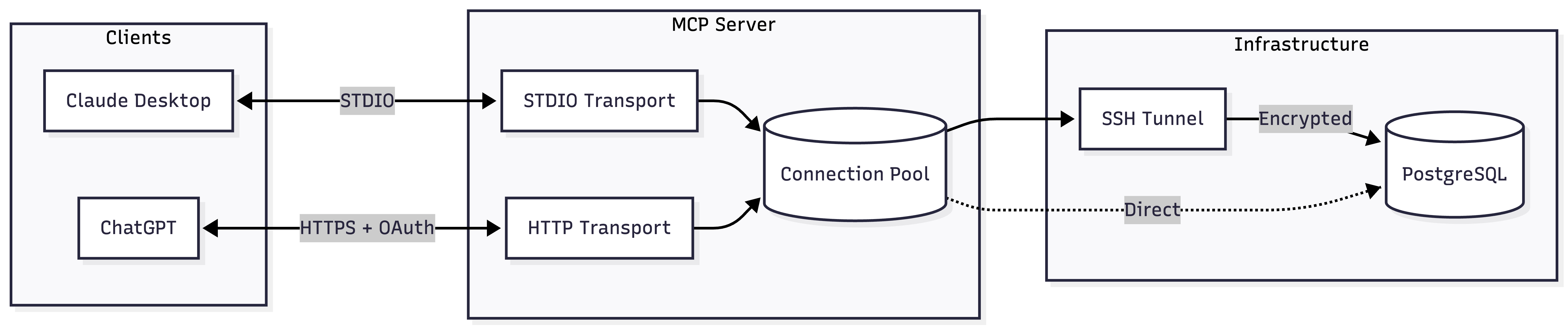
- Dual Transport — STDIO for Claude Desktop, Streamable HTTP for ChatGPT
- SSH Tunneling — Built-in tunnel with auto-reconnect and TOFU (trust on first use)
- Read-Only by Default — Safe for production; enable writes explicitly
- OAuth Support — Auth0 integration for secure ChatGPT connections
- Connection Pooling — Efficient resource management with configurable limits
Architecture
Quick Start
Claude Desktop (STDIO)
Add to your Claude Desktop config:
{
  "mcpServers": {
    "postgres": {
      "command": "npx",
      "args": ["-y", "@zlash65/postgresql-ssh-mcp"],
      "env": {
        "DATABASE_URI": "postgresql://user:password@localhost:5432/mydb"
      }
    }
  }
}
ChatGPT (Streamable HTTP)
DATABASE_URI="postgresql://user:pass@localhost:5432/mydb" npx @zlash65/postgresql-ssh-mcp-http
Then configure ChatGPT to connect to https://your-subdomain.example.com/mcp.
Note: ChatGPT requires HTTPS. Use a tunnel (ngrok, Cloudflare Tunnel) for local testing.
Available Tools
Query Tools
Schema Tools
Admin Tools
Environment Variables
Database Connection
*Either DATABASE_URI or all individual connection variables are required.
SSL Configuration
SSH Tunnel
*Required when SSH_ENABLED=true
**Either SSH_PRIVATE_KEY_PATH or SSH_PASSWORD is required
Query Behavior
HTTP Server (Streamable HTTP only)
OAuth (Auth0)
*Required when MCP_AUTH_MODE=oauth
Documentation
Docker
STDIO Server
docker build --target runtime -t postgresql-mcp .
docker run -e DATABASE_URI="postgresql://..." postgresql-mcp
HTTP Server
docker build --target runtime-http -t postgresql-mcp-http .
docker run -p 3000:3000 -e DATABASE_URI="postgresql://..." postgresql-mcp-http
Development
# Install dependencies
npm install

# Build
npm run build

# Run tests
npm test

# Type check
npm run typecheck

# Lint
npm run lint