
📱 MCP Server for iOS Simulator
A Model Context Protocol (MCP) server that enables LLMs to interact with iOS simulators through natural language commands.
ℹ️ Overview
This MCP server provides a bridge between Large Language Models (LLMs) and iOS simulators, offering comprehensive control through natural language commands. Here's what it can do:
For detailed usage, see the Installation guide and Supported Commands sections. You can use this server either through direct MCP integration or as a standalone library.
Check out the Architecture section to understand how the components work together to enable natural language control of iOS simulators. For the full execution flow, component contracts, and the session model, see ARCHITECTURE.md. Guidance for agents and contributors working on this repository is in AGENTS.md.
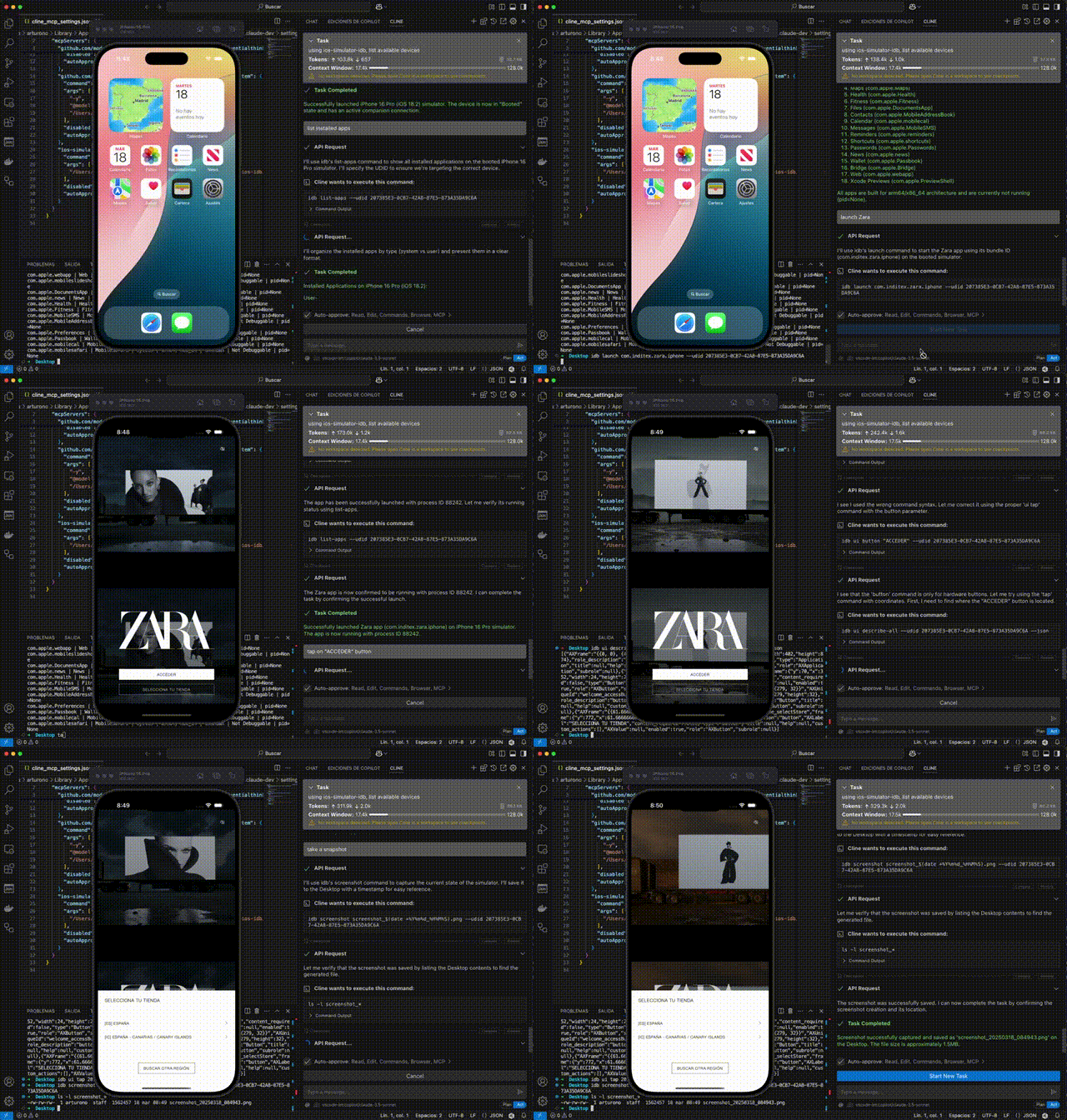
🎮 Simulator Control
- Create and manage simulator sessions
- Boot, shutdown, and monitor simulator states
- List available and running simulators
- Focus simulator windows
📱 Application Management
- Install and manage iOS applications
- Launch, terminate, and uninstall apps
- Monitor app states and verify installations
- Handle app permissions and configurations
🖱️ UI Interaction & Testing
- Interact with the simulator UI
- Execute tap, swipe, and button press actions
- Input text and key sequences
- Access accessibility elements for UI testing
- Record videos of UI interactions
🛠️ Development & Debugging
- Capture screenshots and system logs
- Debug applications in real-time
- Monitor and analyze crash logs
- Install dynamic libraries and manage app data
⚡ Advanced Features
- Additional functionality includes:
- Location simulation
- Media injection
- URL scheme handling
- Contact database management
- Keychain operations
For detailed usage, see the Installation guide and Supported Commands sections. You can use this server either through direct MCP integration or as a standalone library.
Check out the Architecture section to understand how the components work together to enable natural language control of iOS simulators.
📋 Requirements
- macOS: Required for iOS simulator support
- Node.js: v20.0.0 or higher
- Homebrew: Required for installing dependencies
- XCode: With iOS simulators installed
🚀 Installation
The easiest way to install this server is through Cline:
- Simply ask Cline:
Add this mcp to cline https://github.com/InditexTech/mcp-server-simulator-ios-idb
- Cline will handle the installation process automatically, including dependency management and configuration.
Alternatively, you can install it manually:
# Clone the repository
git clone https://github.com/InditexTech/mcp-server-simulator-ios-idb.git
cd mcp-server-simulator-ios-idb

# Create and activate Python virtual environment
python3 -m venv venv
source venv/bin/activate  # On Unix/macOS

# Install dependencies
npm install

# Build the project
npm run build

# Start the project
npm start

# Run tests
npm test
The installation process will automatically:
- Check if you're running macOS
- Install idb-companion via Homebrew
- Install fb-idb via pip in the virtual environment
Note: Make sure to keep the virtual environment activated while using the server. If you close your terminal and come back later, you'll need to reactivate the virtual environment with the source venv/bin/activate command before running npm start.
🔌 MCP Integration
To use this server with Claude or other LLM assistants:
- Add the server to your MCP settings in Claude Desktop:
{
  "mcpServers": {
    "ios-simulator": {
      "command": "node",
      "args": ["/path/to/mcp-server-simulator-ios-idb/dist/index.js"],
      "env": {}
    }
  }
}
- The LLM can now use natural language commands to control iOS simulators:
create a simulator session with iPhone 14
install app /path/to/my-app.ipa
launch app com.example.myapp
tap at 100, 200
take a screenshot
📚 Usage as a Library
You can also use this package as a library in your own projects:
🔰 Basic Usage
⚠️ Import side effects: importing the package entry point (
'mcp-server-simulator-ios-idb'/dist/index.js) runs the server startup code at module load: it overrides console output, creates alogs/directory, registersSIGINT/SIGTERM/exception handlers, and starts the MCP stdio server unconditionally. There is currently no opt-out. This applies to any import of the package root — named imports do not opt out of the bootstrap. To use the parser/orchestrator/manager without transport and signal side effects, import the compiled component modules by deep path as shown below (dist/...); note that importingdist/mcp/mcp-server.jsalso bootstraps the MCP server singleton, so avoid that path for library use. The package only declares"main"(noexportsmap), so deep paths resolve normally.
// Deep imports of compiled component modules: these do NOT trigger the
// package root startup (no MCP stdio server, no signal handlers).
import { MCPOrchestrator } from 'mcp-server-simulator-ios-idb/dist/orchestrator/MCPOrchestrator.js';
import { NLParser } from 'mcp-server-simulator-ios-idb/dist/parser/NLParser.js';
import { IDBManager } from 'mcp-server-simulator-ios-idb/dist/idb/IDBManager.js';

async function main() {
  // Compose the components (equivalent to createMCPServer internals)
  const idbManager = new IDBManager();
  const parser = new NLParser();
  const orchestrator = new MCPOrchestrator(parser, idbManager);

  // Process natural language commands

  // Create a simulator session
  const sessionResult = await orchestrator.processInstruction('create session');
  console.log(`Session created: ${sessionResult.data}`);

  // Interact with the simulator
  await orchestrator.processInstruction('tap at 100, 200');

  // Capture a screenshot
  const screenshotResult = await orchestrator.processInstruction('take screenshot');
  console.log(`Screenshot saved at: ${screenshotResult.data}`);
}

main().catch(console.error);
ℹ️ The MCP server itself (currently defined in
src/mcp/mcp-server.ts, not re-exported from the package entry point) is only meaningful when running the actual server process vianpm start/ an MCP client config; itscreateMCPServer()factory simply composes the same three components shown above.
🚀 Advanced Usage
You can also use the individual components directly via deep imports:
import { IDBManager } from 'mcp-server-simulator-ios-idb/dist/idb/IDBManager.js';

// Create instance and use it directly
const idbManager = new IDBManager();

const sessionId = await idbManager.createSimulatorSession({
  deviceName: 'iPhone 12',
  platformVersion: '15.0'
});

await idbManager.tap(sessionId, 100, 200);
🏗️ Project Structure
mcp-server-simulator-ios-idb/
├── src/                      # Source code
│   ├── adapters/             # Adapter components
│   ├── idb/                  # IDB manager implementation
│   ├── mcp/                  # MCP server implementation
│   ├── orchestrator/         # Command orchestrator
│   ├── parser/              # Natural language parser
│   └── index.ts             # Main entry point
├── scripts/                 # Installation scripts
├── package.json            # Project configuration
└── tsconfig.json          # TypeScript configuration
🎯 Supported Commands
The NLParser supports the following natural language commands:
🎮 Simulator Management
📱 App Management
🖱️ UI Interaction
♿ Accessibility
📸 Capture and Logs
🐛 Debug
💥 Crash Logs
🔧 Additional Commands
The interface supports all commands available in the idb CLI tool, providing a comprehensive set of operations for iOS simulator automation.
🔍 Architecture
The server consists of three main components:
- IDBManager: Low-level component that interacts directly with iOS simulators through idb.
- NLParser: Component that interprets natural language instructions and converts them into structured commands.
- MCPOrchestrator: Central component that coordinates interactions between the parser and the IDBManager.
These components are connected through adapters:
- ParserToOrchestrator: Converts parser results into orchestrator commands.
- OrchestratorToIDB: Translates orchestrator commands into IDBManager calls.
The complete execution flow (MCP stdio → orchestrator → parser/registry → adapters → IDBManager → idb / xcrun simctl), component contracts, the session model (activeSessionId vs sessionId → UDID), and a checklist for adding new commands are documented in ARCHITECTURE.md.
🔌 MCP Integration
To use this server with the Model Context Protocol:
- Add the server to your MCP settings:
{
  "mcpServers": {
    "ios-simulator": {
      "command": "node",
      "args": ["/path/to/mcp-server-simulator-ios-idb/dist/index.js"],
      "env": {}
    }
  }
}
- Connect to the server in your LLM application:
const result = await useMcpTool({
  serverName: "ios-simulator",
  toolName: "process-instruction",
  arguments: {
    instruction: "create simulator session"
  }
});
🙏 Acknowledgments
This project would not be possible without facebook/idb, which provides the underlying iOS simulator control capabilities. We extend our sincere gratitude to the Facebook/Meta team and all contributors to the idb project for creating and maintaining such a powerful and reliable tool.
📄 License
This tool is available as open source under the terms of the Apache-2.0.