
OpenAPI MCP
OpenAPI MCP is an open-source framework for exposing any OpenAPI-documented HTTP APIs as MCP servers. Built on Spring AI and designed to run as a Spring Boot application, it's already running in production, powering Infobip MCP servers.
It's production-tested and ready for you to use in your own projects!
Features
The framework is a bridge from the OpenAPI described APIs to MCP servers. Core functionality is mapping HTTP API operations (paths and HTTP methods) to MCP tools. This includes a setup step that happens upfront to prepare tool metadata which is presented to AI agents and a runtime step that happens when AI agents invoke tools.
Some of the core features include:
- Adapting OpenAPI specification to work with MCP tools. APIs have more flexibility in their inputs, e.g. they accept path and query parameters, while MCP tools expect to receive all inputs as a single JSON object. The framework will detect these cases and wrap / unwrap inputs accordingly.
- OpenAPI specification allows advanced features in request schema definitions, such as discriminators for polymorphic models. This is not allowed in pure JSON schema used by MCP, so the framework has a transformation step in which discriminators are resolved and embedded in a way compatible with JSON schema.
- Mock mode in which MCP server returns examples from the OpenAPI specification instead of making HTTP API calls
- MCP Apps support: tools can declare interactive HTML UIs and receive structured results, using
x-mcp-app-resourceandx-mcp-appvendor extensions
[!IMPORTANT] The OpenAPI MCP framework allows you to expose any HTTP API documented with OpenAPI to LLM agents. Since LLMs will process the API responses it is important that you trust the API won't compromise your users' agents with prompt injections. It is equally important to trust the OpenAPI specification, as it is used as a source of meta-data that is directly provided to LLMs. When exposing your own APIs make sure that responses are secure and can't be used to inject untrusted text that might contain prompt injection. When exposing 3rd party APIs make sure the API itself is trusted, but also that the OpenAPI specification which defines it is equally trusted. When working with 3rd party OpenAPI specifications you can review and store them as a static files inside your application resources. That way you can be sure specifications won't change unexpectedly.
Authentication
Authentication and authorization is important for MCP servers, and can be tricky to implement. In case of exposing HTTP APIs as MCP tools the security posture of the API is bases for everything. The OpenAPI MCP framework adapts it to MCP specification in few key ways:
- The framework exposes required
/.well-knownHTTP endpoints. Two of them (/.well-known/openid-configurationand/.well-known/oauth-authorization-server) are proxied to your authorization server, and one (the/.well-known/oauth-protected-resource) is handled by the framework itself. - There is the option of supporting authorization checking API endpoint that framework invokes before processing MCP interactions to validate client credentials.
Lastly, by delegating authentication to dedicated API endpoint, the framework supports arbitrary auth type, such as classic API key and Basic auth types, in addition to OAuth.
There are more technical features that enable customizing various behaviors, like:
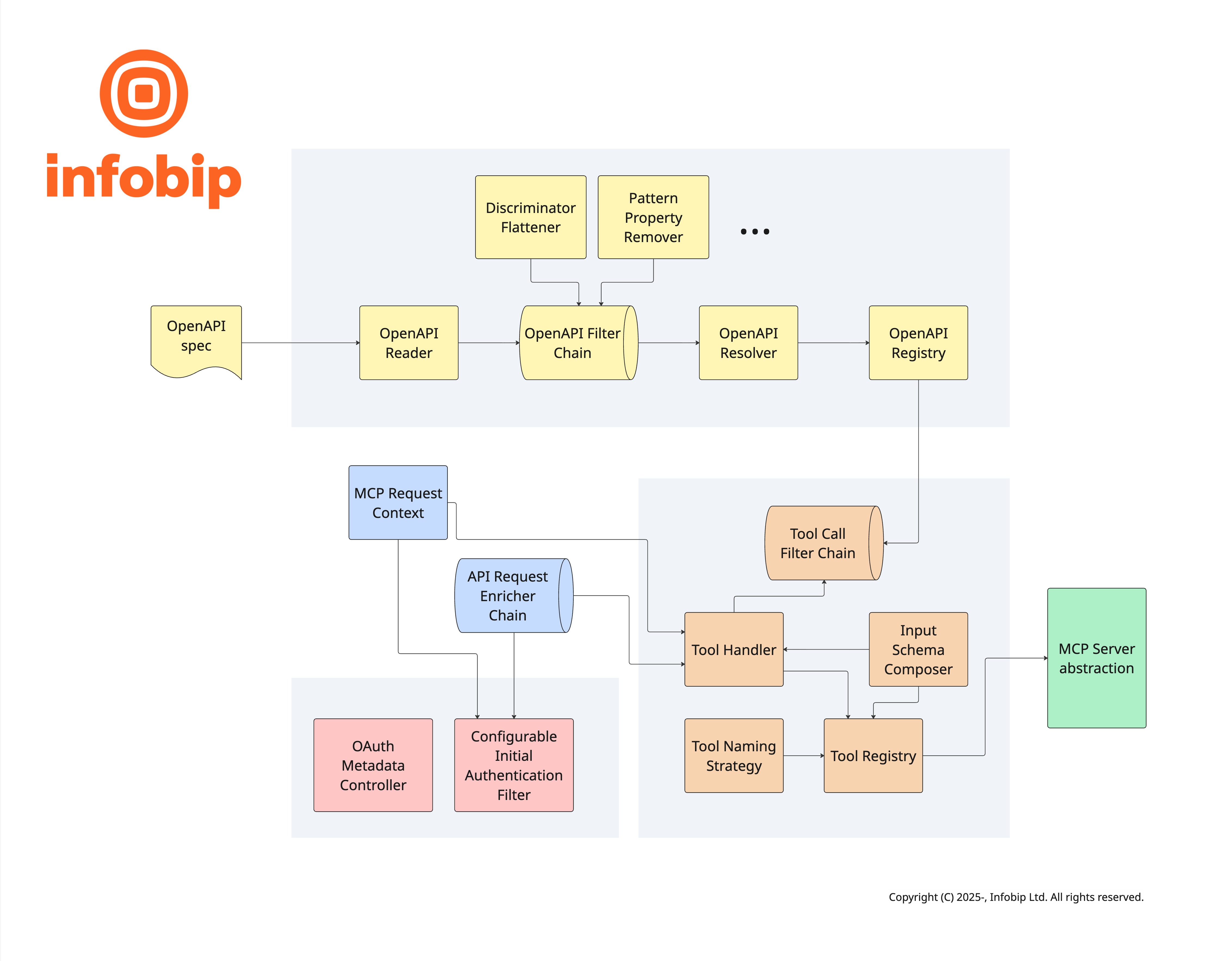
- OpenAPI filters that can be used to programmatically customize the specification before MCP tool metadata is constructed.
- OpenAPI extensions that can be used to customize different aspects of MCP tools, including listing custom OAuth scopes.
- Several naming strategies are available to customize MCP tool names.
- API request enrichers that can be used to programmatically customize the API requests that back the tool calls.
- MCP tool call filters that can be used to customize tool call behavior.
- A base of Spring AI external customization options, which framework builds on top of with its own options. See below for a full list.
Getting Started
Prerequisites
OpenAPI MCP framework requires Java version 21 of newer, and is based on Spring Boot 4.1.x and Spring AI
2.0.x.
Installation
You can install it in your Java project with maven:
<dependency>
    <groupId>com.infobip.openapi.mcp</groupId>
    <artifactId>infobip-openapi-mcp-spring-boot-starter</artifactId>
    <version>1.1.0</version>
</dependency>
or gradle:
implementation("com.infobip.openapi.mcp:infobip-openapi-mcp-spring-boot-starter:1.1.0")
Usage
After installation enable one of the server protocols supported by Spring AI with externalized configuration properties. For example, you can enable stdio transport with a config like this:
spring:
  ai:
    mcp:
      server:
        type: sync
        stdio: on
[!IMPORTANT] Make sure to set the server type to
sync, as some of the framework features (such as authentication) will not work with theasynctype.
To expose a remote server using the currently recommended streamable HTTP transport use this config:
spring:
  ai:
    mcp:
      server:
        protocol: STATELESS
Configuration
OpenApiFilter
You can implement and register beans of type com.infobip.openapi.mcp.openapi.filter.OpenApiFilter to change the
OpenAPI specification before framework extracts MCP tool meta-data from it. Individual filters can be disabled in
externalized configuration with the infobip.openapi.mcp.filters.[filter-name] property. For example, to disable the
built-in filter that removes regex pattern property from OpenAPI schemas set
infobip.openapi.mcp.filters.PatternPropertyRemover: false.
The framework ships with several built-in filters that are enabled by default:
DiscriminatorFlattenerresolves OpenAPI discriminators into plainoneOf/allOfschemas, since MCP does not support discriminators natively.PatternPropertyRemoverstrips regexpatternconstraints that some MCP clients cannot validate.NullableTypeNormalizercollapses OpenAPI 3.1 nullable union types (such as["array", "null"]) into a single scalar type, so tools with nullable parameters can be called without validation errors on MCP clients that cannot validate an array-valuedtype. Disable it withinfobip.openapi.mcp.filters.NullableTypeNormalizer: false.
[!TIP] AI agents perform best with smaller, focused MCP servers. On the contrast, HTTP APIs are ofter large and full of different features. This means we usually need to pick a subset of API operations that will be included as tools. Sometimes we need to also pick a limited subset of input parameters like query parameters or even request body properties. There are two ways to prepare OpenAPI specification for this:
- You can make a dedicated OpenAPI specification for your MCP servers. This can be done either from scratch, or by transforming the original specification with something like OpenAPI overlays. This transformation can be automated as part of your CI pipeline. In this case your MCP server will receive the limited-scope specification with only the elements that you selected to expose to AI agents.
- Alternatively, you can provide MCP server with the original, fully featured specification and narrow down its scope by implementing OpenAPI filters in your application code.
Both approaches can be combined.
Parameter handling
OpenAPI allows parameters to be serialized in different styles, with or without explode. The framework
currently only supports the OpenAPI default: form style with explode: true for query and cookie parameters, and
simple style with explode: false for header parameters. Given a parameter named color:
Note that a query or cookie object value is exploded into one parameter per property, named after the property rather
than color, matching the OpenAPI specification for form style with explode: true. A header object value instead
keeps the single color header name and lists each property name and value as comma-separated pairs, matching
simple style with explode: false. The specification leaves object serialization undefined for form style
cookies with explode: true; the framework mirrors query parameter handling for consistency, but this is not a
spec-mandated behavior. Other styles and explode combinations are not currently supported.
Tool NamingStrategy
MCP servers expose functionalities to AI agents as tools. Each tool is identified by a name which is accompanied by a description. LLMs pick tools to use based on this information, so it is important to make them concise and clear. The framework implements several strategies for naming tools:
OperationIdStrategy, which produces names based onoperationIdfrom OpenAPI specification.SanitizedOperationIdStrategywhich usesoperationId, but sanitizes it by lowercasing alphanumeric characters and replacing others with underscore.EndpointStrategy, which combines HTTP method and path.
Various MCP client libraries have different limitations on the maximum tool name length. To accommodate this the
framework provides TrimNamingStrategy, which wraps one of the base strategies and enforces length limits on top of it.
You can customize tool naming with infobip.openapi.mcp.tools.naming.strategy and
infobip.openapi.mcp.tools.naming.max-length external configuration properties. If provided implementations do not meet
your needs you can provide your own implementation.
[!TIP] Many MCP client libraries implement scoping of tool names. Common pattern is to allow client applications to name each MCP server they connect to, and to prepend the server name to names of tools loaded from the server. This means you as MCP server developer do not need to scope your tool names. It is best to keep names short and to the point.
Tool descriptions
LLMs pick tools based on their names and descriptions. In order for them to be able to do that descriptions of all tools from all MCP servers that an agent is connected to are loaded into LLM context. This means that tool descriptions need to be as short as possible while retaining clarity, but not shorter than that.
The OpenAPI MCP framework can use few API operation properties to create tool descriptions. It can either take just the
operation summary, or it can combine it with operation description. The behavior can be controlled with
infobip.openapi.mcp.tools.prepend-summary-to-description externalized configuration property.
The framework can also append a request example to each tool description as a Markdown JSON code block. Examples are
extracted from the OpenAPI specification — from parameters and request bodies — and combined into a single object
mirroring the tool's input schema structure. The behavior is controlled by the
infobip.openapi.mcp.tools.examples-mode property, which accepts three values:
-
SKIP(default) — no examples are appended. -
ALL— all examples from the OpenAPI specification are included. -
ANNOTATED— only examples explicitly marked for MCP use are included. Mark an example by addingx-mcp-example: truedirectly on the OpenAPIExampleObject (inside theexamplesmap of a parameter or request body):examples: basicRequest: summary: Basic SMS x-mcp-example: true value: to: "41793026727" text: "Hello" advancedRequest: summary: Advanced SMS (not shown in MCP) value: to: "41793026727" text: "Hello" validityPeriod: 720
[!TIP] Be mindful that examples add to the context size consumed by tool descriptions. If the examples in your OpenAPI specification are large or numerous,
ANNOTATEDmode is the recommended approach — it lets you selectively expose only the examples that are most useful for the LLM, without needing OpenAPI overlays or custom filters.
Tool annotations
MCP tools support annotations that describe their behavior to MCP clients. The framework automatically infers annotations from the HTTP method of each API operation:
openWorldHint is always true because every tool calls an external HTTP API.
Annotations can be overridden per-operation using the x-mcp-annotations vendor extension on the OpenAPI
Operation object:
paths:
  /messages:
    post:
      operationId: sendMessage
      x-mcp-annotations:
        idempotentHint: true
They can also be overridden globally per tool name using externalized configuration properties:
infobip:
  openapi:
    mcp:
      tools:
        annotations:
          sendMessage:
            idempotent-hint: true
Override precedence (lowest to highest): HTTP method defaults, x-mcp-annotations vendor extension, YAML configuration
properties. Each layer only overrides fields it explicitly sets; unset fields fall through from the previous layer.
Authentication
MCP defines OAuth as preferred authentication method. The framework aims to make this as easy to implement as possible. There are few considerations when exposing existing APIs:
- The underlying API must implement the same authentication type as MCP server.
- There are few specifics of MCP specification that need to be satisfied for clients to work automatically.
One of MCP requirements is that first interaction with MCP server that doesn't include valid credentials should be
rejected; in fact that is what triggers the login flow in MCP clients. However, this interaction is usually not direct
tool invocation, meaning that the framework does not need to make any API calls to implement tool calls. Since
credentials still need to be verified framework needs to invoke some API endpoint which only performs the
authentication. This special endpoint, which is not exposed as a tool but is used only in this auth flow, needs to be
defined in an externalized configuration property infobip.openapi.mcp.security.auth.auth-url. This is needed whenever
security is enabled. The framework will pass any Authorization header from the inbound MCP request to the auth-url
endpoint on the API.
OAuth
MCP specification defines a flow for automatic authorization server discovery. One of the requirements is that MCP
server itself should expose few /.well-known HTTP endpoints defined by the OAuth specification. Some of these are
usually implemented by the OAuth authorization server, and the OpenAPI MCP framework can proxy those calls to make it
more convenient to expose them from the same server as the rest of MCP features. Some endpoints are implemented and
exposed directly by the framework, as in acts as OAuth resource server.
OAuth APIs usually rely on scopes for fine-grained access control, and MCP specification allows for this. OpenAPI MCP
framework takes the OAUth scope information from the provided OpenAPI specification. The framework looks for scopes
either in standard security properties or in custom operation-level OpenAPI extensions that can be defined in
infobip.openapi.mcp.security.auth.oauth.scope-discovery.scope-extensions. Additionally, fixed, predefined scopes can
also be defined with infobip.openapi.mcp.security.auth.oauth.scope-discovery.mandatory-scopes.
You can configure what set from all discovered scopes are requested during login by setting the externalized
configuration property infobip.openapi.mcp.security.auth.oauth.scope-discovery.calculate-minimal-scopes. When NONE
is used, which is the default, all discovered scopes are requested. When GREEDY is used an optimistic greedy algorithm
picks a subset of scopes which still covers all operations.
ApiRequestEnricher
If you need to customize HTTP requests that the framework is making towards the API you can implement and register beans
of type com.infobip.openapi.mcp.enricher.ApiRequestEnricher. This is a good place to include any meta-data for
monitoring or custom tracing that you may need. Framework provides few enrichers out of the box, for example the one
that sets the User-Agent header to the value defined in externalized configuration property
infobip.openapi.mcp.user-agent.
[!NOTE] Implementations of API request enrichers should be lightweight and non-critical. The framework will skip enrichers that fail by catching any exceptions and carry on to make the API request. This is why the enricher interface is limited to tweaking Spring's
RestClient.RequestHeadersSpecand does not provide options to break the flow and prevent the API call from being made.
CredentialProvider
The framework uses com.infobip.openapi.mcp.auth.CredentialProvider to obtain the credential
value used for authenticating incoming requests and forwarding authorization to the downstream API.
The default implementation reads the Authorization header from the incoming HTTP request.
You can replace this bean to supply credentials from any source:
@Bean
public CredentialProvider credentialProvider() {
    return context -> Optional.of(myVaultClient.getApiKey())
            .filter(key -> !key.isBlank())
            .map(key -> "Bearer " + key);
}
[!NOTE] If the provider throws an unchecked exception, the framework catches it and fails closed:
InitialAuthenticationFilterreturns HTTP 401, andToolHandlerreturns an error tool result with an authentication error.
Call filters
You can implement and register call filter beans to customize how tool calls, prompt calls and resource reads are handled. A call filter can inspect or modify the request before it is processed, inspect or modify the result before it is returned to the MCP client, and short-circuit the chain to prevent further processing entirely. Call filters are a good place to implement custom observability, authorization, or caching. Unlike API request enrichers, call filters can break the processing chain, thus preventing the downstream API call from being made.
Each chain ends with a default filter which performs the actual work. It is registered with the lowest precedence, so you can preempt it by using any precedence higher than that.
JSON serialization
Both MCP client libraries and underlying LLMs can sometimes produce invalid JSON documents and send them to MCP server
tools. The OpenAPI MCP framework implements a helper to address one of the common errors: embedding JSON sub-objects
into strings. This is a common failure mode in which a sub-object property of a complex request model is sent to MCP
server inside a JSON string. The framework will first send this request to HTTP API as normal, but will likely receive a
HTTP status code 400 response. In that case framework will attempt to unwrap string property values and look for a
JSON object or a JSON array inside it. If it detects such a case, it sends another HTTP API requests with the corrected
request body.
You can disable this behavior by setting externalized configuration property
infobip.openapi.mcp.tools.json-double-serialization-mitigation: false.
Mock mode
Framework offers a mock mode in which MCP server will return tool call results based on examples from the OpenAPI
specification. Framework picks first example for the successful (2xx range) response with application/json content
type from the API endpoint that corresponds to the tool being called. In case example is missing for the specific
API endpoint an error MCP result is returned. This feature is disabled by default, and can be enabled by setting the
externalized configuration property infobip.openapi.mcp.tools.mock: true.
[!NOTE] Even with mock mode enabled, security features still work and will delegate authentication checks to the server defined by the
infobip.openapi.mcp.security.auth.auth-urlproperty. This allows MCP client implementors to test authentication configuration on their end, including OAuth config.If this is not desired you can disable authentication by setting
infobip.openapi.mcp.security.auth.enabled: false. By disabling auth and enabling mock mode framework won't use API, and all tool calls will receive successful results based on OpenAPI examples.
Tool Reload
The framework supports automatic reloading of the OpenAPI specification at runtime. When enabled, the framework periodically fetches the OpenAPI specification and updates the registered MCP tools if changes are detected. This is useful for scenarios where the OpenAPI specification is updated frequently and you want the MCP server to reflect these changes without requiring a restart.
Tool reload works by comparing the OpenAPI specification version. When a version change is detected, the framework compares the registered tools with the new specification and:
- Removes tools that no longer exist in the specification
- Adds new tools that were introduced in the specification
- Updates tools that have changed (title, description, or schema)
- Discovers new OAuth scopes if scope discovery is enabled
After detecting changes, connected MCP clients are notified about the tool list changes, and OAuth scopes are rediscovered automatically if scope discovery is enabled.
[!NOTE] Due to MCP SDK constraints, notifications are sent after each individual tool modification rather than in batch.
The framework retries up to max-retries times per scheduled execution, but terminates early on the first successful
reload (whether or not tools changed). Retries only occur when the reload fails (e.g., due to network errors), using
exponential backoff between attempts. If a refresh is already in progress when the next scheduled execution triggers,
that execution is skipped.
Prerequisites:
- Add
@EnableSchedulingto your Spring Boot application configuration
Configuration example:
infobip:
  openapi:
    mcp:
      live-reload:
        enabled: true
        cron-expression: "0 */5 * * * *"  # Every 5 minutes
        max-retries: 3
[!WARNING] The tool reload task runs on Spring's task scheduler thread pool and blocks the thread during execution. By default, Spring uses a single-threaded scheduler. If your application has multiple scheduled tasks and the reload operation takes time (e.g., due to network latency), consider configuring a larger thread pool:
spring:
  task:
    scheduling:
      pool:
        size: 2
Progress Notifications
While an HTTP API call is in progress, the framework can send periodic notifications/progress messages to MCP
clients. This keeps clients responsive during slow API calls and prevents them from timing out prematurely.
[!NOTE] Progress notifications only work with stateful MCP servers (SSE or stateful Streamable HTTP), and only when the MCP client requests them by including
_meta.progressTokenin the tool call.
The feature is enabled by default. To opt out:
infobip:
  openapi:
    mcp:
      progress-notifications-enabled: false
The interval between notifications defaults to 1 second and can be adjusted with
infobip.openapi.mcp.progress-notifications-interval. Keep this value below your read-timeout, otherwise no
notification will be sent before the HTTP call completes.
By default, notifications carry an incrementing counter with no total or human-readable message. To customize the
progress, total, and message fields, implement ProgressUpdateProvider and register it as a Spring bean:
@Bean
public ProgressUpdateProvider progressUpdateProvider() {
    return new ProgressUpdateProvider() {
        @Override
        public Double total(McpRequestContext context) {
            return null; // unknown duration
        }

        @Override
        public ProgressUpdate next(long tick, McpRequestContext context) {
            var toolName = context.toolName() != null ? context.toolName() : "tool";
            return new ProgressUpdate(tick, "Waiting for " + toolName + "…");
        }
    };
}
The total value is resolved once before the first notification and stays constant throughout the tool call, so
clients that display a progress fraction always receive a consistent value.
Prompts
The framework supports MCP prompts — reusable prompt templates that MCP clients can discover and invoke. Prompts
are defined using the x-mcp-prompts vendor extension on the root OpenAPI object as an array of prompt
definitions. Two resolution modes are available:
- Static templates — prompts with inline
messagescontaining Mustache{{placeholder}}templates. Templates are rendered server-side from the user-supplied arguments with no backend call. Missing required arguments fail the request; missing optional arguments render as empty strings. - Backend resolution — prompts with a
resolveblock that delegates to a backend HTTP endpoint at runtime. Arguments are forwarded as query parameters forGETor as a JSON request body forPOST. Credentials are forwarded using the configuredCredentialProvider.
Each prompt must use exactly one mode — defining both messages and resolve on the same prompt causes a startup
error.
# Top-level OpenAPI vendor extension (sibling to info, paths, components)
x-mcp-prompts:
  - name: greet
    description: "Greet a user by name"
    arguments:
      - name: user_name
        description: "User's name"
        required: true
    messages:
      - role: user
        content: "Hello {{user_name}}, welcome!"
      - role: assistant
        content: "Thanks! Glad to be here, {{user_name}}."

  - name: summarize
    description: "Summarize the API capabilities"
    arguments:
      - name: format
        description: "Output format (markdown, plain, json)"
    resolve:
      path: /prompts/summarize
      method: POST
The path in the resolve block is resolved relative to the same base URL used for API tool calls (derived from
the servers entry in the OpenAPI specification).
For backend-resolved prompts, the endpoint must return a JSON response with the following structure:
{
  "description": "Greet a user",
  "messages": [
    {"role": "user", "content": "Generate a greeting for Alice."},
    {"role": "assistant", "content": "Hello Alice, welcome!"}
  ]
}
Messages support both user and assistant roles, enabling few-shot prompt patterns. Prompts are automatically
included in live reload — when the OpenAPI specification changes, prompt additions and removals are detected and
connected MCP clients are notified.
Resources
The framework supports MCP resources — read-only data that MCP clients can discover and fetch by URI. Any GET
operation in the OpenAPI specification can be exposed as a resource instead of a tool by marking it with the
x-mcp-resource: true vendor extension. A marked operation is removed from the tool list, so it is exposed
either as a resource or as a tool, never both. Marking a non-GET operation is a configuration error and fails at
startup.
paths:
  /status:
    get:
      operationId: getStatus
      summary: Service status
      description: Current health and version of the service
      x-mcp-resource: true
      responses:
        "200":
          content:
            application/json: { }
  /users/{id}:
    get:
      operationId: getUserById
      summary: User profile
      x-mcp-resource: true
      parameters:
        - name: id
          in: path
          required: true
          schema: { type: string }
        - name: expand
          in: query
          schema: { type: string }
      responses:
        "200":
          content:
            application/json: { }
Resource URIs are derived from the operation path as <uri-scheme>://<path>, where the scheme is configurable via
infobip.openapi.mcp.resources.uri-scheme (api by default). Operations with no path or query parameters become
static resources with a concrete uri; operations with parameters become resource templates whose uriTemplate
keeps path parameters as {param} placeholders and appends query parameters as an RFC 6570 form-style
expansion:
Parameters declared on the OpenAPI Path Item are inherited by the operation and taken into account, with operation level parameters overriding inherited ones of the same name.
The resource name is produced by the same NamingStrategy bean used for tool names, the title comes from the
operation summary (falling back to the name), the description from the operation description, and the
mimeType from the content type of the first successful response declaring content — 200 is preferred, then any
other 2xx code in ascending order, then the 2XX range (defaulting to application/json).
When a client reads a resource, the framework matches the concrete URI back against the operation, forwards path
variables and query parameters to the downstream API, and returns the response body as the resource contents. The
media type of the contents is taken from the response Content-Type header, falling back to the declared mimeType.
Media types declaring a charset, text/*, JSON (application/json, application/*+json), XML (application/xml,
application/*+xml), application/yaml and application/javascript are returned as text contents, decoded using the
declared charset (UTF-8 by default). Any other media type is returned as base64 encoded blob contents, which is
lossless for any content. To customize this, for example to return a vendor specific media type as text, or to apply
size limits, register your own ResourceContentsConverter bean. It receives the downstream response (URI, declared
mimeType, OpenAPI operation, status, headers and body) and returns the resource contents. The default
DefaultResourceContentsConverter can be constructed with a custom list of text media types, or delegated to:
@Bean
public ResourceContentsConverter resourceContentsConverter() {
    var textMediaTypes = new ArrayList<>(DefaultResourceContentsConverter.DEFAULT_TEXT_MEDIA_TYPES);
    textMediaTypes.add(MediaType.parseMediaType("application/vnd.acme.config"));
    return new DefaultResourceContentsConverter(textMediaTypes);
}
Query parameter values in the resource URI are percent-decoded as URI components (a literal + stays a +, it is
not treated as a space) and re-encoded when forwarded to the backend.
Query parameters that are not declared on the operation are dropped and logged rather than forwarded, so clients
cannot inject arbitrary parameters into the backend call. Credentials are supplied by the configured CredentialProvider
and requests pass through the registered ApiRequestEnricher beans, exactly as for tool calls. Reads can be
intercepted by implementing ResourceCallFilter.
Resources are included in live reload in the same way as tools and prompts — when the OpenAPI specification changes, resource additions, removals and definition changes are detected and connected MCP clients are notified.
MCP Apps
MCP Apps (extension io.modelcontextprotocol/ui) lets a tool declare an interactive HTML UI that
MCP Apps-capable hosts render inline with the tool's results. The framework exposes it through two vendor
extensions:
paths:
  /dashboard:
    get:
      operationId: getDashboard
      x-mcp-app-resource:
        uri: ui://users-dashboard            # optional, defaults to ui://<path>
        csp:
          connectDomains:
            - https://api.example.com
        permissions:
          clipboardWrite: { }
        domain: abc123.sandbox.example.com   # optional, host-assigned sandbox origin
        prefersBorder: true                  # optional
      responses:
        "200":
          content:
            text/html:
              schema: { type: string }
  /users:
    get:
      operationId: getUsers
      x-mcp-app:
        resourceUri: ui://users-dashboard    # required, must start with ui://
        visibility: [model, app]             # optional, defaults to host-defined
      responses:
        "200":
          content:
            application/json: { }
x-mcp-app-resource marks a GET operation whose response is an HTML document as a UI resource. Like
x-mcp-resource, the operation is removed from the tool list, but the resource is always static (never a template),
so a marked operation must not declare path or query parameters, must be a GET, and its ui:// URI must be unique
across all UI resources — violations fail at startup. The resource is listed with the exact MCP Apps media type
text/html;profile=mcp-app, and reads return the downstream HTML with that media type and the declared _meta.ui
metadata (CSP origins, permissions, domain, prefersBorder) merged into the contents. The shorthand
x-mcp-app-resource: true uses the default URI (ui:// + path without the leading slash) and no metadata. Hosts
sandboxes the HTML and only allows the origins it declares under csp (connectDomains for fetch/XHR/WebSocket,
resourceDomains for scripts, styles and images, frameDomains for nested iframes, baseUriDomains for
base-uri), so declare every origin the UI itself contacts. If the HTML cannot come from the downstream API, an
application ResourceCallFilter can short-circuit the read and serve the document from the application itself — the
open-meteo-mcp example demonstrates this.
x-mcp-app links a tool to a UI resource. The tool gains _meta.ui.resourceUri (plus the deprecated flat
_meta["ui/resourceUri"] key for older hosts), and the optional visibility list (model, app) controls whether
the tool result is shown to the model, to the app, or both. A resourceUri that does not match any UI resource
registered from the specification logs a startup warning instead of failing, because application code may still
register that resource itself.
In addition to the usual text content, a successful call of an app-linked tool also returns structuredContent —
a JSON object the rendered UI can read:
Structured content is omitted for error responses, non-JSON responses and empty bodies; the text content is always kept as a fallback for clients without MCP Apps support.
[!NOTE] The framework always emits the MCP Apps metadata, regardless of whether the connecting client declared the
io.modelcontextprotocol/uiextension — clients ignore unknown_metakeys, so this is safe. The MCP Java SDK does not yet expose the negotiated client capabilities needed to gate emission (java-sdk#999).
Properties
External configuration properties that can be used to configure framework behavior:
Architecture
Dependencies
The framework requires java versions 21 or newer and is compatible with following versions of dependencies:
For the complete list of dependencies you can consult the pom.xml files.
Versioning
Infobip OpenAPI MCP framework uses semantic versioning. In practice this means you should expect breaking changes
between 0.x releases, such as 0.1.0 -> 0.2.0. Consult release notes for specific versions for more information.
License
This project is licensed under the MIT License.