
Seven independently released Python engines that apply Australian tax and payroll rules to figures you supply, plus Aus Accounting MCP, a local Model Context Protocol server that hands those engines to an AI assistant. It serves Australian accountants and bookkeepers, and the developers who build tooling for them.
Each tool returns a calculation, the facts it used and the matters it refuses to decide. The engines and the MCP server run locally: they read files you point them at, contact no service, write to no ledger and lodge nothing. Two boundaries sit outside that: an MCP host sends every tool argument and result to its model provider, and the optional LodgeiT adapter below makes bounded HTTP calls only when you enable it. Missing facts stay unknown: a Payday Super row with a fund-receipt date but no matched_amount or remitted_amount evidences when the fund received something, not how much, so the checker leaves it UNKNOWN rather than ON_TIME and names the amount it needs (from payday-super-checker 0.1.7; 0.1.6 and earlier read that receipt as covering the whole SG amount and say so in a caveat). Supply the amount the fund received with every receipt date. A person reviews every output before it is relied on.
Start here: what each component is · MCP client setup · tool reference · scope, limits and examples
Ryan Duguid is not a registered tax agent or BAS agent. Project support is limited to software issues reproduced with fabricated data. Do not send taxpayer information or request advice, return preparation, tax-treatment confirmation, or lodgement.
Synthetic examples. Accounting decisions stay with the reviewer.
Input: $120 super contribution for payday 6 August 2026, remitted 14 August, with no fund receipt evidence as at 20 August.
Try one contribution
With uv installed, download the synthetic CSV as timely_remittance_no_receipt.csv. Open a terminal in that folder and run:
uvx --from payday-super-checker==0.1.7 payday-super-check timely_remittance_no_receipt.csv --as-at 2026-08-20 --confirm-remittance-only -o payday-report.csv
This downloads the pinned PyPI package without cloning the repository. It writes payday-report.csv in the current folder, replacing that file if it exists. Open the report to see the due date and verdict.
The confirmation acknowledges the missing receipt; it does not establish payment. Omit --confirm-remittance-only to see the same AT_RISK result with exit 2, which asks you to resolve or acknowledge that evidence gap.
Output: AT_RISK, due 17 August 2026; exit 0 acknowledges the remittance-only evidence, without proving timely receipt.
Read the 5-minute Payday Super case · Division 7A repayment case · MCP setup
The recorded public evaluation uses release 0.1.3. Follow its fixed revision and commands to reproduce that historical run; the quick trial above uses release 0.1.7, which requires an evidenced amount alongside a fund-receipt date.
Choose the next example
For transaction GST coding, load the linked bas-preparation skill and its
bundled transaction reference. They require row coverage and separate evidence
for supply treatment, buyer credits and BAS attribution. Aus Accounting MCP does
not provide a transaction GST classifier; its calculations or a control-account
tie-out cannot establish correct tax coding. Missing facts remain unresolved for
the authorised reviewer. The walkthrough explains instruction-file delivery to
Codex, ChatGPT and Copilot without claiming equivalent tested behaviour.
Development home for the Aus Accounting MCP application and 7 independently released Australian accounting engines. Each component keeps its own distribution name, version, lockfile, tests, release notes, commands and licence. There is no root distribution, shared runtime library or combined version.
Use Aus Accounting MCP
For the MCP server, install Python 3.14+ and uv, then configure your MCP client to run:
uvx aus-accounting-mcp
This starts a local stdio server; it waits for an MCP client rather than opening a web page. It requires no API key. Package installation downloads dependencies; the tools then use bundled data without network requests or record writes. The MCP host you connect it to is a separate boundary: it sends every tool argument and result to its model provider, so use fabricated data with a hosted model.
uvx keeps using the version it first downloaded, so a new release does not reach
you on its own. To move to a release, name it in your client configuration, for
example aus-accounting-mcp==<version> from PyPI;
uvx downloads it, and later launches reuse the cached copy without a download until
the uv cache is cleaned.
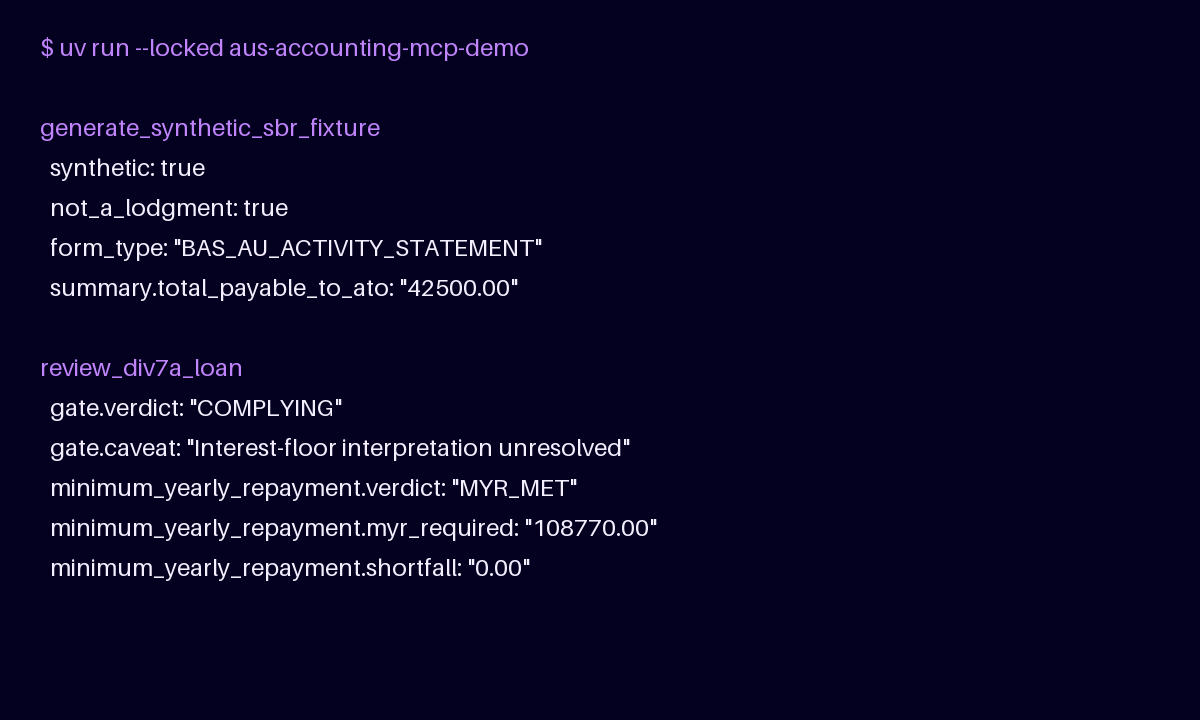
Once it is connected, ask your assistant in plain English. Each of these fabricated requests resolves to one tool call:
Client setup and examples · Tool reference · PyPI · Glama listing
The tools list ATO benchmark industries, compare supplied expense buckets, review Payday Super timing, look up reviewed Division 7A rates, review an operator-supplied Division 7A loan, refuse unsupported Division 7A matters, and generate synthetic CTR/BAS fixtures. They also assess related Payday contributions, calculate 14 bounded tax and super worksheets and retrieve cited local Markdown excerpts. Division 7A review is limited to the delegated engine's s 109N/s 109E scope; it does not form amalgamated loans or classify repayments under s 109R. Outputs are review aids, not advice or lodgements.
For an editable source installation, run pip install -e . from
apps/aus-accounting-mcp/. The repository root is not an installable Python package.
Components
IMPORTS.md records the source repository, commit and tree of every imported component. The
MCP application is the io.github.ryanduguid/aus-accounting MCP Registry server; it
depends on the published ato-benchmark-compare, payday-super-checker,
div7a-loan-review, australian-tax-calculators and gst-review distributions. In
the development workspace, uv takes gst-review 0.1.0 and australian-tax-calculators 0.2.0, div7a-loan-review 0.3.2,
ato-benchmark-compare 0.2.2 and payday-super-checker 0.2.2, the last Python
releases, from PyPI.
The uv workspace continues to develop the Python engines and applications; the MCP server uses none of the Rust crates yet.
Install the Rust engines
The 8 Rust engines are unreleased standalone binaries. With
Rust 1.99 or later, install au-accounting, one command
with a subcommand per engine (benchmarks, div7a, exchequer, payday-super,
gst-review, solomons, tax and wip):
cargo install --locked --git https://github.com/ryanduguid/australian-accounting au-accounting
au-accounting div7a --help then shows that engine's own commands; see
its README. To install one engine's own command
instead, name its crate from the table above, for example:
cargo install --locked --git https://github.com/ryanduguid/australian-accounting div7a-loan-review
au-accounting gst-review review-coding and reconcile-bas read JSON on stdin;
see the GST Review schemas.
Prebuilt binaries are coming: CI already builds each crate's Windows, macOS and Linux archive, and every crate carries cargo-binstall metadata naming those release assets. No release publishes them yet; that waits for a Release Policy workflow for Rust binaries and for the crates on crates.io. Once both ship, this will download a prebuilt binary instead of compiling:
cargo binstall au-accounting
Working in a component
Change into the component directory and use the commands its own README.md,
AGENTS.md or CONTRIBUTING.md documents. The root CONTRIBUTING.md routes the
common commands and names the root workflow that runs them.
To skip local setup, open the repository in GitHub Codespaces.
The devcontainer installs uv and runs uv sync --locked, so the fabricated examples
above run as written. Codespaces usage counts against your own GitHub quota.
Boundaries
- The MCP application depends on engines only through their published distributions.
- Engines never import
aus_accounting_mcpor another engine, and no production module uses a relative import that leaves its package;tests/test_boundaries.pyproves both. - Only the workflows under the root
.github/workflows/are active; component directories carry none. - No client data, credentials or generated client reports enter this repository.
Releases
Each component is released on its own namespaced tag <component>/vX.Y.Z by its own root
workflow .github/workflows/release-<component>.yml, which calls the pinned Release Policy
reusable workflow for that component directory only. CONTRIBUTING.md has the table.
The rates dataset in packages/au-tax-rates-data/ is never released.
Each component's LICENSE applies to that component, and
packages/ato-benchmark-compare/NOTICE and packages/au-tax-rates-data/NOTICE cover their
ATO material. Outputs are review aids, not advice.