
A PostgreSQL MCP server that gives AI assistants expert DBA capabilities.
Quick Start · Demo · Tools · Safety · Configuration · Docs
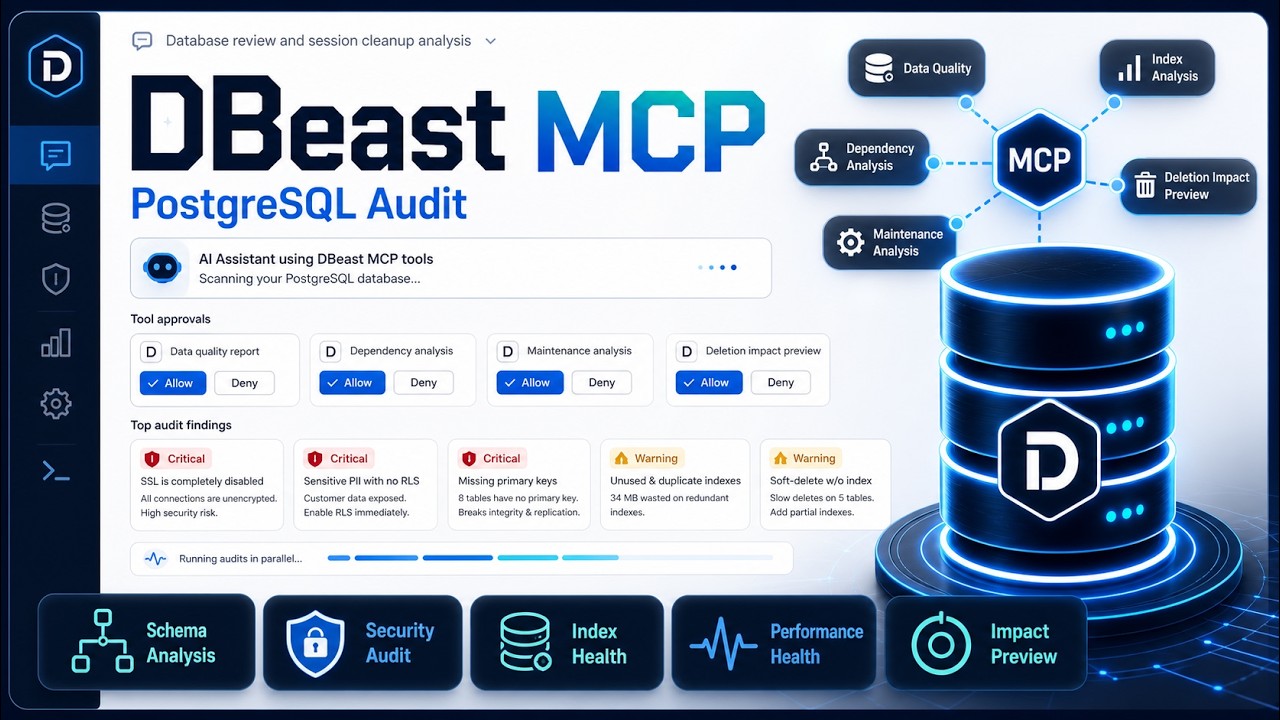
DBeast connects AI assistants such as Claude, Cursor, Windsurf, and VS Code Copilot to PostgreSQL through the Model Context Protocol. Instead of exposing one broad execute_sql escape hatch, DBeast provides 21 focused tools for schema discovery, safe query execution, impact analysis, performance review, security checks, maintenance reporting, replication monitoring, and data quality inspection.
Demo
Watch Claude use DBeast MCP tools to audit a PostgreSQL database, identify security and maintenance risks, and preview cleanup impact without executing destructive SQL.
How It Works
AI assistant  --MCP stdio-->  DBeast server  --asyncpg-->  PostgreSQL
Claude/Cursor                  Python local                 Local, RDS,
Windsurf/VS Code               subprocess                   Supabase, Neon
DBeast runs as a local stdio MCP server. Your IDE or desktop assistant starts it as a subprocess and passes database credentials through environment variables. The assistant calls DBeast tools, DBeast queries PostgreSQL, and structured results come back to the assistant. No HTTP service or extra infrastructure is required.
Quick Start
1. Install
git clone https://github.com/snss10/DBeast.git
cd DBeast
pip install -e .
For development:
pip install -e ".[dev]"
Optional: copy .env.example to .env and set your database credentials.
2. Verify
dbeast
Or run the source entry point directly:
python src/server.py
3. Configure Your MCP Client
Minimal Cursor or Windsurf config:
{
  "mcpServers": {
    "dbeast": {
      "type": "stdio",
      "command": "python",
      "args": ["/absolute/path/to/DBeast/src/server.py"],
      "env": {
        "DATABASE_URL": "postgresql://user:password@localhost:5432/mydb"
      }
    }
  }
}
Common config locations:
See SETUP.md for full client examples, Docker, RDS, Supabase, Neon, SSH tunnels, AWS Secrets Manager, and troubleshooting.
4. Ask Simple or Complex Questions
Once connected, your assistant can answer quick lookup questions and also run multi-step database investigations.
Simple examples:
Show me the schema for the orders table.
Which queries are slowest right now?
Run a security audit on the public schema.
Generate a Mermaid ERD for the sales schema.
More complex examples:
Before I archive old sessions, estimate how many rows would be affected, identify related tables, and tell me the rollback risk.
Investigate why the dashboard query is slow, explain the execution plan, and suggest safe indexes.
Review the public schema for maintenance issues, security risks, and data quality problems, then summarize the top priorities.
Compare table growth, dead tuples, and index health across all schemas and recommend what to vacuum or reindex first.
Tools
DBeast exposes 21 MCP tools across 10 categories.
Connection
Schema Discovery
Data Access
Query Analysis
Database Health
Security
Maintenance
Data Quality
Server Config
Audit
Recommended Workflow
Start by discovering schemas:
get_schema()
get_schema(schema='public')
Run safe read queries:
execute_query(query='SELECT * FROM orders ORDER BY created_at DESC')
Preview risky writes:
analyze_impact(query='DELETE FROM sessions WHERE last_active < now() - interval ''30 days''')
Check health and maintenance:
database_health()
maintenance_analysis(schema='public')
query_performance()
Most analysis tools accept a schema parameter:
maintenance_analysis(schema='public')  -> analyze one schema
maintenance_analysis(schema='all')     -> analyze every schema
get_schema(format='mermaid')           -> generate an ERD diagram
Supported Databases
Configuration
Choose one connection method.
# Full URL
DATABASE_URL=postgresql://user:pass@host:5432/db

# Or individual variables
DB_HOST=localhost
DB_PORT=5432
DB_USER=postgres
DB_PASSWORD=secret
DB_NAME=mydb
DB_SSLMODE=prefer

# Or AWS Secrets Manager
AWS_SECRET_NAME=my-rds-secret
AWS_REGION=us-west-2
You can also connect at runtime:
connect(url='postgresql://user:pass@host:5432/db')
connect(host='localhost', user='postgres', password='secret', database='mydb')
connect(aws_secret_name='my-secret', aws_region='us-west-2')
Key settings:
See SETUP.md for the complete configuration reference.
Safety Model
Formatted and JSON responses use a consistent wrapper:
{
  "success": true,
  "data": { "...": "..." },
  "meta": {
    "connected": true,
    "source": "tool"
  }
}
Audit Logging
DBeast logs MCP tool calls for accountability and debugging.
DBEAST_AUDIT_ENABLED=true
DBEAST_AUDIT_DIR=logs/mcp_audit
Audit files are stored as daily markdown files and include timestamps, tool names, durations, masked parameters, truncated responses, and errors.
Development
pip install -e ".[dev]"
pre-commit install
pytest tests/ -v
ruff check src/ tests/
ruff format src/ tests/
Start the optional local PostgreSQL test database:
docker compose up -d postgres
Legacy Compose:
docker-compose up -d postgres
Documentation
- SETUP.md - Full client setup, connection scenarios, configuration, and troubleshooting
- CONTRIBUTING.md - Development setup, tests, style, commits, and PR process
- CODE_OF_CONDUCT.md - Community guidelines
License
MIT