
❌ Without it / ✅ With it
Without it, your agent sees Timeout 5000ms exceeded waiting for getByTestId('checkout'),
guesses a new selector, edits the test and hopes. Or it "fixes" the test around a real bug.
With it, your agent reads the page as it was when the test failed, swaps in a locator proven unique on that page, re-runs the test, and keeps the edit only if it passes. When the button is really gone, it tells you it's an app bug.
run-test ──────┐
load-report ───┴─▶ get-failure ──▶ suggest-fix (apply + re-run) ──▶ green
 (CI job report)        │                 └─ refuses when the element is really gone (app bug)
                        └─ DOM at failure, failed requests, console errors
every run ──▶ analyze-history (flaky / broken / slow / which commit broke it)
test code ──▶ audit-tests (flake risks, ranked by history, verified rewrites)
red at HEAD ─▶ bisect-failure (runs it across git history, names the breaking commit)
Key features
- Fixes are proven, not guessed. Every fix is re-run before it's kept, and undone if the test is still red.
- Honest. It won't paper over a real bug to make a test pass.
- Works on CI failures too. Load a CI job's report and traces and get the same diagnosis and fixes.
- Flakiness with evidence. Names the flaky test, whether it's a race, shared state or test order, and the seed that reproduces it.
- Lean. Finding and fixing a broken locator took about 5,300 tokens versus about 7,400 with Playwright MCP plus a shell (benchmark).
- Free and open source. MIT, no account, no API key, no telemetry, no paid tier.
🚀 What only this MCP does
Most testing MCPs let an AI drive a browser: Microsoft's Playwright MCP, Chrome DevTools MCP, ExecuteAutomation's mcp-playwright and the Selenium MCP. They're great for clicking through a page. None of them, as of October 2026, does the following. This one does:
It works alongside a browser MCP rather than replacing it: that one drives the page, and this one keeps your suite green.
What you can ask
Requirements
- Node.js 22 or newer
- A project that uses
@playwright/test, with a browser installed (npx playwright install chromium) - Claude Code, Claude Desktop, Cursor, VS Code, Windsurf, Codex, Gemini CLI or any other MCP client
Getting started
Fastest: run this in your project root. It adds the server to every client config it finds (Claude Code, Cursor, VS Code, Gemini CLI, Codex) and installs the agent skill, leaving your other servers alone:
npx -y playwright-e2e-mcp init            # --client all | cursor,vscode … · --dry-run
npx -y playwright-e2e-mcp doctor          # checks Node, Playwright, browsers and client setup
Or let your agent do it. Paste this into any coding agent:
Install the playwright-e2e-mcp server and skill by following https://raw.githubusercontent.com/xsignon-secure/E2E/main/llms-install.md
Standard config works in most clients:
{
  "mcpServers": {
    "playwright-e2e": {
      "command": "npx",
      "args": ["-y", "playwright-e2e-mcp"]
    }
  }
}
The server uses its working directory as the project root. If your client starts it somewhere
else (such as your home directory), add "env": { "PW_MCP_PROJECT_ROOT": "/path/to/your/project" }.
Server and skill, as a plugin:
/plugin marketplace add xsignon-secure/E2E
/plugin install playwright-e2e-mcp@xsignon-secure
Or the server only:
claude mcp add playwright-e2e -- npx -y playwright-e2e-mcp
Download the .mcpb extension from the latest release
and double-click it. It ships its own dependencies, so no Node setup is needed. On install it
asks for your project root: choose the project folder, not your home directory.
You can also add the standard config to claude_desktop_config.json.
Click Install in Cursor,
or go to Settings → MCP → Add new MCP server and paste the standard config. For one
project only, put it in .cursor/mcp.json.
Click the Install in VS Code button above, or run:
code --add-mcp '{"name":"playwright-e2e","command":"npx","args":["-y","playwright-e2e-mcp"]}'
codex mcp add playwright-e2e -- npx -y playwright-e2e-mcp
A Playwright run with retries can take longer than Codex's default 60 s tool timeout. Raise
the timeouts in ~/.codex/config.toml:
[mcp_servers.playwright-e2e]
command = "npx"
args = ["-y", "playwright-e2e-mcp"]
startup_timeout_sec = 60
tool_timeout_sec = 600
Server and skill, as an extension:
gemini extensions install https://github.com/xsignon-secure/E2E
Or paste the standard config into .gemini/settings.json (Qwen Code: .qwen/settings.json).
Add the standard config to the client's MCP config file (Cline: MCP Servers → Configure).
Clients that take a command, such as Zed, run npx with the arguments -y playwright-e2e-mcp.
Drop an mcp.json with the standard config into your project's .agents/ folder. This repo
ships one in .agents/mcp.json, so opening the checkout attaches the
server workspace-wide. Freebuff asks you to trust a repository's .agents/ on first run.
Some clients only accept a remote HTTPS server. This repo ships a Streamable HTTP bridge you can host for free on Vercel, with OAuth sign-in for claude.ai connectors. See Hosted endpoint. On Vercel the page tools (inspect a page, check selectors, accessibility and Web Vitals audits) run on a bundled Chromium against public URLs. Running and fixing your own tests needs your project, so use the local install for that.
Your first prompt
Restart your client, then ask:
Run my Playwright tests and fix whatever fails.
Your agent should run the suite, read the failure, and propose a fix it has re-run. To check the
setup without your own tests, ask it to run examples/sample-test.spec.ts from this repo.
What's new in 0.6
- Find the commit that broke a test:
bisect-failureruns the test across git history in a temporary worktree and names the first bad commit, its changes and the failure there. - Flake-risk audit:
audit-testsfinds hard waits, one-shot assertions, missingawaits and fragile selectors, ranked by real flakiness, and applies the safe rewrites with a verifying run. - One-click fixes on pull requests: the GitHub Action proves each fix in CI and posts it as a suggested change.
doctor:npx playwright-e2e-mcp doctorchecks Node, Playwright, browsers and client setup.- Structured results: every tool returns JSON next to its Markdown, with output schemas.
- Phones, tablets, Chrome and Edge:
devicepresets andchannelfor every page tool, and a Docker image onghcr.io. - Node 22 or newer is now required, and the hosted endpoint limits guessing of its key.
Tools
Two prompts package the main workflows for clients that show them as slash commands:
fix-failing-test and triage-flaky-tests.
Every argument and example output is in the tool reference. All tools carry
MCP tool annotations (readOnlyHint, destructiveHint, …), so clients can show accurate safety
prompts.
Only need the fix loop? --tools=core (or PW_MCP_TOOLS=core) exposes six tools and cuts the
tool-definition context by about three quarters. Other profiles: triage, inspect, author.
run-test{ "testFiles": ["tests/checkout.spec.ts"] }, or{ "background": true }for a long suite andget-run-status{ "waitSeconds": 30 }until it finishes. For a failure from CI, download the job's artifacts and callload-report{ "report": "ci-artifacts/results.json" }instead.get-failure{ "index": 1 }to read the code frame, expected/actual, the DOM snapshot at failure, the failed network requests and the page's console errors.suggest-fix{ "index": 1 }for a locator or copy change: review the diff, then{ "index": 1, "apply": true }to write it and verify with a re-run. If it reports the element is missing, fix the app, not the test.- For anything it cannot patch:
inspect-page{ "url": "…", "view": "locators" }(addstorageStateoractionsto reach the right screen), thenvalidate-selectorto prove the new locator before editing. - If a failure looks intermittent:
diagnose-flaky{ "runs": 3 }for fresh evidence, andanalyze-historyto see how the test behaved across earlier runs ({ "view": "commits" }names the commit where it went bad). - After changing CSS or components:
compare-visual-state{ "url": "…", "name": "checkout" }. - Re-run only what failed with
run-test{ "lastFailed": true }until green.
To write a new test, find the locators with inspect-page { "view": "locators" }, then call
generate-e2e-test with a description and the steps of the flow; it walks them on the live
page, writes the spec and runs it once. To check a page's speed or accessibility, use
audit-performance and audit-accessibility.
CI: GitHub Action and ci command
The same diagnosis runs without an agent. playwright-e2e-mcp ci runs the
suite (auto-retry once, so flaky tests are reported as flaky, not failed),
optionally drafts suggest-fix diffs and a flaky verdict for the failures, and
writes one Markdown report to stdout, to --output, and to the GitHub job
summary when GITHUB_STEP_SUMMARY is set. Exit code 0 passed, 1 tests
failed, 2 the run itself failed.
npx -y playwright-e2e-mcp ci --flaky-runs 3 --suggest 2 --output report.md
npx -y playwright-e2e-mcp ci --help
As a GitHub Action, it adds the report to the job summary and keeps one PR comment up to date when the run fails. On a pull request it also re-runs each failing test with its suggested fix and posts the fixes that pass as suggested changes on the failing lines, so a reviewer applies one with the Commit suggestion button (only on lines the PR changed; the rest stay in the report):
permissions:
  contents: read
  pull-requests: write   # for the PR comment and the suggested fixes
steps:
  - uses: actions/checkout@v6
  - uses: actions/setup-node@v6
    with: { node-version: 24 }
  - run: npm ci && npx playwright install --with-deps chromium
  - uses: xsignon-secure/[email protected]
    with:
      flaky-runs: 3      # 0 skips the flaky verdict
      suggest: 2         # suggest-fix diffs for the first 2 failures
      # args: --browser chromium tests/checkout
Inputs: project-root, args, flaky-runs, suggest, comment, review,
verify-fixes, fail-on-failure, version, github-token. Outputs: exit-code, report.
Configuration
Logs always go to stderr — stdout is reserved for the MCP protocol. Unrecognized values
fall back to the default, so a typo in LOG_LEVEL logs at info and one in LOG_FORMAT
logs as text rather than silencing the server. With LOG_FORMAT=json each line is a single
object (time, level, message plus context):
{"time":"2026-10-07T08:00:00.000Z","level":"info","message":"server ready","name":"playwright-e2e-mcp"}
Benchmark
bench/token-benchmark.mjs breaks a checkout button's test id
on a storefront page and fixes it two ways: with this server (run-test → suggest-fix →
apply) and with Playwright MCP plus a shell (playwright test, browser_navigate +
browser_snapshot, edit, re-run). Latest result (full output):
Tokens are characters ÷ 4. The Playwright MCP route is a lower bound: it assumes the agent picks the right locator from the snapshot on the first try, which the server does for it here.
Demo
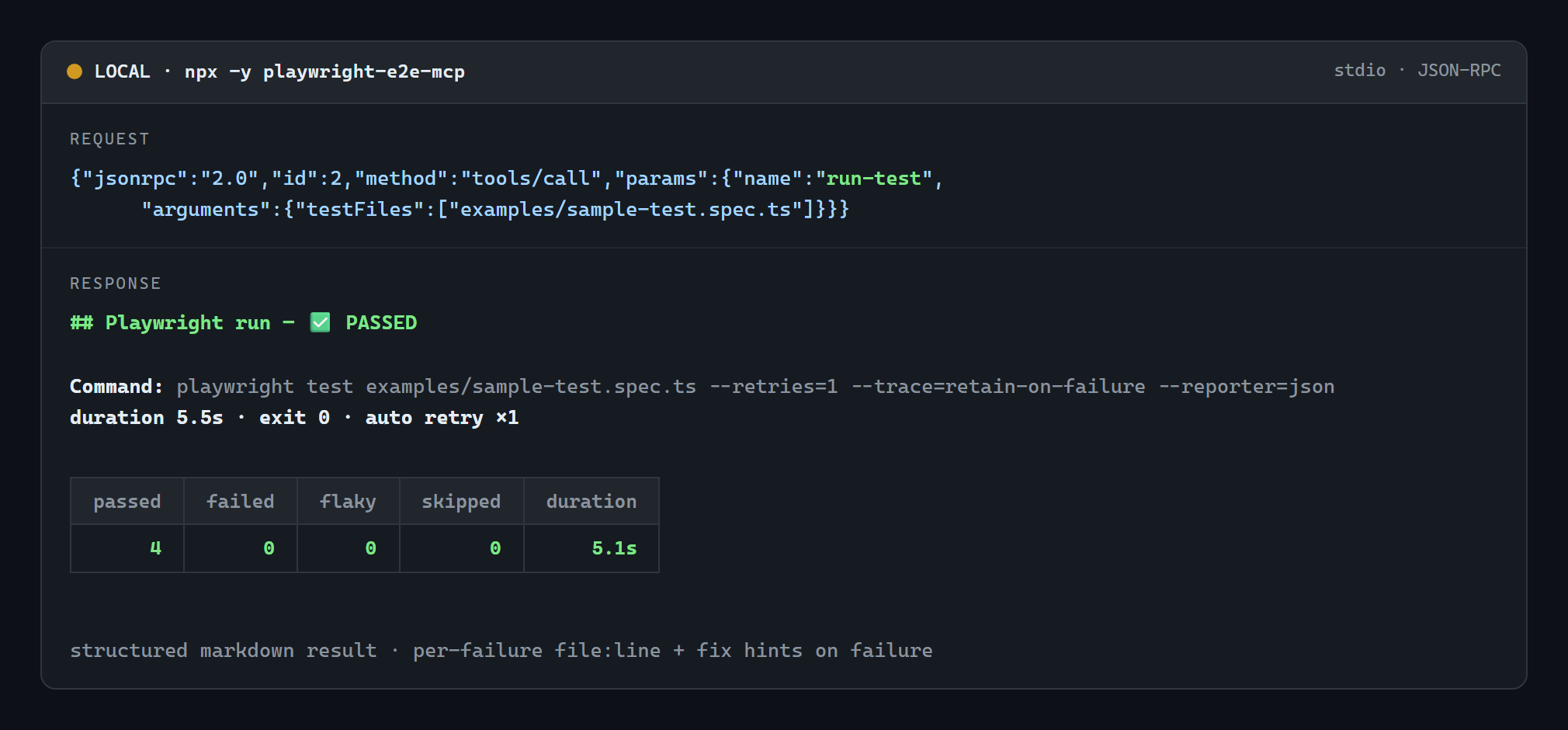
A real run-test call served over stdio by npx -y playwright-e2e-mcp against the bundled
examples/sample-test.spec.ts (actual output, unedited):
Free and open source
- MIT licensed. Use it, change it, ship it in commercial work; no fees, no paid tier, no feature held back.
- No account, no API key, no sign-up.
npx -y playwright-e2e-mcp initis the whole setup. - No telemetry. It never phones home; your tests, traces and run history stay on your machine.
- Free dependencies only: the MCP SDK (Apache-2.0), zod (MIT), axe-core (MPL-2.0) and the Playwright your project already has (Apache-2.0).
- Free to host yourself, too: the HTTP bridge deploys to a free Vercel account (see Hosted endpoint).
What it does not do: it doesn't drive an exploratory browsing session step by step, and it doesn't replace Playwright's own Test Agents inside VS Code. Use Playwright MCP for interactive browsing and this server for running, diagnosing and fixing the suite. They work side by side.
More documentation
- Tool reference: every argument, example outputs, edge cases handled
- Hosted endpoint: the HTTP bridge for ChatGPT and claude.ai connectors
- Security: the security model and how to report a vulnerability
- Development: building, tests, Docker, signing and releasing
- Contributing · Code of conduct
License
MIT. If this saves you a debugging session, a ⭐ on the repo helps other Playwright users find it.