ExoHarness
English | 简体中文 · Live demo · Demo administration · Documentation
An extensible Agent Harness in Rust, with a ready-to-use, self-hosted web console.
Copyright © 2026 Jason Yang · Contact
ExoHarness provides the common runtime for AI agents: model connections, context management, capability discovery, authorization, tool execution, progress, persistence, and tracing. Developers and operators compose applications by adding Skills and MCP services, configuring models, and assigning capabilities to assistants.
The framework supports applications across different domains, from research and software engineering to business operations and content creation. Its multi-user web application gives these agents a shared chat interface, administration console, and file delivery service. The connected capabilities define each assistant's actual scope.
See it in action
Try the user portal · Administration demo · Download a release
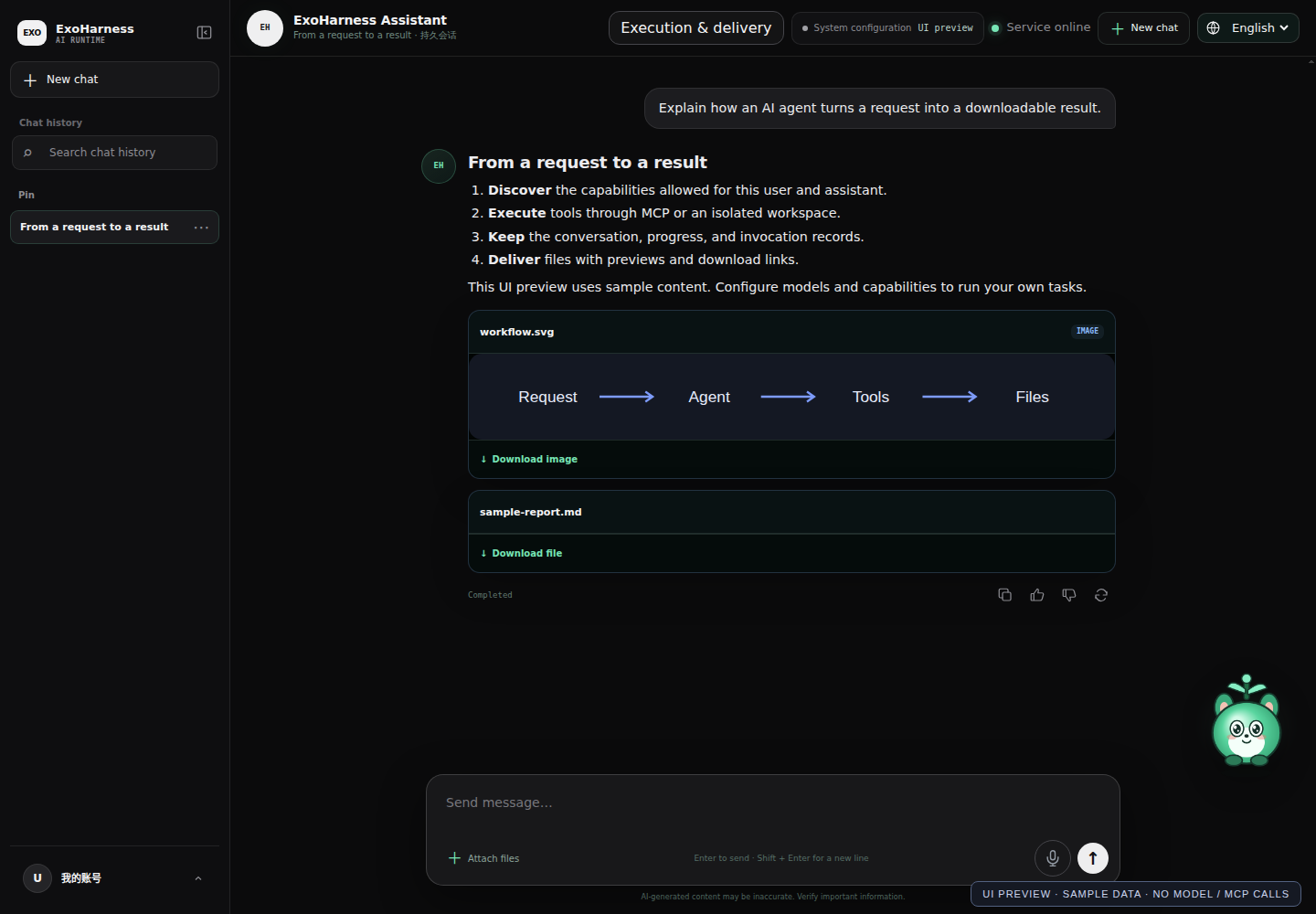
Chat, previews, and downloadable files
Administration: task status, execution resources, and usage
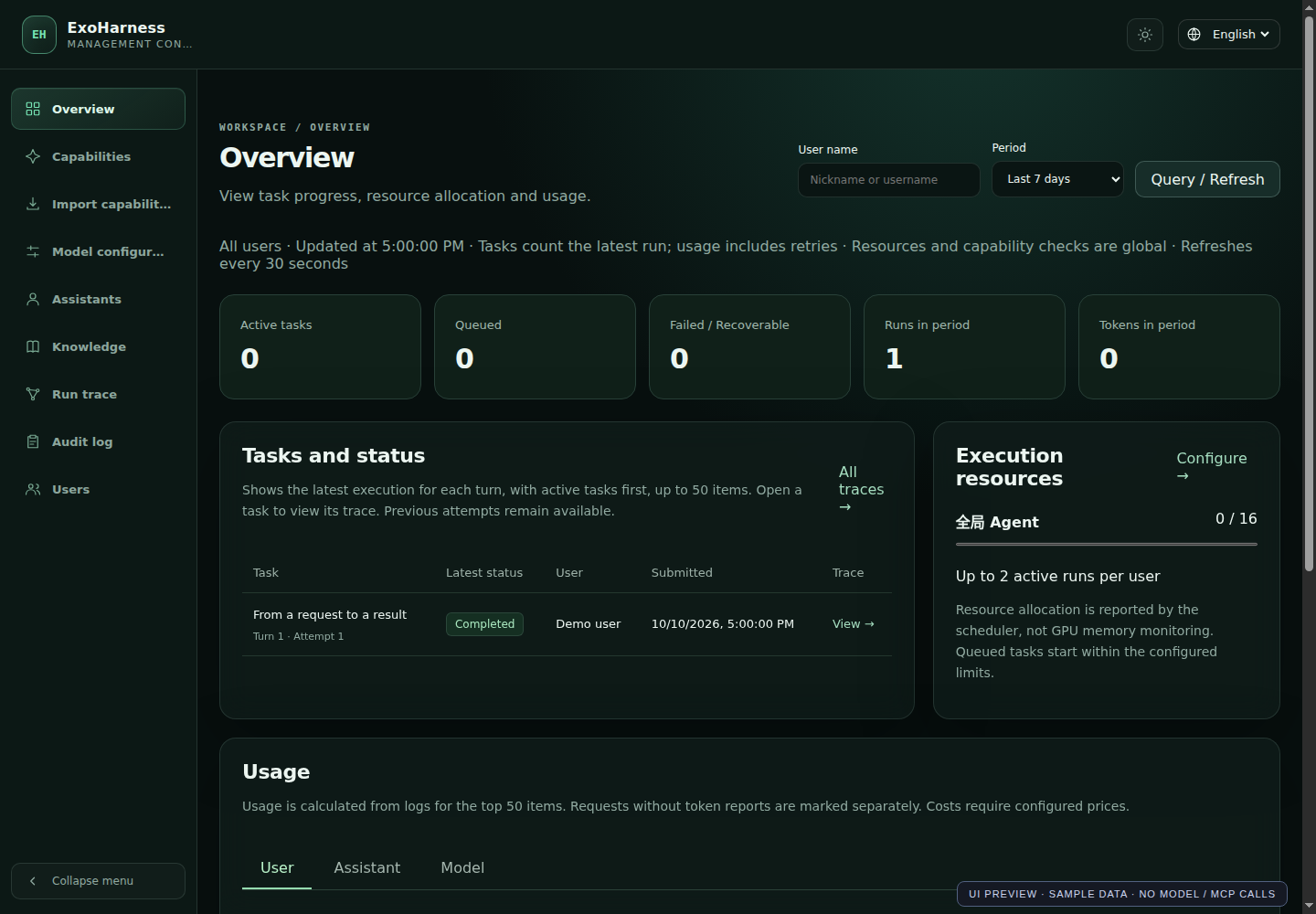
These screenshots render the actual interface with sample data; they do not represent model or MCP executions. Reproduce them with node scripts/capture-demo.mjs (Node 22+ and Google Chrome). Live tasks require configured models and authorized capabilities.
Run the Linux release
The first public preview targets Linux x86_64 with glibc 2.39+, such as Ubuntu 24.04. Install Python 3.11+ and Docker Engine, then download the .tar.gz and SHA256SUMS from Releases.
sha256sum --check SHA256SUMS --ignore-missing
tar -xzf exoharness-v0.1.1-linux-x86_64-gnu.tar.gz
cd exoharness-v0.1.1-linux-x86_64-gnu
docker pull postgres:18.6-alpine3.23
bash scripts/start-native.sh prepare-db
bash scripts/start-native.sh start
bash scripts/start-native.sh access
Open administration at http://127.0.0.1:9797/ and the user portal at http://127.0.0.1:9798/. The access command displays private local credentials. Configure a model and assistant before submitting tasks; SMTP is required for user signup. Model credentials, capability packages, external MCP services, and the OCI execution image are supplied separately. See the bundled README.txt / README.zh-CN.txt and Deployment.
Build your own agents and workflows
The core framework and domain capabilities have separate responsibilities:
- Skills supply reusable procedures, task instructions, reference material, and optional scripts.
- MCP services expose tools and connect agents to APIs, applications, data sources, and specialized execution services.
- Model connections provide reasoning and supported speech or other model-backed capabilities.
- The Harness handles discovery, context, permissions, invocation records, execution guards, progress, and result delivery across those capabilities.
To extend an assistant, import a compatible Skill or register an MCP service, prepare its execution dependencies, and grant access. Compatible additions use the existing discovery and execution path without changing the core Agent loop. Transport and model protocol support is documented in Capabilities and Model configuration.
An organization can use the same deployment for assistants with different responsibilities and tool permissions. Developers can connect their own services and compose new workflows around the framework's execution and API contracts.
Application examples
The following examples illustrate what a configured deployment can do. They are starting points for capability composition, rather than a fixed list of supported applications.
Each example depends on its installed and authorized capabilities. Additional Skills and MCP services can enable other applications through the same framework. Standalone skills/ and mcp/ projects are distributed separately from the core repository.
From a request to a result
- An administrator configures model connections, imports capabilities, and assigns an assistant and permissions to users.
- A user sends a request, optionally with reference files, through streaming chat.
- The assistant discovers authorized capabilities and loads the tool schemas needed for the current step.
- MCP services or isolated sandbox tools perform the work. Progress and execution records are persisted.
- The user receives the task's response or resulting files, with previews and downloads where applicable. Administrators can inspect the request, tool calls, errors, usage, and files in Trace.
Core features
Multi-user chat and assistant administration
The user portal includes streaming responses, searchable history, conversation management, attachments, voice input through ASR, personal materials and memory management, and file preview/download. Administrators configure assistant identity, avatars, model choices, and capability permissions, then assign assistants to users. Both interfaces support Chinese and English.
Skills, MCP services, and model connections
Register versioned Skill packages and remote MCP services through the management console. Tool discovery follows the user's and assistant's authorization, enabled state, and runtime readiness. Execution arguments are validated against live JSON Schemas. Model adapters connect LLM, TTS, and ASR protocols; credentials are stored separately from public capability descriptions.
Inspectable execution
Sessions, Turns, Runs, invocation records, snapshots, and events are persisted in PostgreSQL. Trace exposes model requests, tool arguments and results, errors, Token usage, and generated files. Progress from MCP services is forwarded to the interface; declared background tasks can be polled and cancelled by the execution backend.
Context and Token management
The execution journal keeps complete inputs and results, while model requests use a task-focused projection. ExoHarness loads tool schemas on demand, deduplicates repeated Skill instructions, and replaces eligible persisted exchanges with compact checkpoint references. Argument repair and repeated-call guards have bounded budgets. Usage statistics distinguish input, output, and cache usage. See Context and Token management for the actual rules and limits.
Isolated execution and Coding
Python, Shell, JavaScript, and TypeScript tasks run in OCI containers with resource limits, read-only package mounts, writable task workspaces, and networking disabled by default. Files can be reused and edited within a task. The Coding module adds multi-file search, exact edits and atomic patches, build/test checks, project archives, and static website previews.
Unified deliverables
One file service handles images, audio, video, office documents, and published static projects. It records provenance and SHA-256, provides signed access, and supports Range requests for media playback. Chat displays declared final artifacts as previews or download cards.
Knowledge and operations
Manage personal or administrator-provided materials, categories, DOCX and text-based PDF imports, structured blocks, and literal search. The administration console also provides user management, execution overviews, audit records, Run admission limits, MCP concurrency, and shared resource pools. Automatic knowledge retrieval, embeddings, and OCR are not part of the current implementation.
Architecture at a glance
Management console :9797       User portal :9798
              \                  /
                  ExoHarness
                  ├── PostgreSQL: identities, conversations, execution records
                  ├── Configuration, capability registry, and secret storage
                  ├── OCI sandbox: code, scripts, and task workspaces
                  └── MCP services and model APIs: external capabilities

File service :9790 ── downloads, media playback, static site previews
The listeners bind to 127.0.0.1 by default and are configurable. Source modules live in modules/; Rust tests live in module tests/ directories, with script and browser tests in scripts/tests/.
Technology stack
Which environments are needed?
Python is not only a testing dependency. Host Python runs the supplied operational scripts; sandbox Python executes isolated tasks. A directly launched, prebuilt Rust executable does not need a host Python interpreter for basic chat and remote MCP calls. Installing packages in a host Conda environment does not make them available inside the task sandbox.
Build and deploy
The supplied build scripts target Linux / WSL2. Install the toolchains above and native compiler/linker dependencies such as build-essential, pkg-config, and libssl-dev on Debian / Ubuntu.
git clone [email protected]:jason571/Exoharness.git
cd Exoharness
cargo fetch --locked
npm --prefix web-console ci
bash scripts/package-release.sh
The build produces release/ with the executable, web resources, startup scripts, and a checksum manifest. Frontend resources are also embedded in the executable, so frontend changes require rebuilding the release. Credentials, databases, user files, and installed capability packages remain outside the release.
For sandbox tasks, build the separate execution image:
docker build -t exoharness-sandbox:0.1 runtime/sandbox
export EXOHARNESS_SANDBOX_IMAGE=exoharness-sandbox:0.1
The main-service image and task sandbox image are separate. The main service runs the Harness and APIs; task containers execute code with isolation and resource limits. Images do not install the separately maintained Skill/MCP projects or model weights.
Choose a deployment mode
Docker is recommended for PostgreSQL and task isolation. Review the sandbox limitation before choosing a fully containerized main service. The API container does not receive the host Docker socket.
Prepare PostgreSQL
Run after creating release/:
docker pull postgres:18.6-alpine3.23
bash release/scripts/start-native.sh prepare-db
bash release/scripts/start-native.sh set-admin-password
This prepares a dedicated PostgreSQL container and persistent volume, plus private connection and access credentials. PostgreSQL listens on 127.0.0.1:9799. Use bash release/scripts/start-native.sh data-path to locate the private data directory; keep it outside images and the source repository.
Start the native main service with Docker sandbox execution
After building the sandbox image above, register it with the launch configuration:
bash release/scripts/start-native.sh set-runtime-image --image exoharness-sandbox:0.1
bash release/scripts/start-native.sh start
bash release/scripts/start-native.sh status
set-runtime-image records the cached image's SHA-256. The service starts isolated task containers on demand; the sandbox is not a permanently running application container.
Build and start the Docker main-service image
Build the native release first, then run from the repository root:
docker build -f runtime/server/Dockerfile -t exoharness-server:0.1 .
docker run --rm --network none --read-only exoharness-server:0.1 --version
export EXOHARNESS_RUNTIME_IMAGE=exoharness-server:0.1

# Stop the native main service before switching modes.
bash release/scripts/start-native.sh stop
bash release/scripts/start-docker.sh start
bash release/scripts/start-docker.sh status
The Dockerfile-specific context allowlist includes the compiled executable and build metadata, excluding credentials, user data, capability packages, and caches. The image installs runtime libraries; Rust compilation remains a native build step. The launcher checks binary/image ABI compatibility and mounts the selected release and private configuration. Startup does not automatically pull or build images.
The launcher uses host networking: use Linux Docker Engine, or Docker Desktop with host networking enabled. HTTP endpoints remain on loopback; use a correctly configured HTTPS proxy for public access.
Logs, restart, and image transfer
docker logs --tail 100 exoharness-pro-local-service
bash release/scripts/start-docker.sh restart
bash release/scripts/start-docker.sh stop

docker save exoharness-server:0.1 exoharness-sandbox:0.1 -o exoharness-images.tar
# On the target machine:
docker load -i exoharness-images.tar
For code/page updates, rebuild release/ and restart. The launcher mounts the current executable, so it can reuse the runtime image; rebuild images when runtime dependencies change. The target host must match the binary's architecture and ABI. See the deployment guide for direct binary startup and existing PostgreSQL configuration.
Default local endpoints:
- Management:
http://127.0.0.1:9797 - User portal:
http://127.0.0.1:9798 - File service:
http://127.0.0.1:9790
Public deployments should use an HTTPS reverse proxy and follow the current Host/Origin, credential, and database security boundaries.
Try ExoHarness
Visit the live demo and register or sign in to use the configured assistants. Avoid uploading sensitive information to the public demo.
Demo management console: harness.flyang.art.
Documentation and current scope
Technical documentation is available in English by default, with Chinese versions linked from each document.
- Architecture, API, Database
- Context and Token management, Capabilities, Coding
- Deployment, Security, Testing
- Implementation status and limitations, Documentation index, Contributing
Read the implementation status before planning a deployment. In particular, safe HTTP Run Resume, the user self-installation execution chain, managed stdio MCP execution, and dynamic code-plugin loading are not yet connected.
This repository contains the core framework, frontend, tests, build/deployment scripts, and documentation. Root-level skills/ and mcp/ capability packages are maintained separately. The framework integration modules modules/skills and modules/mcp are included.
License
Core code is available under the GNU Affero General Public License v3.0 (AGPL-3.0-only). Use under AGPL is free when its terms are followed, including source-code access requirements for modified network services. Organizations that need to use the code without complying with AGPL obligations must obtain a separate commercial license. Contact [email protected].
External Skills, MCP services, runtime images, model weights, and third-party dependencies retain their own licenses. See Commercial License for the dual-license policy.