
Jolli Memory
Every commit deserves a Memory. Every memory deserves a Recall.
Jolli Memory automatically turns your AI coding sessions into structured development documentation attached to every commit, with no extra effort.
When you work with AI agents (Claude Code, Codex, Gemini, OpenCode, Cursor, GitHub Copilot, Cline, Devin, Antigravity, Kimi Code, or Hermes Agent), the reasoning behind every decision lives in the conversation: why this approach was chosen, what alternatives were weighed, what went wrong along the way. The moment you commit, that context is gone. Jolli Memory captures it automatically.
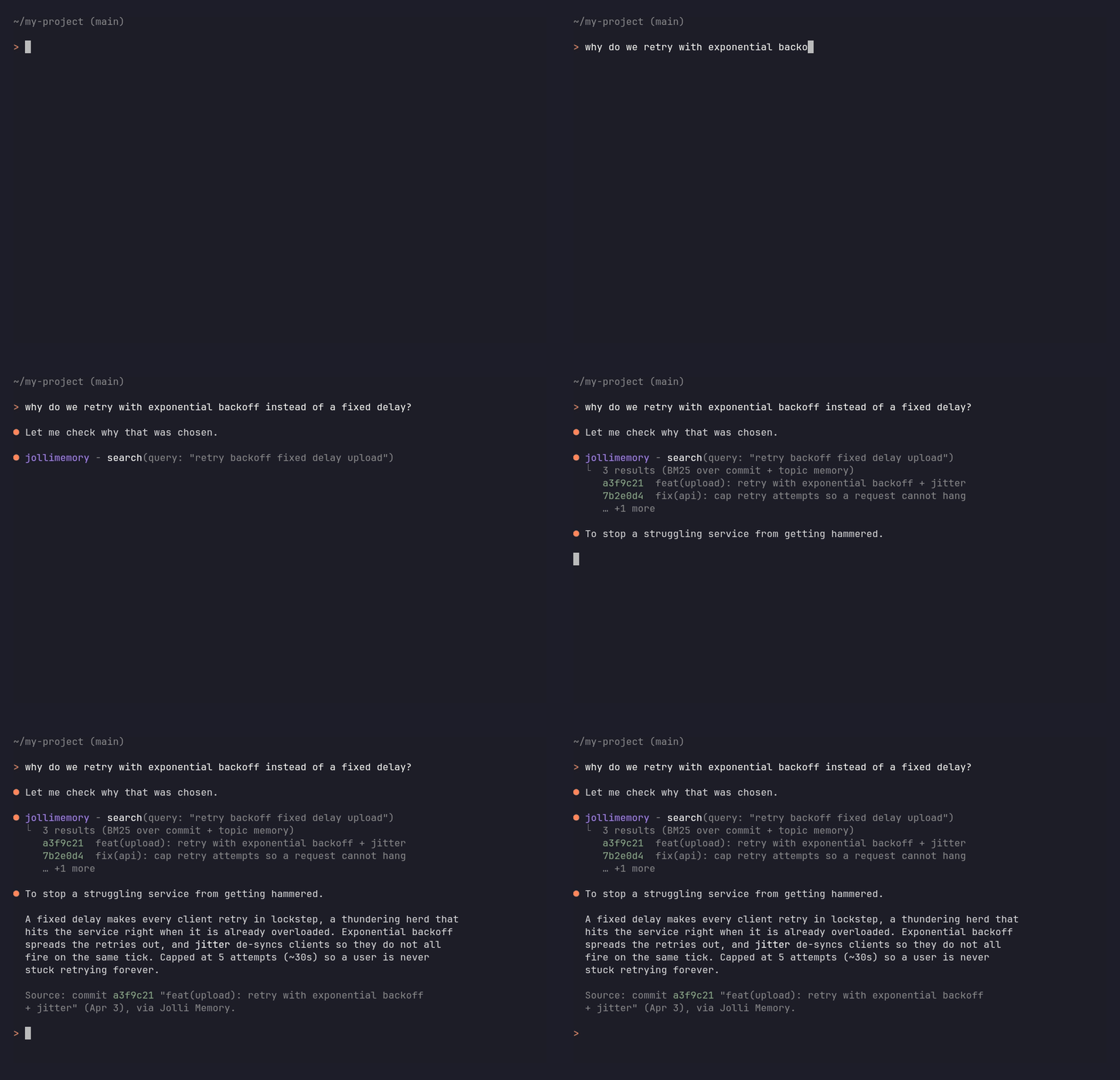
Ask your AI agent about a past decision; it answers from the reasoning Jolli captured at commit time.
Quick start
Install the CLI, run jolli, and your next commit becomes your first memory.
npm install -g @jolli.ai/cli   # requires Node 22.13+
cd your-repo
jolli                          # guided setup: sign in to Jolli, enable hooks, optional backfill
Sign in when prompted (it opens your browser, no API key to manage). That is the whole setup: work with your AI agent as usual, commit, and the memory is written automatically. Read it back anytime:
jolli view      # recent commit summaries
jolli recall    # full branch context, ready to feed back to your agent
Full walkthrough: Getting started with Jolli Memory.
Just want the MCP server, without installing anything? Point any MCP-aware agent at npx -y @jolli.ai/cli mcp, or use a one-click link:
That gives your agent read access to memories you already have. To record new ones you still need jolli enabled in the repo, since capture runs off git hooks.
Prefer an in-editor panel? The same memories show up in the VS Code extension and the JetBrains plugin (preview). Working in Claude Code or Codex? The Claude Code plugin and the Codex plugin install the hooks and the MCP server for you, with no npm step. See Which install is right for me? below.
Before you start
- Node 22.13+ and a git repository (hooks live in
.git/hooks).- A free Jolli sign-in to generate summaries. Bring-your-own Anthropic API key also works if you'd rather (
jolli configure --set apiKey=...), but signing in is the quickest path and needs no key management. With no credential at all, hooks still record sessions but no summary is written; localsearch/recall/viewwork with no account.- Restart your AI agent session after enabling, so the hooks take effect.
- Installing the CLI globally does nothing on its own: run
jolliinside a repo to enable it there.- Windows: if
npmis "not recognized", install Node from nodejs.org and reopen your terminal.
What you get
- Never lose the why. Every commit gets a structured memory: the trigger behind the change, the decisions and trade-offs, and what was actually built.
- Works with 12 AI agents. Claude Code, Codex, Gemini, OpenCode, Cursor (Composer IDE and the
cursor-agentCLI), GitHub Copilot CLI, VS Code Copilot Chat, Cline (VS Code extension and CLI), Devin CLI, Antigravity, Kimi Code, and Hermes Agent. Sessions are detected automatically, no per-tool setup. Claude Code and Gemini install a hook, and Hermes installs its own session-end hook; the rest are discovered by scanning their own local session stores. - Ask your agent about past work.
jolli mcpexposes your history over the Model Context Protocol (10 tools: search, recall a branch, trace a decision's timeline, list branches, draft a PR description, check installation health, and more), so your agent can answer "how did we handle X?" and draft PRs without leaving the chat. Registered automatically into the AI hosts Jolli detects when you enable, and when you are signed in your Jolli Space's own platform tools are surfaced alongside them. - Catch up on history.
jolli backfillwrites memories for commits you made before installing Jolli. - Knowledge wiki and graph.
jolli compilefolds work scattered across many commits into per-topic pages;jolli graphrenders them as an interactive, shareable map of decisions and how they connect. Both rebuild when you ask — a command, or one click in the dashboard or the editor sidebar, which also tell you how far behind they have fallen. - Local-first, and explicit about what leaves. Every memory is written to your own repo and to a plain-Markdown folder on disk you can read or
grep. Two things do leave: at commit time the transcript slice and diff go to whichever AI provider you configured, because that is the summarization call itself (the Jolli LLM proxy holds them in memory only and never persists or logs them); and once you are signed in,git pushsyncs that branch's memories to your bound Jolli Space. Turn the second off per repo withjolli push-control, or globally withsyncOnPush. Raw transcripts are never part of it.
Free and open source (Apache-2.0). A hosted Jolli Space for team sharing is optional.
What to ask your agent once it's running
You never invoke these by name. Ask in plain language and your agent picks the tool.
The payoff is on the second pass over a piece of code, or the first time a teammate touches it. A fresh agent session normally starts from zero and re-derives your reasoning from the diff; with Jolli it starts from what you actually decided.
Behind those questions are ten built-in MCP tools (search, recall, get_decision_timeline, list_branches, get_pr_description, queue_status, status, bind_space, list_spaces, push_memory). Signed in to a Jolli Space, your Space's own tools appear alongside them.
Which install is right for me?
Every surface writes to the same place, so mixing them is fine. The CLI is the only one you need; the editor plugins bundle it and add a panel on top.
How it works
After each commit, a background process reads your AI session transcript and the code diff, calls the LLM, and writes a structured summary. Your commit returns instantly; the summary lands about 10 to 20 seconds later. Memories are stored on a dedicated git orphan branch (jollimemory/summaries/v3), completely separate from your code history, and mirrored to a readable Memory Bank folder on disk.
More detail: How capture works · Recall vs. search · Use your memory from any AI assistant (MCP).
Documentation
- Guides: docs.jollidev.com, covering getting started, supported assistants, MCP, Memory Bank and sync, CI, and a full reference.
- Troubleshooting and FAQ: docs.jollidev.com/jolli-memory/troubleshooting-and-faq.
- Per-surface reference:
Also available: Jolli Site
Turn a folder of Markdown and OpenAPI specs into a polished documentation site. Site generation ships as a separate plugin, @jolli.ai/site-cli (npm install -g @jolli.ai/site-cli); the CLI discovers it automatically and lists its commands (new / convert / dev / build / start / reverse / theme) in jolli --help. See the Jolli Site section of the CLI README for details.
Two more optional plugins install the same way: @jolli.ai/space-cli (Jolli Space commands) and @jolli.ai/workflow-cli (run Jolli workflows locally and report on remote runs). All three are allow-listed in cli/src/KnownPlugins.ts.
Repository layout
Monorepo with six deliverables that share one product model and storage:
jolliai/
├── cli/            Node.js CLI (@jolli.ai/cli, npm workspace)
├── vscode/         VS Code extension (npm workspace)
├── intellij/       IntelliJ plugin (Kotlin + Gradle)
├── claude-plugin/  Claude Code plugin (bundles the CLI, hooks, and MCP server)
├── codex-plugin/   Codex plugin (bundles the CLI, hooks, and MCP server)
├── cursor-plugin/  Cursor plugin (bundles the CLI, hooks, and MCP server) — pre-release
├── package.json    Root workspace config (coordinates cli + vscode)
└── .nvmrc          Pinned Node version for development
cli/ and vscode/ are npm workspaces coordinated from the root package.json. intellij/ is a separate Gradle project. The three plugin trees are built by npm run build:claude-plugin, npm run build:codex-plugin and npm run build:cursor-plugin, and each is published to its own marketplace repo. The Cursor plugin is not published yet — see cursor-plugin/DEVELOPMENT.md for the open questions still to be closed before its first release.
Development quick start
Requires the Node version in .nvmrc (currently 24.10.0, which is the development toolchain, distinct from the 22.13+ runtime floor for users):
npm install
npm run build        # builds the CLI, the Claude Code / Codex / Cursor plugins, then VS Code
npm run all          # clean, build, lint, test (run this before committing)
Per-workspace variants exist (npm run build:cli, npm run test:vscode, and so on). IntelliJ: see intellij/DEVELOPMENT.md.
Contributing
Contributions welcome. Please read CONTRIBUTING.md (workflow, code style, DCO sign-off) and CODE_OF_CONDUCT.md.
Support
- Issues and feature requests: GitHub Issues
- Questions and how-to: see
SUPPORT.md - Jolli Space onboarding / enterprise: [email protected]