
bevy_fairy
Let a coding agent look inside a running Bevy game, drive it, and ask the person playing it for help — without touching your desktop.
bevy_fairy is two things in one crate:
- a Bevy plugin your game links, which adds debugging methods to the Bevy Remote Protocol (BRP);
- an MCP server,
bevy-fairy, which gives an agent such as Claude Code tools to read the game's state, run the game's own commands, capture what it shows, and inject input.
coding agent ──MCP over stdio──▶ bevy-fairy ──BRP over HTTP :15702──▶ your game + DebuggerPlugin
                                                                            │
                                                        guide card on screen ▼
                                                              the person at the keyboard
[!NOTE] This crate was written by an AI agent working from a human's direction. It is tested against a fixture game and used against a real one, but it has had no line-by-line human audit.
See it work
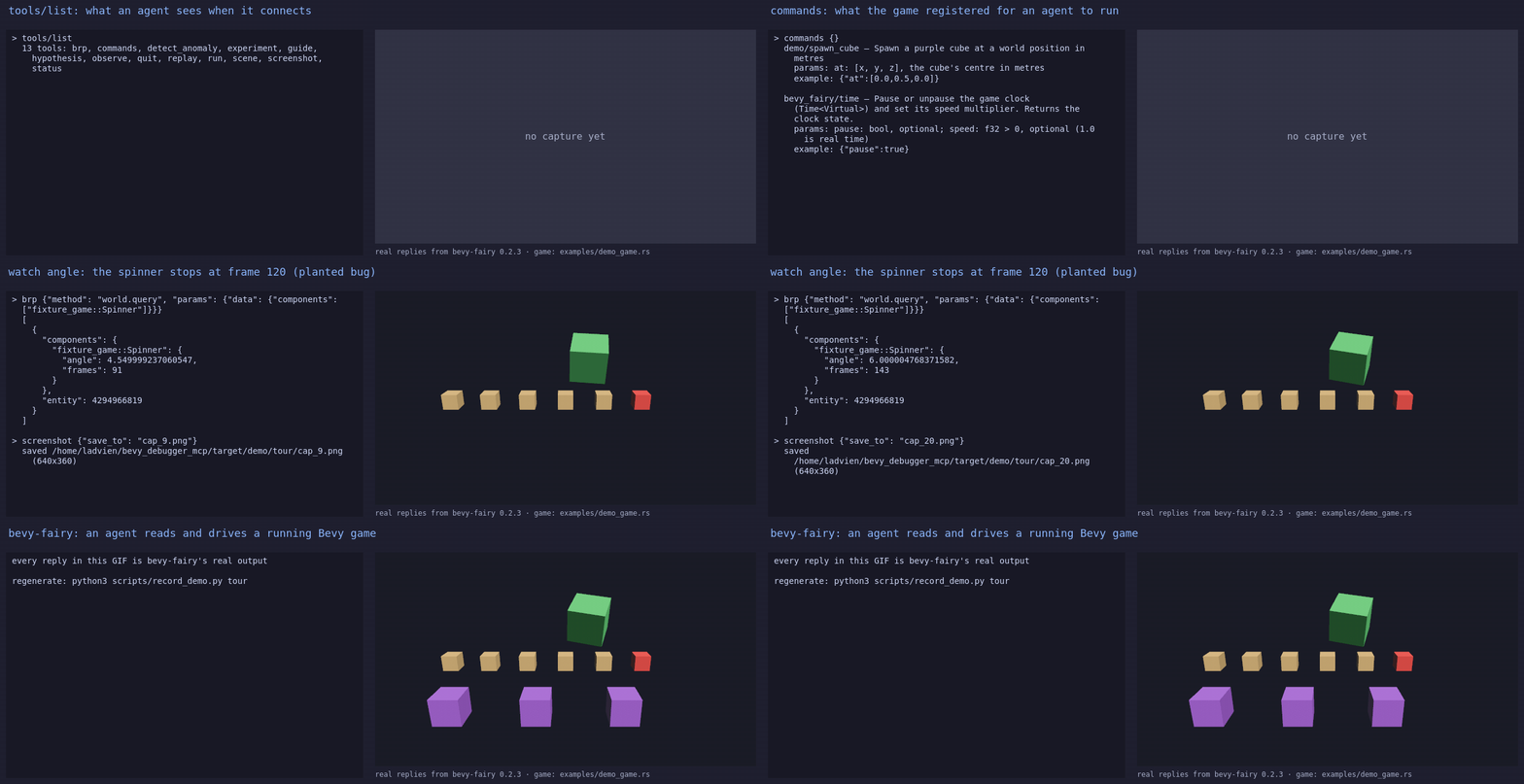
A scripted tour. Every reply is the real server's output; every picture is the game frame its
screenshot tool returned. The game runs at 10 fps here so the planted bug — the spinner stops at
frame 120 — happens mid-tour.
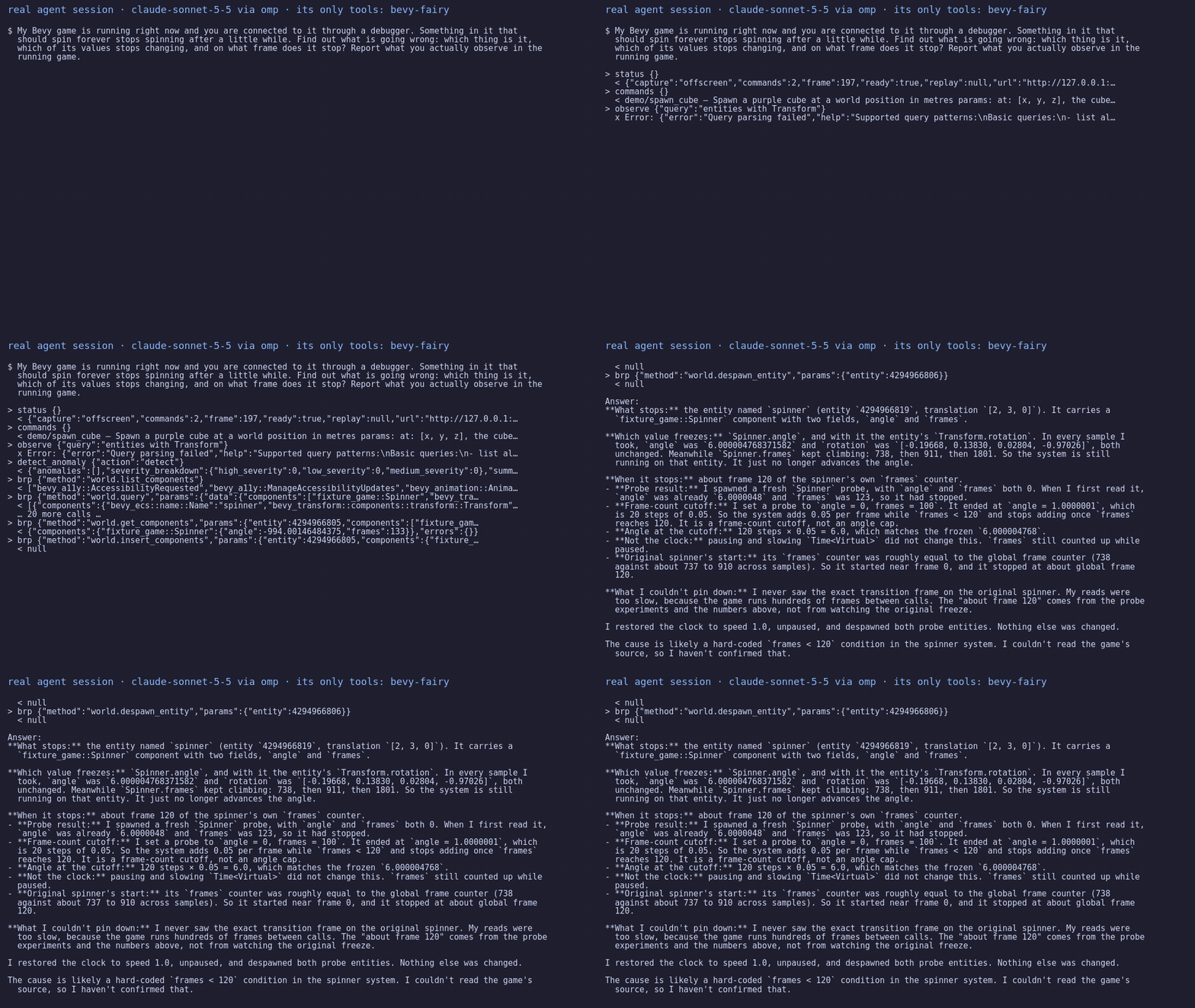
A real agent session. Claude, with no tools but these, told that something in the game which
should spin forever stops, and asked what it is, which of its values stops changing, and on what
frame. The script runs that question as the spinner_stops eval up to three times and draws the
first session that passes; it never draws one that failed.
Both are recorded from examples/demo_game.rs
by python3 scripts/record_demo.py all.
Why
An agent that debugs a game by reading source code is guessing. It needs to see the game's actual state, change it, and check what happened. The obvious way to do that, OS screenshots and OS input, needs the game window in front: on the game this was built for, a capture with the window focused had 7,188 distinct colours, and with another app in front it had one. Synthetic OS keystrokes go to whichever window has focus, which is often the one you are typing in.
So nothing here touches the operating system. Captures come from the game's own pixels, input is
written into Bevy's own input streams, and tests/plugin_leaf.rs fails the build if the plugin's
dependency graph ever gains something that could synthesise an OS event.
What an agent can do with it
It cannot see frame time, CPU or memory: BRP does not report them, and the tools say so rather than make up a number.
Quick start
This takes a game you already have and an agent that speaks MCP, such as Claude Code.
1. Add the plugin to your game.
# Cargo.toml
[dependencies]
bevy = "0.20"
bevy_fairy = { version = "0.2", default-features = false, features = ["plugin"] }
use bevy::prelude::*;
use bevy::remote::http::RemoteHttpPlugin;
use bevy_fairy::DebuggerPlugin;

fn main() {
    App::new()
        .add_plugins(DefaultPlugins)
        .add_plugins(DebuggerPlugin::default()) // registers the bevy_fairy/* methods
        .add_plugins(RemoteHttpPlugin::default()) // serves them on port 15702
        .run();
}
Run the game, then check it answers:
curl -s localhost:15702 -d '{"jsonrpc":"2.0","id":1,"method":"bevy_fairy/status"}'
# {"jsonrpc":"2.0","id":1,"result":{..., "ready":true, ...}}
2. Install the server.
cargo install bevy_fairy --no-default-features --features server
bevy-fairy --version
# bevy-fairy 0.2.2
3. Register it with your agent. For Claude Code, from your project directory:
claude mcp add bevy-fairy -- bevy-fairy --stdio
For Claude Desktop or a project .mcp.json:
{
  "mcpServers": {
    "bevy-fairy": {
      "command": "bevy-fairy",
      "args": ["--stdio"],
      "env": { "BEVY_BRP_HOST": "localhost", "BEVY_BRP_PORT": "15702" }
    }
  }
}
4. Try it. With the game running, ask the agent: "Call status, then list the game's resources
with brp." It should report ready: true and a list of resource type names. From there, ask it
questions about your game.
If it doesn't work
Guides
Let the agent run your game's actions
Register commands with typed params and a worked example. The agent finds them with commands and
runs them with run; a mistyped name is answered with the nearest real one, and wrong params are
refused before your handler runs.
use bevy_fairy::{DebugCommandInfo, DebugCommandsAppExt};
use serde_json::{json, Value};

#[derive(serde::Deserialize)]
#[serde(deny_unknown_fields)]
struct SpawnCube { at: [f32; 3] }

fn spawn_cube(In(p): In<SpawnCube>, mut commands: Commands) -> Result<Value, String> {
    commands.spawn(Transform::from_translation(Vec3::from(p.at)));
    Ok(json!({ "spawned_at": p.at }))
}

// After .add_plugins(DebuggerPlugin::default()):
app.add_debug_command(
    DebugCommandInfo::new("demo/spawn_cube", "Spawn a cube at a world position in metres")
        .params("at: [x, y, z]")
        .example(json!({ "at": [0.0, 0.5, 0.0] })),
    spawn_cube,
);
Registration is checked at startup: a reserved name (bevy_fairy/, world., ...), a duplicate,
or an example that does not parse as the params type panics then, not when the agent calls it.
If your game needs time to load, build the plugin with DebuggerPlugin::default().host_signals_ready()
and set the DebugReady resource to true when it is; until then every command answers "not
ready yet".
Capture what the game shows
Enable plugin-screenshot, then give the plugin an image one of your cameras renders to:
use bevy_fairy::DebugCaptureTarget;

commands.insert_resource(DebugCaptureTarget { image: render_target_handle });
With a DebugCaptureTarget, captures come from that image and never depend on the window. Without
one, screenshot falls back to the game window. That needs nothing from the OS, but a covered or
minimised window can give a stale frame. A full example with the camera setup is
examples/plugin_agent_scene.rs.
Inject input
The agent sends input through brp with the method bevy_fairy/input:
{"kind": "Keyboard", "key": "Space"}                      // a tap: pressed one frame, released the next
{"kind": "Keyboard", "text": "site_67"}                   // typed into a focused text field
{"kind": "Cursor", "x": 640, "y": 360}                    // logical window pixels
{"kind": "Mouse", "button": "Left", "action": "Press"}
{"kind": "Cursor", "clear": true}                         // hand the pointer back to the real mouse
Input is written into Bevy's own input messages before its input systems run, so just_pressed,
text fields and ButtonInput all see it like a real key. The cursor is the exception that needs a
line of your code: read the pointer through bevy_fairy::cursor_position(&window, &debug_cursor),
not Window::cursor_position. The plugin never moves the real pointer, because Bevy would move the
physical mouse out from under whoever is at the machine.
Guide a person through a test
Enable plugin-guide. The agent posts a script with guide; your game shows one step at a time:
{"steps": [{
  "label": "drop a floor and a wall",
  "goal": "a tile needs two pieces before the solver can match",
  "do": ["walk the library with up and down", "press Enter to bring a row in"],
  "checkpoint": "tile has two members",
  "recovery": "if nothing lands, the filter is hiding every row: press Backspace"
}]}
A checkpoint is a condition your game registers by name, so the plugin never needs to know your game's vocabulary:
use bevy_fairy::Checkpoints;

let has_two = app.register_system(|_: In<serde_json::Value>, tile: Res<Tile>| tile.members >= 2);
app.world_mut().resource_mut::<Checkpoints>().register("tile has two members", has_two);
A step without a checkpoint waits for the person to say it is done. For each step the agent gets back how many times it came up, how many of those its checkpoint passed, and how long it took.
Save and replay a session
Every game command the agent runs is recorded. scene save <path> writes them to a file;
starting the game with BEVY_FAIRY_SCENE=<path> replays them, one step per frame, once the game
reports ready. Scenes record commands, not raw input.
Reference
- Tools: 13 MCP tools.
docs/mcp-tools.mdhas every description and argument, generated from the server's owntools/list. - API: the plugin's types are documented on docs.rs.
BRP methods the plugin registers
Bevy's own methods (world.query, world.get_resources, registry.schema, ...) work too.
Cargo features
A game should depend on bevy_fairy with default-features = false, or it compiles the server too.
Environment variables
Examples
None of these need a window or a GPU unless noted. Each prints what happened.
Development
cargo test --workspace                                                    # everything
cargo test --no-default-features --features plugin --test plugin_leaf     # the no-OS-access check
UPDATE_TOOL_REFERENCE=1 cargo test --test tool_list                       # regenerate docs/mcp-tools.md
Tool behaviour is tested against examples/fixture_game.rs, whose state is known from its own
constants. evals/ measures
whether an agent with only this server can answer debugging questions about that game.
CLAUDE.md explains the design
decisions that are easy to undo by accident.
Issues and pull requests are welcome at github.com/Ladvien/bevy_fairy.
Changelog
See CHANGELOG.md.
License
Licensed under either of MIT or Apache-2.0, at your option.