
Lauterbach TRACE32 MCP Support (Preview)
[!NOTE]
This is an early development preview. The implementation is still evolving and may change in future releases.
t32mcp is the official MCP server by Lauterbach which gives AI agents access to TRACE32 PowerView.
It provides the following tools:
trace32_manage_instances: Manage the PowerView instances this server talks to, e.g. for AMP.trace32_get_status: Query the state of the TRACE32 target system.trace32_run_script: Run a PRACTICE script (*.cmm) in PowerView and return its output.trace32_run_command: Run PRACTICE commands in PowerView and return their output.
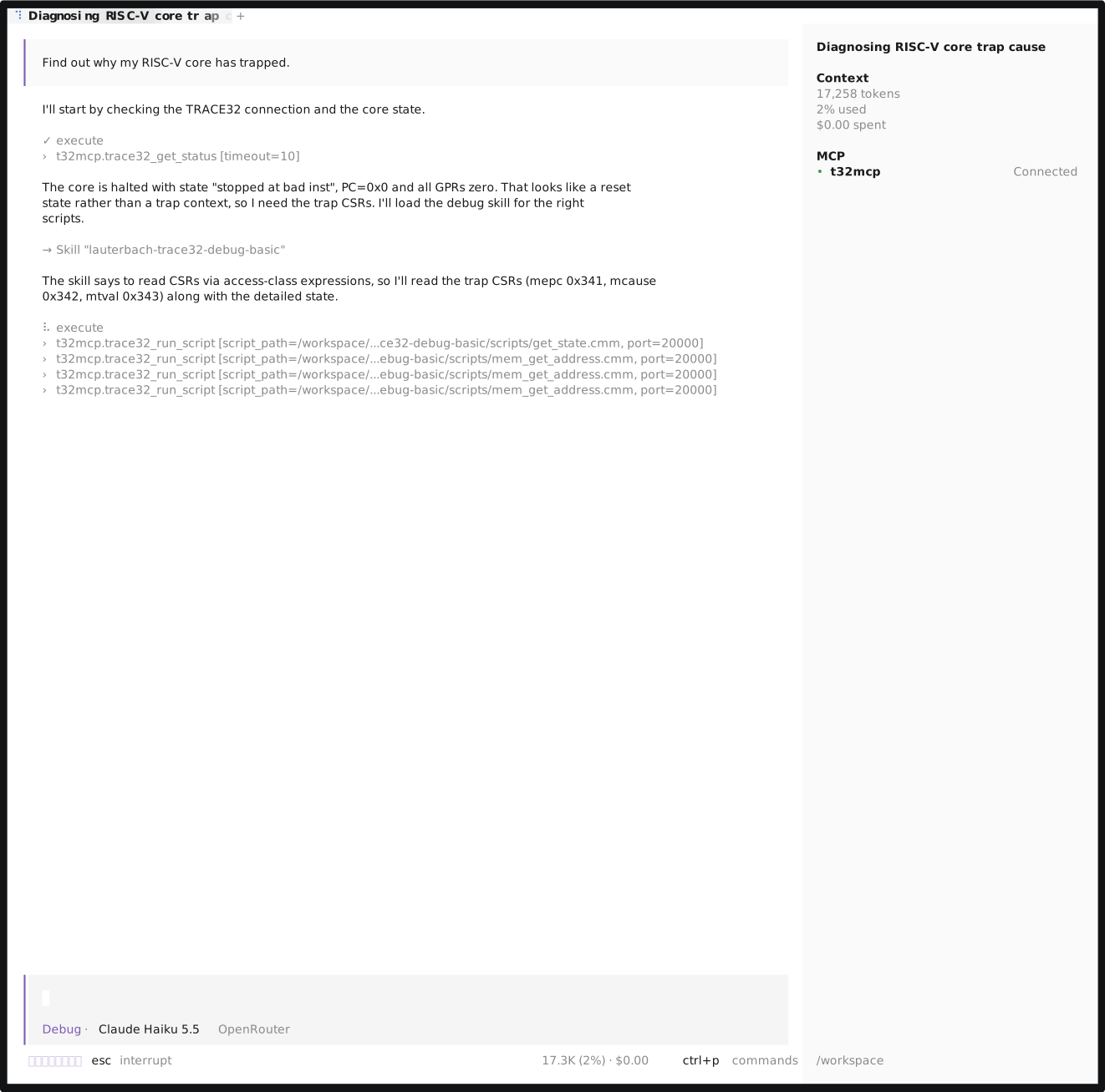
PRACTICE is Lauterbach's proprietary scripting language which can be used to fully control PowerView.
t32mcp lets you reuse your existing scripts or author new ones using the TRACE32 AI Assistant.
Bundle the scripts into agent skills to optimize your development environment and to control what your agent is allowed to do.
[!WARNING]
Giving AI agents unrestricted access to PowerView is only advised inside controlled sandboxes.t32mcpprovides additional facilities that let you specify exactly what the agent is allowed to do. For more details, refer to the section Execution Policies.
Requirements
t32mcp and TRACE32 PowerView must run on the same system and PowerView must have the Remote API enabled.
The option /RemoteHost {ALLOW | DENY} controls where the Remote API listens: ALLOW binds to 0.0.0.0 instead of 127.0.0.1 and makes the Remote API reachable from the network.
Keep it on DENY unless your setup needs remote access.
Activate Remote API via configuration file:
RCL=NETTCP
PORT=20000
REMOTEHOSTDENY
Activate Remote API via PowerView command line (trailing dot indicates decimal number):
SETUP.API.RCL.Enable /PRotocol TCP /Port 20000. /RemoteHost DENY
Activate Remote API when invoking PowerView: t32m<arch> --t32-api-rcl-remotehost=DENY --t32-api-rcl=TCP:<port> ...
Getting Started
Download t32mcp from the prebuilt releases or build it from source:
$ cargo build --manifest-path t32mcp-rs/Cargo.toml --release
t32mcp accepts the following arguments:
$ t32mcp --help
t32mcp v0.3.1 (script interface 1)
General Options:
  --version                Print version number and exit
  -h, --help               Print this help message and exit

MCP Transport (default: stdio):
  --http PORT              Run as Remote MCP, served over HTTP
  --bind ADDRESS           Address to bind on (default: 127.0.0.1)
  --token TOKEN            Authentication Token (use with --http)
  --allow-origin ORIGIN    Allowed remote hosts (use with --http)

PowerView Connection:
  --execution-policy P     Execution Policy (required):
                           unrestricted, scripts, strict
  --port PORT              TRACE32 Remote API TCP port (default: 20000),
                           repeatable for AMP sessions. The agent can also
                           add and remove ports dynamically itself using the
                           trace32_manage_instances tool (disabled in
                           "strict" execution policy mode).
  --skills DIR             Root location of agent skills (repeatable,
                           required by execution policy "strict")
See Execution Policies for more information.
Agent Skills
t32mcp comes with two pre-defined skills:
lauterbach-trace32-debug-basic: Basic debugging skills.lauterbach-trace32-skill-creator: Authoring guidelines for new skills or scripts. Recommended: Use together witht32chat.
Lauterbach customers with an active maintenance license furthermore have the option to access an exhaustive skill set consisting of knowledge skills (manuals, PRACTICE, Remote API, t32mcp), more debugging skills and an index skill lauterbach-trace32.
Install them from t32chat (login required): ask the agent to install the TRACE32 skills from t32chat (it uses the tool trace32_install_skills of the t32chat MCP server), or run the install command from the skills page of t32chat (https://assistant.ai.lauterbach.com/agents/skills). The commands there contain a short-lived download ticket of your account, no token is needed. The page also links the install scripts, to review them first.
Both replace all lauterbach-* skills in the directory (install, update or reset): local changes to them are lost, your own skills with other names stay. The skills must be local files, because the MCP server runs their scripts by absolute path on the PowerView host.
Agent Configuration
Refer to the documentation of your AI agent (e.g. Claude Code, VSCode, ...) on how to register MCP servers and where to put the agent skills.
Note: An execution policy must always be specified. Depending on the selected policy, you might also need to provide further arguments.
Claude Code
$ claude mcp add-json t32mcp '{"type":"stdio","command":"/home/you/t32mcp/t32mcp","args":["--execution-policy", "<policy>", "<additional arg>"]}'
Mistral Vibe
Inside ~/.vibe/config.toml:
[[mcp_servers]]
name = "t32mcp"
transport = "stdio"
command = "/path/to/t32mcp"
args = [
    "--execution-policy",
    "<policy>",
    "<additional arg>",
]
Execution Policies
Since PRACTICE can change the target, e.g. erase flash, and run host commands (OS.*), t32mcp restricts what the agent may execute with an execution policy, configurable with the --execution-policy option, by restricting the provided tools.
unrestricted
This policy provides the most flexibility with the least control. Recommended to use only inside controlled sandboxes.
trace32_manage_instancestrace32_get_statustrace32_run_script: accepts absolutescript_pathtrace32_run_command
scripts
This policy tries to find a trade-off between flexibility and control.
Agents can still run any PRACTICE script, addressed by an absolute path on the PowerView host, but the tool trace32_run_command is disabled.
Script modifications can be controlled via file system permissions on the agent harness level.
trace32_manage_instancestrace32_get_statustrace32_run_script: accepts absolutescript_path
strict
This policy provides the most control:
trace32_get_statustrace32_run_script: runs only scripts inside--skillsdirectories that declare"strict": truein their header.
PRACTICE Script Authoring
PRACTICE scripts (*.cmm) are expected to start with a comment that declares their arguments.
A script header is required in the strict policy and recommended for unrestricted and scripts.
Refer to the skill lauterbach-trace32-skill-creator for more details.
Example:
; {
;   "interface": 1,
;   "strict": true,
;   "arguments": {
;     "arg1": { "type": "<predefined type>" },
;     "arg2": { "pattern": "^<custom regex>$", "optional": true },
;     "arg3": { "enum": ["val1", "val2"] }
;   }
; }
interface(required): the version of thet32mcpscript interface the script is written forstrict(optional): set totrueto declare the script compatible with thestrictexecution policy. Scripts without it are rejected understrict(see Execution Policies).arguments(optional): the arguments the script accepts. Each argument is described by exactly one of:type: one of the pre-defined types belowpattern: a custom regular expression, anchored with^and$enum: a list of allowed values
optional(per argument, defaultfalse): set totrueso a call may omit the argument. Every argument is required by default.
A script without arguments takes no arguments.
t32mcp rejects the execution if a required argument is missing, an unknown argument is passed, or an argument does not match its type. Unknown keys in the header are rejected as well.
Argument Types
Argument sanitization is based on regular expressions and provides the following pre-defined types:
Serving Remote MCP via HTTP
With --http PORT, t32mcp serves the MCP protocol over HTTP instead of stdio, listening on the address given by --bind (default: 127.0.0.1).
Binding a non-loopback address requires --token and --allow-origin.
Authentication Token
When --token is specified, or the environment variable T32MCP_TOKEN is set (lower precedence), every request is expected to contain an Authorization: Bearer <token> header, otherwise the server responds with 401 Unauthorized.
While the MCP specification defines HTTP-transport authorization on OAuth 2.1, most MCP client support this authorization as well.
Claude Code
claude mcp add --transport http --header "Authorization: Bearer my-secret-token" t32mcp http://127.0.0.1:8080
Mistral Vibe (CLI)
name = "t32mcp"
transport = "http"
url = "http://127.0.0.1:8000"
headers = { "Authorization" = "Bearer my-secret-token" }
Cross-Origin Resource Sharing (CORS)
To prevent that any web page could reach the server via localhost, every request carrying an Origin header will be rejected with 403 Forbidden, unless the origin is explicitly allowed using --allow-origin.
Allowed origins receive the CORS response headers, and preflight OPTIONS requests are answered.
Questions and feedback
We would love to get your feedback and improvement suggestions. For questions, feedback and help, refer to the contribution guidelines.
License
This project is licensed under the Apache License, Version 2.0. See LICENSES/Apache-2.0.txt.