
World Intelligence MCP Server
Real-time global intelligence across 30+ domains with 160 MCP tools, a live ops-center dashboard, a CLI, and a Qdrant vector store for enterprise-grade semantic search across accumulated intelligence. All data comes from free, public APIs: no paid subscriptions required.
Built for AI agents that need world awareness: market conditions, geopolitical risk, military posture, aircraft-cohort early warning, refugee and migration flows, supply chain disruptions, cyber threats, and more — all queryable via the Model Context Protocol. The vector store enables natural language queries like "military activity near Taiwan" or "cyber threats targeting healthcare" across all historical data.
For research, the collector keeps a dated history of what it captures. Each observation carries the period it describes, the publisher's release date when known, and when it was saved, so earlier copies, revised values, lagged correlations between series and any past day can be queried, and collection health is measured from the collector's run log rather than inferred from cache freshness. The server also exposes 29 MCP prompts (worked research questions, each naming the tools it needs and the limit to respect) and 3 MCP resources: a research guide generated from the live tool registry (intel://guide), a measures glossary (intel://guide/measures) and live source health (intel://guide/source-health).
What You Get
Total: 160 tools across 30+ intelligence domains.
Quick Start
Install
git clone https://github.com/marc-shade/world-intel-mcp.git
cd world-intel-mcp
pip install -e .

# Optional extras
pip install -e ".[dashboard]"  # Live ops-center dashboard
pip install -e ".[vector]"     # Qdrant vector store + FastEmbed
pip install -e ".[dev]"        # pytest, respx, coverage
Run as MCP Server
world-intel-mcp # stdio mode for Claude Code, Cursor, etc.
Claude Code Configuration
Add to ~/.claude.json:
{
  "mcpServers": {
    "world-intel-mcp": {
      "command": "world-intel-mcp"
    }
  }
}
Dashboard
intel-dashboard              # http://localhost:8501
intel-dashboard --port 9000  # custom port
Research panels (RESEARCH in the top bar, or the p key): four tabs over the same functions the MCP tools call, each loaded from its own JSON route when the tab opens and refreshed every 60 s while the panel is open.
- Liquidity board (
/api/liquidity-board?sort=biggest_move|newest,fetch_liquidity_board): latest value, units as each row states them (USD millions, USD billions, EUR millions; nothing converted), change and percent change against the previous observation, freshness and stale-cache badges, the ranking rule, unavailable indicators with their reasons, the blocked upstreams (ICI, FINRA, BLS) and the net liquidity method. Amounts outstanding are grouped apart from flows; a change between two levels is labelled as not a flow. - Situations (
/api/situations?hours=&sort=&kind=,fetch_situations) and Top stories (/api/top-stories?hours=&min_outlets=,fetch_top_stories): ranked situations or multi-outlet stories with sample headlines, the attention list, feed coverage (failed feeds named) and the functions' own definitions, method and data gaps. - Collection health (
/api/collection-health,HistoryStore.collection_health): state counts, then failing, degraded, not-attempted-recently and never-run sources with last attempt, last success, failures in a row, overdue and reason, storage size, and the report'scannot_provetext as given.
A panel that has not loaded says so; a failed call shows UNAVAILABLE with the reason (HTTP 503, or 504 after a 90 s budget) and never an empty list; a failed refresh keeps the earlier copy under a REFRESH FAILED banner with the time it loaded. Limits: the situations and top stories panels read every RSS feed: 5 to 15 s per call in the 2026-10-17 runs, warm cache included, because a feed that fails is not cached and every call tries it again, with retries, for up to 12 s. Collection health reads the history store in the dashboard's own cache database (WORLD_INTEL_CACHE_DB, or the default path), so it shows only cycles a collector ran against that same database; one writing elsewhere leaves every source never_run. These four routes send no Access-Control-Allow-Origin header, so a page from another site cannot read their answers; the older dashboard routes still send Access-Control-Allow-Origin: *, and /api/overview includes the cache database path. The server binds 127.0.0.1 unless --host says otherwise.
PDF/HTML Reports
pip install -e ".[pdf]"      # requires: brew install pango (macOS)
intel report                 # full PDF report → ~/.cache/world-intel-mcp/
intel report --format html   # HTML (no native deps needed)
intel report -o brief.pdf    # custom output path
intel report -s markets,cyber,earthquakes  # select sections
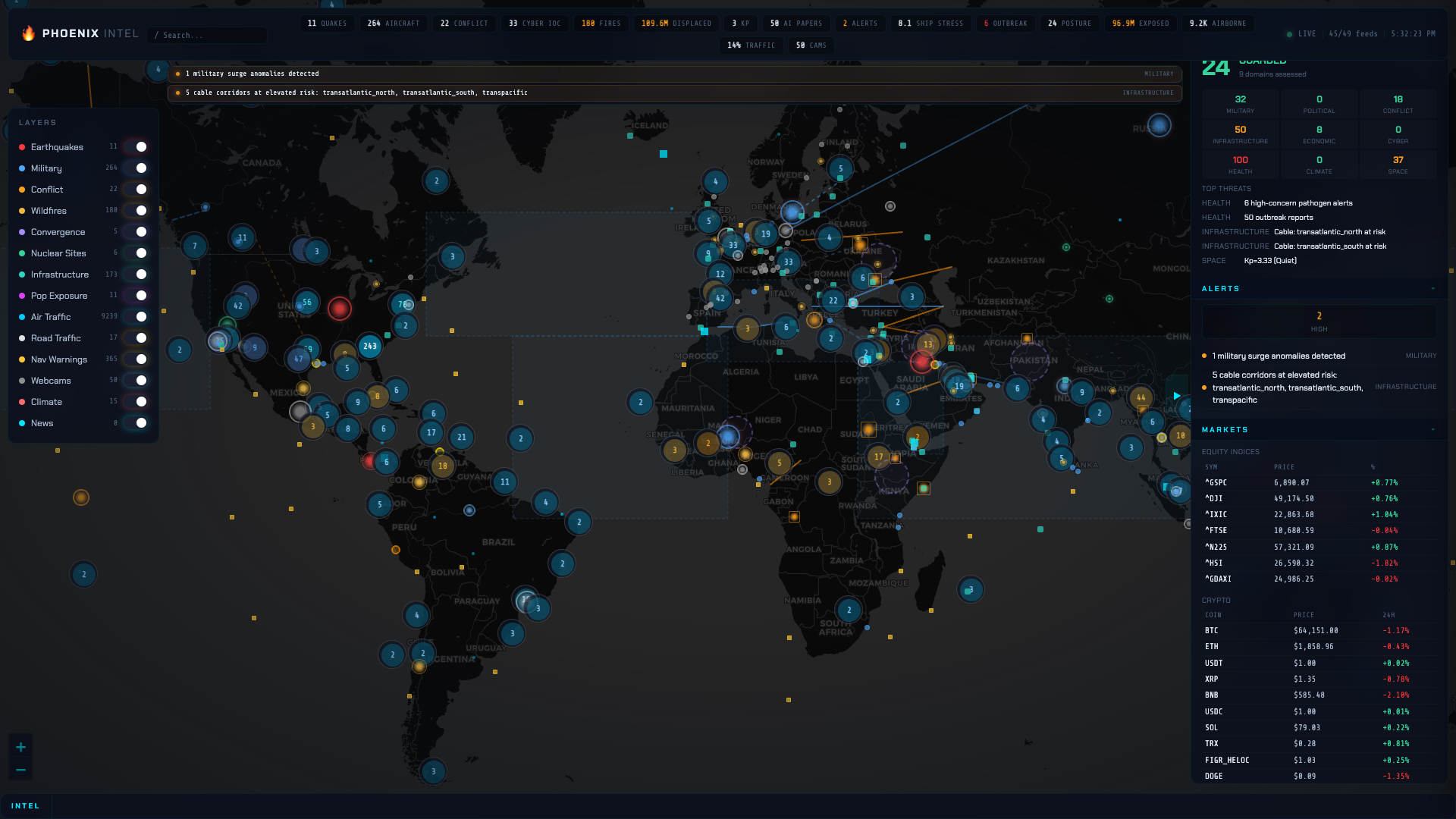
Map-first ops center: Leaflet map with toggle-able layers (quakes, military, conflict, fires, convergence, nuclear, infrastructure, your AOI geofences with last-sweep counts, UNHCR migration corridors between capitals), 47 live SSE feeds, HUD bar, glassmorphic panels, per-source circuit breaker health.
CLI
intel markets              # stock indices
intel earthquakes --min-mag 5.0
intel migration-surges     # year-over-year displacement jumps (UNHCR)
intel migration-flows -o Sudan
intel liquidity            # Fed balance sheet, TGA, RRP, net liquidity, US M2, euro area M1-M3
intel net-liquidity -n 0   # full weekly history, components and RRP date per week
intel news-reaction -c finance  # same-session moves of companies in the news
intel hostility Iran Israel --days 7   # daily hostile coverage (GDELT)
intel situations --sort change         # ranked situations (RSS)
intel top-stories -m 4                 # stories carried by 4+ outlets
intel kalshi -c Economics  # Kalshi open markets by volume
intel prediction-compare -c Economics   # same event on Kalshi and Polymarket
intel prediction-settled   # Brier scores on settled markets
intel status               # cache + circuit breaker health
intel guide                # the research guide (also served as intel://guide)
intel history health       # per-source collection health from the collector's run log
intel history connections central_bank_rates:federal_funds_rate central_bank_rates:boe_bank_rate_sonia
                           # correlation at leads and lags between stored series (day grid by default)
intel history day 2026-10-17 --by observed   # values observed on one UTC day (default: captures that day)
intel history backfill fred WALCL RRPONTSYD --start 2020-01-01  # load FRED history into the history store
intel history backfill ecb BSI.M.U2.Y.V.M30.X.1.U2.2300.Z01.E   # load ECB Data Portal history (euro area M3)
Architecture
server.py     (MCP stdio) ─┐                                               ┌─ VectorStore (Qdrant)
cli.py        (Click CLI)  ├─> sources/*.py ─> Fetcher ─> CircuitBreaker ─┤
dashboard.py  (SSE)        │    analysis/*.py                              └─ Cache (SQLite)
collector.py  (daemon)    ─┘
- Fetcher: Centralized async HTTP client (httpx). Retries, per-source rate limiting, stale-data fallback. Auto-stores results in vector store on fresh fetches.
- CircuitBreaker: Per-source tracking. 3 consecutive failures trips for 5 minutes. Each RSS feed gets its own breaker.
- Cache: SQLite WAL-mode TTL cache.
get()returns live data,get_stale()returns expired data for fallback. - VectorStore: Qdrant + FastEmbed (BAAI/bge-small-en-v1.5, 384-dim). Async background worker queue for non-blocking storage. Enables semantic search across all accumulated intelligence.
- Collector: Standalone daemon that fetches all 61 sources in parallel and populates the vector store. Run once or as a daemon (default: 5-minute interval). Includes the AOI change sweep, so a running daemon continuously watches every defined geofence.
- Sources (
sources/*.py): 30+ modules, each exportsasync def fetch_*(fetcher, **kwargs) -> dict. - Analysis (
analysis/*.py): Cross-domain synthesis — signal aggregation, instability indexing, NLP, company enrichment, macro composite. - Config (
config/*.py): Curated datasets — 22 hotspots, 70+ bases, 40 ports, 24 pipelines, 24 nuclear facilities, 34 cables, 48 datacenters, 27 spaceports, 82 exchanges.
Research Guide: MCP Prompts and Resources
Besides its tools, the server answers the MCP resources and prompts
requests and advertises both capabilities at initialize. A connecting
model can read which tool answers which question, and what the data
cannot support, before it calls anything.
29 prompts, each a worked research question that names the tools to call and the limits an honest answer respects (arguments marked * are required):
prompts/get with conflict-trend and {"country": "Sudan"} returns one
user message: the question with Sudan and the default 30-day window
filled in, the numbered tools (intel_ucdp_events, intel_acled_events,
intel_unrest_events) with the arguments to pass and what each call is
for, the limits (recent days are the least complete; count events and
fatalities separately; compare each source only with itself), and the
shape of a complete answer. A missing required argument, an unknown
argument, a number outside its range (latitude -90 to 90, longitude -180
to 180, an AOI radius of 1 to 2000 km), a value outside an argument's
list, a value that names a tool the prompt does not call, or an unknown
prompt is an invalid params error, never a guess. The tests fail if a
prompt names a tool that is not registered, passes an argument the
tool's schema does not take (wrong name, type or listed value), cites an
output field the code does not produce, describes a step in words that
share nothing with the called tool's own description, or if the guide
leaves out a registered tool. Tools that cannot work without an API key carry a
[needs VARIABLE] mark in the guide's tool list.
From the shell, intel guide prints the same guide markdown and
intel guide --measures prints the glossary. intel guide builds its
tool list from the live registry, so it opens the cache database and
creates it on first run (~/.cache/world-intel-mcp/cache.db, or the
path set by WORLD_INTEL_CACHE_DB or XDG_CACHE_HOME). Starting the CLI
at all, intel --help and intel guide --measures included, creates
~/.cache/world-intel-mcp/temporal.db under your home directory.
MCP Tools Reference
Financial Markets (7)
Forex & Currency (3)
Bonds & Yields (2)
Earnings (2)
SEC Filings (3)
Company Enrichment (1)
News vs Market Reaction (1)
Macro Composite (1)
Economic (6)
Central Banks (1)
Liquidity and Money (5)
Keyless: FRED graph CSV and the ECB Data Portal. Every point carries its observation date, value and units; every series is typed amount_outstanding, flow, growth_rate, index or unknown, and carries a freshness block (age of the newest observation against its publication cadence). limit=0 returns the full history. A failed upstream is an error or an unavailable row, never a zero.
BTC Technicals (1)
Natural Disasters (2)
Environmental (2)
Conflict & Security (4)
Military & Defense (6)
Infrastructure (5)
Maritime (2)
Geospatial Datasets (10)
News & Media (3)
News Signals (3)
Intelligence Analysis (8)
NLP Intelligence (4)
Strategic Synthesis (4)
Climate (1)
Prediction Markets (4)
Elections (1)
Displacement and migration (7)
Aviation (5)
Cohort early warning. The three intel_jet_* tools watch a cohort of aircraft
(business jets by ICAO type designator, or military) for activity that departs
from its calendar baseline, and locate where an excess came from. Data:
adsb.lol's live API and its public half-hour globe_history heatmaps (readsb
format, ODbL 1.0, no key). Heatmaps are ~14 MB each and immutable once
published, so they are cached on disk next to the cache DB
(WORLD_INTEL_HEATMAP_CACHE_MB, default 1024) and fetched at most one at a
time with a 2 s floor. The cohort is learned from live snapshots (run
intel_jet_cohort_snapshot or the collector daemon, which now includes
bizjet_cohort and military_cohort); the analyses only use members first
seen min_learning_lead_hours (default 24) before the window, because a
cohort learned during a window inflates that window (measured: 1,002 vs a
206 baseline median when the gate is bypassed). Until the cohort has that
lead, the tools answer warming_up. The baseline is a handful of
same-weekday slots fetched on demand, not a year-long backfill, so there
are no learned holiday profiles or annual ratios.
Approach inspired by kylemcdonald/ews (Early Warning System: business-jet cohorts against calendar baselines, and the excess-origin detector). This is an independent implementation over a different, openly licensed data source; no ews code is used.
Cyber Threats (1)
Space Weather (1)
AI & Technology (4)
Health (1)
Social & Sanctions (3)
Shipping & Trade (1)
Government (1)
Country Intelligence (3)
Extended Geospatial (1)
Traffic (2)
Cross-Domain Alerts (2)
Monitoring (2)
Vector Search (5)
Cross-Domain Analytics (3)
Reports (1)
AOI Geofences (10)
Daily Digest (1)
Severe Weather (2)
Tropical Cyclones (2)
Space Launches (1)
Volcanoes (1)
Situation Brief (1)
Collection History (6)
History accrues only while the collector (intel-collector) runs; nothing before its first recorded cycle exists, except what a backfill loads (intel_history_backfill, intel history backfill): FRED graph CSV and ECB Data Portal series, stored under backfill:fred and backfill:ecb with the publisher's current vintage, so revisions made before the first backfill are invisible. Every observation keeps three dates: observed_at (the period the value describes, from the payload, or null when the payload has none), published_at (publisher release, when known) and collected_at (when this server saved it). A run answered from an expired cached copy is recorded as a stale-cache replay: it never counts as a success, and its observations are not stored, because a replay is not a new observation.
Connections Between Series (1)
Reads the history store only, so the sample is what the collector saved, not each series' full history. A connection is a correlation in that sample: it does not show causation, and a lead does not show causal direction.
Watching your own area (geofences/AOIs)
Static infrastructure results (bases, ports, nuclear, cables, datacenters, spaceports) draw on this repo's curated strategic datasets, which are global and deliberately sparse, not exhaustive local registries. A quiet AOI brief means nothing from those curated sets is in range, not that your area has no infrastructure.
Before the AOI family, only intel_signal_convergence accepted a real
point-plus-radius, intel_military_flights took a bbox, and hotspot
escalation scoring was restricted to the 22 hardcoded INTEL_HOTSPOTS.
The intel_aoi_* tools let you name your own area (a city, a border
region, a facility) and get the same cited, multi-domain treatment.
Geofences survive the antimeridian (a Bering Strait or Fiji AOI queries
both sides of the dateline), and pipelines/undersea cables are matched
as line features via great-circle segment distance, not just by their
endpoints.
Define an AOI once, then brief, score, edit, and watch it. Three shapes: a circle (point + radius), a polygon (3-64 vertices, for a border region or strait a radius cannot express), or a corridor (a waypoint route + width, for a shipping lane or supply road):
intel_aoi_define(name="Pittsburgh", lat=40.4406, lon=-79.9959, radius_km=50)
intel_aoi_define_polygon(name="Taiwan Strait", vertices=[[22.5, 118.0], [22.5, 121.5], [26.5, 122.0], [26.5, 118.5]])
intel_aoi_define_corridor(name="Suez Approach", waypoints=[[29.9, 32.55], [27.5, 34.0], [24.0, 36.0]], width_km=80)
intel_aoi_brief(name="Taiwan Strait")
intel_aoi_escalation(name="Pittsburgh")
intel_aoi_update(name="Pittsburgh", radius_km=100)   # resize/rename in place
intel_aoi_changes(name="Suez Approach")  # what entered/left since last sweep
intel_aoi_digest()  # one-call sweep across ALL your areas
The same nine operations are available from the terminal: intel aoi define|define-polygon|define-corridor|list|update|delete|brief|escalation|changes.
Membership is exact for the shape (an event inside a polygon's
bounding circle but outside the polygon is excluded); corridor
distances are measured to the route. Line-feature infrastructure
(pipelines, undersea cables) matches the bounding circle for
non-circle shapes, disclosed in data_gaps.
intel_aoi_changes is the alerting primitive: the first call records a
baseline, and every later call reports what entered and left the fence
per domain, with failed fetches reported as data_gaps rather than
counted as departures.
intel_aoi_brief filters every geo-capable domain to the 50 km radius
around Pittsburgh: earthquakes, military flights (bbox derived from the
radius), wildfires (region-mapped, since NASA FIRMS has no point+radius
query), ACLED conflict events, a sample of nearby aviation traffic,
nearby static infrastructure (military bases, ports, pipelines, nuclear
facilities, undersea cables, datacenters, spaceports) with distances in
km, and news about the place at the AOI's centre (the reverse-geocoded
settlement and county, here Pittsburgh). Every item in the
response carries a [n] citation into a numbered sources list, and
data_gaps names any domain that couldn't be scoped to the AOI (for
example, wildfires when the AOI falls outside NASA FIRMS's coverage
regions, or conflict events when ACLED credentials aren't configured)
instead of silently omitting it.
intel_aoi_escalation runs the same baseline/military/conflict/social-
unrest scoring engine that powers intel_hotspot_escalation for the 22
built-in hotspots, but scoped to your AOI's own radius instead of a fixed
2-degree window. An AOI has no curated baseline, so that component is 0
and the score tops out at 80; score_ceiling gives this call's ceiling,
lower when a component is missing or zero-filled. It also scores the two
components the built-ins leave null. News is the change in the area's
share of all GDELT coverage, the 7 days ending with GDELT's current
(still filling) daily step against the 7 before, for the reverse-geocoded
settlement and county at the AOI's centre (the same query the brief
uses), so a swing or outage in what GDELT ingests is not read as a news
surge; only a rise scores. Convergence runs the multi-domain convergence
grid, laid at four half-degree offsets so a compact cluster on a degree
line is not split, over the earthquakes, military flights, ACLED events
and wildfires inside the AOI's exact shape. A source that did not answer,
or answered only with an expired cached copy, counts as missing, never as
quiet, and a global sample that hit its cap counts as partial. If either
component's inputs fail, it comes back null with the reason in
data_gaps, never as a 0, and computed_from names the components the
score was computed from (zero_filled_components flags any that are a 0
only because the military or ACLED fetch failed, and
lower_bound_components any that partial data can only have
understated).
AOIs persist in a dedicated table inside the same SQLite cache database
the server already uses ($WORLD_INTEL_CACHE_DB when set, otherwise
$XDG_CACHE_HOME/world-intel-mcp/cache.db, falling back to
~/.cache/world-intel-mcp/cache.db), so a scheduled agent can watch any named
area across restarts with intel_aoi_list / intel_aoi_delete to manage
them.
Temporal and keyword spike baselines use temporal.db and
keyword_spikes.db in $XDG_CACHE_HOME/world-intel-mcp/, or
~/.cache/world-intel-mcp/ when XDG_CACHE_HOME is unset.
WORLD_INTEL_CACHE_DB only overrides the main cache database, not these
baseline files. Databases open on first use, not on import. If you set
XDG_CACHE_HOME, move the two baseline files from ~/.cache/world-intel-mcp/
to $XDG_CACHE_HOME/world-intel-mcp/ to keep existing baselines.
Vector Store
The optional Qdrant vector store accumulates intelligence over time for semantic retrieval. All data fetched through the Fetcher is automatically embedded and stored.
Setup
# Install Qdrant (Docker)
docker run -p 6333:6333 qdrant/qdrant

# Install vector dependencies
pip install -e ".[vector]"

# Run the collector daemon (populates vector store 24/7)
intel-collector --daemon              # every 5 minutes
intel-collector --daemon --interval 120  # every 2 minutes
intel-collector --sources markets,cyber  # specific domains only
intel-collector                        # single collection cycle
intel-collector --daemon --sources aoi --interval 900  # AOI watch only: sweep every geofence every 15 min
The aoi group runs intel_aoi_digest as a sweep: each cycle diffs every
defined AOI against its stored snapshot and advances it, so the daemon
interval is your geofence watch cadence. Change digests are logged and
(when the vector store is enabled) stored for semantic search. Set
WORLD_INTEL_AOI_WEBHOOK to get a POST whenever a sweep finds something
entered or left a geofence (quiet sweeps never fire); with
WORLD_INTEL_AOI_WEBHOOK_FORMAT=text the body is raw markdown with a
Title header, which ntfy-style sinks render directly.
Running as a macOS launchd Service
scripts/collector-daemon.sh manages the collector as a launchd agent so it
survives reboots. It fills in com.agentic.intel-collector.plist.template
with this checkout's own path (resolved from the script's own location, so
it works from any clone) and installs the result to
~/Library/LaunchAgents/.
scripts/collector-daemon.sh start    # install + load the launchd job
scripts/collector-daemon.sh status   # check state and log info
scripts/collector-daemon.sh logs     # tail stdout (logs err for stderr)
scripts/collector-daemon.sh stop     # unload the launchd job
scripts/collector-daemon.sh restart
scripts/collector-daemon.sh render   # print the filled-in plist without installing it
Semantic Search Examples
Once data accumulates, AI agents can query across all domains:
- "military activity near Taiwan strait" — finds military flights, naval warnings, theater posture data
- "cyber threats targeting healthcare" — finds URLhaus, CISA KEV entries related to healthcare
- "economic indicators suggesting recession" — finds yield curve inversions, macro signals, FRED data
The vector store uses FastEmbed (ONNX-based, BAAI/bge-small-en-v1.5) for embeddings — no GPU required, ~3 second cold start.
Environment Variables
Everything else uses free, unauthenticated public APIs.
Development
pip install -e ".[dev]"
pytest                       # 2,781 tests (2,801 total, 20 live-network smoke tests deselected by default)
pytest --cov=world_intel_mcp # with coverage
pytest tests/test_forex.py -v # single module
Adding a New Source
- Create
sources/your_source.pywithasync def fetch_your_data(fetcher: Fetcher, **kwargs) -> dict - Use
fetcher.get_json(url, source="your-source", cache_key=..., cache_ttl=300)— automatic caching, retries, circuit breaking, rate limiting - In
server.py: addTool(...)toTOOLS, addcaseto_dispatch()(use inline import) - Add tests using
respxto mock HTTP (seetests/test_forex.pyfor pattern) - Optionally add to
dashboard/app.py(SSE) andcli.py(Click)
License
MIT