Agent Skills
[!NOTE] Work in Progress — This repository is under active development. More skills are being added, existing skills are being updated to use the latest SDK patterns, and tests are being expanded to ensure quality. Contributions welcome!
Skills, custom agents, AGENTS.md templates, and MCP configurations for AI coding agents working with Azure SDKs and Microsoft AI Foundry.
Blog post: Context-Driven Development: Agent Skills for Microsoft Foundry and Azure
🔍 Skill Explorer: Browse all 175 skills with 1-click install
Quick Start
npx skills add microsoft/skills
Select the skills you need from the wizard. Skills are installed to your chosen agent's directory (e.g., .github/skills/ for GitHub Copilot) and symlinked if you use multiple agents.
Manual installation (git clone)
# Clone and copy specific skills
git clone https://github.com/microsoft/skills.git
cp -r agent-skills/.github/skills/azure-cosmos-db-py your-project/.github/skills/

# Or use symlinks for multi-project setups
ln -s /path/to/agent-skills/.github/skills/mcp-builder /path/to/your-project/.github/skills/mcp-builder

# Share skills across different agent configs in the same repo
ln -s ../.github/skills .opencode/skills
ln -s ../.github/skills .claude/skills
Coding agents like Copilot CLI and GitHub Copilot in VS Code are powerful, but they lack domain knowledge about your SDKs. The patterns are already in their weights from pretraining. All you need is the right activation context to surface them.
[!IMPORTANT] Use skills selectively. Loading all skills causes context rot: diluted attention, wasted tokens, conflated patterns. Only copy skills essential for your current project.
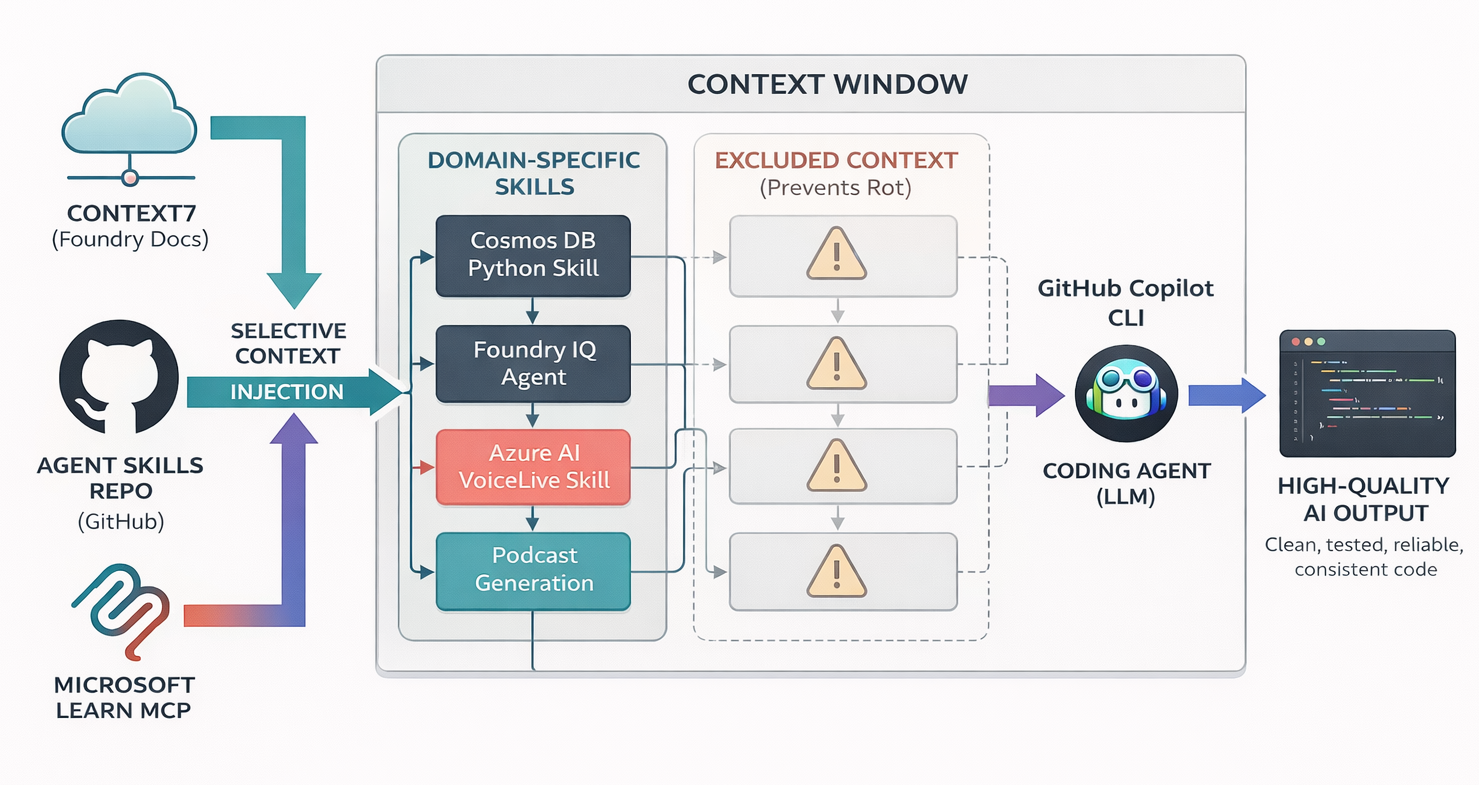
What's Inside
Skill Catalog
175 skills across language plugins — see skill catalog below for the full breakdown
Core
11 skills — tooling, infrastructure, language-agnostic
Foundry (Language-Agnostic)
11 skills — Microsoft Foundry agent platform (preview), language-agnostic via
azd,azCLI, and Foundry MCP
Python
39 skills • suffix:
-py
.NET
29 skills • suffix:
-dotnet
TypeScript
25 skills • suffix:
-ts
Java
26 skills • suffix:
-java
Rust
7 skills • suffix:
-rust
Repository Structure
AGENTS.md                # Agent configuration template

.github/
├── skills/              # Backward-compat symlinks to plugin skills
├── plugins/             # Language-based plugin bundles (azure-sdk-python, etc.)
│   └── azure-sdk-*/     # Each bundle has skills/, commands/, agents/
├── prompts/             # Reusable prompt templates
├── agents/              # Agent persona definitions
├── scripts/             # Automation scripts (doc scraping)
├── workflows/           # GitHub Actions (daily doc updates)
└── copilot-instructions.md

docs/                    # Generated llms.txt files (daily workflow) - GitHub Pages hosted
├── llms.txt             # Links + summaries
└── llms-full.txt        # Full content

skills/                  # Symlinks for backward compatibility
├── python/              # -> ../.github/skills/*-py
├── dotnet/              # -> ../.github/skills/*-dotnet
├── typescript/          # -> ../.github/skills/*-ts
├── java/                # -> ../.github/skills/*-java
└── rust/                # -> ../.github/skills/*-rust

.vscode/
└── mcp.json             # MCP server configurations
Plugins
Plugins are installable packages containing curated sets of agents, commands, and skills. Install via the Copilot CLI:
# Inside Copilot CLI, run these slash commands:
/plugin marketplace add microsoft/skills
/plugin install deep-wiki@skills
/plugin install azure@skills
MCP Servers
Reference configurations in .vscode/mcp.json:
For full MCP server implementations for Azure services, see microsoft/mcp.
Additional Resources
Agents
Role-specific agent personas in .github/agents/:
Use AGENTS.md as a template for configuring agent behavior in your own projects.
Prompts
Reusable prompt templates in .github/prompts/:
Documentation
See the docs at https://microsoft.github.io/skills/#documentation.
Testing Skills
The test harness validates that skills produce correct code patterns using the GitHub Copilot SDK. It evaluates generated code against acceptance criteria defined for each skill.
# Install test dependencies (from tests directory)
cd tests
pnpm install

# List skills with test coverage
pnpm harness --list

# Run tests for a specific skill (mock mode for CI)
pnpm harness azure-ai-projects-py --mock --verbose

# Run with Ralph Loop (iterative improvement)
pnpm harness azure-ai-projects-py --ralph --mock --max-iterations 5 --threshold 85

# Run unit tests
pnpm test
Test Coverage Summary
129 skills with 1169 test scenarios — all skills have acceptance criteria and test scenarios.
Adding Test Coverage
See tests/README.md for instructions on adding acceptance criteria and scenarios for new skills.
Vally Evaluations
Vally evaluation specs can live alongside harness scenarios under tests/scenarios/<skill-name>/vally/.
- Workflow:
Vally Evaluation - Trigger: changes under
tests/scenarios/**/vally/**(plus manual runs via Actions) - Scope: lints resolved eval specs and runs evals when
COPILOT_TOKENis available
Ralph Loop & Sensei Patterns
The test harness implements iterative quality improvement patterns inspired by Sensei:
Ralph Loop — An iterative code generation and improvement system that:
- Generate code for a given skill/scenario
- Evaluate against acceptance criteria (score 0-100)
- Analyze failures and build LLM-actionable feedback
- Re-generate with feedback until quality threshold is met
- Report on quality improvements across iterations
Sensei-style Scoring — Skills are evaluated on frontmatter compliance:
Contributing
Adding New Skills
Note: The
azureplugin (.github/plugins/azure-skills/) is copied from microsoft/github-copilot-for-azure. Changes to that plugin should be made in the upstream repository rather than directly here.
New skills must follow the full workflow to ensure quality and discoverability:
Prerequisites:
- SDK package name (e.g.,
azure-ai-agents,Azure.AI.OpenAI) - Microsoft Learn documentation URL or GitHub repository
- Target language (py/dotnet/ts/java)
Workflow:
-
Create skill in
.github/skills/<skill-name>/SKILL.md- Naming:
azure-<service>-<language>(e.g.,azure-ai-projects-py) - Include YAML frontmatter with
nameanddescription - Reference official docs via
microsoft-docsMCP
- Naming:
-
Categorize with symlink in
skills/<language>/<category>/# Example: Python AI agent skill in foundry category cd skills/python/foundry ln -s ../../../.github/skills/azure-ai-projects-py projectsCategories:
foundry,data,messaging,monitoring,entra,integration,compute,m365,general -
Create acceptance criteria in
tests/scenarios/<skill>/acceptance-criteria.md- Document correct/incorrect import patterns
- Document authentication patterns
- Document async variants
-
Create test scenarios in
tests/scenarios/<skill>/scenarios.yaml- Test basic usage, error handling, advanced features
- Include mock responses for CI
-
Verify tests pass
cd tests && pnpm harness <skill-name> --mock --verbose -
Update README.md — Add to the appropriate language section in the Skill Catalog
Full guide: See
.github/skills/skill-creator/SKILL.md
Other Contributions
- Improve existing prompts and agents
- Share MCP server configurations
- Fix bugs in test harness
License
MIT