
Microbe
A fast, lightweight IDE for MicroPython: every board, every connection, one small native app.
Tauri 2 · Rust · Svelte 5 · CodeMirror 6 · ty language server
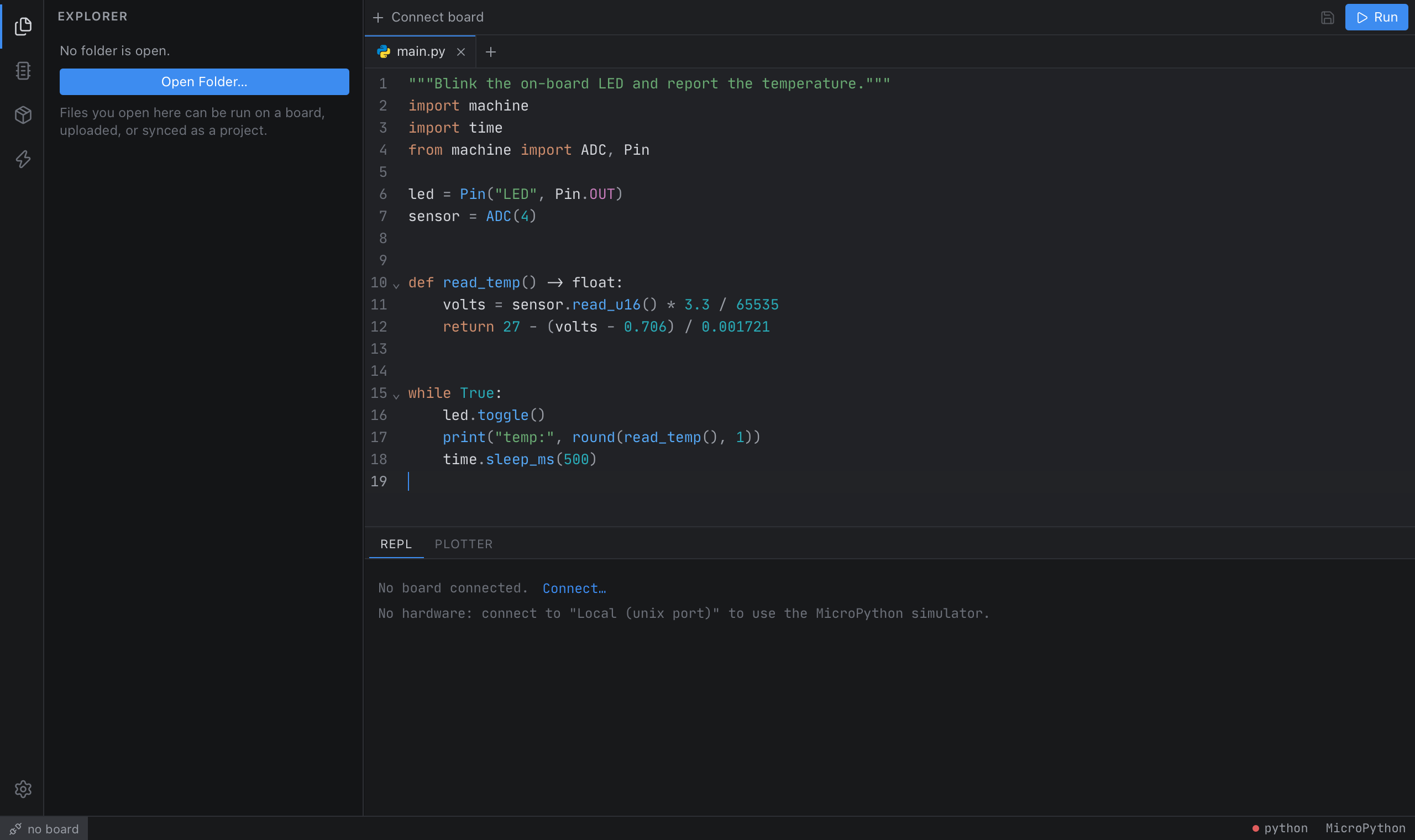
Microbe is a desktop IDE for MicroPython. It talks to your board directly, gives you a real Python language server that knows machine, rp2 and network, and flashes firmware for you. It is built on Tauri instead of Electron, so it uses the operating system's webview and a Rust core rather than shipping a browser.
Features
Getting started
Prerequisites
- Rust 1.88+ and Node 22+
- Platform prerequisites for Tauri (guide)
- Optional:
brew install micropython(or your distro's package) for the simulator and the end‑to‑end tests - Linux: add yourself to the
dialoutgroup for serial access; BlueZ is needed for BLE
Run it
npm install
npm run sidecars        # downloads the ty language server for your platform
npm run tauri dev       # builds the Rust core and opens the app
No board? Open the connect dialog (⌘K) and choose Local (unix port) to run code in the MicroPython simulator.
Build a release
npm run tauri build # .app / .dmg on macOS, .msi on Windows, .deb/.AppImage on Linux
CI builds all platforms (.github/workflows/build.yml). To release, bump version in package.json, src-tauri/Cargo.toml and src-tauri/tauri.conf.json, then push to main. CI builds Linux, Windows and macOS (Apple Silicon and Intel) installers and publishes them as release v<version>. Pushes that don't change the version build nothing. Running the workflow by hand builds the installers as artifacts without publishing.
Installer names don't include the version, so these links always point at the latest release:
The macOS app is ad-hoc signed but not notarized (D-030). On first launch macOS says it can't verify the app. Right-click the app and choose Open, or use System Settings → Privacy & Security → Open Anyway. You can also run xattr -dr com.apple.quarantine /Applications/Microbe.app.
Keyboard shortcuts
On Windows and Linux, use Ctrl instead of ⌘.
Using Microbe from an AI agent
Turn on Settings → MCP server. Microbe then serves the Model Context Protocol at http://127.0.0.1:7357/mcp. Copy for Claude Code puts the registration command on the clipboard:
claude mcp add --transport http microbe http://127.0.0.1:7357/mcp --header "Authorization: Bearer <token>"
The tools are list_boards, board_info, exec, run_program, stop_program, read_output, list_files, read_file, write_file, make_dir, delete_path, reset and check_code. If you clear Allow running code and changing files, only the read-only tools are offered.
Development
npm run check           # svelte-check (types + a11y)
npm test                # frontend unit tests (vitest)
npm run test:e2e        # UI tests in WebKit, the macOS app's engine (Playwright)
cd src-tauri && cargo test   # Rust unit tests + end-to-end tests against the unix port
                             # (sessions, debugger, tests, asyncio, OTA, network transports, MCP)
Opt-in diagnostics against real hardware and the network:
cd src-tauri && cargo test --test hardware -- --ignored --nocapture
macOS note. Some Command Line Tools releases ship an SDK that their own linker can't read ("unknown architecture arm64e.x1").
npm run tauridetects this and switches to an older installed SDK automatically. For plaincargocommands, see the workaround inAGENTS.md.
Project layout
src/                 Svelte frontend
  lib/features/      sidebar panels (files, board, debug, tests, packages, firmware, settings)
  lib/runtime/       live data from running programs (heap, asyncio tasks)
  lib/components/    shared UI (editor, file tree, terminal, dialogs, tooltips…)
  lib/state/         rune-based stores (boards, editor tabs, project, settings…)
  lib/editor/        CodeMirror setup, completion ranking, LSP client, diagnostics
  lib/bindings/      TypeScript types generated from Rust (ts-rs), do not edit
src-tauri/
  src/               Rust core: transports, raw REPL, sessions, files, firmware, LSP bridge, analysis, MCP
  platforms/*.toml   one profile per MicroPython port (including GPIO maps)
  analysis.toml      tables for the MicroPython checks
  builders.toml      Docker recipes for building firmware from source
  quirks.toml        firmware-version protocol quirks
  py/*.py            device-side scripts (templated, overridable per port)
  tests/             end-to-end tests against the MicroPython unix port (sessions, MCP over HTTP)
e2e/                 Playwright UI tests (WebKit, backend stubbed)
docs/                architecture and decision log
Extending Microbe
Most extensions are a single file or a single trait implementation. AGENTS.md has step‑by‑step recipes for adding a port, transport, flasher, detector, language server, lint rule, MCP tool, firmware build recipe, runtime feature, sidebar feature or icon.
Documentation
docs/ARCHITECTURE.md: how the pieces fit togetherdocs/DECISIONS.md: why things are the way they areAGENTS.md: conventions and recipes for contributors and coding agents
Credits
Microbe builds on Tauri, CodeMirror, xterm.js, uPlot, ty, espflash, micropython-stubs, Lucide and the Material Icon Theme. Protocol behaviour follows MicroPython's own mpremote.