MisterDiagram
Your diagrams, as requested. (Visio files without Visio!)
Formerly DiagramCraft; renamed on 2026-10-16 out of respect for DiagramCraft, an older open-source diagram editor with that name.
Tell Claude what you want drawn, in plain English, and get a real Visio .vsdx back. MisterDiagram has no GUI. Its interface is an MCP server (and a CLI for scripts), and its output is a file that opens in Visio without a repair prompt. "Make a flowchart of our onboarding process", "draw the org chart for these twelve people", "a network diagram with two offices, a firewall each and a VPN between them" become shapes dropped from stencils, glued connectors routed the way Visio routes them, and a .vsdx you can hand to whoever still has Visio.
Under the hood it is a clean-room, headless Rust core of Microsoft Visio. It opens .vsdx, .vssx and .vstx files (and their macro-enabled .vsdm, .vssm and .vstm variants with the VBA payload dropped), evaluates the ShapeSheet the way Visio does, renders pages and stencils to PNG, SVG and PDF, writes files that Visio opens without repair, and authors drawings from commands: shapes, masters, shape data, glued connectors with orthogonal routing and line jumps. Everything it claims is measured against Visio 2021's own output on the same files. PowerPoint export is next. Anyone who wants a GUI on top is welcome to build one: the licence is MIT or Apache-2.0, and the core is the part that has to be right. It is built in the mould of the Craft apps (deckcraft, vectorcraft and their siblings) and shares their conventions.
Download: MisterDiagram 0.1.0-alpha.13, the twelfth alpha (soft line breaks, which Visio stores as the U+2028 character, now break the line instead of unwrapping the label and drawing a box; found by a tester in two of five drawings and present in 339 of 7,778 corpus files), for macOS (universal), Windows (x64 and arm64) and Linux (x64 and arm64). The binaries are unsigned; docs/install.md covers checksums, the first-run warnings and MCP setup. Testers wanted: see below.
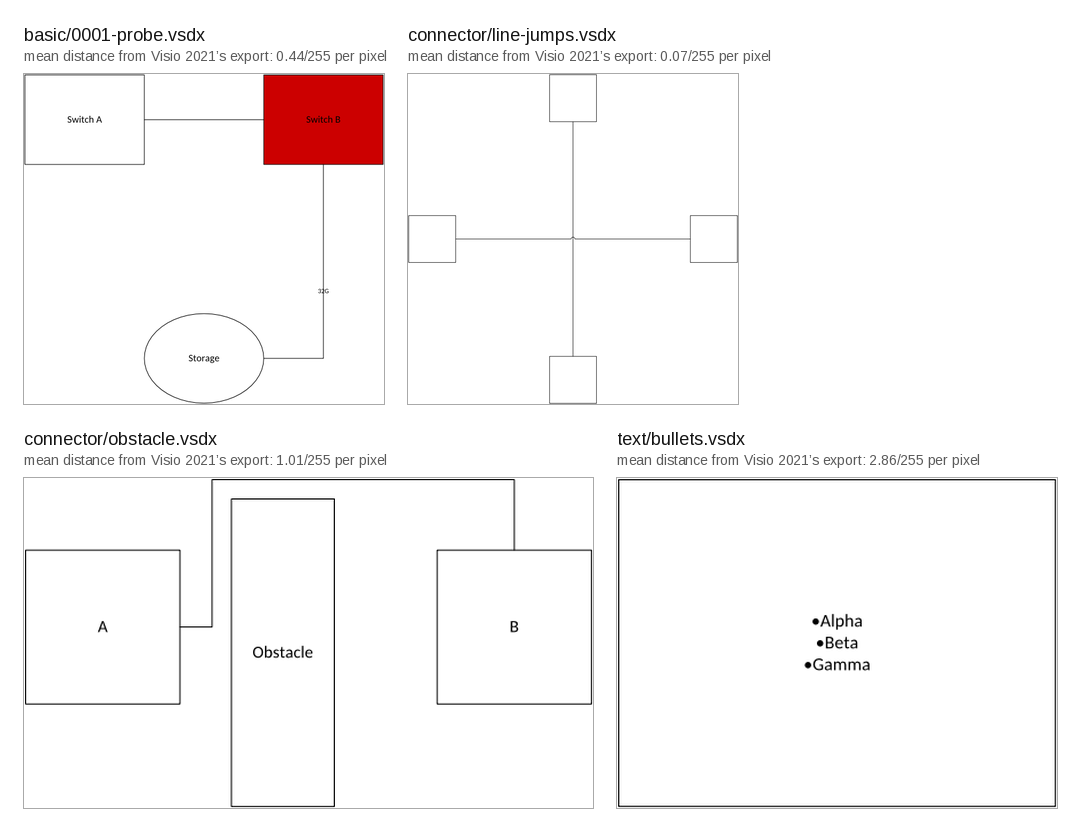
MisterDiagram's own renders. Each label gives the mean per-pixel distance from Visio 2021's PNG export of the same file, measured by the test harness; Visio's exports stay out of the repository.
What works today (2026-10-28, 0.1.0-alpha.13)
- Open every one of the 1,181 stencils and templates that ship with Visio 2021, plus a generated drawing corpus, with zero errors and zero panics under mutation fuzzing.
- Evaluate the ShapeSheet: 122 functions including 3 internal functions, from
crates/sheet/src/functions/mod.rs'sIMPLEMENTEDregistry. Inheritance covers masters, style sheets and document defaults, with dirty-set recalculation. The full oracle check passes its fixed floors, including 62,348/67,866 cached text metrics and 54,510/58,180 COM text metrics. - Render PNG, SVG and vector PDF. All aggregate feature groups of the test corpus pass their fixed pixel ceilings against Visio's own 96 dpi export. Individual connector comparisons remain above their ceilings and are tracked as a renderer gap. All 1,108 masters in the review stencil set render. The vendor inventory renders 6,678/6,742 masters with zero blanks or guard kills; the remaining 64 are named gaps. PDF text extracts with ligatures and combining marks intact.
- Write .vsdx, .vssx and .vstx, and build documents from scratch. Visio 2021 opened all 230 files of the acceptance set, five of them built from scratch, with no repair beyond a few disclosed metadata rewrites, and its COM dumps of the reopened files show zero differences. Read, write, read preserves all 15.1 million cells across 1,413 packages.
- Author through schema-described commands in a transactional session: pages, layers, shapes, text, shape data, hyperlinks, formatting, stencils and master drops, connection points, static and dynamic glue, and connector routing. Routes match Visio's own on 28 of 29 witness drawings (obstacles, route styles, page preferences and line jumps) within one millionth of an inch; the one gap is a 1/64 in packing shift where three connectors cross. The 24-switch, 40-connector topology keeps every route when Visio re-saves it, and its equal-size export matches ours inside the pixel ceilings. Current office, SAN and fabric examples retain 18/80/20 Connects after Visio re-save with zero repair or route differences. Office and SAN pass layout checks; fabric retains its documented box and heading crossings.
- Automate through sixteen MCP tools or CLI scripts: atomic reference batches,
styled creation, connector creation, built-in network masters, tree/row/fan
layout and layout checks. Filtered inspection bounds reply sizes. Unsaved-change
protection, panic recovery and bounded malformed-line recovery keep sessions usable.
CLI scripts can rebuild drawings from data with
run --batch FILE. The built-in network stencil provides eleven semantic device masters as native editable geometry viastencil.open {"builtin":"network"}.
M4 met its plan gates on 2026-10-15. Phase 5 is in progress and P5a is accepted; PowerPoint export remains next. CI runs all eight gates on Linux, Windows and macOS, plus an Ubuntu check at the declared Rust minimum.
Known gaps are listed in docs/gaps.md. All 85 native-opened field
files now render, but this is not complete appearance or cell parity. Timeline
date labels, milestone positions and two caption colours, stored ActiveX versus live-control appearance,
3D rotation, fine equipment details, repeated-master strict evaluation and some
master cells still differ. THEMEVAL
retains 2,550 unequal secondary backgrounds and dormant gradient angles.
Container/list formulas, text wrapping, larger-page routing, legacy formats,
EMF+, compound line patterns, shadows, PowerPoint export and masters with several
top-level shapes remain limited. Large-drawing authoring is slow
(#39; measurements in docs/gaps.md).
From Microsoft's template catalogue, filed and open: the feet-and-inches text-field picture
itself (#95; the field now draws its saved text), THEME() with a colour argument (#88),
the Text Callout cycle (#91), thin-line arrowheads (#93) and the sheet exit status after a
complete dump of a drawing with an undeterminable embedded picture (#100). From the first batch
of real company files, filed and open: SVG text is exported as outlines rather than <text>
(#102); SVG import (#103). The bundled symbol face covers the dingbat, geometric, arrow and
pictograph blocks; Segoe UI Symbol's mathematics and Windows icon ranges, and the Wingdings
and Webdings symbol-charset fonts, are not covered (docs/gaps.md). Where a connector does reroute, the path is this router's, not Visio's: all
three connectors that rerouted on the witness drawings differ from Visio's path (two take the
other side of the obstacle, one bends elsewhere); the 28 of 29 geometry witnesses still hold.
New in 0.1.0-alpha.13
Soft line breaks are honoured (#108, from the #87 batch). Visio stores Shift+Enter inside a label as the U+2028 line separator; the converter treated it as text, so a two-row label such as "FOR-END / PARALLEL / LOOPBACK" came out on one row with the missing-glyph box where the break was. It is now a line break inside the paragraph, and the tester's two drawings break line for line as Visio's own export does. The character turned out to be in 339 of the 7,778 Visio files on the corpus machine, Microsoft's own templates included, so the text-metric parity counts rose (cached text 62,415 of 67,866, COM text 54,548 of 58,180); every other corpus, field, theme and hostile number is unchanged from alpha.12.
Testers wanted
MisterDiagram has been checked against Visio 2021 on drawings its own scripts made. Real drawings are the next test, and that needs people who use Visio at work. Alpha binaries for macOS, Windows and Linux are on the Releases page; docs/install.md covers download, checksums, the first-run warnings for unsigned binaries and MCP setup. Building from source (see Try it below) works too. The most useful things to try:
- Open your own .vsdx, .vssx and .vstx files with
infoandrender. Tell us which files fail to open and where a render differs from what Visio shows. - If you have Visio, open the files MisterDiagram writes and tell us whether Visio repairs anything or draws them differently.
- Point an AI agent at the MCP server (in Claude Code:
claude mcp add misterdiagram -- /path/to/misterdiagram mcp) and ask it for a network or SAN drawing. Tell us what it could not do, or did wrong. - Try vendor stencils (network, storage, server) and tell us which masters fail to drop, glue or render.
Report each finding as an issue, with the command you ran and what you expected. Please do not attach drawings that hold customer names, addresses or other private data: a small file that shows the same problem, or a screenshot and a description, is enough.
Try it
cargo build --release
cargo run --release -p misterdiagram-cli -- info drawing.vsdx
cargo run --release -p misterdiagram-cli -- sheet drawing.vsdx --page 1
cargo run --release -p misterdiagram-cli -- render drawing.vsdx --page 1 out.png
info lists the package parts. sheet prints every evaluated cell in the same columns as a
Visio COM dump, so the two diff directly. render also takes .svg and .pdf output names,
and --masters stencil.vssx draws a contact sheet of a stencil. Prebuilt binaries are on the
Releases page (see
docs/install.md); building from source needs Rust stable with edition 2024. There is no GUI and none is planned in this repo.
Session retention defaults to a 2 GiB ceiling; use --memory-limit <MiB> or
MISTERDIAGRAM_MEMORY_LIMIT (the flag wins) to change it without changing any per-file
admission bound.
Generate a drawing
Build the CLI with cargo build -p misterdiagram-cli, then run this script from the
repository root. The built-in network library provides eleven semantic device masters with native geometry; this example places them with tree layout and fits the page.
#!/usr/bin/env bash
# Contributor-original office network, MIT OR Apache-2.0. Run from the repository root.
set -euo pipefail
cli="${MISTERDIAGRAM_CLI:-target/debug/misterdiagram}"
out="${1:-target/office-network}"; image="${2:-docs/images/office-network.png}"
mkdir -p "$out" "$(dirname "$image")"
args=(--cmd 'stencil.open={"builtin":"network"}')
names=('Sky Internet' 'Alder Firewall' 'Birch Router' 'Cedar Core' 'Elm Access' 'Fir Access' 'Grove Server' 'Hazel Wi-Fi' 'Iris PC' 'Juniper PC')
masters=(network.cloud network.firewall network.router network.switch.core network.switch.access network.switch.access compute.server network.wireless_ap compute.desktop compute.desktop)
for i in "${!names[@]}"; do
  args+=(--cmd "master.drop={\"master\":\"${masters[$i]}\"}" --cmd "shape.text={\"id\":$((i+1)),\"text\":\"${names[$i]}\"}")
done
args+=(--cmd 'layout.tree={"root":1,"edges":[[1,2],[2,3],[3,4],[4,7],[4,5],[4,6],[5,9],[6,10],[6,8]],"gutter_x":2,"gutter_y":0.5,"fit_page":true}')
"$cli" run "${args[@]}" --save "$out/office-network.vsdx"
"$cli" convert "$out/office-network.vsdx" "$image"
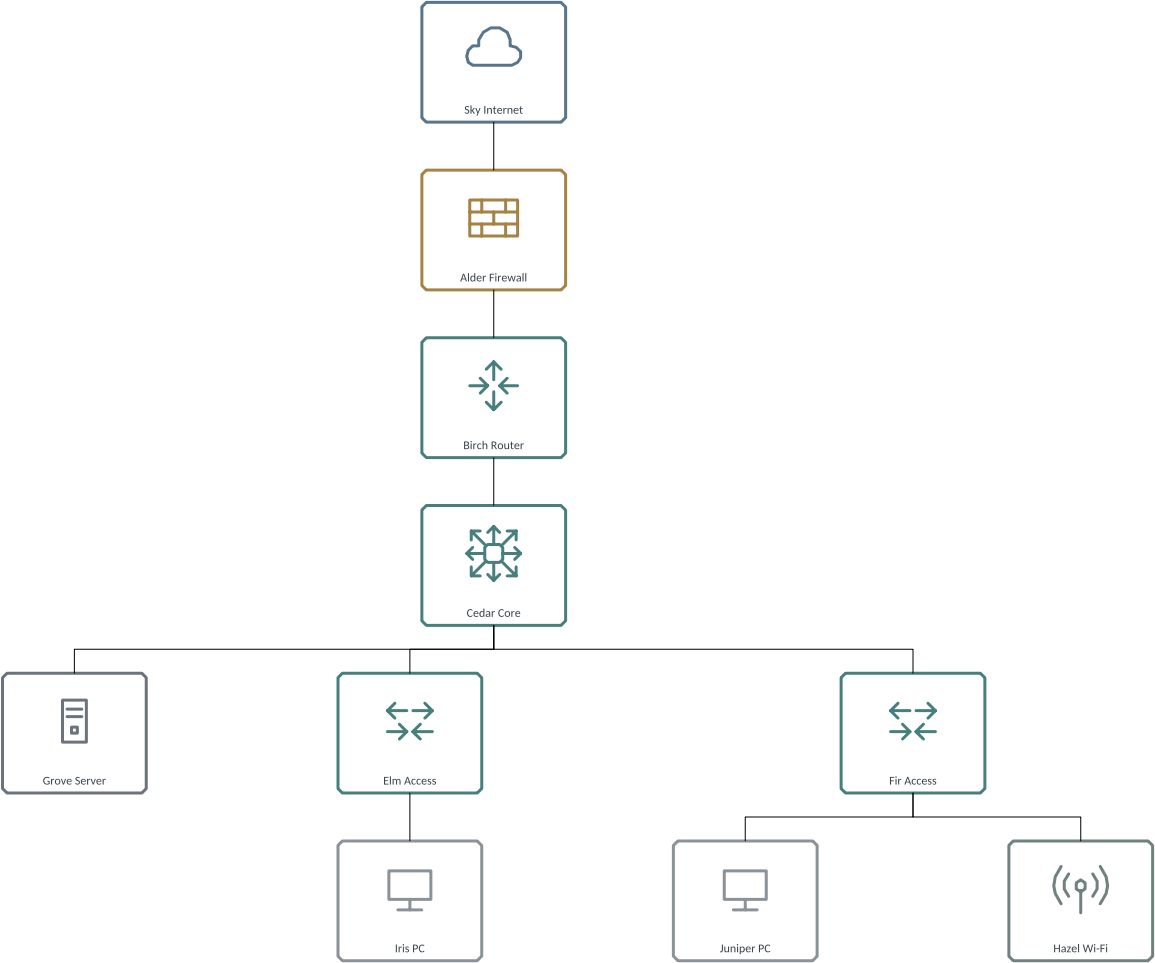
The same script is tools/examples/office-network.sh.
It saves target/office-network/office-network.vsdx and renders the image above.
Check it with python3 tools/check-layout.py target/office-network/office-network.vsdx --cli target/debug/misterdiagram --root 1 --fit-page.
run commits each command separately. Page numbers are one-based, shape IDs are
document IDs, lengths use inches and angles use radians. commands and describe
print the command schemas. misterdiagram mcp serves the same engine over stdio;
see the tools and examples.
Individual connector pixel comparisons are measured and reported as informational until the connector stroke rendering gap closes; route acceptance is cell and geometry equality with Visio plus the unchanged group ceilings. The rulings behind each gate are dated in ROADMAP.md.
What is coming
- Phase 5b: PowerPoint export. The MCP server and layout commands are available; the semantic SAN and office drawings pass Visio repair, route and render acceptance and their human review (2026-10-20).
- Carried gaps, named in docs/gaps.md: the three-crossing packing shift, unwitnessed WalkPreference values, theme.apply (Visio refused the variant call under COM), connector stroke rendering, and export mapping for small images.
See ROADMAP.md for the milestones and the numbers each one has to reach.
How it is built
Clean room. Visio is observed only as a black box, on drawings this repo's own scripts made, in a licensed copy of Visio Standard 2021. File formats come from Microsoft's published references, cited in doc comments and collected in docs/sources.md. No Microsoft stencils, templates, icons or fonts are in this repository; the reference corpus is private for that reason, and the scripts to regenerate it with your own Visio are in tools/oracle. Every milestone is a number produced by the test harness against Visio's output, with floors that only rise. Details are in docs/provenance.md.
Code reused from the Craft apps is MIT OR Apache-2.0 and is listed per file in ATTRIBUTION.md.
Status and handover
Pre-alpha. Milestones M0 to M4 (reading, evaluation, rendering, writing, authoring and routing) are met and independently reviewed, each under dated gate rulings recorded in the roadmap. Phase 5 adds MCP and layout; its human review of the example drawings passed on 2026-10-20. The canonical repository is github.com/MisterDiagram/MisterDiagram. Issues, discussion and pull requests go to this repository.
MisterDiagram is not affiliated with, endorsed by or sponsored by Microsoft. Microsoft Visio is a trademark of Microsoft Corporation.
Development
Build gates, the oracle VM workflow, corpus pinning and contact sheets are in docs/development.md. Operating rules for agents are in AGENTS.md; layers and architecture in docs/architecture.md.
Licence
MIT OR Apache-2.0; see LICENSE-MIT, LICENSE-APACHE and NOTICE. The embedded fonts Carlito, Caladea, Arimo, Tinos and Cousine are under the SIL Open Font License 1.1.