
DreamGraph v14.0.2 - Ashoka
Current project state: Established behavior and maintainer field confirmations, including permanent Architect operational tabs, the configuration redesign, working Codex CLI Computer Use and successful graph upgrade on all seven tested instances.
Current patch: v14.0.2 release notes introduce DreamGraph’s own browser backend for Codex CLI and native API routes, Windows Save/Open dialog handling, clearer task reporting and context-cost fixes. Follow the browser extension installation and connection guide. Install and graph migration remain separate operations.
Ashoka's legacy migration procedure provides a reviewed preview, backup, cutover and recovery path. Installing v14 does not migrate a graph automatically. The sealed system gate records 2,040 passing root tests, 546 compiled editor tests and eleven Windows browser checks. Subsequent maintainer field confirmation records successful upgrades on all seven tested instances.
The current Computer Use contract uses the connected DreamGraph browser backend for Codex CLI and native API execution, with Codex CUA as an available fallback. Browser access requires an explicit permission policy. Native Windows Save/Open dialogs are supported; Linux/macOS dialogs require operator action. Historical Windows and accepted WSL installer/browser evidence remains scoped to the runtimes it tested.
Ashoka native-host spend admission joins editor/SDK API and CLI transport to the durable ledger without transferring provider credentials. Generated core contracts separate possible-dispatch permits, trusted host reports and read-only recovery.
The matched answer collector previews exact context/model/retention/tariff disclosures before an operator-approved native API run. Both answers share one job/spend allocation; partial answers survive failure and remain unscored. The public GPT-4.1 pilot records quality failures and does not establish improved understanding or cost savings.
Ashoka's canonical analytics separates current proof, coverage, currency and workload across thirteen Python modules and the daemon. Narrative/lucid interaction preserves historical outcomes, derived ancestry and explicit human contributions through cancellation/recovery.
Ashoka strategy alignment uses one executable catalogue for eleven active dream strategies, exact combined budgets and explicit focus. Reflective is retired explicitly; model hypotheses remain speculative. Implementation modules: src/cognitive/strategy-catalog.ts and src/cognitive/strategy-registry.ts.
Typed plan authority keeps current ownership, running leases, dependency eligibility and reviewed verification in one core reducer and publication journal.
Website: dreamgraph.nofs.ai — overview, guide, downloads, and screenshots in a friendlier format than this README.
New here? Use the DreamGraph Easy Start guide for a short path from install to Architect, its Config/Schedules/Status tabs, and the separate Explorer.
Engine alignment audit (2026-09-30): See the coverage and correctness report, subsystem alignment map, and unified v14.0.0 - Ashoka plan. Revision 7 retains the resolved policies, schedule management, CLI controls and coherent lifecycle/status design, and makes graph-centered execution and bounded digestion a release invariant. It also specifies Architect context menus and selected-plan navigation. The Computer Use design adds adapter-native execution, cross-platform workers and bounded delivery. The full execution simulation closes contract/dependency/recovery handoffs and makes reconciliation-based freshness explicit: old scan does not mean stale graph. See the sealed system checkpoint, release evidence and implementation log for qualification results and explicit limitations.
v14.0.2 - Ashoka extends the v14 practical-testing release with a shared browser backend and field-driven fixes. See the current release notes, v14.0.1 field patch and upgrade guide. The earlier model pilot does not establish understanding gains; the new cost observation is a single maintainer run, not a general benchmark.
DreamGraph is a governed architecture cognition layer for MCP-enabled software projects. It combines an instance-scoped daemon, CLI, architect beta, VS Code extension, dashboard, and a persistent knowledge graph so project understanding is grounded in source, ADRs, workflows, tests, runtime observations, and human review rather than any single file read or isolated chat turn.
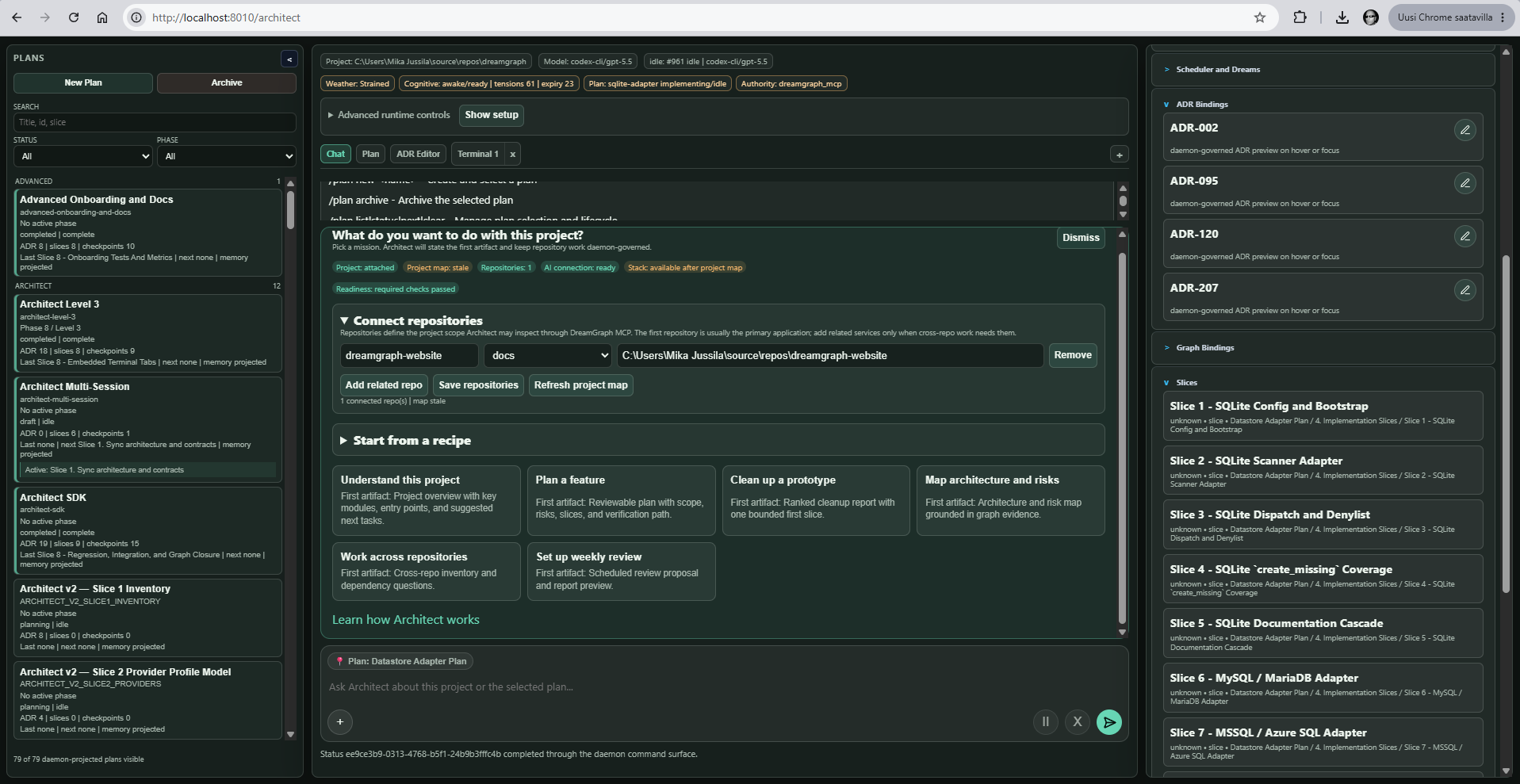
v12.0.0 Hippodamus introduces the standalone architect beta. From this release onward, architect means the daemon-served standalone browser Architect surface. The editor-integrated chat surface is the VS Code architect. Architect beta brings project-bound chat, selected-plan scope, runtime provenance, model/adapter route visibility, governed DreamGraph MCP tool use, and auditable tool traces into the browser while keeping the daemon, graph, ADRs, and source mutations authoritative.
It is built for repository understanding, architecture-aware reasoning, disciplined code change, and continuous graph enrichment through scans, workflows, ADR capture, tensions, and dream cycles. Cognitive outputs are advisory until backed by governed evidence or explicit review, and expired, rejected, retired, or superseded ideas remain inspectable as part of the project history.
DreamGraph works with single repositories, monorepos, and multi-repository systems. It can build graph links across repos that share workflows, APIs, databases, infrastructure, or ownership boundaries.
You can use DreamGraph on a multi-repo product with frontend, backend, mobile, and a shared Postgres/Supabase schema. It can reason across repo boundaries and inspect the live DB schema directly.
DreamGraph began as compassion for an intelligence forced to forget. It has become a governed way for software systems to remember how their architecture understanding changes: what was observed, what was hypothesized, what was reviewed, what was rejected, what expired, and what superseded it.
What do I need DreamGraph for as a developer?
You need DreamGraph when your codebase has become bigger than your short-term memory.
DreamGraph is not just another AI coding chat. It is an architecture cognition and review layer for your projects: part architect, part code cartographer, part release assistant, and part systems analyst.
DreamGraph helps you understand, change, and evolve software without losing the plot.
For developers, that means:
- Ask better questions of your codebase: “Where does auth really happen?”, “What breaks if I change this?”, “Why is this module risky?”, “What should I refactor next?”
- Turn AI from a stateless assistant into a project-aware architect that tracks decisions, tensions, patterns, APIs, plugins, repos, past work, and the evidence behind each claim.
- Make large changes safer by using graph context, ADRs, tool traces, schedules, cognitive cycles, and multi-repo awareness instead of relying only on grep and vibes.
- Expose your system to itself: plugins, MCP tools, CLI, schedules, resources, UI panels, and cognitive engine all become connected parts of one inspectable development environment.
- Support both fast vibe coding and serious engineering: prototype quickly while still accumulating structure, provenance, release notes, architectural insight, lifecycle history, and remediation plans.
For vibe coders, DreamGraph is the guardrail. For app developers, it is the product-building cockpit. For system engineers, it is the architecture intelligence layer.
Short version: DreamGraph is for developers who want AI help that understands the system, explains what changed, and shows why each recommendation should be trusted, inspected, ignored, retired, or superseded.
New here? Start with the User Guide
If this is your first encounter with DreamGraph, read the User Guide first. It is the hand-written, human-friendly companion to this README — written for people, not for the system documenting itself.
The guide walks you through installation, your first instance, LLM setup, bootstrapping the graph, the VS Code extension and Explorer, dream cycles, curation, daily workflow, multi-repo setups, and troubleshooting:
- What is DreamGraph?
- Installation
- Your first instance
- LLM setup
- Bootstrapping the graph
- VS Code extension
- The Explorer
- Dreams and cycles
- Curating the graph
- Daily workflow
- Multi-repo setups
- Troubleshooting & FAQ
- Glossary
- Adaptive Future Engine
- Architect beta
The auto-generated technical reference (every tool, every parameter, every schema) lives in docs/ and is best read after the guide.
Building plugins? The full Plugin Developer Guide & Reference Manual lives in docs/sdk/ (Markdown source). A multi-file HTML site and a single-file PDF are produced by scripts/build-plugin-docs.ps1 into docs/sdk/site/. Start with docs/sdk/plugin-developer-guide/00-index.md for the guide and docs/sdk/plugin-reference/00-index.md for the strict reference. Working reference plugins live at examples/hello-events/ and examples/action-checklist/.
Sponsor DreamGraph
DreamGraph is built and maintained by a solo developer on aging hardware. If this tool saves your architecture team time — debugging a multi-repo system, onboarding a new engineer, or just keeping a SaaS backend's data model honest — please consider sponsoring.
Current goal: $300/mo to fund a 64 GB DDR5 / NVMe dev machine that can run the upcoming multi-engine datastore test matrix (Postgres + MySQL + MSSQL + Mongo + Redis containers in parallel) without thermal-throttling. See the live progress on the sponsors page.
Sponsorship directly funds:
- A dev machine that doesn't catch fire when running 20 DreamGraph instances next to a Postgres container and a WSL kernel
- CI infrastructure for the multi-engine datastore tests on the v8.3.0 → v8.9.0 roadmap (SQLite, MySQL, MSSQL, MongoDB, Redis, blob storage, event bus)
- More frequent releases — fewer hours spent on contract work means more hours on the daemon, the cognitive engine, the VS Code architect, and the documentation
Tier ladder: $5/mo (sponsor badge + name in SPONSORS.md) · $10/mo (release-notes thanks) · $25/mo (logo in this README) · $100/mo (priority issue triage) · $500/mo (logo + monthly office hour) · $1,000/mo (embedded support in your team chat). One-time tiers cover release-notes mentions, pair programming, consulting, sponsored bugfixes, and contract work.
:sparkling_heart: Sponsor on GitHub →
What DreamGraph Includes
- Daemon — the long-running DreamGraph runtime with stdio or HTTP transport
- MCP tool surface — tools for graph queries, enrichment, source inspection, cognition, ADRs, workflows, and remediation
- CLI (
dg) — instance creation, attach/detach, start/stop, status, scan, enrich, schedule, export, fork, and migration - Architect beta — standalone browser Architect with a compact Web64 IDE v2-inspired charcoal workbench, project-bound chat, selected-plan scope, runtime provenance, model/adapter route visibility, governed MCP tool use, and auditable tool traces
- Architect CLI (
dg architect) — terminal-native Architect client for status, plans, plan lifecycle, runtime config, chat, task controls, ADR/graph/scheduler/Adaptive Future inspection, JSON automation, and dependency-free log-mode TUI projection over daemon contracts - VS Code extension — VS Code architect chat, dashboard, Explorer (interactive 2D/3D graph + curated mutations), changed-files view, daemon connection, and local support tools
- Knowledge graph + cognitive engine — features, workflows, data model, tensions, validated relationships, dream-cycle reasoning, trust calibration, evidence ledgers, and lifecycle visibility
- Adaptive Future Engine — advisory candidate-future ranking, future-fit scoring, compact objections, and bounded audit metadata for graph-tool and cognitive-workflow decisions
- Datastore-as-Hub — first-class
datastoreentities, live schema introspection (scan_database), and theschema_groundingdream strategy for multi-repo SaaS projects sharing a backend (setDATABASE_URL; inert otherwise) - Plugin host & SDK (v9.0.0 — stable seams M0–M6) — in-process plugin runtime (
@dreamgraph/sdk+@dreamgraph/host) with manifest discovery from<instance>/plugins/<id>/plugin.json, capability/effect gate registry, telemetry bridge, trust banner, anddg pluginCLI (list,inspect,register,enable,disable,trust,reload,unload). Hot reload/disable plus enrichedsystem://plugins(activation, subscriptions, contributed tools/resources). Plugin-contributed MCP tools and resources viactx.tools.register/ctx.resources.register, gated bytools:register/resources:registercapabilities and naming/namespace prefix rules. M5 ships outbound webhooks as a core subsystem (dg webhookCLI; HMAC-signed delivery; persistent dead-letter; replay). M6 adds the UI/closure seams (archetypes, policies, markdown fences, UI hooks). Standalone Architect plugins can also register declarative host-rendered tabs with explicit plan scope, daemon-owned namespaced state, governed actions, sidebar summaries, and badges. Opt-in viaDG_ALLOW_INPROCESS_PLUGINS=trueplus per-plugintrusted: trueininstance.json. Seeexamples/hello-events/andexamples/action-checklist/for reference plugins anddocs/sdk/for the developer guide and reference manual.
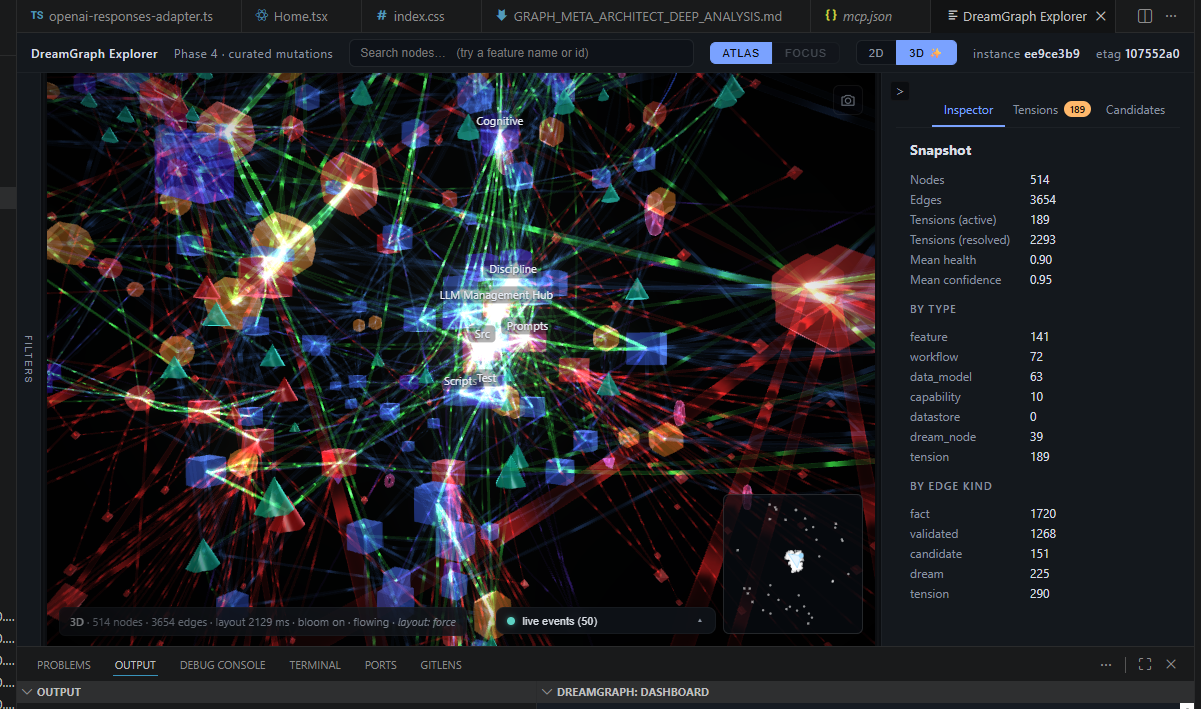
DreamGraph Architect with the DreamGraph Explorer in VS Code
Current OpenAI, Anthropic, and Codex CLI models
The engine and both Architect surfaces offer gpt-6.1-sol, gpt-6-astra, gpt-6-sol, gpt-6-luna, and the GPT-5.6 family. GPT-5.5, GPT-5.6, and GPT-6 API calls use Responses, including structured JSON output and reasoning replay. The Codex CLI adapter also offers the GPT-6 models and defaults GPT-5.6/GPT-6 runs to xhigh reasoning unless explicitly overridden. Model access depends on your account and installed CLI. See OpenAI model guidance and Codex models.
Anthropic selectors include claude-opus-5-5, claude-sonnet-5-5, claude-fable-5-1, and restricted-access claude-mythos-5-1. The engine's unconfigured Anthropic model defaults to Sonnet 5.5; VS Code architect retains its governed Opus 4.7 default. Existing model settings remain explicit choices. See Anthropic setup and migration and the Claude model catalog.
Local LLMs (Ollama and LM Studio)
DreamGraph runs against local model servers as first-class peers of the hosted APIs. Both the cognitive engine and the VS Code architect support Ollama (default http://localhost:11434) and LM Studio (default http://localhost:1234/v1, OpenAI-compatible). Pick the one you already use — there is no preferred option. See docs/setup-llm.md and guide/04-llm-setup.md for the env-var blocks and Architect settings.
Why DreamGraph
DreamGraph is designed for development environments where architectural memory matters.
Instead of treating every prompt as stateless, it maintains a structured graph of:
- features
- workflows
- data-model entities
- architecture decisions
- UI registry elements
- tensions and candidate hypotheses
That allows the system to answer from accumulated project understanding, not just a single file read.
Prerequisites
Before installing or running DreamGraph, make sure you have:
- Node.js 20+ for the root project build and runtime (
package.jsonuses modern TypeScript/Node tooling) - npm for installing dependencies and running builds
- Git for cloning and normal repository workflows
- VS Code 1.100+ if you want the extension experience
- A supported shell
- Windows: PowerShell 7+ recommended
- Linux/macOS: Bash-compatible shell
- Optional:
codeCLI in PATH if you want the installer to automatically install the VS Code extension - Optional: PostgreSQL for database-backed or production-oriented deployments
Quick checks:
node --version
npm --version
git --version
code --version
Upgrading from an earlier version
For the v14 upgrade path, including existing graph formats, see the Ashoka release and upgrade guide. The historical v8.2.6 confidence repair script remains at scripts/repair-confidence-inflation.mjs for affected data.
Install From Source
Windows (PowerShell)
git clone https://github.com/mmethodz/dreamgraph.git
cd dreamgraph
./scripts/install.ps1 -Force
Linux / macOS (Bash)
git clone https://github.com/mmethodz/dreamgraph.git
cd dreamgraph
bash scripts/install.sh --force
The installer builds DreamGraph, deploys the dg CLI, and installs the VS Code extension when the code CLI is available.
For full installation details and troubleshooting, see INSTALL.md.
Quick Start
1. Build from source manually
If you are working directly from the repository:
npm install
npm run build
2. Create a DreamGraph instance
Create an instance and optionally attach it to the current repository immediately:
dg init --name my-project --project /path/to/your/repo --transport http --port 8100
What this does:
- creates a named DreamGraph instance
- records the initial project root or workspace attachment
- configures the daemon transport
- prepares the instance for CLI, dashboard, and VS Code attachment
3. Start the daemon
HTTP daemon mode (background)
Use this when you want a long-running background daemon process:
dg start my-project --http
If the configured port is busy, DreamGraph will select an available HTTP port.
Foreground stdio mode
Use this when an MCP client is expected to manage the process directly:
dg start my-project --foreground
This is the actual supported stdio startup path. Background stdio is intentionally rejected by the CLI.
4. Check status
dg status my-project
This shows:
- instance identity
- attached project root
- daemon running state
- transport and port
- dream cycle count
- graph/tension/ADR/UI counts
5. Attach an existing project later
If you created the instance first and want to attach a repository or workspace afterward:
dg attach /path/to/your/repo --instance my-project
6. Bootstrap the knowledge graph
Once the daemon is running and the project is attached:
dg scan my-project
dg scan my-project --max-hops 1
dg enrich my-project --skip-scan --max-hops 1
You can also use:
dg enrich my-project
dg curate my-project
If you need to manually trigger DreamGraph's full bootstrap flow, use dg bootstrap my-project (see the bootstrapping guide). This is mainly the operator escape hatch when dg scan / dg enrich are not enough.
Typical Development Flows
Local development from the repo
npm install
npm run build
npm test
npm run start
CLI-oriented daemon workflow
dg init --name my-project --project /path/to/repo --transport http --port 8100
dg start my-project --http
dg status my-project
dg scan my-project
VS Code workflow
- Install DreamGraph and the VS Code extension
- Start or connect to a DreamGraph instance
- Open the attached repository or workspace in VS Code
- Use the DreamGraph sidebar for chat, dashboard, and file-change context
Core Commands
Ashoka's generated MCP catalogue contains 93 core tools and 31 resource URIs. Its shared contract preserves structured results/provenance and private Architect ownership across tools and passes; 94 discipline classifications include one intentional local extension. Generate/check with npm run mcp:generate / npm run mcp:check.
npm run build
npm test
node dist/index.js
node dist/cli/dg.js --help
dg --help
dg init --name my-project --project /path/to/repo --transport http --port 8100
dg start my-project --http
dg start my-project --foreground
dg status my-project
dg scan my-project
dg plugin list my-project
dg plugin inspect my-project <plugin-id>
--max-hops sets enrichment graph-neighbor depth for both dg scan and dg enrich (0–6, default 2). 1 uses direct neighbors; 0 uses node/source evidence without graph neighbors. It reduces context depth rather than imposing a token, call, or spending limit. Use --skip-scan for an enrichment-only pass when the source map is current.
The daemon permits one scan or enrichment operation per instance at a time. An overlapping request fails with GRAPH_OPERATION_BUSY before paid calls or graph writes; enrichment inside its owning scan remains allowed. This also prevents an automatic model-change refresh from overlapping a running scan. The shared operation guard lives in src/utils/graph-operation.ts.
Architecture at a Glance
DreamGraph has six major surfaces:
- Knowledge graph — features, workflows, data model, ADRs, UI registry, tensions, and validated edges
- Cognitive engine — dream cycles, normalization, promotion, temporal/causal analysis, remediation planning
- Adaptive Future Engine — ranks compliant candidate futures with graph evidence, ADR/workflow/API constraints, score factors, objections, and compact audit trails
- Daemon runtime — the MCP-capable service layer exposed through stdio or HTTP
- CLI — operational control over instances and daemon lifecycle
- Architect beta — the standalone browser Architect experience for daemon-authoritative project work, selected-plan chat, tool traces, and runtime provenance
- VS Code extension — the primary interactive editor experience for VS Code architect chat, dashboard, changed-files context, daemon connection, and local-tool execution
- DreamGraph Explorer — the interactive graph surface for browsing entities, tensions, candidates, and curated graph mutations, available in a web browser or through the VS Code extension; supports both a 2D Sigma.js canvas and a 3D Three.js canvas (toggle in the Explorer toolbar)
For deeper architectural detail, see:
- docs/architecture.md
- docs/cognitive-engine.md
- docs/adaptive-future-engine.md
- docs/tools-reference.md
- docs/workflows.md
Instance data
The physical publication registry contains 39 named stores (21 graph stores and 18 metadata stores). Full normalization outcomes are immutable receipt-bound artifacts, separate from that named-store count.
data/
  features.json, workflows.json, data_model.json  # source/entity families
  dream_graph.json, candidate_edges.json          # hypotheses and assessment history
  normalization_evidence.json                     # exact claim observations and withdrawals
  validated_edges.json                           # promotion history; current proof is rechecked
  normalization-result-<operation-sha256>.json     # complete recoverable pass outcomes
  publication_state.json, reconciliation_journal.json
  change_obligations.json, dirty_partitions.json
  plan_state.json, jobs.json, spend_ledger.json
Source Layout
The dashboard's compact settings and runtime clients are src/server/configuration-workspace.ts and src/server/runtime-workspace.ts. They consume the daemon configuration and job/currency authorities; workspace behavior includes protected templates, exact retries and effective readback. The daemon root links both Architect and Explorer.
Ashoka's 31 core MCP resource URIs use revisioned whole-record paging through resources/read and query_resource. Runtime capabilities remain at system://capabilities; project entities use system://capability-entities. Follow continuation before claiming completeness; raw JSON is never clipped. See foundation status for implementation and qualification evidence.
Ashoka's canonical retrieval supplies all 17 graph families with typed identities, provenance and bounded neighborhoods. Required plan/slice/ADR/evidence context is reserved before optional expansion; missing or oversized mandatory context is explicit. Source debt stays scoped, and an old full scan does not mean a stale graph. Pure retrieval does not probe or call a model; the published paired pilot documents observed quality failures without an improvement claim.
src/
  api/
  cli/
  cognitive/
  config/
  data/
  db/
  discipline/
  graph/       # canonical contracts/read model, publication, recovery and Explorer projections
  instance/
  plugins/
  resources/
  server/
  tools/
  utils/

packages/
  sdk/    # @dreamgraph/sdk — generated canonical graph and public plugin contracts
  host/   # @dreamgraph/host — in-process plugin loader, gate registry, watchdog

examples/
  hello-events/  # M3 reference plugin

extensions/
  vscode/
    src/
      extension.ts
      chat-panel.ts
      dashboard-view.ts
      daemon-client.ts
      managed-cli-pass.ts
      mcp-client.ts
      local-tools.ts
      tool-groups.ts
      architect-core/
        adapters/
          copilot-cli/   # native GitHub Copilot CLI Architect adapter
          codex-cli/     # native Codex CLI Architect adapter, runner/auth recovery, ProviderPort seam, chat routing, and live MCP tool traces

explorer/
  src/
    App.tsx
    GraphCanvas.tsx
    Graph3DCanvas.tsx
    label-layout.ts      # viewport label budget, priority, and collision packing
    Inspector.tsx
    TensionsPanel.tsx
    CandidatesPanel.tsx
    ReasonField.tsx
    EventDock.tsx
    PulseOverlay.tsx
    FiltersPanel.tsx
    SearchBar.tsx
    api.ts
    sse.ts
Version Semantics
The CLI, standalone Architect, VS Code Architect, daemon, Explorer, Dashboard, analytics suite, and daemon-exposed MCP authority share release 14.0.2. MCP initialization and system://capabilities report the daemon package version. Analytics reports it with python -m analytics --version from the python/ directory.
DreamGraph instance status can show two different version concepts:
- Created With — the DreamGraph version recorded when the instance was initialized
- Daemon Version — the version of the currently running daemon/runtime
These can differ after upgrades, and that is expected.
After installing or updating DreamGraph, restart any running DreamGraph daemon instances and reload VS Code windows so the updated runtime and extension code are actually in use.
Documentation
New here? Start with the User Guide — the hand-written, onboarding-focused companion to DreamGraph. Read chapters 1-5 in order to go from "what is this?" to a working instance with a populated graph.
Reference docs (auto-generated from the codebase):
- Architect beta user guide
- INSTALL.md
- Living Docs
- docs/architecture.md
- docs/setup-llm.md
- docs/tools-reference.md
License
This repository is licensed under the DreamGraph Source-Available Community License v2.0. See LICENSE for the full terms.
Ashoka provider boundaries cover API output contracts, independent role dispatch, schema validation, usage, cancellation and explicit CLI adapter behavior.
Ashoka configuration now uses a typed, revisioned engine.env authority. Dashboard scheduler/event/narrative saves persist before runtime application, preserve unrelated values, and reject conflicting edits. The setting inventory names typed fields and client/build-only exceptions. Computer Use remains disabled by default; configuration grants no execution authority.
The core configuration modules are engine-settings.ts (schemas), engine-setting-catalogue.ts (ownership), engine-env-document.ts (codec), engine-configuration.ts (durable authority), role-settings.ts (pure role schemas) and setting-schema.ts (UI constraints), under src/config/.
Ashoka inference passes through durable admission. API dispatch requires an exact versioned tariff and positive role run/day allocations; template defaults remain zero. Two-hop enrichment respects bounded neighbors, preserves accepted batches on exhaustion, and reports unavailable usage explicitly. Native CLI subscriptions remain separate from API money. Indexed retrieval preserves reference context and frozen task evidence. The model pilot reports its limitations separately.
Ashoka cognitive output now retains source/model/prompt/schema attribution and a frozen offline evaluation baseline. Repeated model agreement remains one evidence ancestry; the measured legacy promotion weakness is retained for Slice 15. These fixtures do not establish superiority of a named model.
The session authority binds private Architect state, MCP sampling/discipline, continuations and cancellation to a principal/session. HTTP defaults to loopback; explicit remote mode requires a protected token and exact host/origin controls. session_authority.json stores private hashes/preferences/grants alongside publication metadata. Health probes are stateless and cannot exhaust that store; a capacity/recovery refusal returns a bounded HTTP503 while preserving existing identities. No configuration or autonomy setting grants Computer Use. Source owners are src/server/{session-context,session-authority,http-policy,http-authority,computer-control}.ts, src/cognitive/cognitive-provenance.ts and src/evaluation/cognitive-policy.ts; the reproducible runner is scripts/evaluate-cognitive-policies.mjs.
Ashoka claim evidence is owned by src/cognitive/normalization-evidence.ts and its registered normalization_evidence.json ledger. See normalization evidence for exact typed claims, independent ancestry, source proof/withdrawal and native ADR-241. Model agreement never creates factual corroboration.
src/cognitive/normalization-publication.ts owns coherent normalizer snapshots, typed claim resolution and one C04 promotion transaction. The old direct engine promotion methods reject bypasses; source/human/hypothesis semantics and history are preserved.
Ashoka CLI controls bind selected autonomy to daemon-admitted exact actions and separately disclose provider/prompt/presentation verbosity; see CLI controls.
The CLI control owners are src/server/execution-policy.ts (immutable execution scope and exact action admission), src/server/scoped-command.ts (daemon command fence) and src/architect/cli-bridge.ts (qualified native launch/output guidance). Controls and integration boundaries distinguish enforced policy from model guidance and unavailable native Computer Use routes.
Slice 25 client integration adds canonical bounded HTTP context, generated VS Code contracts, contextual actions, selected-plan reveal and exact action review. src/server/context-menu.ts, src/architect/context-actions.ts, src/architect/execution-review-ui.ts, src/server/managed-execution.ts, src/graph/execution-context.ts and packages/token-economy/src/machine-result.ts own these additions. Private execution_contexts.json records host delivery and unresolved effects; it is not graph evidence or model understanding. Editor extensions/vscode/src/execution-review.ts and extensions/vscode/src/webview/execution-review.ts add captured review/retry controls. extensions/vscode/src/managed-native-pass.ts owns native and explicit operator execution. Changed-file Undo uses the original daemon source owners with a reviewed file hash; outcome inspection never repeats the action. The sealed system gate records accepted functional qualification.
src/graph/observed-command.ts observes bounded scan-visible project source before/after managed native commands, excluding private instance stores, generated paths and secrets. Existing change obligations retain intent before launch and exact changed scopes after termination; external effects remain unattested. Command exit alone does not prove graph synchronization.
src/plugins/graph-context.ts connects ctx.graph to the core context owner through the SDK's packages/sdk/src/seams/graph-context.ts. The 32 generated contracts include the strict context query as well as its result, so editor/SDK request controls share one schema. Plugin reads require declared capabilities/effects and retain unattested delivery; private plugin writes are not claimed reconciled.
Ashoka Slice 14 persistent strategy learning stores post-dedup observations and reviewed usefulness in existing meta_log.json, with atomic dream/learning publication and explicit fixed-allocation recovery. Source owners include src/cognitive/strategy-portfolio.ts and src/cognitive/dream-deduplication.ts; repeated generation is neither evidence nor labeled accuracy.
Ashoka Slice 16 curation and retention adds append-only dispositions to existing graph_maintenance.json and reversible hash-bound archives. The source owner is src/cognitive/curation.ts. Reject/retire/reopen, dream decay and quarantine share the graph publication writer; human acceptance remains a human assertion and assessment history is preserved. mutate_validated_edge requires reason and expected_revision and accepts operation_id/dry_run; retarget creates a proposal requiring revalidation.
Cognitive operational store reads use src/cognitive/cognitive-store.ts and the canonical read barrier; missing/corrupt previously published history is unavailable, never an empty reset.
Ashoka durable job ownership (Slice 17)
The registered jobs.json owner in src/cognitive/jobs.ts pins role policies, pricing references, shared parent resources, instance storage and conflict lanes. src/cognitive/job-context.ts carries the cancellation signal and generation fence to graph publication, managed source effects and inference. Cancellation stops publication and records uncertain termination; it never claims a timed-out promise or paid request was undone.
Slice 17 provides immutable schedule occurrences, definition revisions and replay identities; new schedules start disabled. Scheduler preview and dispatch share the named-zone evaluator (DST gap/fold policy). /api/schedules/v2 and /api/jobs/v1 expose the core ports used by the schedule workspace. src/cognitive/schedule-definition.ts, digestion.ts and src/server/schedule-api.ts are the owners. Readiness observations dispatch no bootstrap work. Bounded dirty-source generations use existing dirty_partitions.json and graph_maintenance.json; unknown scope and optional unfunded cognition stay pending, without making reconciled facts stale.
Slice17 adds bounded durable webhook dispatch/acknowledgement records to existing engine jobs; transport uncertainty remains recovery-required with its stable receiver deduplication ID. Queue resume, engine recovery and shutdown share the daemon owner. Capability readiness records pending admission and never authorizes paid bootstrap. See docs/ashoka/engine-jobs.md for core scope and qualification limits.
Ashoka Slice 18 aligns temporal/causal and federated evidence: event and observation time are distinct; correlation is advisory; v2 origin/manifests and import receipts prevent repeated support inflation. Exports use fixed redacted vocabulary. See temporal/federation contract for quarantine, compatibility and bounded affected-generation behavior.
The protected JSON setting DREAMGRAPH_FEDERATION configures sharing for the next execution: allow_import/allow_export, anonymize=true for enabled export, and an optional stable instance_id. Complete candidates use the same schema as the federation owner; malformed settings do not silently re-enable sharing.
Ashoka Slice 19 separates risk observations, advisory proposals, action outcomes, human dispositions and independently verified resolution. Stable risk revisions and retained histories preserve conflict/reappearance evidence. TTL expiry retires attention as expired_unverified; it does not prove false-positive status. See docs/ashoka/risk-remediation.md for the in-progress qualification scope.
Ashoka Slice 20 narrative/playback/lifecycle views consume a revision-bound derived source context and separate historical counts from current proof. Story history is retained in archived_chapters/archived_digests; missing/corrupt published history fails closed. Lucid exploration has a finite session-owned existing engine job lease and durable lucid_log.json intent/actions/recovery. Human acceptance records a rationale and human_assertion with zero independent roots, never inflated confidence or source verification. No source/provider/user wait occurs under the writer; see lifecycle narrative.