Nexus Cloud
Your Agents. Your models. Your devices.
English · Chinese
Motivation · Watch the workflow · Features · Use cases · Quick start · Documentation · Ecosystem downloads · Contributing · Citation
Try Nexus Cloud online: Explore Nexus Cloud in your browser, or self-host to get started.
An Execution Fabric for AI Agents Across Cloud, Edge, and Devices.
Motivation
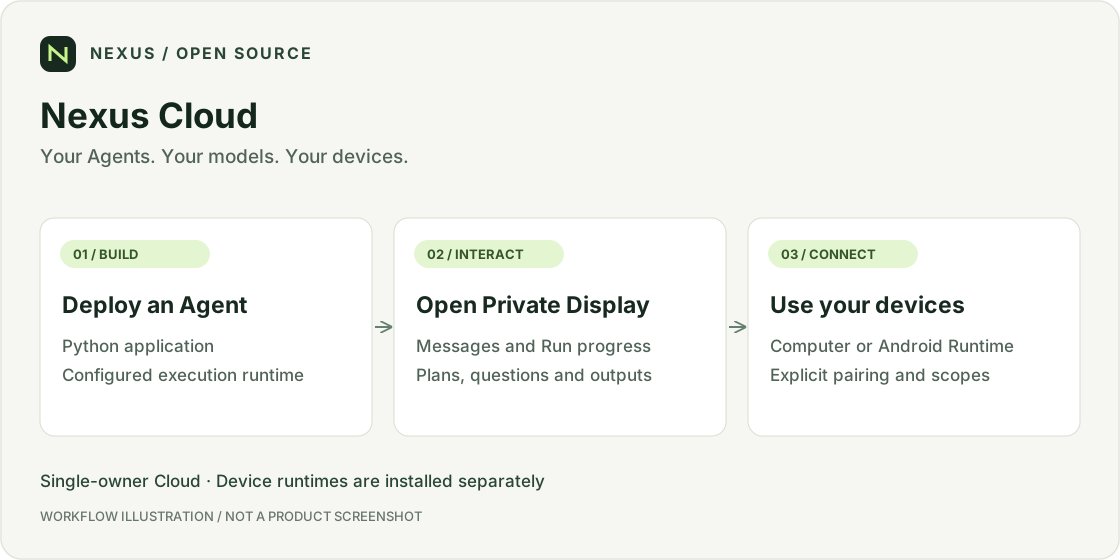
Your files may be on your computer, your next task in a browser, and another workflow on your phone. You should not have to move that work to the developer's machine—or install every Agent's application and dependencies on your own.
Nexus lets a separately hosted Agent work with the devices you attach and authorize. For you, that means:
- Less to install and maintain. Use a cloud- or developer-hosted Agent without deploying that Agent on your computer. Pair the device Runtime once, then authorize the Agents you choose to use with it.
- Work in your own environment. Let an Agent handle files in your authorized workspace, use your Computer's terminal or isolated browser, or operate your attached phone. You choose the device and approve the requested access.
- Choose the device that fits the task. Use the same Agent with different supported devices for different tasks, without redeploying it for each device. The Agent and device do not need to share a machine or local network.
- One place to follow the work. Private Display gives you a consistent place to chat, see progress, answer questions, add instructions and inspect results, even when the work happens on an attached device.
For example, an Agent hosted in Docker can process a file in your authorized Computer workspace and return the result to Private Display. You do not need to deploy that Agent on the Computer first.
This is the idea behind a decoupled Agent execution fabric: separate where an Agent is deployed from the user-authorized devices it can operate, and connect them through a shared execution context—the Run Context.
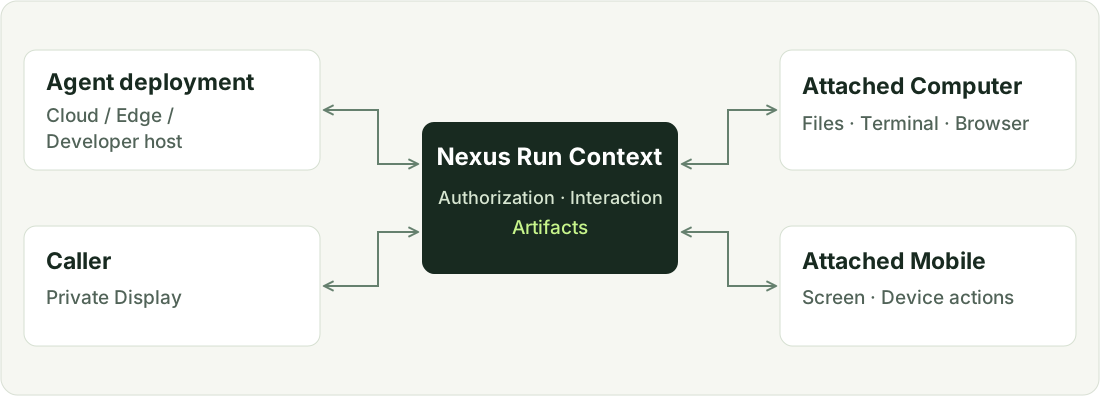
For developers, the same separation reduces repeated work on device connectivity, interaction UIs and execution state. Nexus provides Python Agent build and deployment workflows, Run authorization and observability; Enterprise adds commercial billing.
Devices still need a compatible Runtime, working connectivity and explicit authorization. Pairing alone does not grant Agent access, and choosing another device does not automatically migrate an in-progress terminal or browser session.
The Agent can live elsewhere. The task can happen on the device you choose.
See it in action
An Agent in Docker. A CSV on your Computer. A report you approve.
You want a short report from expenses.csv on your Computer. The developer has
already deployed the Agent; you do not install its code or dependencies locally.
Your Computer only needs the paired Nexus Computer Runtime.
1. Pick the Agent, then choose your Computer
Find the assistant in Marketplace, open its details and select Attach Computer. Approve its file permissions and choose your online device.
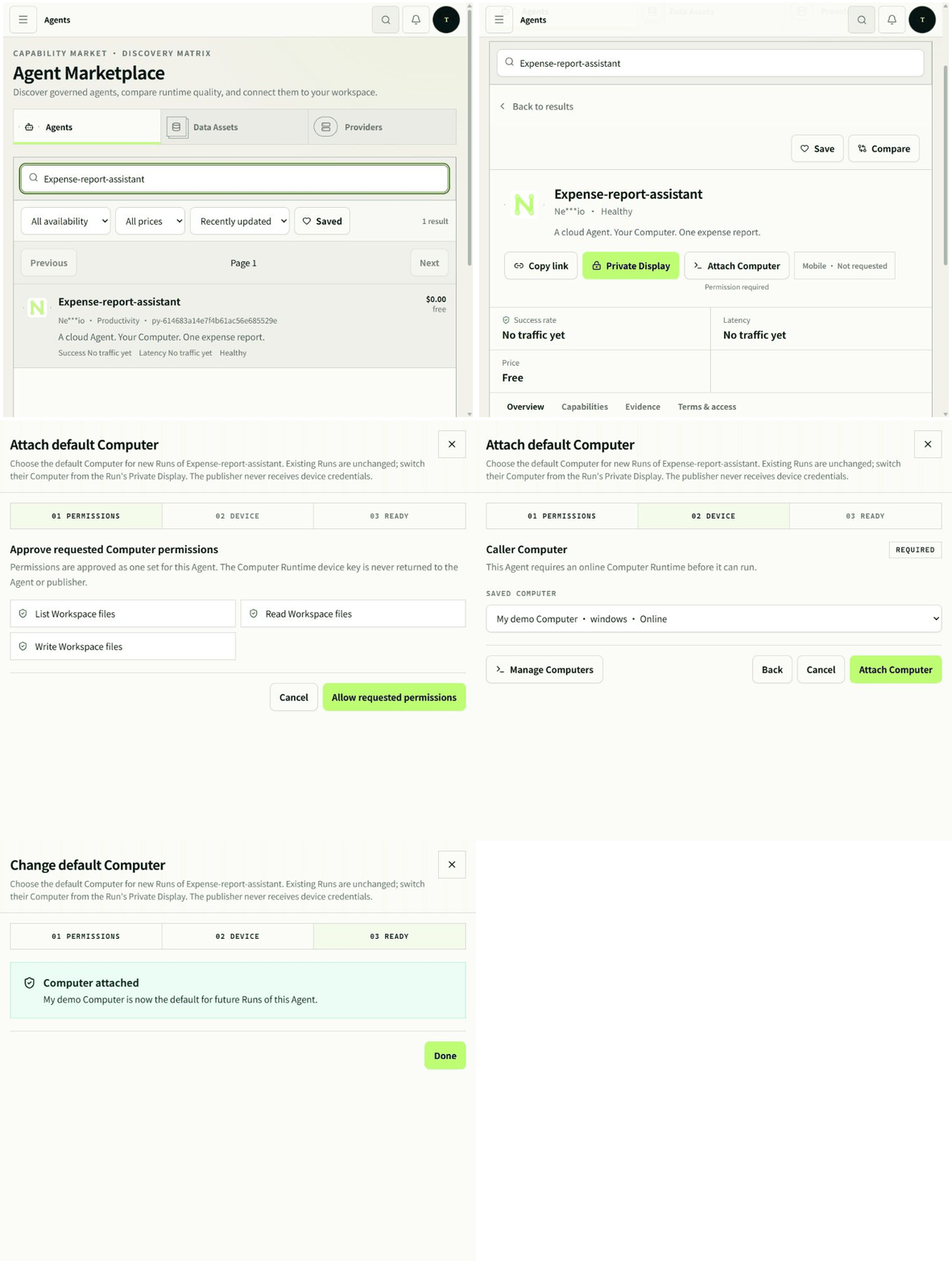
The Agent is already hosted. You supply the authorized place to work—not another Agent installation.
2. Ask once. Stay in control.
Open Private Display and ask: “Turn my expenses.csv into a short report. Ask before writing it.” The Agent reads the file through Run Context, updates its Plan and asks for confirmation inside the same conversation.
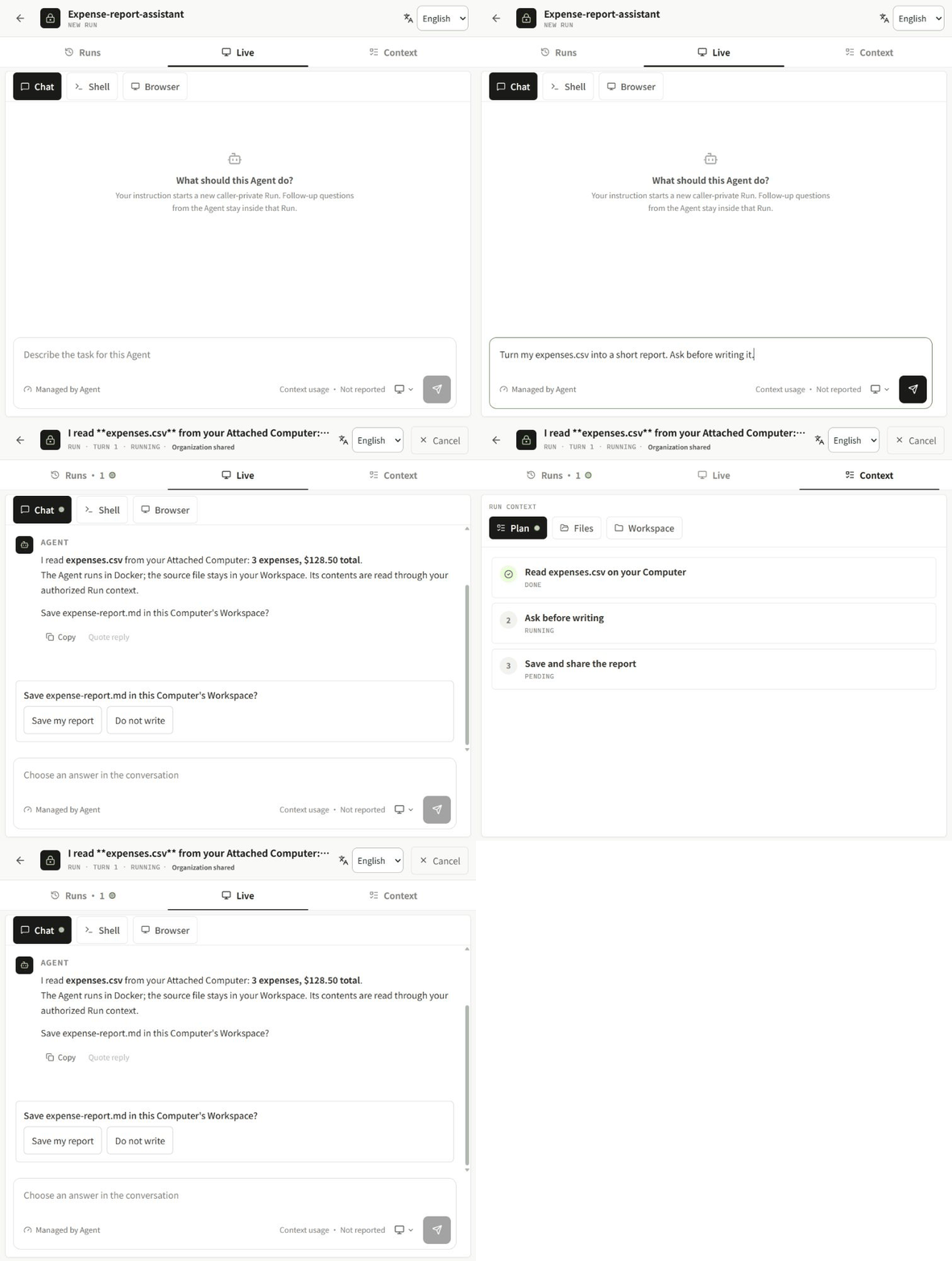
The sample contains three synthetic expenses totaling $128.50. Nothing is written until the caller chooses Save my report.
3. Get the result where you need it
The Agent writes expense-report.md beside the CSV on the Attached Computer.
A private copy opens in Files for preview and download. The original CSV is
unchanged; the Computer file, Run artifact and browser download have matching
SHA-256 hashes.
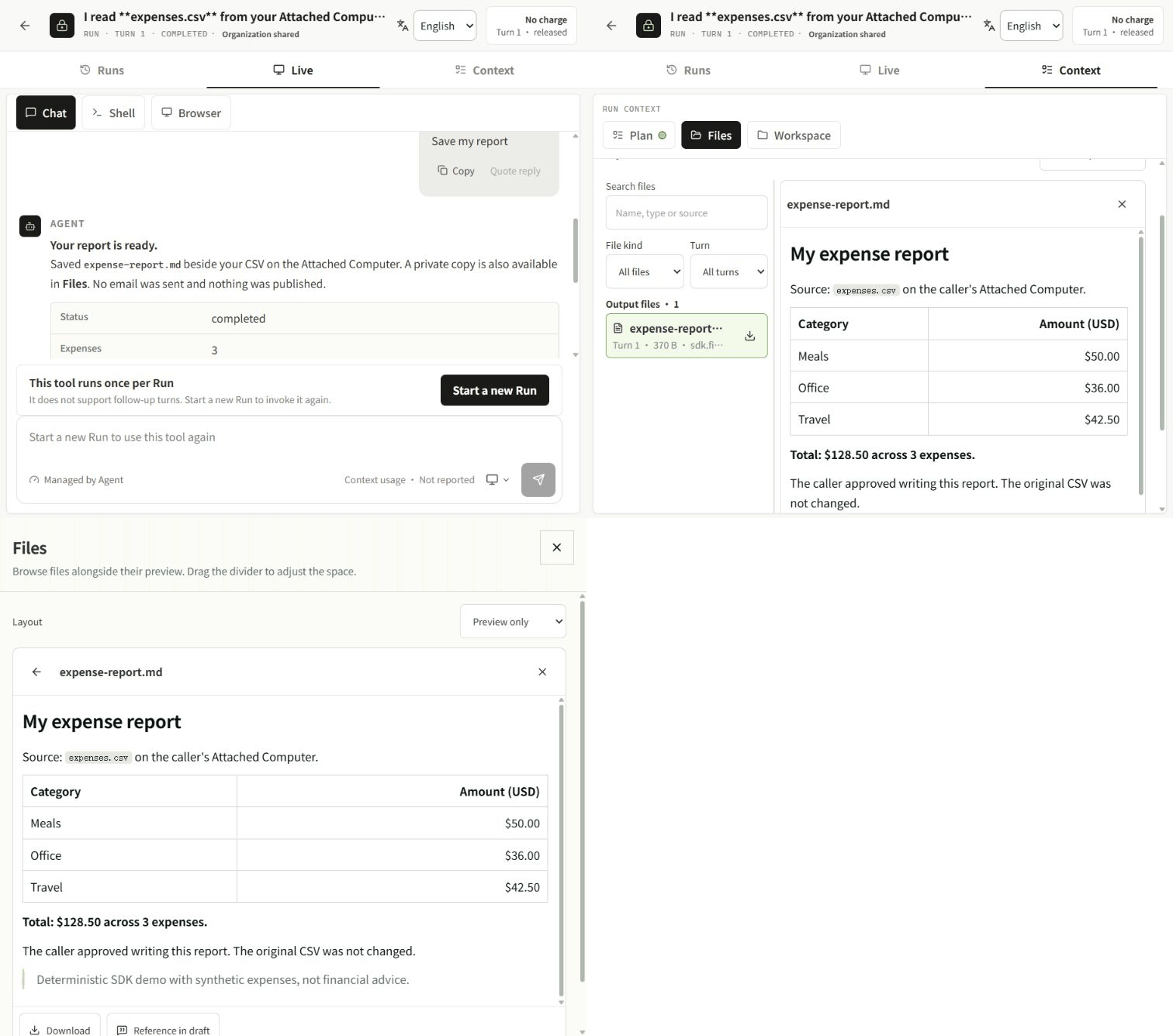
One Agent deployment. Your chosen device. One place to follow the work.
- Configure a supported Python build worker, Docker execution and private file storage. Upload readme_computer_agent.py through Build → Agents → Runtime → Upload Python, then build and deploy.
- Pair Nexus Computer Runtime with an isolated test Workspace. Attach it to the
Agent and approve
files.list,files.readandfiles.write—no terminal or browser permission is requested. - Place expenses.csv in this Agent's Workspace on the
Computer (
<paired-root>/agents/<agent-id>/workspace/in this capture), then open Private Display and send the request above. - Choose Save my report. Where output scanning is required, an authorized operator must scan and approve the private artifact before preview/download.
The example is deterministic and needs no model API key; it demonstrates device execution, not model reasoning. File contents travel through the authorized Cloud execution path—this is not a claim that data never leaves the Computer.
Recorded on the existing Enterprise installation with a real Docker Agent and Windows Computer Runtime in an isolated demo workspace. Marketplace is an Enterprise entry point; self-hosters can open the Agent from Build → Agents. These GIFs are edited real-browser keyframes with shortened waits, not UI mockups, a continuous video or a speed benchmark.
Verified steps, boundaries and reproduction notes · Capture checksums
Features
- Deploy agents independently of user devices. Host agents in Docker, on a developer's computer, or through an OpenWrt-connected edge deployment. Each user chooses the authorized devices where the work happens.
- Connected computers and Android phones. Work with files, terminals, isolated browsers and supported Android actions through Attached Computer and Mobile. The Computer Runtime and Android app connect outbound to Cloud, without requiring inbound SSH access to the devices.
- Python SDK and MCP integration. Turn Python capabilities into callable agent services. Keep your preferred model and agent framework while using Nexus for serving, device access and user interaction.
- A built-in interface for every agent. Private Display brings chat, progress, plans, inline questions, browser views and file outputs into one place, reducing the need to build a separate interaction UI for each agent.
- User-authorized execution. Users explicitly attach devices and approve requested permissions. Run-scoped delegation connects each invocation to the appropriate caller, device and workspace.
- Execution history and observability. Track runs, inspect errors, review terminal output and retrieve generated artifacts. Supported workflows can continue across turns while retaining their execution context.
- Model API routing. Connect Providers and organize access through Execution and Aggregation Routers, giving applications a consistent API for configured models.
- Files and reusable Data Assets. Import files and images, preview supported formats and archive agent-generated outputs into Data Assets, with scanning and access controls where configured.
- Agent distribution and monetization. Publish agents through Marketplace and support fixed or agent-reported pricing in the commercial edition.
Marketplace, Organization access administration and billing are Enterprise capabilities; see Community or Enterprise?. Device operations require compatible runtimes, working connectivity and explicit authorization.
Use cases
Nexus separates where an agent runs from where its users need work done.
Quick start
Before you start: Git, Docker with Linux containers, Compose v2 and at least 4 GiB available memory on the recommended x86_64 host. Repository access is required.
git clone https://github.com/Nexilume-AI/nexus-cloud.git
cd nexus-cloud
docker compose -f deploy/community/compose.yaml up -d --build --wait
Open http://127.0.0.1:18090. Sign in as [email protected] using the generated password retrieved locally:
docker compose -f deploy/community/compose.yaml run --rm --no-deps --entrypoint cat initialize /var/lib/nexus-bootstrap/owner-password
Change that password in Settings. First startup builds images and initializes storage; subsequent starts reuse persisted data.
[!IMPORTANT] This starts Cloud, not a ready-made Agent execution fleet. Configure execution controllers separately. Remote Computer/Mobile pairing requires working HTTPS/WSS. Follow the Docker deployment guide before exposing the installation. Upstream model usage may incur charges.
Your first workflow
- Connect a Provider and verify its models. Direct API needs only your existing endpoint. Codex Proxy / CLIProxyAPI require the explicit Provider execution setup, available for native and Compose installs. Docker Engine is a host prerequisite, not a pip dependency; the default Cloud stack does not receive the Docker socket.
- Create a Pool and Router for model access when your workflow needs one.
- Configure execution, deploy an Agent and check runtime health.
- Open Private Display, send a message and inspect the result.
- Pair and attach a Computer or Mobile only if the Agent needs it.
Success looks like: a healthy deployed runtime, a completed Run and its returned result or outputs. A paired device must also be online and authorized; pairing alone does not grant access.
Community or Enterprise?
Choose the edition for your deployment:
Documentation
The reference retains the previous setup and troubleshooting material. Historical comparisons and test statements there are dated evidence, not live status.
Ecosystem
Install only the components you need. Cloud, the SDK and device runtimes are distributed separately.
Install the Python SDK:
python -m pip install --upgrade nexilume
For MCP integrations, install "nexilume[fastmcp]" instead. The package name is nexilume; the Python import remains nexus_agent.
Connect a Computer, including optional browser support:
python -m pip install --upgrade "nexilume[computer,browser]"
nexus-computer setup "<pairing-url-from-your-cloud>"
Use a virtual environment; Python 3.12 is recommended for optional integrations. Browser control also requires a compatible local Chromium browser.
Android: requires Android 8.0+. Check the release notes and checksums before installing; all Android releases are available separately.
Contributing
Small reproducible fixes, clearer tutorials, translations and sanitized examples are welcome. Before submitting a change, follow the setup and checks for the component you touch. Use Issues for reproducible bugs; include versions and redacted diagnostics, never credentials or private files.
Report sensitive security issues privately to the repository maintainers. Release checks and CI are not a guarantee of production readiness on every platform.
Citation
If Nexus supports your research or engineering work, please cite the technical report below, rather than the software repository. CITATION.cff provides the same report metadata through preferred-citation.
Nexilume Research. Nexus: An Execution Fabric for AI Agents Across Cloud, Edge, and Devices. Technical Report NX-SYS-2026-001, September 2026.
@techreport{nexilume2026nexus,
  author      = {{Nexilume Research}},
  title       = {{Nexus}: An Execution Fabric for {AI} Agents Across Cloud, Edge, and Devices},
  institution = {Nexilume Research},
  type        = {Technical Report},
  number      = {NX-SYS-2026-001},
  year        = {2026},
  month       = sep
}
License
Nexus-authored source is distributed under Apache License 2.0 (modified). Third-party components retain their own licenses and notices. Documentation does not grant rights to separately distributed Enterprise implementation.
Licensing conditions
Nexus is licensed under a modified version of the Apache License 2.0, with the following additional conditions. Multi-tenant service operation and removal of existing Nexus UI branding require prior written authorization. Earlier Apache-2.0 grants and third-party licenses remain unchanged. Contributions require explicit agreement permitting commercial use and future relicensing. See LICENSING.md. Authorization contact: [email protected].