Motion Site Builder
Design, review, and improve motion-driven interfaces with AI.
Generate new sites or refine existing UI through profile-aware building, strict motion review, whole-codebase audits, executable improvement plans, and a deterministic 20-rule linter.
Live demo · Quick Start · How It Works · The Design DNA · Docs · Contributing
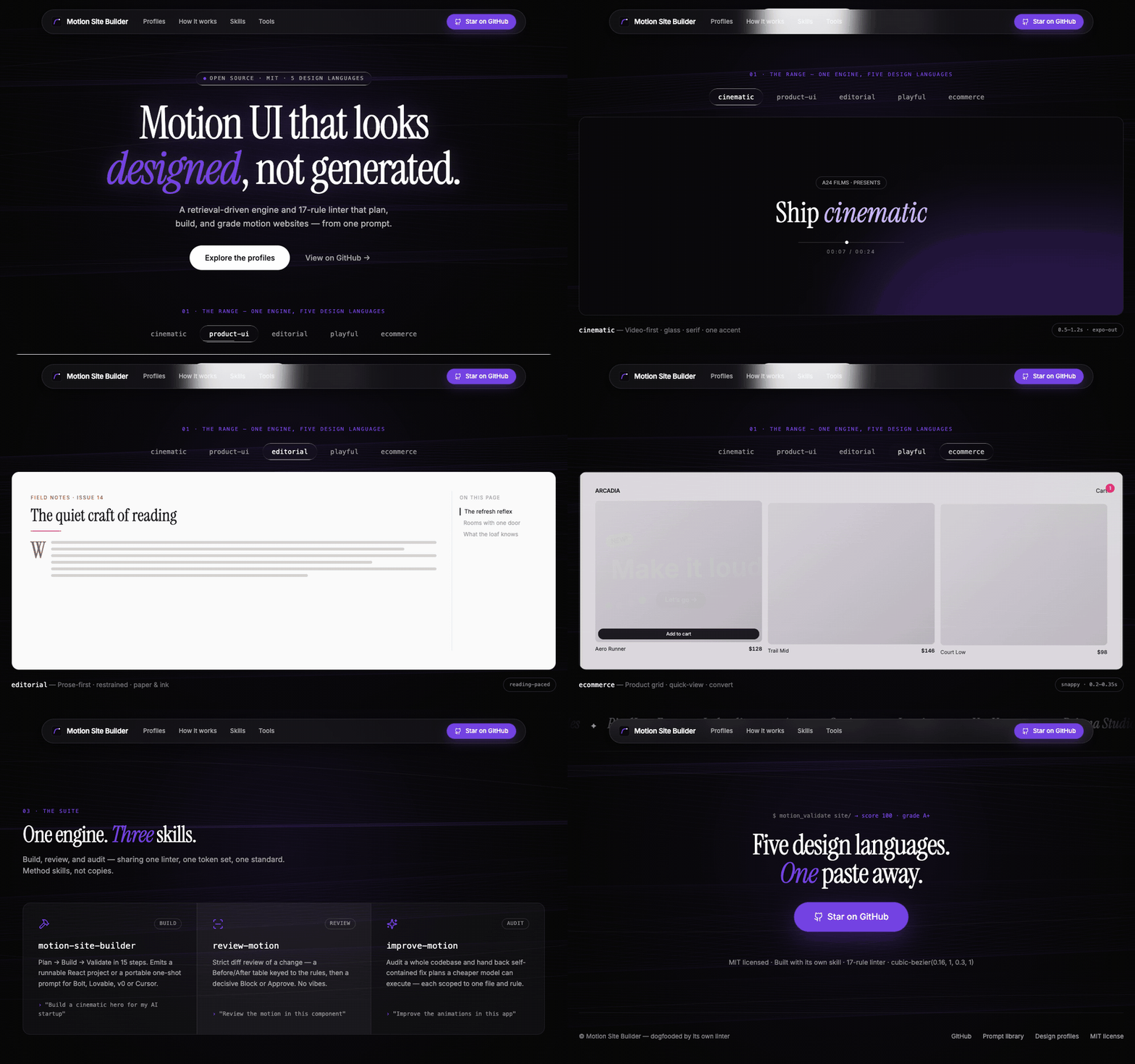
This landing page (site/) was built from its own prompt — a cinematic shell whose hero embeds a live five-language stage — and scores 100/A+ on every file with the bundled motion linter.
What You Can Do
The suite is deliberately split by responsibility: motion-site-builder builds, review-motion judges a change, and improve-motion surveys a codebase and plans the highest-leverage fixes. They share the same profile configs, 20-rule linter, and motion standards.
✨ What's Inside
🚀 Quick Start
Path 1 — Copy a production prompt (30 seconds)
- Browse the prompt catalog and open a prompt close to your idea.
- Copy the whole file into Bolt / Lovable / v0 / Cursor.
- Personalize the explicitly marked values: brand/copy, palette within that profile's accent budget, and licensed local media or placeholders. Keep the motion and accessibility constraints intact.
Path 2 — Install the full agent suite
With the skills CLI (works for Claude Code, Cursor, Codex, and friends — re-run any time to update):
npx skills add olbboy/motion-site-builder --all
# review-motion/improve-motion share the builder engine; install it alongside either method skill:
npx skills add olbboy/motion-site-builder --skill motion-site-builder review-motion
In Claude Code you can also install via the plugin marketplace:
/plugin marketplace add olbboy/motion-site-builder
Or, to hack on the skills themselves, clone and symlink (Claude Code shown):
git clone https://github.com/olbboy/motion-site-builder
cd motion-site-builder
for s in motion-site-builder review-motion improve-motion; do
  ln -s "$(pwd)/skills/$s" ~/.claude/skills/$s
done
For another agent runtime, copy or link the same three directories using that runtime's SKILL.md discovery convention.
Use the skill that matches the job:
"Build a product-ui billing dashboard and return working code."
"Review the motion in this diff and give me a Block/Approve verdict."
"Audit this app with improve-motion deep; prioritize fixes by impact / effort."
"Execute plans/001-fix-dropdown-origin.md, then review the diff."
improve-motion is read-only during recon/audit: it writes implementation plans, not source changes. execute <plan> is the explicit implementation path; it dispatches an executor and reviews the resulting diff with the review-motion bar.
Path 3 — Enable the MCP tools (optional, zero deps)
{
  "mcpServers": {
    "motion-site-tools": {
      "command": "python3",
      "args": ["<repo>/skills/motion-site-builder/scripts/server.py"]
    }
  }
}
You get motion_list_profiles, motion_validate, motion_get_tokens, motion_get_template, motion_suggest_pattern, motion_easing_rationale, motion_find_reference, motion_validate_file. Every taste-bearing tool takes an optional profile arg.
🧠 How It Works
Most AI-generated sites look generic—and existing products often feel inconsistent—because motion decisions are left to chance. This repo turns taste into two deterministic workflows:
New brief    → Profile → Plan → Adapt nearest of 54 → Build → Lint → Runtime smoke
Existing UI → Recon   → Audit → Prioritized plans   → Execute → Review → Validate
Changed diff          → Profile-aware lint + judgment          → Block / Approve
- Retrieval over generation — the skill finds the closest existing prompt and adapts values instead of hallucinating structure.
- Verbatim primitives — signature CSS (
liquid-glass,text-glow, seamless video crossfade, rAF+lerp parallax) is pasted exactly, never paraphrased. - Deterministic quality gate — the linter scores every file 0–100; errors block, warnings advise.
- Judgment after lint — review and audit add frequency, interruptibility, cohesion, and missed-opportunity analysis that regex cannot see.
- Plans before mutation — whole-codebase improvement is scoped and reviewable before an executor touches source.
- Build accountability — the builder scans an existing project before touching it, previews its picks before writing code, self-critiques on six axes before emitting, then stamps the output (
/* motion-site · … */) and appends.motion-site/log.jsonso the next build must differ — repeat briefs diverge instead of converging on one template.
🎨 The Design DNA — five profiles
The engine ships five design languages — pick one, and the linter + tools enforce that taste (motion_list_profiles, then a profile arg). Full guide: design-profiles.md.
Good motion feel (reduced-motion, GPU-only, press feedback, no ease-in on UI) is universal across all five; the tempo, palette, and typography vary per profile.
Cinematic (the default) — the signature elements the linter and tokens enforce:
Full guidelines: motion-design-dna.md. Everything is customizable — cinematic defaults live in config/motion-tokens.json; the other four languages live in config/profiles/*.json, all with the same schema. See the customization guide.
📁 Repository Structure
prompts/                      # the library — one .md per prompt (all original)
skills/llms.txt               # skill index (fast discovery for agents)
skills/motion-site-builder/   # the engine (build)
  SKILL.md                    #   agent workflow (entry point)
  references/                 #   profiles & schema, DNA, interaction standards, choreography,
                              #   modern-css motion, gsap interop, troubleshooting, catalog
  config/motion-tokens.json   #   cinematic taste (default profile)
  config/profiles/*.json      #   product-ui · editorial · playful · ecommerce
  data/prompt-index.json      #   generated corpus index
  scripts/                    #   linter · consistency audit · index builder · MCP server (zero-dep Python)
skills/review-motion/         # strict diff review (Before/After table + Block/Approve)
skills/improve-motion/        # codebase audit → self-contained plans (SKILL + AUDIT + PLAN-TEMPLATE)
site/                         # cinematic landing page — dogfooded from its own prompt
examples/                     # profile dogfoods (e.g. product-ui-dashboard — 100/A+ under product-ui)
docs/                         # getting started, prompt guidelines, architecture
.claude-plugin/               # plugin-marketplace manifests; AGENTS.md + copilot-instructions cover other runtimes
review-motion and improve-motion are method skills — they reuse the builder's linter, tokens, and standards rather than duplicating them.
📚 Documentation
- Getting Started — build, review, improve, and standalone validation paths
- Prompt Guidelines — how to write and submit a prompt
- Architecture — how the skill, linter, index, and MCP server fit together
- Project Roadmap — what's next (eval fixtures, variant mode, motion-DNA study)
- Interaction Standards — exact micro-motion values, springs & overshoot budgets, frequency rules
- Choreography — composing multi-element motion: attention budget, staging, direction semantics
- Profile Schema — the profile JSON schema + deriving a custom profile from references
- Modern CSS Motion · GSAP Interop · Troubleshooting Feel
- Review Skill · Improve Skill — working with existing code
- Skill README — customize & extend the engine
🤝 Contributing
Prompts, lint rules, and primitives are all welcome — see CONTRIBUTING.md. The short version:
- Add your prompt to
prompts/following the guidelines. - Run
python3 skills/motion-site-builder/scripts/build_index.pyto re-index. - Run
python3 skills/motion-site-builder/scripts/lint_motion.py --self-testif you touched the engine. - Open a PR — CI runs the same checks.
⚖️ License & Provenance
- Everything in this repo — code, skill, linter, docs, landing page, and all 54 prompts: MIT.
- Original prompts: every prompt is authored from this project's own design profiles and motion DNA. No brand replicas, copied copy, or hotlinked third-party assets.
- Bring your own media: most prompts use explicit placeholders. The Vietnam collection instead records Pexels source pages, photographer credits, crop guidance, and local-download targets; image binaries are not bundled. Re-check the source license before publication. All fonts are open-licensed (Google Fonts / OFL).